Tag: enterprise

  • The Trouble With Enterprise DevOps

    The Trouble With Enterprise DevOps

    The literary world and beyond has been up in arms as of late regarding the use of the word ‘literally’. It seems that many are using the word literally when they mean figuratively. For example, if you say, “I literally split my pants laughing,” it would be plausible for one to look at your pants looking for a tear. Words are funny that way. When used to emphasize the action or outcome, some will take literary privilege. Enterprise is also one of those words that are used to convey emphasis often with disregard to the implied meaning.

    When it comes to DevOps there has been a lot of debate about the modifier ‘enterprise’. Modifiers are supposed to add specificity to the noun it is modifying. Agreeably, enterprise is a horrible modifier for DevOps when used without additional modifiers representing scale. I have been, and continue to be, a big advocate of the concept of Enterprise DevOps. That said, I too have been remiss in my use of the word enterprise to further modify with the term ‘large-scale.’

    I don’t remember exactly what triggered me to seek out if the word enterprise implied large, but when I did I was surprised to find that there is no implied meaning that enterprise means large and, in fact, can be modified with small-, medium- and large-scale to represent the appropriate size. As further evidence to the ambiguity of the use of the word enterprise, I worked for a company that divided their sales organization into enterprise and commercial accounts. Clearly, this organization believes that enterprise connotes large-scale since this group was responsible for selling to a specific class of customer that spent a significant amount of money with them. In this case, scale was identified by how much money the business spent with that vendor versus annual revenues versus number of employees. So, clearly, not only does the word enterprise not imply scale, but it also has different metrics that will determine the scale of an enterprise.

    Merriam-Webster defines Enterprise as follows:

    en·ter·prise


    noun
    \
    ˈen-tə(r)-ˌprīz\

    : a project or activity that involves many people and that is often difficult

    : a business organization

    : the ability or desire to do dangerous or difficult things or to solve problems in new ways

    Obviously, none of these meanings relate to size or scale, but two of the meanings do indicate difficulty. Let’s put that in the parking lot for later.

    Why is this important? With regard to IT, I believe there is a tendency to throw around the word enterprise with no modifiers when we mean large-scale. For example, “Enterprise Software” is a term that is often used to describe very expensive and complex software applications that are designed to operate at the scale of the entire business versus the individual. Typically, the software described by enterprise software is found in mid- to large-scale enterprises where they can afford to acquire, configure and operate this type of software. Likewise, “Enterprise Storage” is a way to describe compute data storage environments for large organizations.

    Likewise, “Enterprise DevOps” is a term that that is often used to represent adoption of DevOps practices in large, complex organizations with many different stakeholders and sub-organizations making it much more difficult to coordinate efforts around efforts like continuous delivery and continuous improvement.

    Interestingly, and I believe accidentally, implementing enterprise software and adopting enterprise DevOps are difficult projects. So, based on our Webster’s definition, enterprise works as a modifier for these nouns. But there’s still the issue that for small-, mid- and large-scale enterprises the challenges and hurdles associated with DevOps adoption vary enough that the constraints and bottlenecks require different approaches to remove. This is especially true of large-scale global enterprises where development exists in four continents, operations data centers exist in multiple countries on four continents and the business operates in six continents with a comprised IT staff of 120,000 people.

    I for one will be very careful in the future to define what I mean when I’m using the word enterprise in the future. If I’m talking about large-scale enterprises, which I usually am, I will make sure that early on in my writings and presentations I specify that when you see enterprise going forward I’m talking about large-scale enterprises.

  • You Might Already be Doing DevOps in the Software-Defined Data Center

    You Might Already be Doing DevOps in the Software-Defined Data Center

    I was out reading the Internet and came across a report from EMA (Enterprise Management Associates) regarding the state of the Software-Defined Data Center (SDDC) in 2014. After perusing the data and highlights, I was surprised (and yet should not have been) to find so much DevOps-related content and concepts within. Neither should I have been surprised to find significant mention of software-defined networking (SDN). It makes sense, in a puzzle-fitting-together kind of way, that SDDC comprises software-defined operations and software-defined networks (and probably software-defined storage but it’s too early in the day for me to contemplate that).

    In any case, a significant percentage of organizations take advantage (today) of software-defined operations and networking, based on the report:

    Which of the following technologies, structures or processes does your organization take advantage of?

    4. Cross-functional processes to orchestrate provisioning and management of storage, network and server resources (57%)
    5. Solution for server administrators to provision their own storage volumes (56%)
    6. Continuous/centralized capacity management for physical, virtual and cloud resources (55%)
    9. Policy-based automation of infrastructure for routine adjustments without human intervention (50%)
    10. Software Defined Networking (virtual overlay network) (48%)
    11. Software Defined Networking (separated control plane from delivery plane)  (46%)
    13. APIs for developers to provision their own app environments (servers, network and storage)  (42%)
    14. Configuration management solutions (Puppet, Opscode Chef, SaltStack, ServiceMesh, etc.)  (41%)

    More telling, perhaps, of how critical DevOps is to enabling the SDDC is the emphasis put on not just automation but on process. When asked what respondents believed were the “most important aspects of the Software Defined Data Center”, number 2 and 3 focused on deployment and automation of applications and infrastructure:

    • Best-practice, repeatable configurations of software and infrastructure for workload deployment  (46%)
    • Orchestration and automation to easily deploy applications across silos  (44%)

    In case you weren’t entirely convinced, yet, “operational analytics” (we might call it “measurement” or “metrics” here in DevOps land) came in number four with a respectable 42% of respondents.

    There’s more in the report, some less relevant but for the most part, reading this SDDC report left me with a decidedly DevOps after taste. Which was kind of a minty chocolate coffee taste, in case you were wondering.

    The concepts typically associated with DevOps are not necessarily peculiar to DevOps or SDN. They’re generally part of a larger trend to operationalize all the things: the network, the storage, the compute, the security. The business goals of SDDC are strikingly similar to those promoted by DevOps and SDN – reducing risk, lowering opex, improving stability and time to market. The collaboration through creation of interfaces designed to promote repeatable, consistent (and measurable) handoffs between groups is present and looms as large in SDDC as it does in DevOps.

    The point is that DevOps may, in fact, be in the adoption process right now under the guise of another name in an organization near you – or around you. If you hear someone saying software-defined something, check it out. You may be surprised to find out that someone has snuck in DevOps through another door, under a different name.

  • DevOps:  As critical for the Systems of Record as for the Systems of Engagement

    DevOps: As critical for the Systems of Record as for the Systems of Engagement

    There is a lot of talk about DevOps, and how it improves the process of delivering business value. Much of the discussion of DevOps has been focused on web based companies such as Facebook, or the mobile and distributed development teams. But DevOps principles apply just as well to the traditional Systems of Record, z/OS applications.   Many of these applications have been around for a long time and have very mature development and deployment processes. These processes include the requirements for separation of duties and audit tracking. Over the years these processes have developed into lengthy procedures, to be comprehensive, the net effect of this has been to reduce the number and frequency of the deployments to reduce risk. However, there is a better way.

    In the recent blog posting by Ashok Reddy he talked about the 8 critical DevOps Practices: innovate, deliver, repeat. All of these are as applicable to z/OS applications as any other, for this blog I want to focus on just a few of the practices, Loosely Coupled Architecture, Automate Testing using APIs, Transparency and Minimize hand-offs, Maximize flow.

    DevOps is about bringing the entire organization together, including Development and Operations, to more efficiently deliver the business value. The practices of “Transparency” and “Minimize hand-off, Maximize flow” go to the core concepts of the people aspects of DevOps i.e., integrating the organization.   By breaking down the barriers between the organizations, people can work together to accomplish the business goals more quickly. This does not necessarily mean actually changing the organizational structure, but it does mean having the organizational structures work together as cross functional teams.

    One example would be the monitoring and optimization practices. These are generally done by Operations after the applications are deployed into production. However, if instead Operations and Development worked together in the early part of development cycle to monitor and optimize the application using the same capabilities that will be used in production any issues can be addressed much earlier in the cycle. This also helps both teams learn what is required to monitor and manage the application long before it is ever deployed to production. In many z/OS environments today, the same infrastructure is already available in the test environments, but it is seldom used.

    A second example is to have Operations define the deployment automation such that it can be done by Development in early stages and turned over in later stages. This ensures continued testing of the deployment capability and a validation that by the time the deployment is done in production; the deployment process itself will be well tested. Through this integration of Development and Operations you remove the hand off that currently happens only at the final stage just before production deployment.

    The practice of loosely coupled architecture is key when building multi-platform applications. Having clear interface definitions between the different parts of the application is essential of a loosely coupled architecture. It is easier to allow the capability to build independently, tested at the interface level and then brought together when the parts are ready. By defining clear interfaces between application components and properly handling forward and backward compatibility, there is less of a requirement for coordinated simultaneous deployments. This allows teams to be less dependent on other parts of the application during the development process, and allows for easier automated testing.

    The practice of Automate testing is critical to any DevOps transformation. It provides the capability to improve the speed of delivery while reducing risk. Moving to agile development practices while still requiring people to perform manual tests, will not allow the quick iteration on the capability. Even for existing applications you can generate interface tests to begin to build up automated regression test cases. Automated tests can be generated based on interface definitions such as a JSON schema or a COBOL copybook for new development. The increased focus on testing the interfaces early helps reduce the integration problems generally found late in the development cycle.

    These are just a few of the key practices of DevOps but hopefully they have started to demonstrate how DevOps is as applicable to the Systems of Record on z/OS as it is to Systems of Engagement.   To learn more read the best practices for a DevOps approach with IBM System z whitepaper or watch the replay of the November 20, IBM DevOps Symposium webcast.


    About the Author:

    RosalindRosalind Radcliffe is a Distinguished Engineer within the IBM Rational organization. She is Chief Architect for CLM and DevOps.  She is responsible for driving the DevOps for multi-platform architecture.  This includes System z and Power system.  In addition she is responsible for the architecture for the Collaborative Management capability for Enterprise solutions. This includes UrbanCode Deploy and Rational Team Concert’s support for standard Mainframe development activities.

    She is a member of the IBM Academy of Technology and a Master Inventor.  Prior to Rational, she was in Tivoli responsible for the SOA Management Strategy for IBM.

  • Infrastructure Automation and API Taxes

    Infrastructure Automation and API Taxes

    That automation is one of the critical components of DevOps is apparent in numerous surveys and studies that focus on the benefits organizations have realized from implementing the approach across operational groups. Automation itself starts with (or should start with) a comprehensive API. That means infrastructure – network and application focused – needs to expose via an API the myriad configuration options it requires as well as optional features it offers.

    It is through these APIs, after all, that integration between devices and systems and across operational groups occurs. The much vaunted SDN or cloud “ecosystem”  is really a euphemism for pre-packaged and validated integration. Integration that occurs via an API.

    These same APIs are available to everyone, of course, and lay a foundation to operationalize app deployments by automating the various provisioning and configuration tasks required to move an app from dev to production.

    APIs allow for fine-grained automation and orchestration, with each and every knob, button and slider option available to be flipped, switched or turned. The more features and functions possible, the more buttons and knobs and sliders there are to manipulate, figuratively speaking.

    Each and every one of those calls to do so needs to be carefully managed. Exceptions happen, errors occur, and any script or tool ought to carefully validate that each and every one of those calls has been successful. Which is going to take a lot of code. Code that itself will introduce the possibility of errors and require maintenance and reviews and all that goes along with good development practices.  Code that will also impact the time required to execute. Given that most APIs are RESTful and require invocation via standard HTTP exchanges, each and every API call incurs time to send, time to execute, and time to receive a response. The overhead is basically an API tax; for every API call you invoke, you’re paying with time… and more time.

    Martin Fowler touches on this in his post “Microservices and the First Law of Distributed Objects“:

    The consequence of this difference is that your guidelines for APIs are different. In process calls can be fine-grained, if you want 100 product prices and availabilities, you can happily make 100 calls to your product price function and another 100 for the availabilities. But if that function is a remote call, you’re usually better off to batch all that into a single call that asks for all 100 prices and availabilities in one go.

    Thus for sufficiently complex systems another option is needed: templates. Templates do not replace APIs, but rather provide an additional and far more compact method of accomplishing the same tasks automatically, but without the overhead imposed by highly granular sets of API calls. Templates encapsulate a configuration; codifying the settings for a variety of knobs, buttons and sliders into a single configuration artifact. In a fine-grained API-base integration, each of those settings must be maintained somewhere external to the automation script or system. Each API call will include one (or maybe two) of those variables as read from some file or system that maintains the application-specific set of data. This introduces many potential points of failure. Whether file or database, variables must be retrieved before being associated with an API call and then transmitted to the receiving device. Errors may occur on read, on format, or on transmission.

    In contrast, if all the variables exist as a single, validated configuration template artifact, it can then be sent, as a single entity, via an API call to the device or service in question. The number of potential points of failure is effectively reduced to read/retrieve and on transmission. This greatly simplifies the process as well as reduces the time it takes to actually execute the configuration of the target device or service.

    In addition to simplifying integration by reducing the provisioning and configuration tasks from potentially hundreds of API calls down to a small set of calls, this has the benefit of fitting much easier into an infrastructure as code strategy, where common configurations are treated as artifacts and stored in repositories much like its application counterparts.

    There is an inflection point at which it becomes advantageous to use a template-based approach over individual API calls. That point occurs before the scripts driving the API-based automation become as complex as an application and thus bring with it associated issues like error rates, time spent troubleshooting and maintainability.

    A template-based approach simplifies upstream workloads and integration as well as discrete automation scripts by reducing the set of variables required to just a few – usually those dependent on network-specific values such as IP addresses and network segmentation membership (tags or ids representing VLAN, VXLAN, NVGRE, etc…).

    This further ensures a consistency (and in turn results in greater stability of the underlying infrastructure) in app deployments.

    APIs are a good thing. They’re a key enabler of software-defined architectures like SDDC, cloud and SDN. But API-enabling infrastructure doesn’t necessarily mean only on a checkbox and radio-button basis. That can be valuable but it can also lead to integration efforts that are just as complex (or more so) than their manual counterparts. A template or policy-based (application-driven) approach  coupled with an API through which to deliver and execute such constructs results in a much cleaner, more consistent and stable means of integrating provisioning processes into the greater software-defined architecture.

  • Acorns Turns Sluggish FiServ on its Head with DevOps

    Acorns Turns Sluggish FiServ on its Head with DevOps

    Modern investment tools are popping up all over the place. Not only are they shifting the power from large institutions to the consumer, they are applying modern technology to a red-tape laden world.

    (more…)

  • Mobility Means Enterprises Need to Get Lean with DevOps

    Mobility Means Enterprises Need to Get Lean with DevOps

    When people say “mobile” most folks think “devices.” Phones. Tablets. Phablets. Smart things. Wearables.

    But what we really ought to be talking about in most cases is apps.

    A McKinsey & Company survey noted, “When we recently surveyed 250 CIOs on their mobility strategies, 56 percent reported strong demand from employees to support a wide range of mobile devices.” With no direct mention of applications you might think CIOs are reporting just that employees be allowed to use mobile devices, but dig deeper into this and similar surveys and you’ll find what CIOs and employees mean by “support a wide range of mobile devices” is really this: make applications available across all the myriad devices we might want to use.

    When we say “mobility” is a driving factor for the adoption of a technology or an emerging methodology like DevOps, we don’t mean just the insatiable demand consumers have for engaging with you through mobile apps. We also mean your employees, who have an increasing appetite for engaging with business applications and tools through mobile apps.

    For enterprises, mobile means apps as much as devices – and lots of them. If there is one area of enterprise concern that aligns well with the startup mentality of measuring the success of a DevOps approach by the number of deploys per , it is around mobile applications.

    the state of applications

    That’s because mobile apps change a lot. According to an Oracle-sponsored survey, “35 percent of midsize and large enterprise organizations update their application portfolio monthly, while an additional 34 percent update their applications quarterly. More than four-fifths (82 percent) of respondents expect those rates to increase over the next two years.”

    That rate may seem trivial to organizations seeking to achieve “X deploys per day” but traditionally enterprises plan for a single change window a month, and if you can’t fit in that window, you’ll just have to wait. There’s only so much time – and so many cans of Mountain Dew one can drink – in a single Saturday night change window and these numbers don’t take into account existing applications – both new and updates to existing – that are being pushed out on a monthly basis.

    A 2012 survey from VersionOne found 37% of organizations push 6-25 net new applications per year. Nearly half (46%) push 11-50 upgrades during the same time period. That’s atop an existing base of apps that must be managed, scaled and secured.

    One of the ways DevOps is able to assist is through the optimization of deployment processes that take that app or app update to production. Whether it’s through value-stream mapping or Six Sigma or automation – or all of the above- the precepts of “lean” that underpin many DevOps concepts are invaluable to enterprises looking to up their number of deploys – even if it is just per window.

    If you can automate and optimize deployment processes to fit 2 or 3 more applications into each window, you gain ground. And gain ground you must, because mobile isn’t going away and neither is cloud and neither is the application economy we’re running headlong into.

    There is certainly room for operational improvement – and DevOps – in the enterprise to accommodate the increasing number of applications (mobile and otherwise) that need to get to market faster and with greater assurance of availability and competitive performance.

  • The Dark Side of Infrastructure as Code

    The Dark Side of Infrastructure as Code

    We spend a lot of time extolling the virtues of infrastructure as code. All of it is true. Treating infrastructure as code can add great value in terms of its ability to promote consistent, predictable and repeatable results during the application deployment process. One of the ways in which infrastructure is treated as code is through the use of programmability.

    Programmability is an integral component in software defined architectures and a part of the DevOps approach is automation through integration with traditionally development lifecycle focused tools and technologies. APIs, app templates and the ability to programmatically interact with the data path are enabling rapid provisioning of services in the network. That’s important to the business. Improving service velocity in the network is critical to achieving faster time to market and enabling the operational scale necessary to meet growing pressure on networks arising from the growth of applications driven by cloud, mobile and the Internet of Things.

    Speeds and feeds of processes are now as important to gain a competitive advantage as speeds and feeds of packets.

    Those who see DevOps and SDN as having a strategic impact on their organization view programmability as having even greater importance.

    But that does not mean that treating infrastructure as code doesn’t have its dark side. Because adopting a programmatic approach to anything means you get both the benefits and the risks.

    I happened to be cogitating on this topic when I stumbled across a post reminding us of the importance of code reviews. The content was so-so, but the premise was spot on: code reviews are a must for those embracing the notion of treating their infrastructure as code.

    Why is that (or should it be) an imperative?

    Consider some stats from InitialState, “a technology startup helping engineers capture and understand product data. Our cloud-based log visualization-as-a-service platform helps engineers make sense of the exploding number of logs being produced by “smart”, complex products and applications.”

    According to their data, developers have to find and fix 100 bugs per 1000 lines of code. And it takes 30 times longer to fix one of those bugs than to write one line of code. Overall, developers end up spending 75% of their time (about 1500 hours per year) debugging code.

    Now spend a moment thinking about what that means when you start treating infrastructure as code, writing scripts to automate provisioning and integrating with other systems to orchestrate deployment processes.

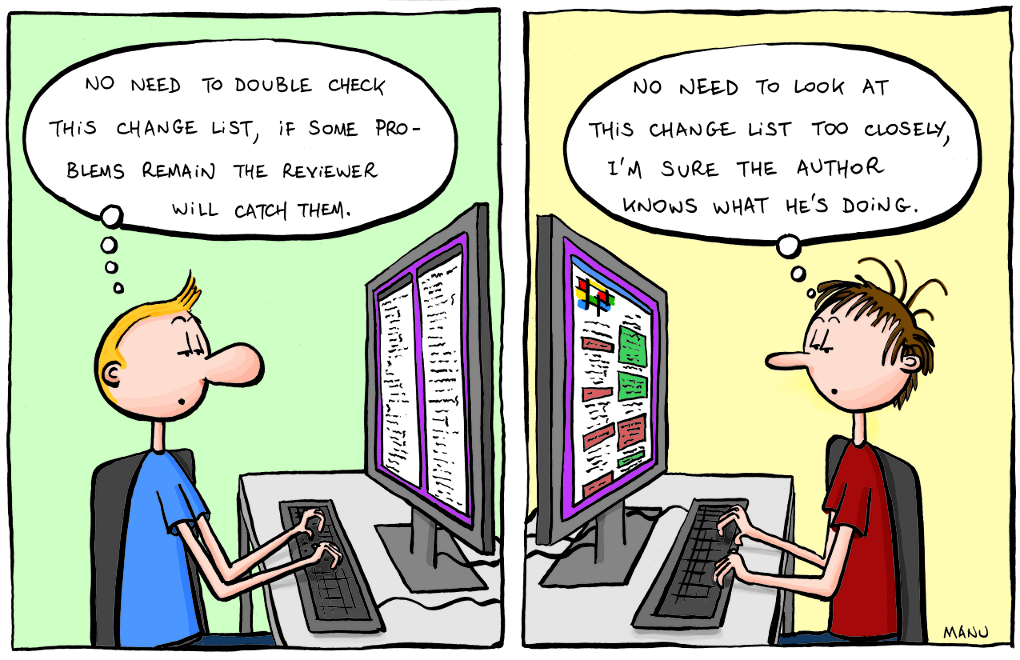
    2011.09.18_code_reviews

    I won’t lie, code reviews can be tedious. But the first time someone points out an error, particularly one that could have resulted in a security breach or an undesirable service outage, the pain is more than made up for. In the long run, code reviews are beneficial to eliminating disruptive errors. A SmartBear survey in 2012 found that “70% of organizations indicated that code reviews are very important” and “Those that do code reviews clearly have a greater level of satisfaction in the overall quality of their software – they were twice as likely to indicate that they were very satisfied with their software quality.”

    In other words, code reviews are an important part of the software development lifecycle (SDLC). Which means it should be a part of the software deployment lifecycle when it leverages programmability to treat infrastructure as code.

    Therefore it is important in the early stages of DevOps (or SDN if you’re going that way) adoption that you put into place processes to check (and perhaps double check) the scripts, templates and integrations you’re using to automate application and service deployment along the entire operational chain – from the app to the network.

  • Enterprise DevOps and the Project Management Office

    Enterprise DevOps and the Project Management Office

    Welcome back to this occasional devopsy.kinsta.cloud series on Enterprise DevOps Q&A. Remember, if you have questions about DevOps in the enterprise, let me know and I will try to answer them (or find someone who can). E-mail me at andi.mann@ca.com, tweet me at @AndiMann, or leave a comment below.

    This week brings a question about DevOps that could only come from a large enterprise:

    Q. For software development and IT operations, the picture is quite clear. But in my company the PMO has so much control over what projects we take on, what their scope is, when they are due, etc. How can I encourage and enable DevOps in our PMO?

    Startups and ‘DevOps unicorns’ likely have never worried about dealing with a Project Management Office (PMO), but this is a very common process gate for enterprise-scale organizations. The PMO provides essential capabilities to plan application strategy, gather requirements, prioritize projects, allocate resources and budgets, manage project risk, and report on delivery, especially across complex organizations. However, as with many uniquely ‘enterprise’ departments, the PMO often seems like a significant bottleneck too.

    That means enterprise DevOps initiatives must bring the PMO along too. After all, you cannot deliver business-critical software faster if you have no idea of your business priorities or requirements. You cannot claim a successful release without measuring how (or if) it has delivered on business goals. While this will often happen organically in small businesses, in large enterprises this is the remit of the PMO.

    Unfortunately I have not seen a lot of ‘best practice’ (or even ‘good practice’) advice on this yet, as DevOps discussions have focused mainly on smaller organizations. However, what I have seen working in large enterprises to foster a closer relationship between the PMO and the DevOps teams is a shared approach to agile Project and Portfolio Management (PPM).

    I have seen this shared, agile PPM working in three key ways:

    Align development with business priorities

    First, a shared, agile approach to PPM helps the PMO and DevOps teams come together and collaborate to prioritize development of capabilities that matter to the business. The PMO shares portfolio priorities and project plans with dev, ops and other stakeholders; dev and ops share development estimates and operational requirements to enable accurate planning with realistic timelines. DevOps teams can help foster this collaboration by bringing PMO stakeholders into requirement gathering and agile planning, even into standup meetings as part of the scrum methodology. This benefits DevOps teams too, by ensuring immediate feedback and shared alignment against business goals.

    Manage agile parallel development and continuous operations

    Second, encouraging DevOps teams to track and report on timelines, resources, and deliverables helps the PMO to report back to business leaders on progress across multiple parallel projects. In large distributed enterprises, DevOps teams can assist by sharing granular project status (e.g. burndown, commits, etc.) with PMO stakeholders, so they can measure delivery against business objectives. Shared project reporting also helps DevOps teams to measure themselves, and assign responsibilities appropriately too. This shared commitment to business deliverables is itself a key objective of DevOps in any size organization.

    Measure and iterate the SDLC

    Third, a shared, agile PPM approach can help drive iteration back into development. After new features have been released, shared reporting means the PMO can immediately measure the impact of new releases on business priorities. This also allows them to ensure DevOps teams have delivered against the prior plan before they reassess the current portfolio and start on the next plan. With shared project reporting, the PMO can adjust project plans to reflect achievements, prioritize the new set of macro and micro gaps, and close the feedback loop back by driving requirements into the next development cycle.

    Shared, agile PPM tools and solutions

    Much of this change – as with all DevOps change – is primarily cultural; it is not necessary to use specific PPM tools to enable an agile, shared approach to PPM. However, as with many activities in DevOps, automation and tooling can certainly help. Especially in large enterprises with complex portfolios and geographically dispersed teams, a shared PPM toolset may be essential.

    As you mature and move from waterfall to agile development and DevOps, all stakeholders will appreciate a shared PPM solution that allows a business view of the current application portfolio, a shared view of planning and priorities, common management for both waterfall and agile projects, and roll-up reporting of application delivery and portfolio value. You may find your current PPM solution already fits; or you may need to consider supplementing or replacing it.

    Where agile and DevOps aim (at least in part) to accelerate time-to-market for new business ideas by bringing business closer to service delivery, a formal Project Management Office can seem like a brake on productivity. However, as the whole business needs to go faster, IT teams can help bring the PMO onboard the DevOps train with a shared, agile approach to Project and Portfolio Management.

  • Moving Security To the Left In a DevOps World

    Moving Security To the Left In a DevOps World

    Moving security to the left has become a coined phrase meant to describe the process of getting the security team involved earlier in a process.  Most typically, the phrase is used in conjunction with IT or software development projects. One of the top suggestions for ensuring security in a DevOps world is to move security to the left in the process tool chain. But what exactly or how exactly can you move security to the left?

    Grab that Open Seat

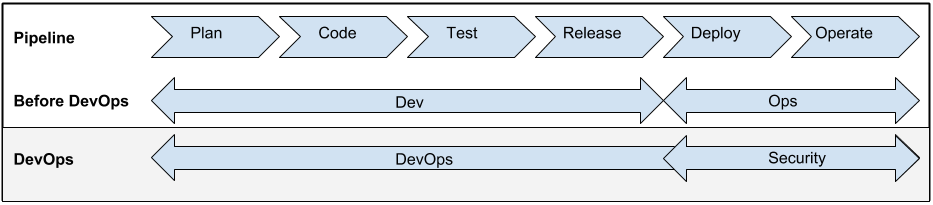
    The new DevOps process pipeline created an opening for a seat at the table for security. Prior to DevOps, the development team owned the entire pipeline from plan to release.  The Ops team would historically receive the release from over the wall and then be responsible for the deployment and operating the software inside the production environment.  With the Ops team joining forces with Development in the process pipeline, that has opened a proverbial seat at the table. What I’ve started to witness are security teams taking advantage of the musical chairs to quickly grab the open spot.

    DevOpsProcessPipeline


    Taking a seat at the end of the development pipeline is not enough.  Too many security teams are still being relegated to positions too late in the process.  While running pen tests and security code reviews after a release is better then nothing, its still not ideal.  Security needs to find ways to add value to the process so they can act as a force for positive change instead of the after thought.

    Threat Vector Analysis

    Threat vector analysis is part science and part art and part trying to guess uncertainty. What is certain, however, is that most developers would rather be spending their time writing new functionality instead of trying to understand how an attacker could be break their code. The security team could offer a tremendous service to an organization by offering their expertise in this area.

    Continuous Integration Security Testing

    Continuous integration is a key component of DevOps. The security team can leverage the development chain to insert early yet important risk control tests. Those tests could be for example static or dynamic code analysis. Other tests could be simple yet known vulnerability checks in included libraries. The OWASP introduction to testing guide lists a plethora of application security tests that should be checked often and early.

    Author Micro Security Services

    Think about how great it would be if there was a group who specialized in authoring and delivering security related services into your application?  Proponents of services models generally promote splitting the development team up into groups that are organized around business capabilities.  For example, there are separate development groups for UI, middleware and DB.  What’s missing in most of those models is who is responsible for security services such as authentication, authorization and audit. Security has an opportunity just waiting for them to add incredible value while also ensuring the security services used pass muster.

    Summary

    Where we once had Ops fighting their way to be part of the entire development process, we now have security trying to do the same. Ops managed to garner their way into the club by coming to the table with invaluable skills and resources. Now its up to security to present their creative sweet spot in order to secure their own seat at the table.

    Further Reading

    Andi Mann on Ensuring security and managing risk in enterprise DevOps

  • Right-Picking the First Project to Go DevOps On

    Right-Picking the First Project to Go DevOps On

    One of the hardest things to do when starting a new initiative is picking the right project to work on. Should I start with App A? App B?  Does it really matter as long as I get started on this DevOps thing and prove its value to management?

    Yes, actually, it might.

    If you think about it, one of the reasons you’re doing DevOps in the first place is not just because it’s cool (it is, of course, but that rarely flies with the business guys) but because it’s going to add value in one or more ways by improving time to market, reducing risk and lowering operating costs. If the project you choose to go DevOps on isn’t capable of showing those benefits (or isn’t capable of showing those benefits in a reasonable time frame) then you might just be choosing the wrong one to start with.

    So how do you choose? Well, how about starting with an app that’s being developed using agile methodologies?

    According to the “8th Annual State of Agile” survey from VersionOne 88% of respondents were practicing agile development, which means you shouldn’t have a hard time finding one.

    Except, you might if you aren’t paying attention. A high adoption rate doesn’t necessarily mean a high saturation rate, however.

    number of projects using agileDig a bit deeper into the survey and you’ll find that agile isn’t used for every project. On the contrary, there’s a good distribution of agile and traditional (waterfall ) methodologies being used. While over half of the respondents are using agile to manage more than 50% of projects, the other 48% are using some other methodology.

    Which offers some interesting strategies for how to get started with DevOps on the other side of the wall (that’s you, in operations land).

    On the one hand, the projects most in need of improved velocity in deployment (time to market) are likely those being developed using agile methodologies. The aforementioned survey validates that approach, with the top reason cited for adopting agile being “accelerate time to market.” The general premise of agile is fast, frequent updates, making the need to deploy into production a more pressing priority. Choosing an app that’s being developed using agile methodologies means you’ll be able to practice, refine, and optimize the processes as you work to automate the deployment. Because of the frequency with which agile-developed projects tend to need deployment, this gives you the opportunity to practice similar techniques on your automation and optimization.

    You’ll be able to automate individual tasks and test them thoroughly before moving on to the next one and the next one and the next one, until you’ve got the process orchestrated (yes, Virginia, there is a difference). You’ll then have ample opportunity to optimize the process, finding redundancies or inefficiencies in the way information is gathered and disseminated into the process. Optimization of the process means greater efficiency, especially if you can knock out those all important wait times between tasks.

    The key here is that you have to know which projects are being developed using agile methodologies, and which aren’t. That means communicating with developers. And not just by sending an e-mail and asking for a list, but really talking to them to understand which projects the business would benefit from improving time to market. Getting an app that is the vehicle for competitive advantage to market faster seems a bigger return on investment than the app used by just a few people for non-critical purposes. You’ve got to dig in and determine which agile projects need agile deployment the most, and then decide where to dig in.

    This is not to imply that less frequently deployed apps will not benefit from agile. They most certainly will, though the benefits that DevOps brings to those apps are more about stability and consistency than they are those derived from improving time to market.

    What’s important is to decide what your goals are with DevOps and what benefits will be worth the most bang for the buck (cause it ain’t going to be cheap in terms of time investment). Getting DevOps on an infrequently but mission-critical app can reduce the risks associated with rusty processes and improve stability in general. Automating the deployment  of such applications can certainly save time and resources that can be redirected to agile projects in need of greater deployment velocity.

    But if you’re looking to show value and return on investment, you’ll likely want to choose one of the agile-developed projects that already exists and needs some attention. Not only because it’ll show value faster, but because it’s releasing frequently enough that you’ll actually get the opportunity to refine (and one hopes optimize) your automation and orchestration.