Tag: enterprise devops

  • REP SPOTLIGHT: ITSM Academy

    REP SPOTLIGHT: ITSM Academy

    DevOps Institute: Tell us a little about your organization.

    ITSM Academy: Since the early DevOps Days in the U.S., ITSM Academy has been involved in the DevOps community. We are proud to be the first DOI REP in The Americas. We offer DOI’s full line of training, in our open-enrollment public (virtual) classrooms as well as on-site. All instructors have completed thorough Train-the-Trainer programs and we are achieving phenomenal pass rates.

    DevOps Institute: What other topics do you teach or consult on?

    ITSM Academy: For the last 12+ years, ITSM Academy has offered the full ITIL catalog. These courses are all developed in house, and licensed to other organizations. Our groundbreaking Certified Process Design Engineer (CPDE) course is also developed by our in-house team.

    DevOps Institute: What type of interest in DevOps are you seeing in your region?

    ITSM Academy: Enterprise organizations are embracing DevOps and agile service management and attending our courses to help build sustainable programs.

    DevOps Institute: How do you think DevOps contributes to the business’ value stream?

    ITSM Academy: At its core, DevOps is about a shift in culture. Organizations have a tendency to focus on tools, or the automation of manual tasks. Taking a big-picture approach, starting with reviewing existing processes and being willing to re-engineer, is where the real value comes in. Organizations that are coupling DevOps training with the Certified Process Design Engineer (CPDE) course are seeing equipping their teams for success.

    DevOps Institute: What topic area in DevOps excites you the most?

    ITSM Academy: Improvement of the flow of work between software developers and IT operations professionals. Enriched workflows enable IT organizations to deliver greater business value by improving the ability to more quickly design, develop, deploy and operate reliable software and services.

    DevOps Institute: Why should enterprises and individuals consider formal DevOps training?

    ITSM Academy: DevOps is a philosophy, not a “tool” to be learned. DevOps foundation training helps teams start on the same page, with common vocabulary and goals.

  • State of DevOps Report: Reaping Results

    State of DevOps Report: Reaping Results

    The newly released 2016 State of DevOps Report concludes that DevOps is “no longer a mere fad or buzzword,” but rather an established set of practices and cultural patterns. Yet, a closer look at this year’s findings reveals progress is far more substantial than any matters of perception.

    The report was conducted and analyzed by the experts of DevOps Research and Assessment (DORA) and sponsored by CA Technologies. Among its findings is proof that high-performing organizations that have embraced agile and DevOps methodologies deeply are outperforming massively those that have not. And the gap is widening.

    The State of DevOps Report also shows leading DevOps practitioners are appreciating benefits that span nearly every area of their business. If I know my colleague Gene Kim, he will assert this point exuberantly on our upcoming State of DevOps Report Webcast.

    It’s noteworthy that high performers are surpassing incredible milestones related to core elements of the applications life cycle. Examples include deploying code 200 times more frequently than low performers, driving 2,555 times faster lead times, 24 times faster recovery times and producing three times lower change failure rates. This is evidence that DevOps is having the desired outcome on applications delivery, software quality and organizational velocity. It also shows organizations truly committed to wholesale transformation of culture and process are actively succeeding.

    At the same time, the State of DevOps Report shows employees working at organizations enjoying this success are more satisfied with their jobs and more closely engaged with their companies. Chalk this up to the halo effect of operating in a fundamentally more sensible, innovative fashion. Cultural change is undoubtedly the greatest hurdle to DevOps advancement. Here’s proof that if you can navigate the process, your workers will be happier and more productive.

    Using Employee Net Promoter Score (eNPS) as a barometer, the report finds that employees in high-performing organizations were 2.2 times more likely to recommend their organization as a great place to work. They also were 1.8 times more likely to recommend their team as a great working environment. Previous studies have found that such an air of positivity can be directly correlated with improved business outcomes, researchers noted.

    Shifting the manner in which you build applications to better adapt to changing customer expectations is a necessity. That’s what began driving this movement years ago. That said, proof it also makes it easier to keep valued software engineering and IT operations employees should not be overlooked.

    In addition to positive conclusions on the impact of continuous delivery and improvement of test data management, the report offers some important metrics related to return on investment. This is nothing short of landmark, as for decades we have struggled to make a hard case for IT investment beyond implied competitive advantage. It actually was impressive that last year’s report highlighted such a “predictive relationship between IT performance and organizational performance.”

    One such new measurement of note is that high-performing teams occupy the least amount of time responding to unplanned work and rework—efforts widely recognized to be results of flawed processes. On a related note, DevOps leaders spend 49 percent of their time on new work‚ surely, in many cases, the next “must-have” feature which impacts competitive standing and, ultimately, the bottom line.

    This report is fantastic. It reaffirms powerfully that so many of the promises made about DevOps over the last few years are neither hype, nor overstated. The gap between the leaders and laggards is growing. Industry landscapes and business models are being redefined.

    This is critical transformational work that every organization must adopt to survive.

    Are you on board? Download the full State of DevOps Report here.

  • DevOps Matchmaking: APM + CI = A Perfect Marriage

    DevOps Matchmaking: APM + CI = A Perfect Marriage

    As anyone who has ever been set up on blind dates by friends can attest, finding the right match in today’s world is a tricky feat.

    There’s a lot of evidence suggesting that the frantic pace of life makes such matchmaking more difficult than ever. That said, when the right set of complimentary traits exist and there’s a willingness to find common ground, things can work out.

    Spike Jonzian-notions of artificial intelligence aside, certain technological partnerships are increasingly being perceived as “a perfect marriage” within the context of DevOps automation.

    Register today for the upcoming webcast: “Using APM to Turbocharge Continuous Integration”

    These technological matrimonies closely support the underlying tenets of DevOps methodology—collaboration, experimentation and increased velocity. In fact, it’s easy to wonder why no one ever conjoined them before. But we were using traditional waterfall development and operations and so couldn’t conceive of such a thing. On the other hand, emerging availability of tooling supporting new integrated workflows represents a significant catalyst.

    Finding the Perfect Fit

    One such DevOps confederation getting a lot of attention is the matchmaking of continuous integration (CI) and application performance management (APM) technologies. Tying together these once-disparate systems makes a lot of sense, despite the fact that few tools would seemingly appeal to more (traditionally) polarized constituencies.

    Continuous integration has been a staple of the development community for many years. It emerged as teams evolved the practice of long build times into more frequent check-ins to deliver code and look for potential errors more quickly. Today, with the rise of CI tools such as the Cloudbees Jenkins platform, some development teams are touting tens of thousands of builds per day.

    On the other end of the spectrum, squarely on the turf of IT operations, APM has been evolving rapidly over the past few years as organizations have sought to improve use experience and applications reliability via dedicated monitoring. Enabling this ability to identify and address emerging issues has resulted in APM becoming the fastest-growing segment in the IT ops management market, according to Gartner.

    DevOps matchmaking factors in when you bring these tools together to create an automated workflow that spans their respective use cases. A cross-functional team can leverage APM-level monitoring and KPIs within the domain of CI and testing to identify potential performance obstacles introduced in new code. Doing so then rather than waiting to respond later in the applications life cycle benefits everyone.

    Reaping the Benefits

    For example, say an e-commerce applications developer has implemented a new inventory search functionality—something considered a key differentiator by business management. The developer knows this feature could rely heavily on some back-end database system and wants to ensure it’s tested properly, even as the code is being introduced.

    Integrating APM and CI allows the entire team to monitor the process and test various conditions related to the update, tracking multiple builds and looking out for related performance issues. Such integration also allows for centralized tracking of other key attributes such as build number, status and build date, to further ease management.

    Most importantly, by tying these two critical aspects of the applications delivery life cycle together, the collaboration and feedback loops required to truly embrace DevOps methodology become ever more valuable as these core Dev and Ops functions become intrinsically linked.

    If this type of DevOps advancement gets your heart pumping, you’re not alone. Later this month, we’ll host a webcast here on devopsy.kinsta.cloud featuring experts from CA Technologies and Cloudbees. They’ll be discussing the benefits of matchmaking with APM + CI integration. They’ll also detail real-world benefits organizations leveraging integration of our respective technologies (CA APM and Cloudbees Jenkins) enjoy.

    We obviously feel that this is a DevOps tooling marriage that will mature, change and stand the test of time. We’d love to garner your questions and feedback on the topic.

    Which is all good, because thankfully there’s no such thing as Tinder for DevOps … yet.

  • Infrastructure-Testing Dominoes

    Infrastructure-Testing Dominoes

    Understanding the artifacts of a given technology component is critical to an enterprise-class DevOps service offering. Second-most critical is understanding the dependencies between given components. Testing helps illuminate those dependencies.

    For example, let’s assume I have a server running the previous version of the Windows operating system (OS) that I now want to upgrade to the latest version. The previous deployment package of this version of the OS would be an artifact. It should also include all of the test automation I run to validate that version of the OS is working after I install it. The artifact also might include configuration files I deploy when I install that version of the OS on this type of server in this class of environment. Having these bits of automation bundled together allows me to do a successful install of my OS (assuming no hardware errors) on perhaps many servers.

    As I create a new artifact for the latest Windows OS, I keep in mind all the things I had in my last version. I might include a newer config file and perhaps a set of tests (albeit new ones) to make sure it is working when I am done. Bundling all these bits gives me a new Windows OS artifact or package that I can use over and over on this kind of server in this class of environment. The idea is that I am creating a single kind of artifact or package to cover this kind of technology—in this case the latest version of the Windows OS operating system. All my artifacts should be version-controlled. So when I’m done I have an artifact for the previous Windows OS and one for the latest version. Each artifact version has embedded or included testing (pointers to, or discreet automation) to verify the validity of the install, and perhaps a little more to prove the OS works.

    Within my DevOps tooling, I likely have some sort of artifact management system. It may not be as formal as a full-on configuration management database (CMDB) system, but whichever tool I use will have some sort of database to manage my artifacts or packages by version. How long I retain these artifacts will be defined in my retention policies, but likely I will retain every version in use at my company today. This is step one, and it forms the foundation for my next effort in cataloging the dependencies that exist between artifacts.

    Enter the Spider’s Web

    Under the scenario I have described, when I deploy either the previous OS or the latest one, I would run a series of tests specific to that version to ensure the OS is working properly. As an infrastructure engineer, I tend to think my job is done at this point. But it isn’t. To truly validate that my OS is working, I really need to know what is running on the server I just deployed to. If my server was bare or new, then I am really done. But if my server has middleware running on it, then the job is not finished until I re-deploy the right version of the middleware on top of my new OS and verify it is still working properly.

    To pull this off, I will need a catalog of the technologies that depend on each other. The OS example is kind of simple, because it lives at the bottom of the stack where a server is concerned. But on top of the OS might reside a middleware platform (perhaps messaging or a database). On top of the middleware might reside an application or perhaps several applications, depending on the horsepower of the server in question. Upgrading the OS component implies I am redeploying the middleware layer and then the application layer on top of that.

    Enter full-stack engineering. It takes an application-centric view of the world, but this implies a single application-centric view. It looks at one app from top to bottom and treats the entire stack as a single version-controlled artifact. But if you have legacy environments that run multiple applications on the same physical box, perhaps on the same virtual instance, you have the makings of a spider web of dependencies. There are no full-stack solutions (to my knowledge) that have figured out how to incorporate multiple applications at the top of the same stack, varying middleware in the middle and “n” number of virtual instances that ride on one OS on one physical box. Instead, each piece of the technology tends to be treated separately. Thus the need for some sort of catalog that tracks the interdependencies between them all.

    Starting the Domino Testing

    So once I have discreet testing that is version-controlled (or associated with) each type of technology component, I will have to re-execute those tests if anything “under” me undergoes a change. For example, if the version of my WebSphere is upgraded, beyond just the core WebSphere testing that occurs, I really should execute the tests associated with each application to ensure “that app” is still working after the upgrade. You could apply this premise to a database layer (say, upgrading the current version of Oracle, as an example). To really know if the database upgrade was successful, you should run the testing of each dependent app and ensure “that app” still works after the upgrade. The results are likely to be surprising.

    To execute this kind of domino testing, even if you have the web of dependencies defined and the artifacts or packages managed, you can take one of two approaches: redeploy everything, although this method may not actually kick off tests if it detects the versions did not change from the last deployment (smart overwrite), or set up discreet testing jobs within your release orchestration software to execute the entire web of dependencies and track the results. In either case, you are going to need human oversight on whether it is better to keep the new version or roll back to the old one. Only a human can prioritize the impact of what might seem small or catastrophic (based on a human perspective) of a given app or series of apps.

    Impact to the Bottom Line

    True quality can be assessed only through testing. Part of breaking down silo-thinking is taking a holistic view of the technology your organization supports. Just because the OS support engineer’s testing passes does not mean the upgrade was a success. For an upgrade to be a success, the tests of everyone else who relies on that technology underpinning must pass to prove it worked. The entire team needs validation when the underlying infrastructure undergoes change. The dominoes of tests must pass from end to end. Only then can true quality or true success be measured.

    Of course, most engineers are reluctant to have “app software” guys influence whether they did their own jobs right. After all, most software quality problems are in the code, not due to infrastructure errors. However, if the applications upon which your business relies cannot work, no matter what the reason, after an infrastructure upgrade, it is a problem for the entire business, not just the software guys. To tear down the silos, we need to look at impacting events for change across boundaries and drive toward overall results, not just departmental ones. When this occurs, the cost of quality is significantly reduced.

    To continue the conversation, feel free to contact me.

  • Dashboards from Hell

    Dashboards from Hell

    Even organizations with a mature DevOps services model inevitably will hear from executive sponsors about the “need” for a dashboard for DevOps information. Organizations just starting to embrace DevOps won’t have the time to construct one yet, but over time will reach the same conclusion. The need is real, and the value is significant—it is how you get there that makes the difference. Vendors are keen to promote the idea that they already have a dashboard built into their respective products. And this is partially true.

    But the problem with dashboards is not a matter of information, it is a matter of perspective and scope. Ultimately, all of the information an audience wants can be found in the various DevOps tooling used in the continuum of services your organization created. However, locating some of it takes profound knowledge of how each tool operates, adequate security profiles and an elephant’s memory as you click on multiple windows to try to correlate the data you ultimately are seeking across the various tools.

    Before you know it, executives and perhaps even practitioners are calling for a consolidated dashboard that would present this information cleanly. The danger here, of course, is an attempt to consolidate every perspective from every individual audience into a single dashboard for your company. Instead, it is wiser to begin such an effort by breaking down the number of audiences into categories (by need, perhaps) and examining what is already available and what is missing to make a dashboard project effective, and not one originating from hell.

    Dashboards: The Practitioner Perspective

    There is a keen difference in what a typical engineer wants to see as it relates to DevOps from what the other audiences will be looking for: namely, detail. If you consider this part of a dashboard effort the foundational section (i.e. providing the right detail information to the engineers who ask), the remaining higher-level presentations can be built on top of this data. Most engineers are content to just “look into the given tool” to get what they want. But sometimes consolidating this information into a dashboard begins to make more sense.

    Ideally, your company has only one build tool and, again ideally, only one deploy tool. If you have multiple types of both kinds of tooling in these disciplines, you would be better served to pick a winner there than try to use a dashboard effort to consolidate build and deployment data across multiple build and deployment tools. Allowing multiple kinds of build and deployment tools across an enterprise usually winds up in the demand for multiple dashboards from multiple audiences, and before you know it, the dashboard project from Hades once again has infested your organization. A clear winner in build, deployment and release orchestration cuts out this kind of problem.

    Most of the time the need for a dashboard emerges when users are trying to see information in a way the native tooling did not plan for. For example, I want to look at a given server, or class of servers, and a list of everything that is on them (by version). Or as an example, I want to look at these technology components of this type and version and find out every server in my entire data center that they may have been deployed to.

    Some vendors offer internal reporting capability intended to meet these needs. However, using those reporting features should be labeled with “caveat emptor” signage. Typically, vendors apply their reporting directly against online or production data within their respective tools. So an engineer presses the report button on his build tool, and the build reporting function begins to look at its own data from a production viewpoint, instead of from an offline reporting copy of the data. When you start running reports against “live” tools, you get slowdowns, sometimes significant slowdowns.

    To avoid this issue, start with determining what data the engineers need, how often they need it and to where you can copy this information (to form the basis of your dashboard system). You also may wish to examine how the base data is inherently constructed and join some of it where it makes sense, so you are not issuing very large queries joining key data from many tiny tables together before anything sensible emerges for your new dashboard system. Speed of presentation will matter still, even though the data becomes only near-real-time instead of real-time.

    Dashboards: The Business Perspective

    Once you have ascertained the detailed information to satisfy your engineering or practitioner community, it usually needs to be married to your business segmentation to meet the needs of this audience perspective. For example, I may have 30 servers that I use regularly in my e-commerce products or line of business division. My engineers may care less about this designation, as they only care which servers are content servers or database servers or application servers. But my e-commerce business teams look at this information differently. They only want to see “their” servers, not every server in my company. So to accommodate the next perspective audience, I need a way to marry servers and technologies to the product lines or lines of business my company understands.

    This may require an outside or additional database that tracks the raw server name and marries it with the business unit that cares about it. It may also track the application names the same ways, marrying them with the appropriate business unit. But this marriage now offers the ability to pull reports (or dashboard screens) by line of business—it is nearly certain your basic build and deploy tools weren’t designed to show information in this way. This kind of business segmentation, or filtering (in some tools), provides an entirely new way to examine the data. The need to drill down to the details may still exist, but a picture of change relative to a product line or business line becomes a high value-add for the business community who looks at DevOps data.

    The business community looks at DevOps information to help it make decisions based on the state of change at any point in time. E-commerce customers, for example, might get special company notifications of upcoming changes or improvements in their capabilities, as the business community is made aware, and stays current with the planned release events and quality of testing underway. Or those same notifications might be delayed based on a quick look at the same information presented the same way.

    The point is, business users are an important community or audience of DevOps information, and the lens they use to examine data is from a product or line of business construct rather than the raw data aggregated by a practitioner.

    Dashboards: The Executive Perspective

    Executives, no matter the level, usually are more concerned about trends in the information than point-in-time data. For example, a given executive may want to know how many deployments per month are happening out of the development class environment for a given line of business. If you have constructed your dashboard with the architecture laid out above, you should be able to provide this kind of information. The discreet data is stored offline (copied from the build and deploy and other DevOps tools themselves), then married with the business segmentation data. Now it can be presented in trend-over-time manners that executives invariably want.

    It is much more likely that a business team member will use the drill-down features of your dashboard than your typical exec. But having it available up to the executive layer is a huge win when demonstrating the detail of what is going on where and potentially framing the why. The other significant win of having a single dashboard for presenting trending data is the consistency in the presentation across the enterprise. Consider for a moment how many Excel spreadsheets are sure to spring up around the company when execs task their people to produce reports that aren’t available in a dashboard at their fingertips. Each minion of the exec likely will grasp certain data in unique ways, often resulting in bar charts that never seem to line up.

    Having one dashboard—or, rather, one method of presentation of the same data—eliminates having multiple unique minion versions that lack context and often misrepresent the real story. In addition, without having a central dashboard you construct and control, minions will pull data requests against the production copies of build and deploy and release tooling, perhaps slowing these tools down to a crawl while data is gathered. The act of looking at a thing will certainly change the speed of that thing, in this instance.

    Impact to the Bottom Line

    Meeting the 80/20 needs of your primary audiences of DevOps data can be done without tying up programming resources forever. Once you have delivered a core dashboard system with mainline capabilities, your executive or business teams can decide how much more resources they are willing to fund to continue to update and enhance the dashboard. As long as they fund it, you can dedicate the resources you need to keep making it better (see agile). But for most shops, this kind of dashboard is a three-to-six-month effort from end to end.

    Once the dashboard is up and running, it becomes “the” tool in the arsenal of transparency for DevOps services. Granting access to this kind of tool (i.e., setting up user IDs) is significantly simpler than doing it in the multiple of underlying tools you have to administer without it. The cost of administration in a large firm can be substantial if a dashboard is not present. Imagine having to set up a typical user ID in your build tool, deploy tool, configuration management database, testing tool(s), release orchestration tool and monitoring tool—and that’s just to start. Within these types of tools that provide a real service or function are secondary concerns such as security or permission profiles, group memberships, etc. A dashboard only needs a valid company ID, and you are ready to “see” change in motion via DevOps.

    The work effort typical executives “task” their minions to produce reports is usually no small effort, either. While this work effort is rarely captured or understood by the executives who request it, it definitively puts a drain on company resources (both man and machine). A functional dashboard can eliminate this work nearly altogether, and produce a consistent work-product output. Your DevOps strategies should be created to reduce costs and facilitate innovation at every turn. If you need help feel free to contact me, I am still looking at the moment 🙂 .

    To continue the conversation, feel free to contact me.

  • Rep Spotlight: Global Lynx

    Rep Spotlight: Global Lynx

    DevOps Institute: Tell us a little about your organization:

    Global Lynx: Global Lynx is a leading and fast-growing IT consulting and training company that assists companies and government agencies improve the competence and skills of their IT organization, enhance the maturity of their IT governance and improve the quality and effectiveness of their IT operations, services and processes.

    Since 1996, Global Lynx experts have helped organizations in five different countries, improving—and often transforming—their IT operations through the implementation of effective frameworks for IT governance, ITSM (IT services management), PMO (project management office) and information security.

    As an Accredited Training Organization (ATO), Global Lynx also offers a wide variety of IT courseware covering different areas, standards, frameworks and methodologies, and at various levels of expertise.

    Global Lynx trainers are experienced consultants, certified in multiple IT disciplines. They have actual firsthand experience in their areas of IT expertise, as well as experience in delivering training programs.

    DOI: What other topics do you teach or consult on?

    Global Lynx: IT service management, IT corporate governance, IT audit, information security, cyber resilience, IT risk management, cloud computing, project management, SCRUM, business continuity, process design and implementation, and enterprise value creation.

    DOI: What type of interest in DevOps are you seeing in your region?

    Global Lynx: Companies are interested in obtaining a common understanding of DevOps concepts and best practices, and they are focusing on deploying these practices organization-wide.

    DOI: How do you think that DevOps contributes to the business’s value stream?

    Global Lynx: The digital disruption all industries are experiencing, has created the need for IT to be embedded in every single business unit. Solid DevOps practices will help IT organizations deliver higher value to their customers, as value is delivered through operations, but it is defined and enabled in the development stages. Value should be managed not only in operations, but rather from the early stages of the service life cycle. A mature IT organization cannot have a poor collaboration and communication culture; without this, value creation will be limited to technical value instead of real business value.

    DOI: What topic area in DevOps excites you the most?

    Global Lynx: How DevOps interfaces other frameworks and how all of them can work together toward creating value to the customer.

    DOI: Why should enterprises and individuals consider formal DevOps training?

    Global Lynx: DevOps is all about people, and it is enabled by people. If a person is not committed, that person will do little to support the DevOps initiative. People need to go through formal DevOps training to learn what DevOps is, and how their role impacts the initiative and how they contribute to value creation. Certification is a plus, as it gives people a personal benefit. People will naturally react positively to something they own, because they will believe in it.

  • Embedding Predictive Analytics

    Embedding Predictive Analytics

    For an enterprise with a deep DevOps maturity model, the initial “wow” factor of automation has worn off. At this point, the sexier concepts involve proving continuous improvement. As an example, our first baseline of metrics might have taken the pre-DevOps timings of a typical build and deployment of a given application. We can measure this time against our post-implementation of DevOps automation and show a significant savings in time. This is opportunity time, meaning an employee must be ready to turn around the decision cycle faster to take advantage of the time saved (not be playing solitaire, for example). But once DevOps automation is old hat, the difference between our initial post-DevOps typical build and deployment time and our current one still using DevOps may not be all that significant. But is there more hidden there than meets the eye?

    Establishing Context & Baselines

    At this point context may be a more meaningful measurement. As an example, if my first version of DevOps automation for a deployment contained 35 steps and my current one contains 160 steps it would stand to reason I am “doing more” now in my deployments than I used to do. These additional steps may involve executing more tests than I originally thought to do. They may be interacting with monitoring systems (turning them on and off as appropriate), which reduces “noise” in the alerts my monitoring teams have to respond to. In short, over time, my deployment processes may become “longer” because I am increasing the capabilities or the sophistication of what I do during these deployments. While from a pure timing perspective this may make them longer, it also makes them more powerful and, so, is worth measuring. To know the delta, however, I must have retained older versions of automation to compare against, not just throw away the old every time I update with new steps.

    So let us assume the context of my automation is now fairly stable. I do the same things, more or less, the same way every time I deploy my application. At this point, measuring the functionality of what I do becomes more meaningful. As an example, my deployment automation may complete four main functional tasks to complete, I deploy the code (the app), I deploy the dataset, I deploy the config files and, finally, I run a series of tests on the above. While I may not ever incorporate too many new kinds of things to do in this automation, understanding how long each function takes to complete is relevant to proving continuous improvement. For instance, if my code takes roughly the same amount of time each deployment, as does my config files, but all of the sudden my dataset begins to grow in each deployment (from normal usage), my overall deployments may be getting slower. This is not due to hardware inefficiency or network inefficiency; it is simply due to a larger dataset that keeps growing.

    If on the other hand, it is my test set that is getting progressively longer to execute, that is an indicator of test script inefficiency (given same code, same config and same dataset). If the number of tests being executed has not increased, but the length of time it takes to run them has, there likely is inefficiency in “how” the testing is being constructed or executed. Understanding the context for what is going on in a deployment or similar kinds of automation must occur before introducing predictive analytics can occur.

    Historical Trends Extended

    Predictively evaluating automation is nothing more than taking the data from a historical perspective and extending the trend lines into the immediate future. If for example, my deployment automation is getting four seconds longer each month for the last 12 months, I can reasonably infer the trend will continue, and I can predict the length of time it takes to execute a deployment in the coming months. Understanding “why” this occurs requires a contextual investigation, but predicting its occurrence does not. This may seem inconsequential as we talk about the length of deployment processes of a given app, particularly if my portfolio of apps is small. But if the trend holds true for a portfolio of thousands of applications, the impacts become more consequential. Or if the phenomenon is directly connected to a particular cloud provider and not seen elsewhere, again, the consequences become meaningful.

    Where having “ground-up” predictive analytics (build and/or deployment automation) becomes much more useful is in the construction of release events. Often, release managers are asked to supply an estimated time duration for a given event to factor into the construction of a new release. If a vendor were to integrate more predictive analytical tooling into the release orchestration (RO) toolsets, “random” or “best guess” timing estimates could be replaced by extending historical data into the timing estimation fields. The RO tooling could provide a default timing estimation based on examining historical trends for a period defined by the user. Estimation defaults could always be replaced by a user (assuming discreet knowledge of other impacting events), but at least the new overall lengths of releases then could become significantly more accurate.

    This has special significance for manual tasks. Let’s say our database admin team traditionally takes 40 minutes to perform a given release event update, but now is running significantly longer than that. Having the RO software aware of the historical trends could alert the release manager, as well as the database team manager, during the event to check out why this is occurring. For manual tasks in particular it may be hard for anyone besides a predictive analytics module to determine what timings “should” be, as compared with what they are in a given release.

    Impacts to the Bottom Line 

    The real questions are, Why should a customer care about this kind of feature set? Why should we be looking at the vendors of our tooling to incorporate forward-thinking architectures such as predictive analytics into the tooling they sell us? Because the efficiency it can bring to our DevOps set of services lowers the costs of administration and increases the speed at which we can deliver innovation in general. Over time, trending combined with context can statistically prove continuous improvement of our DevOps services, which is the promise we made to the executive teams that sponsored and made the investment in DevOps to begin with.

    Metrics analysis can occur (usually with a dedicated investment on our part) without a predictive view of the impacts. But this changes the perspective of our analysis to hindsight thinking instead of forward thinking. In essence, we then are simply “reacting” to what has occurred instead of tailoring our environment to alter the picture of future predicted events to be better than the software predicts it to be. We start tweaking the variables to instantly impact future predictions, instead of only examining them in a post mortem.

    This perspective is yet another cultural catalyst for change your business needs. When I talk about changing how an organization “thinks” about innovation, this is one of the key objectives. We take an enterprise from knowing little about the costs of innovation, to having an extensive knowledge, to having a forward view of what is—or what should be, possible. All of this is possible despite the loss of waterfall controls and in the midst of an agile construction model. All it takes is the integration of forward-thinking architectures into the products we select. If our vendor does not offer them, we begin to enlighten our vendors on the value they would bring to us in cost reduction and to them in market capture. If you need help in these areas, feel free to contact me, I am looking at the moment 🙂 .

    To continue the conversation, feel free to contact me.

  • Tales of DevOps Discovery Part 2: Definitions Matter

    Tales of DevOps Discovery Part 2: Definitions Matter

    Definitions Matter: Step Two in a DevOps Transformation

    The first post in this series on DevOps Discovery discussed the importance of asking fundamental questions of stakeholders to facilitate alignment on priorities and establish a mission statement when beginning a DevOps transformation. Part 2, below, reviews definitions of common DevOps-related terms and provides examples of how failure to agree on such terms can hinder your transformation.

    The industry is full of terms such as continuous integration, agile, continuous delivery, DevOps, etc. The practices described by these terms often are defined differently by various industry “experts,” resulting in stakeholders in the software delivery process having different understandings of what constitutes these practices. Some will state they are already following the practices; others will state they do not. Some will believe the objectives unachievable, while others will be bullish on the prospects; differing interpretations blocking agreement on the organization’s current and target states. If stakeholders cannot agree on the current state (or the start point) and the target state (or the destination), it is impossible to “map a route” for the journey to DevOps.

    For example, let’s look at how some define continuous delivery:

    Continuous Delivery – Definition 1:

    A software engineering approach in which teams produce software in short cycles, ensuring that the software can be reliably released at any time. It aims at building, testing and releasing software faster and more frequently.

    The approach helps reduce the cost, time and risk of delivering changes by allowing for more incremental updates to applications in production. A straightforward and repeatable deployment process is important for continuous delivery.

    Source: Wikipedia


    Continuous Delivery – Definition 2:

    Continuous Delivery is a software development discipline where you build software in such a way that the software can be released to production at any time.

    [Continuous Delivery Blog Post by Martin Fowler]


    You may read the above and initially think there is no difference in the definitions but, note that the first definition addresses deployment of software with the statement: “A straightforward and repeatable deployment process is important for continuous delivery,” whereas the second definition addresses deployment of software with the statement: “Build software in such a way that the software can be released to production at any time.”

    This distinction may seem trivial, but it is the often the source of confusion between the practices of continuous delivery and the practice that is commonly called continuous deployment. In contrast to continuous delivery, which states that every software build “could be released,” continuous deployment is loosely defined as “the practice of releasing every good build to users.”

    When establishing your target state for the DevOps transformation a seemly slight confusion such as this can result in pushback from stakeholders concerned that continuous deployment is unachievable or too disruptive. These sentiments include:

    • Business: “We cannot gather, spec and track our requirements at that rate.”
    • Operations: “There is no way we can support daily delivery into production, ensure security, uptimes and perform our day-to-day work. It takes us an entire weekend and multiple attempts to deploy today.”
    • Customers: “Our compliance team needs three months to review and approve every new version of our accounting system.”

    The confusion and potential pushback exemplify the need for establishing baseline definitions and alignment at the start of a DevOps transformation, and doing so in the specific context of your organization. The importance of points such as how far it deploys varies with the organization—some organizations can support continuous deployment to production multiple times a week or even multiple times a day, such as Netflix does. Other organizations, such as providers of critical financial systems, may never pursue this cadence of deployment. Be sure to apply these industry practices pragmatically as fit for your organization, not dogmatically based on generic industry definitions.

    Let’s look at a couple of definitions of DevOps:

    DevOps – Definition 1:

    “DevOps (development and operations) is an enterprise software development phrase used to mean a type of agile relationship between Development and IT Operations. The goal of DevOps is to change and improve the relationship by advocating better communication and collaboration between the two business units.”

    [Webopedia]


    DevOps Definition 2:

    “DevOps (a clipped compound of “development” and “operations”) is a culture, movement or practice that emphasizes the collaboration and communication of both software developers and other information-technology (IT) professionals while automating the process of software delivery and infrastructure changes. It aims at establishing a culture and environment where building, testing, and releasing software, can happen rapidly, frequently, and more reliably.”

    [Wikipedia]


    Like the example with continuous delivery, these two definitions also are very close. Yet on detailed observation, it is clear the first definition describes DevOps as being focused on relationships (i.e., culture and collaboration). The second definition extends this to include the “automating the process of software delivery and infrastructure changes,” giving consideration to tools and technical practices such as continuous delivery.

    Does this matter? Yes. Often if the executive sponsors and key stakeholders do not account for the need to establish tools and technical practices and only focus on relationships, there is a high chance for unrealistic expectations for timeline, budgets and results. Conversely, if the need for changes in culture and process are not considered and the DevOps transformation focuses only on tools and technical practices, the efforts are also unlikely to yield the expected results. A DevOps transformation must account for the trinity of “People, Process and Tools.”

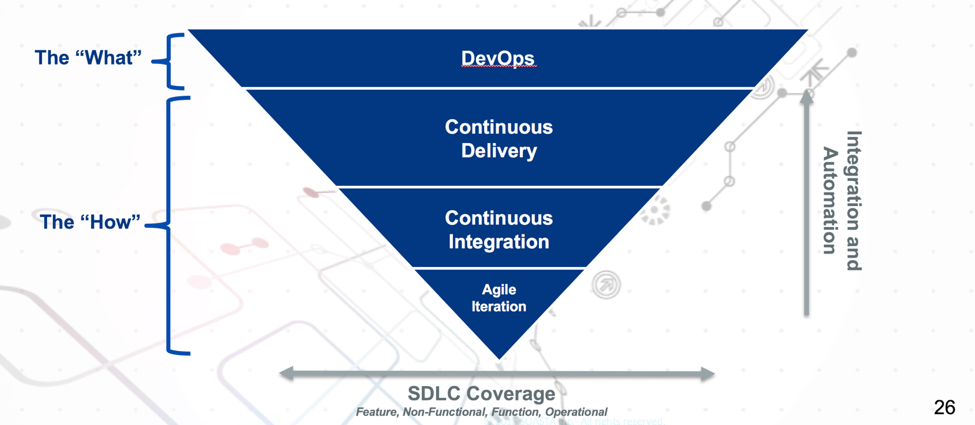
    When considering DevOps, it objectives and the objective of its component practices it is useful to establish a clear idea of the relationships between theses practices. It is often useful to visualize them as below:


    DevOps Transformation Triangle
    The DevOps Transformation Triangle


    DevOps is the “What,” the target state as defined by a set of guiding principles. Agile development, continuous integration and continuous delivery are the “How,” a collection of process, practices and tools that together build the foundation for a sustainable DevOps implementation.

    In the next section, we will review some of the initial discovery questions asked when beginning on a DevOps transformation, provide real-world examples of answers from various stakeholders in real organizations, and analyze those answer to better understand the journey to DevOps.

  • The Automation of Compliance

    The Automation of Compliance

    Consider how much money your enterprise spends on audits. Smaller firms not subject to external regulation should consider how much money is spent on quality assurance—or the lack of it. A business that suffers from a customer-facing quality incident will, at minimum tarnish the brand of its services or at the high end, lose market share altogether. Larger firms that fail audits can suffer from brand tarnishing as well as high fees, not to mention further scrutiny by regulatory agencies.

    Failure to perform or failure to follow proscribed processes inevitably leads to a black eye in front of customers. The entire discipline of governance is premised on avoiding both. Whether your governance practices are efficient or not—and whether your “process” as it sits today leads to quality or not—is not the subject of this review; it is how DevOps and automation can shine a spotlight on both and radically reduce the costs you spend today to achieve them.

    The Spotlight of DevOps

    The spotlight of DevOps begins with consistency that leads to predictability. Automating any given kind of process or technology the same way every time begins to give insight on any “holes” from things that do not work (or work well). If all that changes in your deployment process, for example, are pointers inside a configuration file and the kind of testing executed against this version of the code, you have achieved a build-once, deploy-many state of deployment automation. Operations staff who support the deployment of change or maintain the environments in the software development life cycle (SDLC) begin to  isolate any issues faster because they become familiar with “how” a given kind of technology is automated to deploy. This reduces the total number of deployment errors and, in tandem, reduces the length of time it takes to fix them. Any “process” problems or weaknesses in your governance model become apparent quickly and can be fixed quickly. Limiting variation is the medicine to keep them away in future.

    The spotlight of DevOps next turns to transparency. Offering your entire enterprise visibility or “read only” access to your entire DevOps tooling suite has a profound impact on the transparency of change. As an example, consider that I am a humble accountant in your firm who has submitted an agile story to improve our billing system. I may or may not, given the nature of my job, be co-located near the programming team who will fulfill this request. If our firm specializes in accounting software then perhaps I will co-locate, but if I am only requesting a change to an ancillary or support system, likely not. Without direct access to the programmers through traditional agile co-location, my visibility into the progress of change is limited to the tracking system I submitted the request within (assuming you have one, and don’t use email to do this).

    If I know a programmer in MIS, perhaps I ask him at lunch how my change is coming along. But if I have read-only access to the testing systems, or to the release orchestration (RO) tooling, I may get a much better up-to-the-minute view of exactly where my change is, how it is doing from a quality assurance (QA) perspective, and when it is scheduled for release into production. Based on this news, I may make decisions about how we bill our customers in what time frame to increase overall revenue to the company. I would notify my boss of same (who also has access, but pays less attention), and of any changes that impact the new timeline I create. The marketing team (who also has access) begins to work with public relations (PR) and the advertising guys on customer announcements, etc. etc.

    The net impact of having universal transparency is that audiences who are not traditionally notified or interested in the inner workings of change movement now make decisions based on it. Consider that prior to this systemic access, and the reliability of DevOps to ensure delivery, the only news you got before was from “the IT guy,” who was often wrong. It does not take long before IT loses credibility from being wrong about delivery timelines, and these other audiences begin to pay less attention (if at all). At that point, an “I’ll believe it when I see it,” attitude emerges. And this same attitude infects internal auditors because of what they hear and see from disaffected internal customers who have been misled repeatedly by the failed manual methods of the past (pre-DevOps).

    Processes that are disinfected over time by the consistency of DevOps begin to change the internal company thinking about the delivery of innovation—namely that it can be counted on as accurate. Transparency offered to all audiences of a company increases the visibility into all aspects of innovation delivery and better ideas emerge, both about what to do with completed efforts and how to improve the innovation process itself. And before you know it, your governance and QA processes become efficient, reliable and predictable. Variation is eliminated or greatly reduced, and the costs of operation and innovation begin to decline.

    The Forgotten Stepchild of Automation

    What is rarely a matter of focus in most companies is the secondary ability to automate the compliance history of a given application. Most firms are content (translate, only able to) work with their testing tools to produce logs about a given version of an application now residing in production. A test log does show an auditor the majority of the quality related information about a given version of an application. But the log is a highly limited view of what has taken place. What is needed is the full context of innovation. Enter compliance automation.

    Consider for a moment, that requirements drive the train. Why are we doing the innovation we are doing? Is this a bug-fix, a new feature, a client request, a regulatory requirement? Being able to trace the code itself back to the requirements system that drove the need adds significantly more context than is possible from mere test logs. Next, think about the number of attempts that finally resulted in this version of the application. An automated build tool (part of our DevOps suite) has this information. At this point you could evaluate how many builds and deployments took place in development before a worthwhile candidate emerged to traverse the remainder of the SDLC. An automated deployment tool (part of our DevOps suite) can trace the number of environments this version of the app was deployed into for testing and how long the overall process took to get something moved from development to production.

    And finally, testing is often done from a variety of tools, with results compiled in a variety of result repositories. This information may be available from a solid RO tool that tracks the gated progress of this version of the application, but if it’s not, it still should be sitting in each of the testing tools used throughout the process. Depending on the level of inherent DevOps tool integration (i.e., using a vendor suite) much of this information may “flow” from one tool to the next. But if not, the information does still exist in the logs produced by each of the DevOps tools.

    It may be well worth the application of internal programming resources to put together a tool that gathers all this information (automates the collection and presentation of) for audit purposes. Imagine the reduction in cost of supporting an audit that can gather a simple push-button report (or dashboard) of the entire life cycle of a given version of change. At that point, you have the entire context for a piece of innovation. You know what drove it (requirements). You know what it took to create it (build and deploy). You know the entire history of testing it (testing tools). And, finally, you have the entire governance process used in its deployment to production (RO tooling). But instead of examining multiple tools to collect and present it, you have created a push-button system to do so.

    Impacts to the Bottom Line

    The investment in adding automation to the compliance history of innovation pays off in more than one way. It is not just the ease with which history can be recited. It follows the same principles as DevOps itself. Automation introduces consistency in how audit information is gathered and presented (reducing variability from one audit to the next). Automation introduces transparency if the entire company is given “read only” access to this new system. Automation shows auditors we are not afraid to learn from our mistakes and proud of our accomplishments. And in effect, it reduces the need for audit altogether.

    Typically, regulatory bodies investigate and audit firms where they are uncertain of how the results were obtained. An automated system like this one fully eliminates that need. Transparency as could be offered here, may convince auditors that attention is not warranted here. Keeping in mind the spotlight of DevOps has already improved quality and streamlined process, add to that full transparency of audit materials and the confidence of auditors regarding your company may increase significantly. Routine becomes the only reason to audit, rather than suspicion.

    Invariably the “new” will sometimes result in an error that your current systems and processes (automated or not) will not catch. But this truism is recognized, and accounted for, in how DevOps enables innovation. And if you have this kind of automation in place, it can be demonstrated in how we fixed what we fixed (whether governance or QA). Your strategies in DevOps should help you achieve this level of confidence. (If you need help, feel free to contact me, I am currently looking.)

    To continue the conversation, feel free to contact me.

  • The War with Human Nature

    The War with Human Nature

    What is the difference between “leading” edge and “bleeding” edge? Being the first human being to advocate change.

    It is a virtual war with human nature to accept change. For all the innovation introduced into our society, most of it is a product of invention over evolution. Don’t get me wrong: Once we find something that works, we inherently work tirelessly to make it better, thus evolving it over time. But the genesis of the “new” is easier to accept as creation—a new idea, a new innovation of our own—than a change in direction, a forced acceptance of the ideas or creations that were “not invented here.”

    In the workplace, most employees are looking for personal security, for a feeling derived from consistency and predictability in the day-to-day work activities. Anything that threatens an employee’s ability to continue to secure compensation becomes something that inherently meets our resistance. The No. 1 culprit: you guessed it … “change.” As long as what I do remains the same, over time I will get better and better at it. Practice makes perfect. But when something “new” is introduced in the actions I am supposed to perform, there is a risk that my value, my expertise, will be reset to zero and perhaps I will not be valued as I once was. This threat to my compensation is real; therefore, my resistance to it is equally real.

    Programmers Found Guilty

    You would think that engineers and those working in the software industry would be exempt from this phenomenon. But most are not. Finding an ex-Cobol, ex-Clipper, ex-Windows, current mobile Apple iOS programmer is like finding a unicorn in Central Park. Most successful Cobol programmers are still Cobol programmers, looking for jobs in mainframe shops, content to see the new generation of programmers not competing for their declining job markets. The early generation of programmers minted after the adoption of the PC computer tend to know less about Cobol and RPG-3 and more about PC-based programming languages such as GW-Basic and Pascal (at least the older ones). Programmers minted after the Windows graphical adoption know more about that generation of coding languages, and so on, and so on.

    The basics of coding have remained the same since the advent of this discipline. We create a list of instructions, in sequential order, that the computer must execute to produce a desired result. There are nuances to this, and an explosion of capability in this, but the basic principles remain much the same. Yet, programmers well-versed in a particular language are shy about learning a new one, unless the platform is similar, the features are similar (albeit improved) and the belief is high that they will be successful in the new language quickly. There is no reason why a Cobol programmer could not be successful creating mobile apps. Or, for that matter, a mobile app developer could try his hand at Cobol. But it seems neither do, at least not very often.

    What happens instead is that each programmer begins to establish his/her own ecosystem of support: simulation models that imitate the platform responses, highly evolved text entry tools that auto-format code and check for omissions such as missing parenthesis and scripted tools that perform the mundane tasks we need to build (or construct) new versions of code or deploy a build into a new environment. This same ecosystem of support will exist for database, network and middleware engineers as well. The tools will be decidedly different, but the reasoning for them tends to be identical: to make things easier to do.

    Looking for a Magic Bullet

    There is no cure for breaking down the resistance to change, except constant exposure to it. However, forcing employees to face perceived threats to their value—and their compensation—will, at a minimum, produce exorbitant stress at work—or, worse, an employee turnover rate that would rival donuts next to a police station. The goal is to introduce change that will ultimately increase the value of an employee, as well as potentially increase the compensation they worry about. This is where the DevOps value proposition must be created for each impacted audience. A generic value statement is not enough, nor is a mandate by top company executives. You cannot “force” people to adopt something new, anything new.

    Creating the right value proposition must be specific to the audience you seek to adopt the “new” system, tooling or process. DevOps is a continuum of all three (people, process, technology). So for the database team, for example, changing out the ecosystem it has evolved into a new set of tools and processes, may seem like a hard sell at first. The advocate of DevOps (whether the exec teams or the service teams delivering it) must be able to articulate the value proposition clearly to the database teams.

    “Why” should they move to a newer ecosystem? A stubborn engineer can always point out the holes in your tool and the beauty of his own. He/she will likely have evolved his/her own support ecosystem to a state of near utopia … but only for himself. Usually the processes and tooling engineers use to make their own lives better do not scale to others in the department. And God forbid some other engineer updates “their” scripts or makes changes to “their” process. While this is wonderful for the engineer who creates it, it is miserable for anyone else attempting to use it.

    Constructing a Value Proposition

    The value statement must trade prima donna utopia for scale. Using common DevOps tooling, it is possible to support many more task requests than most individually constructed ecosystems can handle in a given day. And believe me, those task request increases in volume are coming. For example, an Ops engineer may be able to handle provisioning five systems a day with his own tooling, but when requests come in to provision 50 or 100, he is dead in the water. Having the Ops engineer help manage the deployment template or framework allows users to self-serve on provisioning requests and keeps him from having to do everything for everybody. His job is different but every bit as important.

    The value statement must trade current skills proficiency for next-generation, market-valued skills. In effect, a database guy is valuable, but a DevOps database guy is considerably more valuable, or a “big data” database guy, or a IoT database guy … pick your poison. Whatever you are today, whatever skill set you have, the jobs that pay more money are the jobs that fewer people know how to do. At some point, a lack of DevOps proficiency will relegate an engineer to the pages of history. On the other hand, adopting and embracing DevOps will allow engineers to get the training they so desperately need to keep their career “fresh.”

    Finally, the value statement must trade today’s earnings for tomorrow’s increase in earnings. Companies that embrace DevOps are going to either save extreme amounts of overhead by staff reduction remaining at the same level of innovation productivity. Or, they are going to increase innovation productivity levels radically, making them leaders in their respective space by meeting customer demand much faster with higher quality (the path most taken). Either option should translate into higher compensation for employees who embrace DevOps. If companies do nothing to increase employee comp, choosing only to increase profits, competing firms will be happy to poach them and pay them more instead. This forces more costs in recruiting, training and employee turnover when it happens again.

    A Human Strategy that Works

    Your strategy for training employees to embrace change should be particular to the kind of work they do, and reflect the things that will matter to them. If you need help crafting a strategy let me know, I am looking at the moment 🙂 . Not every team will be as critical to the overall success of DevOps as perhaps your engineers are, but the value proposition should adjust for this fact. Keep in mind, if the change is less, then the resistance will be less as well. Your accounting, HR and legal teams, for example, may not feel the impact of DevOps as rapidly or as severely (in terms of change); thus, their resistance may be less, but it is likely more than zero.

    DevOps is about people, process and technology. It is in that order, with a heavy emphasis on people and a relatively light impact from tooling. And it will succeed or fail based on the embrace of people, process and technology. Process and technology do not care about change. People do. Since people are the largest priority or component of DevOps, it is their fears that must be addressed and their value that must be enumerated to succeed.

    To continue the conversation, feel free to contact me.