Tag: end user experience

  • Forget Automation: Why IT Should Take UX Cues From Fine Dining

    Forget Automation: Why IT Should Take UX Cues From Fine Dining

    As a college student, I worked at a five-star Italian restaurant where I learned the discipline and practice of customer service. The general manager knew exactly which corner to stand in to get a view of every single table during service. They would gauge diners’ experience according to how they were interacting, their microsignals, how much food was left on their plate and the way they glanced around the restaurant. What does this intense attention to detail and individual customer experience have to do with running a service-oriented technology business? Everything.

    The tech industry is notorious for automating processes at the expense of personalization, and that aversion can extend to building the relationships necessary to produce a successful end product. Understandably, some companies and their developers prefer to keep relationships with their clients strictly functional because these connections are messy, people are unpredictable and nothing ever goes completely according to plan. It’s a dance we have to do over and again with every new client and project. 

    For those of us who wish to function as service-oriented tech companies, keeping on top of client and customer experiences requires us to stay attentive and listen with active care. Just like the veteran restaurant manager, we have to constantly scan our environment for cues of satisfaction and dissatisfaction.

    Service is More Than an End Product

    Before opening every night, the general manager would make staff hold long pieces of string to measure the angles and distance between tables to ensure they were straight and the edges perfectly aligned. Then, after telling staff the evening specials, he would randomly quiz them about the menu. What color is a fava bean? 

    Seeing the value of such old-school standards left a deep impression and helped me embed attention to detail as a foundational practice across the board, from designing good UX to cultivating relationships. Creating a desirable environment is about successfully orchestrating a million tiny details and always looking for tweaks to make the customer experience better. 

    That seemingly omniscient Italian from my earliest experience in the restaurant industry also taught me that being empathic goes hand-in-hand with the hard-nosed realities of running a service-oriented business. They showed me how to take care of people, how to make them feel good and how to read body language. 

    It might be easy to stereotype tech companies as impersonal dispensers of products (and their developers as cogs in the machinery), but we don’t want to just take orders. Our job is to become strategic partners from the ground up for long-term success, and that requires constant care and continual adaptation. 

    Mapping the Client Experience

    We must be willing to redesign how we work with customers and end users over and over again—it’s always changing because expectations are always changing, and market norms are always changing. The moment that we stop trying to get better through small incremental improvements is the moment we stop being service-oriented.

    In the same way that a restaurant has a sequence of service that maps a diner’s journey from the moment they enter the door, we can architect a customer experience from every touchpoint. 

    In the sales process, it’s valuable to layer in different people to create more relationship touchpoints throughout an organization, so, in our case, a new client meets a member of our operations team and then somebody from our engineering team in order to ensure that they feel fully supported. Then, we set expectations in terms of communication as part of a scripted onboarding experience. In our review meetings, we seek feedback to determine whether we have under-delivered and course correct if necessary. 

    The other thing I learned from that Italian restaurant is that no mistake is irredeemable. It doesn’t really matter if you get it right or wrong the first time, it is how you respond when the unexpected happens that matters. Turning a situation around after making a horrible mistake—even sending out a cold steak—can breed even more loyal customers because it demonstrates that you really care.

    The Creative Heart of Service

    Despite the image of tech as cold and distant, it’s important to recognize that coding and development itself is creative and we should seek to nurture a healthy environment so that people can perform at their best. To that end, it makes sense to think of your responsibility as running the entire length of the chain, from employees to clients and, finally, to end users. Finding humanity in the work along each link is key to building successful partnerships. 

    In the context of building products, we must be creative to design seamless, curated experiences for end users. There are plenty of apps that sit on someone’s phone unused before ultimately being deleted. The only way to grab the attention of people that share the same interests and problems is by understanding their needs. 

    To that end, we must always be asking our clients: What is the easiest point of entry for the user? Creating a low barrier is a quick win that in and of itself is an onboarding experience and an opportunity to build trust. 

    Equally, what may make one customer happy may not actually have any resonance in the wider market. If customers were only hiring us to write code, we would only be interested in meeting their expectations. The goal is not just to build products, but successful products that establish or reinforce a client’s reputable presence in the marketplace. 

    Adding Value Through Relationships

    When we stand in our metaphorical corner of the room to observe the customer experience, we are consolidating data from products that have millions of users and harvesting insight. We are not interested in quick fixes. Customer service and a focus on the end-user experience means being oriented to what the market wants, not designing in a vacuum. We can then continue to build value over time.

    In the restaurant business, the little surprise at the end of dinner adds value because it is unexpected. A complimentary after-dinner liqueur with a pithy origin story is a point of detail at its finest. Creating a richer, fuller customer experience can set a tech business apart in an exploding marketplace. For my old mentors, paying attention to every nuance from the beginning to the end is what defines five-star service.

  • Popular iOS Apps Request Excessive User Data Permissions

    Popular iOS Apps Request Excessive User Data Permissions

    Most apps require some sort of user data to function properly. Google Maps needs location data to offer routing services. Twitter needs photo library access to upload a photo, and so on. Many users are quick to allow access to personal information without hesitation. However, in recent years, it’s become apparent that many apps are collecting (and leaking) an excessive amount of personal data, resulting in serious privacy issues. This has led Apple to give user privacy a heightened focus in recent iOS updates and marketing campaigns.

    Often, user data is being collected in the background for legitimate use cases, such as tailoring personalized user experiences and refining app performance. But, many apps are also monetizing user data by reselling it to third-party advertising data brokers without explicit user consent. More seriously, recent studies show that commercially available “anonymous” data can be de-anonymized. If location data is exposed, it could put at-risk people in actual danger. These are nuanced privacy violations that U.S. regulators have yet to respond to and address.

    To shed light on the data that apps are collecting, a recent study conducted by Jamf analyzed the iOS permissions requested by nearly 100,000 popular apps on the App Store. The study found the four most-requested mobile app permissions to be photo roll, camera, location data and microphone. The findings also revealed that popular apps are consistently requesting access to data that does not serve the application’s core purpose.

    Users should consciously be aware of the data they allow apps to access. Yet, the onus is also on business leaders and app developers to limit unnecessary data collection and reduce the potential for data overexposure. In the wrong hands, access to device hardware, such as a microphone or camera, could be used to steal sensitive material. And, if leaked, personally identifiable information (PII) exploits could be disastrous to the business.

    Below, I’ll review the key takeaways from the Jamf study and consider if the constant barrage of permissions requests is exacerbating privacy issues during the application development process.

    Four Most-Requested App Permissions

    The Jamf research found the top four types of app permissions were photo library access, camera access, location data and microphone access. In addition, other popular areas included calendar information, contacts and Bluetooth. Less-requested app permissions included voice processing, health data and local network access. The study arranged apps by their App Store categories, such as business, education, entertainment, news, shopping, travel and other areas.

    user data permissions

    1. Photos

    By far, the most requested data access type is photos. At least half of apps across all categories request access to user photo libraries. Naturally, this request is most common among photo and video apps such as YouTube, FaceApp or Splice; 96% of such apps request access to photos. This is followed by 87% of shopping apps (Amazon, Shop, eBay, etc.), and 84% of social networking apps (Facebook, Instagram, Twitter, etc.).

    At issue here is that the level of intended photo library access can be highly variable. For example, granting access to an entire camera roll along with decades of old personal photos just to upload one picture grants a rather invasive privilege. This has led Apple to enhance privacy controls—users can now choose to allow access to select images only or their entire roll.

    With these new constraints in mind, app developers should take steps to respect user privacy. Be aware of potential photo limitations and design apps to only collect necessary photos for the task at hand.

    2. Camera

    The next-most requested permission is for camera access. This is most common among photo and video apps, among which 90% request camera access. This is also common among shopping and social networking apps (83% each) and business apps (75%) like Zoom, Slack or WebEx. Similar to findings about photo library access, enabling camera access is ubiquitous. However, it is also one of the most dangerous permissions to grant indefinitely. If a bad actor obtained account access, this vulnerability could enable them to spy on users.

    Again, developers should consider introducing camera functions only when it’s essential for the task at hand. Obviously, it’s unethical to invoke camera access when users are unaware. Even camera-related bugs can have extreme repercussions. For example, a 2020 lawsuit against Instagram argued the app was spying on users. Due to its threat potential, high-security facilities have disabled camera hardware entirely.

    3. Location

    Location tracking is another permission that can be very useful but is, at times, overprescribed in modern app development. Location data includes cellular, Wi-Fi, GPS and Bluetooth data used to determine a user’s approximate location. The categories that collect location data most often include shopping and food and drink, both at 81%. Social networking and photo and video app categories follow at 72% and 68%, respectively.

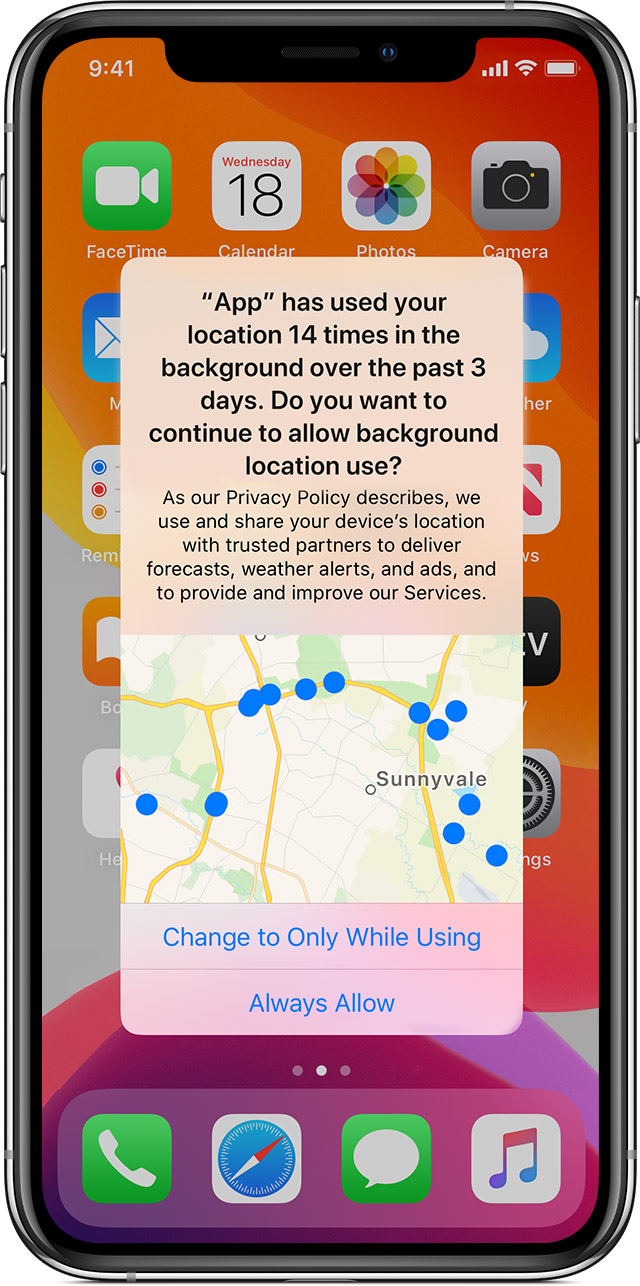
    Nowadays, iOS privacy settings offer a check against tracking location data in the background. iOS users can now choose between: ‘Allow While Using App’, ‘Allow Once’ or ‘Don’t Allow’.

    user data

    When an app tracks data in the background, a blue indicator now displays in the status bar to increase user awareness. iOS also reminds users when apps use significant amounts of location data and offers ways to turn location services completely off. Android has followed suit with an ‘Allow only when the app is in use’ function, too.
    user data

    Location tracking feels a bit creepy. In the wrong hands, it could easily be leveraged for nefarious purposes. Out of all the permission-granting options, location data presents much more of a physical safety concern for the end user. From the user’s standpoint, they should only enable access to location tracking while using an app. From a developer’s standpoint, they should be extremely careful when collecting and storing such PII to ensure regulations aren’t broken.

    4. Microphone

    Lastly, access to the user’s microphone is the fourth most commonly requested permission. The survey found 69% of social networking apps, 64% of photo and video apps and 41% of both business and productivity apps (Asana, Google Calendar, TimeTree, etc.) all want to be handed the mic.

    Here, potential privacy concerns are similar to those involving camera access. Bad actors could potentially activate the mic to listen to private conversations, record ambient noise and sell findings to advertising brokers. To increase user awareness, iOS 14 now requires an orange dot to display, indicating when the mic is in use.

    Other User Privacy Concerns

    User behavior tracking and app-to-app information exchange is another ongoing area of privacy concern. Companies often resell such information to data brokers, which is then used to refine highly targeted ad campaigns on third-party sites. This is how your search on Google results in product advertisements popping up in your Instagram feed. Apple is just starting to counter this practice with their App Tracking Transparency feature. In iOS 14.5, app devs must ask whether they can track your activity.

    Recent analysis has confirmed that commercially available consumer data, though labeled as “anonymized,” can successfully be used to piece together an accurate picture of a user by corroborating behavior on other apps. For example, users were able to track and pinpoint behavior that resulted in the outing of a catholic priest on Grindr. Smartphone app data could similarly be used by predators to spy on celebrities or politicians, posing a tangible security threat.

    Another cause for concern is metadata associated with photos. People often enable GPS-embedding into images to help organize their photo memories. If this is inexorably linked to photos, it essentially permits location data sharing to parties with photo library access who might not otherwise have location tracking permissions.

    From Big Data to Big Problem

    Perhaps the most curious finding of this report is that all apps are requesting permissions that seem irrelevant to their core value proposition. For example, why do 87% of shopping apps need access to a user’s entire photo library? Do 46% of food and drink apps really need access to a user’s personal contacts to place a food delivery order? Do navigation apps really need your personal calendar information to calculate a route downtown?

    The answer is not a pretty one. There has been a business imperative, for years, to track and collect large amounts of user data. There is undoubtedly an argument to be made for enhancing the user experience with innovative features and the role of big data in AI. However, this ongoing practice continues to creep into ethical gray areas. The fact is, the more personal data an app collects, the more potential privacy issues and security threat vectors are created in the process.

    Requesting permissions to on-device hardware and data collection is not always necessary. Thus, to stay safe and limit data overexposure, don’t overprescribe data collection. If it’s not fundamental to your app’s core function, don’t collect it, and don’t store it. Think twice before requiring many device permissions, and regularly audit app permissions requests to keep them to a minimum. As iOS and Android introduce new platform guidelines to elevate user privacy, developers should be prepared for users to grant fewer and fewer data collecting permissions. This is their right.

    It would be great if tech companies invested in honest, ethical business models that didn’t rely on harvesting and reselling user data to shady advertisers. And for those that mine user data but say it’s anonymous, I would point to reports that show anonymous data is nothing but pure myth.


  • Lessons in User Engagement From Game Development

    Lessons in User Engagement From Game Development

    Quarantine measures forced most of the world to stay physically distant — a shift that has forever changed consumer behaviors, and especially how humans interact and spend their free time. A clear change over the past year was the rapid boom of gaming, which saw a massive increase in both console and mobile games — estimated to be as much as 50%. With this sudden increase in new players, how can developers keep gaming experience fresh and exciting? What can game developers do to keep players coming back after they hit ‘Close’? And are there lessons developers in other industries can learn from those game developers to make their applications more engaging?

    While this article is geared toward game developers specifically, there are multiple lessons that could apply to any application with regard to user experience and engagement. It’s especially applicable if you have a gamified corporate application or continuing education app for your enterprise users.

    Much of the answer to the engagement question comes down to users’ journey before, during and after they play a game. Effectively communicating why someone should download a mobile game is the first step, but communicating with players during and after their experience is equally important for long-term engagement and overall experience.

    A vast majority of mobile games still don’t implement basic messaging best practices for improving user engagement and retention. At the same time, COVID-19 has raised the bar for digital experiences. More than ever, game developers need to improve their communication strategies to survive and succeed.

    One difference between established gamers and the large number of new gamers from the pandemic is that they are increasingly diverse. This wave of new gamers are also more likely to play on their mobile device, or even across multiple devices like their smartphone and tablet, which will likely require a friendlier, more streamlined experience than their more experienced peers.

    Hence, creating the right communication strategy, whether through in-game events, updates on exciting new content, or relevant promotions, will all go a long way in keeping gamers coming back after they hit close.

    User Onboarding is Crucial

    There’s been over a 700% increase in game titles available on the Apple and Google app stores in the past decade, with nearly a million titles to choose from. With so much more competition, developers struggle to find and keep players; the top 25% of mobile games have an average 28 day retention rate of just 4%.

    Mobile games have minutes (or even seconds) to convey value and engage users. How a game onboards a player can mean the difference between a loyal customer and a missed opportunity. If you drop a player into a game with no support or context, they might fumble through the rules and features, and could get frustrated enough to abandon the game.

    Here are some ways to onboard players more effectively:

    Function-Oriented Onboarding – This can take the form of a deck-of-cards tutorial immediately after a user opens your game. Through full-screen in-app messages, it educates the player on game mechanics, app navigation and enables players to swipe through the information at their own pace.

    Benefit-Oriented Onboarding – This method reveals features that improve the player’s experience in addition to the game’s basic mechanics. For example, highlighting how a user can resume from a checkpoint instead of starting over.

    Progressive Onboarding – This method helps players interact with the game interface and guides them through different actions when they reach milestones in the game. It’s well-suited to games that have more complex or varied mechanics.

    Enhancing the Post-Game Messaging Experience

    Re-engaging users outside of the game through push notifications, email messages or even SMS can be incredibly powerful. At the same time, if your message’s quality does not match the quality of your in-game experience, users are much more likely to block your messages or uninstall your game entirely.

    The differences come down to personalization, timeliness and progression.

    Players want to get recognition for their achievements and milestones, plus get instantly notified about making their next move, attack or strategy. Generic messages like, “You haven’t played in a while. Come back today!” are unlikely to have much of an impact on user retention. Instead, enhancing the in-game experience with personalized messages that provide incentives tend to perform far better: “Congrats, Matilda! Your hero is nearly at level 10 – get double XP for every level you complete today!” is a much more engaging option.

    In Zynga’s popular “Words with Friends” game, the granular personalization of notifications tells users when a friend made a move, which word they played and its point value. This helps increase messaging utility and encourage reengagement by promoting friendly competition.

    Another way to enhance the experience both within and outside of the game is by leveraging achievements and recognition. These can turn a mundane milestone into a moment of celebration, or convince a player to return to the game to get another reward. Displaying the daily high score of top players can also motivate players. With set goals, players strive to achieve a higher score, push harder to win a level, and play the game more.

    Developers who only focus on building great game mechanics often overlook basic (and critical) communication features to engage and retain users. By employing these best practices for engagement, game developers can build a solid, growing community of happy players that keep coming back for more.

  • Splunk Dives Deeper Into Observability

    Splunk Dives Deeper Into Observability

    Splunk, during its online .conf20 conference today, launched the Splunk Observability Suite, which combines tools for infrastructure monitoring, application performance monitoring, digital experience monitoring, log investigation and incident response in a single offering.

    Kia Behnia, vice president of ITOps for Splunk, said IT teams can correlate metrics, traces and log data in real-time to go beyond simply monitoring IT platforms to also include the end user experience. As part of the Splunk Observability Suite, Splunk is making available in beta Splunk Log Observer, a cloud-based service for visually inspecting logs and sending messages to DevOps platforms based on events being observed by Splunk platforms, and Splunk Real User Monitoring, which extends the reach of Splunk Application Performance Management(APM) platform to add a module that tracks specific end user application experiences.

    That critical because without end user monitoring capabilities an observability platform will lack crucial context, said Behnia, noting observability needs to start with IT infrastructure and then extend out to encompass the actual end user experience.

    Splunk this week also announced enhancements to Splunk Cloud and Splunk Enterprise, which are now based on a version 8.1 of the core Splunk platform that is now generally available. The company is also making available in beta a Splunk Machine Learning Environment (SMLE) to makes it easier to build and operationalize machine learning models and algorithms.

    The Splunk Data Stream Processor (DSP) platform is also being updated later this year to add support for cloud services such as Google Cloud Platform (GCP) and Azure Event Hub along with support for lookups and machine learning algorithms.

    Splunk is also making available a beta release of a Splunk Operator for Kubernetes to simplify deployments along with making Splunk Cloud available on GCP.

    The company is also updating Splunk Connected Experiences to include a Splunk Augmented Reality capability that adds a remote collaboration feature that allows users in two different places to interact and visually compare data.

    Splunk TV, a mobile application for analyzing IT operations trends, is now also available on Google Android as well as Apple. Users can now also centrally control multiple TVs without having to be connected to the same network.

    Other additions to the Splunk IT Operations portfolio include Splunk Service Intelligence for SAP, which applies artificial intelligence (AI) to these environments; an update to Splunk IT Service Intelligence (ITSI) that adds predictive analytics tools; a Splunk Infrastructure Monitoring Add-On to integrate Splunk Infrastructure Monitoring gained via the acquisition of SignalFX; and the beta of Splunk IT Essentials to provide a more curated implementation of Splunk Cloud.

    Finally, Splunk has updated Splunk Enterprise Security and launched both Splunk Mission Control and the Splunk Mission Control Plug-In Framework. The framework makes it possible to combine third-party security tools with updates to Splunk security information event management (SIEM) and Splunk Phantom security orchestration automation and response (SOAR) platforms. Initial partners include Accenture Security, C3M, Crowdstrike, Netskope, Recorded Future, RiskIQ and Tenable.

    Put it all together, and it’s clear Splunk is now pushing to extend observability in every IT direction possible.

  • Modern Workers Demand Modern Technology

    Modern Workers Demand Modern Technology

    Companies today must think of their employees as customers and employ technology, including mobile apps, that employees want to use.

    I have always been a bit of a technophile. Many years ago, in another life, when I worked in technology sales, I was one of the first sales engineers on my team to buy a personal laptop to use as a way to manage leads and accounts. The advantages of doing so over pen and paper became clear to me within weeks. I was able to track my activities more effectively and follow-up more precisely than my associates.

    For similar productivity reasons, I also equip my home office with the best tools that make the most sense from a productivity standpoint. This has been true for both the years I worked out of my home office self-employed and as an employee.

    I expected the tech I bought for my work to always be better than the tech that was provided to me by my employers. I grew to dislike the outdated computers, software and support services provided by employers. Why didn’t these employers invest in their employees to make them as productive as possible? There was never a good answer to that question.

    However, in the late 1980s and early 1990s, I was an outlier. Most workers didn’t have personal computers and most appreciated whatever outdated green screen hardware and software was planted in front of them. Today, it’s the other way around: Employees don’t just want state-of-the-art technology that matches their work—they demand it.

    Consider a recent note from research firm Gartner that found outdated technology pushes Australian workers away from their employers. In fact, Gartner’s “Q4 2018 Global Talent Monitor” found that technology now ranks ninth in the top 10 reasons Australian employees will leave their current role.

    “People have become so used to advanced technology in their day-to-day lives, that they expect the same thing from their workplace. However, businesses are having a hard time matching the speed at which technology is adopted at home,” noted Aaron McEwan, human resources advisory leader at Gartner. “It’s not surprising that employees are becoming frustrated when they find themselves wasting valuable time navigating complicated systems and processes that utilize slow and old technology. It’s unproductive and inefficient for everyone involved.”

    According to McEwan, businesses no longer can ignore the needs of their employees and must start thinking of them as they do their customers, making it a priority to offer a personalized, seamless and efficient experience.

    This recent Gartner Australian survey taps into trends that have been underway for some time. A few years ago, Microsoft partnered with SurveyMonkey to conducted a survey of about 1,000 millennials in the United States. That survey found 93 percent of respondents said modern technology was one of the top aspects of a good workplace.

    This isn’t just about new hardware or off-the-shelf software. It’s also about custom-built enterprise apps. For decades it has been accepted practice that enterprise software didn’t have to compete with consumer software, and poor-to-lackluster design was considered acceptable.

    This is no longer the case. Most employees today are technically savvy and their enterprise apps are on their tablets and phones, right next to the consumer apps that they love to use.

    Enterprise IT can try to force them to use leaden software, but this strategy increasingly is unlikely to prove productive. If they don’t like a collaboration platform, they’ll turn to one of the widely available cloud alternatives. If they don’t like the enterprise CRM, they’re likely to turn to Salesforce or a competitor.

    When consumer apps are designed—think Evernote, Uber, Instagram or another favorite consumer mobile app—a considerable amount of thought is invested into the user interface and making the app enticing to use, designing an intuitive workflow and hiding complexity from the user into the background of the app. The same should be true for the enterprise apps designed for the enterprise.

    A recent survey from Adobe found that 61 percent of 1,500 enterprise leaders believe organizations that don’t deploy mobile apps are at a competitive disadvantage. I’d take that a step further and conclude that deploying isn’t enough. But it’s more than simply deploying an app; organizations that don’t deploy effective and compelling apps will find they are at a competitive disadvantage.

    — George V. Hulme

  • Akamai Gives DevOps Teams More Control

    Akamai Gives DevOps Teams More Control

    When most DevOps teams think about platforms, it’s usually a conversation about some form of software sitting on a server in a data center. But many web and mobile applications employ a content delivery network (CDN) as the platform on which they depend most to run. Akamai Technologies is moving to provide DevOps teams with much greater visibility into and control over what’s occurring across its namesake CDN.

    Ari Weil, senior director of industry marketing at Akamai, says CDNs now play a pivotal role in enabling IT organizations to deploy web and mobile applications in the cloud. To provide DevOps teams with more control over those deployments, Akamai is committing to treat the core CDN as code that can be programmatically invoked in addition to providing real-time visibility into applications running on Akamai and simplyfing the modification of applications in production, says Weil.

    As part of that effort, Weil says, Akamai is expending the range of application programming interfaces (APIs) that it exposes via toolsets spanning frameworks such as Terraform, Varnish and WordPress. The goal is to expand significantly the level of scripting and automation enabled by the Akamai CDN. Akamai is also making available a testing suite that DevOps teams can employ to test and fix applications in real time.

    Akamai is making it possible to deploy custom configurations and code across Akamai’s CDN in minutes, including the ability to remove content in seconds and revert to past configurations whenever necessary.

    Akamai has also released mPulse Lite, a free version of a digital performance management tool that identifies ways to improve application performance and the end user experience, and its IoS mobile application and companion IoS watch app to specifically optimize the performance of iOS applications accessing the Akamai CDN.

    Most DevOps teams are hyperfocused on what occurs inside the data center. But in the age of extended enterprise the level of dependency on caching and security services provided enabled by a CDN has never been greater. The fact that Akamai has also begun a more DevOps initiative is also testament to how far the DevOps movement has been able to extend its influence. Historically, providers of external services have been reluctant to provide any visibility into how their network services operate.

    Weil notes that it’s apparent the developers are also exercising more influence and control over IT. As such, providers of external services are now under more pressure to programmatically expose their services in much the same way as any other cloud service. In fact, many cloud service providers are leveraging their global footprint to make available CDN services that rival Akamai.

    Regardless of the CDN chosen, developers are under more pressure than ever from the business to optimize the end user application experience. Mobile and web applications are core to any digital business transformation initiative. In the face of that pressure, DevOps teams are finding that having more control over the CDN used to deliver those applications is now an absolute necessity.

    — Mike Vizard