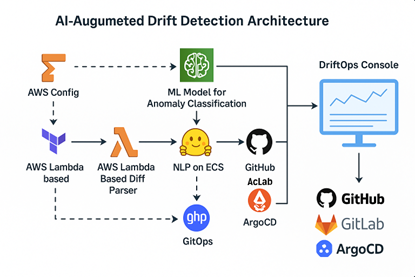
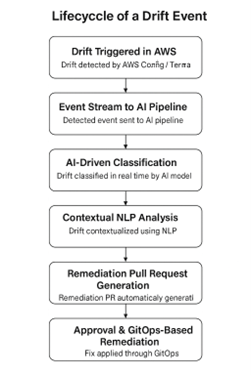
Infrastructure as code (IaC) has changed the way we manage our cloud infrastructure but has also introduced new security vulnerabilities that many teams are overlooking. According to SentinelOne Cloud Security in 2025, 83% of organizations experienced at least one cloud security incident in 2024, and 23% of cloud breaches were due to misconfigurations. The security gaps in IaC implementations are costing organizations millions.
The automated nature of IaC increases both benefits and risks. While infrastructure can be provisioned in minutes, security misconfigurations can also spread across entire environments in minutes. Most IaC security failures stem from fundamental differences in how infrastructure automation approaches manage security. The comparison between configuration management and IaC reveals that each approach handles security differently, with some emphasizing continuous state monitoring and others focusing on declarative provisioning. This creates severe security gaps, including a lack of drift detection, missing policy enforcement, no audit trails, insufficient access controls and hardcoded secrets in code repositories.
This article will cover five critical IaC security vulnerabilities, provide practical remediation and outline best practices to prevent future incidents.
Security Issues in IaC
IaC solves many operational problems but introduces specific security challenges that require tailored solutions. The automated and templated nature of IaC can amplify security issues across multiple environments at once, therefore, certain types of problems can have a significant impact. Here are the top five critical security issues in IaC:
1. Configuration Drift Without Detection
Configuration drift occurs when your actual infrastructure state differs from what your IaC templates define — often without any visibility into these changes. This creates a dangerous gap between what you think your infrastructure looks like and what it actually is.
For example, consider a Terraform configuration that defines security groups allowing only ports 80 and 443 for web traffic. During a production issue, a developer manually opens port 22 through the Amazon Web Services (AWS) console to troubleshoot connectivity issues. The immediate problem is resolved, but the secure shell (SSH) port remains open indefinitely. However, your Terraform state file still shows the original secure configuration, while your actual infrastructure now includes an unmonitored access point. This scenario occurs frequently across organizations, where emergency changes bypass normal IaC workflows. Manual quick fixes are rarely documented, and automated system updates often modify configurations outside the defined templates.
The security impact is significant. These invisible changes can create backdoors, complicate incident response because the documentation does not match reality and make compliance auditing nearly impossible. Organizations often discover drift only during security incidents — when attackers exploit the gaps between intended and actual configurations.
2. Missing Policy as Code
Most organizations manage security policies through static documentation, spreadsheets or manual review processes that cannot keep up with automated IaC deployments. This creates a fundamental gap between security requirements and actual infrastructure implementation.
Consider a company security policy that mandates all simple storage service (S3) buckets must have encryption enabled and public access blocked. In traditional environments, this might be enforced through manual reviews or periodic audits. However, with IaC, engineers can deploy dozens of S3 buckets daily through automated pipelines — making manual policy enforcement impractical. Without automated policy enforcement, security violations accumulate silently. An engineer under pressure to meet a deadline might deploy a bucket with default settings that violate company policy, simply because there is no automated check to prevent it. The Terraform or CloudFormation template runs successfully, even though the resulting infrastructure violates established security requirements.
This gets worse over time. Teams deploy hundreds of resources across multiple environments, each potentially violating different security policies. Database instances might lack encryption, Elastic Compute Cloud (EC2) instances might have overly permissive security groups or identity and access management (IAM) roles might grant excessive permissions — all because policies exist only as documentation rather than enforceable code. The result is systematic policy drift across the entire infrastructure estate, making compliance audits expensive and revealing widespread security gaps that require manual remediation.
3. Inadequate Audit Trails
Most IaC implementations do not provide complete audit trails that capture who made changes, what was changed, when and why. This creates blind spots for security investigations and compliance reporting. While version control systems track code changes, they often miss the full picture of infrastructure modifications. A standard Git log might show that a developer committed Terraform changes, but it will not indicate which resources were affected or why emergency changes were made outside normal workflows. When a security incident occurs six months later, teams struggle to figure out what happened.
For example, consider an IAM policy modified during a weekend deployment to grant broader S3 permissions. The Git commit might read ‘fix deployment issue’, but there is no record of which production systems were affected or whether the change was meant to be temporary. Months later, during a compliance audit, investigators are unable to determine if this was a legitimate business requirement or a security oversight.
The problem worsens when teams make emergency changes directly through cloud consoles during incidents, bypassing all audit mechanisms. Here is an obvious scenario: A database security group is opened to additional Internet Protocol (IP) ranges during an outage, but no record of this change exists. Without audit trails, security investigations become manual reconstructions that may miss critical evidence of which infrastructure changes preceded an incident and who had the authority to make those changes.
4. Insufficient Access Control
Many IaC implementations grant excessive permissions to both human users and automated systems, creating unnecessary exposure when accounts are compromised. Teams often assign broad administrative rights during initial setup and fail to refine them over time, violating the principle of least privilege.
For example, consider a continuous integration/continuous delivery (CI/CD) pipeline that deploys a simple web application but runs with full AWS AdministratorAccess. In reality, the pipeline only needs permission to update Lambda functions and application programming interface (API) gateway configurations. However, it can create, modify or delete any resource across all AWS services and regions. If an attacker compromises this pipeline through code injection or stolen credentials, they gain full administrative access to the entire AWS account. Additionally, developers working on front-end applications are often given the same IAM permissions as infrastructure engineers. This happens because maintaining granular access controls requires continuous effort — something many teams indefinitely postpone.
5. Hardcoded Secrets
Some engineers embed sensitive credentials directly into IaC templates or configuration files, exposing them to anyone with access to the repository. Database passwords, API keys and access tokens are often hardcoded into Terraform variables or CloudFormation parameters because it’s the fastest way to get infrastructure running during development.
Consider a Terraform configuration that creates a relational database service (RDS) with the password defined as ‘password = “MySecretPassword123″’ in the template file. This credential is committed to version control, shared across team repositories and potentially exposed through CI/CD logs or infrastructure outputs. Even if the repository is private, every developer, contractor and automated system with access can view these credentials. The risk compounds when teams reuse templates across projects or share infrastructure code with external consultants — unknowingly distributing sensitive credentials across multiple systems and organizations.
How to Fix IaC Security Issues
Fixing these security vulnerabilities requires automated solutions that match the scale and speed of modern IaC deployments. Manual processes simply cannot keep up with infrastructure changes occurring multiple times a day across different environments. Below are some effective strategies for addressing IaC security issues:
1. Automated Drift Detection and Alerting
Drift detection tools continuously compare your actual infrastructure state against your IaC templates and alert you when discrepancies are detected. This helps close the visibility gap between intended and actual configurations.
Cloud-native services such as AWS Config Rules or Azure Policy can detect when resources deviate from defined standards. In multi-cloud environments, tools such as Checkov or Terrascan integrate with CI/CD pipelines to scan for drift during deployments.
Here is an example of an AWS Config rule that detects unencrypted S3 buckets:
“`json
{
“ConfigRuleName”: “s3-bucket-server-side-encryption-enabled”,
“Source”: {
“Owner”: “AWS”,
“SourceIdentifier”: “S3_BUCKET_SERVER_SIDE_ENCRYPTION_ENABLED”
},
“Scope”: {
“ComplianceResourceTypes”: [“AWS::S3::Bucket”]
}
}
“`
For Terraform users, tools like Driftctl compare Terraform state files to actual cloud resources and generate reports showing exactly what has changed outside your templates. You can also schedule automated scans to run daily and integrate alerts with your incident management system, ensuring that the drift is addressed quickly rather than accumulating over time. The key is continuous monitoring, not periodic checks — so you can detect unauthorized changes within hours, not months.
2. Setting Up Policy as Code
Policy as code transforms security requirements from static documentation into executable rules that block non-compliant infrastructure deployments. The most widely adopted solution is Open Policy Agent (OPA), which integrates with Terraform, Kubernetes and CI/CD pipelines.
To implement policy as code, start by identifying your most critical security requirements and converting them into OPA’s Rego language. Below is a practical example of a policy that prevents the creation of unencrypted S3 buckets and public access blocks:
“`rego
package terraform.s3
deny[msg] {
input.resource_type == “aws_s3_bucket”
not input.server_side_encryption_configuration
msg := sprintf(“S3 bucket ‘%s’ must have encryption enabled”, [input.name])
}
deny[msg] {
input.resource_type == “aws_s3_bucket_public_access_block”
input.block_public_read_buckets != true
msg := sprintf(“S3 bucket ‘%s’ must block public read access”, [input.name])
}
deny[msg] {
input.resource_type == “aws_s3_bucket”
input.acl == “public-read”
msg := sprintf(“S3 bucket ‘%s’ cannot have public-read ACL”, [input.name])
}
“`
Integrate policy as code into your CI/CD pipeline using tools such as Conftest or OPA’s Terraform plugin. Add a policy check step before the Terraform apply phase to fail deployments that violate your security rules.
For teams using GitHub Actions, the setup might look like this:
“`yaml
– name: Run OPA Policy Check
uses: open-policy-agent/conftest-action@v0.1
with:
policy: policies/
input: terraform/
“`
The key advantage here is to start with three to five critical policies that cover encryption, public access and IAM permissions. Begin small and expand gradually as your teams become familiar with policy-driven workflows. Each policy should include clear error messages that guide engineers toward compliant configurations.
3. Implementing Least-Privilege Access Controls
Always replace broad administrative permissions with role-based access control (RBAC) that grants only the permission required for each task. Start by auditing existing policies and defining specific roles for different use cases.
For CI/CD pipelines, use targeted IAM policies instead of admin access. Here is an example of AWS IAM policy that enables Lambda deployment without granting unnecessary permissions:
“`json
{
“Version”: “2012-10-17”,
“Statement”: [
{
“Effect”: “Allow”,
“Action”: [
“lambda:UpdateFunctionCode”,
“lambda:UpdateFunctionConfiguration”,
“lambda:GetFunction”
],
“Resource”: “arn:aws:lambda:*:*:function:myapp-*”
},
{
“Effect”: “Allow”,
“Action”: [
“apigateway:GET”,
“apigateway:PATCH”,
“apigateway:PUT”
],
“Resource”: “arn:aws:apigateway:*::/restapis/*/deployments/*”
}
]
}
“`
You can use role-based permissions with tools such as AWS IAM Access Analyzer to identify and remove unused permissions. Additionally, create environment-specific roles that restrict production access for engineers working only on staging systems. As a best practice, use temporary credentials through AWS Security Token Service (STS) AssumeRole instead of long-lived access keys.
For example, if you are using Terraform, you can apply resource-specific permissions with conditionals to control access:
“`hcl
resource “aws_iam_policy” “developer_s3_access” {
name = “developer-s3-limited”
policy = jsonencode({
Statement = [{
Effect = “Allow”
Action = [“s3:GetObject”, “s3:PutObject”]
Resource = “arn:aws:s3:::dev-bucket/*”
Condition = {
StringEquals = {
“s3:ExistingObjectTag/Environment” = “development”
}
}
}]
})
}
“`
Conclusively, always review and remove unused permissions using cloud provider access analyzers, so that permission scopes decrease over time.
4. Secrets Management Solutions and Scanning Tools
Replace hardcoded credentials with dedicated secrets management systems that encrypt, rotate and audit access to sensitive data. Modern cloud providers offer native solutions that integrate into IaC workflows. Use tools such as AWS Secrets Manager, Azure Key Vault or HashiCorp Vault to securely store credentials outside your templates. Here is how to reference secrets in Terraform instead of hardcoding them:
“`hcl
# Instead of: password = “MySecretPassword123”
data “aws_secretsmanager_secret_version” “db_password” {
secret_id = “prod/database/password”
}
resource “aws_db_instance” “main” {
engine = “mysql”
password = data.aws_secretsmanager_secret_version.db_password.secret_string
# other configuration…
}
“`
For Kubernetes environments, use native secrets with external secrets operators:
“`yaml
apiVersion: external-secrets.io/v1beta1
kind: ExternalSecret
metadata:
name: database-secret
spec:
secretStoreRef:
name: vault-backend
kind: SecretStore
target:
name: db-credentials
data:
– secretKey: password
remoteRef:
key: database
property: password
“`
Additionally, you can use automated scanning tools such as GitLeaks, TruffleHog or cloud native solutions that scan commits before they hit production. Configure pre-commit hooks that prevent credential commits:
“`yaml
# .pre-commit-config.yaml
repos:
– repo: https://github.com/Yelp/detect-secrets
rev: v1.4.0
hooks:
– id: detect-secrets
args: [‘–baseline’, ‘.secrets.baseline’]
“`
Set up automated credential rotation policies that change passwords and API keys regularly. This limits the exposure window in case credentials are compromised.
5. Comprehensive Audit Logging and Monitoring
Implement centralized logging that captures both infrastructure changes and the context behind those changes. This requires combining version control logs with cloud provider audit trails and deployment pipeline logs to achieve full visibility.
For example, you can configure AWS CloudTrail, Azure Activity Log or Google Cloud Platform (GCP) Audit Logs to capture all infrastructure API calls. These logs can be exported to centralized systems such as Splunk, the ELK stack or cloud-native solutions for analysis:
“`json
{
“eventVersion”: “1.08”,
“userIdentity”: {
“type”: “IAMUser”,
“principalId”: “AIDACKCEVSQ6C2EXAMPLE”,
“arn”: “arn:aws:iam::123456789012:user/developer”,
“userName”: “developer”
},
“eventTime”: “2025-01-15T12:34:56Z”,
“eventSource”: “ec2.amazonaws.com”,
“eventName”: “AuthorizeSecurityGroupIngress”,
“resources”: [{
“resourceName”: “sg-1a2b3c4d”,
“resourceType”: “AWS::EC2::SecurityGroup”
}]
}
“`
Create automated alerts for high-risk changes such as IAM modifications, security group updates or emergency console access. You can also use AWS Config or custom automation scripts to correlate infrastructure changes with deployment pipelines, linking every change back to specific commits, pull requests and approvers.
Conclusion
IaC security requires proactive automation — not reactive fixes. The five vulnerabilities outlined in this guide are preventable with the right combination of tooling and processes. Implement automated drift detection, policy as code, least-privilege access controls, secrets management and logging to create a defense-in-depth strategy that scales with your infrastructure growth. Start by addressing the highest impact issues in your environment and build these security practices into your IaC workflows from day one, rather than retrofitting them after incidents occur.