Welcome to The Long View—where we peruse the news of the week and strip it to the essentials. Let’s work out what really matters.
This week: GitHub touts unbelievable AI stats, and Intel’s beautiful open source typeface. (more…)

Welcome to The Long View—where we peruse the news of the week and strip it to the essentials. Let’s work out what really matters.
This week: GitHub touts unbelievable AI stats, and Intel’s beautiful open source typeface. (more…)

Over 1.3 billion people live with some form of disability. This accounts for almost 20% of today’s workforce in the U.S. While great strides have been made in closing the disability inclusion gap in the workforce, more needs to be done.
As the popularity of hybrid and remote work continues to grow, workers who live with a disability and work from home increasingly need accessible collaboration tools made available to them.
To meet this demand, developers need to build with accessibility in mind. By doing so, they can create more accessible software to help workers with disabilities overcome any unique challenges they may find when interacting with technology while creating an enjoyable working environment for everyone.
There are many ways to do this, however, here are some best practices and key learnings to help developers build with an accessibility-first mindset.
Innovation is always about challenging the norm, and this is especially the case when it comes to developing more equitable products. There are many ways to do this, depending on what processes are already in place. Still, one area that I believe can always be adapted is the way accessibility is thought of and managed internally, especially with regard to product design.
While the vast majority of companies today prioritize accessibility in some way or another, often it’s done by having a team—or, in the case of smaller departments, an ambassador—tasked with managing this work. This approach often leads to accessibility being seen as an add-on to design, something that happens at the end of the process. In reality, it’s better for developers and DevOps teams to take a hub-and-spoke approach to accessibility. In this model, there is one central source of expertise that people can go to for advice, but individual teams also are tasked with working on and being mindful of accessibility at the same time. The results as a collective would be far more collaborative and impactful.
Likewise, challenging the status quo could be as simple as encouraging conversations about accessibility with your team. If accessibility is a subject you want to discuss with your team but don’t know how to bring it up, remember that most accessibility problems stem from a lack of awareness. It’s usually an oversight, and ideas begin to flow once the conversation starts. So why not kickstart the conversation? Come prepared with user stories and potential solutions and your team will immediately start seeing all the appropriate changes that need to be made.
When building any software, it’s important to gather feedback from all kinds of people so you can be sure you’re building the features and experiences people need.
When we begin a project or an update, we strive to understand how current functions or other similar products are (or are not) accessible so we can better understand our customers’ expectations or frustrations. There are a number of ways to do this, but perhaps the most broadly impactful is hiring people with disabilities and having an open discussion with them about the product. Along with hiring, it’s also valuable to contract specific companies that employ people with disabilities to test products and give their feedback.
Receiving this feedback is key to developing a successful product and usually results in a more flexible and well-rounded user experience. For example, a text-based app with extensive text scalability designed for people who are blind or low-vision will be equally as useful to a user who prefers their text to be small or uses the product in a language requiring different string lengths. Similarly, captions designed for people who are deaf or hard of hearing can be useful to anyone who might be in a noisy environment or who prefers to consume written rather than audio content. When you make a product work really well for a particular group, you inherently create a better and more adaptable experience for everyone; you are meeting users where they are.
It’s incredibly important when you’re having conversations with people with disabilities or when designing a new product to not make assumptions. For example, early in my career, I would have assumed that an image-based program would be completely uninteresting to someone who is blind; I now understand that is categorically not true. By integrating interesting and vivid descriptions of images into the product, an image-based program can become accessible and engaging to all.
By avoiding assumptions about what someone can or cannot do based on their abilities, we open ourselves up to a world of creative solutions and possibilities that we might have otherwise not considered.
While people with disabilities ultimately provide the best feedback, don’t forget to spend time on your own or as a team actively challenging your design and looking for ways to improve its accessibility. Spend an hour or two as a team using your product with a screen reader such as VoiceOver or TalkBack or use your application using only the keyboard but no mouse. By constantly engaging with and testing your own design, you will better understand the user experience and may catch bugs or accessibility issues on your own.
Twelve years ago when I first started to focus on prioritizing developing for accessibility, there was very little documentation on accessibility in this space–especially when designing for mobile technology. This caused a great deal of frustration and often slowed our work down as we tried (and failed) to get it right. Sometimes this involves a delicate balance of adhering to your product’s established standards (i.e. how things should be labeled or how things should look) while solving for accessibility and efficiency in tandem.
Since then, things have changed a lot in the developer space. Today, there is a lot more material out there about the topic as well as industry standards to abide by. Universities are now offering more accessibility training within computer science courses, content creators with disabilities share more of their experiences, and companies are more open about sharing accessibility resources.
However, trial and error is still vital to building with an accessibility-first mindset, especially as we continue to innovate in this sector. So be patient and trust the process.
Inclusive design results in better products for everyone and, in particular, for all the people around the world experiencing some form of disability. Make sure you are a part of the solution and share your learnings with your developer community to continue this movement.
As a developer, the more time you spend learning and listening to your community and making them your number-one resource the more understanding you will be of their needs and how you can create the ultimate user experience. In turn, this empowers users to do their best work regardless of their abilities or circumstances.
mabl today made available in beta an automated accessibility testing capability that it added to its software-as-a-service (SaaS) platform for testing applications.
Dan Belcher, mabl co-founder, said given the increased accessibility requirements included in various compliance mandates, there is a greater need to address these issues as early as possible in the application development life cycle. Otherwise, organizations could find they are liable for failing to comply with accessibility requirements outlined in, for example, versions 2.0 and 2.1 of the Web Content Accessibility Guidelines (WCAG).
At the same time, providers of applications that don’t address accessibility are also likely to find themselves called out on public social media forums, noted Belcher. The damage to brand reputation can be considerable, he added.
The SaaS platform mabl created makes it possible to create reusable tests using a low-code engine dubbed axe-core. Those tests can then be inserted, as appropriate, into a DevOps workflow. That approach allows a dedicated testing team to create tests in a way that doesn’t need to occur on a DevOps platform, said Belcher.
Regardless of regulatory requirements, Belcher said there is a clear need to include end users with disabilities within a digital universe that continues to rapidly expand. Unfortunately, as a whole, the software industry is only just starting to make accessibility a first-class concern, he added.
The goal should be to enable fast feedback via accessibility regression tests that address, for example, contrast check, said Belcher. However, it’s not likely those tests are going to eliminate the need for periodic audits by accessibility subject matter experts as an application continues to evolve, he noted. Those reviews would address everything from the user interface to the overall performance impact, noted Belcher. It may possible, however, to one day address 50% of the accessibility issues identified in the WCAG guidelines via automation, he noted. Scanning code as it is being developed will prevent a backlog and a buildup of accessibility debt that would be much more costly to address after an application is deployed, added Belcher.
In general, Belcher said, it’s not likely automation is ever going to entirely eliminate the need for dedicated testing teams. Testing platforms such as mabl are designed to enable a finite testing resource to keep pace with an accelerated rate of application development, he added.
Accessibility is, for all intents and purposes, a subset of any comprehensive software quality review. The sooner development teams realize that fact the less likely they will find themselves apologizing in the future for not coming to that realization earlier.

Being able-bodied is a temporary condition. Some of us are born with disabilities, and some of us develop them. At some point in your life, you will get old enough to need reading glasses, or you will break your arm, or you will develop hearing problems. Are you reading this page through glasses? Are you using a wrist brace or ergonomic mouse? Is your operating system set to dark mode? Those are all accessibility modifications.
One of the things I love and appreciate about the world wide web’s governing body, W3C, is that they are constantly working to make and keep the web open and accessible. The standards that browsers and other software use are derived from the W3C recommendations. Your current browser can serve pages from 1998 and they are perfectly legible, and even pretty, if the images were captured.

The W3C has a group dedicated to accessibility, and their new set of standards, WCAG 2.2, will take effect this month. In December, a website’s accessibility will be rated based on the new standards.
> WCAG 2.0 and WCAG 2.1 are stable, referenceable technical standards. They have 12 to 13 guidelines that are organized under four principles: perceivable, operable, understandable and robust. For each guideline, there are testable success criteria, which are at three levels: A, AA and AAA.
There are lots of easy accessibility fixes for web pages, such as using semantic headings instead of text styling and using HTML buttons instead of DIVs. Many times, however, even the lowest level, A, is missing from an organization’s web pages. But like everything in software, progressive improvement and rapid feedback are more useful than a large transformation project that requires a massive commitment.
Sometimes, accessibility needs conflict. For example, in the example users listing in the WCAG documentation, some of the users need their text to reflow around increased-size buttons and some users need the buttons to stay in a stable location for findability. If you’ve ever been frustrated when a phone update reorganizes all your apps, you can identify with how difficult it can be when an everyday interface changes without permission.
Low-vision users are often helped by high-contrast text, black-on-white or white-on-black. However, users with dyslexia and other text-processing disabilities can find the contrast too jarring and need a lower contrast to help them read comfortably—something like dark grey on off-white. It’s difficult for a site or application to meet those conflicting needs, so users often have browser extensions or settings that help them manage their web experience.
Site and application developers need to be aware that not everyone is using their site or app exactly the way the developer sees it. Users may have smaller screens, or be on a mobile device, or have installed browser extensions the developer has never heard of or imagined. This system works as long as we develop according to the accessibility standards that keep the web semantic. It seems contradictory that making the web accessible to machines helps humans, but it does because the humans are using the computer’s concepts to translate information in a way that works for them.
I’ve been thinking about how feature flags could make designing for accessibility easier, especially around the problem of trying to serve populations with different needs.
When it is possible to serve everyone, that should be the default and the main page code. Everyone is served by standards such as semantic headings, image alt text and text that is not an image. Some people need further accommodations, such as reduced motion, tab navigation or large buttons. Those needs could be flag variants.
In the image below, I have configured a flag with four variations for text display:
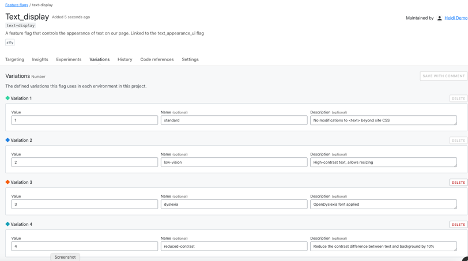
This flag variation could be tied to a user-configurable setting so that every time they logged into the site, they would get the text the way they need it, even if they were on a different browser or device.
That’s a simple example, of course. Ideally, developers and accessibility advocates would work together to determine which part of the site or app should be modified, and how it would work in combination with other modifications.
Even if your team doesn’t have user research or accessibility experts available all the time, you can code proactively to make room for them. Accessibility flags would be permanent—you wouldn’t want to remove them as you would a rollout flag. Since they are permanent, there is no harm in using them as a placeholder; they won’t add more testing demand empty than they will full.
At the start of a project, most teams don’t have the resources to do everything they want, even though they know it will need to be done eventually. We don’t do localization for proof-of-concept applications, we don’t write API documentation for strictly internal tools. But if a product succeeds, then we do need to add those elements and they become technical debt that we have to pay off without adding new value to the product.
One of the ways to reduce the cost of this debt is to add placeholders for future modifications. Trying to refactor an application with hard-coded interface elements to accept localization is like trying to add chocolate chips to cookies that are already baked—it’s much less effective. Using flags set to only return a default value (for now) is a way to plan for future changes in your code, without making the full investment.
The WCAG standards are not arbitrary or imposed without meaning. They exist to help everyone access the information, services and capacity they need. When we build sites that don’t meet those standards, we are losing customers, clients and users—and not in small numbers.
Using feature flags to make your site accessible is a smaller, cheaper intervention than creating entirely separate sites. Feature flags also help build the framework to provide other elements of your site on an on-demand basis, allowing you to meet user needs with precision and efficiency.
When it comes to digital experiences, every one of us can recount a frustrating interaction with a website or app. For the 61 million American adults with disabilities, lack of website accessibility can transform a frustrating experience to one that inhibits essential activities such as working, shopping and socializing.
To improve customer experiences and ensure equal access for all users, more businesses are adopting a human-centered, inclusive approach to design. But building a culture of accessibility can be a daunting task. Consider these steps to help build a culture of accessibility in your organization and engrain it as a practice across your development teams.
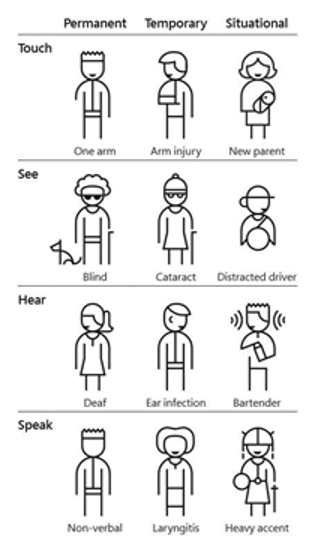
While most businesses agree accessibility is important, getting internal buy-in can be a bumpy process. Accessibility likely wasn’t a part of the curriculum for developers and engineers, and it may not be a common term yet among leadership in your organization. The industry and your brand haven’t been intentionally exclusive; rather, teams haven’t been enlightened yet to think about accessibility and its impact. There’s a misconception that inaccessible products only affect a small portion of end users. However, 1 billion people, or 15% of the world’s population, experience some form of disability, and we must include them when designing products.
Additionally, the following points can help champion an accessibility program:
Like any program, accessibility requires constant attention to engrain it in an organization’s culture. Consider creating a group of cross-functional Accessibility Champions that own keeping accessibility top of mind, sharing insights and advocating for accessibility on their teams. This group should consist of anyone who touches the UI of the product, such as the entire design team, someone on each engineering team and representation from QA. This approach ensures each team is prioritizing accessibility as they build and test and they have a point person on their team leading the effort. It also redistributes the idea of an accessibility expert, disseminates knowledge throughout your organization and gives everyone the sense that accessibility is a part of their role.
Creating an accessibility engineering plan will help guide your organization toward making accessibility and inclusive design an integral part of your processes across planning, development and QA. This plan can include incremental changes along with broader, long-term goals:
So, what to do first? A great place to begin is your component library. Identify which components are used the most often and which underlying components underpin other functions. For example, make sure buttons, inputs and links have accessible focus and hover states. It’s a lucrative, efficient way of scaling accessibility fixes because once you make one fix, you’ll see it propagate throughout the organization wherever that component is used.
There are a few key factors to be aware of at this stage. First, create a clear plan for who can make changes and how you’re testing components to ensure accessibility features are not unintentionally removed. Second, your work doesn’t end after creating accessible components. In the UI, individual components are put together like puzzle pieces, and just because each piece is accessible doesn’t mean the entire UI will be. Since the UI involves multiple components talking to each other, you’ll need to ensure that the experience is usable and accessible as a whole.
The goal is to ensure every existing and new component in a library is accessible by default. This way, when developers pull features into their work, they’ll know with certainty it’s designed to be accessible. Get it right once, and you get it right everywhere.
Building a culture of accessibility doesn’t happen overnight, but you can start with a few small changes that have a greater collective impact and build from there to make it a part of your entire development workflow. Most importantly, making an actionable, conscious commitment to accessibility will contribute to building better products and a more inclusive web.
For more information and resources about accessibility and inclusive design, visit the W3C Web Accessibility Initiative documentation, which includes tips to help designers and developers get started. Additionally, the A11Y project provides Web Content Accessibility Guidelines (WCAG) checklists to determine how accessible your site is. Plus, services such as Fable and Access Works allow you to meet with people with disabilities and engage them in research and user testing.