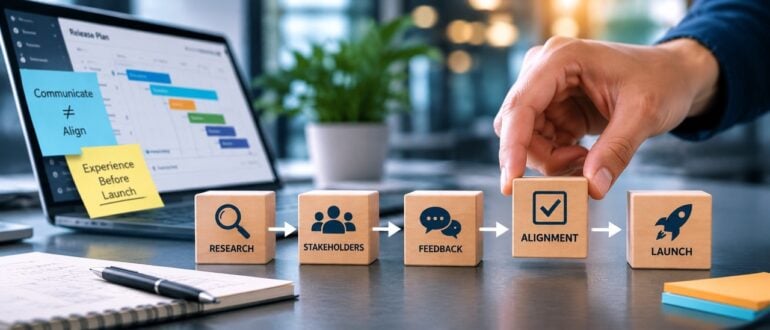
The first sign of trouble was a screenshot. We’d just switched on the A/B test via our feature management platform. Within the hour, a senior stakeholder landed in the variant feature flag, opened the app on their own phone, and sent us an image of it. The message, more or less: “Why is there a new tab in my app?”
It was a fair question. It was also one I thought we’d answered weeks earlier. Turns out we never really had. That’s the day I learned the difference between telling people and aligning them.
The Work We Were Proud Of
My team was reworking the information architecture and frontend navigation architecture of our app. This wasn’t a cosmetic refresh. We were changing the top-level structure to match our product vision and make the app the home of our loyalty programme. It was a strategic bet, and it carried real commercial weight.
We did the work properly, or so I believed at the time. We ran discovery sessions. We walked through the conceptual designs and release readiness plans. We reviewed the user research together. We held a final design and engineering review. And we invited our key stakeholders to every one of them. These were the people whose confidence the launch depended on.
When they couldn’t make a session, we didn’t let it drop. We sent summary emails. We posted updates in Slack. We wrote down where we’d landed and where we were going next.
By any reasonable measure, the information had been delivered. On paper, everyone was in the loop. I treated that as alignment. I was wrong.
The Launch Day Moment
When the test went live via progressive delivery, some of those same stakeholders were placed in the variant flagged user bucket. For the first time, they weren’t reading a summary. They were tapping through the change on their own phones, finding a structure that no longer matched the one in their heads. The screenshot was just the first of several.
The questions that followed were fair. Why were we making such a big change now? How confident were we that it wouldn’t hurt commercial performance or service reliability? These were exactly the questions I’d have wanted to talk through. The problem was the timing. I thought we’d worked through them weeks earlier, in sessions these stakeholders had been invited to but missed.
What I’d sent had been received. It hadn’t been absorbed. A skimmed Slack message and a declined calendar invite had given me a false reading. I’d mistaken silence for agreement. All it really meant was that busy people hadn’t yet engaged with a decision that didn’t feel real to them.
My first reaction was not a calm one. I wanted to fire back the links – the research, the design and technical specs doc, the session recording – as if the right attachment would settle it. Then it landed: if those links had worked, we wouldn’t have been in this situation. The person wasn’t missing information. They were missing the conversation that the information was meant to replace. This one was on me.
The work itself was sound. The research was solid. The design and underlying release architecture were good. But I spent launch day defending decisions instead of building on them. I was re-explaining context that should have been shared long before. The cost wasn’t a failed test. It was lost trust, a tense launch, and the quiet sense that people who should have championed the work felt it had been done to them.
Why Broadcasting Fails in Continuous Delivery
Here’s how I see it. continuous delivery isn’t just about moving code through a fast pipeline; it’s about preparing the business for that code. Written updates are great for keeping people informed. They’re a weak tool for getting people aligned on a big decision.
A Slack message asks nothing of the reader. It’s easy to skim. It’s easy to put off. It’s easy to assume you’ll catch up later. An optional invite is just as easy to decline when the week is full. None of these create the moment a stakeholder actually needs: the moment where they engage with the change, feel what it means, and raise concerns while there’s still time to act.
And concerns don’t disappear because no one said them out loud. They wait. They come back at the worst possible time, usually when someone finally experiences the change first-hand. By then you’re not aligning anyone. You’re defending a decision that already looks final. That’s a much harder conversation.
For an information architecture or core system feature change tied to commercial performance, that’s an uncomfortable place to be. A nervous stakeholder on launch day can stall a test, demand last-minute rollbacks or feature flag disables, or simply pull their confidence in the work. Not because the work was wrong, but because they were never brought along.
What I Do Differently Now
The fix wasn’t more communication. It was a different kind of communication. Three things changed.
First, I treat key stakeholder attendance as a requirement, not a nice-to-have. If someone who can make or break a launch can’t make a session, we move the session. A declined invite is not alignment. Treating it as one just defers the problem to a worse moment.
Second, for big launches, we now run a dedicated pre-launch alignment call. It isn’t a status update. It’s a working session. We walk through the whole experience together, revisit the reasoning, and surface concerns while there’s still room to act. The goal is to hear the hard questions in that room, not on launch day.
Third, and most importantly, we let stakeholders experience the change before customers do by targeting them directly using feature toggles. Ahead of a key launch, we run a round of friends-and-family testing through internal canary releases. The people who matter use the new experience on their own devices. There’s no substitute for this. Reading about an information architecture or system change is abstract. Navigating it yourself makes it real. And real is where the genuine questions, and the genuine buy-in, come from.
The Takeaway
Alignment isn’t a message you send. It’s an experience you create.
The point of stakeholder communication was never to be able to say “I told them.” It’s to reach launch day with no surprises, because everyone who matters has already seen the change, questioned it, and agreed it’s worth doing.
So before your next big launch, ask yourself one question: have my stakeholders actually experienced this decision, or have I only informed them about it? If it’s the latter, you don’t have alignment yet. You have a launch day waiting to go sideways, and a perfectly good piece of work that no one is ready to stand behind.
Open source supply chain security has been a scanner-and-CVE game for years — pull the package, run the scan, cross-reference known vulnerabilities, hope the metadata is current. That model always had gaps, and AI agents are widening them fast. Agents pull open source components from wherever they can find them, at machine speed, and the after-the-fact scan is not a control that keeps up. What developers and platform teams actually need is a curated catalog that vets components before they enter the environment, not after they cause a problem.
Alan Shimel sits down with Leslie Pascual, Field Engineering Manager for AI and Security Solutions at ActiveState, to work through what a trusted open source catalog looks like in practice and why it becomes table stakes as soon as AI agents join the software supply chain. Pascual brings more than 20 years across engineering, architecture and leadership, with a stint hardening enterprise healthcare applications that pushed her into cybersecurity. Her point is direct — scanners compare packages to CVE metadata after the fact, which is fundamentally different from vetting a component before it ships.
They get into the mechanics. Packages go through a cool-down period, secure build, attestation and strong provenance before landing in the catalog, which now spans the top nine open source ecosystems and is expanding to twelve — Python, Java, JavaScript, R and more. Continuous monitoring keeps catalogs current with patches and fixes, and SBOMs and attestations ship with every component. The integration side matters just as much: catalogs plug into JFrog Artifactory, Sonatype and Cloudsmith so developers see no extra friction, and mirrored repositories let each customer expose the catalog inside their own Artifactory instance.
The forward-looking piece is where AI agents plug in directly. Tools like Claude and Cursor need a source of truth for open source components, and Pascual argues that the trusted catalog becomes exactly that — the place agents pull from instead of grabbing whatever the internet returns. An MCP server is on the roadmap to extend that intelligence directly into the CI/CD pipeline. The broader read is that shifting security all the way left, past the scanner and into the catalog itself, is what actually makes AI-assisted development safe enough for enterprise teams to scale.
Most organizations writing AI usage policies right now are stuck between two bad options: ban the tools and watch people use them anyway, or say nothing and hope code review catches whatever slips through. Debian just spent two weeks working through that exact problem in public, and the way the vote landed is worth paying attention to, whether you maintain a package archive or a private repo.
The Debian Project ran a General Resolution from August 15 through August 28, asking developers to settle the community’s stance on AI-assisted contributions. Eight separate proposals were on the ballot, ranging from an outright ban written into Debian’s Social Contract to a hands-off position treating AI tools like any other developer choice. Debian used the Condorcet method for the vote, meaning developers ranked their preferences rather than picking a single option, and just over 130 of roughly 1,000 eligible developers cast ballots.
The ban needed a three-to-one supermajority to pass, since it would have amended the Social Contract itself. It didn’t come close. Instead, developers settled on an approach that neither endorses nor prohibits the use of generative AI in Debian’s development process. Project Secretary Kurt Roeckx announced the outcome once the vote closed.
The policy that won is notable for what it doesn’t do. It doesn’t require anyone to disclose that they used an LLM to draft a changelog, debug a build script, or triage a bug report. Disclosure is encouraged, not mandated. What the policy does instead is put the obligation on the human in the loop. Contributors have to review, test, and fix model output before it goes anywhere near the archive. “Blindly accepting or uploading AI-generated material without appropriate human review” is treated as a violation of normal Debian practice, full stop, regardless of whether the contributor labels it as AI-assisted.
Three specific guardrails came with it. Confidential material, private communications, embargoed security bugs, cryptographic keys, and credentials can’t go to a third-party AI service without explicit authorization. Bulk automated contributions, like mass bug filing or large-scale patch sweeps, require upfront discussion and someone accountable for the results. And Debian is staying out of the copyrightability question entirely; existing licensing rules apply to AI-touched contributions exactly as they do to everything else.
That credentials clause isn’t hypothetical caution. Researchers tracked 28.65 million hardcoded secrets leaked in public GitHub commits in 2025, with leaked AI service credentials up 81% year over year. A project the size of Debian pasting embargoed vulnerability details into a third-party AI service isn’t a rules violation waiting to happen; it’s a leak waiting to happen.
Mitch Ashley, VP and practice lead for software lifecycle engineering and AI-native software engineering atThe Futurum Group, sees a harder problem sitting underneath that requirement. Putting the obligation on the reviewer is the right call, but reviewers are the resource Debian has the least of.
“Debian put the obligation on the reviewer, the right place for it, and this is the component that runs out of capacity first,” Ashley said. “Review was already scarce in a volunteer project where roughly 130 of a thousand developers voted. AI-assisted contributions do not arrive at volunteer reviewer speed. Every organization borrowing this model inherits the same arithmetic. Policy language is free but reviewer hours are not.”
What makes Debian’s outcome worth watching outside the Linux world is the logic behind it. The project didn’t try to regulate the tool. It regulated behavior around the tool, which is much easier to enforce. Banning LLMs assumes you can detect their use reliably, and you mostly can’t. Requiring disclosure assumes people will self-report accurately, and plenty won’t, especially once AI assistance is baked into the editor rather than something you consciously reach for. Debian’s approach sidesteps both problems by holding contributors to the same standard regardless of how the code was written: you own what you submit, you tested it, and you didn’t leak anything on the way there.
That’s a template DevOps and platform teams should recognize, because it maps onto the problem enterprises are chewing on right now. Most internal AI policies fixate on “did you use AI,” when the more useful question is “did a human review this before it shipped, and did anything sensitive leave the building to get an answer?” But Ashley’s point holds whether the reviewers are volunteers or salaried: writing “humans must review AI output” into a policy doesn’t create the capacity for reviewers to do it. Debian’s vote looks that fact squarely in the face and refuses to pretend that a ban would do the job review already does — even without solving the underlying capacity problem.
The vote doesn’t resolve every open question. Copyright status of AI-assisted contributions remains genuinely unsettled, and Debian punting on it just pushes the ambiguity downstream to anyone redistributing the archive. But as a governance model, “trust the review process, restrict the specific behaviors that actually cause harm” is a more honest starting point than most enterprise AI policies manage, and it’s one other projects and IT organizations will likely borrow from as this debate keeps repeating itself across the industry.
devopsy.kinsta.cloud is now providing a weekly DevOps jobs report through which opportunities for DevOps professionals will be highlighted as part of an effort to better serve our audience.
Our goal in these challenging economic times is to make it just that much easier for DevOps professionals to advance their careers.
Of course, the pool of available DevOps talent is still relatively constrained, so when one DevOps professional takes on a new role, it tends to create opportunities for others.
The ten job postings shared this week are selected based on the company looking to hire, the vertical industry segment and naturally, the pay scale being offered.
We’re also committed to providing additional insights into the state of the DevOps job market. In the meantime, for your consideration.
Dice
Booz Allen Hamilton
McLean, VA DevOps Engineer
$77,600 to $176,000
Alarm.com
Centennial, CO DevOps Engineer
$120,000 to $130,000
HarbourVest Partners
Boston, MA DevOps Engineer
$135,000 to $145,000
Auria Solutions USA, Inc
Boulder, CO DevOps Engineer
$140,000 to $160,000
Certificate renewal is often treated as a scheduled task: run an ACME client, obtain a new certificate, and move on. In practice, that view is too narrow for production systems.
A certificate is not useful because it exists on disk. It is useful because the right service is presenting it to users. Between issuance and that final state, several operational steps can fail.
The more useful way to think about renewal is as a deployment workflow: renew, deploy, reload, verify, and recover when something goes wrong.
Renewal Success Is Not Production Success
The first failure mode is simple: a certificate authority successfully issues a new certificate, but the service continues using the old one. The renewal job is green, yet the incident clock is still running.
This happens because issuance and production state are different things. The certificate may need to be copied to a specific host, mounted into a container, written to a secret, synchronized to a load balancer, or placed behind an ingress controller. A successful ACME transaction proves only that the certificate was issued. It does not prove that the service users reach is presenting it.
Deployment is Only One Step
Even after the new certificate reaches the correct system, the running service may not pick it up automatically. NGINX, Apache, HAProxy, IIS, application servers, and custom services can all require a reload or restart depending on how they are configured.
That creates another common failure pattern: the files are correct, but the process still has the previous certificate loaded in memory. File-level checks say everything is fine while the live endpoint says otherwise.
Configuration drift makes this harder. A deployment script may write to one path while the service reads from another path that was introduced months ago during a migration. The script can exit successfully without changing production behavior at all.
Verification Has to Be Part of the Workflow
This is why certificate automation should end with runtime verification rather than with a successful command.
The most important question is not whether the renewal process returned exit code 0. It is: what certificate is the service presenting right now?
A strong workflow verifies the live endpoint after deployment and reload. It can compare the observed certificate fingerprint, serial number, issuer, or expiration date against the certificate that was just deployed. If the expected certificate is not being served, the workflow should fail even if every earlier command reported success.
That changes the definition of success from ‘the script ran’ to ‘production reached the intended state.’
Automation Needs Controls, Not Just Commands
Once certificate tooling starts changing production systems, operational controls matter as much as the happy path.
Some environments can renew and deploy automatically. Others need an approval gate before a change. Some services support safe reloads, while others require more careful coordination. Legacy systems may need manual handling until their deployment process is made predictable.
Useful controls include retries, timeouts, approval gates, failure notifications, audit trails, rollback behavior, and a way to suspend automated execution. Automation should reduce repetitive work without removing the ability to intervene when the environment no longer matches expectations.
Private Keys Create an Architectural Boundary
Certificate lifecycle automation also raises an important security question: where should private keys be handled?
Centralizing private keys in a management service can simplify orchestration, but it also creates a sensitive new trust boundary. An alternative is to keep key-bearing operations inside the infrastructure that already owns the keys and use a local agent or controller for issuance, deployment, reload, and verification.
In that model, a control plane can coordinate inventory, schedules, approvals, alerts, and audit state without needing to receive the private key itself. For security-sensitive infrastructure, that separation can be worth the additional engineering complexity.
Kubernetes Does Not Eliminate the Lifecycle Problem
Kubernetes improves certificate automation in many environments, especially when cert-manager or another controller handles issuance and secret updates. But the lifecycle question still exists.
Teams still need to understand what consumes the secret, whether workloads reload updated material automatically, how external endpoints are validated, and how failures are surfaced. The details change, but the core question remains the same: did the intended certificate actually reach the live service?
The same applies to certificates outside Kubernetes. Virtual machines, reverse proxies, Windows servers, appliances, and hybrid environments often require their own deployment and verification steps.
These lessons came out of our work on TokenTimer, where we have been building certificate lifecycle automation around the full renewal, deployment, reload, and verification workflow.
Treat Certificate Renewal Like Any Other Production Deployment
The useful mental model is to treat certificate renewal the same way we treat application delivery: a change moves through stages, each stage has a defined success condition, and the final state is verified from the user’s point of view.
That means moving from a narrow sequence such as ‘cron runs ACME’ to a lifecycle such as inventory, monitor, renew, deploy, reload, verify, and recover.
Expiration monitoring still matters. It provides visibility and time to act. But monitoring alone does not close the loop. The operational value comes from making the path between an upcoming expiration and a verified production state reliable enough that the routine case no longer depends on someone remembering to finish it manually.
Harness today launched a code repository service that is specifically designed for DevOps teams that are relying on artificial intelligence (AI) agents to generate code.
Martin Reynolds, Field CTO for Harness, said the Agent-Ready Harness Code Repository and AI Code Review service provides an alternative to existing GitHub source code repositories that were not designed to handle the volume of pull requests and updates that are made by AI agents operating at machine speed.
As a result, there are not only more outages but search and file history get slower as indexing falls behind, pull requests pile up faster than anyone can read them, and a permission system designed around a list of developers lacks the ability to identify and track an AI agent that might merge code on its own. The assumption legacy source code management tools make is that a human wrote code and opened a pull request that will be reviewed sometime later.
In contrast, the Harness Code Repository has been tested to handle thousands of simultaneous pull requests and commits from both AI agents and human application developers, said Reynolds. Search, history, and diffs keep working across repositories of any size that can have tens of thousands of branches.
Harness Code Repository and AI Code Review are both designed to be reachable via the Harness Model Context Protocol (MCP) server or command line interface (CLI). DevOps teams can review pull requests by the author’s email instead of an internal ID, see every open pull request across every repository and create, reply to, or resolve comment threads without opening a browser.
AI coding agents can either be assigned specific permissions or they can inherit them from application development teams that have deployed them. DevOps teams can further define what an AI agent can access, merge, or deploy, much like they do for any human software engineer using role-based access controls (RBACs) and policies based on the Open Policy Agent (OPA) framework provided via the Cloud Native Computing Foundation (CNCF).
The AI Code Review then reads a pull request, checks to see what gates are mandatory and prevents any request that fails from being merged. Additionally, differences are grouped by risk rather than by file, so high-risk changes that alter how the software behaves are not lost under a mass of renamed repositories and dependencies. A feedback capability also describes what a change puts at stake rather than noting that a line moved. If the feedback is valid, changes can be merged with a single click.
Any team can start using Harness Code Repository for free. Migrations from another repository, including GitHub, GitLab, Bitbucket and Azure DevOps, only require a few clicks, noted Reynolds.
In general, DevOps teams are starting to realize that a piecemeal approach to agentic AI engineering isn’t going to be sufficient, said Reynolds. Instead, the entire software development lifecycle (SDLC) will need to be re-engineered to manage what is becoming massive amounts of code that is overwhelming existing DevOps workflows, he added.
In the case of Harness, that means commits, review, builds, tests, security and deployments all stem from a single sequence within the platform. The Harness Software Delivery Agent then runs those workflows from commit to production using policies created via a single common engine. All workflows are then mapped in the Harness SDLC Knowledge Graph to provide the context needed for every review. Based on early testing, Harness claims DevOps teams have seen savings of 10,000 hours over the last month alone.
Mitch Ashley, vice president and practice lead for the Futurum Group, said the bottleneck in AI-assisted development has moved to review and approval. Agents produce code faster than teams can verify it, and verification debt builds faster than anyone can hire reviewers, he added.
The key here is still accountability, noted Ashley.
Regardless of the approach to software engineering in the age of AI, it’s now more a question of when rather than if DevOps workflows will be re-engineered. The only thing that remains to be seen now is how long that might actually require.
An AI agent that can call tools is not automatically an unsafe system. The dangerous move is smaller: Letting a workflow turn a recommendation into an external action without a durable decision record.
That distinction matters in DevOps. An agent can sensibly summarize a failed deployment, draft a rollback plan or classify a dependency alert. The moment it opens a change request, modifies a feature flag, creates an incident, messages a customer or publishes a configuration, the system needs more than a high-confidence score.
It needs a change-control gate.
The gate below is a practical pattern for a tool-using agent. It verifies whether the policy is still current, pauses for the required human decision, makes one idempotent outbound request, then confirms the receipt. It is deliberately boring. That is the point.
Figure 1: Illustration of a Workflow Moving Through Policy, Human Approval and Idempotency Gates While a Risky Duplicate Path is Stopped
Why a Confidence Threshold Isn’t Enough
Confidence says something about a model’s answer. It does not say whether a particular action is reversible, who owns its consequences, whether the policy changed while the agent was working or whether the same action has already happened.
For a production workflow, treat those as separate decisions.
Question
What the Gate Should Decide
Is this action permitted now?
Revalidate the current policy and declarations.
Does this action need a person?
Route it to an explicit approver with the exact action payload.
Has this action already been sent?
Use an idempotency key stored before or with the transmission.
Did the destination accept it?
Verify a receipt, job ID or visible confirmation without resending.
This maps cleanly to the NIST AI RMF’s idea that risk management should cover governance, measurement and management throughout the system life cycle — not merely model evaluation. It also fits a practical fact of durable agent runtimes: A paused workflow can restart a node when it resumes, so outbound side effects must be idempotent. NIST AI RMF and LangGraph’s interrupt guidance both make the broader control problem explicit.
The Smallest Useful State Machine
Do not begin with a large autonomous platform. Begin with explicit states that an operator can inspect.
The useful property is not the spelling of the states; it is that ‘approval_required’ and ‘transmitting’ are distinct. A system should be able to show an approver exactly what will happen before it happens, then preserve a record of the result.
Revalidate Policy Immediately Before the Action
The policy check belongs close to the outbound call. A week-old permissions decision is not a preflight check.
This is where an organization can apply its real rules: Production versus staging, maintenance windows, owner groups, regulated data or a mandatory incident commander for customer-impacting work. Keep the policy data outside the prompt. A prompt may explain a rule; it should not become the only enforcement point.
Ask for Approval Using the Actual Outbound Payload
An approval that says, “approve the agent’s plan?” is too vague. Show the action type, destination, change summary and required declarations.
If the user rejects the request, end the workflow. Do not reinterpret a rejection as a request to regenerate a more persuasive plan.
Make the Transmission Idempotent
The awkward failure is an ambiguous one. The receiving system may complete the change while the client times out before it receives a response. If the agent retries blindly, it can create a duplicate ticket, a second deployment or a second message.
Use a stable key derived from the action’s business identity — not a fresh UUID for each retry.
The destination must honor the key, or your own durable store must do so before the outbound request. Either way, do not put an automatically retried network call before a pause node unless that side effect is safe to repeat.
Verify Instead of Resending After Ambiguity
Treat a timeout as an observation problem first. Query the destination with the key, look for the created job or ticket and write the result to the workflow state. Only retry if the system can prove that no action exists.
async function verifyReceipt(key: string) { const result = await findActionByIdempotencyKey(key); if (result) return { accepted: true, receipt: result }; return { accepted: false, issue: “No receipt found; needs operator review” };}
That final status should be ‘submission_unverified’, not ‘failed’. The name forces the right next action: Investigate before sending another request.
A Controlled Simulation: Where Duplicates Appear
To make the trade-off concrete, I ran a deterministic simulation of 10,000 outbound agent actions. Each simulated action had a 9% policy-change state, a 21% non-approval state and 1–3 resume events. This is a controlled illustration of workflow logic, not production telemetry, a reliability claim or a measured industry failure rate.
Control Design
Sends
Duplicate Sends
Policy-Bypassing Sends
Unapproved Sends
Ungated Send
12,114
2,114
1,106
2,544
Approval Only
9,570
1,673
879
0
Preflight Gate
8,691
1,514
0
0
Durable Gate
7,177
0
0
0
Figure 2: Bar Chart Comparing Outbound Sends and Duplicate, Policy-Bypassing and Unapproved Actions Across Four Simulated Control Designs
The notable row is the preflight gate. It eliminated actions that bypassed policy or approval, but it still created 1,514 duplicate sends because resumed workflow events could enter the same action more than once. The durable gate reduced that to zero in this simulation by using a stable idempotency record.
The simulation code and raw summary are included with this submission so that editors or readers can reproduce the numbers. Modify the assumptions before applying the result to your own environment.
Keep the Approval Boundary Narrow
This pattern is not an argument for asking a human to approve every tool call. That usually leads to notification fatigue and workarounds.
Instead, classify actions by consequence:
Action Class
Typical Examples
Default Control
Read-Only
Fetch a deployment record, inspect a log
Allow with audit trail
Reversible Internal
Create a draft change ticket, add a label
Allow or sample review
Material but Reversible
Change a feature flag, queue a rollback
Named approval plus idempotency
External or Hard to Reverse
Deploy to production, message a customer, delete data
Named approval, policy recheck, idempotency, receipt verification
The fastest agent systems make safe paths easy and consequential paths explicit. They do not pretend all operations have the same risk.
What to Test Before Enabling an Agent Action
Run these cases in a non-production environment before connecting a new action to an agent:
A policy changes after the agent produces its recommendation but before the approval click.
An approver rejects the action, then the workflow resumes.
The destination completes the change, but the client loses the response.
A queue redelivers the same event.
An operator tries the same action manually while the agent is waiting.
Receipt verification is temporarily unavailable.
For each test, the expected outcome should be visible in state: Blocked, rejected, submitted, verified or unverified. “The agent probably handled it” is not an operational status.
The Operational Rule
AI agents can move quickly without bypassing change control. The reliable pattern is straightforward: Validate the rules immediately before the action, show the real payload to the right approver, record one idempotent transmission and verify the result before retrying.
That sequence gives teams something better than a promise of autonomy. It gives them a system they can inspect when the answer is ambiguous and the consequences are real.
Raw Results: `research/contribution-gate-simulation-2026-08-21/summary.json`
The simulation uses a fixed seed and synthetic policy, approval and resume-event rates. It does not measure any customer system.
The article’s workflow pattern was implemented and tested in TypeScript as part of an internal contribution-control graph. The sample code is simplified for teaching.
Enterprise AI agents need more than stronger models. They need durable execution environments that can coordinate multi-step workflows, survive failures, pause for human review and resume reliably after disconnects or delays.
AI Agents Have Moved Beyond Chat Demos
AI agents work beautifully in demos. A user asks a question, a large language model generates a response and everyone sees possibility. Production systems are different.
Consider what these systems are now asked to do. An agent assessing a change request may pull deployment history, evaluate blast radius, check freeze-window policy, wait for a release manager’s sign-off and then schedule the rollout. An agent adjudicating an insurance claim may extract fields from submitted documents, cross-check them against prior claims, apply underwriting rules and route anything unusual to a human adjuster. An agent triaging a security alert may enrich indicators, correlate against past incidents, assess asset criticality and hold containment until an analyst approves it.
Those three workflows have almost nothing in common at the domain level. They share a shape: Multiple steps, several systems, independent failure modes and at least one point where a person decides. They take minutes or hours, not milliseconds.
The challenge is no longer only intelligence; it is execution. Many enterprise AI conversations focus on model selection, prompt engineering, retrieval-augmented generation and tool calling. Those are important, but they do not answer what happens after the agent begins executing long-running work across multiple systems.
The Problem: Most Agents Are Still Designed Like Request-Response Applications
Traditional AI applications assume a simple request-response model: User input goes in; a model response comes out. That model works well for Q&A, summarization, content generation and search-like experiences.
Enterprise workflows are different. A procurement review agent might parse a contract, compare its terms against a standard template, check vendor risk ratings, invoke a sanctions screening service and produce a recommendation. These steps may execute independently, fail independently and complete at different times.
Once an agent crosses the boundary from answering a question to executing a process, it starts to look less like a chatbot and more like a distributed system. It needs state, retries, coordination, observability and recovery.
Why Stateless APIs Break Down
Teams often start by implementing an agent as a synchronous API. That approach works until the first real workflow appears. What happens if the HTTP request times out? What if the user closes the browser? What if an external system is unavailable? What if a human approval arrives six hours later?
A stateless API can initiate work, but it is a poor place to manage long-running state. Developers quickly end up building custom queues, status tables, retry logic, compensation logic and ad hoc workflow tracking. The hidden cost is not the first prototype; it is operating the system after it begins handling real workloads.
The missing layer is a durable runtime: A workflow engine that can preserve progress, coordinate parallel work, wait for external events and resume execution reliably.
Figure 1: The Same Multi-Step Workflow Under Two Runtimes
A stateless service holds progress in process memory, so a host failure discards completed work and the retry begins again from the first step. A durable runtime checkpoints each completed activity, so a replacement worker replays the history and continues from where execution stopped.
The Key Design Shift: the Workflow is the Application
The most important design shift is this: The model is not the application. The workflow is the application. The model is one activity inside a larger execution graph.
In production-grade agentic systems, the orchestrator coordinates work while specialized agents perform specific tasks. The specialization is domain-specific, but the division of labor recurs: One agent gathers and enriches raw signal, another retrieves reference material, another looks for precedent among prior cases and another evaluates policy or risk conditions.
This design makes the system easier to reason about. Each agent has a focused responsibility, and the orchestration layer owns execution flow, state, retries, progress and human interaction.
Using Durable Orchestration as the Agent Runtime
A practical architecture places a durable orchestrator between the calling application and the AI execution layer. The caller starts the workflow and immediately receives an instance identifier. The orchestrator then coordinates specialized agents and records progress as the workflow advances.
Azure Durable Functions is a strong fit for this pattern because it supports stateful workflows, activity functions, external events, checkpointing and long-running orchestration. Azure AI Foundry can provide the model and agent execution layer, while Durable Functions handles the operational execution semantics around the agent.
The result is a cleaner separation: AI services reason; activity functions perform work; the durable orchestrator governs the process.
Figure 2: The Orchestrator Between the Calling Application and the Reasoning Layer
It owns sequencing, retries, timers and external events. Specialized agents run on the model layer with narrowly scoped access and every completed activity is checkpointed so the workflow can be rebuilt after a failure or a process restart.
Fan-Out/Fan-In Maps Naturally to Multi-Agent Systems
These investigations are rarely one sequential task. Many subtasks can run independently. Enrichment, reference retrieval, precedent search and policy evaluation usually have no dependency on one another, so they can execute in parallel. This is where fan-out/fan-in becomes a natural orchestration pattern.
The orchestrator fans out work to specialized agents, waits for them to complete, and then fans in the results to generate a synthesized recommendation. This pattern improves latency while keeping the workflow easier to understand than a large monolithic agent prompt.
The fan-in step is also where engineering judgment matters. The system should handle partial results, conflicting findings and low-confidence recommendations rather than assuming every agent will succeed perfectly every time.
Example Orchestration Sketch: The sketch below triages a security alert; the domain is incidental. Rename the activities and the same orchestration serves claims adjudication or change-risk review.
Three details in that sketch are worth calling out. The external event is raced against a durable timer, so an approval that never arrives escalates instead of leaving the instance parked indefinitely. The timer is then cancelled on the success path, because a durable timer that is neither cancelled nor allowed to expire keeps the instance in the Running state long after the orchestrator function has returned. Since Task.WhenAll surfaces the first exception it encounters, genuine partial-success handling means having each activity return a typed failure result rather than throwing it once its retries are exhausted.
Human-in-the-Loop is Not an Edge Case
In regulated and high-impact workflows, human review is part of the process by design. A payment exception above a threshold, a production change during a freeze window, a claim falling outside underwriting rules: None of these should be finalized automatically when confidence is low or the consequences of being wrong are large. The important thing is to make human review part of the workflow rather than a side channel.
A durable orchestration can pause while waiting for a review event, then resume when the approver submits a decision. The system does not need to keep an HTTP request open or hold compute resources while waiting. The workflow state remains available, and the final recommendation can include the reviewer’s context.
This capability is especially important because the slowest step in a production workflow is often not the model call. It is the human decision, the external dependency or the operational handoff.
Figure 3: One Instance Over Time
Parallel agents make wall-clock cost the slowest agent rather than the sum of all of them; a failed agent degrades the result instead of failing the run, and the review window consumes no compute because the orchestration is parked rather than blocked.
Operational Considerations Matter as Much as Prompts
A durable runtime does not remove the need for engineering discipline. It makes that discipline easier to apply. Production-grade agents still need observability, correlation identifiers, retry policies, cost controls, security boundaries and careful versioning.
Workflow telemetry should answer questions such as: Which stage is running? Which activity failed? How many retries occurred? How long did human review take? What evidence supported the final recommendation? These are operational questions, not prompt engineering questions.
Retries should be designed around external dependencies such as AI model calls, search systems, databases and APIs. At the same time, not every failure should fail the entire workflow. Multi-agent systems should be designed for partial success where appropriate. If the precedent agent fails but enrichment and retrieval succeed, the system may still produce a useful recommendation with clear caveats.
Three constraints tend to surface only once a workflow reaches production. Orchestrator code has to stay deterministic, because recovery works by replaying it: Wall-clock reads, random values, fresh identifiers and direct I/O belong in activities, not in the orchestrator. Every wait needs a deadline, else an approval that never arrives becomes an instance nobody ever looks at again. Versioning deserves a decision before the first production deploy because long-running instances guarantee that new orchestrator code will ship while old instances are still in flight.
Security and Governance Cannot Be Bolted on Later
AI agents often sit at the crossroads of sensitive enterprise data, operational tooling and user-facing experiences. That makes security and governance foundational design concerns.
Each specialized agent should receive only the access necessary for its responsibility. A retrieval agent may need the document corpus and nothing else. An enrichment agent may need read access to telemetry. The agent that composes the final decision may need only summarized evidence, never the raw sources behind it. Avoid creating one over-permissioned super-agent that can reach everything.
Prompts and outputs should also be auditable. Store workflow version, prompt version, model deployment, agent version, evidence references and correlation identifiers. As agents become part of operational decision-making, teams need to explain not only what the system recommended but why it recommended it.
Figure 4: Scoping Access per Agent Contains the Blast Radius
A single agent holding every credential turns one poisoned input into estate-wide exposure, while narrowly scoped agents limit any single compromise to one agent’s data, with the synthesis step working from summarized evidence.
What This Means for DevOps and Platform Engineering Teams
The future of enterprise AI is not just better prompts. It is reliable execution. As agents become responsible for operational workflows, DevOps and platform engineering teams will need to provide runtime capabilities similar to those used in distributed systems: Orchestration, observability, resiliency, governance and deployment discipline.
This resembles the evolution of microservices. Early conversations focused on APIs. Later, the industry learned that production systems also require service discovery, telemetry, deployment strategies, circuit breakers and operational practices. AI agents are entering a similar phase.
Organizations that treat agents as production workflows rather than chat interfaces will be better positioned to build systems that users trust.
Conclusion
Most enterprises already have access to powerful foundation models. The harder challenge is building systems that can execute reliably when work spans minutes, hours, tools, services and human decisions.
Long-running agents of any kind need a durable execution layer. They need to coordinate multiple specialized agents, survive transient failures, pause for human review, provide progress visibility and generate auditable outcomes.
Azure Durable Functions and Azure AI Foundry offer one practical way to approach this architecture: Durable Functions provides orchestration and stateful execution, while Azure AI Foundry provides the intelligence layer. The broader lesson applies beyond any specific platform: Production AI agents need durable runtimes. Intelligence is only half of the system. Execution is the other half.
Anyone who’s ever been on an on-call rotation knows the feeling. A dashboard lights up green to red across a dozen services, an incident channel starts filling with theories and somewhere in that noise is one root cause hiding behind six symptoms that all look equally suspicious. Fixing the problem is rarely the hard part. Figuring out what the problem actually is- that’s where the time is spent.
So, when yet another vendor pitch promises that AI has solved this (point a model at your telemetry and it tells you what broke), part of me wants to believe it. Honestly, some of that promise is real. However, the more time you spend around incident response, the easier it gets to spot claims that skip past the hardest part of the job. Finding symptoms is easy; understanding causes is not. This is just my opinion on where that gap actually sits, and what it would really take to close it.
The Gap Between Correlation and Diagnosis
Look closely at what most ‘AI-driven root cause analysis’ tools actually do, and a pattern starts to show up. They’re very good at telling you that 47 alerts are all part of the same problem. They’re much less reliable at telling you what that problem actually is. Alert correlation, topology mapping, and noise reduction are genuinely useful capabilities that meaningfully reduce the time an engineer spends on triaging. However, grouping related symptoms isn’t the same thing as identifying a cause.
That distinction isn’t just semantics. It’s the difference between an engineer opening an incident channel to “here are the 12 things that fired around the same time” versus “here’s why they fired, in that order, and here’s what to fix.” The first still needs a human to do the actual diagnostic reasoning. The second means the system has built something closer to a real causal model, an understanding of how a change three services upstream produced a symptom two hops downstream, three minutes later.
Most tools on the market today are much closer to the first category than they’d like you to believe.
Sketching What Real Diagnosis Looks Like
If correlation is “these things happened together,” diagnosis is “this happened because of that.” Getting from one to the other isn’t just a matter of bolting on more dashboards. It’s a genuinely different process, and I think it’s worth actually sketching out instead of leaving it vague.
At a high level, a system capable of real causal diagnosis needs to move through like this:
The step that quietly gets skipped is testing causal direction. Does perturbing the upstream service actually explain the downstream symptom, or are the two just moving together? Most tools stop at correlation dressed up as causation, because that step is genuinely hard to build. Matching against incident history is where organizational discipline comes into play, since that knowledge base doesn’t build itself. The confidence check at the end, the part where the system is willing to say, “I’m not sure, escalate this,” is the one I’d trust least to actually exist in most tools being sold today. Uncertainty doesn’t make for a great product demo.
Where This Gets Harder: Non-Deterministic Systems
All of this is already hard for traditional infrastructure, where failure modes are at least somewhat bounded and repeatable. It gets a lot harder once AI and LLM-based components are part of the system you’re trying to diagnose.
The traditional signals SRE teams have leaned on for a decade (latency, traffic, errors, saturation), all assume a system that behaves the same way twice given the same inputs. A RAG pipeline or an agentic workflow doesn’t offer that guarantee. The same request can fail differently on different days for reasons that have nothing to do with infrastructure health: A shift in retrieved context, a subtle change in model behavior and a guardrail stepping in somewhere unexpected. A diagnostic system trained to reason about deterministic failure patterns will confidently give you the wrong answer here, and it’ll say it with the same tone of authority it uses when it’s right.
That’s the part that worries me most, honestly, more as a leader than as an engineer. An automated system that’s occasionally, confidently wrong isn’t neutral. It actively erodes an on-call engineer’s willingness to trust it, often for good, after just one bad call. Trust, once a team loses it in a tool, is brutally hard to earn back. It’s not uncommon to see decent tooling get quietly abandoned after exactly this kind of incident, and it rarely comes back into rotation once that happens.
The Human-in-the-Loop Argument, Restated
None of this is an argument against automating incident diagnosis. The toil is real, the pages at inconvenient hours are real and the case for AI assistance in incident response is a strong one. It’s an argument for being precise about what’s actually being automated, and for treating the postmortem, not the dashboard, as the real training ground for these systems.
A good postmortem is a structured record of a causal chain that a human worked out under pressure. That’s exactly the kind of data the ‘match incident history’ step in the flow above needs to work well. This is where leadership matters just as much as architecture. A team that treats postmortems like a checkbox exercise, written thin and fast just to close out a ticket, is quietly starving its own diagnostic tooling of the one input that would actually make it smarter. A team that puts real-time into writing specific, causally clear postmortems, even when it’s tempting to just write “flaky network” and move on, is building the training data for tomorrow’s automation. Whether or not anyone thinks of it that way in the moment.
This is one of the more underrated jobs of an engineering leader right now. It’s not about picking the right AI vendor; it’s about making sure a team’s own incident discipline is good enough to be worth automating in the first place.
A Practical Checklist
Before adopting or building automated incident diagnosis, a few questions are worth asking honestly:
Does this tool group related alerts, or does it actually explain why one caused another?
Can it show its reasoning in a way an engineer could defend in a postmortem review?
Does it work off the live dependency graph, or a stale architecture diagram from months ago?
How does it hold up on non-deterministic components, and does it know when to say “I’m not confident” instead of guessing?
Is there a feedback loop where past incidents actually improve future diagnosis, or does that knowledge just sit locked in a wiki page?
The teams that get real value out of automated diagnosis won’t be the ones with the fanciest model. They’ll be the ones who were already disciplined about turning incidents into institutional knowledge, and who are now feeding that discipline into the machine instead of hoping the machine invents it from scratch. That’s a leadership problem before it’s an engineering one, and I think it’s the one most of the current conversation keeps skipping past.
Platform and DevOps teams spent a decade learning to manage cloud as a variable cost. Metered usage, spiky demand, spend spread across services and teams, and a whole FinOps discipline built to bring it under control. That hard-won muscle is about to be tested by something that looks a lot like cloud but is not being treated like it: the cost of AI coding assistants.
For most of the SaaS era, developer tools were a fixed line item. You multiplied a per-seat price by headcount, and you had a budget. Over the past year, the major AI coding assistants moved off that model. Billing now runs on tokens, requests, or credits, with premium models and agentic features drawing down a metered pool. GitHub Copilot, for example, shifted to usage-based billing in mid-2026, pricing premium usage against credits. The result is that two engineers on the same plan can generate very different costs depending on the models they pick and how heavily they use agents. Seat count no longer predicts spend.
If that sounds familiar, it should. This is the cloud cost curve arriving in the developer tools budget, and most organizations are meeting it with a per-seat SaaS mental model.
Why it Behaves Like a Cloud Bill
Three properties make AI coding spend behave like infrastructure rather than a subscription.
It is usage-metered. The meter runs on what developers actually do, not on how many of them there are. Idle seats cost little, heavy users cost a lot, and the distribution is rarely even.
It is spiky and model-sensitive. The cost of an identical task can vary by more than twenty times depending on which model handles it. A routine change routed to a frontier model, or an agent left in an always-on high-effort mode, costs many times what a capable smaller model would. Spend can climb sharply with no new seats at all, driven entirely by a drift toward premium models on ordinary work.
It is multi-vendor. Teams rarely standardize on one assistant. They use several, the tools overlap, and each vendor can only meter its own slice. No single vendor dashboard can tell you a developer’s true combined cost, and because vendors do not even define a “user” consistently, you cannot naively add the dashboards together.
Usage-metered, spiky, multi-vendor. That is a cloud bill, and it deserves the same discipline.
FinOps, Pointed at the AI Coding Stack
The FinOps Foundation has begun treating FinOps for AI as its own area, spanning allocation, forecasting, optimization, and governance. AI coding assistants are the sharpest edge of that shift, because the spend sits inside engineering, moves fast, and is bought in a decentralized way. The good news for platform teams is that the FinOps lifecycle you already know applies almost directly.
Inform. Before you optimize anything, make the spend visible. That means cost per developer across every tool, not one vendor’s view, plus utilization of the seats you pay for and the share of usage going to premium models. Visibility first is not a nicety; it is what earns you the right to change behavior later.
Optimize. The two highest-yield levers are rarely “buy fewer seats.” They are reclaiming idle assignments and correcting model-mix drift, premium models used for work a smaller model would handle just as well. Both are invisible until you instrument them, and both are recoverable without slowing anyone down.
Operate. Stop managing from the invoice, which is a report on money already spent. Usage-based spend is forecastable because it is usage-based. A trailing burn rate against a remaining credit pool tells you the date it runs dry and the projected overage if nothing changes, in time to act.
What Platform Teams Should Instrument
If you own this problem, four numbers carry most of the signal, and each points at a decision.
Cost per developer, computed across every tool and normalized to a consistent definition of a user. This is the number leadership will ask for and the one that makes team comparisons fair.
Utilization, active versus assigned seats. Idle assignments are the simplest waste to find and the easiest to defend cutting.
Premium-model mix, the share of usage going to the most expensive models. This is your early-warning signal, and it moves before the bill does.
Forecast versus budget, where this quarter is heading at the current run rate. This is what turns a surprise into a plan.
Deliberately not on that list: acceptance rate and raw token counts. They are easy to collect and nearly useless for cost decisions, because they reward volume rather than value and say nothing about what actually shipped.
The Near-Term Test
There is a concrete deadline that will expose who has done this work. Several vendors ran promotional credits through the summer of 2026 that quietly subsidized real usage. As those promotions expire, teams whose behavior has not changed will see their true baseline for the first time, in some cases tens of dollars per user per month higher than they had planned around. The spend did not jump. The subsidy ended, and the meter was always running.
Teams that instrumented cost per developer, watched their premium-model mix, and forecast their pool will have seen this coming and adjusted. Teams still budgeting seats times price will find out from the invoice.
Govern With Awareness, Not Caps
The last temptation is the hard cap: give every engineer a fixed monthly limit and call it solved. It is not. A flat cap throttles your highest-leverage developers, treats heavy legitimate use the same as waste, and does nothing about the actual leaks, which are misrouted models and idle seats.
The higher-leverage move is awareness. When engineers can see the cost consequence of their own choices, close to the moment they make them, behavior shifts on its own. “This task went to a frontier model; a smaller one would have cost a fraction” is a nudge that changes the next decision. A cap only changes behavior at the boundary, and usually the wrong behavior. Governance done well is two-sided: leaders get the aggregate forecast and the levers; engineers get a quiet signal about their own impact.
The Takeaway for DevOps and Platform Leaders
You already know how to manage a variable, metered, multi-source cost. You did it with cloud. AI coding spend is the same shape arriving in a new place, and the organizations that get surprised by it are not spending recklessly. They are managing a cloud-shaped cost with a SaaS-shaped budget. Point your existing FinOps instincts at the AI coding stack, instrument the four numbers, forecast the pool, and make engineers cost-aware, and the curve stops being hidden.