Tag: devops

  • Legacy On-Premises Apps Got You Down? Cloud DevOps to the Rescue!

    Legacy On-Premises Apps Got You Down? Cloud DevOps to the Rescue!

    With all the buzz around DevOps we tend to assume that everyone is doing it. But the reality is that most companies are not. That’s because organizations using legacy, on-premises applications think that it can’t work for them, and, according to IDC, the vast majority of enterprise apps still reside on-premises. Even in 2018, less than 28 percent of the worldwide enterprise applications market is expected to be software-as-a-service (SaaS)-based. But even if your organization is weighed down by legacy apps in your data center, that doesn’t mean you can’t do DevOps in the cloud.

    DevOps Requires Cattle

    A good reference point for DevOps is the “cattle versus pets” analogy. That is to say, you should treat your servers as cattle, not pets: They all should get fed and treated equally so that all your test labs will be the same. The problem is, when it comes to test labs for on-premises apps, it seems as though everyone has pets, while only the new breed of SaaS apps are treated like cattle. This is because the labs are very complex and have a way of accumulating their own unique settings, prompting conversations such as:

    “What is this 5000-line XML?!?”

    “Oh, that was configured by Adam in 1999 and we copy it verbatim ever since.”

    “Who’s Adam?”

    “Oh, he hasn’t worked here for five years.”

    Good DevOps practices require an organization to have multiple identical labs, available on-demand. You don’t get that with pet labs. Therein lies the problem.

    The Dreaded Configuration Drift

    Pet labs also lead to some other bad phenomena, such as configuration drift. Configuration drift results from the fact that it’s really hard to maintain even one lab correctly, so deploying and managing two or three or 20 labs becomes a daunting and very error-prone task. Since it’s easier, people often will simply copy images of other labs. But over time, those labs keep getting manually configured to account for various version needs and bug fixes. Hence, the “drift.”

    One cure for drift is starting from scratch every time. But for those “pet” labs (like the one Adam, who no longer works here, configured himself and was the last person alive who knew how and why), starting from scratch every time is intimidating and impractical, so they just keep drifting along. That means even though your test labs are supposed to be exact duplicates, they aren’t.

    ‘It Works for Me’  and ‘Cannot Reproduce’ Syndromes

    Inconsistencies between labs also lead to some common syndromes in bug tracking systems known as “works for me” and “cannot reproduce.”

    Here’s how these play out: The QA team has its own set of labs (hopefully they aren’t individual snowflakes), as does each dev team, and there are customer environments—another type of beast. Now all hell breaks loose—some bugs appear only in QA and not in the customer or dev environments, while others are only at the customer level. Miraculously, everything always works in the developer lab because those labs haven’t been reinstalled since the era of vacuum tubes and they contain every registry hack, debug symbol and kernel patch known to mankind.

    The “cannot reproduce” syndrome creates a lot of wasted time. When the QA person finds a bug, they talk to a developer, but developers are not in a bug-fixing sprint, and say they will get to it in a couple of weeks. So the labs move on. Meanwhile, two weeks later, a developer finally puts in a few hours but doesn’t find it and closes out the bug with “doesn’t reproduce.” Then the QA puts in another three hours trying to find it again.

    The Serious Issue of Lab Scarcity

    Last, but not least, physical in-house labs cause lab scarcity. Many companies find it too expensive and not cost-effective to build and maintain the number of labs they would need to enable all teams to work in parallel. With a limited number of labs, developers have to wait for others to finish their tasks before they can claim the lab for their own work. From my own experience, we had developers that wouldn’t leave the lab to take lunch breaks because they didn’t want to risk losing their place in the queue; they actually lost weight from not eating lunch all week (maybe a good thing for some?).

    Lab scarcity is literally a DevOps killer, not to mention the consequence of wasted developer time. (One can argue that wait time for lab spent on Reddit isn’t truly wasted, but that’s another story.) The point is, you want a lab for every developer, for every tester and for every CI run. Disney World-level wait lines are not a DevOps enabler.

    DevOps in the Cloud

    The ultimate goal is to create identical, reproducible test environments for every test, tester and run that are elastic, burstable and present short feedback loop times. This is what brings you to cloud.

    Using the cloud to replicate and share identical labs that can easily be started over and saved at a specific state is the way to avoid these problems. But not all public cloud providers are created equal, especially when it comes to re-creating complex, on-premises environments in the cloud.

    Commodity cloud providers AWS, Google and Azure present one option. However, they have little to no support for uploading your images, no complex L2/L3 networking support, little to no nested virtualization and no promiscuous mode adapter. After all, they are built for “cloud-native” apps.

    Another option is to build your own data center. But this is costly in terms of hardware (which repeats every two to four years) and fairly complicated to do properly, and involves lots of overhead for creating and maintaining them. Eventually, you’ll probably realize you’re not an infrastructure-as-a-service (IaaS) company and that you prefer to focus on your core business.

    The best option is to look for something as convenient and agile as commodity cloud, but which is specialized for your on-premises challenges.

    For many cases, you’ll find that specialized virtual IT lab providers let you replicate production server images in the cloud without modification, and also save templates of production labs regardless of complexity or number of nodes. These providers should enable you to quickly spin up as many identical environments as needed and then easily connect tools and scripts to automate processes across systems.

    When it comes to debugging, make sure you can easily capture snapshots of issues to get back to the same spot later. Then look for automation capabilities that save time and control costs, such as environment policies, auto-suspend, Zapier integration, organizational structure modelling and more.

    A Sample Use Case

    Smaller startups often run into challenges because they want to run fast with very big systems. Take, for example, the case of a financial trading company that started out by investing in production instances and tweaking them manually. The system comprised more than a half-dozen subsystems, each with its own programming languages, technology stacks and deployment methodologies. Developers working on one subsystem had virtually no knowledge about the others, except for how the interfaces behaved. The setup worked in production (most of the time …), but then quality issues mounted.

    The company first invested in a waterfall-like methodology with long QA cycles. But much of the QA happened in production because there was no complete staging system. And when you are a financial trading organization dealing with people’s money, doing QA on your production environment becomes costly in multiple ways.

    The lack of a safety net in the form of a complete staging environment also slowed the deployment of new features. Even if a change was working nicely internally within the subsystem where it was made, it still would have to be orchestrated with the larger system—sort of like a composer who changes a note for one instrument then has to call all the players to hear it with the entire symphony.

    The company eventually solved its issues by uploading complete images of its existing production machines to the cloud, then divided them into subsystems with different blueprints. Once the company established a “golden blueprint” of each subsystem, it became very easy to test by mixing and matching servers from different blueprints. To continue the composer analogy, the company could now change the notes in one subsystem and see how it sounds together by playing them together with recordings of all the other players.

    The company ended up achieving a dramatic decline in the number of production issues, and significantly increased the speed at which it could develop new features (no doubt one runs faster on the high wire when a safety net exists).

    Special Bonus for Docker Users

    Snapshots also come in particularly handy when using Docker. In a Docker-based environment, current practice is to run CI tests on the actual Jenkins slaves in an ephemeral way, which disappears between consecutive runs. This means you only have logs of the end results. But what happens when there is a failure and you want to debug? The bug may appear to be non-deterministic when it is actually deterministic because something has changed between tests. And even if the bug is deterministic, you still have to re-create it. Imagine if instead of running tests on ephemeral Jenkins slaves, you spin up an ephemeral cloud-based Docker machine and, in case of test failure, you set your CI to take a snapshot. You can then go back to your snapshot later and employ traditional debugging techniques, saving precious developer time.

    DevOps for All

    Doing DevOps in the cloud can make all of this possible. No matter how old and complicated your architecture may have become, you can still get into the game. Just remember that cattle are easier to herd than cats.

    — Muly Gottlieb

  • How DevOps Can Help You Thrive in Your DX Journey

    How DevOps Can Help You Thrive in Your DX Journey

    Digital transformation (DX) continues to be top of mind for leaders who are working to find new ways to improve their business outcomes and take full advantage of the new technologies and techniques that are now available. One topic continues to be consistent with these thoughts: DevOps.

    DevOps is enabling business leaders to look at new opportunities in their market with more confidence. This is in large part due to the noticeable improvements in their company’s ability to deliver to the growing and dynamic needs of the market. New software and features can be delivered more quickly, providing exciting new opportunities.

    The skills and tools necessary for DevOps are rapidly being adopted. According to a recent survey by IDC and NetApp, 38 percent of organizations are adding new DevOps skills into existing organizations as part of their IT investment and integration strategy for DX. They are applying these techniques to fulfill some of the early results that DevOps promises as well as providing a foundation for continued improvement.

    DevOps and DX

    While not every organization will develop the capabilities to achieve a true DevOps implementation, the following can be applied universally to support a successful DX.

    Don’t Isolate the Legacy

    There is a natural desire to put heavy focus on the newer modes of working exclusively. IT leaders will become very engaged in the evaluation and implementation of new tools, changes in culture, increased rate of deployments and outages and all of the meetings and planning involved.

    Successful organizations work to modernize and evolve to improve processes universally. They apply new learning and new models to the entire environment, not just the innovation areas. This is not to say that more traditional applications will require a value stream that represents the next-generation applications being developed. On the contrary, those applications tend to not change very often. The intent should be to apply technologies such as configuration management, cloud and code management to these segments of the environment to deliver a more stable, predictable and self-service environment. This helps bring the entire organization up and provides a more effective working environment.

    Fortunately, the latest generation of data center technology available consistently delivers APIs and SDKs that enable new and diverse capabilities. Vendors also are delivering native integrations that support control through common tools. IT organizations now have more flexibility in both their tool choices and the outcomes those tools deliver. Infrastructure investments are supporting the next generation of demands while still delivering the resiliency and features that have become critical to managing more traditional application types.

    Change the Way You Measure

    It is common for organizations adopting DevOps to experience a noticeable uptick in the frequency and severity of incidents, as we have seen reported in the “State of DevOps” report. If measurement of success continues to be defined by mean time to resolution and mean time between failures, it is now more than MTTR and MTBF.

    Leaders have a tendency to focus on the negative, because it needs to be “fixed.” What went wrong? How can we keep it from happening again? A shift needs to occur as DevOps is implemented to help facilitate DX.

    If this shift does not occur, organizations will likely begin to feel resistance to the critical changes being applied. Team members may also be less likely to explore to new ideas or to “touch that fragile system” in the value stream.

    A stronger understanding and focus on what is working needs to become front of mind. How quickly can we confidently deploy a new feature? How much growth have we been able to support? How much sooner are we identifying bugs and potential issues? By exploring areas that are working, it is possible to apply these gains in other areas of the business.

    Move the Whole Organization Forward

    Tools may be critically important in the adoption of DevOps, but there is no substitute for the application of good leadership. Companies on their DX journey will need to re-evaluate elements of their business that may have been originally considered separate to the transition. Skills applied to the innovation segment of the transformation should be considered for application in the more steady-state elements of the business. This effort will increase the effectiveness of the organization as a whole, while also making it better-equipped to address the next phase of transformation.

    — Josh Atwell

  • How to Ensure DevOps Success in a Distributed Network Environment

    How to Ensure DevOps Success in a Distributed Network Environment

    Data-centric applications are not typical, and the environment where they’re deployed are also not typical. Most often, they’re deployed into large, distributed network of machines, which compels the question of whether DevOps practices and tools can be applied to distributed applications.

    To be successful, DevOps practices for data-centric applications must work smoothly even when production environment is a distributed network. For that to happen, developers and testers must define best practices for DevOps as well as continuous deployment into these distributed network environments.

    Can DevOps Work in Distributed Environments?

    Let’s say you’ve adopted a distributed network environment for your data-centric application production environment. Unless you’re able to successfully and rapidly develop your application for such an environment, it’s a wasted effort. Although DevOps is the solution, how many DevOps tools allow you to develop applications in distributed network environments?

    Here are three critical steps to ensure DevOps success in a distributed network environment:

    1. Containerize applications
    2. Use DevOps tools to enable a continuous DevOps life cycle
    3. Use sandboxes throughout the DevOps life cycle

    Why are they important? The above three steps help you address the what, how and where aspects of your data-centric DevOps problem:

    1. The What (Containers) —A distributed network environment, most likely, is heterogenous and consists of different types of systems and applications. Putting your application within containers will make them look uniform and allow you to easily move them from non-production to production environments, as well as from on-premises systems to cloud.
    2. The How (DevOps Tools) — To rapidly develop your application you’ll need to quickly iterate through the program-test-deploy cycle. DevOps tools help automate these steps.
    3. The Where (Sandboxes) — Sandboxes help you decide where you develop your application so that its infrastructure and environment looks the same whether you access it from development lab, or testing lab, or production data center or anywhere else.

    Of these, two steps are common to both data-centric and non-data-centric environments. Containerizing applications is definitely important to data-centric applications whose requirements don’t seem to affect DevOps tools much. Nevertheless, the DevOps practices still apply fully.

    However, the data-centric environment is quite different from a typical application environment. This makes sandboxing for distributed network environment all the more essential for data-centric applications.

    Playing in the Sandbox

    Sandboxes (also called uber containers) are basically self-contained infrastructure environments that can be not only configured to look identical to your final target deployment but also created and run from anywhere.

    Developers, for example, can create a sandbox that looks exactly like their production environment—hardware, network, OS versions, software and even cloud APIs. Sandboxes can be spun up so developers can do their development and then torn down when they are done.

    Similarly, testers can create a sandbox that looks like their internal IT environment to run a bunch of tests and then re-configure it on the fly to look like their external cloud environment so they can run some more tests. This will enable them to test all possible environments that the application could run in, without actually disrupting the production infrastructure.

    So, what, technically, is a sandbox?

    A physical sandbox is a protected space where you have complete control and others are allowed only by your invitation. You can build whatever you want with the sand and even bring your own toys into it. If you don’t like it, you can always start over.

    Similarly, a technological sandbox provides a controlled environment where you can build and test what you want without disrupting what’s outside the environment. You can even install your own software (bring your own toys) to create the desired environment for your application.

    In fact, a number of vendors are now offering sandbox solutions (also called “environment as a service”) that provide a simple interface for creating any target infrastructure environment and configuring it with any control you want. You can bring applications, tests, tools and automated processes to your sandbox. User access to your sandbox is highly controlled so no one can mess up the infrastructure that you are currently using in your sandbox.

    You can even reserve and schedule sandboxes so that whole teams of developers and testers can share the infrastructure for hours, days and even weeks at a time. These sandboxes can be triggered even from the outside, right from your DevOps tools.

    If you’re developing a data-centric application such as an internet of things (IoT) application, it needs to be deployable on distributed network infrastructure. Sandboxes provide a great way to mimic these complex, large-scale environments and allow developers to build applications that can run in this type of environment.

    Wrapping Up

    Ideally, it is possible to combine containers, DevOps tools and sandboxes to enable continuous deployment in a distributed network environment. The key is to package your application in containers, use DevOps tools to automate the process of moving through the various stages of your development cycle and create sandboxes to mimic the target product environment required to run those applications.

    About the Author / Sreeram Sreenivasan

    For more than eight years, Sreeram Sreenivasan has worked with various Fortune 500 companies in areas of business intelligence and sales and marketing strategy. He’s the Founder of Ubiq BI, a cloud-based BI platform for SMBs and enterprises. He’s also the editor of Fedingo blog, which covers a wide range of business growth topics.

  • All Day DevOps, Viewed from the Outside

    All Day DevOps, Viewed from the Outside

    This year was my first All Day DevOps event. I loved it, as much as I was able to attend. I was especially interested in how DevOps worked with government, as I work in state government. We don’t use DevOps. My guess is that if you work in state or local government, your group also may not use DevOps. This may also be true of some federal agencies.

    I’ve not been fortunate enough to work in an organization that used DevOps. So, when I learned of the All Day DevOps event, I had to join.

    I’m a DevOps outsider looking in. Where I work the waterfall project management paradigm is followed, mainly because waterfall includes the word, “requirements.” I’ve been told that scrum and, more generally, agile project management includes the concept of requirements, but they’re just not called that.

    Since we use waterfall, our progress in delivering software solutions is lengthy. I appreciate the need to get a very good understanding of what the users want, but it can be difficult to meet so many needs in a timely manner. Consequently, many users will strike out on their own to come up with a software solution. In our state department, that means using Microsoft Access. Sometimes a division will get someone to write an Access app to quickly satisfy their needs, which they start to use. This works for a while until the demands on the app become too great and they come to IT begging for help.

    I really should mention that not all of this is caused by IT being slower to respond than we would if we were using DevOps. A large part of this is a consequence of not having enough money to purchase a commercial, off-the-shelf software solution, if such exists. Fiscal limitations coupled with a long queue of projects to work on and a project management process that tends to be slower makes for aggravation on both sides.

    Another thing I’ve noticed about my department is that both IT and development don’t work together as well as they could. I wouldn’t characterize it as adversarial—more like just not entirely trusting of each other. This IT/Dev department has more than 200 people throughout the state, so I find it interesting to see how it plays out. Before this job, I worked in a very small organization with just two IT people—and I was one of them. It was easy to coordinate and there was no divide between IT and development. In my current position, however, everyone has their assigned tasks: IT, development, business analyst or security. There is very little overlap. I very much would like to see more.

    When I learned about the All Day DevOps event, I was thrilled with the prospect of being able to learn more about DevOps. Where I work, no one ever travels to any conference, so having All Day DevOps online was a huge bonus. Also, it was free to attend, which was essential. I caught a few of the sessions throughout the day. This may sound trite, but I was awestruck with the idea that All Day DevOps was going on worldwide! This demonstrates just how widespread the DevOps movement is. When I start promoting All Day DevOps to my colleagues, I will stress this fact.

    I understand that All Day DevOps will be done again in 2018. I look forward to that because this year I learned of the event only the day before, which was hardly enough time to really prepare. If you’re like me, working in a government agency—or any organization, really—and you desire to do a better job of providing your users with software solutions they’ll enjoy and in a more timely manner, as well as work better with your colleagues, I recommend that you join in at the next All Day DevOps event. I’ll be there, so I hope to see you there as well.

    About the Author / Rod Falanga

    I’m a longtime software engineer working primarily in the Microsoft stack. Writing applications for both the desktop and web, with some experience in writing mobile apps. I’m also a longtime fan of the BBC’s Sci-fi show, “Doctor Who.” Follow me on Twitter @Doctor_Who.

  • What is an Agile IT Organization?

    What is an Agile IT Organization?

    Agile IT is the new sexy.

    Don’t get me wrong. It has always been around. But with the rise of digital transformation, it has taken on a renewed urgency.

    For example, Domino’s Pizza has repeatedly said that the reason it was able to beat the competition was a result of its investment in building a more responsive IT organization.—an IT function that heavily relies on Lean, Agile development and DevOps best practices.

    But what does it mean to be a faster, nimble, and more responsive IT?

    Agile IT Characteristics

    Based on our experience, it comes down to the following characteristics:

    1. Bring new software/functionality to market quickly—all the way from idea to production.
    2. Experiment first mindset. Cut big ideas into small projects (MVPs) and deliver iteratively.
    3. Deliver experiences not just features.
    4. Measure success in business impact, not IT KPIs. This applies to both the idea and the teams.
    5. Create small, dedicated, cross-functional teams. They are more nimble than functional silos.
    6. Reward individuals based on their contribution to team goals (i.e business KPIs).
    7. Decentralize decision-making.
    8. Make continuous improvement part of the company culture. Failure is learning, not something to be punished for.
    9. Create short feedback loops so that you can be responsive.
    10. The sum of the parts is greater than the parts. Speeding up development and not operations drives minimal benefits.

    So how do you reboot IT capabilities to get them to be faster, nimble and more responsive? It’s more than just investing in new technologies; it’s about defining new ways of working. It starts with how work is defined and structured, how it is performed and how success is measured.

    In our next article, we will go into more details on the new ways of working, including explore how IT needs to change its mindset, set up new operating models and measure itself differently.

    — Mustafa Kapadia

  • Making Software Maintenance Cool Again with DevOps

    Making Software Maintenance Cool Again with DevOps

    What makes DevOps so important? Part of the answer lies in how DevOps encourages more appreciation for and investment in software maintenance.

    Traditionally, the IT industry has been like the construction industry. People who design new things (architects or software developers) are at the top of the value hierarchy, whereas the folks who build and maintain them (construction workers and IT Ops admins) are not held in such high esteem.

    This isn’t to say people hate admins, of course (or construction workers, for that matter). What I mean is that the work of building and maintaining tends to be seen as less creative and exciting—and ultimately less important—than the work of designing new things.

    This is why software developers in the pre-DevOps world got most of the glory. They created new code that did exciting things.

    Meanwhile, admins on the IT Ops team were stuck deploying and maintaining that code—and occasionally cleaning up messes created by developers who wrote bad code. Admins were also the first folks to take the blame when something went wrong.

    This isn’t to say that developers cause all the problems, of course. Some mistakes can be attributed to admins. Others are the result simply of poor communication between developers and admins.

    Still, in general development work—which involves creating new features and innovations—was what was celebrated. Maintenance work performed by IT Ops was less glorious.

    DevOps and Software Maintenance

    One of the most important—yet also most underappreciated—results of the DevOps movement is that it has made software maintenance cool again.

    In addition, DevOps provides more organizational support for maintaining software, while also facilitating the type of communication between developers and admins that leads to better maintenance.

    DevOps does this through principles such as the “you build it, you own it” mantra, which stipulates that whoever writes code is also responsible for deploying and maintaining it.

    Even if your organization doesn’t adopt that particular DevOps practice, it probably still seeks greater collaboration between developers and IT Ops. As a result, when something breaks in production or needs to be upgraded to maintain reliability, developers are involved, too.

    Celebrating Software Maintenance in DevOps

    Despite the emphasis that DevOps has brought to software maintenance in practice, you still don’t hear a lot of talk about maintenance work in the DevOps world.

    In essence, coding is still seen by many people as the coolest type or work that is done in the DevOps world. What DevOps has done is break down the silos separating those who code from those who maintain. It hasn’t necessarily made maintenance itself the object of more excitement.

    It may be time for that to change. Forward-thinking organizations should recognize that software maintenance—which includes tasks such as applying updates, monitoring applications and scaling host infrastructure—is just as crucial for a seamless application experience as the applications themselves. This should become an explicit part of the DevOps conversation.

    — Chris Tozzi

  • DevOps Challenges in C/C++ Projects

    DevOps Challenges in C/C++ Projects

    “C++ is not only the most powerful language in terms of performance, but it’s also a great language! It has true generics, it is expressive, and one of the most loved languages out there by programmers.”

    — Diego Rodriguez-Losada, SW Engineer at JFrog and creator of Conan.io

    This very powerful language that has unbeatable performance continues to be used and favored in all industries. However, while DevOps has become pervasive in other major domains of software development such as Java, implementing modern C and C++ DevOps hasn’t been easy, despite solutions out there that can actually help.

    Let’s take a look at the challenges C/C++ developers face, and then see how they can be solved.

    tl;dr

    C and C++ are are favored by many developers for many great reasons. However, implementing modern DevOps and continuous integration in C and C++ projects isn’t easy. It is still challenging due to the nature of the C/C++ programming languages and ecosystem. Today, we have the knowledge and experience to identify the requirements we need to meet today’s DevOps needs for C and C++. And I’ll demonstrate with the below case study that this is possible.

    Building C and C++ Projects

    Ideally, we want the CI/CD flow from the developer changes to production to be as smooth and fast as possible. However, when compared to other development languages, C/C++ developers face greater challenges:

    • Long build times: This is not because C and C++ compilers are slow. In fact, they are blazing fast and some of the most advanced and brilliant pieces of technology in the whole IT world. But, C/C++ have the problem of headers and the preprocessor basically copying every included file again and again in each translation unit, bloating the lines of code that they have to compile. There are some mechanisms as pre-compiled headers that can partly alleviate the issue for second and subsequent rebuilds. Also, C/C++ languages are used many times for huge projects compared with other languages, with millions lines of code (MLoc)—a typical AAA game has 20 MLoc.
    • Diverse platforms and ecosystems, different build systems: C and C++ are ubiquitous. They are used in computers, embedded devices, mobile devices and more. But in every platform they will use different compilers (such as MSVC cl.exe in Windows, GCC in Linux, apple-clang on OSX) and with many different build systems. CMake, MSBuild and Makefiles or autotools are widely used, but companies are also using many other build systems, even developing their own custom solutions.
    • Binary compatibility: C and C++ are built to native/binary code, but binaries compiled with a certain compiler version are not compatible with other compilers, or even with the same compiler of a different version. This problem is known as ABI (Application Binary Interface) incompatibility, which other languages don’t have to deal with. ABI incompatibilities can result in link errors, which are easy to catch at build time, but oftentimes can produce runtime errors.
    • Code inlining and embedding: Shared libraries directly embed native code of static libraries they are linking. But not only that, even static libraries might embed code declared in headers from another library. This means it might be necessary to rebuild binary artifacts from source code libraries that have not been modified at all, just because some of its dependencies have changed.
    • Lack of standard for OSS: OSS libraries can host their source code in GitHub, GitLab or Bitbucket, but that doesn’t make them ready to use. Users need to build binaries from sources (which can be painful), retrieve prebuilt binaries from a system package manager (which may be obsolete and in any case different for each platform) or by using other installers or precompiled modules (which must be downloaded from a website). After that, they typically also require different tweaks to the consumer build system, which is also different for each platform.

    Modern DevOps Requirements for C and C++

    Given the above list of challenges, what are the modern DevOps practices and tool requirements for C and C++ projects?

    • Manage and reuse binaries: Building from sources every time is very expensive, error-prone and doesn’t scale for large projects. Reusing binaries should be consistent for different platforms, and deal with the ABI compatibility issues.
    • Manage all binaries in a single repository or server: Creating and maintaining packages in several systems (such as apt in Debian, rpm in RH, nuget/choco in Windows and pkg in OSX) is very costly for developers or DevOps engineers. Being able to store, manage and retrieve binaries from the same location is a great simplifier of infrastructure and flows, thus a big time saver.
    • Adapt to any build system, platform and tool, from legacy to latest: Creating good CI and package management would be much simpler if everyone was using a single build system. But thinking projects can migrate to a build system is plainly naive. The cost of migrating some libraries or projects to a new build system is a huge investment that can take months. Processes and tools must be able to adapt to to deal with any build system and existing legacy tool.
    • Have good integrations with other tools: Not only build systems, but tools must integrate as simply as possible with other kinds of tools. For example, continuous integration platforms such as Travis and Appveyor cloud services for Linux/OSX and Windows, popular for being free for OSS projects, as well as Jenkins, which is the de facto standard in the industry for proprietary code. Also tools must integrate well with popular IDEs such as Visual Studio or XCode and testing, coverage, static analysis, multiple control version systems, etc.

    Conan C/C++ Package Manager Case Study

    Conan is a free OSS C/C++ package manager. It is decentralized, portable, and multi-platform, running on many operating systems, such as Windows, Linux, Mac, BSD and Solaris, but targeting any possible target of C/C++ applications.

    Here’s how Conan addresses the above requirements:

    • Conan is able to build, upload, and share binaries for any number of different configurations. It manages binaries, retrieving the correct one for each corresponding platform as needed, and is also able to build from sources when necessary, minimizing ABI incompatibility issues.
    • Conan packages and pre-built binaries can be uploaded to a server and shared within They can be shared privately within a team or companywide, using the OSS conan_server or JFrog Artifactory Pro. If desired, Conan packages can be distributed worldwide using JFrog Bintray either with private or public repositories, completely free for OSS projects. All different binaries for all supported platforms can be uploaded and managed in the same server with exactly the same interface.
    • Conan works with any build system. It includes built-in integrations with CMake, Visual Studio, Makefiles, SCons, QMake and more. It also has good user-side extensibility to support any other build system, using “generators.” This means extensions can be developed to translate the Conan dependencies model to any build system format and generate files that can be read by those build systems.
    • Conan integrates well with different CI systems, with specific tools and helpers for Travis, Appveyor and GitLab, and also features custom DSLs in the Jenkins Artifactory Plug-in.

    Conan package recipes are written in Python, so they can be used to easily customize behavior to a great extent with standard Python syntax, allowing users to easily plug-in many different tools that were previously mentioned in this article: static analysis, testing, code coverage, and more.

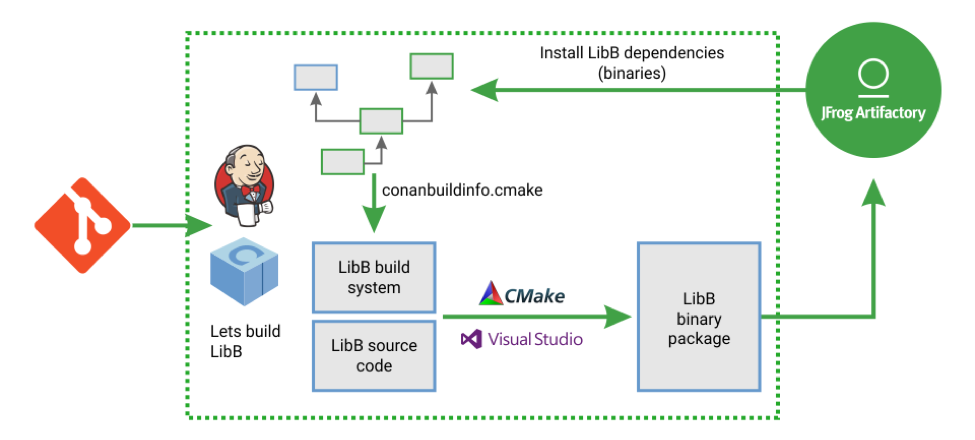
    Let’s take a look at a typical flow, from a DevOps perspective, to illustrate how Conan works. First, a developer makes some source code changes to a specific library (LibB), committing and pushing these changes to the shared version control system server (Git Repo).

    Diagram: CI Cycle example for C/C++ with Conan, Artifactory and Jenkins (build systems: CMake, VS, MakeFile)

    Then the CI system will listen to the Git repository, ideally with Git hooks since polling is not recommended, and fire a job for it (Jenkins). Below is an example of how this would be defined with a Jenkins pipeline:

    The first stage in the above example is straightforward. The second stage invokes the package creation that is internally split into the two subtasks:

    1. The LibB dependencies are retrieved in binary form, to avoid rebuilding them from sources and wasting time.
    2. The dependency graph for all transitive dependencies is built and one or more files are written. In this example, LibB uses CMake as the build system and Conan generates a “conanbuildinfo.cmake” file that includes all of the dependencies information to enable LibB find and correctly link to them. Conan will then call the LibB build system to generate a binary package for it. And finally, in the last Jenkinsfile stage “Upload packages,” the generated binary is uploaded to the Conan package server (JFrog Artifactory). The LibB binary package is immediately available for consumption by developers or other CI jobs.

    This example illustrates a build configuration for a 32-bit architecture as specified in the  “conan create” command with the “-s arch=x86” argument. Note that many additional configurations can be built in parallel using parallel tasks and jobs for different compilers, OS, architectures and more.

    Conclusion

    C and C++ have extra challenges compared to other programming languages in development. This also makes it more challenging when trying to implement modern DevOps, but not impossible. C/C++ has been overlooked and it’s time we update the tools to meet the needs of developers. What DevOps principles and practices are you implementing with your C/C++ projects?

    About the Author / Baruch Sadogursky

    Baruch Sadogursky is the Developer Advocate at JFrog. For a living he hangs out with JFrog’s tech leaders, writes code around the JFrog platform and its ecosystem, and then speaks and blogs about it all. He has been doing this for the last dozen years or so, and enjoys every minute of it. He also is a professional conference speaker on DevOps, Java and Groovy topics, and is a regular at the industry’s most prestigious events including JavaOne (where he was awarded a Rock Star award), DockerCon, Devoxx, DevOps Days, OSCON, Qcon and many others.  His full speaker history is available on Lanyrd. Follow him on Twitter @jbaruch on Twitter, or read his blogs here and here.
  • How Blockchain Tech Can Make DevOps Better

    How Blockchain Tech Can Make DevOps Better

    DevOps and blockchain are among the hottest topics in today’s technology world. However, you rarely hear the two discussed in tandem. Going forward, that may change. Here’s why.

    On the surface, the two may not seem to have much to offer each other. DevOps is a set of cultural principles and practices designed to improve software delivery. Blockchain is a way of storing data in a decentralized fashion.

    Bitcoin, a digital currency whose transaction records are stored using a blockchain, is the most well-known example, but the world is much bigger than Bitcoin.

    So, besides using DevOps practices to create blockchain-based applications, how can they be used together?

    DevOps on the Blockchain

    The answer centers on making software delivery chains more transparent and reliable via blockchain technology.

    What if, instead of relying on tools such as continuous integration servers and automated test suites to determine that code is moving down the pipeline successfully, you instead recorded that data on the blockchain?

    This would make software delivery more transparent, which would in turn improve software quality and reliability. Application delivery status and information about software problems could be viewed instantly by anyone over the blockchain, providing a much greater deal of visibility into the continuous delivery process.

    In addition, smart contracts could be used to regulate how code moves down the pipeline. They could also ensure that software deliveries meet user expectations.

    Rather than relying on tools within the pipeline to catch problems such as a continuous integration error, information could be independently and automatically verified via smart contracts on the blockchain. If a problem occurs, the smart contract could require that it be fixed before it moves down the pipeline and grows into a bigger problem.

    SLAs and Smart Contracts

    At the same time, software functionality could be guaranteed using smart contracts. Currently, DevOps teams use service level agreements (SLAs) to promise their application users a certain degree of functionality and reliability in an application.

    SLAs are not a great solution. They are inefficient to negotiate and costly to dispute. If an application fails to meet SLA terms, it’s on the user to report the problem and demand a solution.

    If service agreements were instead recorded on the blockchain and enforced via smart contracts, users would have a guarantee that an application’s failure to provide the guaranteed functionality would be detected automatically. It could also result in an instant solution, such as the refund by the smart contract of a contractually determined amount of money.

    Traditional SLAs, and all of the inefficient legal and contractual trappings that surround them, would become a thing of the past.

    Conclusion

    For now, no one is actually applying it to improve DevOps and continuous delivery. Like most blockchain-enabled innovations, this remains a theory, not a reality.

    Yet, its potential to improve the work of DevOps teams, and the experiences of their users, is clear. Blockchain may not be a part of the DevOps conversation today, but it is poised to become a part in the future.

    — Chris Tozzi

  • Is DevOps Transformation a Holy Grail?

    Is DevOps Transformation a Holy Grail?

    Both development and operations teams are popping up in enterprises all over the world, and even though DevOps programs are still in the early stages, our ultra digital world calls for even more software applications. This is why many analyst and consultants alike believe that, in the near future, DevOps will be even more powerful than legacy IT. DevOps will be something businesses of all sizes will not be able to live without and the sooner you initiate the DevOps transformation, the better.

    Why DevOps Transformation?

    One of the most exciting aspects of DevOps is enacting technology practices and architecture that help organizations create an agile and continuous product flow, from development to testing, operations and all the way to deployment while increasing stability, reliability and security at the same time.

    More importantly, adopting DevOps can enact changes in the culture of your business, such as allowing teams to work more quickly with more independence. Back in the days before DevOps, deploying even a minor update, upgrade or bug fix would involve literally hundreds of developers doing weeks worth of work.

    Today’s top-performing businesses and DevOps adopters are deploying much faster, and the products they release generally have greater reliability. Still not convinced that DevOps is the holy grail? Consider the following.

    Focus on Speed, Not Cost

    Do you want to achieve the same capabilities of Amazon and Netflix? Of course! Who doesn’t? It’s easy to make an excuse that they have a lot of money to spend, but, when we look deeper, companies that achieve DevOps success are more focused on optimizing speed, not cost. Organizing and optimizing for cost creates functional silos for networking and database people, server admins and many others.

    When you optimize for speed, you are willing to cultivate talent from within, increase engineers’ salary and send them to conferences. You would not necessarily do these things if you were simply optimizing for cost. There are a whole bunch of techniques we can use to optimize for speed, such as using small, cross-functional teams that can deploy value to the customer independently without having to rely on hundreds or, in some cases, thousands of people.

    Best of all, you don’t have to be a big conglomerate to make this transition. Even small and medium-sized businesses can choose to optimize for speed, break down silos and get their product to market faster. After all, this is what DevOps is all about.

    Software Speed vs. Quality

    Businesses that rely on developing and deploying software to support or supply their customers often are faced with choosing speed or quality. If you go to market before your competitor(s), you could be cutting corners in terms of testing and quality assurance, which can ruin your launch. However, if you wait until your code is perfect, you could end up lagging behind in the race for the next big breakthrough. Fortunately, the DevOps approach can resolve this dilemma while improving the bottom line.

    Way back in 2015, the “State of DevOps Report” collected the DevOps health and habits of more than 20,000 tech professionals and found that top performers using DevOps show more agility and reliability in their releases and they were twice more likely than non-DevOps users to exceed productivity goals. In the roughly 800 companies that had a stock ticker symbol, the top performers had an almost 50 percent higher market capitalization growth over three years. This indicates that DevOps is great for IT performance as well as organizational performance.

    What everything boils down to is that all modern businesses are increasingly more reliant on technology when it comes to acquiring new customers and bringing value to those customers. It is becoming increasingly apparent that agility and speed are key attributes for companies who want to win in today’s marketplace.

    DevOps Transformation Guide

    With all of the benefits listed above, you are probably eager to get started with DevOps. Here is a simple step-by-step guide to assist you in your DevOps transformation.

    1. Conduct an Enterprise Readiness Audit – The highest probability of a successful DevOps transformation is when it is championed from the very top. The participation of business leaders is just as vital as operations, security and development teams. To get everyone on the same page and to ensure that your DevOps transformation gets off to a good start, seek assistance from an experienced, external consultant or coach. The purpose of this first step is to get executives to buy in, create mutual goals and get an understanding of what an Agile-DevOps program looks like.
    2. Create a DevOps Center of Excellence (CoE) – One of the most important things you must do here is designate an Executive DevOps lead with enterprise authority. There is no use in creating this Center of Excellence at the incorrect organizational level. It must be spearheaded by someone who has the support and trust from all branches of the organization including delivery and vendors.
    3. Create a Program Governance – Such a program will include creating a communications plan, an enablement program as well as establishing program KPIs. In terms of making a cultural impact on your organization, this is perhaps the most important step. The roles and responsibilities of practitioners will change with Agile and DevOps and it is vital that they understand collaborations between structures where historically animosity could have existed so they can break down these organizational silos. The KPIs will also need to be transitioned from individual metrics to holistic customer business results.
    4. Create a Project Intake Process – Project intake really sets the tone for how successful each new sprint that comes into the program will be. What matters here is not the tools and process, but rather the proper sizing of the tools and process. There is a need to fit for purpose when selecting accelerators, toolchain and development methods. Once it is created, the communication of the intake process needs to be disseminated across the organization. Keep gathering feedback and and continuously evolve and mature based on this feedback.
    5. Identify and Initiate Pilots – To achieve the highest probability of success, apply this step to a specific portfolio of applications or a domain solution. The purpose here is to create a value-stream map of a specific application with company wide participation on all levels. This needs to be done with the necessary amount of detail to identify manual and automated processes, end-to-end process tooling and the people and skills that are involved.
      The next aspect of the intake project is the collaboration between the subject matter experts from the Center of Excellence with the project team. The goal is to advise on “to-be” processes with proper tooling, reusable assets and automation. As the application goes through the development and test cycle, be sure to identify and capture the KPIs for the program in order to compare with existing KPIs.
    6. Scale Your DevOps Program – This final step involves taking feedback from the pilot metrics and scaling them by taking different application portfolios and running multiple release trains. It is not enough to merely do automated deployments and daily builds. The last, but by no means least, piece of the DevOps puzzle is constant feedback and optimization.

    Key Takeaways

    • To keep up with top-performing businesses and stay alive in today’s ultra-competitive, fast-paced environment, implementing DevOps is an absolute must. DevOps is not solely reserved for giant enterprises such as Amazon and Netflix and can be implemented in any-size organizations.
    • In the not too distant future, DevOps will become something businesses of all sizes will not be able to live without. To reap all the benefits DevOps has to offer, the sooner you make the transition to DevOps, the better.
    • With DevOps, there is no longer a reason to choose between speed and quality when deploying your software. When implemented properly, DevOps will allow you to deploy software with both agility and reliability increasing your customer base and the bottom line.
    • The step-by-step approach mentioned above can and should be implemented in any flavor and variety that best suits each individual organization’s needs and constraints.  Pay particularly close attention to large gaps or excessive deviations as they are red flags which will need to be corrected.

    About the Author / Stanislav Ivaschenko

    Stanislav Ivaschenko is a certified AWS solutions architect at Squadex with more than 10 years of professional experience in building, delivering, supporting and optimizing a broad range of software applications. From bare metal to the cloud, from monolith architecture to microservices his expertise and experience help to meet business needs for startups, mid-sized companies and large enterprises. He has experienced a large number of DevOps and infrastructure related tools, services and management practices.

  • The Impact of DevOps and Continuous Testing in 2018

    The Impact of DevOps and Continuous Testing in 2018

    At its core, DevOps is meant to touch an entire organization; however it’s heavily weighted in the software development life cycle (SDLC). That’s why DevOps is going mainstream in 2018. Companies are making the business benefits of DevOps a top priority—it’s all about delivering value to the customer faster through maximum automation of the release cycle/processes. And that begins with organizations realizing that to mature their DevOps processes, they need continuous testing as part of their continuous integration practice.

    Cross-platform Engagement and IoT Will Mean More Devices—and More Apps

    With organizations shifting processes and innovation to a mix of digital technologies—a concept known as digital transformation—consumers are engaging with different apps across various platforms 24 hours a day, seven days a week. Add in the rise of internet of things (IoT) devices, which allow for seamless transitions across smartphones, TVs, tablets and other devices. Now is the time for optimum user experience (UX).

    In 2018, industries such as financial services, health care, retail and automotive will fully embrace IoT. We may also see new types of applications replacing current ones, as consumers and developers embrace the constantly evolving innovative capabilities coming in 2018. However, until the C-suite implements the tools needed to keep up with the growing demand for cross-platform upkeep and testing, other industries will experience slow adoption.

    A critical step in delivering flawless UX is testing, and lots of it. Never has there been more to test, measure and develop than in this digital revolution we are seeing today.

    Frequent New Releases Will Require Even Faster Updates

    As the number of platforms consumers engage with rapidly grows, so does the pressure for developers to ensure apps are running as they should at all times. Same goes for the pace of cloud adoption: Cloud test labs will need more sophisticated capabilities, meaning more platforms and blind spots which require continuous optimization to ensure market readiness. This need for faster turnarounds on update releases and bug fixes will multiply in 2018.

    To maintain and grow customers and profitability, CIOs must recognize the importance of empowering developers with the tools and time to implement continuous testing across the SDLC. Tools, such as those powered by automation and the cloud, increase efficiencies and free up time developers previously spent on manual quality-checking, allowing them to ensure the apps they are producing are keeping up with consumer expectations. If users feel their app is not delivering on the experience they want, they will delete it and move on to the next competitor, which has a direct negative impact on the company’s bottom line.

    Outdated Technologies Will Make for Even Slower Updates

    There is a suite of new tools being introduced to the market for all stages of the SDLC in the hopes of keeping up with the heightened speed of testing. As many DevOps environments struggle to adapt their pipelines to these new tools, many are powered by emerging technologies including machine learning and automation. In 2018, developers should ditch outdated infrastructure and processes in favor of more modern architectures, including implementing microservices.

    Modernizing pipelines will allow developers to design in next-gen engagement methods such as artificial intelligence (AI), augmented reality (AR) and virtual reality (VR) without compromising velocity.

    AI Will Experience Its Shining Moment (for Some)

    In the coming year, AI will start to move from a theoretical concept to a commonly applied technology, especially within the DevOps space. However, developers first must understand what they want AI to help them accomplish—and how—within the SDLC and across the DevOps pipeline. One logical place to start is figuring out how they can best leverage it to analyze test automation strategies.

    The value of a well-oiled, or not-so-well-oiled, DevOps process can make or break an organization. As the new year begins, be sure to include the IT leadership in these conversations to ensure developers are getting what they need, when they need it, to keep business moving as usual. IoT, AI and the cloud are just a few things to keep in mind as the industry moves to implement the latest tools in 2018.

    About the Author / Eran Kinsbruner

    Eran Kinsbruner is the lead technical evangelist at Perfecto and the author of the “Digital Quality Handbook.” He is a software engineering professional with nearly 20 years of experience at companies such as Matrix, Qulicke & Soffa, Sun Microsystems, General Electric, Texas Instruments and NeuStar. He holds various industry certifications such as ISTQB, CMMI, and others. Eran is a recognized mobile testing influencer and thought leader. He is also a patent-holding inventor (test exclusion automated mechanism for mobile J2ME testing), public speaker, researcher and blogger. Follow him on Twitter, connect with him on LinkedIn and check out his professional mobile testing blog.