Tag: devops

  • DevOps and Low-Code/No-Code Tools

    DevOps and Low-Code/No-Code Tools

    Helping out a friend, I had reason to revisit low-code/no-code solutions and poke around a bit. The industry has been relatively quiet on the topic, but changes in systems and marketing made me feel the need to offer an update on the relation of current solutions to DevOps.

    Low-code/no-code solutions have been a panacea in the eyes of some both in and outside the industry for decades. 4GLs were the earliest widespread attempt to make an environment that eliminated the need for developers, and while some years are quieter than others, the movement has not slackened.

    There are even some things we should consider adjuncts to low-code/no-code environments that normally are not considered. Traditionally the drive for low-code/no-code solutions is to move faster than IT normally turns out solutions. This would force us to consider the spreadsheet in accounting with 50,000 lines of special functions as a companion solution—faster than waiting for IT and more agile.

    The thing is that low-code/no-code environments have increasingly realized that IT is going to be their best customer, adjusting their offerings to focus more in that direction. At the same time, agile development and DevOps have made low-code/no-code solutions more palatable to an IT shop that is looking to continue the gains brought about by these technologies.

    The future appears to trend toward low-code/no-code solutions being an adjunct of agile and DevOps. I don’t say this lightly, but the signs do seem to point that way. Agile shops, having become more responsive to business needs, will hit a limit on what they can deliver, while the appetite for faster and more responsive systems delivery will not abate. Low-code environments that offer the following will become a very real option to extending the gains of agile and DevOps:

    • A clear and understandable way to code when needed in the language of choice for the IT environment.
    • A high level of feedback on what is wrong, possibly including suggestions on how to fix it.
    • Transparency in what is actually happening behind the scenes with the “no-code” part of the system.

    The idea is simple. By handling tasks that we, as developers, do over and over and over, we are freed to spend more time doing the truly innovative and environment specific work. This would seem to offer the next step in the growth of agile.

    Those tools that offer options such as automated deployment will step into ARA land also, making the Ops side of DevOps happy—in shops that haven’t invested a fortune in setting up ARA already, anyway. If low-code can offer the ability to say, “Here is a problem,” then the developer can submit a fix, and it is submitted to test, and if tests pass is sent to production (and some of the tools do), then the only questions are, “Does the code generated by the low-code part perform? and, Is it easy to integrate existing libraries, etc.?” If the answers are yes, then we also have an add-on for DevOps that delivers value.

    We live in interesting times. It will be very cool to see this all play out, and interesting to see where it heads after this. At least one vendor is betting on artificial intelligence (AI) and machine learning (ML) to offer increased productivity.

    Of course, it isn’t a panacea. I read where a vendor said, “We automatically update your queries when a table is modified,” which spawns another dozen questions for me, starting with “Really? What do you do about code that was counting on that field much later in processing? Do you check that screens are displaying defaults, or that variables used to make decisions aren’t always the default value? Do you flag this stuff so devs can ‘fix’ what automated query changes ‘broke’?” I’ll be digging in some more, because now they’ve got my attention. So you’ll probably be hearing more from me about this topic.

    Meanwhile, let the future worry about the future, and keep kicking it today. Just stay aware of what else is going on out there that might be handy in your toolbox.

    — Don Macvittie

  • NGINX Extends Microservices Ambitions

    NGINX Extends Microservices Ambitions

    NGINX has extended the reach and scope of a namesake application platform that the company is positioning as a bridge between legacy applications and emerging microservices architectures.

    The NGINX Application Platform now includes NGINX Unit 1.0, an open source application server designed to simplify microservices across multiple application types simultaneously using a single instance of a server. It supports Go, Perl, Python, PHP and Ruby, with additional support planned for Java and JavaScript support soon. Sidney Rabsatt, vice president of product management at NGINX, said NGINIX Unit 1.0 is different from other application servers in that it is configured via an application programming interface (API) and is 30 percent faster than existing app servers.

    NGINX in the second quarter plans to add new monitoring dashboards, alerting and management via NGINX Controller R1 offering that provides the capabilities of a service mesh for microservices without having to set up a separate dedicated framework. Service meshes are a critical capability because they provide a means to manage interdependent microservices at scale.

    Finally, NGINX Plus R15 for enterprise customers builds on new HTTP/2, gRPC and JavaScript features that have been added to the core open source NGINX platform to provide support for high-availability clustering and OpenID Connect capabilities. These capabilities extend the ability to deploy NGINX as a web server, load balancer, API gateway, Kubernetes Ingress controller and sidecar proxy, said Rabsatt.

    Rabsatt noted most IT organizations do not want to set up separate infrastructure for managing microservices. Managing legacy and microservices-based applications in DevOps environments will be a fact of life for years to come, he said, adding that based on the number of downloads of NGINX software being used on Kubernetes platforms running Docker containers, that message is already resonating.

    NGINX claims users have pulled a billion NGINX instances from the Docker Store, including more than a million pulls of the NGINX Kubernetes Ingress controller. According to the company, more than 3 million NGINX instances are deployed in production microservices environments across more than 250 customers. That’s critical for the company because some rivals have positioned service meshes as an existential threat to the NGINIX platform. Overall, NGINIX says there are more than 11 million instances of NGINX are downloaded each month, an average of four instances every second.

    Rabsatt said most developers have made it clear they don’t have the patience to wait for IT operations teams to stand up dedicated microservices infrastructures. Most IT operations teams still don’t have the skills required. NGINX provides the ability to deploy microservices at scale using a platform most developers already know how to programmatically invoke on their own, he said.

    At the same time, NGINX is also committed to making available best practices that DevOps teams can employ when trying to manage what amounts to a new type of hybrid computing environment spanning legacy applications and microservices, he added.

    It remains to be seen exactly where the divide between microservices and legacy applications will be laid down inside most organizations. Some will draw a proverbial line in the sand, while others will look to deconstruct existing applications into series of microservices. Regardless of the approach taken, all those existing legacy applications will not be disappearing anytime soon.

    — Mike Vizard

  • Can Videoconferencing Solve the DevOps Collaboration Conundrum?

    Can Videoconferencing Solve the DevOps Collaboration Conundrum?

    Every DevOps expert has their own definition of what DevOps really means, but a common thread running through each definition is that it is based on collaboration and evolution of a culture of sharing and communication between IT and operations. How that collaboration is achieved has evolved rapidly, and in today’s most successful digital transformation initiatives, video integration is playing a significant role in improving that teamwork.

    Success tactics in a DevOps initiative depends less on the specific tools and more on that theme of creative collaboration, yet many tools claiming a DevOps heritage actually do very little to facilitate that collaboration. Development platforms, for example, do achieve the goal of faster development, which is a goal of DevOps, but DevOps is less about the deliverable and more about the journey. Tools that facilitate better collaboration between teams, such as videoconferencing, lie at the heart of that DevOps journey.

    How businesses handle issues such as videoconferencing decides, to a large degree, how effective and successful they are in a globally connected marketplace and how well they achieve the twin goals of faster software delivery and a final product that meets the needs of the business. 

    Solving the Essential Development Struggle

    The fundamental development struggle is based on a constant battle between developers and line-of-business managers, who often have different goals and different perspectives on how to achieve those goals. Developers may not have a full grasp of the business goals of their projects, while the managers may fail to recognize the technical challenges being faced in delivering the final product.

    Agile, lean and Scrum development strategies do help to hold the development team accountable to the desired timeline of the business, but beyond these tactics, simply understanding the “big picture” of the project is what makes it work and avoids developers getting bogged down in less important details. How, though, does the development team facilitate this understanding?

    The obvious answer is collaboration, but how is that collaboration achieved? Emails? Nobody pays attention to them. Conference room meetings with whiteboards? People will pay attention half the time and then get bored. Team messaging tools? They do facilitate workflow and communication, but still often lack the real-time interaction necessary for getting a true understanding of the project’s requirements.

    Videoconferencing Integration Meets the DevOps Challenge

    New forms of collaboration have been a major catalyst for new development initiatives over the past year, with cloud-based systems have shown the greatest potential. Simple tools such as Office 365 or Google Docs allow users to share and co-edit documents, while Slack, Zoom and other communication tools allow for easy group communication. However, videoconferencing has been shown to have the greatest potential because of its real-time and highly visual nature, and its use has become much more practical with the ubiquity of 4G and high-quality cameras on smartphones and laptops.

    DevOps is as much about creating a culture of collaboration and sharing as it is about specific development tools and tactics. Videoconferencing facilitates the cultural aspect of DevOps, an especially important factor given that teams are often in different physical locations. Even when those functional teams are in the same building, it is common for those teams to operate in a silo. Creating an inclusive and interdepartmental DevOps team is always the starting point, but getting those teams to communicate requires a cultural change—and a little boost from videoconferencing and other collaboration tools.

    Integrating and Executing Videoconferencing in DevOps Environments

    When it comes to video conferencing in the workplace, businesses have to stop taking a laissez-faire approach to integration and execution. While they may assume it’s as simple as plugging in a solution and getting to work, it often requires much more technical competence and involvement from the appropriate parties. 

    For starters, the IT department needs to be involved in its deployment. There’s a lot to consider from a technical perspective before you can even begin to think about details related to specific software solutions and platforms.

    Cloud-based systems have made deployment of videoconferencing and other tools simple, and there is a growing tendency for departmental managers to source and deploy their own tools in a “shadow IT” approach. But since the goal is inter-departmental communication, in this case IT should play the central role in its deployment and execution.

    One of the issues organizations need to think about is how the integration of video technology will affect current processes. The goal of video is to make things more efficient, not to drag processes down.

    It’s also wise to consider how much videoconferencing will be used and whether it’s better to have multiple small-video equipped rooms or one larger, more expensive boardroom setup.

    While IT involvement is vital for successful implementation and execution, it’s not the only factor involved. Failing to involve outside sources can actually result in an incomplete setup.

    “IT departments are incredibly adept at managing network, servers, processes, and internal applications. They know their business and the needs associated with it,” noted videoconferencing provider IVCi in its blog. “However, in certain circumstances deploying videoconferencing can require an organization to act more like a service provider, rather than an IT department. IT departments are rarely experienced in video conferencing implementations and are forced to learn while doing.”

    This lack of experience has become increasingly evident over the past few years—something that The New York Times recently exposed in a story on the lack of security in many videoconferencing systems in major organizations.

    The article exposed a story in which a security chief assumed the role of “hacker” to find holes in his client’s network security. What he found was alarming. While companies spend millions on securing their networks, he was able to hack into multiple conference rooms relatively and control the cameras with relative ease.

    “Many systems are sold, installed and maintained without any level of access security, with auto-answer enabled by default,” the “hacker” HD Moore said. “It boils down to whether organizations are aware of the risk, and our research indicates that many, even well-heeled venture capital firms, were not aware and do not implement even the most basic of security measures.”

    It’s not just security, though. Many businesses simply don’t know how to use their video conferencing solutions. The IT department might understand how the system works, but individual users don’t even know how to start a video session. This results in cumbersome processes that reflect poorly on the business, especially when video is used in client-facing situations.

    It’s Time to Take Video Seriously

    While business leaders spend a lot of time talking about how to be successful with videoconferencing, in terms of knowing what to wear and how to interact with participants, very few take implementation, security and execution seriously. Until it’s given the priority it deserves, videoconferencing will lag in organizations.

    — Dan Blacharski

  • DevOps and Cloud: A Symbiotic Relationship Aimed at Business Success

    DevOps and Cloud: A Symbiotic Relationship Aimed at Business Success

    DevOps and cloud computing are not mutually exclusive, though their relationship has often been uncertain and confusing from a layman’s perspective. While cloud computing relates to technology and services, DevOps is more about processes and process improvement. However, both DevOps and cloud computing are vital in every organization’s journey toward an effective digital transformation.

    Cloud-centric DevOps Automation

    Cloud computing’s centralized nature enables a standard and centralized platform for DevOps automation. Using a cloud platform resolves issues in centralized software deployment caused by the distributed nature of enterprise systems.

    DevOps objectives including continuous integration (CI) and continuous delivery (CD) are supported by most of the private and public cloud service providers. This ensures centralized governance and control, in addition to reducing the costs associated with DevOps automation on-premises. DevOps utilizes orchestration systems that can proactively monitor the cloud data sets and application workloads. End-to-end automation is a prerequisite for deriving the full advantage from the cloud.

    By expanding the concept of continuous improvement to cloud-based platforms, DevOps ensures lesser system vulnerabilities and greater security.

    DevOps Best Practices for Effective Cloud-Based Computing

    DevOps provides several core capabilities that assist organizations in effectively handling cloud challenges. These include:

    • Infrastructure as Code (IAC): IAC comprises the provisioning of servers and installation of application code, the core components of the system architecture.
    • Automated Application Deployments: DevOps practices facilitate the creation of a fully automated application deployment pipeline that is of great importance in the development life cycle.
    • Application Lifecycle Management (ALM): DevOps principles such as continuous integration and delivery help in effective ALM in the cloud.
    • Continuous Quality Assurance (QA) and Testing: DevOps capabilities address the challenges for QA and testing in the cloud by provisioning multiple test environments using cloud-based resources that result in enhanced quality and productivity.
    • Knowledge-Sharing with the Cloud Provider: DevOps promotes the concept of knowledge sharing between organizations and SMEs of the cloud service providers throughout the application life cycle using online communities that are focused on fostering communication and collaboration, thereby ensuring that most risks are mitigated effectively.

    The Significance of Cloud Computing vis-á-vis DevOps

    Cloud computing complements DevOps in several ways. The application-specific infrastructure in the cloud enables developers to own more components easily and enhance their productivity and efficiency. It allows developers to create the development environments quickly without the need for IT operations to provision resources and infrastructure.

    Cloud computing ensures flexible IT infrastructure in addition to enabling greater business agility. It propels IT transformation by helping organizations in streamlining and embedding DevOps processes.

    DevOps tools and services eliminate human error and help in establishing repeatability by automating and streamlining the process of building and managing code.

    IT Transformation Enabled by DevOps with Cloud Technology

    Cloud computing coupled with DevOps ensures that scalability becomes an integral part of application development, thereby contributing to reduced infrastructure costs and increased global reach.

    Cloud-based operations increase the availability and failover ability of applications in addition to eliminating downtime, which leads to improved business reliability and rise in customer satisfaction.

    DevOps automation and IAC help in reducing the complexity of the cloud and improving system maintenance. Additionally, the automated repeatable processes increase security controls. Process streamlining and faster access to the development environments ensure improved product time to market.

    In Conclusion

    By realizing the importance and prioritizing the usage of DevOps in the cloud, organizations can derive a huge number of potential benefits including enhanced agility and reduced operational costs.

    — Veritis

  • Google Unveils Suite of APM Tools

    Google Unveils Suite of APM Tools

    Google today announced that it is making available application performance management (APM) tools based on the same technology it employs to manage its internal IT environment.

    Morgan McLean, a product manager at Google, said Stackdriver APM is based the open source StackDriver Trace and Debugger tools Google originally developed for its DevOps teams.

    The APM offering, available in beta, also includes Stackdriver Profiler, a tool Google developed to enable DevOps teams to explore how their code is running in a production environment.

    Google also said it has integrated Stackdriver Debugger with GitHub Enterprise and GitLab to extend the number of repositories developers can use to create mirrors of their code.

    DevOps teams will have the option of deploying Google APM tools either on-premises or on a public cloud.

    McLean noted that rather than throwing additional compute resources at a performance issue, Stackdriver Profile enables DevOps teams to discover and remediate issues and ultimately reduce costs. To minimize the impact of Stackdriver Profile on the performance of a production application, Google opted to employ statistical methods to create a profile of a piece of code. Specifically, Stackdriver Profiler collects data via lightweight sampling-based instrumentation that runs across every instance an application. Data showing CPU time, wall time, RAM used and contention, for example, is then displayed on a flame chart.

    At the core of the Google APM toolkit is a the Stackdriver Trace software the company developed to collect latency data about applications deployed in a distributed computing environment. McLean said that in the age of microservices it’s not feasible to managed modern distributed applications without any ability to instrument them. For many IT organizations, however, the cost of acquiring APM software or employing a cloud service has forced them to limit their use of APM technologies to only their most critical applications.

    Google is trying to remove cost as significant APM factor, which ultimately will result in the applications deployed on the Google Cloud Platform (GCP) becoming more robust and reliable. The Google APM tools can be applied to applications running on virtual machines and containers, as well as the Google AppEngine, a framework Google exposes on its cloud service to enable the development and hosting of applications. In effect, Google is making it easier for organizations to consume open source tools that IT operations previously would have had to stitch together on their own.

    Reliance on APM tools is at the heart of any DevOps process. But DevOps processes are not universally employed, largely because in addition to acquiring new tools, organizations must evolve their processes and culture. The debate many of them have comes down to an argument over whether they need to buy tools before they change those processes or change their processes to justify buying the tools. Most often, it’s the initiative of handful of developers that force the issue. It’s only once that team is successful that senior managers start to think about replicating the DevOps process employed by that team across the rest of the organization. Via Stackdriver APM, Google is clearly hoping to accelerate the rate at which those transition to DevOps occur.

    — Mike Vizard

  • Integrating ITIL Change Management and DevOps

    Integrating ITIL Change Management and DevOps

    A DevOps solution to the DevOps problem

    Intel IT’s Enterprise landscape is highly complex and diverse. The Enterprise Change Management team has the responsibility of managing the changes in this landscape, which is of the order of hundreds of changes every week. On one hand, we had to make sure we keep the change management processes stringent so that defects/major incidents did not happen in the production environment, leading to productivity loss, shipment delays or cost impacts. On the other, there is a need to assist the capability teams to land changes into production faster than ever to meet their dynamic business demands.

    A challenge that many global IT organizations face is, How do we adhere to ITIL processes while teams transform into agile/DevOps way of working? In other words, how do we manage the two seemingly conflicting goals from two different IT organizations, one focusing on the agility of the development and measuring the success of the projects by their throughput time and the other measuring the success by the quality?

    In the IT enterprise, the quality is measured by the number of change induced incidents in production—incidents that are caused due to change(s) landing in production. Our team had a challenging goal of keeping it to zero! The year 2017 started with this million-dollar (or is it worth more than that?) question: How do we meet this goal while not impacting the speed of the agile teams? We came up with an agile solution. A DevOps solution for the DevOps problem sounds logical, right?

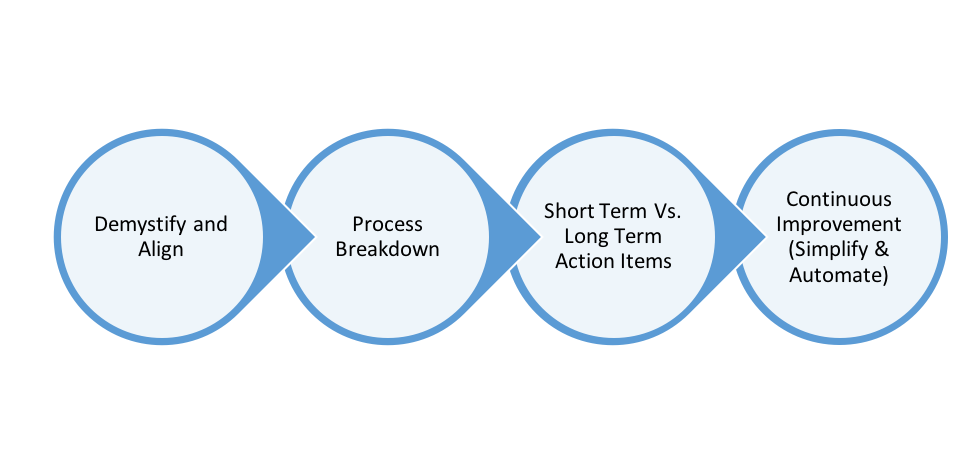
    We formed a scrum team to address this problem with the theme, “Simplify and automate, keeping the focus on quality, velocity and productivity.” The scrum team had change management process owners and the representatives from all the development technologies. The chart below summarizes the steps followed:

    Simplify and Automate, Keeping the Focus on Quality, Velocity and Productivity

    The first sprint was all about getting the alignment. As much as the number of teams that follow agile, as many definitions of agile exist! The focus was to demystify the myths about agile as well as ITIL change management processes. At a glance, processes look incompatible with Agile, but the goals are the same. Both aim to add business value incrementally in a continuous manner without disrupting the operations. They are not contradictory but complimentary.

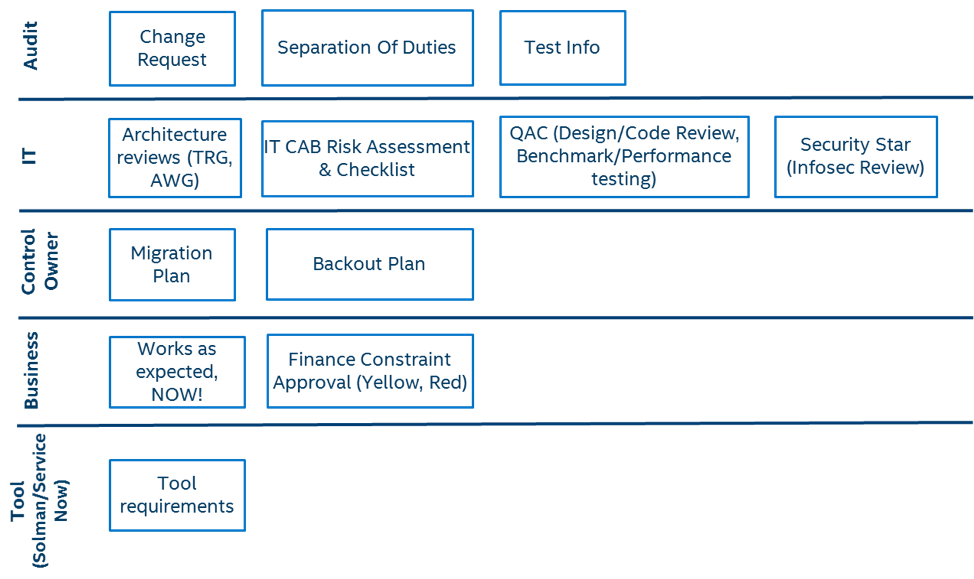
    Subsequent to this alignment, the second sprint went to the details of the enterprise change management process that’s in place. The process was broken down into the lowest level of details based on the 5W and 2H’s (who, why, what, when, where, how, how much). For example, there are process requirements from legal standpoint that are non-negotiable. There are certain processes required to ensure architectural compliance. We also acknowledged and aligned on some of the challenges and the time taken for process adherence. Multiple discussions happened in this space and it helped all of the teams to come to a common understanding on why these process requirements exist. Process swim-lane categorizing all of these aspects was internalized as part of this sprint.

    Change Management Process Swim Lane

    The third sprint got things into action mode. Each of those process steps was identified for potential simplification and automation. They were further classified as short-term and long-term based on the automation efforts on continuous integration/continuous delivery (CI/CD) that were underway. The development teams were shown the flexibility and empowered to meet the process need by way of automation rather than completing a manual checklist for every change. This way of policy and rule-based automation helps in a longer way in integrating ITIL Change Management and DevOps.

    All along these three sprints, process improvements were rolled out. Several automation efforts were launched. Objective risk assessment enabled us to identify changes that required advance communication to all segments. Multiple gate approvals were reduced into only two—one when the development starts and later before it goes to production. Test cases and results from the CI/CD tools were used effectively to replace documentation.

    Process refresher and engagement sessions were held across the organization to share the improvements, gather feedback and incorporate them into further sprints. This helped to gain the confidence of various teams and made the journey further better.

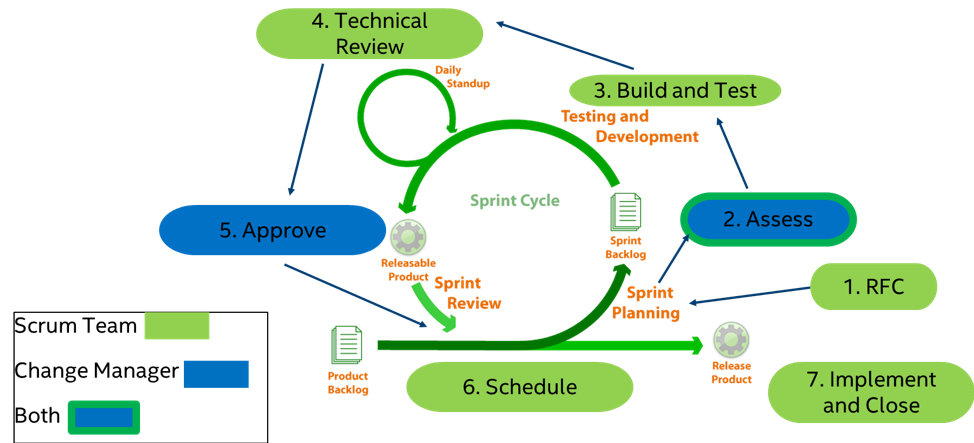
    Now the focus is on continuous improvement, which is to implement all those action items identified and also keep them updated as other factors change in the internal and external environments. Engagement between theAgile/DevOps teams and the change management teams are getting refined based on the scrum development models. The success of ITIL Change Management and DevOps integration relies on calling out the agile process followed for the project and having the right engagements at the right points in time. The below picture depicts the engagement in a simplistic manner:

    Scrum and Change Management Intersection

    The efforts yielded fruits and the organization met the goal. The number of change induced major incidents was ZERO for the Enterprise Segment for the whole of 2017. We need to remember that these process improvements were done without impacting anything underway; it was akin to servicing a flying aircraft in the middle of the sky. The feather in the cap was the positive feedback from the ERP vendor: “The change control process at Intel has become very agile in recent years, with transports to production now occurring nearly every day of the year. … In general, we do not consider such frequent changes to Production to be desirable due to the risks involved; however, Intel appears to be managing the process well as the quality of transports is closely monitored.”

    References:

    1. ITIL® Service Management v3
    2. The DevOps Handbook: How to Create World-Class Agility, Reliability, and Security in Technology Organizations by Gene Kim,‎ Jez Humble,‎ Patrick Debois &‎ John Willis

    This article was co-authored by Ramani Subramanian

    — Srinivasan Radhakrishnan

  • Beware the Blind Spot in Performance Testing for DevOps

    Beware the Blind Spot in Performance Testing for DevOps

    According to Forrester, 64 percent of businesses are dissatisfied with the time it takes to release new features for customers. Brand loyalty has given way to customer loyalty; to drive it, organizations must focus on customers and their experiences using their products and services.  As a result, organizations of all sizes need to make customer experience their highest priority.

    To many business leaders, the speed of rolling out new updates is the most important part of satisfying customer expectations, maintaining customer loyalty and staying ahead of the competition. At the same time, user expectations for fast and reliable digital experiences across platforms continue to increase. As a result, development teams are pushing out service updates faster than ever before while trying to minimize any degradation of the experience as they move at a quickened pace.

    But with heightened and persistent focus on rollout speed, it is easy to forget that the overall user digital experience is critical to maintaining customer loyalty. Businesses must integrate their focus on performance testing with their DevOps workflows to make sure speedy product rollouts don’t come at the expense of customer experience. So how should businesses ensure strong delivery processes to both improve customer experiences and drive efficiency in the application development and delivery pipeline?

    Performance Starts with Constant Measurement in Unit Testing

    DevOps, as does Agile, breaks down testing into smaller chunks. Each new rollout has an iterative impact on the application or website. Whether good or bad, the results stack up. Customers may demand certain new features, but user experience will suffer if each update that meets that demand slows down the application more and more over time.

    Testing these units is very important and setting performance SLAs per unit per build is the first step to a performance culture. Organizations with a mature performance culture will turn back code if it doesn’t meet their performance SLA, keeping it from ever reaching QA.

    This is Not an Either/Or — It is an And 

    DevOps teams are very good at rolling out rapid iterations of products and features, but without careful consideration, the pace of those updates can build momentum for digital experience failure. There are false positives in DevOps testing. With unit tests constantly passing, it’s easy to lose sight of the bigger picture. It’s not the fault of the DevOps engineers or QA; they are working within an established process that is designed to sniff out errors on a per-build basis. But what happens when you put it all together? Organizations start to forget about end-to-end testing and can see failures when the application is stressed by heavy demand, when it really matters during critical business events like Black Friday, live sporting/news events, product launches, or changes in financial markets. Teams implementing DevOps-style testing must remember to test all the “units” working together end to end. This needs to be part of the DevOps workflow but is often being forgotten.

    What You Can’t See Can Hurt You

    Testing for performance in the development lab can help mitigate some of these performance issues before they get out in the wild. But it’s overly optimistic to think that you’ll catch everything. Delivery teams need to constantly maintain visibility in the real-world use of their applications with real-time real user monitoring to alert them of any degradation in the experience during or just following a release. A quick response can help mitigate a larger detrimental impact to the business, and the fidelity of real-user data gives assurance there aren’t any blind spots so you can fail fast, and shorten time to resolution. The web is a wild place, and users have sneaky ways of finding their way into and through your app that you may not foresee when building your test plan. You can use this real user data that you’ve collected while monitoring to create more realistic test plans that will truly replicate real-world browsing behavior.

    This data can also inform the development team about the impact of design decisions on performance in each new update. They can prioritize which parts of the site or app to fix based on what would be most impactful to the business and weigh that against plans to build out new features aimed to enhance functionality. The key factor is an understanding of the business impact of performance and using that to guide and prioritize development resources to achieve the best possible results.

    Adopting a methodology to monitor, optimize and validate ongoing enhancements to your application can help with the continuous improvement of user experiences and give your development efforts a customer focus. DevOps teams have a responsibility to the user experience and should consider how it correlates to business impact. Faster time to market is important, but as important is making sure the customer experience continuously improves as well. Uniting cloud delivery with DevOps workflows and keeping performance in mind will put your business on the path to ensuring both faster rollouts and superior user experiences.

    — Anthony Larkin

  • 5 Things That Will Be Automated in 2018

    5 Things That Will Be Automated in 2018

    We may not have fleets of robots waiting on us hand and foot yet, but the automation revolution is in full swing. With automation becoming more apparent in daily life, some of the misguided fears over the concept and its potential to eliminate jobs are slowly being replaced with the view of automation as an opportunity. And given that IT departments are powering today’s businesses, few can capitalize on this opportunity more than enterprise IT.

    Across industries, the pressure to deliver innovation faster continues to grow, and with budgets and headcounts remaining relatively stagnant, organizations not adopting an automation strategy are being set up for failure. Automation allows computers to do the mundane tasks—and increasingly, even the not so mundane—freeing staff to focus on innovation.

    Automation Everywhere

    While 2017 demonstrated that automation is key to IT optimization and digital transformation, 2018 will be the year IT automation truly hits its stride, with widespread, systematic adoption across industries. So what trends in automation should organizations be looking to embrace next? These five areas in enterprise IT are prime to be automated in 2018:

    Networks

    Networks are arguably the bedrock of enterprise IT, yet true automation of the network stack has been nearly nonexistent. In fact, managing networks hasn’t changed significantly in the past 30 years. Network engineers still are logging in to individual devices and hand-crafting configurations, leaving network teams increasingly isolated from the DevOps revolution and slowing digital transformation.

    This year, network automation will move full steam ahead in the enterprise—and there isn’t really an option for it not to.

    With the ongoing march to cloud, new and potentially massive IoT deployments and increased pressure to modernize internal IT for efficiencies, network engineering must have the same focus and attention that server and app engineering has had in recent years. Network teams cannot remain isolated and resigned to merely maintaining the status quo; we should embrace them and show them how to reap the same benefits combining Dev and Ops has provided.

    Bringing the automation of networks into the fold of DevOps will enable tasks to be executed with increased cadence and with a higher degree of accuracy, while increasing collaboration between teams that are critical to the success of modern application architectures.

    Infrastructure

    To run business systems, you need infrastructure, and that infrastructure must be set up to have an impact on an organization’s day-to-day operations. Regardless of whether your systems are running in the cloud, virtualized environments, containers or on bare metal, if you still have to configure and provision infrastructure manually, you are moving too slow. Weeks or even days to provision systems means holding up changes that your business needs.

    While automated provisioning has been around for a long time, in 2018 we will see this amplified, primarily due to the ease of use of automation tools and platforms. With automation, infrastructure can be scaled automatically or, using precanned scripts, an operations engineer can quickly affect hundreds or even thousands of devices. This type of technology will allow IT departments to rapidly expand their infrastructure without expanding manpower.

    Once automated provisioning takes over the heavy lifting, focus can move to automating management, maintenance and troubleshooting.

    Microsoft

    Traditionally, in the enterprise, Microsoft environments have been managed by discrete teams. Recently the company has been doing a great job of helping users learn from wider experiences within the industry (joining the open source initiative, for example), and it’s helping break down some of the walls within IT departments. Microsoft also has focused on enabling Azure-backed services in the enterprise, offering more opportunities for customers to adopt automation.

    With SQL Server accelerating in popularity—helped by installs on Red Hat Enterprise Linux as well the traditional base of Windows—automation is an opportunity to ease some of the traditional burdens of scale. We’re already seeing open source development of SQL Server Ansible modules, which is only going to help fit this piece of critical application infrastructure into DevOps-style workflows.

    Microsoft has also taken a broader interest in open source projects. This has included contributing to the Ansible community, helping users integrate open source projects with their Windows environments.

    Security

    Make anything simpler and easier and it is far more likely to be adopted. Over the last 25 years, the connection of our lives to the internet has only increased complexity. This complexity has made it more difficult for security professionals to keep us all safe.

    With configuration management, we’re able to build security in from the start rather than as an afterthought. Changes can be logged and enacted rapidly, giving us the ability to respond to incidents in a timely manner—even across massive scale.

    As our colleagues in cloud and networks have automated more, they’ve reached new levels of scalability. This year we’re already seeing growth of the DevSecOps movement, and expect it to continue. When we bring systems and processes together with automation, doing so securely becomes easier.

    Orchestration

    It comes as a surprise to no one when we say modern applications are complex. They comprise the latest technologies as well as legacy systems. They run in the cloud, across multiple databases and need to be accessed from a variety of devices. This makes it exponentially harder to determine root causes of issues, let alone tell these resources what to do. Since application performance can impact a company’s bottom line, maintaining it is a top priority. However, performance tuning often can’t be an IT team’s full-time job.

    Orchestration is the automation of processes. It delivers relief from the administration, monitoring and help-desk chores that eat up time and resources. IT teams can define how an application is supposed to behave in its running state, and orchestration can bring about that bigger picture. Orchestrated automation is what will really set companies apart from one another, allowing teams to deploy applications quickly and reliably with an easy maintenance path ahead.

    — Justin Nemmers

  • Transition to DevOps Increasing Across IT Firms

    Transition to DevOps Increasing Across IT Firms

    Demand for faster product development and quick market release created a need for increased collaboration between Development (Dev) and Operations (Ops) teams, which eventually led to “DevOps.” With this, transition to DevOps has become one of the key points of discussion across many IT firms. This article gives you an overview of the demand and trend for organizations to transition to DevOps.

    Rise in IT innovation and burgeoning digital revolution have led to the demand for faster development and quicker releases to stand out in the IT competitive scenario. This transition eventually led to a new culture that saw collaboration between two key IT teams, development and operations teams, which the industry calls DevOps.

    DevOps established a new style of IT functioning, easing different phases of software process from product development to testing and final market release, all in a rapid and reliable way.

    Why DevOps Transition?

    Rapid delivery of independent software components and continuous integration of the same with production systems forms the key principle behind DevOps functioning.

    DevOps is often confused with Agile methodology. Though they share similarities in providing improved IT performance through rapid development, DevOps stands apart from Agile because of its efficacy in the software deployment phase, ensuring a constant communication between the two teams. Thus, DevOps is often termed as a successor to Agile.

    A collaborative approach, key for information exchange across the line, is one of the major factors driving firms to undergo DevOps implementation.

    Though DevOps is well-known as a merger of development and operations teams, an effective DevOps model extends beyond that to other key functional areas of organizations.

    Breaking the old trend of limiting individual teams to their respective work domains, DevOps brought in a scope for knowledge-sharing among them, wherein developers can extend themselves to testing and deployment and operations team members can upgrade their skill set, learning new languages, architectures and tools.

    Increased Demand for DevOps Resource

    Transition to DevOps holds a key demand in the fast-growing IT market, wherein managing with the existing infrastructure or resource plays an almost equal role as coming up with something new.

    Greenfield projects aside, DevOps deployment is most often seen in brownfield projects that encourage building on the existing resources.

    With this situation in place, there is also a lot of demand for DevOps resources across firms. The “2017 Open Source Jobs Report” from the Linux Foundation shows 60 percent demand for DevOps human resources among more than 2,000 IT open source professionals and IT hiring managers.

    This clearly shows the level of demand that transition to DevOps is holding in the IT industry.

    “If there isn’t an existing DevOps role within your company, software developers should spend time sitting with the operations team or vice versa to understand how their processes work and how they can be improved through collaboration,” said Mike Durney, CEO of the job-hunting site Dice.

    The report found:

    • Nearly 50 percent of hiring managers are keen about those DevOps resources with professional credentials such as relevant certifications
    • More than 47 percent of the companies are ready to fund certification programs for their existing personnel
    • 42 percent of companies are keen on adding DevOps skills to their hiring portfolio
    • “DevOps Engineer” profile ranks second in Glassdoor’s Best 50 jobs in America

    Despite its advantages, however, DevOps has a few challenges to overcome related to application integration, test automation, budget and skill set, among others.

    — Veritis

  • A Saner Way to Build a DevOps Cloud

    A Saner Way to Build a DevOps Cloud

    There’s a popular definition of insanity: doing the same thing repeatedly but expecting different results. Yet, too many enterprises implementing digital services and apps in the cloud fail to heed this warning as they turn to point-to-point integration of their cloud components. In the process, they’re introducing tremendous complexity that looks eerily similar to the point-to-point application integration headaches companies faced before the concept of centralized mediation emerged some 15 years ago.

    Consider the scope of the challenge. A cloud deployment can contain 30-plus product components that need to be integrated to run together smoothly. At any time, an update to one of these products can break processes that rely on the other components. DevOps compounds the complexity, since teams need to ensure consistency across development, test and production environments. It may be fine for a dedicated DevOps team in the group to handle these environments when there’s just one project. However, as the number of applications utilizing cloud technology grows, it is expensive to have DevOps teams build each environment as a wild west project.

    Standardizing on Stacks

    A saner approach is to implement a cloud architecture that standardizes on stack-level operations. Implemented effectively, a stack serves as the reference architecture for all the components and automation needed to create a replica of your production environment. This “full stack” is in essence much like the configuration management database (CMDB) once thought to be the holy grail of enterprises.

    With a meta-description of your full stack for a service or application in place, it becomes possible to deploy identical copies for development, test and production, as well as automate DevOps across your application. This ability to duplicate stacks removes the barriers to, for example, deploying multiple test environments or multiple copies of the stack for security compliance or disaster recovery.

    The stack is an important concept for understanding how you are building and running your software. If something goes wrong, it also provides visibility into what is running, how it was deployed and what the problem might be, facilitating the ability to systematically correct the problem and deploy the fix to all needed replicas. Developing a stack concept also lets you track applications—plus the associated tools, development practices, cloud practices and vulnerabilities—across your organization, providing a critical step in the maturity of your enterprise’s cloud development.

    Standardizing on stacks enables development teams to focus on building new applications and services rather than spending six to 18 months implementing the cloud architecture. At the same time, different groups may require different capabilities, making a one-stack-fits all-approach impractical. The middle ground is to provide a set of “sanctioned stacks” or a portal for configuring stacks, which limits options to products that have been pretested to confirm they work together.

    Structuring DevOps Cloud Stacks

    A DevOps cloud architecture will consist of at least two main stacks: the core infrastructure stack and the DevOps stack. Increasingly, these stacks run in containers, which provide two key advantages: a greater agility through the ability to spin up apps faster and more cost-effective use of resources through operating system-level virtualization.

    The core infrastructure stack supports a service or application with services that ensure security, reliability and scalability. It includes cloud infrastructure, such as networking and storage, which may be handled by a public cloud platform or a private cloud, along with container-specific functionality, such as a Docker runtime with orchestration provided by Docker Swarm or Kubernetes. The stack also has a layer for handling performance and management, including networking, load balancing, service directory, log management, monitoring, backup and recovery and vulnerability scanning, which are supported by a range of different products.

    At the top of the core infrastructure stack is an application layer or stack that includes development tools, such as Java Stack or Node.js Stack. More advanced application stacks will go beyond tools to provide the blueprints for migrating from monolithic apps to containers and microservices.

    The DevOps stack supports continuous integration/continuous deployment (CI/CD). It runs across multiple infrastructure stacks and codifies the tools, processes and procedures to test and deploy or rollback changes to the infrastructure stacks. It typically incorporates DevOps instructions using Chef or Terraform, Ansible, Puppet, Swarm, Helm and half a dozen other tools. Because automated testing is critical, DevOps stacks also should include tools that help with development, building, integration, automated testing. Popular options include WireMock and Selenium for testing web apps and services, Artillery for performance testing and Blackduck or Clare for security testing.

    Additionally, there are key functions within the DevOps cloud platform that extend across development, test and production stacks. These include security, a catalog of stack templates, a registry for certified containers and usage data collection to apply predictive analytics for performance and cost optimization.

    Introducing Stack Automation

    Enterprises implementing a DevOps-enabled cloud need to consider automating as many processes as possible, particularly for large installations. For example, a bank may have 150 to 200 groups developing applications. With each app requiring environments for development, test and production, that means anywhere from 450 to 600 deployed stacks to maintain.

    Significantly, updating stack components needs to be a coordinated process. It’s not enough to rely on automated upgrades and security patching provided by individual product vendors. That’s because if the upgrade or patch changes something that affects a component in the enterprise’s stack, the vendor probably doesn’t know that and this may break the stack.

    Automating stack functions in a coordinated way is best accomplished using an intelligent, centralized “command center” portal that incorporates a central orchestration hub. This eliminates much of the complexity associated with manually running multiple scripts by performing whole operations on a stack. Whether your organization builds it or you use a third-party solution, this hub for automating the execution of scripts should incorporate an orchestration engine, visual map, domain model, proactive monitoring and cost analysis.

    Importantly, a command center incorporating an automation hub lets you take advantage of improved visibility provided by stacks to track and report on cloud costs. Moreover, you can capitalize on “spot” instances—costing five to 10 times less than persistent instances—by using the hub to automatically handle periodic interruptions and redeploy the components taken away.

    Through automated stacks, your organization now has a sane way to cut the complexity of implementing a DevOps cloud while providing an agile platform to support your development team’s innovations.

    — John Mathon