Tag: DevOps

  • Containers In Action: Integrating Containerized Workloads Into Your SDLC – Webinar

    In this session, we’ll start off with an introduction to containers, explore their functionality, their place within your SDLC and their role in CI/CD processes. We will then tackle the intricacies of designing and implementing robust CI/CD workflows that are tailored to handle containerized workloads. This comprehensive discussion will cover essential elements such as the ideal image builders for your needs, build caching strategies and the types of security checks you should consider.

    Presentation Materials:

    Presentation Slides

    CloudBees on AWS Marketplace

    CloudBees Pipeline Demo Text

  • Getting Started With Serverless on AWS With Pulumi – Webinar

    Getting Started With Serverless on AWS With Pulumi – Webinar

    In this workshop, a series of guided exercises will teach you the fundamentals of creating serverless architectures on AWS. You will be introduced to Pulumi, an infrastructure-as-code (IaC) platform, where you can use familiar programming languages to provision modern cloud infrastructure. This workshop is designed to help new users become familiar with the core concepts needed to effectively deploy serverless architectures and workloads on AWS.

    Presentation Materials:

    Sign up for a Pulumi account

    Workshop Code

    Sign up for the Pulumi Community Slack

    AWS Serverless Application 

    Registry

    Automating Pulumi Import with Manually Created Resources

    Pulumi Policy as Code

    Example code here for Fargate (in case Lambda can’t be used) 

    ​​Dockerized ASP.NET App on AWS ECS Fargate

  • Why Multi-Cloud Cost Optimization is Harder Than it Looks

    Why Multi-Cloud Cost Optimization is Harder Than it Looks

    If your business is like most businesses that use the cloud today, you’ve gone multi-cloud. Nine out of 10 large companies have already adopted multiple clouds, and IT analysts expect that even more businesses will embrace multi-cloud architectures over the next several years. Now, the challenge facing those companies is how to optimize spending across multiple clouds. Many will find that, despite common narratives suggesting that cost savings are an inherent benefit of multi-cloud architectures, reducing spending when using multiple clouds can be a lot harder than it looks.

    This is, fortunately, a challenge that can be conquered easily enough. Keep reading for tips on updating your cloud cost optimization strategy to support multiple clouds.

    Multiple Clouds Don’t Guarantee Reduced Cloud Cost

    Before diving into strategies for reducing spending when using multiple clouds, let me dispel a common myth about the relationship between multi-cloud architectures and spending.

    Contrary to popular belief, using multiple clouds doesn’t guarantee that your business will spend less overall in the cloud, or even make it very easy to do so. Although advocates of multi-cloud strategies often promote the idea that using multiple clouds makes it simpler to find the most cost-effective cloud services because you have a larger menu of offerings to choose from, the reality is that cost-saving is not a common outcome of going multi-cloud.

    Sure, in theory, having multiple clouds does give you more opportunities to reduce costs. But in actuality, migrating workloads between clouds typically takes significant time and effort. Given that most mainstream cloud services–like VM hosting and object storage–have been commoditized to the point that there are rarely major pricing differences between them, few businesses are actually going to migrate workloads back and forth between clouds on a frequent basis in order to save a few dollars.

    To Reduce Multi-Cloud Spending, Focus on Cloud Provider Relationships, not Workloads

    That said, adopting a multi-cloud strategy does place you in a position to reduce overall spending–but it’s not because you can migrate workloads between clouds. It’s because you can leverage relationships with multiple cloud providers to negotiate pricing reductions.

    If your teams are actively using multiple clouds, you have a strong ability to negotiate enterprise pricing deals with the providers of each of those clouds. Each provider that you work with will be eager to earn as much of your business as possible, and if they know that your company is already also using a competitor’s platform, they’ll probably be more forthcoming with discounts in exchange for a commitment on your part to run more of your workloads on their cloud.

    How to Keep Multi-Cloud Cost-Efficient – but Also Flexible

    The caveat is that if you want to retain the flexibility that a multi-cloud architecture nominally provides, it’s important not to over-commit to any single cloud provider. If you do, you may find yourself locked into one cloud for certain workloads due to pricing discounts that you’ve negotiated for those workloads with that cloud provider.

    An effective approach for finding the right balance between pricing discounts and flexibility is to decide which percentage of your overall cloud spending you want to avoid tying to a particular cloud. For example, you might decide that it makes sense to commit 30% of your spending to one cloud provider and 30% to another in exchange for pricing discounts that negotiate with each provider. But the remaining 40% of your cloud spending won’t be linked to enterprise agreements with cloud providers, so you’ll be free to spend it in whichever cloud you like.

    Maintain Workload Portability to Minimize Multi-Cloud Spending

    As you work to optimize multi-cloud spending, strive to adopt portable workload technologies, like containers in place of ones that are harder to migrate between clouds, like VMs.

    This is important not just because portable technologies help to maximize the flexibility of your multi-cloud strategy, but also because they give you more leverage when negotiating with cloud providers. The providers realize that some types of workloads are harder to migrate than others, and they’re less likely to offer serious pricing discounts if they know it’s going to be very difficult for you to move your workloads to a competitor.

    But if you can say, “70% of what we deploy runs in Kubernetes and can migrate from your managed Kubernetes environment to your competitor’s offering next week,” you’re in a much stronger negotiating position.

    Conclusion

    In short, don’t assume that simply adopting a multi-cloud architecture will yield enormous cost savings just because you can easily move workloads from one cloud to another to take advantage of pricing differences. In most cases, you can’t.

    What you can do, however, is leverage your relationships with competing cloud providers to negotiate discounted enterprise pricing agreements. And the more portable your workloads are, the better able you’ll be to obtain serious cost savings while simultaneously enjoying the flexibility and agility that multi-cloud architectures stand to offer.

  • What are the Pulumi offerings for modernizing applications on AWS?

    What are the Pulumi offerings for modernizing applications on AWS?

    Get quick info on how builders use Pulumi to modernize their apps on AWS.

  • System Initiative Open Sources Digital Twin Tool for DevOps

    System Initiative Open Sources Digital Twin Tool for DevOps

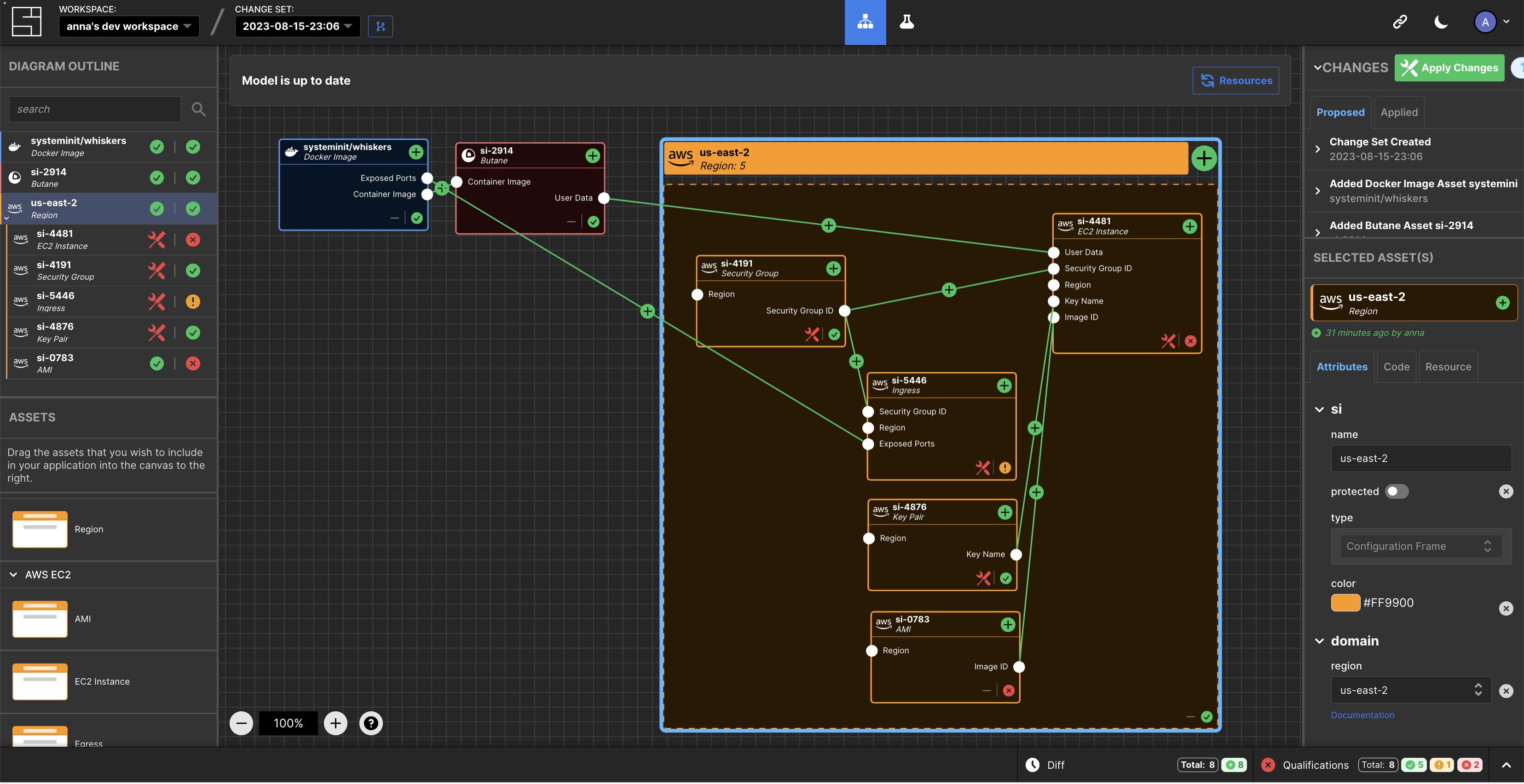
    System Initiative (SI) today announced it is making the digital twin tool it developed to manage DevOps workflows available under an open source Apache 2.0 license.

    Company CEO Adam Jacob said the approach will enable third parties to contribute to a project that is still early in its development cycle while SI provides commercial support via a subscription service.

    SI has developed a tool that creates a digital twin of a DevOps environment that provides a level of abstraction that makes it simpler to manage complex workflows at scale.

    At the core of that effort are models of IT environments created by the SI platform accessed via a visual interface. The automation framework built into the platform uses the relationships between models to infer configuration dynamically and generates typescript code that a DevOps team can then apply to automate a task.

    Feedback loops are provided in real-time to give insight into the viability of a configuration, in addition to eliminating the need for state files to track and ‘plan’ versus ‘apply’ stages.

    This approach streamlines a lot of the complexity that creates bottlenecks in DevOps workflows in what heralds the arrival of a new DevOps 2.0 era, said Jacob.

    In general, SI is making a case for an alternative approach to managing DevOps as the existing platforms and framework are fundamentally broken, added Jacob. Models that create digital twins of DevOps environments represent the arrival of a new era of software development and deployment, he noted.

    As more organizations realize their dependency on software to drive digital processes many are then looking to improve the productivity of developers and the DevOps teams that support them. Unfortunately, many DevOps teams are supporting DevOps workflows using custom code that varies widely in quality. Rather than rely on a DevOps engineer to write code, the SI digital twin tool will create code that can be applied more consistently to create DevOps workflows programmatically.

    One of the reasons few organizations today have fully automated DevOps across the application development and deployment process is that it’s simply too difficult to achieve using legacy tools and DevOps platforms. It’s not clear to what degree a digital twin approach to managing DevOps will resolve that issue, but when coupled with the arrival of artificial intelligence (AI) capabilities the way DevOps is managed is clearly about to transform.

    It may take a while for that transition to occur, but DevOps teams that have historically embraced automation are at the very least going to aggressively experiment with technologies that promise to eliminate much of the drudgery that makes DevOps more tedious than need be. The issue, as always, will be determining which technologies live up to the current level of hype being generated in a way that can be easily adopted.

  • How Observability and Explainability Benefit the SDLC

    How Observability and Explainability Benefit the SDLC

    Software systems require continual modification to meet changing requirements, address errors, improve performance and enhance reliability. Yet, maintaining and modifying complex and distributed software systems as they change and grow can present challenges. When systems are designed with observability and explainability in mind, adapting, expanding and troubleshooting software becomes easier and more effective. Observability refers to the ability to discern and monitor software systems’ real-time behavior and performance. This allows developers to identify and fix issues before they become critical. Explainability articulates how and why the software system operates.

    Both observability and explainability can contribute to the health of the software development life cycle by improving visibility and transparency, helping developers better understand the system’s overall behavior, and allowing the easy identification of errors, all of which contribute to the software system’s overall stability.

    Overview and Benefits of Observability

    Observability combines data from various sources, including application performance management (APM) monitoring, infrastructure monitoring, distributed tracing, third-party integrations and machine-language data. The data is then structured and presented in an accessible way. The first step to building an observable workflow is to identify which metrics best measure the behavior and performance of a software system. This will vary based on the specifics of the system. As a software system operates, logs and traces keep track of activities, requests and responses. They can be used to find the causes of errors and performance bottlenecks. Application performance monitoring (APM), infrastructure logs, machine logs and application traces are just a few examples of logs and traces. These records provide the necessary data to create dashboards and visualizations, which can then be presented to organizational stakeholders.

    While observability is often compared to software monitoring, which generates data focusing on various metrics related to application performance, it differs from monitoring in several respects. Monitoring tracks raw data related to a few performance metrics. It provides information that is best used by the operations team. Observability uses a large amount of structured data to provide a more robust, accessible picture of the whole system, from front end to back end, that can be understood by employees throughout the organization—even those who do not work in development or lack a technical background entirely.

    Advantages of Explainability

    Explainability refers to transforming machine data into a clear articulation of how a software system works such that others outside the organization can understand it. This capability empowers developers and users alike by enabling them to understand what a software system does and how and why it does it, providing a deeper understanding of why errors occur and how to fix them. Presenting data in a visual format is often a vital part of explainability.

    Explainability is especially important in artificial intelligence (AI) and machine learning (ML) systems, where it constitutes a cornerstone of ethical AI development. Model tracing, which refers to monitoring an ML model as it executes to understand its decision-making process better, is a key component of explainability in ML.

    Best Practices and Common Issues With Observability and Explainability

    Before adding observability or explainability to the software development life cycle, it is important to revisit software life cycle best practices and examine what kind of data is being generated. Not all data is meaningful or useful in observability and explainability. Structuring and ordering data from logs and traces is time-consuming but vital to correctly analyze and draw conclusions from the data. For optimal results, it is important for traces to be appropriately tagged and named consistently according to conventions.

    Additionally, the tools used to implement observability and explainability can be complex. For organizations to achieve maximum benefits from these strategies, it’s important for employees to familiarize themselves with the tools and develop specialized knowledge and skills, which can take time. Finally, there are costs associated with implementing observability and explainability. On one hand, commercial software tools come with licensing costs, which can pose a barrier for small businesses. On the other hand, open source alternatives often do not perform well because they lack the funding and resources required to continuously update and enhance the software.

    Harnessing the Power of Observability and Explainability

    Observability and explainability have numerous benefits for organizations that use flexible, ever-changing and complex software systems. Any company interested in building smoother-functioning software applications stands to benefit. Though both observability and explainability require upfront investments of time and money, these investments pay off in the form of quicker and easier error correction, with resolution occurring in minutes rather than hours or days, and greater application stability. In customer-facing applications, this results in fewer crashes and a better experience for the user. Increased stability also makes it easier to scale applications without losing performance. As these benefits become more apparent, a significant number of companies will likely develop software solutions that are reliable, cost-effective and accessible. This will increase the adoption of observability and explainability, which will continue to influence the evolution of software systems.

  • Using Observability to Create a Smart Data-Driven Culture

    Using Observability to Create a Smart Data-Driven Culture

    The first words that come to mind when talking about smart technologies are often artificial intelligence, machine learning and automation. While these smart technologies play a crucial role in smart-driven cultures, they are not the sole factor in making workplaces “smart.” Organizations that have a smart-driven culture, or data-driven culture, also promote innovation. An innovative organization actively encourages creativity, exploration and the pursuit of new ideas, continuously developing and implementing groundbreaking solutions, products and processes. Innovative companies with a culture of learning and growth are often seen as desirable employers and have high employee retention rates, attracting top talent.

    Let’s go over the benefits of a smart-driven culture and how an observability platform can help your company become data-driven in five steps.

    Why is Smart-Driven Culture Important

    You can increase efficiency and productivity among your employees by fostering a smart-driven culture. Smart technologies are able to automate repetitive tasks and streamline processes, which helps free up workers’ time and focus on other issues instead.

    A data-driven culture can also drastically improve decision-making on a company level. Your organization will begin to strategize and act on objective insights rather than guesswork or assumptions. Through collecting, analyzing and interpreting data, you will not only be able to make informed decisions but also know how to optimize processes and mitigate risks.

    Use data to better understand your customers’ preferences and improve your products to meet their demands more effectively. For example, leverage smart technologies and create high-tech touchpoints to tailor each of your customer’s experiences. A culture that encourages continuous learning, experimentation and adaptation is ready to navigate market shifts, changing customer needs and emerging technologies.

    How to Create a Data-Driven Culture in Five Steps

    According to the 2023 Data Analytics Survey conducted by New Vantage Partners, 79.8% of data leaders identified people, business processes and organizational alignment as the principal challenge to becoming data-driven. These folks cited cultural issues, including organizational receptivity to change, communication and organizational alignment, as the greatest obstacles to realizing business value.

    One way to overcome these challenges is by harnessing the power of observability, building data literacy and organizational transformation. Observability refers to the practice of gaining real-time insights into systems, applications, and processes through the collection and analysis of relevant data. Real-time insights will enable your organization to make data-driven decisions, understand your customers better and quickly identify areas of optimization to improve your products.

    These characteristics are fundamental to smart-driven companies, enabling them to stay competitive and drive innovation in the market. Take the following five steps to ensure you’re maximizing the potential of observability and paving the way toward becoming a smart-driven organization:

    1. Define Clear Goals

    Start by defining what a smart-driven culture means for your company. Write down clear outcomes that you want to achieve with a new culture, and identify the specific areas where observability can make a significant impact on your team.

    Focus on areas where real-time insights derived from observability can generate substantial business value. Set SMART (specific, measurable, achievable, relevant and time-bound) goals that can be tracked over time. For example, you could aim to reduce website loading time by 20% in the next two months in order to increase customer conversion.

    2. Implement Robust Observability Tools

    Evaluate and choose observability tools that align with your organization’s specific needs and goals. Look for tools that offer features such as real-time monitoring, log management, distributed tracing, advanced analytics and visualization capabilities.

    Consider factors like scalability, ease of use, integration with existing systems, and the ability to handle diverse data sources. Remember that the availability of accurate and timely insights promotes a culture that values data and encourages performance for achieving business objectives.

    Ask your IT department to help set up your observability tools to gather the relevant data. For our previous example goal of improving website loading times, this will mean gathering real-time data on website performance, such as server response times, page load speeds, and user interactions.

    3. Promote Data Literacy

    Your observability tools are of little help if no one understands how to use and derive helpful insights from the data you gather. Educate all of your employees on good data practices and the role of analytics in decision-making.

    Provide training and support on the data tools you have chosen and encourage your employees to understand, interpret and utilize data effectively in their day-to-day work. For instance, in meetings, you can ask for data points to back up business decisions.

    4. Encourage Collaboration and Knowledge Sharing

    Creating cross-functional teams and encouraging collaboration among different departments, such as IT, operations and analytics, is crucial for the successful implementation of observability practices.

    Taking an interdisciplinary approach allows for a better understanding of the systems and data within the organization. This can lead to the identification of optimization opportunities, help break data silos and practice collective problem-solving as a result.

    5. Iterate and Improve

    Embrace a culture of experimentation and continuous improvement by using observability data to identify areas for optimization and innovation. Encourage teams to test hypotheses, implement changes and measure the impact, fostering a cycle of learning and refinement. Track progress against the goals you set at the beginning and adjust your trajectory if needed.

    Coming back to our goal to improve website loading time. Now that your interdisciplinary team implemented some changes and reduced the loading times, you can assess the impact on user experience and business metrics, such as bounce rates, conversion rates and customer satisfaction.

    Becoming a smart-driven organization will grant you a great competitive advantage. You will make better and faster decisions, employ the best talent, maximize their productivity, and provide an enhanced experience for your customers.

  • CI/CD at Scale With CloudBees, AWS and EKS

    CI/CD at Scale With CloudBees, AWS and EKS

    Ian Kurtz explains what the CloudBees offerings are for modernizing applications on AWS.