Tag: DevOps processes

  • Applying Automation to DevOps

    Applying Automation to DevOps

    In the book, “Life and the Art of Engineering,” author Haresh Sippy said, “Automation is cost-cutting by tightening the corners, not cutting them.” Today, businesses and organizations are constantly on the lookout for ways to improve productivity while reducing inefficiencies across their operations. Automation has emerged as the natural answer as it addresses these issues while enabling organizations to scale their operations.

    And this is a natural fit with DevOps, which aims to automate and streamline and accelerate the development process from code generation to application performance monitoring. Automation promises better results, greater efficiency and reduction or elimination of errors, but many organizations remain hesitant to deploy it in critical operational areas.

    But there are many benefits to DevOps automation that organizations shouldn’t ignore:

    • Consistency: The most crucial benefit of DevOps automation is consistency. The absence of human effort can remove errors because automation tools repeat processes in the same way, ensuring the development environment remains of consistently high quality.
    • Scalability: DevOps automation not only allows new code to be released quickly but in larger quantities, as well. Automation also allows teams to deliver multiple projects in multiple environments simultaneously, reducing manual processes.
    • Speed: One of the first visible benefits DevOps automation will bring to the table is the sheer speed of the product delivery process. DevOps automation streamlines the configuration process, the development environment and other aspects of deploying new software, making the process significantly faster. With DevOps automation, software delivery becomes less dependent on people. 
    • Flexibility: Flexibility can often be an overlooked aspect of automation. However, with DevOps automation, organizations can change and modify critical code based on new requirements and deploy these changes in real-time, rather than having to train the team to manage the operations based on the new changes. 

    Critical DevOps Automation Processes

    Once an organization is aware of the benefits, the obvious next step is to figure out which processes to automate. 

    While a core tenet of DevOps is to automate everything logically possible, that is a long-term goal. On a more immediate basis, organizations would be well-advised to focus on automating a few critical standard processes. 

    This will allow for a smoother transition as well as more efficient results. But the question of which exact processes to automate is a subjective decision that will depend on each organization’s unique needs and technological requirements. However, some fundamental areas that may benefit from DevOps automation in any organization include the following:

    • Software Testing: Any organization with a digital service or product to offer spends considerable time and human resources testing the new offering or updates before rolling them out. Naturally, automating the testing process would bring greater efficiency to the test results while significantly reducing any errors, especially human errors. Additional tests that may be automated include unit tests, smoke tests and UI tests. 
    • Monitoring: Most organizations understand how important it is to adopt a proactive approach to monitoring. A key aspect of DevOps is consistently reading, recording and maintaining crucial data from regular monitoring. By automating this process, organizations can further increase the extraction of valuable B2B data and insights while ensuring greater security against possible breaches and data theft. 
    • Infrastructure: Infrastructure management is a critical area that serves a vital role in ensuring things run smoothly. This includes networks or servers that are consistently in need of maintenance, configuration modifications and initial setups. By deploying an automated infrastructure, organizations can increase efficiency while freeing up valuable human resources to be deployed elsewhere. 
    • Continuous Integration/Continuous Delivery (CI/CD): CI/CD’s entire purpose is fast application development and delivery. By its very nature, this task is ripe for automation as it requires testing and monitoring every little change or modification. Similarly, automating the deployment phase of CI/CD would ensure the distribution of successful updates is carried out proactively the very second it is ready. As a result, organizations will see updates being rolled out more efficiently with minimal errors or bugs in the final updates.
  • 5 Ways to Reduce DevOps Toil

    5 Ways to Reduce DevOps Toil

    Over the last several years, DevOps has become a bit of a buzzword. It has become simultaneously a practice, a culture, a team, a job title and a vendor product. You can hire some DevOps, buy some DevOps, adopt DevOps and sprinkle a little bit of DevOps on top for good measure.

    But, at its core, DevOps is about service ownership: having a single team with end-to-end ownership of software running in production. You should not have one team building software and another team deploying and operating it. That’s slow. DevOps is literally combining development and operations into a single consolidated team. DevOps means embracing the mantra of “you build it, you own it.”

    The primary benefit of DevOps is increased speed and agility of engineering teams. With DevOps, exactly one team is responsible for a given piece of production software. There are no handoffs or knowledge silos. Practices like continuous delivery can emerge. Features can be put in front of your customers’ eyes with a shorter turnaround time. A secondary benefit is increased reliability and security. With “you build it, you own it,” it is no longer someone else’s job to ensure that software is correct or performant or reliable or secure. These responsibilities are “shifted left” onto exactly one team.

    So, where do things go off the rails?

    Service ownership and DevOps mean giving teams the agency to make whatever changes are necessary to their software. That can and will come at the expense of product functionality at times. So, the first place things go off the rails is when there is not a healthy balance between product needs and engineering needs. If teams are constantly working on new features but do not have the capacity to fix operational issues that are affecting them, product quality will eventually suffer. Ultimately, product-engineering imbalance generally comes from misaligned incentives or poorly defined goals from management.

    The second place where things go off the rails is insufficient training. Especially with organizations early in their journey to adopting DevOps, which may have separate development and operations teams, there is a lot of training on new technologies and processes. Developers need to learn about observability, responding to incidents and debugging production applications. Operators and sysadmins need to learn about coding and the principles of software design. These are new skills for both camps and investment in training and mentorship is required.

    What are some best practices for keeping DevOps on track?

    There are lots of these best practices. It really depends on your starting point as an engineering organization, but here are five important ones:

    1. Track Service Ownership

    If DevOps is about “you build it, you own it,” you need an authoritative list of a) what’s running in production and b) which team owns it. If a piece of software goes down, you do not want to find out that the last person to work on it was the intern who left three years ago. Many folks start tracking this kind of information in spreadsheets or wikis, but keeping the data up-to-date becomes challenging. SaaS service catalogs have emerged as the easiest way to automatically keep this data accurate, complete and consistent.

    2. Adopt Continuous Integration, Continuous Delivery and Feature Flags

    Committing small changes multiple times per day is superior to release trains where one large change is committed on an infrequent basis. CI/CD allows for new features and improvements to be tested faster and put in front of customers more quickly. Feature flag tools let you easily test new functionality and product hypotheses for different segments of customers.

    3. Embrace Incident Management

    Software breaks sometimes. Having a robust process for how to triage and respond to both alerts and incidents is important. Within the context of DevOps, the team that owns a piece of software should be responsible for being on-call to respond to associated incidents. If the software breaks or behaves in some unexpected way, the team is expected to fix it. The team is also responsible for identifying what happened and investing in ways to ensure the same error does not occur again.

    4. Treat Everything as Code, Then Automate all the Things

    Applications and microservices? That’s code. Infrastructure? That’s code, too. Security policies? Also code. Deployments? You guessed it–code.

    Treating everything as code allows for processes like “code review” to emerge beyond just your applications. You can have multiple eyes on every change, which catches bugs sooner and spreads knowledge to others. As well, version control systems (like Git) are a natural audit log, allowing anyone to see what was changed, when, and by whom.

    With everything defined as code, the next step is to invest in automation. How many steps does it take for a developer to deploy new code to production? Or to spin up new infrastructure? Or to hook up monitoring or error tracking tools?

    Your goal should be “one step:” run a command. It can be a shell script, a Slack bot or a button with a nice web UI. But it should always be one step. If there are more, you’re now in “manual steps” territory, and that’s brittle. You have no guarantees that successive individuals will run whatever sequence of steps in the same order, which can lead to divergence in how various parts of production are set up.

    Another example is maintaining a list of a) what’s running in production and b) who owns it. Manually keeping that list up-to-date is impossible as the size of your production infrastructure or engineering team scales. You’re better off investing in service catalog tooling that can automatically integrate and capture this information.

    5. Invest in Reducing Toil

    Service ownership and DevOps are two-way streets between management and their engineering teams. On one hand, consolidated ownership will lead to faster delivery and more reliable software. That’s good for management. But, on the other hand, teams require actual empowerment and agency to make decisions about their software. Part of that is having capacity on their roadmaps to make improvements to issues that are causing toil.

    For example, if a particular service is paging a lot or experiencing load issues, service ownership means giving the owning team the time to make any necessary changes. That will come at the short-term expense of new production functionality.

    There’s no free lunch on this last point. Engineering management can’t just combine dev and ops responsibilities and magically expect results. Service ownership is a two-way street. Otherwise, toil will kill your teams in the long term.

  • The Role of DevOps Feedback Loops in Your Value Stream

    The Role of DevOps Feedback Loops in Your Value Stream

    Feedback loops are found in all systems, organic or inorganic. They propel the recirculation of hot or cold air to raise or lower temperatures; they drive the idea exchange that helps businesses fine-tune operating strategies. Yet, nowhere are feedback loops more important but also misunderstood than in software delivery.

    Attaining the “holy grail” of software development—gaining maximum efficiency and maintaining velocity while reducing or eliminating wait times and waste—involves a variety of value stream activities that generate complex feedback loops. These loops are not sequential. They must operate in tandem and in sync with one another within a constrained environment or delivery flow will be disrupted. Understanding, mapping and optimizing this “ecosystem” is essential to ensuring all feedback loops are timed appropriately and no software activity is thrown off schedule.

    Misperceptions of Software Feedback Loops

    Much confusion arises among business leaders regarding the role of feedback loops in software delivery because they are also invaluable in other business activities. There, feedback loops operate in both open and closed systems. A system, whether open or closed, is a set of elements that take inputs through a phased transition to the emergence of an output.

    For example, assume a bank is developing a new depositor service, and although it announces the service will be available soon, it does not solicit specific feedback on how the service will work. Even if it receives random feedback from the public, it is coming from outside the controlled environment. That’s an open system. If the bank hosts customer focus groups and monitors the outcomes of specific variables without any opportunity for outside influences to impact the process, the activity is taking place in a closed system.

    The use of a closed system, whether in business or software development, embraces the principles of systems thinking—the shift in mindset away from linear to circular. With systems thinking, there are a half-dozen defined components, one of which is feedback loops. Understanding feedback loops is an essential part of value stream management to achieve the goal of delivering value to customers faster.

    Feedback loops can have a very positive or negative impact on software flow because awareness of and action on effective feedback impacts all parts of the system. But, before software leaders and teams can address their feedback loops, they must identify them in the value stream and understand the causality of each loop. As you identify feedback loops, patterns start to develop. These patterns can be direct or indirect, and feedback may need to be amplified or throttled, automated or removed altogether based on the loop’s causality.

    Optimizing the System

    Right now, feedback loops are likely disrupting software delivery flow and impeding velocity for millions of companies around the globe because software professionals, from project managers to software engineers, don’t understand them. Even though they recognize that software activities are taking place and that one activity may impact others, they don’t adequately consider the fact that information and material flow are interconnected, as are request flow, development flow and operations flow. They don’t perceive that software delivery is like a three-dimensional game of chess, with the pieces moving around the board multi-dimensionally.

    They also haven’t analyzed their feedback loops in detail so they can adjust based on reality, not perception or plan. Even if they have mapped the flow and the loops, most are unaware of the severe negative consequences even a seemingly minor issue can cause.

    Follow a Real Example

    Here’s an example that mirrors real-life scenarios I have witnessed time and again. Assume that for a new feature request, Epic 1 has entered Intake. The project gets into the Design phase and other work starts moving across the organization. Since everything is interconnected, the User Story ends up in Backlog waiting for the Epic to be completed. Two more User Stories are completed but the Epic has not moved, so they all sit in Backlog.

    Once the Epic clears Design, the User Stories start moving to the Plan phase and the Epic can go straight to Development. Soon, User Stories are In Progress and Material Flow kicks in. Somebody is working on a sprint, and someone else is working on those two pieces of code to make the change or implement a story. The DevOps pipeline is flowing, but not as efficiently as it could.

    Let’s assume instead that teams and managers now understand the feedback loops, and they have been automated to the greatest extent possible. User Stories are automatically moving from Backlog to In Progress once the Epic enters Development.

    When code goes from Build to Test, if a defect is discovered, automated feedback loops can connect to the right User Story and move the code back to In Progress. The developer fixes the defect and it goes right back to In Progress. The company meets its release window.

    In addition, once these elements are connected, and everyone understands these loops, management gains traceability across the value stream, which makes everyone, including customers, happy.

    Beyond the Basics

    The effort described here may sound like a lot of work to the uninitiated, but in practice, the effort more than pays for itself. That’s a great thing because it doesn’t stop here. In our example, as in virtually every software project, there is a lot of valuable human feedback beyond what I have mapped. It could be the information flow from a product manager through a product owner and on to someone tasked with the development portfolio. Or it might flow from testers to the product owner.

    Companies don’t have to map all this flow, but they should understand and address its potential impact. Furthermore, as project specifics, customer mindsets and other variables change, teams should adjust accordingly. That may mean creating, amplifying, throttling or automating feedback loops—or removing them altogether.

    Once organizations have attained a solid footing, they can explore more options. For example, tools, especially with integrations between and among them, can propel and automate the feedback loops, but they should be aligned, from a systems perspective, with the organization’s project workflow.

    Final Thoughts

    Streamlining flow through more efficient feedback loops is only a piece of the puzzle, but it opens up new opportunities such as more easily recognizing and removing waste. It enables organizations to release software faster, which is an imperative for digital transformation.

    Even if they don’t develop software in-house, firms that use enterprise software, from Salesforce to SAP S/4HANA, often have teams that modify it. Plus, customers and end users are all clamoring for a no-touch, self-serve digital experience. If a firm doesn’t provide, its competitors will.

    In mastering the science of delivering quality code at the right level of velocity, companies propel greater innovation, deliver ROI faster, ensure higher quality with lower costs and deliver products that better fit their intended audience and use. They also position themselves to be value stream leaders, and that pleases everyone from the board room to the sales floor.

  • Continuous Testing: Complementary to Agile and DevOps

    Continuous Testing: Complementary to Agile and DevOps

    Digital transformation brought about by quality software applications and robust hardware platforms helps to create a competitive advantage for enterprises across verticals and geographies. Now it is no longer about choosing between speed or quality of software but to incorporate both when delivering to customers. With Agile and DevOps being embraced by enterprises to stay up to speed on the competitive curve, continuous integration (CI), continuous delivery (CD) and continuous testing (CT) have become the catalysts driving quality digital transformation.

    It goes without saying that continuous testing has become critical and is challenging. CI and CD are primarily tools and team-driven activities, while CT is comprehensive in its scope, including teams, tools, testers and services. The importance of driving and integrating code changes cannot be ignored in the software delivery life cycle. At the same time, unless the automated delivery system can figure out the impact of such code changes on customer experience, CI and CD could become meaningless.

    Rising competition and changing market dynamics have put pressure on enterprises to innovate and change. Agile and DevOps in consonance with continuous testing offer the framework to address the requirement. At the heart of digital transformation lies the need to deliver software quickly, safely and reliably, which can be achieved through continuous testing in DevOps.

    Why Continuous Testing?

    Customers today use software applications across a plethora of devices, operating platforms, browsers and networks. They want the applications to be high-performing, navigable, scalable, secure, intuitive and fast-loading. These attributes can only be fostered if the software development process supports a robust QA mechanism in the Agile or DevOps mold. Unlike in the traditional or manual way of testing, where QA comes after development as a separate discipline, the Agile and DevOps models have QA as part of an integrated team with development.

    In Agile testing, the software is tested for performance, security, usability, scalability and more throughout the various stages of development. Thus, glitches are identified and fixed early in the SDLC, leading to the delivery of quality software. A continuous testing strategy enables enterprises to put in place the processes, systems and automation to accelerate the time to market, install improved feedback loops and deliver desirable business outcomes including high-quality products and services, operational efficiency, responsiveness, competitive differentiation and enhanced customer experience.

    Continuous testing services create a quick and risk-free feedback loop for the QA specialists in the Agile testing pipeline to understand (and act upon) the issues faced by the end customers. These services help to manage business risks borne out of the complexity and pace of application delivery.

    Why Agile and DevOps?

    To thrive in a competitive business environment, enterprises must address issues such as time constraints and resource mobilization to build-test-deliver applications that are higher quality, secure and stable. This engenders a renewed focus on continuous test automation and collaboration.

    • The DevOps approach is ideal for enterprises that struggle to manage demand and implement rapid changes in the SDLC.
    • DevOps allows enterprises to address their acceleration and integration needs by establishing a toolchain that cuts across the realms of development, QA, integration, management and delivery.
    • The silo-driven development and operations teams should be integrated to drive better collaboration. Further, the pipeline should have a built-in mechanism to receive continuous feedback and to generate better quality features and functionalities.

    DevOps: The Extension of Agile

    In the Agile model of software development, developers create user stories comprising smaller chunks of the build to generate feedback loops and to align the product to the market need. It started with small teams comprising developers and QA testers working collaboratively and efficiently. Thereafter came the notion of scale, wherein the software code was developed in short iterations. However, down the pipeline, when it came to deployment and receiving feedback, the silo-driven processes stifled what was expected of Agile.

    Consequently, the process was further refined by automating and streamlining the SDLC and incorporating continuous integration. In CI, code is tested repeatedly and integrated to create a stream of small but frequent releases. However, these challenged the Ops team, which found it difficult to keep pace with development. So, while Agile addressed the issues developers faced with glitches being passed on to the next phase, the DevOps approach turned out to be more effective, as it treated the entire SDLC as a monolith of collaborative processes that generate better outcomes.

    Continuous Delivery and Testing

    To support the strategic business needs, many enterprises have graduated from performing CI to implementing CD. In doing so, they have fine-tuned both processes and technical frameworks. From creating CI builds and executing testing to achieving deployment, the continuous delivery and continuous testing methodologies have covered all dimensions of the organization’s operations. These ensure the quick and frequent deployment of quality software applications to end users. The questions to be asked while implementing a continuous testing framework are:

    • Is the software application deployable during its life cycle?
    • Can the software application be deployed while the team is working on its new features?
    • Can the process receive quick and automated feedback each time a change is implemented?
    • Can a push-button deployment be performed for a software version in any environment?

    How Agile, DevOps and Continuous Testing Benefit Enterprises

    These interconnected methodologies help enterprises in several ways:

    • Accelerated time to market.
    • Better productivity and efficiency.
    • Frequent releases of reliable and stable builds.
    • Capability to build products aligned to the market.
    • Better feedback mechanism.
    • Superior customer experiences.

    Conclusion

    The need for enterprises to be the disrupter in the market by producing or delivering top-quality software products or services has put focus on methodologies such as Agile, DevOps and continuous testing. The complementary relationship among the three methodologies has led to the overhauling of processes and working culture in favor of a new paradigm in which quality deployment is a continuous process.

  • Pushing Beyond Agility: The Kanban Maturity Model

    Pushing Beyond Agility: The Kanban Maturity Model

    Kanban is not a novel idea. It is a well-practiced and known method for organizations to increase productivity and efficiency, reduce the lead time of processes and improve delivery flow. However, historically Kanban has been frequently misunderstood.  Many people think that Kanban is just a whiteboard with stickies in columns of to-do, doing, and done. Or just a visual representation of a board in their agile tool. This resulted in many organizations missing out on the full potential of Kanban.

    The Kanban Maturity Model (KMM) is challenging this idea by defining certain steps for growing the maturity of the organizations that use the Kanban Method. The KMM collects and summarizes a decade of experience applying Kanban across diverse industries, in businesses of all sizes. By codifying these experiences, it addresses two common problems experienced in Kanban and agile implementations: overreaching and plateauing. We see overreaching when organizations or teams learn about some interesting practices and try to take them on before they are ready for them. While the practices have shown to be valuable in evolved environments, when taken on too early they can backfire. Plateauing happens when improvement levels off as the original problem that initiated the change initiative is abated. While there have been some improvements, there is potential for significantly more improvement. The KMM addresses this by identifying a road map and coaching tools for taking teams or an organization to the next level of improvement.

    As defined by Teodora Bozheva, Kanban trainer and consultant, and co-author of the “Kanban Maturity Model” with David J. Anderson, “The Kanban Maturity Model provides guidance for developing cultural values and management practices that enable enterprise agility, better customer satisfaction and business outcomes. It is an organizational maturity model that helps organizations evolve their agility and resilience.”

    The KMM maps Kanban practices as well as cultural values against seven organizational maturity levels. At first sight, the KMM may look complex. However, by advancing through the different stages, organizations are helped in a variety of ways with a road map to achieve their improvement goals.  For example, it can help relieve staff from overburdening, make processes more predictable and sustain a balanced workflow. In addition, businesses can deliver faster to market, align around a shared purpose and strengthen organizational values.

    When used in conjunction with software technologies such as Kanbanize, a Kanban automation solution for Agile Project Management, the model helps users fully optimize the workflow across all business functions and bolster the full intent of Kanban. Kanban software solutions and the KMM are stronger together. When companies simply invest only in Kanban automation solutions, they lack the required guidance and resources to fully maximize such tools. Similarly, without the automation of processes, insights and metrics provided by Kanban software technologies, deeper organizational maturity on the KMM scale is difficult to achieve.

    KMM: Understanding the Maturity Levels

    Transitioning from individual gain to the long-term company goals, each level represents a different step in the organizational journey toward agility with Kanban. The seven levels are arranged based on the company focus, main values, how stable the business is and what benefits it receives from Kanban. It is important to understand that each level of the model includes transition and consolidation practices. The transition practices are key to getting past the plateau and helping move from one level to the next,  causing the company to reflect on what can be improved in the process. The consolidation practices are then pulled to achieve the outcomes that the maturity level describes.

    Level 0 – Oblivious

    If your organization is not aware of the need for a structured work process, you are at maturity Level 0. Most organizations at this stage do not have a systematic approach to organizing the way they work and have a difficult time applying Kanban on a team level. At this stage, organizations typically visualize work on a personal level using either a physical or online Kanban board.

    Level 1 – Team Focused

    At maturity Level 1, team members already have built the habit of using Kanban on an individual level. After individuals start to recognize the advantages of simple workflow visualization, it is time to transmit the benefits of Kanban from an individual to a team level.

    An indication that an organization has initiated the transition toward using Kanban at the team level is that the work from the personal Kanban boards is moved to a shared team Kanban board using per-person swim lanes. This way, team members will easily recognize their own tasks, but at the same time, have an overview of what others are doing.

    An important step at this stage is to define and visualize initial policies. These are norms or rules that the whole team agrees to follow for the sake of normal functioning and improving work processes.

    Level 2 – Customer-Driven

    So far, your team should have an understanding that using Kanban helps to boost collaboration and bring transparency to the work process. The next step is recognizing the workflow. In other words, the team starts to understand what and how things are done and realize the need for a defined work process. The goal is for workers to understand what is expected of them and what they can expect of their colleagues with a shared vision of what finished product should look like.

    However, at this stage, while the process, policy usage and decision frameworks are consistent, there is still inconsistency of the desired outcome.

    Level 3 – Fit-for-Purpose

    By the time a company reaches maturity Level 3, they get a deeper understanding and better definition of their processes, workflow, policies and decision frameworks. It is important that the whole team agrees on all of them and understands how they help them achieve better results.

    As you start to outgrow maturity Level 2 and begin the transition from a customer-driven to a “fit-for-purpose” process, an organization becomes better at meeting customer expectations in a sustainable manner, as well as balancing upstream and downstream flow. The steps for maturity should be dedicated to complete alignment of the organizational requirements and processes needed to consistently meet customer expectations with predictability, a fast and balanced workflow, actionable metrics and shorter lead time.

    Level 4 – Risk Hedged

    Maturity Level 4 introduces risk-hedging practices, data-driven decision-making frameworks and use of predictive models. At this level, organizations embrace a model-driven management approach to strategic planning that anticipates risks, forecasts outcomes and results in consistent economics. All these improve overall business economics and robustness against unforeseen events and exceptional circumstances.

    Level 5 – Market Leader

    At maturity Level 5, not only have design, implementation and service delivery become routinely “fit-for-purpose,” the business is now entirely “fit-for-purpose” from a shareholder and end user perspective. The focus of this level is now on continually optimizing the workflow for efficiency and improved economic outcomes without sacrificing quality, increasing margins, minimizing costs and optimizing the value of work done.

    Level 6 – Built for Survival

    The deepest stage, maturity Level 6, is when a business can be established as “built to last.”

    The business is capable of questioning and assessing:

    • Is the way we do things still competitive?
    • Are new technologies, processes, methods or means becoming available that we should be investigating or adopting?
    • Do we offer the right products and services? and if not, how should we change?
    • Are we serving the right markets? Do we have the capability to serve our chosen markets adequately?
    • Who are we as a company? Is our current identity relevant and appropriate, or do we need to reinvent ourselves?

    These questions are strategic concerns, and the answers can help establish capabilities and services that align with the broader company strategy and bottom-line.

    A Road Map for Business Resiliency

    Over the past few years more and more people have learned, understood and applied the Kanban Method correctly and demonstrated significantly improved results. Knowledge work of all forms, from operations to project management to product innovation, the use cases and impact of Kanban across industries and business functions are extensive but sometimes underutilized. The KMM provides a greatly detailed map on how to take your company from a shallow practice that helps sort out individual needs to a fully functional business model. When adopted in conjunction with Kanban automation software, the KMM enables organizations to evolve and improve processes, business outcomes and customer expectations, and drive business resiliency and robustness.

  • GitLab Makes Economic Case for DevOps Platform

    GitLab Makes Economic Case for DevOps Platform

    GitLab is advancing its case for integrating as many DevOps processes as possible on a single platform by making available an economic analysis that claims organizations can improve application development and delivery by 87%, resulting in a savings of more than $23 million.

    Based on an analysis conducted by Forrester Consulting on behalf of GitLab, the report concludes organizations can save as much as $3.7 million by reducing the number of DevOps tools they need to acquire by a factor of four.

    The report also claims organizations can also see a 12x increase in the number of revenue-generating application releases in a year, resulting in $12.3 million in additional revenue, while at the same time reducing code defects to generate more than $16.8 million in savings.

    Overall, the report says there is a 407% return on investment (ROI) in the GitLab platform.

    GitLab has made available an online DevOps cost estimator based on the Forrester Consulting report.

    Colin Fletcher, manager for market research and customer insights for GitLab, said the core GitLab platform is designed from the ground up to make every integrated tool a natural extension of the existing DevOps workflow.

    IT organizations are also focusing on productivity and workflow now that it’s apparent most DevOps teams will be working from home to help combat the spread of the COVID-19 pandemic well into 2021. That shift is requiring some organizations to reorganize DevOps teams around specific development projects, he noted.

    In the wake of the economic downturn brought on by the pandemic, there is also naturally a lot more focus on costs. At the same time, many organizations are trying to accelerate the rate at which applications are developed and deployed as part of a larger digital business transformation initiative. The more business processes become digitized, the more dependent organizations become on software.

    The issue many IT leaders are trying to navigate is finding a way to reduce costs without forcing every member of the DevOps team to standardize on the same set of tools. While it’s arguable there are too many tools employed in a DevOps process today, it’s also clear that most members of those teams prefer to select their own tool whenever possible.

    It’s too early to say to what degree IT organizations may be willing to re-engineer their DevOps processes. Most have spent a significant amount of time and effort tailoring existing platforms to fit their needs. The level of inertia surrounding existing DevOps workflows inside an IT organization is considerable, so IT leaders would have to exercise a considerable amount of political will to switch DevOps platforms. There are, however, often multiple DevOps platforms in use within the same organization. The pressure to rationalize those platforms increases in a downturn.

    In the meantime, there are plenty of IT teams that have still not embraced DevOps. As the size of the DevOps market continues to expand, competition among providers of DevOps platforms is intensifying. For the average IT organization, that’s usually a good thing until a key vendor is acquired by a rival that is not as committed to a platform on which the DevOps team depends.

  • How to Calculate ROI on Infrastructure Automation 

    How to Calculate ROI on Infrastructure Automation 

    Infrastructure and cloud automation. You know you want it. Infrastructure as code and programmable infrastructure are hot topics these days. The possibilities opened by applying software development practices to infrastructure make the vision of transparent infrastructure closer than ever.

    But before you start automating, you may want to look at the value you get from your investment and make sure your plan makes sense. After working in automation for over a decade, I’ve seen the importance of having a clear understanding of the value of automation time and again. It’s about time I write about calculating the return on investment (ROI) on infrastructure automation. But before getting to the specifics of infrastructure and cloud automation, it may be wise to start with the value of automation in general.

    The Value of Automation

    The equation is simple. You have a long, manual process. You figure out a way to automate it. Ta-da! What once took two hours now takes two minutes. And you save sweet 118 minutes. If you run this lovely piece of automation very frequently, the value is multiplied. Saving 118 minutes 10 times a day is very significant. Like magic.

    The Value Formula

    The formula for the value from automation can be very simple:

    Time or Money Saved by Automating a Manual Task

    Time or money saved by automating a manual task should include any benefit you can attribute to the automation. Here are some examples:

    1. The time saved by automation to accomplish a complex task (this process took eight hours. Automation does it in eight minutes. Now we can do it more often).
    2. The time saved for the person who used to do it manually (the person who used to do it manually now has eight free hours, while automation does the work).
    3. The time saved for a person who was waiting for the task to be completed (the person who used to wait eight hours for the task to be done, now waits eight minutes; they can do more).
    4. The time saved by not making human errors (the person who used to spend 10 hours troubleshooting after the eight-hour person finished saves 10 hours).
    5. The time saved by not having to document a manual process (the two people who spend five hours a month teaching other people how to do the eight-hour thing …).

    Investment in Automation

    Investment in automation is often naively calculated as the investment in building automation, but the real investment in automation also includes maintaining and supporting what you have built. So, if someone tells you it took five minutes to whip up this little Bash script, ask yourself what it would look like to update it and support it forever (and when there are 300 more of these scripts). Your calculation of the investment in automation must include building, maintaining and supporting your automation.

    What Should I Automate?

    The formula makes it easy to decide what your automation targets should be—or, in other words, where you would find the most value in automation.

    A good start would be to look for tasks that take a long time to do manually or tasks that are done very often, as automating them will save more time and money. But you need to make sure the investment in automating them would justify the gain.
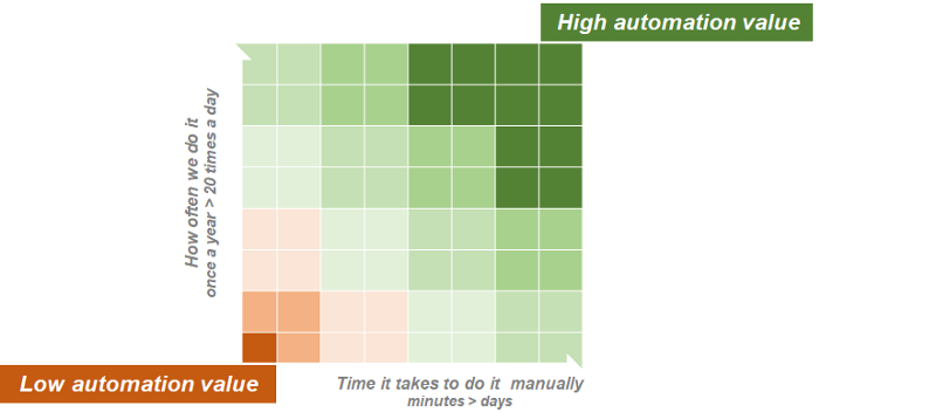
    I wish I had a dollar for every time I talked to someone who wanted to automate the “most difficult task” to prove the value of automation. This follows the logic, “If you can do the hardest thing, you can also do the simplest thing.”—a bit like making it in New York City. But this is not how automation works. Why? Because automation is very much like software development.

    In the software development world, one of the most common answers product teams gets from developers when they ask, “Is it possible to implement feature X?” is: “Everything is possible. It’s just a matter of effort.”

    Well, automation works the same (and that’s not the only similarity to software product development).

    Pretty much everything can be automated. The question is whether it’s worth it.

    If you automate something that takes a whole day to do manually, but you only need to do it once a year ,  it may not be worth automating.

    You could be automating the stupidest thing, and only save 20 minutes, but this thing happens 2,000 times every day, so that may very well be worth it. And the more stupid it is to automate, the better.

    Real Life Infrastructure Automation

    Back to the value formula. In real life, there are more facets to this formula. One of the factors that affect the value you get from automation is how many people have access to it.

    You can automate something that can potentially run 2,000 times a day, every day; this could be a game-changer in terms of value. But if this is something that 2,000 different people need to do, there is also the question of how accessible your automation is.

    Getting your automation to run smoothly by other people is not always a piece of cake (“What’s your problem?! It’s in git! Yes, you just get it from there. I’ll send you the link. You don’t have a user? Get a user! You can’t run it? Of course, you can’t, you need a runtime. Just get the runtime. It’s all in the readme! Oh, wait, the version is not in the readme. Get 3.0, it only works with 3.0. Oh, and you edited the config file, right?”).

    Your calculation of the time or money saved by automating a manual task needs to consider the value derived from automation accessibility:
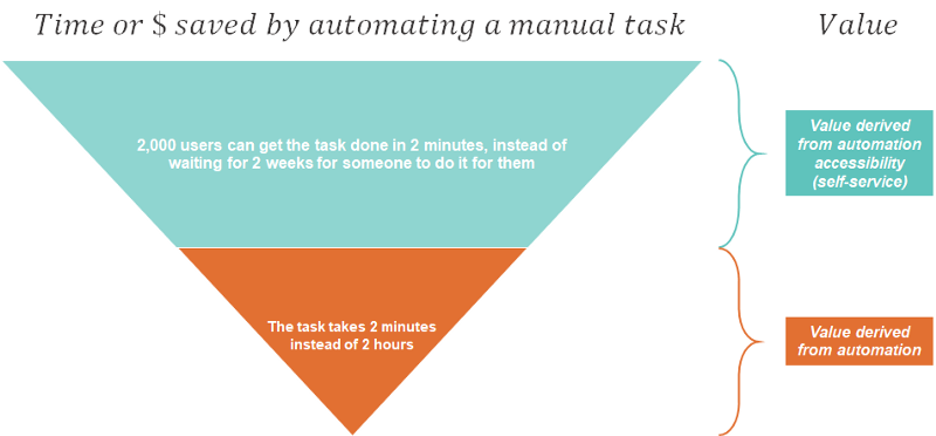
    The more people involved, and the more distributed they are, the more difficult it is to achieve accessibility. Your calculation of the investment in automation should therefore also include the investment in self-service:

    Adding Self-Service

    The self-service part of the equation is often neglected when looking at the value of automation, especially when the focus is very technical. It’s very easy to show a promise of value if you can automate a task, and by the time the question of self-service surfaces, it may be too late.

    This is very common with grassroots automation. In my field, I see this time after time, with teams that adopt free infrastructure automation tools (Ansible, Terraform, Cloudformation, ARM, you name it). In 2020, most people understand that there are no free lunches and that it takes precious time to develop and maintain this automation. Most already get that supporting it over time results in an automation team that is often too swamped to do much else.

    But I dare say that few properly estimate how difficult it is to provide this automation as a service to other teams. I don’t blame them. For an engineer, the thought “This is too slow! I will automate it” comes very naturally. It’s much more difficult to imagine as a developer a user who doesn’t understand the beautiful capabilities of Terraform; someone who freezes when they hear, “It’s in GitHub”; someone who isn’t as fascinated by the elegance of the code and has no #$$%$@ idea what to do with code.

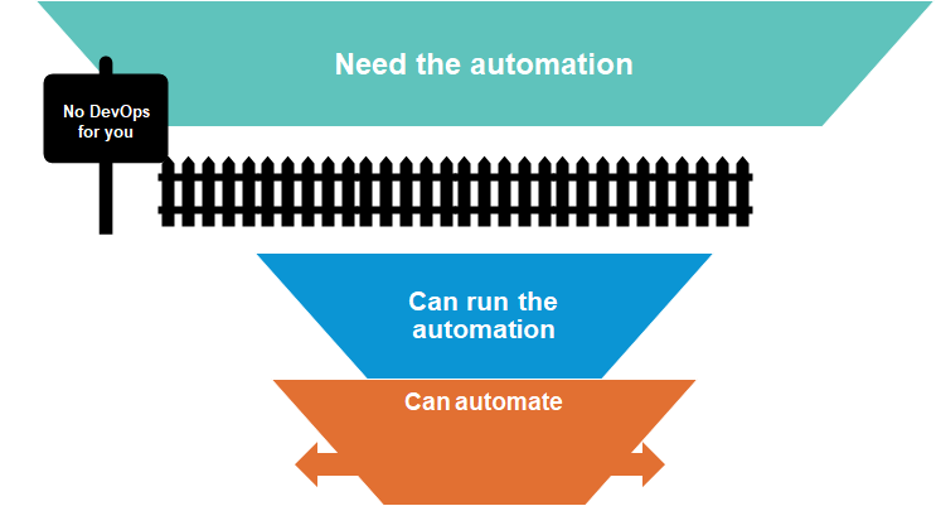
    In a company with multiple teams, the gap between the people who can automate to the people who need the automation can be huge. And if you ignore it, your automation value formula can be very skewed.
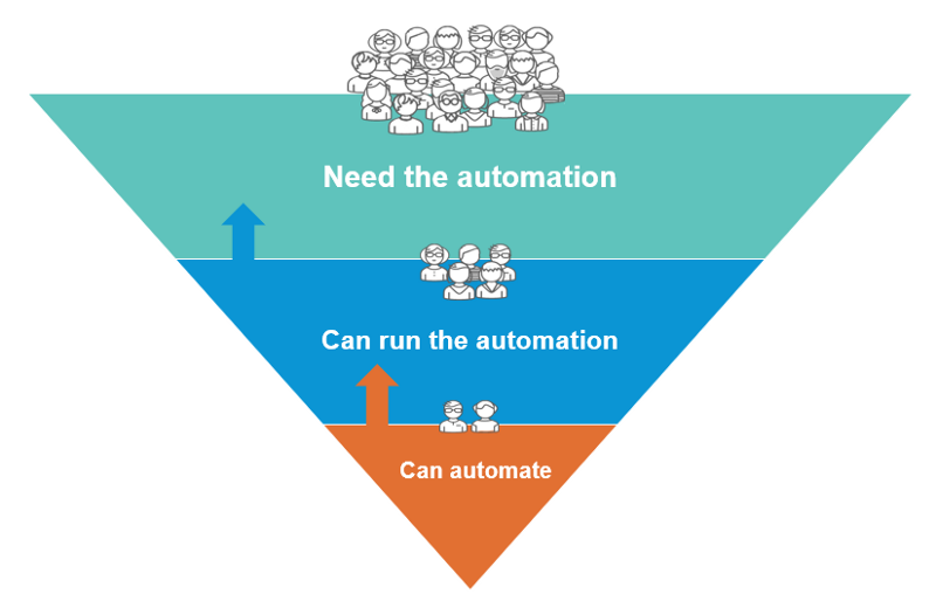
    Can Everyone Run This Automation?

    When you consider automation, the technical question, “Can it be automated?” is not enough. How efficient the code will be, or how much time it would take to build the automation, is also not enough.

    The question, “Can all relevant users run it as a seamless part of their workflow?” has to be asked and weighed in. You may be surprised, but highly accessible yet technically mediocre automation can actually win in some cases.

    How the Value Equation Works in RPA

    Robotic process automation (RPA) is a great example. RPA systems typically provide users with lists of automated actions by recording tasks that the user performs on a graphical user interface.

    For many coders and automation professionals, this approach is almost sacrilegious. You can automate fast, but scaling the technology is extremely limited. It gives a wide audience access to automating tasks without enforcing coding best practices (we already know the masses can’t be automation experts). But RPA can offer high ROI in some cases. If we return to the value formula, this quick-and-dirty type of automation is highly accessible, and therefore the investment in self-service is low. If using RPA means x100 or x1000 people can benefit from automation, compared to high-code tools that only a few can use, we may be able to get impressive ROI.

    Does this mean we should use RPA for DevOps automation? Not really. RPA is not always the right tool for the job, and it won’t always provide the best value in automation. RPA works well when you want to eliminate toil in small tasks (e.g. it is very popular for accounting tasks that a person triggers manually), but the value is lower when you have strict scale, efficiency and reliability requirements, which is typical in DevOps.

    In the case of DevOps, with machine-to-machine heavy interfaces, the investment you will have to make in scaling and maintaining RPA can be very high and the ROI would eventually be very low. RPA may therefore not provide the greatest value in this field, and it makes sense to opt for more scalable options. But this doesn’t mean you should focus solely on good engineering and the question of accessibility and self-service must be addressed in your ROI calculation.

    Infrastructure Automation in DevOps

    In the past years, there has been a growing awareness of self-service in traditional infrastructure automation. Often led by IT and Ops, some of it started with simple means, such as connecting ticketing systems (JIRA, Service Now) to automation tools.

    However, in DevOps infrastructure automation, accessibility of automation is often an afterthought. DevOps automation initiatives usually start with developers. The natural tendency is to invest in high-code automation and to focus on value derived by the time saved on the execution of a task rather than the multiplication of the value through the enablement of a broader user base. Existing self-service mechanisms are thrown aside,  and for good reasons: they are too slow and they don’t seamlessly fit into the DevOps process.

    Ignoring self-service is one of the reasons why DevOps initiatives show great value-promise in small-scale and fail in larger scales.

    Moreover, since DevOps spans so many areas of subject matter expertise, the chances of leaving critical expertise outside the coders’ silo is very high—especially expertise in operations, security and finance. Ignoring these experts’ accessibility to automation leaves them outside the DevOps loop.
    I was very happy to see Gartner’s “Market Guide for Infrastructure Automation Tools,” published in April. If you don’t have access to the gated content, I recommend taking a look at Manju Bhat’s post on the topic. Gartner finally highlights self-service as a critical capability for infrastructure automation:

    “Infrastructure automation tools provide DevOps teams with on-demand, self-service access to standardized environments. Adopting these tools enhances their ability to deliver customer-focused agility and velocity improvements while consuming new technology platforms with limited disruption.”

    I see this acknowledgment in the importance of customer-facing accessibility as a crucial milestone on the way to realizing value in larger-scale DevOps initiatives.

    Additional Value Factors in Infrastructure Automation

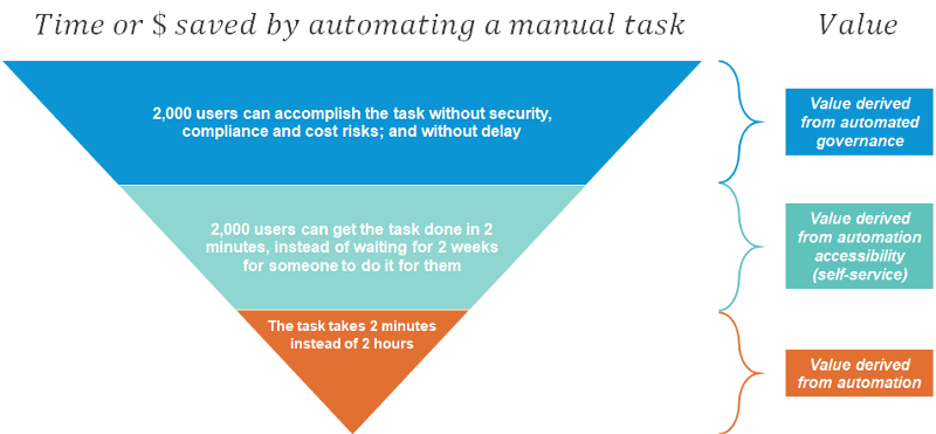
    Unlike general automation, infrastructure automation is a field in which there are additional factors in the value formula, which fall under the Infrastructure Governance category:

    1. Cloud security.
    2. Cloud cost.
    3. Compliance with industry standards.

    These elements need to be taken into consideration when addressing the value derived from automation. Infrastructure automation, especially in public cloud, involves sensitive assets: compute, network, storage, data and security elements. These elements can be expensive, and they could be very vulnerable to attacks.

    If ignored,  these three factors can diminish value. But handling them properly in automation can also generate value.

    The “time/money saved by automating a manual task” could, therefore, include an additional value segment:
    And the investment calculation should also include embedded governance:

    Build Your Value Formula

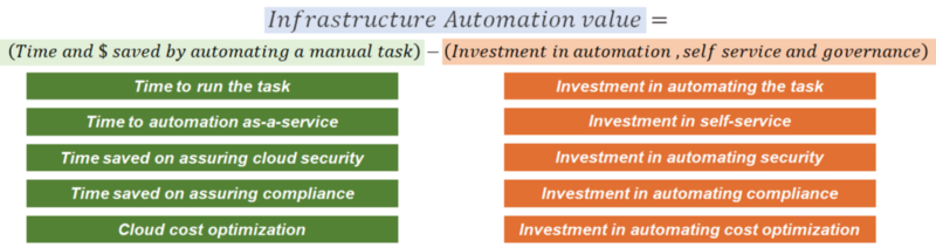
    If you are working on an automation initiative, don’t forget your value formula. It will help you build a business case, get management buy-in and achieve a better understanding of value factors you should focus on.

    The TLDR version:
  • The Fallacy of Move Fast and Break Things

    The Fallacy of Move Fast and Break Things

    Ever since Mark Zuckerburg uttered the phrase “move fast and break things,” it has become the motto of many development teams. Companies wanting to be the next unicorn decided this must be the way to operate. The race was on to release more, ship faster, never stop. If moving slowly and methodically wasn’t working, doing more had to be the key to success.

    These companies would cherry-pick statistics from reports such as the Accelerate: State of DevOps Report. The 2019 report showed elite companies have 46 times more frequent code deployments than low-performing teams and a 2,555 times faster lead time to move from code commit to deploy to support their initiatives to move faster.

    The problem is moving fast doesn’t work across industries or for all teams. To effectively move fast, you need processes in place to support the velocity. The consequences of moving too fast and not being able to fix things when they break are high. 

    How We Got Here

    What has gotten us to the point where we are moving too fast? In short, we have. How do you feel when it takes months or a week for a PR to be resolved compared to hours or days?  As consumers and end-users of software, our expectations are continually rising. We have to ship quickly because that is what we as consumers expect. As customers, we are pushing companies, which in turn push their employees to meet the increasing expectations.

    What are the consequences when you try to move fast and not just break things, but fail? 

    • It takes longer to resolve incidents.
    • You lose customer confidence and sales.
    • Employees burnout and you have a high turnover rate.

    Let’s go back to the stats from the Accelerate: State of DevOps Report. Yes, elite teams ship faster. But, their changes are 1/7 as likely to fail and they recover from incidents 2,604 times faster than low-performing teams. It’s not just about moving fast and breaking things; it is about having the right systems and processes in place to support this way of working.

    Setting Yourself Up for Success

    You need two things to effectively move fast: a culture of psychological safety and smart investments in tooling. Employees need to feel empowered to speak up if things are moving too fast, if they are concerned about why a feature is being built and to identify gaps in the processes. They need to feel they won’t be blamed when something breaks. Building this requires empathy, open communication and teamwork.  This psychological safety is the foundation of being able to move quickly and quickly recover when things break. 

    Next up is selecting the right tooling and processes. Invest in tools that make things easier. Tools should be useful, usable and change the underlying problems, not create more. 

    Think about the tools in place to quickly resolve incidents when something fails:

    • Observability and monitoring tools to identify and notify when things go wrong.
    • Incident management tools to route, track and escalate issues.
    • Feature management tools to enable circuit breakers and load shedding to turn off features quickly. 

    The culture and tools are part of the equation; the final piece is having the right processes in place to effectively use the tools and support the people. 

    What are some processes you can implement to enable safety at speed?

    You should attempt to move fast, you should try to break things—but only when you have the right protections and processes in place. Using a combination of the right tools and processes, you can deliver more value faster without sacrificing quality or your employees’ health.

    — Dawn Parzych

  • Harness Adds Analytics to CDaaS Platform

    Harness Adds Analytics to CDaaS Platform

    Harness has added an analytics module to its namesake continuous delivery-as-a-service (CDaaS) platform that makes it easier to better align constrained software development resources with business goals.

    Omed Habib, director of product marketing at Harness, said Continuous Insights enables organizations to identify bottlenecks and improve overall software delivery by automatically gathering metrics such as deployment frequency, lead time, mean-time-to-restore (MTTR) and change failure rate.

    The Harness Continuous Insights dashboard

    Habib said the biggest challenge organizations face when it comes to continuous delivery is the delicacy of most IT environments. All the interdependencies between complex systems force IT organizations to rely on manual processes and custom scripts, he said, noting the process of rolling back an application whenever there is an issue can take days and weeks.

    The Harness CDaaS platform provides a more seamless approach to application delivery that automatically detects new builds in GitHub, Bamboo, Jenkins, Artifactory or Nexus repositories or any Git repository. Once the DevOps team is alerted, they can employ graphical tools to not only automate the process of building pipelines using YAML files but also leverage machine learning algorithms to evaluate the quality of a deployment and then automatically roll it back whenever necessary by accessing data from tools such as AppDynamics, New Relic, Splunk, Elastic Search and Sumologic, added Habib.

    Harness comes in three flavors. There is a Professional Edition supported by Harness and a free forever Community Edition. There’s also an Essentials Edition aimed at medium-sized companies that do not require a full set of enterprise and security features. The Continuous Insights analytics module is free for all new and existing customers of the Harness Professional Edition.

    Habib said that despite all the advances being made in terms of DevOps and continuous integration, organizations are still struggling with continuous delivery. Because many of them don’t seem to be able to push code into production as quickly as the code can be built, the pace of innovation within IT environments is being stifled. As business leaders wonder why that pace of innovations has slowed, many of them are now demanding access to application delivery metrics.

    It’s not clear to what degree providing access to those metrics will entice organizations to adopt a CDaaS platform. However, as developers and business leaders alike become more frustrated with the pace of application delivery, a groundswell for change is starting to build. Many IT leaders are now looking to automate as much of the application delivery process to prevent that frustration from morphing into a full-scale mutiny.

    In the meantime, there’s an old adage that says things measured are things done. Not everyone may appreciate all the newfound attention being paid to key performance indicators for application delivery. However, the truth is most organizations are not going to ever really solve the application delivery conundrum until somebody starts producing relevant metrics that enable them to comprehend the true scope of the challenge.

    — Mike Vizard

  • CloudBees Harnesses Additional Cloud Bursting

    CloudBees Harnesses Additional Cloud Bursting

    At the DevOps World | Jenkins World 2019 conference, CloudBees announced that the latest version of its CloudBees Accelerator platform now supports cloud bursting to all three of the major public cloud service providers.

    CloudBees Accelerator makes it possible to distribute the build, quality assurance and testing cycles across a large cluster of inexpensive servers. Version 11.1 further extends that capability into the public cloud by adding support for Microsoft Azure and Google Cloud Platform, alongside existing support for Amazon Web Services (AWS).

    Company CEO Sacha Labourey said as organizations embrace multiple clouds for application development and deployment, continuous integration/continuous deployment (CI/CD) platforms will need to span hybrid cloud computing environments. Most organizations are not yet making use of multiple public clouds to develop an application, but they are increasingly relying on external cloud resources to augment the infrastructure resources they have available in on-premises IT environments.

    In addition to providing cloud bursting support for Azure and GCP, version 11.1 of CloudBees Accelerator provides support for Android Q, a forthcoming update to the widely employed mobile operating system due out in the third quarter of this year. Other new capabilities include support for the SSL and TLS cryptographic protocols and improvements to out-of-the-box support for Windows, including the ability to distribute and cache Visual Studio projects.

    Version 11.1 of CloudBees Accelerator also now makes it possible to apply CloudBees Electrify, a framework for optimizing the use of all available infrastructure in parallel, to accelerate build tools such as MSBuild and Scons. In addition, it provides improvements for the open source Yocto Project, an initiative from the Linux Foundation that streamlines the creation of Linux distributions for embedded systems. CloudBees Accelerator enables developers to at least triple the speeds of builds using BitBake build tools or Buildroot files and patches.

    As expansion occurs in both the volume and types of applications that organizations rely on to build and deploy faster, the need to rely more on automation also is increasing. Many DevOps processes that organizations adopt initially have been crafted manually. As organizations become more adept, however, it becomes apparent there is an opportunity to automate a wide range of lower-level processes. Frameworks such as CloudBees Accelerator essentially provide a layer of abstraction that enables organizations to devote more time and energy to writing application code.

    In fact, the next wave of organizations adopting DevOps is likely to benefit greatly from all the processes that the first wave of adopters helped automate by identifying best DevOps practices. It remains to seen just how automated the entire CI/CD environment can become with the rise of, for example, artificial intelligence (AI), but with each passing upgrade cycle, the accessibility of DevOps increases thanks primarily to advances in automation. Those advances not only make it easier to share best DevOps practices across an enterprise, but they also make it feasible for more organizations to embrace DevOps because the level of expertise required to master those DevOps processes declines.

    — Mike Vizard