Tag: DevOps practice

  • GraphQL Documentation Generators: How They Work and Why They Matter

    GraphQL Documentation Generators: How They Work and Why They Matter

    GraphQL is an open source query language developed by Facebook that provides a more efficient, powerful and flexible alternative to traditional REST APIs for fetching and manipulating data over the web. It allows clients to specify the shape and structure of the data they need and receive exactly that, no more and no less.

    Unlike REST APIs, which expose fixed endpoints for specific resources, GraphQL enables clients to construct complex queries that describe the exact data they need, with the server returning only that data in response. This allows for more efficient network usage and improved integration with CI/CD pipelines, as changes to the data requirements can be easily made without breaking existing clients.

    GraphQL also offers real-time capabilities through subscriptions, allowing clients to receive live updates as data changes on the server and supports a range of programming languages and platforms through a variety of libraries and tools.

    What are Documentation Generators?

    Documentation generators are tools that automatically create documentation from source code, making it easier for developers and other stakeholders to understand and work with a codebase. These tools parse the source code and extract information about the structure, behavior and dependencies of the code and use this information to generate documentation in various formats, such as HTML, PDF or markdown.

    Documentation generators can help improve the quality of code documentation by automating the process and reducing the risk of errors or omissions. They can also save time and effort for developers, as they can quickly generate documentation without having to write it manually.

    There are different types of document generation techniques, each with its own advantages and use cases. Let’s discuss some of them:

    • Batch generation: A generic technique that involves generating documents in bulk using a set of rules and templates. It’s commonly used for generating reports, invoices and other similar documents that follow a specific format. Batch generation can save time and effort by automating the document creation process and reducing errors.
    • Text block correspondence: Involves creating documents based on pre-defined text blocks. These text blocks can be customized and combined to create different types of documents, such as contracts, letters, and proposals. Text block correspondence is commonly used in document assembly tools, which allow users to create documents by selecting the appropriate text blocks and filling in the necessary information.
    • Forms: A type of document generation that involves creating web-based forms that users can fill out to generate documents. Forms can be used for a variety of purposes, such as generating applications, registrations and surveys. Forms can be customized to match the specific needs of the organization or business.
    • Documentation synthesis: Involves combining data from multiple sources to create comprehensive documentation. This technique is commonly used in software development where documentation needs to be created for different parts of the system. Documentation synthesis can save time and effort by automating the documentation process and ensuring consistency across different parts of the system.

    Documentation Generators for GraphQL

    Documentation generators for GraphQL work by analyzing the GraphQL schema and generating documentation based on the information in the schema. The GraphQL schema defines the structure of the data and the available operations, and it serves as the basis for generating documentation.

    Documentation generators typically follow a similar process:

    • Analyze the schema: The documentation generator analyzes the GraphQL schema to identify the available types, fields and operations.
    • Generate documentation: Based on the information in the schema, the documentation generator generates documentation in a specific format, such as HTML, markdown or PDF. The documentation typically includes information about the available types, fields and operations, as well as any associated documentation, such as descriptions or examples.
    • Include additional information: Some documentation generators may also include additional information, such as query examples, error handling information or performance considerations.
    • Update the documentation: The documentation generator can be run periodically to update the documentation based on changes to the GraphQL schema.

    Documentation generators for GraphQL are typically designed to be flexible and customizable so that developers can customize the generated documentation to meet their specific needs. For example, developers may be able to customize the format of the documentation, include additional information or exclude certain information.

    Documentation Generators for GraphQL: Why They Matter

    Documentation generators for GraphQL are important tools for DevOps teams for a number of reasons:

    • Efficiency: Documentation generators automate the process of creating and updating documentation for GraphQL APIs. This can save DevOps teams a significant amount of time and effort, particularly when working with large or complex APIs.
    • Consistency: Documentation generators can help ensure that documentation is consistent with the GraphQL API and up-to-date. This can help reduce confusion among developers and other stakeholders and improve the overall quality of the documentation.
    • Collaboration: Documentation generators can help improve collaboration among DevOps teams by making it easier to share and review documentation. This can help ensure that everyone has access to the most up-to-date information and that documentation is reviewed and approved by all stakeholders.
    • Accessibility: Good documentation is essential for developers who are working with GraphQL APIs, and documentation generators can help ensure that documentation is clear, concise, and accessible. This can help reduce the learning curve for new developers and make it easier for developers to understand and work with the API.
    • Scalability: Documentation generators can help DevOps teams manage the documentation of large or complex GraphQL APIs, making it easier to keep up with changes and ensure that the documentation is accurate and up-to-date.

    Conclusion

    In conclusion, by automating the documentation process, documentation generators can save time and effort for developers, reduce the risk of errors and inconsistencies in the documentation and provide a common source of truth for different teams and stakeholders. In addition, documentation generators can help DevOps teams better understand the API, improve collaboration and communication and speed up development cycles. 

  • The Differences Between DevOps and GitOps

    The Differences Between DevOps and GitOps

    The transition to a DevOps model has been welcomed by many organizations that are looking to implement more efficient development processes. However, there are multiple models to choose from, with GitOps a popular choice for many. So what is the difference, and which one is better?

    In this article, we will discuss what each model entails and their key differences and establish if one is better than the other for your business.

    What is DevOps? – An Overview

    The DevOps model involves several tools and practices designed to make software development much more efficient. This increase in efficiency is achieved by implementing more automation, adopting continuous delivery practices and improving the communication channels between the developers and operations. 

    Ultimately, DevOps is designed to assist organizations in deploying new products and systems faster. By establishing more collaboration between development and operational teams, changes can be made quickly to best suit the business’s overall goals. 

    There is no single tool that is required for DevOps. In fact, your team can use any tool that effectively improves communication and automates key tasks. 

    How to Integrate a DevOps Strategy

    Adopting and integrating a DevOps strategy into your organization’s overall workflow is not a difficult process, and it can be achieved by following these steps: 

    1. Create a continuous integration/continuous delivery (CI/CD) pipeline.
    2. Configure this new pipeline to enable the automated deployment of changes to your development/production environment.
    3. Set up an alert and monitoring system for your development environment. 
    4. Create collaboration channels so operational teams can inform the developers of new opportunities to improve the business’s workflow. 

    An Overview of GitOps

    GitOps is a modern concept that was initially introduced by the Kubernetes management system Weaveworks. This model uses Git, an open source, distributed version control system, to track any changes to a system and who has made them. 

    The GitOps model uses a Git repository as the single source of truth (SSoT), improving collaboration between developers and operational team members. This, in turn, allows organizations to automate the deployment process. 

    By leveraging CI/CD pipelines like DevOps, changes are automatically applied to the codebase without any need for manual input. Thanks to Git, these changes can also be easily reversed if needed, reverting to a previous working version. 

    How to Integrate a GitOps Strategy

    GitOps can be integrated into a business’s workflow quite simply by following four key steps: 

    1. Set up a Git repository for your organization’s codebase. When integrating a GitOps strategy, an organization does not need to use GitHub exclusively, as any code repository that uses Git commands can do the job. 
    2. Connect this repository to a CI/CD tool.
    3. Configure your chosen tool to deploy automatic changes to your development environment. Popular tools include Jenkins and Circle CI. 
    4. Set up monitoring and alerts for your development environment. 

    It should be noted that the CI part of GitOps still needs to go through your DevOps tool, whether it’s GitHub Actions or AWS CodeBuild. 

    The Differences Between DevOps and GitOps

    The core difference between the two is that GitOps allows teams within an organization to manage and deploy changes to infrastructure using Git as the single source of truth. DevOps, on the other hand, focuses on effectively connecting development and operational teams using a tool of the organization’s choosing. 

    Either model can offer a number of benefits in terms of development and deployment, but there are notable differences between the two that should be considered. It should also be noted that DevOps and GitOps can work in unison as long as continuous integration (CI) is delivered using your chosen DevOps tool.

    DevOps – Key Elements

    • The DevOps model is considered a working culture.
    • DevOps can use a variety of CI/CD pipelines and is not restricted to any one tool.
    • This model increases automation and the regularity of deployment, reducing any human input. 
    • Cloud configuration can be used for coding, supply chain management and other key requirements.
    • The pipeline separates development and operations processes while improving collaboration between the two.

    GitOps – Key Elements

    • GitOps is a development and deployment technique that relies on the Git version control system.
    • Git is used as the single source of truth for all changes to the codebase.
    • GitOps can use Kubernetes and infrastructure-as-code (IaC) practices and various other CI/CD pipelines. 
    • The GitOps model is designed to increase development times and reduce reliance on lengthy scripts.
    • It also enables a smoother transition between a project’s development and operation stages.

    DevOps Vs. GitOps – Which Model Is Better?

    Both GitOps and DevOps are becoming increasingly popular when it comes to adopting new approaches to improve software development processes and making deployment quicker and more efficient. As outlined above, the difference between the two models largely comes down to the tools that are used, but the result is roughly the same in terms of the overall benefits. 

    Deciding which approach is the right one for your organization or determining which one is “better” will always come down to the needs and requirements of your organization. In fact, the ideal scenario would be to integrate GitOps so it works alongside your DevOps approach. 

    GitOps is not a replacement for DevOps, as the CI process still relies on DevOps tools. However, GitOps can improve the effectiveness of the DevOps team thanks to continuous delivery processes. Using Kubernetes-native mechanisms and commands and sticking to standard source code principles, GitOps does not require developers to change how they work, guaranteeing a seamless implementation process.

    Wrapping Up

    DevOps is a working culture that improves collaboration between development and operations teams and utilizes automation tools, resulting in rapid and more efficient software development. GitOps, on the other hand, uses Git as the single source of truth, making it easy to track changes and further increase development times thanks to continuous delivery processes. 

    Although each model can be used exclusively, they can also work alongside each other to deliver rapid software development and high levels of collaboration. Therefore, it is unfair to claim that one model is better than the other, as they can both play their part in an overall DevOps strategy. 

  • Platform Engineering: Creating a Paved Path to Reduce Developer Toil

    Platform Engineering: Creating a Paved Path to Reduce Developer Toil

    This article is part one of a series of three on the boom in platform engineering and its role in reducing cognitive load and creating a better developer experience.

    Developer toil and cognitive load in the cloud-native space is real. The complexity posed by microservices, Kubernetes, and “software-defined everything” almost necessitated that ops needed to solve many of these issues to support cloud-native development.

    Developers taking on full dev life cycle ownership and the requirement to shift left have resulted in cross-functional and operational concerns that have added even more complexity to already challenging workloads and unclear workflows.

    To fuel productivity and consistency and enable developers to build and ship apps faster and more securely, one must understand what a ‘paved path’ might look like and where responsibility for different aspects of the development life cycle resides.

    Supporting the Majority of Developers Without Alienating the Rest

    Most developers want and need paved paths, particularly as paradigms shift; the adoption of cloud-native development being one such shift. These paths must help them reach the “safety” and productivity on which they are measured in their daily output and provide focus for completing their tasks. Freedom to make choices about processes and tools is not a priority because it ends up being noise that adds to the cognitive load and, in most cases, does not serve the company’s software shipping goals. This majority needs tighter guardrails and guidelines to do their work and get their code into the world without having to figure out too many operational parameters for themselves.

    The cloud-native tooling landscape is vast, duplicative and overwhelming. Just trying to select and test tools could be a developer’s full-time job. Likewise, many organizations and developers have reported frustration—they are wasting a lot of time on repetitive work and routine tasks that deliver no business value, such as setting up environments and troubleshooting CI pipelines along with slow feedback loops in the development process.

    As organizations increase pressure to deliver more with less and do so more frequently, these responsibilities make for a poor and unproductive developer experience and a far-from-ideal use of organizational resources. Stack Overflow’s 2022 Developer Survey reported that 62% of respondents spend more than 30 minutes a day fixing problems and looking for answers, leading to somewhere between 333-651 hours of lost time per week across a team of 50 developers. This reinforces a need for upfront investment in the paved-path developer platform, which eliminates much of this frustration.

    It’s worth noting there is also a so-called 1% developer–one who wants to experiment and discover new tools on their own. Defining the developer experience within narrow guardrails ends up stifling this minority, which not only hampers their productivity but could stand in the way of innovation for organizations as a whole.

    Building quality software requires accommodating both kinds of developers. For most development teams, the goal is to give them a clear route to building apps faster and shipping safely by prescriptively paving the path. The path also must provide enough freedom for adventure, allowing developers to stray from the path (within reason and where it makes sense).

    Internal Developer Platforms: Paving Just Enough Path With Platform Engineering

    Platform engineering and internal developer platforms (IDPs) are much-touted approaches to taming the toil. It is a part of the solution, and as it gains traction, it is becoming more mature. That is, instead of developers and development teams taking on full responsibility for every phase of the software life cycle and potentially cobbling together something resembling a developer platform, the industry trend is moving toward more comprehensive, commercial out-of-the-box platforms. Whether or not this addresses the actual needs of the development organization, this shift works because developer experience is now a business-critical requirement, and a centralized developer platform facilitates that experience (with flexibility enough to house all types of developer experience and developers working across industries).

    The developer platform concept, supported by architecture, DevOps and SRE teams, contains the ingredients of transformation both for business and for developer experience. As the concept reaches critical mass and the “productifying” of developer platforms matures, one thing seems likely: By shifting to a platform model, development organizations are moving from ops-first to developer-first Kubernetes. The developer experience becomes defined by its optimized tools and workflows (and enables wider adoption of cloud-native development across larger organizations and broader industries).

    Refocusing Developer Efforts: Abstractions, not Distractions

    Cognitive toil will exist for developers regardless of the tools they’re offered. Technologies grow more complex and change frequently, and there are performance metrics that must be met. Taking the focus away from developers’ primary concerns—coding and shipping software and features—contributes to this toil without generating much return. As much as developers should be able to gain enough understanding of the way their code behaves and the consequences it can have downstream when shipping and running it, they should not need to become DevOps experts as a part of their work. This is why DevOps, despite predictions to the contrary, isn’t dead.

    The paved-path developer platform gives developers exactly that: The ability to shift left without drifting right. The platform provides much-needed abstractions and tools that enable developers to refocus on priority work without distracting or overwhelming them with too many choices.

    Becoming dev-first doesn’t kill off ops, either. Dev-first Kubernetes and a centralized developer platform elevate the importance of the developer experience while continuing to highlight the importance of DevOps in supporting and optimizing the developer experience. This is an entire topic in and of itself, which will be explored in part two of this article series.

  • The Strategic Product Backlog: Lead, Follow, Watch and Explore

    The Strategic Product Backlog: Lead, Follow, Watch and Explore

    The economic outlook for 2023 suggests many organizations will be leading through a period of resource scarcity as IT budgets are scrutinized and organizational priorities are re-evaluated. For the product manager, smaller budgets and fewer resources place even greater emphasis on ensuring alignment between enterprise priorities and the product backlog.

    Many tools are available to help product managers prioritize individual work items at a tactical level for DevOps teams. These models generally seek to quantify some combination of internal stakeholder value and level-of-effort required for developers and DevOps teams to complete. Higher-value lower-effort items rise to the top.

    Other strategic factors are just as important in the prioritization process, particularly for products living within a larger enterprise product portfolio and competing for scarce resources. For these, a product manager must understand why a given work item or capability should be given priority and how it should be pursued. This involves asking questions such as: On what basis should an item come into the product consideration set? How much should DevOps and developers seek to innovate in delivering a specific capability or feature? What is the product and the portfolio-level opportunity cost of pursuing a given piece of work?

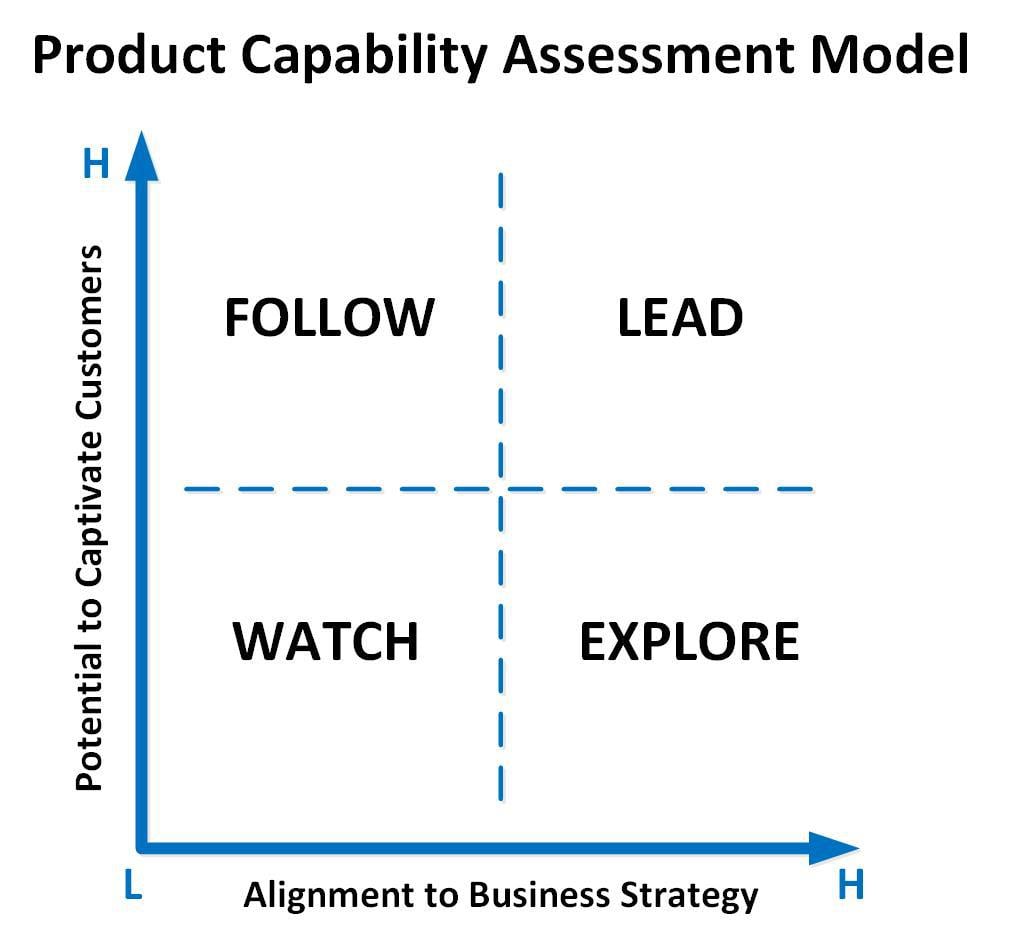
    A strategic model for backlog evaluation helps to set expectations with DevOps, developers and other internal stakeholders and ensure customer needs are front and center in prioritization decisions. It establishes a common language for collaboration. Two dimensions should emerge in evaluating capabilities at higher product and portfolio levels: Capability alignment to business-level strategy and the potential for a capability or feature to not just satisfy but captivate customers with a novel or compelling experience.

    The intersection of business strategy and customer experience factors can serve as a useful model for a product manager to think strategically about their backlog. The model helps to inform not only the question ‘Should we do this?’ but also ‘How should we proceed?’ and make things clearer for DevOps teams.

    Lead

    Items in this quadrant are the unicorns of the backlog and have the greatest potential to both strategically differentiate a product or enterprise and captivate customers. Product focus in this quadrant should be to invest in innovative, industry-leading approaches to satisfying customer needs in a manner that is consistent with business strategy and unique selling proposition. These items should receive the highest strategic priority on the product backlog.

    Follow

    Potential work items in this quadrant have a high potential to delight customers if handled well and irritate them if not. However, these elements are unlikely to be competitively differentiating given the current business strategy. Product focus in this quadrant should be to continually assess competitor treatment of these elements and adopt proven best-in-class experiences within the industry and adjacent industries. The product should focus moderate priority on competitive intelligence for elements in this quadrant and follow existing competitor approaches that enhance the customer experience.

    Watch

    Items in this quadrant are generally not problematic for customers. They are unlikely to differentiate the product or enterprise from competitors given the current business strategy and should be given low priority. The product should monitor proposed solutions in this quadrant to ensure no unnecessary customer effort is being introduced by other backlog items.

    Explore

    Product functionality in this quadrant is either not problematic for the customer experience or represents capabilities that are still emerging in the marketplace. These elements have a likelihood of developing into competitive levers, provided they can be developed in a manner that enhances the customer end-to-end journey. The product should place a high priority on product discovery for elements in this quadrant. It should explore capability innovation through design thinking or similar customer-centered ideation approaches.

    Mapping a product backlog to these four quadrants is as much art as science. It requires a deep understanding of business strategy, intended outcomes and customer needs. As with any strategic model, its value comes from the quality of discussions it produces and its role in surfacing implicit assumptions from the product’s stakeholder group, including DevOps teams and developers. Whatever model is used, having a mechanism to drive strategic product discussions is a critical tool in the product management toolbox and an important step to product management maturity.      

  • DevOps Must Embrace Automation in 2023

    DevOps Must Embrace Automation in 2023

    A survey of 500 engineering and software development professionals in the U.S. suggests more DevOps teams than ever need to resolve to embrace automation at a deeper level in the new year.

    The survey, sponsored by Chronosphere, a provider of an observability platform, found engineers spend, on average, more than 10 hours per week attempting to triage and understand incidents. That equates to a quarter of a 40-hour workweek.

    Overall, 96% of respondents said they spend most of their time resolving low-level issues, with 88% reporting that amount of time negatively impacts them and their careers because so much time is spent troubleshooting IT issues.

    Over a third (33%) said those issues disrupted their personal life with 39% of respondents admitting they are frequently stressed out. Just under a quarter (22%) said they want to quit.

    Chronosphere CEO Martin Mao said much of the stress DevOps teams encounter results from reliance on DevOps platforms that organizations built themselves. Platforms built and supported by a vendor today typically provide higher levels of automation that reduce overall stress levels, he added.

    The survey found that 40% of respondents frequently get alerts from their observability solution without enough context to triage the incident. A total of 59% said half of the incident alerts they receive from their current observability solution aren’t actually helpful or usable, with 49% reporting they struggled with inconsistent performance using their current approach to observability. Nearly half (45%) said their current observability solution requires a lot of manual time and labor.

    Overall, 42% of those using a vendor solution said they experienced high-severity incidents quarterly or more compared to 61% relying on a platform they built. Among organizations not using a vendor solution, the majority said they would consider doing so to enhance team productivity (61%) or improve reliability (54%).

    Stress levels are likely to increase as organizations deploy emerging cloud-native applications. A full 87% of respondents said cloud-native architectures had increased the complexity of discovering and troubleshooting incidents.

    During challenging economic times, it’s more critical for DevOps leaders to understand the total cost of building and maintaining platforms, said Mao. Many organizations decided to build their own platform at a time when there was no other viable option. The manual processes required to support those platforms result in a higher cost of labor that impedes the ability to scale workflows cost-effectively, he noted.

    It’s not clear how big an appetite for change any organization that has built their own DevOps platforms may have in 2023. The challenge is that the initial cost of swapping in a commercial platform may appear high given the fact that the legacy platform is already deployed. However, the cost of the acquisition of a new platform needs to be weighed against the total cost of ongoing operations. A lot of soft costs show up in, for example, higher turnover rates for DevOps professionals that are likely to find a more rewarding job elsewhere that is less tedious. One way or another, at the start of 2023, it’s apparent there are more hard DevOps questions than ever that need to be asked and answered.

  • Switching From FluentD to Vector Log Aggregation Tool

    Switching From FluentD to Vector Log Aggregation Tool

    Log files are extremely important to the data analysis process as they contain essential information about usage patterns, activities and operations within an operating system, application, server or device. This data is relevant to a number of use cases across an organization from resource management, application troubleshooting, regulation compliance and SIEM and business analytics and marketing insights. To manage logs created by these use cases and make use of this wealth of data, log aggregation tools enable organizations to systematically collect and standardize log files. However, choosing the right tool can be quite challenging.

    This blog will detail and compare the popular open source fluentD and Vector tools for log aggregation.

    fluentD Configuration and Efficiency Calculation

    When using orchestration tools like Kubernetes to deploy containers or other API resources, there is a need for a log aggregator to store the pod or node logs in a cloud platform. For a particular requirement, fluentD was used as a log aggregator tool to push K8s pod logs to cloud storage buckets with a sample configuration as shown below:

    <match kubernetes.**>

    @type <cloud platform name>

    project <project name in cloud platform>

    keyfile <credential json to access the cloud storage> bucket <cloud storage bucket name> object_key_format <name for the file to be used>

    path <file prefix/path where the file have to be stored>

    <buffer tag,time>

    @type file

    path /var/log/fluent/gcs timekey 1m timekey_wait 30 timekey_use_utc true flush_thread_count 16 flush_at_shutdown true flush_mode interval flush_interval 1 chunk_limit_size 10MB retry_max_interval 30 retry_wait 60

    </buffer> <format>

    @type json </format>

    </match>

    Using this system, fluentD was pushing only 47.62% of total logs to cloud storage. Since there was a loss of more than 50%, changes were made to the configuration. In most of the changes, the efficiency was somewhere between 40% and 50%, with a maximum efficiency achieved at an average 67% for an entire day. Below are some of the changes made along with the percentage of logs that were pushed to cloud storage:

    <buffer tag,time> @type file

    path /var/log/fluent/gcs timekey 1m timekey_wait 30 timekey_use_utc true flush_thread_count 16 flush_at_shutdown true retry_max_interval 60 retry_wait 30

    </buffer> Efficiency:- 46.32%

    <buffer tag,time> @type file

    path /var/log/fluent/gcs timekey 1m timekey_wait 30 timekey_use_utc true flush_thread_count 16 flush_at_shutdown true

    </buffer> Efficiency:- 49.89%

    <buffer tag,time>

    @type file

    path /var/log/fluent/gcs timekey 10m timekey_wait 0 timekey_use_utc true flush_at_shutdown true

    </buffer> Efficiency:- 37%

    <buffer tag,time> @type file

    path /var/log/fluent/gcs timekey 30 timekey_wait 0 timekey_use_utc true flush_thread_count 15 flush_at_shutdown true

    </buffer> Efficiency:- 60.88%

    <buffer tag,time> @type file

    path /var/log/fluent/gcs timekey 1 timekey_wait 0 timekey_use_utc true flush_thread_count 16 flush_at_shutdown true flush_mode immediate

    </buffer> Efficiency:- 66.77%

    Vector Deployment, Configuration and Resultant Efficiency

    To improve this further, the open source Vector tool by Datadog was also considered. This tool was suitable for K8s setup with a similar configuration as fluentD and was installed in the nodes.

    A Helm command was used to clone the official repository in its VMs; the configuration was changed as described below and installed it as an agent. Vector comes in two working modes: Agent and aggregator. While agent is the plain mode that pushes logs/events from source to destination, aggregator is used to transform and ship data collected by other agents (in this case, Vector).

    The installation of this tool requires a Helm repository in the local machine to fetch the source code. Hence the below commands were run in a sequential pattern before installing Vector in a K8s cluster:

    helm repo add vector https://helm.vector.dev (Adding vector repo to helm list)

    helm repo update (Updating the helm repos)

    helm fetch –untar vector/vector . (command to clone the repository to local machine)

    Configuration:-

    data_dir: /vector-data-dir

    sources:

    <Custom source id>:

    type: kubernetes_logs (because we are using kubernetes as our source)

    exclude_paths_glob_patterns: <Array of directories which has be excluded when collecting the logs from the nodes> (Optional)

    sinks:

    <Custom sink id>:

    type: <Destination cloud storage>

    inputs: <Array of source id’s from where log has to be pushed>

    bucket: <Bucket name of cloud storage>

    key_prefix: <Path inside the bucket where the logs has to collected> (Optional) encoding:

    codec: <Encoding of the log file> (Optional) Command to install the Vector:-

    helm install vector . –namespace vector

    After deploying Vector in the development environment and testing it, the efficiency was ~100% with negligible loss. The switch was then made to Vector and deployed in the production environment. Vector can ship up 100,000 events or logs/sec, which is a very high throughput rate compared to other tools for log aggregation performance. Vector was able to achieve 99.98-100% efficiency even in the Kubernetes production cluster.

    To learn more about how DataOps can enable highly performant data pipelines with real-time logging and monitoring, watch this video. 

  • How a Mature DevOps Practice Can Strengthen Competitive Advantage

    How a Mature DevOps Practice Can Strengthen Competitive Advantage

    Saman Pourkermani, practice lead, operations effectiveness, Inspirant Group, co-authored this article.

    Software development and delivery has become an integral part of every aspect of a business and is no longer simply a support function. Nowadays, most of us, including those in business operations, know the anxieties of having to wait for specific environment release dates to deploy code for urgent fixes or updates to Dev, QA, UAT or production, which slows down productivity. Or worse, an environment has gone down with no backup environment. We all know systems have to be in place to ensure quality and security, but what makes some companies more successful than others when it comes to their DevOps operations?

    Any organization that builds and delivers software applications and digital services can benefit fromDevOps. The main difference is the maturity of their DevOps culture and practices. Companies with mature DevOps practices and cultural philosophies are not only able to build and deliver applications faster than those with traditional DevOps practices, but also learn and innovate faster.  Mature DevOps capabilities, tooling, and cultural philosophies enable faster innovation by automating and streamlining development, testing, deployment, and infrastructure management processes. The ability to outpace others from both a delivery and learning standpoint is a huge competitive advantage.

    Most organizations understand this and as a result, have been heavily investing in maturing their DevOps capabilities and practices. However, most struggle to make meaningful progress to catch up to leading companies.

    Why is That?

    The most obvious reasons are resource constraints–budgetary, human and/or systems. Many companies have fixed budgets and must balance the tradeoffs between setting up an expensive infrastructure (equipped with yearly upgrades) with other business needs for short-term/long-term benefit gains. 

    We believe a company’s DevOps maturity is directly associated with and significantly impacted by how well and disciplined they are at making business prioritization and tradeoff decisions, picking what they will focus/work on and what they will not – ideally leaning out how much work they commit to completing.

    It goes without saying that most companies that want to but don’t yet have mature DevOps practices have more work than they can handle, from setting up and documenting CI/CD processes to creating business continuity and disaster recovery plans to ensuring they have the right people for execution. These critical elements take time, effort, expertise, and budget to put together. While everyone wishes their teams could get it all done in a timely manner, the reality is that everyone has a finite amount of budget and capacity.

    Quite often, progress on DevOps capabilities and automation gets sidelined in favor of ongoing customer delivery work. The trick is to establish a mechanism for balancing teams’ capacity allocation so that it includes a healthy mix of work focused on becoming more effective and efficient at delivery (e.g., maturing DevOps capabilities, improving architecture and design, etc.) and work to fulfill customer needs. In this way, a percentage of a team’s capacity can always be devoted to advancing DevOps delivery capabilities while the rest can be used to address customer requests.

    How Can This be Accomplished? 

    Start With Culture. Culture is a critical factor when it comes to having a mature DevOps practice. Team members must fulfill their individual roles but also operate as a cohesive unit. The mindset of each team member must be focused on the greater good of the whole – not individuals. Has the team established a way of working together that fosters accountability along with encompassing growth and innovation?

    Focus on Process. Progress cannot be made without identifying a clear, sensible process. For example, having a well-documented and executed CI/CD process is paramount to DevOps maturity to address all developer pain points and ensure a smooth deployment process. The key is having a documented process that establishes the team’s way of working and addresses the following: Are the right team members engaged? Are there special circumstances that need to be accounted for during the development/configuration/deployment processes? Does everyone have the same understanding of the process at each stage?

    Automation and Tools. Have your processes been automated in a way that allows the DevOps practices to happen in the same way each time, without manual intervention? Do you have and know how to use the fundamental tools that all successful DevOps practices need (e.g., build and test code continuously, source control (e.g., GitLab), environment configuration management, performance measurement (e.g., load balancing))? Are deployment pain points adequately identified and addressed to prevent coding/release bottlenecks?

    Business Prioritization and Trade-off Decisions. We believe this is the most important aspect of becoming a mature DevOps practice because it allows for progress over time. Balancing the teams’ capacity to include advancing DevOps delivery capabilities is critical for establishing and sustaining a competitive advantage. Optimizing your DevOps capabilities allows you to free up and capitalize on the time, talent and performance of your team members for learning and innovation.

    As Jack Welch once stated, “The only sustainable competitive advantage is to learn faster than your competition and to be able to act on what you have learned.” When a software organization becomes too rigid without an adaptive DevOps edge, it will be left in the dust. 

  • Everything is DevOps

    Everything is DevOps

    It’s funny how we in IT tend to be absolutists, shoving everything into the current bucket. XML was going to eliminate programming—even though it wasn’t even particularly good at data representation. NoCode was going to eliminate programming (yeah, that’s a theme, I’ll skip the other 50 or so ‘going to end programming’ cycles we’ve been through), AI will eliminate IT, you must have a mobile app, even if no one will ever use it, my OS/browser/language is better than yours and will win—you get the idea.

    We’re currently coming to the end of the “Everything is DevOps” phase. DevOps is a great methodology that helped solve several intractable IT problems but, like everything, marketing and a ton of smart people that want to be “right” have taken it too far. Or have they?

    The thing with DevOps is that contrary to what those who try to make a separate market out of DevSecOps or SRE try to tell you, it was designed to literally encompass all of human IT activity. We can excuse the DevSecOps crowd, since DevOps’ roots had a definite “Security is an unimportant bottleneck” feel to it. The SRE crowd, on the other hand, appears to be another case of “my silo is special”. Or, better yet, a stompy marketer saying “We’re late to the DevOps game! Let’s invent something just like it, claim we do it more broadly and give it our own name!”

    Let’s look at what each does, for those of you who are skeptical. 1) break down silos. Check. 2) Monitor everything. Check. 3) Use monitoring results to improve product performance and stability. Check. 4) Design and implement products and product features. Check. There’s more, but you get the idea.

    Do you know what all of this ignores? You.

    One of the issues that our absolutism brings about is that marketers get to dictate what is important. Sometimes that is what enterprise IT needs. Far too often it is what the marketer is paid to dictate.

    I don’t care if you call it DevOps or SRE, I care that your organization feels like it is getting its money’s worth out of IT—something, I might add, that most organizations did not feel prior to DevOps. At least most of the ones I dealt with. I even had a job where they created a whole new department and hired me to run it to “get around those people in IT.” I spent as much time educating business leaders about not duplicating entire groups like storage services and InfoSec as I did building and deploying new products. So avoiding that kind of issue is near and dear to my heart. And we’re more ‘there’ than we have ever been.

    I do care about whether you call it DevSecOps or not. It should not be different. Shifting security left is the appropriate solution to the double-edged sword of security staffing shortages and increased adversary capabilities. So if your developers are getting secure coding feedback in their IDE or each time a build is kicked off, great! But call it DevOps. Say it is part of the DevOps process. Same with configuration reviews like cloud configuration management—it’s just part of the DevOps process, not a security step to be thought of differently.

    I could go on, but hopefully I’ve spurred your imagination a bit and don’t need to.

    You rock. Streamline your thinking to streamline your processes, ignore absolutism and call it macaroni for all it matters. Just keep doing what needs doing—at the most convenient place to do it. And keep developing, deploying and monitoring the systems that keep the company running.


  • DevOps Is Not a Role — It’s a Culture

    DevOps Is Not a Role — It’s a Culture

    The full-stack developer is becoming increasingly rare these days. Due to the accelerating complexity of modern software development, programmers often specialize in specific languages, frameworks or levels of the software stack, such as frontend or backend.

    These same fractures seem to be occurring within DevOps, too. Nowadays, large companies no longer have one strain of DevOps—there are often many flavors of rapid deployment and various DevOps toolchains used across an organization’s development teams. DevOps now requires specific training in the nuances of each cloud service provider’s platforms, too, requiring specialists trained on individual cloud platforms, like AWS, Azure or GCP. The role is expanding and taking on new forms, with platform engineering and site reliability engineering coming of age.

    Therefore, companies should be viewing DevOps not so much as one specific role or a set of tools, but as a culture. I recently met with Sashank Purighalla, CEO and founder of BOS Framework, to gather insights into the evolving role and culture of DevOps. According to Purighalla, “DevOps is a combination of culture, practices, processes and tools.” Below, we’ll identify the challenges that come with introducing DevOps and consider the right blend of technology, human specialists and governance required to get the job done.

    The Challenges of Implementing DevOps

    One challenge of implementing DevOps is simply defining the position itself. “DevOps is not really a job,” Purighalla explained. Instead, it encompasses many aspects, such as CI/CD, provisioning, maintenance, and compliance, all of which now adopt a plethora of different tools. There is also overlap between CloudOps and DevOps, an ambiguity that makes it tricky to write a job description for a DevOps engineer.

    Various roles make up the teams responsible for modern cloud-native operations. In the same way that programmers have particular specialties, DevOps has specialized areas too. This segmentation might be based on the cloud vendor suite or the tools in use, such as familiarity with Jenkins, Docker or Kubernetes. Particular domains, such as DevSecOps or BizDevOps, may require dedicated focus as well. Purighalla shared some example roles that often exist in a modern CloudOps team:

    • Cloud architect
    • App architect
    • Security expert
    • Compliance expert
    • DevOps engineer for AWS
    • DevOps engineer for Azure
    • SRE for AWS
    • SRE for Azure

    Complicating things further, DevOps can transcend cloud-based systems and be applied to on-premises or edge network maintenance. Given the many possibilities, crafting a job description for a DevOps position requires “awareness of and vision for how you want to build the DevOps function in your organization,” said Purighalla. Unfortunately, most people don’t have a clear picture of where to begin, he said. Setting this roadmap will vary from sector to sector and require intimate knowledge of and context about the company and its technological assets.

    DevOps Shouldn’t Create Another Wall

    DevOps is a mechanism to deliver high-quality code more quickly—this business outcome has been the guiding principle since its origin. To get there, DevOps sought to place development and operations ‘in the same room’ to reduce friction. Yet, in some organizations, DevOps emerged as an entirely new role on an org chart. “In certain cases, it created a wall,” says Purighalla. “Developers can’t think beyond when they hand off code to the infrastructure team.”

    If this wall stays in place, it could further divide team motivations. Of course, building a healthy DevOps culture will vary from company to company and will require clarity about the end goal. But creating common incentives could include shifting left some security and provisioning responsibilities so developers have more perspective and can participate in DevOps.

    Another reason to embrace a DevOps culture is simply the talent scarcity in this arena. This is a problem facing businesses of all sizes. Startups may not be large enough to hire a DevOps or site reliability engineer, but are beginning to see the necessity of greater focus on reliability and compliance as a core business function, says Purighalla. Enterprises typically have multiple clouds and hybrid environments, which are challenging to find talent to support. Middle-market companies often lose out to the attractiveness of startups and the big bucks of large corporations.

    Outsourcing DevOps: Is It Ever a Viable Option?

    So, given that it is so challenging to find engineers, is outsourcing DevOps ever a viable option? According to Purighalla, “outsourcing is a good option if your company has pre-built solutions for clouds and if it’s able to give you similar capabilities without requiring ground-up custom work.” A cloud enablement solution could be used to reduce the barrier to entry but is never a replacement for an entire DevOps practice.

    The reason is that software programming is a creative engineering process. “I’ve never found an engineer that does the same thing every time.” People continue to experiment with a ‘build and fix’ mindset. This means that, in general, hiring external engineers is tricky as they don’t have intimate knowledge of the system at hand.

    Furthermore, a platform that applies a standard way of working with multiple cloud providers must be flexible and open to change, as backend infrastructure is constantly evolving. As such, DevOps must be viewed as something that’s much more continual and requires ongoing maintenance. It’s not something you can outsource once and be done with.

    “It’s becoming like accounting—you’ll fail an audit if you don’t do it,” said Purighalla. “Outsourcing needs to be viewed that way. You need to bring in a cloud enablement solution in combination with experts. You can’t have one or the other.”

    DevOps: Not Just a Role or Toolset

    Many assume that DevOps is just a set of tools. Instead, some experts argue that DevOps is more of a combination of varying roles, tools and processes. “DevOps started as a model—it’s not a tool,” Purighalla reiterated.

    In essence, it’s more of a culture than a specific job title. And when viewed this way, organizations can begin to eliminate silos, which DevOps ought to eradicate in the first place. With the right technology and collaborative spirit, a company can create a culture that meets the goals of efficiency that DevOps aims to achieve.

  • Is AI Taking Over DevOps Functions?

    Is AI Taking Over DevOps Functions?

    Artificial intelligence has taken the tech world to a new level of automation. Today, almost every specialization demands the intervention of machine learning to develop AI technologies that help businesses do more with less time and resources. Still, some organizations question whether leading with AI is a good investment. 

    For DevOps, the answer is a resounding yes. AI can enhance DevOps practices to accelerate the pace of software releases, helping businesses achieve continuous delivery. This enables programmers to release software about 10 times faster and allows programs to be reviewed before they are released. 

    AI also has improved DevOps culture, from enabling more efficient decision-making processes to code quality enhancements and automated operations. So, let’s take a deeper dive into how AI impacts DevOps.

    Recent Changes in DevOps

    Monitoring and managing all the data generated in DevOps environments involves a high degree of complexity, making it difficult for teams to collect and use data effectively. In addition, the volume of data any given team may receive can reach well into exabytes, so AI tools provide much-needed assistance. After all, analyzing massive data sets manually would take too much time for a human and won’t meet the demands of modern businesses.  

    What’s more, surveys show that 57% of developers in the United States have less than five years of experience. For this reason, software testing must be an ongoing and in-depth process to check and double-check that no vulnerabilities impact the security of the code. AI can supplement manual review to increase speed and accuracy in finding bugs. 

    That being said, integrating AI into DevOps functions doesn’t mean developers aren’t necessary, even though their roles have evolved considerably. Backend developers are involved in the development and operations sides as they take on ops tasks and tests, especially around cloud-based infrastructure and cybersecurity. And frontend developers will always be needed for the technical support of creative design—which no one can do better than humans. 

    In today’s dynamic and fast-paced world, developers need to release code faster than they used to while the operations teams ensure that the existing systems function with minimal disruption. This partnership is easier when integrating AI, as it makes the collaboration between development and operations teams more efficient. AI-powered systems provide a unified view into systems and glitches in the complex chain of DevOps. 

    Is AI Taking Over DevOps?

    Short answer: No. AI is supplementing human activity in DevOps to make things more efficient and secure. 

    Due to the complexity of DevOps requirements, people have been looking for a more automated solution that could assist humans in performance and accelerate the processes. What’s more, you can expect to pay around $60 an hour for an experienced backend developer in the U.S. This means using AI to automate the grunt work can be a big cost saver as well.

    Here are a few ways AI transforms DevOps functions:

    Enhanced Security

    Distributed denial of service (DDoS) and related attacks have become a widespread threat to the security of websites and online services these days. AI-powered tools have the ability to identify and mitigate these threats. In addition, AI can help in the pivot to DevSecOps in teams still using traditional DevOps.

    AI security tools detect anomalies and threats based on real-time data and by analyzing past behavior. In this way, AI has played a vital role in protecting many organizations, including schools and colleges, from cyberattacks by supplementing human security experts.

    Improved Data Access

    The massive amount of data that needs to be collected, organized and analyzed in DevOps is beyond human capabilities. However, AI has resolved this issue by compiling data from multiple sources and organizing it for analysis. This drastically improves and accelerates the process of DevOps.

    Rapid Software Testing

    Software development and software testing has accelerated with the integration of AI. As a result, various testing types used by DevOps, such as user acceptance testing, regression testing, and functional testing, are more efficient and accurate than ever.

    These tests produce a large amount of data that would take humans ages to identify and collect manually. With the help of AI, identifying patterns and coding practices that lead to errors and vulnerabilities has become convenient and fast. This data can then be used later by the DevOps team to increase their efficiency and improve development practices. 

    Timely Alerts

    DevOps teams sometimes struggle to react and respond to the alerts during incident response. With no priority tags attached, it becomes challenging for the team to prioritize incidents effectively. A more efficient, comprehensive alert system should be capable of spotting flaws instantly and marking the more severe ones as higher priority. That way, the team can tackle the issues more systematically and resolve them without failure.

    AI can assist in prioritizing the responses to alerts based on certain factors, including the intensity of the alert, the source of the alerts and past behavior. This leads to efficient management in situations where systems get flooded with massive amounts of data and have to respond immediately. AI-powered alerts are particularly important in DevOps security, so this is a critical benefit of AI in the discipline. 

    Superior Implementation Efficiency

    DevOps teams are often burdened by the managerial tasks of a rule-based environment which decreases their time spent in more innovative and creative areas. When AI takes over, these tasks become self-governed, increasing efficiency and reducing human intervention. AI systems can work on their own, sparing humans from these tasks to focus more on innovation and creativity.

    This way, AI has turned the DevOps into self-governed systems that no longer require the rule-based, human management of analysis. This should resolve the complexity of research that DevOps teams were struggling to achieve and enable faster adaptation.

    Feedback Loops

    The primary function of DevOps is to use monitoring tools to gather feedback from every stage of operations and then use that to improve software development and delivery processes. Performance monitoring tools use machine learning to gather information such as performance matrices, log files, datasheets, etc. The feedback collected is then used to track potential issues in advance and make suggestions to resolve them accordingly. The application is then altered by applying these suggestions to make it more efficient.

    Artificial intelligence is driving increased efficiency in DevOps functions. However, it would be a stretch to say that it is taking over, as there are still many areas that require human intervention. The idea behind AI integration is not to change the players but to change the game.

    Even though AI is assisting humans in accelerating software development, developers still lead many aspects of the craft. But it also seems impossible to perform DevOps functions at the required pace without the integration of AI. So, if you wish to release software at a pace that keeps up with modern tech trends, you need to incorporate AI in your DevOps functions.