Tag: DevOps pipeline

  • Securing the DevOps Pipeline: Tools and Best Practices

    Securing the DevOps Pipeline: Tools and Best Practices

    The DevOps pipeline refers to the set of practices and tools designed to automate and integrate the processes between software development (Dev) and IT operations (Ops) teams. This pipeline facilitates continuous integration (CI), continuous delivery (CD) and rapid deployment practices, aiming to shorten the development life cycle and provide continuous delivery with high software quality. 

    The DevOps pipeline typically includes planning, coding, building, testing, releasing, deploying, operating and monitoring, enabling teams to develop and deploy software more efficiently and with fewer errors.

    By automating workflows and integrating various development and operational activities, the pipeline supports the rapid iteration of software releases. This not only accelerates the pace of software development but also ensures that quality and performance standards are met throughout the application’s life cycle.

    Due to the critical nature of the DevOps pipeline, security is becoming a top priority. Some of the most devastating cyberattacks in recent years were related to breaches in DevOps pipelines, which led to global-scale supply chain attacks.

    The Need for Security in DevOps

    DevOps, by its very nature, encourages speed and efficiency. However, this drive for rapid software development and deployment can sometimes overlook the critical aspect of security. That’s why it’s essential to weave security into the fabric of the DevOps pipeline, an approach known as DevSecOps. By doing so, we can ensure that security isn’t an afterthought but an integral part of the development process.

    Incorporating security into the DevOps pipeline offers multiple benefits. First, it helps identify and rectify security vulnerabilities early in the development process, reducing the risk of security breaches. It also fosters a culture of shared responsibility, where the development, operations and security teams work together toward the common goal of creating secure software.

    Tools for Securing the DevOps Pipeline

    Securing the DevOps pipeline requires a set of tools that align with the DevOps philosophy of automation and continuous improvement. Let’s explore some of these tools.

    Static Application Security Testing (SAST)

    SAST, also known as white-box testing, is a tool that helps locate security vulnerabilities in the codebase without executing the application. It makes it possible to identify issues early in the development process, even before the code is run.

    SAST works by analyzing the source code, bytecode or binary code, looking for patterns that might indicate a security flaw. The strength of SAST lies in its ability to pinpoint the exact location of the security vulnerability in the codebase. This makes it easier to fix the issue, thus saving time and resources.

    Dynamic Application Security Testing (DAST)

    DAST, a type of black-box testing, involves testing the application in its running state. It’s designed to find security vulnerabilities that can’t be spotted during static analysis.

    DAST works by simulating attacks on the application and observing its response. It can identify security issues like cross-site scripting (XSS), SQL injection and security misconfigurations. The beauty of DAST is that it views the application from an attacker’s perspective, thus providing a real-world assessment of its security. However, DAST can’t identify vulnerabilities in the source code and relies on the application being in its running state for testing.

    Software Composition Analysis (SCA)

    Software composition analysis (SCA) is designed to provide visibility into the open source components used in the software. It helps identify any security vulnerabilities, licensing issues or outdated libraries in the open source components.

    SCA works by creating a bill of materials (BOM) that lists all the open source components used in the software. It then compares this list against various databases that track open source vulnerabilities. If a match is found, SCA flags the component, allowing the developers to take necessary actions.

    Endpoint Detection and Response (EDR)

    Endpoint detection and response (EDR) is a cybersecurity technology that addresses the need for continuous monitoring and response to advanced threats. EDR tools continuously monitor endpoint and network events and record the information in a central database where further analysis, detection, investigation, reporting, and alerting take place.

    EDR is like a surveillance system for your DevOps pipeline. It keeps an eye on endpoint activity, and if it detects a potential threat, it alerts developers and security staff. EDR is not just about detection; it also provides tools for responding to security incidents. It helps isolate affected systems, block malicious activities and even roll back systems to their pre-attack state.

    Container Security Tools

    In a DevOps environment that increasingly relies on containerization, container security cannot be overlooked. Container security tools provide a means to enforce security policies and protect containerized applications.

    These tools offer functionalities like image scanning, runtime protection and network segmentation. Image scanning helps identify vulnerabilities in the container images. Runtime protection monitors the container’s activities in real-time, looking for any signs of compromise. Network segmentation allows for isolating containerized applications, thus limiting the blast radius in case of a security incident.

    Best Practices for Securing the DevOps Pipeline

    Integrate Security Early (Shift Left)

    The concept of ‘shifting left’ in DevOps refers to integrating security measures early in the development process. Instead of treating security as an afterthought, it becomes a part of the software development life cycle from the get-go.

    Implementing security early allows us to identify and address potential vulnerabilities before they become a significant issue. It saves us time and resources by preventing security breaches instead of responding to them. Besides, it fosters a proactive approach to security, emphasizing prevention over remediation.

    SAST and DAST are useful in integrating security early. SAST tools analyze code in its static state to identify vulnerabilities, while DAST tools test applications in their running state to detect security flaws.

    Automate Security Processes

    Automated security scans can be incorporated into the continuous integration/continuous delivery (CI/CD) pipeline. Each time a code push occurs, these scans are triggered, allowing for immediate feedback on potential security issues. Automated scans can detect a broad range of vulnerabilities, from code defects to configuration errors.

    Configuration management tools like Chef, Puppet, Ansible and Terraform can help manage configurations and enforce security policies. They ensure that all systems are configured correctly and consistently, reducing the risk associated with manual configuration.

    Regular Security Audits and Compliance Checks

    Regular security audits and compliance checks are essential in securing the DevOps pipeline. They provide an opportunity to review and update security measures, ensuring they are effective and up-to-date.

    Security audits should be comprehensive, covering all aspects of the DevOps pipeline. They should evaluate security controls, identify potential vulnerabilities, and recommend remedial measures. Compliance checks ensure that security practices align with relevant regulations and standards.

    In conclusion, securing the DevOps pipeline requires a holistic approach that integrates security into every aspect of the development process. It involves shifting security left, automating security processes, conducting regular audits and compliance checks and fostering a culture of collaboration.

  • Why Your Business Needs DevOps

    Why Your Business Needs DevOps

    One of the biggest headaches IT leaders face today is managing cross-functional teams to develop and deploy high-quality software faster. Not only does their work have to be continuous to stay productive, but there’s the need to save the business money, time and improve end user and customer satisfaction while fixing a seemingly endless parade of bugs.

    Without a robust DevOps process in place that benefits the entire organization, IT management and tech leaders often feel like they are chasing the impossible.   

    What is DevOps?

    DevOps is a set of practices that help you plan how both development (Dev) and operations (Ops) teams can work cohesively to deliver your company’s products and services, meet customer needs and stay ahead of your competitors. In short, it is a set of tools that leverages people, processes and technology to enable safer, faster handling of any IT software delivery initiative.  

    Yet, according to Gartner, as of the beginning of 2022, 75% of DevOps initiatives have not met these expectations because of inefficient collaboration, lack of buy-in from employees, trying to do too much too quickly and unrealistic expectations. For a methodology that is so critical to businesses today, it’s still surrounded by uncertainty and doubt. Let’s look at how you can make DevOps work for you and why it’s so important that you do so.

    Addressing Bugs

    Because detecting and addressing software bugs is a major priority of any IT department, disruptions need to be handled quickly and efficiently. This can only be done through immediate action and a tried-and-testing workflow in which all departments involved can act fast. The beauty of DevOps is that the process can be continuous rather than reactive and thus improve the quality of your software when deploying new features, as DevOps allows you to make changes rapidly. 

    Without DevOps, productivity is slowed or even brought to a halt which leads to an often-damaging customer experience.  

     Improving Customer Satisfaction

    A significant benefit of adopting DevOps practices is that it lowers the failure rate of new features while improving recovery time. The continuous deployment, testing and feedback loops ensure faster service delivery and happier customers. The development team can focus on creating superior products by automating the software pipeline while the operations team can improve business delivery. 

    Faster delivery of your products and services should not be a pipe dream. Those who understand and implement DevOps should feel confident they can stay ahead of the competition. 

    Improving the Security of Your Software

    DevSecOps builds on the DevOps pipeline to integrate security from the very beginning of the development cycle rather than at the deployment stage when flaws and vulnerabilities are more difficult and costlier to fix. Combining development, security and operations across your products and services will improve quality, security and your ability to meet client expectations. Building security into your pipeline seamlessly means bugs and other issues can be addressed more easily and remain almost unnoticed to the end users.

    DevOps and DevSecOps make this possible so that outdated security practices are not integrated into your software and don’t interfere with customer demand. So, if increasing customer satisfaction and positively impacting your bottom line by delivering high-quality, secure and effective software is on your business priority list, then implementing a DevOps process can not only save IT headaches but deliver better business outcomes.

  • How AI Can Improve Software Development

    How AI Can Improve Software Development

    Change is constant and inevitable. While some changes are welcome, others are just a necessary evil. 

    Continuous calls for digitalization combined with a pandemic-prompted emphasis on transforming business operations, force organizations across industries to modernize their legacy systems. The emergence of cloud computing has shrunk organizations’ on-premise IT footprints. However, with 96 of the world’s largest 100 banks, 90% of the world’s largest insurance companies, 23 of the 25 largest retailers in the U.S. and 71% of the Fortune 500 still using mainframe systems, any modernization efforts—resulting in increased risk of downtime or defects—will frequently lead to disastrous consequences. 

    So, while making changes can be expensive, uncertain, and lead to customer loss and/or embarrassment in the marketplace, modern business demands that systems change to continue to deliver value. The problem with mainframe modernization, however, is that today’s code search tools, linters and program analysis tools are deficient when it comes to mitigating the risks associated with maintaining and improving systems. 

    Modernization: A Knowledge Problem

    With 10,000 mainframes in active use globally, the average organization annually spends anywhere from 60% to 80% of its IT budget just on maintenance. But, as experienced and proficient programmers retire or move on, many companies are realizing that the specialized domain knowledge of the industry and institution that those developers used to create and update these complex critical systems is walking out the door with them. 

    As the developers who originally wrote the code have long since moved on, and documentation leaves a lot to be desired, developers new to a system are unable to acquire comprehensive knowledge of the system’s functionality, at a detailed or fast enough level, to become adequately productive and proficient. That lack of speed comes with significant risk and cost to any organization.

    Recognizing the full and true intent of the functionality written in code is not simple. Developers today spend roughly 75% of their time searching through source code, to identify the code representing the functionality that needs to be changed. Complicating matters further, understanding the code is not enough. To effectively and efficiently maintain and support any system, software developers must know precisely what an application actually does—and how altering code in one part of the system impacts it as a whole. But since the code representing a behavior that needs to be changed can be littered throughout the system, developers might think they’re making a simple tweak, when really they may be breaking the entire system (and not even knowing it). The risk of change resulting in unintended consequences is real.

    All of that being said, how can developers improve their efficiency and effectiveness?

    The Shortcomings of Today’s Tools

    With code repositories growing unchecked over time to extraordinary sizes, those responsible for maintaining and preserving a system’s functionality say it’s becoming increasingly challenging to find bugs in code without machine assistance. And with debugging being an arduous, time-intensive endeavor, developers are increasingly turning to code search tools, linters, and static and dynamic analysis tools to analyze millions of lines of code, flag errors and suggest fixes. 

    Whether the tool excels at bug localization, code visualization or “error” detection, entirely too many tools are insufficient when it comes to actually identify the specific lines of code that require attention. Program analysis tools only illustrate code in ways that developers still have to interpret (potentially incorrectly) and draw their own conclusions. While code search tools might speed the rate at which developers can build a mental model of the code, such tools are notorious for false positives, and developers still have to undergo the mentally challenging endeavor of piecing that mental model together to identify the code, and then safely make changes. Worse yet, code completion tools—tools that less-experienced developers disproportionately rely on—can actually propose imprecise changes (one prominent tool offers incorrect code 71% of the time), and that introduces risk.

    The cherry on top of this problematic sundae is that today’s tools don’t have any way to effectively validate the scope and accuracy of a proposed change. The influence of a suggested change can be tough to identify, so testing for comprehensive validation is frequently next to impossible. 

    Ideally, there has to be a better way to mitigate risk while making changes to legacy systems. Enter artificial intelligence. By employing a unique approach to AI, the code repository truly becomes a knowledge repository, enabling many capabilities unrealized before now. 

    A Developer’s AI-Enabled Accessible Knowledge Repository 

    By leveraging AI to automate the identification of the specific lines of code that require attention, developers can simply ask this AI-driven knowledge repository where behaviors are coming from—and quickly identify the code associated with that behavior. This puts AI squarely in the position of intelligence augmentation, which is key to leveraging its capabilities. 

    This novel approach of AI reinterprets what the computation represents and converts it into concepts, therefore “thinking” about the code in the same way humans do. The result is that software developers no longer have to unearth the intent of previous developers encoded in the software to find potential bugs. Even better, developers are able to overcome the inadequacies of automated testing by using AI to validate that they haven’t broken the system before they compile or check in the code. The AI will forward simulate the change and determine whether it’s isolated to the behavior under change. The result is the bounds of the change are confined to the behavior under change so that no unintended consequences arise.

    While AI is not yet advanced enough to safely make changes on its own, it can serve as a knowledge repository with the added capability of directing developers precisely where to make any needed changes. With AI, programmers—even on their very first day on the job — can make any necessary fixes with confidence that they won’t break the entire system. 

    Unlike its code search, code navigation, code completion and program analysis tool counterparts, AI fundamentally empowers developers to safely, efficiently and effectively make any necessary changes. With AI — that is fortified by a knowledge repository that understands source code the same way a human does — developers can truly do more with less. 

  • Continuous Delivery Without Exception

    Continuous Delivery Without Exception

    Continuous delivery (CD) and all the other continuous things—continuous integration (CI), continuous testing, continuous deployment—have become the new mantra of DevOps. CI/CD adoption typically starts with agile development teams working on new or well-funded systems. But what about the rest of the world and all of those “other” applications, under-funded IT teams are responsible for supporting? Can or should continuous delivery be a reality for all applications?

    The answer is a resounding yes! No application is an island. Every application is subject to change, whether it be code changes, patches to the OS, changes to the supporting databases or changes to the infrastructure it is running on. Without a regulated pipeline to deliver changes quickly across all systems, organizations expose themselves to unforeseen risks and escalating maintenance costs.

    No matter how new or well-funded an application is today, it will soon become one of many other applications that have to be secured, patched, updated and maintained as part of an organization’s IT estate. For example, consider all those “hot-new” Windows IIS sites built in the early 2000s now sitting on Windows Server 2008/R2, which reached end of life Jan. 14, 2020. Unsupported operating systems are not only costly but they also provide prime targets for cyberattacks, (the Bluekeep Vulnerability being just one of many examples).

    The term “technical debt” was introduced in 1992 by Ward Cunningham to describe what happens when we fail to adequately maintain what he calls “immature” code:

    “Although immature code may work fine and be completely acceptable to the customer, excess quantities will make a program un-masterable, leading to extreme specialization of programmers and finally an inflexible product. Shipping first-time code is like going into debt. A little debt speeds development so long as it is paid back promptly with a rewrite … The danger occurs when the debt is not repaid. Every minute spent on not-quite-right code counts as interest on that debt. Entire engineering organizations can be brought to a standstill under the debt load of anunconsolidated implementation.”

    Organizations Must Navigate Complexity

    The “J-Curve of Transformation” included in the “The State of DevOps, Dora Report” visualizes the challenges large, complex organizations face when automating delivery pipelines. Teams first target high-profile projects and quick wins and then see a drop-off as they’re faced with mounting complexity and technical debt.

    Nowhere is complexity and technical debt more relevant than when it comes to mission-critical commercial-off-the-shelf (COTS) applications Microsoft SQL. Manual controls, layers of process and siloed support teams are all commonly associated with these types of apps. The term “bi-modal” IT is commonly used to describe the variance in delivery processes used for these types of apps versus custom apps being released as part of continuous delivery pipelines.

    Not only are COTS apps handled in this “bi-modal” fashion, but they are also the “forgotten” and the “hidden” applications—the forgotten being legacy applications still in use but no longer being actively developed, and the hidden being all the applications needed by IT to run IT operations. To succeed at continuous delivery, organizations need to apply standardization across delivery pipelines for all teams and environments including complex, forgotten and hidden applications.

    Complex: Mission-Critical COTS Applications

    Large, mission-critical applications such as Microsoft SQL present unique challenges to teams focused on enterprise DevOps, but successful CD pipelines are possible. Teams must first recognize that packaged applications are fundamentally different than custom-built applications. Similar to older applications (which many packaged applications also are), the fundamental challenge is creating an automated way to build packages that can then be consumed by the pipeline. Success here also requires additional intelligence about the underpinning proprietary services and technologies supporting the packaged application.

    Forgotten: Legacy Applications

    There are myriad reasons why older applications present major challenges to organizations trying to achieve continuous delivery: technical debt, lack of resources, required refactoring, operating platform dependencies and a fear of business disruption, to name a few. Updating these apps many times requires individual acts of heroism, involving an abundance of manual efforts in which runbooks are individually updated, shadow sessions are invoked and the impact on dependent systems is typically not known until the update hits production.

    Getting started with continuous delivery requires creating an automated build package that can then be deployed via the pipeline to the preferred destination—cloud, on-premises or hybrid. If the application and all of its dependencies have been successfully abstracted from the underlying operating system and infrastructure and packaged accordingly, it can be consumed into the pipeline and deployed anywhere without having to refactor or rewrite the application.

    Hidden: IT ‘Owned’ Applications

    The Digital Age has led to an exponential growth of applications used by the business (websites, distribution, POS, etc.) as well as third-party applications/tools used by IT teams to build, test, deploy, manage, secure and monitor those applications. In many cases, these applications have become just as mission-critical as the business applications they’re supporting, but they’re not typically treated as “applications” by the business.

    In many cases, they remain completely hidden from the business, with little understanding of the value they provide. Often there is no clear owner for the application, different teams use the application in different ways, updates and patches are handled ad hoc, and expertise is limited to a few individuals within the organization (who take the knowledge about the application with them when they leave).

    Ultimately, third-party applications used by IT need to be managed like any other application. If not, delays in release and production failures caused by changes not properly tested in pre-prod will happen.

  • Opsera Simplifies Building of DevOps Pipelines

    Opsera Simplifies Building of DevOps Pipelines

    Fresh off raising $4.3 million in funding, Opsera today launched a namesake platform that enables IT teams to orchestrate both the tools employed by developers as well as the pipelines that make up a DevOps process.

    Company co-founder Chandra Ranganathan said the Opsera platform automates setup of DevOps pipelines using a declarative approach that doesn’t require DevOps teams to standardize on a specific set of tools.

    Ranganathan said the Opsera platform also acts as a repository for pipelines that can be reused by DevOps teams. To facilitate that effort, Opsera also includes a set of pipelines that DevOps teams can employ immediately, he said.

    Opsera is designed to be a layer of abstraction that can be deployed across multiple continuous integration/continuous delivery (CI/CD) platforms, he said, noting that capability makes it possible for IT teams to reuse pipelines without having to standardize on a specific CI/CD platform.

    Developers, meanwhile, can still choose among any number of third-party tools that have been integrated into the Opsera platform. The goal is to automate what currently is a manual process for setting up DevOps environments, which often can take months, in a few hours using a declarative process, said Ranganathan.

    Once deployed, the Opsera platform also provides access to analytics tools that enable DevOps teams to optimize those workflows, he added.

    While much progress has been made in terms of accelerating application development thanks to the rise of DevOps, the setting up and maintaining of a DevOps platform often requires a dedicated IT operations team in part because each development team wants to continue to use the tools they prefer. However, platforms that automate the DevOps process have thus far required IT organizations to standardize on specific development tools. The Opsera platform reduces the size of the IT staff needed to support DevOps workflows without forcing developers to employ a specific set of tools, Ranganathan said.

    Each development team is also automatically given its own virtual data center environment to ensure isolation between projects, he noted.

    In the wake of the economic downturn brought on by the COVID-10 pandemic, the need to automate IT processes has increased sharply as organizations look to reduce the total cost of IT. DevOps processes are no exception. In fact, DevOps processes by design should lend themselves more to automation than legacy waterfall-based approaches to application development. As DevOps processes become more automated, it also should free additional resources to develop applications faster.

    Regardless of the motivation, automation of DevOps processes will need to become more automated to keep pace with increasingly complex IT environments. Development teams are increasingly being required to build and then regularly update hundreds—sometimes thousands—of microservices. As the tools for building those microservices become more diverse, the DevOps team needs to find a way to embrace tool innovations without requiring a DevOps platform to be entirely reconstructed. Striking that balance requires a level of abstraction that minimizes the impact any change in tooling preferences can have on the underlying CI/CD platforms.

  • Akamai Extends Scope of DevOps Integrations

    Akamai Extends Scope of DevOps Integrations

    Akamai today extended its DevOps strategy to provide tighter integrations with continuous integration/continuous (CI/CD) platforms and IT automation tools such as Terraform from HashiCorp.

    In addition, Akamai is adding support for serverless computing functions to Akamai EdgeWorkers, a JavaScript-based framework through which application logic can be executed on the edge of the Akamai content delivery network (CDN) now as a microservice.

    Greg Griffiths, product marketing manager for DevOps solutions at Akamai, said the latest additions will make it easier for DevOps teams to view the Akamai CDN as a natural extension for deploying applications. Akamai launched its first DevOps initiative last year. The goal is to make possible for DevOps teams to spin up new properties and make configuration changes from within the context of their CI/CD workflows, he said.

    Terraform support, meanwhile, will make it possible for DevOps teams to programmatically provision and manage properties and DNS zones as code, added Griffiths.

    As part of that effort, the Akamai Pipeline can now synchronize with the Akamai Control Center to capture any manual configuration changes in a way that then allows them to be incorporated into a CI/CD workflow, he noted.

    Akamai has been making a case for deploying applications as close to the network edge as possible using its CDN to reduce network latency. As part of that effort, EdgeWorkers allows developers to spin up microservices as needed. Those microservices can now access data embedded in the function, including all the data from the HTTP request such as cookies, headers, URL and query parameters.

    DevOps teams can now also more easily conduct A/B testing and feature experiments using cached content in addition to delivering different application experiences by modifying the path to cached images and other content based on variables such as customer location or time of day.

    Other new capabilities being added by Akamai include the ability to modify both the path and query arguments for a request and determine to which origin any request should be routed.

    Griffiths said now that more organizations are leveraging the Akamai CDN as a vehicle for delivering applications at the network edge, the next big initiative will be to make it easier to leverage the company’s managed security services to embrace DevSecOps.

    It’s not clear to what degree DevOps teams have embraced CDNs as a vehicle delivering applications. Organizations have, however, been leveraging CDNs to deliver web applications for years now. By providing tighter integration with CI/CD platforms Akamai is essentially making the CDN just another target for deploying applications at the end of a DevOps workflow. That capability may prove critical as organizations move to deploy more application code on edge computing platforms involving use cases that require data to be processed and analyzed in near real-time.

    Of course, Akamai is not the only CDN providers with similar ambitions. It is, however, already the largest, so from a DevOps perspective most organizations will soon encounter an Akamai point of presence somewhere soon, if they have not already.

    — Mike Vizard

  • Automation: We Have Not Yet Achieved Balance

    Automation: We Have Not Yet Achieved Balance

    I’m going to start this week’s blog out with a very clear statement that regular readers will already be aware of: I fall on the automation side of the DevOps equation. I see DevOps as automation first, process second. The problem is getting to that “second” part. The act of automating the entire pipeline should, by example, show the benefits of integrating these disparate tools and disparate teams. But it seems it often does not.

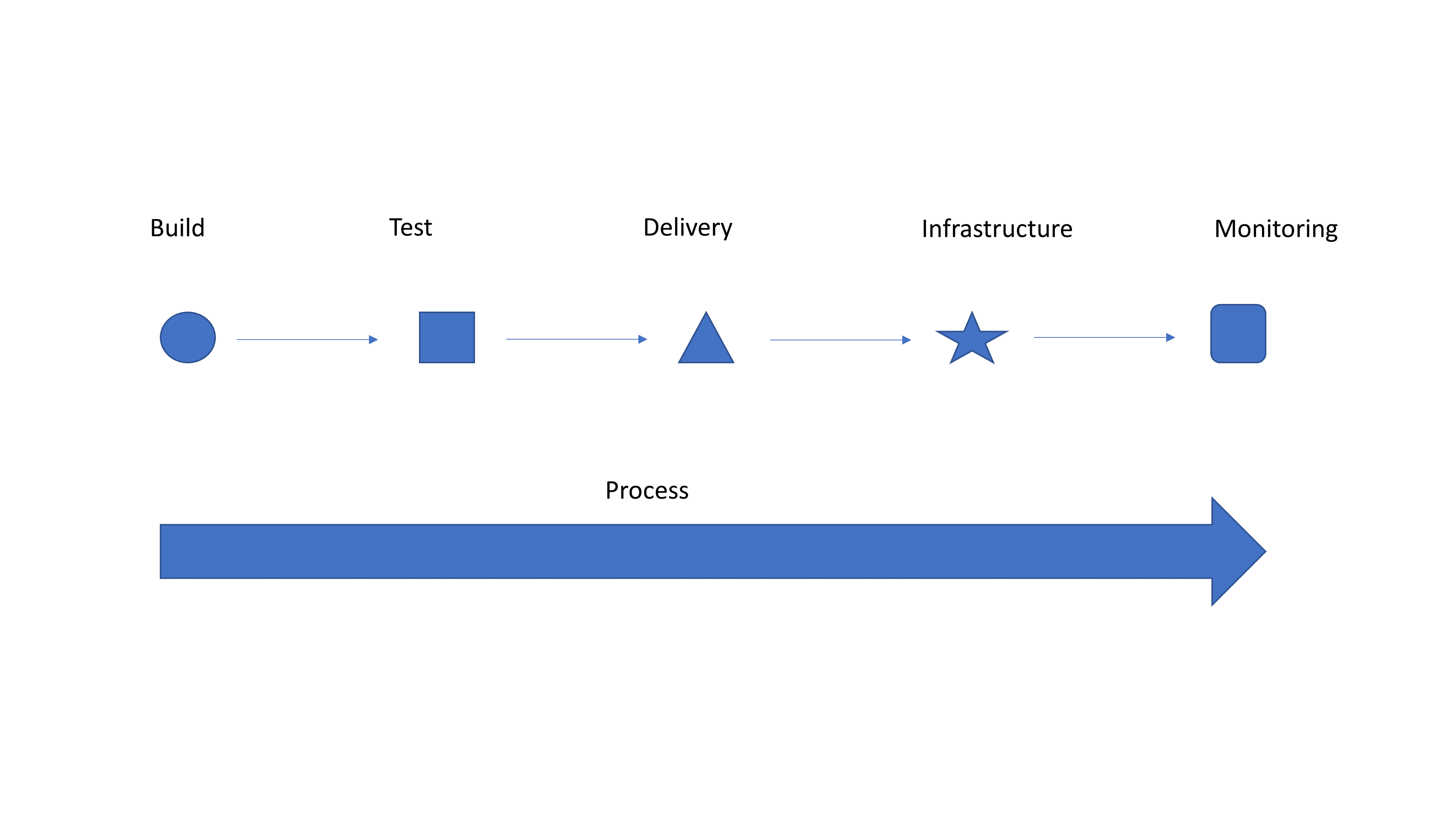
    Simple Graphic for Discussion

    So I’m going to take a second to tell you why it should. If you have integrated tools and teams, kudos! Hopefully you get absolutely nothing out of this blog, and you are enjoying a drink on a beach somewhere while your entire operation is taking care of itself. Everyone else, please read on.

    Look at the generic graphic. Notice how each step on the top is a different shape? That’s because they are individually implemented with limited integration of both people and processes. So you have a tool to submit for testing … Does testing (or monitoring at the end) feed back into your bug tracking system? Does it create tickets to get stuff done? When a container fails, is it simply dropped and a new one spun up to replace it because “they’re just cattle”? If so, does the system take steps to keep the failed container—or at least information about it—alive so troubleshooting can occur? Ignoring failed instances that were replaced and their impact on users was low is exactly how CloudBleed happened a couple years ago.

    Automate first, get the benefits of automation and drive faster delivery. Then take advantage of all that automation and make it into a streamlined process. It’s a massively complex system, even if you deliver everything on a single “platform,” so it will never be perfect. But issues that occur with regularity can be automated also to provide integration between systems. Isolating an instance and sending a notice to the defect tracking system that it is alive but not communicating (because it has been replaced) is something that is relatively easy to script/integrate and offers the ability to find what actually went wrong. Contrasted with just dropping the instance and starting a new one, this process is an order of magnitude better, and with integrated teams, Dev and Ops can work together to resolve whatever caused the instance to go down.

    Strong integration and a smooth pipeline is what technologies such as application release automation are designed to deal with, but most shops see these tools as “unnecessary” overhead. I disagree. Find one you like—there are a million of them—and use it to connect things. It’s just one step, but it is a step to transforming your operational delivery systems from unique snowflakes to part of a collection that works together.

    That’s it. Automate first because the gains are phenomenal, but don’t stop there. Really—don’t. You are doing yourself a disservice if you do. The whole “We’re going to change your world!” crowd is annoying, because changing your world is your decision, but listen to them anyway, and see which of their ideas fit your organization. You’ll be surprised once automation is solidly in place how much of what the process side of DevOps offers makes sense.

    — Don Macvittie