Tag: devops maturity

  • How Test-Driven Methodologies Reduce CI/CD Lead Time

    How Test-Driven Methodologies Reduce CI/CD Lead Time

    Modern development environments, in which rapid continuous delivery is facilitated by automated continuous integration/continuous development (CI/CD) pipelines, require thorough and automated testing in development prior to integration. This article explains how test-driven development (TDD) and acceptance test-driven development (ATDD) methodologies reduce CI/CD lead times.

    Lack of test automation in development impacts CI/CD lead time for subsequent integration, delivery and deployment stages of a CI/CD pipeline in the following ways:

    • Increased defect rate: Without automated testing during the development stage, more defects and issues are likely to be introduced into the codebase, increasing the time spent on debugging and fixing issues in later stages.
    • Slower feedback loop: Without test automation, the feedback loop between code changes and test results is slower, making it more challenging to identify and resolve issues quickly. This delay can impact the overall lead time in the CI/CD pipeline.
    • Reduced confidence in releases: When testing is not performed adequately or isn’t automated, there is less confidence in the quality of the software being released. This may lead to more manual testing and validation, further increasing lead times.
    • Inefficient use of resources: Without test automation, developers and testers need to spend more time on manual testing, reducing the time available for developing new features or fixing existing issues.
    • Increased merge conflicts: When test automation is not performed early in the development stage, the risk of merge conflicts increases as different developers work on the same codebase. Resolving merge conflicts can be time-consuming and may cause delays in the integration, delivery, and deployment stages.
    • Decreased stability and reliability: Inadequate test automation during the development stage can lead to less stable and reliable software. This may require additional time and effort to address issues and ensure that the software is production-ready.
    • Inconsistent test environments: Manual testing may not always be conducted in a consistent environment, leading to potential discrepancies between development, staging, and production environments. This can cause unexpected issues and delays in the pipeline.
    • Hindered collaboration: Lack of test automation may reduce visibility into the quality of the codebase, making it more difficult for team members from development, QA, security and operations to collaborate effectively and identify issues early.

    Although CI/CD pipelines help catch issues and ensure code quality through automated builds and tests, having a strong foundation of test automation during the development stage helps minimize the potential for issues in the pipeline and ensures a smoother CI/CD process.

    There are several reasons why many development teams do not automate tests prior to integration, despite the benefits of doing so.

    • Lack of awareness or understanding: Some development teams may not be aware of the benefits of test automation or may not fully understand how to implement it effectively in their development process.
    • Insufficient skills or experience: Test automation often requires specialized skills and knowledge, and some development teams may lack the necessary expertise to implement it effectively.
    • Time constraints: Developing and maintaining automated tests can be time-consuming. Teams working under tight deadlines might prioritize feature development over creating automated tests, believing that it will save time in the short term.
    • Limited resources: Test automation tools and infrastructure can require significant investments in terms of cost and resources. Some organizations may not have the necessary budget or resources to invest in test automation, especially for smaller projects or teams.
    • Resistance to change: Some teams may be resistant to adopting new practices, particularly if they have been successful with their existing processes. Changing established workflows and learning new tools can be challenging and may encounter resistance from team members.
    • Incomplete or rapidly changing requirements: In situations where requirements are unclear or frequently changing, development teams may struggle to create meaningful automated tests, as they may require continuous updates to stay relevant.
    • Overemphasis on manual testing: Some teams may place a greater emphasis on manual testing due to a belief that it provides more accurate or thorough results. This perception can lead to a reluctance to invest time and effort into developing automated tests.
    • Fear of increased maintenance: Automated tests, like any other code, need maintenance and updates as the application evolves. Some teams may be concerned about the additional effort required to maintain a test suite, particularly if they have limited resources.

    The amount of test automation that should be done in development prior to the integration stage of a CI/CD pipeline depends on several factors, including the complexity of the application, team resources and the specific project requirements. However, here are some general guidelines to help you determine the right balance:

    • Unit tests: Developers should aim to automate most, if not all, unit tests during the development stage. They are typically fast to execute and provide quick feedback, allowing developers to catch issues early and minimize the number of defects that make it to the integration stage.
    • Component and integration tests: While unit tests focus on individual components, component and integration tests verify the interaction between different components or services. These tests should be automated as much as possible to ensure that any issues arising from component interactions are identified and resolved quickly.
    • Static code analysis: Automating static code analysis checks during development helps identify code quality issues, security vulnerabilities, and potential performance bottlenecks early in the process.
    • Code coverage: Strive for a high level of code coverage with your automated tests. However, it’s important to remember that code coverage is just one indicator of test quality and should be complemented by other testing strategies.

    Striking the right balance between automated and manual testing is important. Automate tests that are repetitive, time-consuming or prone to human error. Manual testing should be reserved for exploratory testing, usability testing and other areas where human intuition and judgment are necessary.

    Test-driven development (TDD) and acceptance test-driven development (ATDD) are development methodologies that emphasize creating automated tests before writing the actual code, helping teams ensure code quality and catch issues early prior to integration.

    Test-driven development (TDD) is a software development methodology that emphasizes writing tests before writing the actual code. The primary goal of TDD is to create clean, maintainable and bug-free code by catching issues early in the development process. TDD follows a short iterative cycle consisting of three main steps: Write a test, make the test pass and refactor the code. The developer starts by writing a test for a specific feature or function, which initially fails. Next, the developer writes the minimal amount of code necessary to make the test pass. Finally, the developer refactors the code to improve its structure and readability while ensuring that all tests still pass.

    Acceptance test-driven development (ATDD) is an extension of TDD that focuses on defining and validating the high-level requirements and acceptance criteria for a feature or functionality before development begins. ATDD involves collaboration among developers, testers, and business stakeholders to ensure that the application meets the needs of its users. The process begins with writing acceptance tests, which are derived from the user’s perspective and based on the acceptance criteria. These tests are written in a human-readable language to facilitate clear communication among all team members.

    Once the acceptance tests are defined, the development team follows the TDD process to implement the feature, using the acceptance tests as a guide. As the team develops the code, they also create unit tests and other lower-level tests to validate the implementation. The acceptance tests are executed as part of the development process and serve as a measure of progress. When all acceptance tests pass, it indicates that the feature or functionality meets the defined acceptance criteria, and the development task is considered complete. By using ATDD, teams can improve collaboration, ensure that the application meets user expectations and reduce the risk of miscommunication or misunderstanding requirements.

    Hurdles to overcome when transitioning to TDD and ATDD include:

    • Mindset shift: Adopting TDD and ATDD requires a change in mindset, where testing is considered an integral part of the development process rather than an afterthought.
    • Skill development: TDD and ATDD require specialized skills in writing effective tests and implementing test automation. Development teams may need to invest time and resources in acquiring these skills.
    • Time and resource allocation: Transitioning to TDD and ATDD might initially lead to a perceived increase in development time, as writing tests before code can seem slower. However, the long-term benefits of improved code quality and reduced debugging time should be considered.
    • Collaboration and communication: ATDD relies on effective collaboration and communication among developers, testers, security, operations and business stakeholders. Establishing a culture of open communication and collaboration is crucial.
    • Tooling and infrastructure: Implementing TDD and ATDD may require investments in new tools or changes to the existing development infrastructure to support test automation and continuous integration.

    In the context of TDD and ATDD, the roles of quality assurance (QA), security and operations teams are crucial for ensuring a well-rounded and robust software development process. Their involvement helps to address various aspects of the application, leading to a more reliable and secure product.

    • Quality Assurance (QA): QA team members collaborate closely with developers in both TDD and ATDD methodologies. They can help define test cases, create test plans and provide input on acceptance criteria. In ATDD, they play a particularly significant role in developing and validating acceptance tests, ensuring that the application meets the defined requirements and user expectations. QA team members may also be involved in setting up and maintaining test automation infrastructure, analyzing test results and identifying areas for improvement.
    • Security: Security professionals contribute to TDD and ATDD by identifying potential security vulnerabilities and ensuring that the application is developed with security best practices in mind. They can help define security-related test cases and help to embed security into the application, reducing the risk of vulnerabilities and improving the overall security posture.
    • Operations: Operations teams are responsible for managing the infrastructure and deployment processes that support the application. In TDD and ATDD, they can collaborate with developers to ensure that the application is designed and developed with operational concerns in mind, such as scalability, performance and maintainability. Their involvement also helps to promote a DevOps culture where development and operations teams work together to ensure the application’s success in production environments.

    A practical roadmap for teams to transition to TDD and ATDD while overcoming the hurdles mentioned earlier could look like this:

    Build awareness and buy-in:

      Start by educating the team on the benefits and principles of TDD and ATDD. Obtain buy-in from team members and stakeholders to ensure a smooth transition.

    Provide training and skill development:

      Organize workshops, training sessions or pair programming exercises to help team members develop the necessary skills for writing effective tests and implementing test automation.

    Start small and iterate:

      Begin the transition by applying TDD and ATDD practices to small, manageable parts of the project or a pilot project.

    Foster a culture of collaboration:

      Establish regular meetings or workshops for developers, testers, security, operations and business stakeholders to collaborate on defining requirements and acceptance criteria. Encourage open communication and shared responsibility for test creation and maintenance.

    Set up the necessary tooling and infrastructure:

      Allocate time and resources to select, set up and configure these tools and ensure they are properly integrated into the development process.

    Monitor progress with metrics:

      Monitor key metrics, such as code coverage, test execution time, defect rates and lead time to track progress and identify areas for improvement.

    Continuously improve and adapt:

      Regularly review the team’s progress, gather feedback, and adjust the process as needed.

    Summary

    TDD and ATDD methodologies contribute to reducing CI/CD lead times by automating tests during development. This improves code quality, minimizes defects and promotes collaboration among team members from the outset of the development process. By writing tests before the actual code and focusing on meeting acceptance criteria, teams can catch and resolve issues early, leading to fewer delays and reduced time spent on debugging and fixing errors during the integration, delivery and deployment stages. These practices also help ensure that the application aligns with user expectations and operational requirements, resulting in a smoother and more efficient CI/CD pipeline.

    Anyone who is passionate about modern quality engineering processes for building high-quality software to participate is encouraged to join new ShiftSync Community from Tricentis to engage in discussions about this topic and other development methodologies.

  • CDF Report Reveals Lack of DevOps Maturity

    CDF Report Reveals Lack of DevOps Maturity

    A global survey of nearly 26,000 DevOps professionals published today by the Continuous Delivery Foundation (CDF) at the cdCon + GitOpsCon event found 84% of respondents are involved in some type of DevOps activity. However, the report also found just under half 49% are using a continuous integration (CI) or continuous delivery (CD) platform and only 22% are using CI and CD approaches to automate all building, testing and deployment of code in a production environment.

    The report, conducted in collaboration with SlashData, found the number of developers using CI or CD platforms only increased two percentage points year-over-year, with the use of self-hosted CI/CD tools dropping from 32% in the first quarter of 2022 to 23% in the same period this year.

    The survey also noted that only 7% of respondents this year described themselves as a DevOps engineer or specialist.

    Overall, medium-sized businesses have the highest involvement in DevOps practices (94%), followed by small businesses and large enterprises at just over 90%. More than three-quarters of developers (79%) are now using DevOps practices.

    The most common DevOps activity is monitoring software or infrastructure performance (47%), followed by application security testing and using CI to build and test code, tied at 37% each, and approving code deployments into production environments at 36%, the survey found.

    The average number of DevOps-related technologies used by developers (4.5) has, meanwhile, remained stable over the last year. The most widely used tools address issue tracking (39%), source code management (38%), test automation management (34%), collaboration and knowledge-sharing tools (32%) and application performance management/observability and agile project management tools tied at 31%.

    The survey also noted that the percentage of top performers—defined as those with lead times of less than one day—now stands at 15%. Survey results for top performers over the years continue to fluctuate between 13% and 17% of the survey total. On the plus side, 40% of developers have lead time changes of less than one week, the second-highest ranking for this survey.

    More than a third of all DevOps practitioners (34%), however, take longer than a week to restore service. Only 12% of DevOps practitioners take less than an hour to restore service.

    In general, the survey finds that organizations that use 10 or more DevOps tools are twice as likely to be high performers.

    Fatih Degirmenci, executive director for the CDF, told conference attendees the consortium, which now oversees nine projects, including the open source Jenkins CI/CD platform, continues to make progress as additional projects are added.

    However, while it’s clear that many organizations have adopted multiple DevOps tools and platforms, far too many of them still have a long DevOps journey ahead. Each organization will need to decide whether DevOps workflows need to be adopted to fit their needs, even as the pressure to build and deliver software faster continues to mount. In fact, at a time when more organizations than ever are dependent on software to drive mission-critical digital business transformation initiatives, time may be running out to adopt DevOps workflows at a deeper level if organizations hope to stay competitive.

  • Atlassian Embeds Metrics for Measuring DevOps in Jira

    Atlassian Embeds Metrics for Measuring DevOps in Jira

    Atlassian today announced it has added four features to Jira Software Cloud that allow developers to visualize and measure progress across DevOps workflows.

    Suzie Prince, head of product for DevOps at Atlassian, said rather than organizations having to acquire and deploy separate tools to track DevOps metrics, Atlassian is moving to incorporate those capabilities in a platform that is already widely employed to manage application development projects.

    Two capabilities being added to the standard edition of Jira Software Cloud are Code in Jira, which makes it possible to view the most recently active repositories in Bitbucket, GitHub, GitLab or Git Integration for Jira from within Jira Software Cloud, and Deployments in Jira, which makes it possible to similarly view in real-time at what stage any deployment is on any continuous integration/continuous delivery (CI/CD) platform.

    The Premium Edition of Jira Software Cloud is gaining tools to track both deployment frequency and cycle times to provide more insight into how application development teams are maturing in terms of their overall DevOps proficiency.

    These tools eliminate the need for analytics tools that otherwise would be required for each DevOps platform an organization employs, noted Prince. Jira Software Cloud also exposes a REST application programming interface (API) through which DevOps teams can integrate the Atlassian platform with other DevOps tools.

    It will be up to each organization to determine how they may want to employ the insights surfaced within Jira Software Cloud. However, Prince said most IT teams should identify areas of weakness where there is an opportunity to coach DevOps teams on how to improve.

    There is, of course, a lot more focus on improvement as application development projects have accelerated in recent months, thanks mainly to the increased focus on digital business transformation. Organizations of all sizes are trying to maximize investments in application development at a time when the economic downturn brought on by the COVID-19 pandemic is forcing IT teams to make difficult tradeoffs. Metrics, of course, are critical when it comes time to prioritize one project over another.

    At the same time, Prince noted that many teams are trying to keep the number of tools and platforms incorporated into a DevOps toolchain to an absolute minimum to limit costs and minimize complexity. Many DevOps teams have been employing Jira software to manage application development projects for years now, so Prince said these new capabilities are a logical extension of the company’s project management software.

    Of course, the best metrics are the ones that manifest themselves automatically. No project manager relishes having to badger developers to enter data into a project management application. The more the data residing in a DevOps platform can automatically populate a project management application, the happier all involved will be. After all, the goal is to head off as many issues as possible today before they become major problems tomorrow.

  • DORA Report: DevOps Maturity Levels Rise

    DORA Report: DevOps Maturity Levels Rise

    The annual DORA report on DevOps shows a marked increase among Elite performers compared to last year

    The DevOps Research and Assessment (DORA) arm of Google Cloud today published the results of an annual survey that suggests there have been marked gains in the level of DevOps maturity.

    The “2019 Accelerate State of DevOps Report,” an annual global survey of 31,000 IT professionals, finds 20% of the respondents now consider their organizations to be “Elite” DevOps performers, up from a comparatively paltry 7% a year ago.

    The Elite group reported their organizations routinely make multiple code deployments per day. By comparison, low performers reported deploying code somewhere between once per month and once per six months. The normalized annual deployment numbers range from 1,460 deploys per 365 days for the highest performers to seven deploys per year for low performers. Effectively, Elite performers deploy code 208 times more frequently than low performers, according to the DORA report.

    The report also finds Elite performers need less than a day of lead time to make a change to an application, compared to 2,555 hours for low performers, and Elite performers reported a change failure rate of 0% to 15%, compared to 46% to 60% for low performers. Finally, elite performers are able to recover from an incident 2,604 times faster than low performers.

    Nicole Forsgren, DORA Lead, Research and Strategy at Google Cloud, said the study makes it clear DevOps best practices are now crossing the proverbial chasm in IT. Organizations that are furthest along in making that transition tend to set up “communities of practice” within their organizations through which DevOps best practices are shared across teams, she noted. The DORA report also makes it clear elite performers automate and integrate tools more frequently into their toolchains on almost all dimensions.

    Forsgren said the study also makes it clear that the practice of slowing down the rate at which code is developed to achieve higher-quality application deployments is not nearly as effective as employing lighter-weight change processes to lower the amount of code getting deployed at any one time. Slowing down the rate at which code is developed and deployed is not a good strategy, she said, because as the amount of code that needs to get deployed at any time increases, reliance on heavyweight processes to deploy that code usually results in more errors being made. A lighter-weight approach provides the added benefit of reducing the amount of technical debt any organization is likely to incur at any stage of the DevOps process.

    The increased rate at which organizations are embracing best DevOps practices naturally coincides with the rise of more complex cloud-native applications. Most of those applications are being built using microservices that create a lot of dependencies within that application environment, with different development teams often working in isolation on specific microservices. The only way to manage that level of complexityeffectively is to embrace DevOps processes, noted Forsgren.

    In fact, the DORA report finds Elite performers are 24 times more likely to have met all cloud characteristics as defined by the National Institute for Standards and Technology (NIST) than low performers. Organizations that meet all essential cloud characteristics are 2.6 times more likely to be able to estimate the cost to operate software accurately. They also are twice as likely to be able to identify their most operationally expensive applications easily, and 1.65 times as likely to stay under their software operation budget, the study finds.

    Clearly, best DevOps practices is one of those rare IT gifts that simply keeps on giving.

    — Mike Vizard

  • CXOs Overestimating DevOps and Continuous Testing Maturity

    CXOs Overestimating DevOps and Continuous Testing Maturity

    More work is needed to achieve continuous testing, Forrester report shows

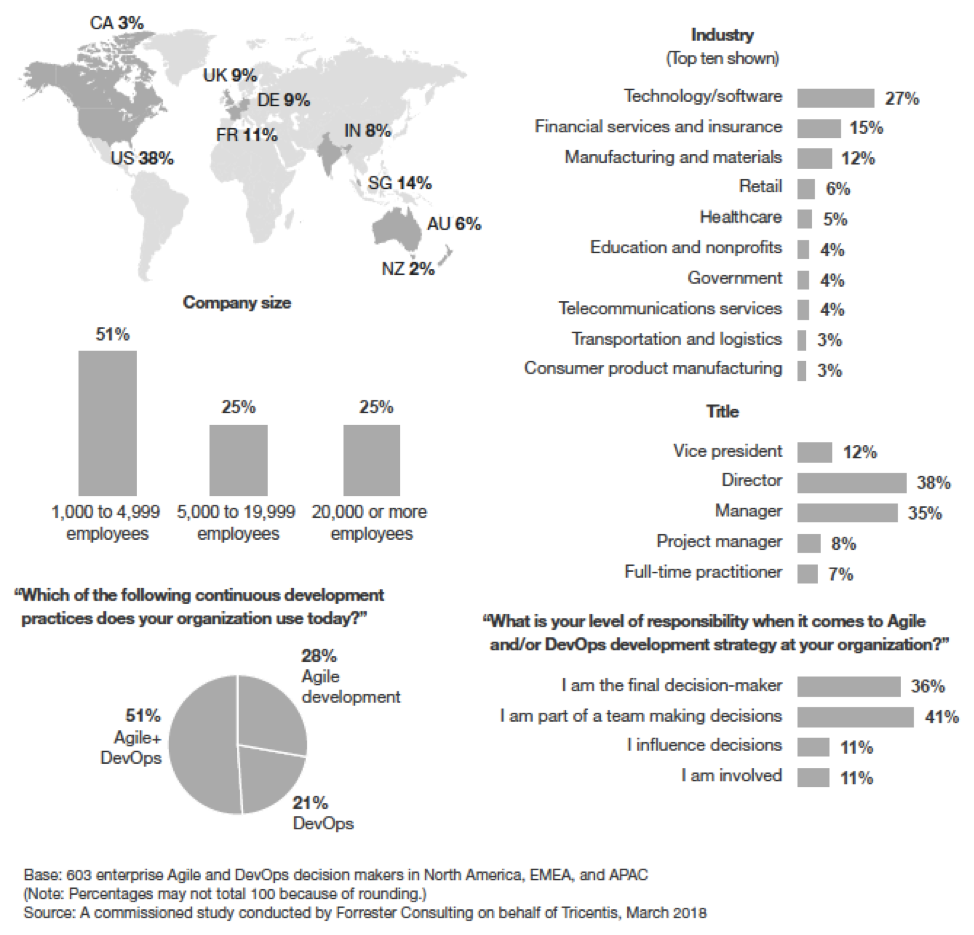
    Forrester recently completed an interesting new research project exploring what separates DevOps leaders from DevOps laggards. After analyzing data collected from 603 global enterprise respondents responsible for their firms’ DevOps strategies, Forrester learned that firms with the most mature DevOps practices do several key things differently:

    1. Allocate proper testing budgets and focus on upgrading their testing skills.
    2. Implement continuous testing to meet the demands of release frequency and support continuous delivery.
    3. Include testers as part of their integrated delivery teams.
    4. Automate end-to-end functional testing.
    5. Shift left testing to earlier in the development life cycle.

    Firms who follow these five best practices experience testing as a way to gain speed and efficiency, rather than a bottleneck to delivering faster.

    This was not terribly surprising. On the one hand, study after study shows that testing is the No. 1 bottleneck to accelerated application delivery. On the other, we’ve seen firsthand how organizations that commit to transforming testing successfully shift from waterfall-style manual testing processes to automated continuous testing integrated into CI/CD pipelines.

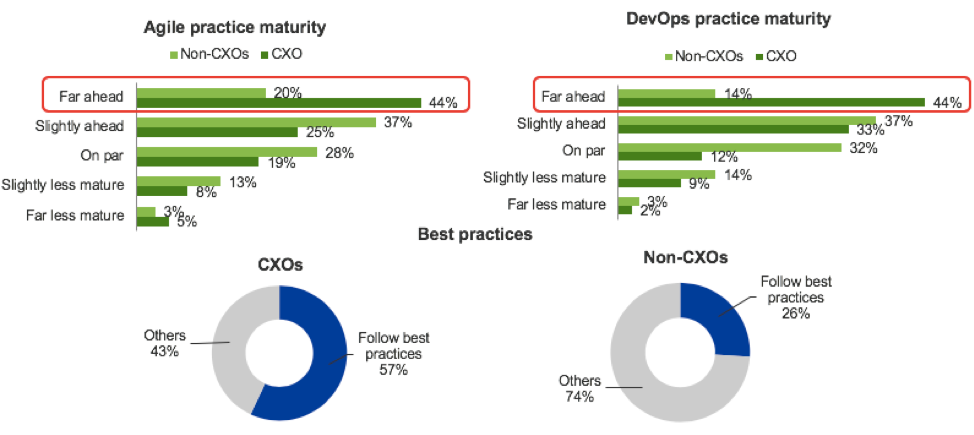
    What caught us off guard, however, was CXOs’ highly inflated estimation of their continuous testing, DevOps and Agile maturity.

    According to the report, only 26 percent of non-CXOs reported that their organization was following all five of these best practices—but 57 percent of CXOs believed that they were. According to the report:

    While most Agile and/or DevOps firms have implemented some of these five core testing practices, few have actually implemented all of them — only about a quarter of respondents say they somewhat or completely agree with all five best practice statements.

    This is an important distinction. While many CXOs and high-level decision makers believe they are ahead of the pack, our research shows that only the small fraction of firms that follow these best practices have more advanced Agile and DevOps practices compared to their peers — and their behaviors and attitudes support that assertion.

    Moreover, CXOs also reported much higher levels of Agile and DevOps maturity across the board than non-CXOs did.

    The good news for DevOps professionals is that CXOs are your champions: They believe you’re doing a great job! The bad news is that, at some point, you need to tell them about the gaps that currently exist in the process. You also need to collect and share some of your own data to make the case that actually adopting these five proven best practices will help you increase delivery speed while reducing business risk.

    Detailed Report Findings

    This was just one of the many interesting findings from research project, which was led by Forrester Vice President and Principal Analyst Diego Lo Giudice.

    As a high-level summary, the research uncovered the following:

    • Understanding of business risk is the most important determining factor of DevOps and Agile maturity.
    • Experts focus primarily on contextual metrics (e.g., requirements coverage) while others focus on “counting” metrics (e.g., number of tests).
    • Experts are more likely to measure the user experience across an end-to-end transaction while others rely on application-specific or team-specific metrics.

    Detailed results and analysis are available in the complete report: “Forrester Research: What Separates DevOps + Agile Leaders from Laggards?”

    Report Methodology

    In this study, Forrester conducted an online survey of 603 enterprise organizations in North America, Europe and Asia Pacific to evaluate current software testing practices and metrics tracked during survey development. Survey participants included decision-makers and individual contributors responsible for their organizations’ Agile and/or DevOps development strategies. Questions provided to the participants asked about their firms’ attitudes toward software development automation, risk management and testing practices, as well as the metrics they track and value in the software development life cycle.


    — Cynthia Dunlop

  • Jenkins World, Training and Infostretch

    Jenkins World, Training and Infostretch

    I’ve talked to a fair number of vendors about Jenkins World 2017, and I’ve spent a decent amount of time lately supporting DevOps training initiatives at a variety of vendors.

    The thing is, the DevOps world is changing fast enough and there are enough options out there that training is not something you need only before moving to DevOps. During one recent project, I ended up learning about a particular topic as I was developing support materials for a training session on that topic. And I’m pretty steeped in the DevOps world.

    So, while I don’t write about every vendor I’ve talked to about Jenkins World, Infostretch‘s new training program is worth talking about. Infostretch is unveiling an array of training solutions to help companies not only get a handle on DevOps needs, but also to grow their DevOps maturity.

    Among the offerings will be a DevOps maturity assessment and new Jenkins training programs. In conjunction with its visit to Jenkins World, Infostretch will be offering a free 90-minute webinar on adopting Jenkins 2.0.

    Demands of the job will keep me from attending Jenkins World, but if you’re there, it might be worth checking out Infostretch’s booth (#415) to see what there is to learn. If you do, feel free to drop me a line—I’m intrigued to learn more about the training and how it fits in with other available offerings. As an added bonus, the company is giving away “Game of Thrones”-themed DevOps Journey Maps marking various stages of DevOps journey and the “happy flow” of DevOps, and including the various tools available in the market for each stage. So you can snag that while stopping by for me to learn about Infostretch’s training.

    The other thing that interested me was a presentation. Sanil Pillai, director of Infostretch Labs, will be presenting a 15-minute demo titled, “Auto-Convert Your Freestyle Jenkins Jobs to Coded Pipeline” on Wednesday, Aug. 30, at 10:45 a.m. at the Sponsor Theater, in the Expo Hall. The variety of scripts that can make up the components of a Jenkins build environment are a problem many of us have struggled with; while better than what we had because they’re part of an automated process, the components are still technical debt with variable maintenance requirements. Someone, please go see the talk/demo and report back. It would be cool if Infostretch has an answer for this problem.

    I Reiterate: Training is Imperative

    It is human nature to make a large change and settle in with the known new world. DevOps is not designed to be that way. It is still growing and changing, so don’t get complacent. Challenge yourself and seek out training, tool enhancements and opportunities to improve. As others have said repeatedly and well, DevOps is a journey, not a destination. Learn, get better, find better ways and tools and keep improving.

    And, keep rocking it. Eliminating IT as a bottleneck is a huge step to improving product development and being more in sync with the business.

    Of course, now that I’ve written out the reasons why Infostretch’s plans for Jenkins World interested me, I am tempted to dig into some of the other offerings. Or to try and figure out how to go to Jenkins world without missing important things at work.

    You may be hearing more of Jenkins World from me before it arrives.

    — Don Macvittie

  • Atlassian Builds a DevOps Stack for the Enterprise

    Atlassian Builds a DevOps Stack for the Enterprise

    One of the major challenges associated with DevOps is that it’s not something an enterprise IT organization can buy. Because of that issue, it’s often challenging for IT organizations to forecast what types of DevOps tools they are going to need. To make it a lot easier to cope with that issue, Atlassian has announced Atlassian Stack, a suite of software that makes Atlassian DevOps tools available in a single package.

    Sean Regan, head of product marketing for Atlassian, says this approach will make it easier for enterprise IT organizations to embark on a DevOps journey without having to worry about what type of tool they may need now versus in the future. For example, an IT organization may opt to get started using the Atlassian Jira software to track software development projects and then work its way up to deploying Atlassian Bamboo continuous integration/continuous deployment (CI/CD) software. From there, Regan says, a DevOps team may opt to embrace collaboration software to streamline communications across their various teams.

    The move to launch Atlassian Stack comes after the company updated a slew of its DevOps offerings, including the release of Bitbucket Server and Data Center 5.0 and Bamboo 6.0. In addition to tightening the integration between both DevOps tools, the company added capabilities for verifying commits, smart mirroring and the ability to define a Bamboo configuration as code.

    Rather than making DevOps teams acquire each tool individually, he says, many senior IT leaders now request a means through which the entire Atlassian portfolio can be made more readily available. That shift in purchasing behavior suggests that the level of DevOps maturity inside many organizations is advancing considerably, he notes.

    Of course, there are many who would contend that level of DevOps maturity has been a long time in coming. Web-scale companies have been employing DevOps tools for years to accelerate the rate at which new applications are released and updated. In contrast, traditional enterprise IT organizations have been slow to implement DevOps processes. In fact, it’s taken the pressure arising from digital business transformation initiatives that have accelerated application deployment timetables to get enterprise IT organizations to fundamentally rethink IT operations. Business leaders are making it painfully obvious that their patience with extended rollouts for new applications is at an end.

    Naturally, the rate at which those transformations are occurring within organizations will still vary considerably. However, the silos that exist within enterprise IT organizations need to be consolidated. The next issue is determining to what degree altering those processes needs to come in the form of a DevOps edict from above versus letting teams come together of their own accord to meet a specific application deadline. Whatever the approach, the way enterprise IT has been managed historically is no longer up to the digital business transformation tasks at hand.

    — Mike Vizard

  • Puppet, Like DevOps, Continues to Mature

    Puppet, Like DevOps, Continues to Mature

    Over the course of the last several years we have seen the DevOps movement continue to mature and evolve. It has moved beyond the early adopter, visionary stage into the mainstream of the market. Therefore, it should be no surprise that some of the leading solutions in the DevOps space should likewise mature and evolve as well.  Yesterday Puppet (formerly Puppet Labs) made several announcements as part of a broader message that they are ready, willing and able to continue to be a leader in this space for years to come.

    There are several parts of the Puppet announcement yesterday, lets have a look at each of them:

    Growth indicators – Somewhat mandatory, Puppet announced that they continue to enjoy rapid growth. puppet growth


    Not a lot to add here, the numbers speak for themselves.

    Puppet Labs is now just Puppet. In my conversation with Nathan Rawlins, SVP of marketing, he said that this was a case of recognizing what the market is already doing.  I don’t know how many people you have heard refer to the company as Puppet Labs. Most everyone I know says Puppet. So why push rope up hill? Henceforth the company will be known simply as Puppet.

    puppet

    But there is more than just the name here.  Rawlins told me that along with the new name, they have also gone through a complete rebranding. New logo, new website look, new collateral look. The new brand seeks to give the impression of simplicity, stability and maturity.

    sanjayNew leadership – The company has hired a software/tech industry veteran leader, Sanjay Mirchandani as President, COO. Mirchandani has held senior leadership roles at VMware, EMC and Microsoft. His responsibilities will include go-to-market operations, including sales, marketing, customer success, and global expansion. From what Rawlins told me, Sanjay will be leading much of the day to day operations of the company.

    This is not a case though of a professional leader coming in to replace the founder/CEO.  Puppet’s Luke Kanies remains in the CEO role. Mirchandani will free up Kanies to do what he is best at. Be a visionary and chart the course for Puppet and in turn help shape the DevOps and software delivery market as well.  It takes a confident founder to bring in a real professional to help run the business to allow you to do what you do best. Many are too insecure to share management with a newcomer who “just wouldn’t love their baby the way they do.” Kudos to Luke for recognizing this move for the long term good of the company.

    blueshift by puppetProject Blueshift– Many people are focusing on Blueshift’s capabilities of using Puppet with container technologies like Docker, Kubernetes, Meseosphere, CoreOS, etc.  While Blueshift does focus on this as of the release today, there is actually more to it than that. Blueshift is really a collaboration between the Puppet community and the company itself to ensure that Puppet will always be able to help companies adopt next-generation infrastructure technologies. While today those next-gen technologies are container related, the idea is to grow Blueshift into something capable of working with new technologies as they emerge. It is a longer range project beyond 2-3 years, instead looking at what could be on the horizon 5-10 years from now. It is an ambitious vision. It is always hard to know what is the next big thing. But the fact that Puppet is even attempting to keep its eye on this is commendable.

    Upgrades to Puppet Enterprise and Puppet Orchestrator – Mixed in all of the news is that Puppet has released upgrades to its Enterprise product and the Orchestrator product that was released last year. Without going into a feature by feature recap (you can read the link to the PR if you like), Puppet continues to polish their enterprise products as part of their maturation.

    Integrations with Splunk and HipChat – As DevOps matures, the market will want greater integration between their tools. Puppet has taken a nice step in that direction by releasing a Splunk App that will allow you to automate set up of Splunk servers and give greater visibility into enterprise DevOps environments.

    The HipChat integration allows your Puppet Orchestration management to show up right in the HipChat GUI and allows users to manage it from within HipChat. A nice bonus is the access rights which make sure that those without permission do not have access to the Puppet Orchestration data.

    All in all, this is a major step up by Puppet. To be fair, the folks at Chef have also been taking steps to further mature their product and organization. As DevOps continues to grow, I am sure we will see some of the other DevOps tools startups follow the leaders here in maturing and growing along with the DevOps market.

  • How Mature Is Your Automation Strategy?

    How Mature Is Your Automation Strategy?

    Working in Operations can sometimes feel like walking up a down escalator. The business puts relentless pressure on your team to overcome bottlenecks, accelerate the overall delivery process and grow the volume and frequency of deployments. You’re also faced with a growing number of service level requirements and demand for higher release velocity—all stretched across different platforms and increasingly complex deployment scenarios, on premise or hybrid.

    The answer to these challenges is IT automation. Scaling your automation not only secures continuous service delivery, it also frees your resources to focus on core activities and industrializes more service management processes, such as self-service portals for infrastructure provisioning.

    However, many organizations are still on low automation maturity levels because of various barriers, including:

    • Organizational inertia
    • Lack of process capability maturity
    • Lack of the right technology expertise
    • Mistrust and fear of getting replaced

    Do you recognize some of these barriers to automate faster, better and more in your organization?

    Here’s the problem: You can determine how much and where that IT automation is needed only after you understand the current state of your automation. Are you still at the manual stage (level 0), copying new release files in the production environment, adjusting parameters and restarting the application service via a management console using manually entered parameters, for example?

    Are you automating repetitive tasks through scripts, but need to do all the preparation work to run the script, frequently modify the scripts and script parameters based on changing context, start scripts manually, monitor their execution individually and look at the outputs each time a script runs? If so, you are on level 1—and you can do much better than that.

    Are you connecting scripts into sequences and deploying new releases using a run book automation tool (level 2), where integration with other tools in the release chain is still manual and context-specific parameters have to be set individually for each execution?

    Or have you scaled the heights of process automation (level 3), where you benefit from the automated deployment of the entire process, including automated retrieval of the right parameters at the right time and in the right context triggering of automated deployments (either using commands or driving run book automation tools), confirming completion and updating records? If so, you are doing very well and can reach the last (final) maturity level by adding dynamic composition and configuration of processes based on the real-time context.

    Understanding your automation status and barriers helps you decide how and where to invest in the next automation steps. Having a baseline means you can build a business case, apply goals and targets to your organization, and measure your success as you progress.

    An Automation Maturity Assessment Service can be applied to create this baseline, identify gaps and provide recommendations, which result in lowering the manual effort and increasing your IT automation maturity and operational efficiency. Consultants initially review your current IT infrastructure and your software delivery processes and release management processes. Next, they perform discovery interviews to gather information on core processes relevant for automation. Services are subsequently rated in terms of their automation maturity and their potential for automation. The qualitative results are then correlated with operational measurements and KPIs to understand the impacts of low maturity on service levels and competitiveness.

    The assessment might find, for example, that your development team changed its deliverable for a particular application to a Docker container, which is currently not integrated in your automation release and deployment process. Your tool already supports Docker, the assessment finds, and it can be easily integrated. The benefit to do this is assessed as ‘medium,’ while the cost is ‘low.’

    Based on the results, a business case can be created or a DevOps roadmap can be crafted.

    You already know the benefits of IT automation. By allowing your automation to mature, you open the door to even greater cost savings, increased efficiency and lower risk.