Tag: devops-as-a-service

  • Armory Aims to Turn Continuous Delivery Into a Service

    Armory Aims to Turn Continuous Delivery Into a Service

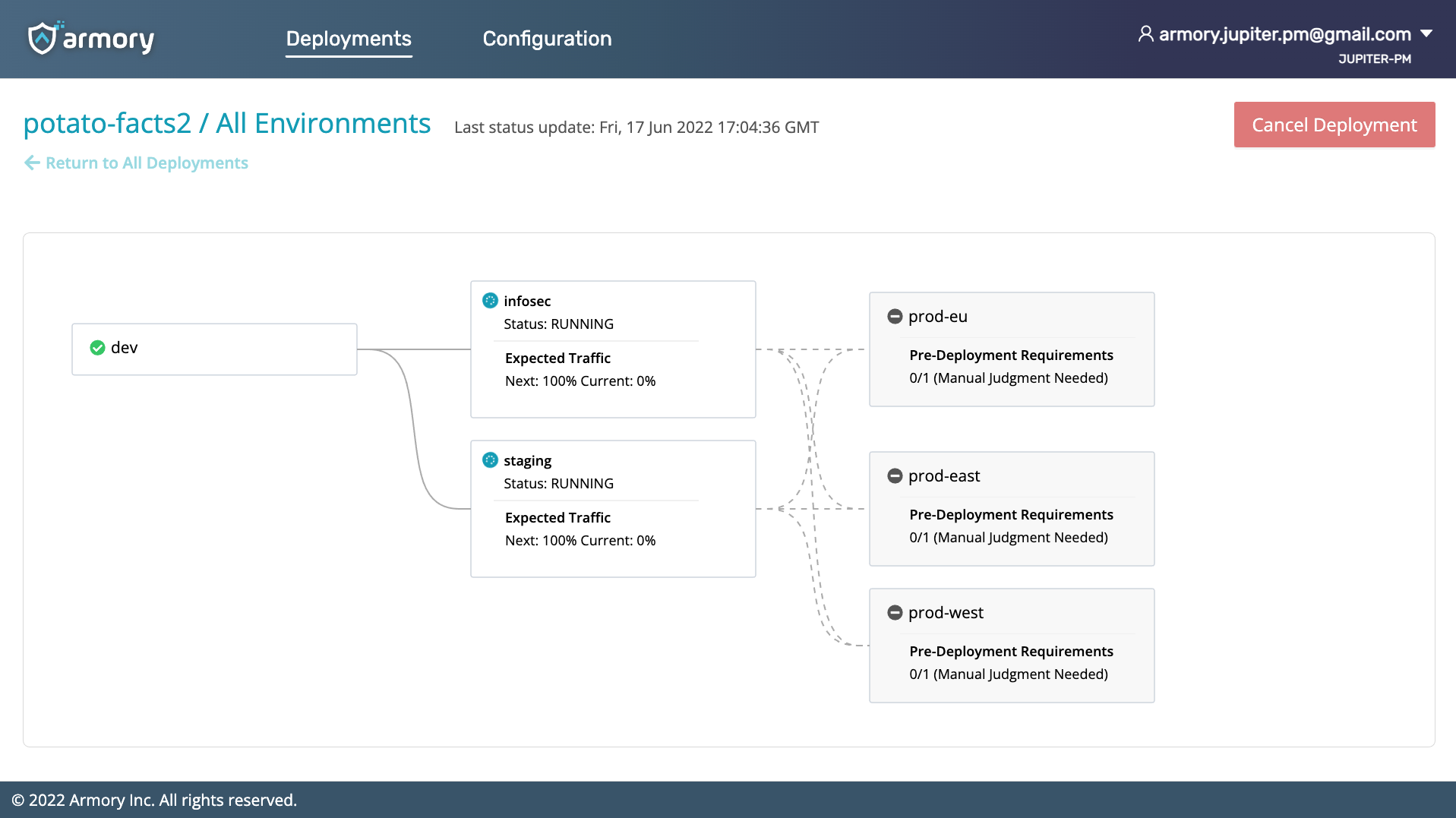
    Armory this week made generally available a continuous delivery-as-a-service (CDaaS) offering that promises to make it simpler for a much wider range of organizations to programmatically deploy applications.

    The Armory Continuous Deployment-as-a-Service platform has been available in beta since March. It differs from Armory’s existing open source Spinnaker continuous delivery (CD) platform in that it is based on a proprietary declarative platform that is designed to integrate with third-party continuous integration platforms.

    Armory CEO Jim Douglas said the goal is to meet organizations that have invested in CI where they are versus requiring them to rip and replace their entire DevOps platform. The company is still committed to providing a curated instance of Spinnaker, but it’s become apparent there are many organizations that want to experience the benefits of a more opinionated CD platform that is more accessible via a cloud service, he added.

    The Armory Continuous Deployment-as-a-Service offering applies many of the best practices that have emerged for the Spinnaker CD platform without requiring organizations to have a dedicated team in place to just manage the CD platform, noted Douglas. IT teams can start using the service to deploy applications in less than 30 minutes, he noted.

    The first edition of Armory Continuous Deployment-as-a-Service is optimized for deploying microservices-based applications on Kubernetes clusters, but Armory will soon extend the reach of the service to platforms running monolithic applications, said Douglas. The company also plans to make available an on-premises edition, he added.

    In either scenario, IT teams will be able to engage in everything from canary testing of deployments to automatic rollbacks in the event an application fails, said Douglas.

    The number of organizations that routinely make use of a CD platform is still relatively small. Historically, each platform used to run applications has been unique, so automating delivery has been problematic. CI platforms, in some cases, have been extended using custom scripts to automate application delivery, but those efforts don’t typically scale across an extended enterprise.

    Douglas said that as more IT teams start to build and deploy microservices-based applications, it’s only a matter of time before CD becomes a more distinct IT discipline. The challenge is enabling IT organizations to achieve that goal without necessarily having to hire a small army of site reliability engineers (SREs). There will still be plenty of DevOps teams that will prefer to deploy Spinnaker, but Douglas said there will also be plenty of instances where a less complex approach to CD will suffice.

    It’s hard to say whether there might soon be varying levels of DevOps platform services that organizations might invoke depending on the complexity of the project and their own internal cultural preferences. However, as the pace of application development continues to accelerate, the need to automate CD will become a more pressing issue. There may be many ways to achieve that goal, but if history is any indication, the path of least resistance is likely to be via the cloud.

  • Measuring the Value of DevOps-as-a-Service (DaaS)

    Measuring the Value of DevOps-as-a-Service (DaaS)

    The late great W. Edwards Deming, statistician, professor, author, lecturer, and consultant said, “In God we trust. All others must bring data.” The point is, if you want people to trust your information, then you need to present measured data. This is true for countless circumstances. As a DevOps consultant, I am often asked by my clients what data should be used to show the value of their DevOps capabilities, in a way that is acceptable to the stakeholders of those DevOps capabilities. A lot of excellent research results, published by DORA and others, describes metrics that demonstrate the value that DevOps provides to application development. More and more enterprises are embracing the idea of providing DevOps capabilities, such as pipelines, tools, hardened containers and tech stacks, as a centralized service to support their many application teams. The question then becomes, “What metrics should be used to show the value of DevOps-as-a-Service (DaaS)?”

    Before measuring the value of anything, you need to know two things: “What is it?” and “Why is it important?”

    What is DevOps-as-a-Service?

    In high-level terms, DaaS is DevOps capabilities made available to the users of those capabilities through portals and APIs. There is no standard set of services; DevOps capabilities offered vary from organization to organization. In my SlideShare, DevOps-as-a-Service (DaaS) Values, I illustrate a generic blueprint for DaaS.

    The DaaS blueprint has four layers, as follows:

    • Stakeholders – There are three types of stakeholders: business, app-dev users and DaaS teams.
    • Service access layer – This layer consists of user portals, APIs, and access security.
    • Service layer – The service layer consists of user services and management services. User services include things such as repositories, CI/CD pipelines, sandboxes, test data, configuration data, guides and training. Management services include service catalogs, issues and change requests, SLOs, SLIs, governance policies, experience monitoring and automated tasks.
    • Resources layer – This layer includes application stacks, infrastructure resources, tools, infrastructure code and topology data.

    Why is DaaS Important?

    The value of DaaS, as perceived by different stakeholders, can be summarized as follows:

    • Business – DaaS makes the business competitive.
    • App-dev Users – DaaS improves application development.
    • DaaS team(s) – DaaS improves management of DevOps capabilities.

    What Service Level Objectives (SLOs) Demonstrate the Value of DaaS?

    The SLOs need to be chosen to best fit the requirements of each application. The following are examples.

    Business value can be demonstrated by:
    ROI based on tracking cost savings relative to a benchmark comparing prior non-DaaS, trend cost per developer and per release.
    SLO agility of services – Lead time for changes, and frequency of releases.
    SLO reliability of services – change failure rate, time to restore services.
    SLO governance, compliance and security scores.

    App-dev user value can be demonstrated by:
    SLO availability of DaaS, service level indicators (SLIs) depend on service components and architecture.
    SLO service response time.
    SLO experience scores.
    SLO change request response time.

    DaaS team value can be demonstrated by:
    SLO scope of applications – number of apps supported, number of users per month.
    SLO number of requests served per month.
    SLO critical events per month.

    How Does an Organization Develop DaaS Metrics?

    Start by picking an application that is supported by DaaS. Do not try to boil the ocean and measure all applications at once. Then, appoint a DaaS SLO/SLI team to work on metrics development for the application. The team should include stakeholders from business, app-dev and DaaS support teams associated with the application.

    DaaS SLO/SLI team members determine the SLOs of DaaS that each class of stakeholder values the most, and then decomposes the services to identify sources of data that will form the most important service level indicators (SLIs).

    With the SLIs in hand, instrumentation, telemetry and analysis requirements can be determined and used to design monitoring agents, communication, analyzers, alerts and dashboards.

    Then, roles, policies, playbooks and responsibilities will complete the solution. Test the solution for the chosen application. As you gain confidence in the solution, adapt and expand the solution for use with other applications.

    Continue to monitor the progress and performance of the SLO metrics, and continuously improve them with experience and as newer technologies become available.

    What This Means

    DevOps-as-a-Service provides many valuable capabilities to business, app-dev users and DaaS teams. Metrics that demonstrate value to each class of stakeholder should be determined for each application that consumes the capabilities offered by each unique DaaS. A DaaS SLO/SLI team can determine the best metrics and system design for the implementation for an example application. The SLOs can be adapted and evolved for other applications in the organization, and used as a basis for continuous improvement.

  • DevOps as a Service: Migrating Your Entire DevOps Stack to the Cloud

    DevOps as a Service: Migrating Your Entire DevOps Stack to the Cloud

    DevOps as a Service (DaaS) enables teams to centralize their tooling and workflow into one unified solution. This solution typically contains all necessary DevOps pipeline features, which replace legacy tooling. This article explains how DaaS works, including pros and cons, and an example showing how to migrate from Azure DevOps Server to Azure DevOps in the cloud.

    What Is DaaS?

    DaaS is a managed, cloud-based service that provides a unified DevOps toolchain. All or most of the tools necessary for a continuous integration/continuous delivery (CI/CD) pipeline are collected in a single platform. This platform is then provided to teams with the support of dedicated DevOps professionals.

    The goal of DaaS is to enable organizations to focus on developing and delivering software without having to worry about managing or maintaining tools. It is designed to abstract away the intricacies of tool integration, deployment and maintenance. This enables teams to focus on higher-level tasks, and outsources significant manual effort.

    DaaS can provide small to medium businesses with enterprise-level infrastructure and tooling without needing to hire more staff or build extensive expertise. Instead, these businesses can rely on the experience of DaaS providers to create, deploy and optimize a pipeline for them. These pipelines are created to be intuitive and to facilitate the smooth collaboration of all team members. 

    DaaS Pros and Cons

    If you are looking to migrate your development processes to the cloud, there are several migration strategies you can use. One involves moving existing tools to cloud resources as microservices, which you must then integrate. The other may involve scraping existing tools and adopting a DaaS. Whichever the case, you need to understand the pros and cons of DaaS before you can make the right choice for your organization.

    Pros of DaaS:

    • Managed services provide access to dedicated DevOps engineers for support, expertise and optimization.
    • Provider teams have experience across a range of organizations and industries, and can customize solutions for you based on that experience.
    • DaaS teams can provide mentorship and guidance which helps your team improve their own skills. This enables teams to learn from the mistakes of others and prevents repeating mistakes.

    Cons of DaaS:

    • The importance of pipeline management and availability requires you to partner with a service provider that is reliable and can ensure zero to minimal interruptions.
    • Outsourcing infrastructure demands and providing access to source code and other sensitive data and systems. This can create a security risk that you are not in control of.
    • DevOps teams still need to understand the tools being implemented and the basics of how to manage and use those tools. 
    • Managed services often cost more than self-implemented pipelines and the costs may not be offset by an in-house reduction in IT responsibilities.

    DevOps Cloud Migration Example: Migrating from Azure DevOps Server to Azure DevOps in the Cloud

    Azure DevOps Server, formerly called Team Foundation Server (TFS), is a server hosted on-premises that enables you to build DevOps pipelines. While based on similar services to those offered in the Azure cloud, it requires you to manage and maintain your infrastructure and provides limited support for your configurations.

    By migrating to the cloud, you can outsource many of your infrastructure responsibilities, focusing instead on producing quality software. Azure DevOps Services are an example of partially managed DaaS that you can use.

    Below is a brief guide for how to transfer your data and projects from DevOps Server. This guide is adapted from the full DaaS guide provided by Microsoft.

    1. Preparation: Planning your migration requires taking an inventory of how you are currently using your tools, what data you need to migrate and how migration will impact your productivity. You also need to determine if you need additional licenses. For this step and those to follow, there is a tool you can use to assist you in the process.
    2. Configure Your Prerequisites: Before you can migrate your pipeline data you need to set-up a few prerequisites. You should synchronize your local Active Directory (AD) with Azure AD for authentication. You also need to set up security and compliance measures to ensure that your infrastructure remains secure.
    3. Update and Validate Your Server: Check to make sure that your server is up-to-date with the latest version of Azure DevOps Server. If you are still using TFS, this may mean a series of updates. Once you’re fully updated, you can use the migrator tool to validate the collection databases of each of your projects. If any errors are found, you need to fix those issues during this phase.
    4. Ready Your Cloud Resources: After all errors are eliminated, you can begin preparing your cloud resources for import. This requires assigning, activating and mapping your DevOps Services subscriptions. You also need to generate a template for your import settings through the migrator tool. These settings should be saved in your Import Specification file. Finally, you need to create a container instance in the data center you want to use your DevOps Services in.
    5. Migrate Your Pipelines: After all of your preparatory and planning stages are done, you are ready to migrate your workloads. During this phase, you should first run a test import to ensure that all configurations are correct and that the import process goes smoothly with no data corruption. This helps ensure that you don’t create unnecessary downtime.

    Provided your test run goes smoothly, you can then proceed to import your data. Once uploaded, you need to assign your organization name, set up billing and redirect your on-premises build servers to the new cloud resources. After you are done, you can resume operations and begin operating your pipelines directly from the cloud.

    Conclusion

    DaaS is typically not just a centralized platform, but also a managed service that comes with certain levels of support and optimization. If you are short on DevOps talent and tooling, DaaS can fill this gap or even help you and your team learn DevOps skills.

    However, since you are giving the DaaS of your choice control over your pipeline, you need to investigate and research. You will be giving your DaaS access to source code and security. Before signing a contract, make sure this service is trustworthy and meets your standards.

  • DevOps in 2017: From Building to Executing

    DevOps in 2017: From Building to Executing

    In 2016, DevOps grew in popularity and use, new tools were introduced and enterprises across industries realized the influence and benefits derived from agile development. But there are even more developments to look forward to as enterprises engage DevOps teams further.

    Scaling-out solutions, providing a baseline for a new cultural approach to problems and continuous improvement will continue to be priorities. But there are a few items that we’ll likely see come to the forefront in the new year. In fact, 2017 should be an even more exciting year for DevOps.

    Here are my top four predictions for what we can expect this year:

    The next phase of DevOps will focus on security

    Security was a perennial news event throughout 2016, and we can expect the same in 2017. However, DevOps teams likely will be challenged to build good security practices into code as a part of application development, rather than refining security post-facto. This will lead to DevOps, QA and operations bringing security teams deeper into the DevOps environment, if not outright incorporating them as a part of the team.

    The foundations for this development were put in place in early 2016 as the DevSecOps model gained traction in cybersecurity circles throughout the year. In 2017, we’ll see DevSecOps teams build on these foundations. After all, every company is at risk for a data breach.

    Containerization will go mainstream

    The convenience of containerization makes it one of the most desirable technologies for DevOps teams, and next year we’ll see it gain even greater use. It’s easy to understand why: Containerization solutions, such as Docker, grant teams the ability to provide a consistent environment from development to production. We may even see containerization move to non-production environments over the course of 2017 due to its portability across multicloud platforms. And that portability is critical not just for production purposes but for security as well.

    DevOps will extend into pay-as-you-go

    DevOps will, almost by necessity, develop an on-demand model in 2017. Companies are realizing the stark demand for DevOps skills and they will be meted out according to internal needs and external demands.

    In particular, we’ll likely see a lot of opportunity for DevOps in cloud implementation, since enterprises leverage solutions across cloud providers. With cloud provider “lock-in” still a real concern for many enterprises, any provider capable of operating cross-cloud development—thereby allowing customers to switch to a low-cost cloud provider—will be in high demand. This is good news for customers, as it allows them to finally benefit from the elastic nature of cloud pricing models.

    DevOps will become pervasive across the enterprise

    Finally, enterprises will use DevOps across the enterprise. Thus far, large enterprises have been experimenting with DevOps in discreet projects, but they have started to plan for employing DevOps principles at enterprise-level, and we will see this roll out next year.

    Watching the Shift

    Thus far, DevOps has been focused on adopting and orchestrating technology and tools to build automation pipelines. But moving ahead, we’ll witness DevOps change its focus from building to executing. With this industry development and the shift within DevOps to security and containerization at an enterprise level, we’ll begin the true potential of DevOps.

    About the Author / Tan Moorthy

    Tan Moorthy is Head of Global Services for Application Development and Management at Infosys, a next-generation IT services provider. Connect with him on LinkedIn.


  • Australian DevOps Company to Open US Office in 2017

    Australian DevOps Company to Open US Office in 2017

    Australia-based DevOps as a managed service provider base2Services is preparing to establish a U.S. office in mid-2017.

    Despite being based in Melbourne, Australia, base2Services already has five customers in North America—including media company All Day and online video specialist Sardius Media—that contribute nearly 20 percent of the company’s revenue. Further expansion in the region will require staff in a similar time zone to potential customers, said managing director Arthur Marinis.

    “Our service is unique in the fact that everything we do and say is aimed at helping development teams at existing companies, big or small, leverage the cloud and automate. They are the ones with the knowledge of how vital it is to speed up development times and to have the ability to change quickly. Those are the ones searching for DevOps around the world.”

    He added, “They have found we are able to provide the right consulting and managed services to help them migrate to the cloud, optimize their cloud infrastructure and implement DevOps processes. They aren’t nervous about our location as they use the cloud, and most are used to working remotely, it helps that we also provide 24/7 support.”

    base2Services’ policy of charging a fixed monthly price to development teams to help them build and manage scalable and agile cloud-based solutions presumably helps.

    So far, only one potential customer was put off by the idea of working with an Australian company, Marinis said. But, “Our cultures aren’t all that different,” and culture is particularly important for DevOps.

    The company often is asked to prove its expertise, in which case its preference is to organize a meeting between its technical staff and their counterparts at the prospective customer. “That solves the issue in most cases,” he said.

    Location, Location, Location

    Although most of its customers are in California, base2Services currently plans to locate the new office in either Boulder, Colorado; Kansas City, Kansas; or Austin, Texas. Marinis described Kansas City as a high-growth area for DevOps, and said inland areas of the United States offer a good supply of talent at more affordable prices than California. Another benefit of these cities is that their time zones provides a better crossover with eastern Australia.

    Indeed, the time difference between the United States and Australia has proved beneficial to North American customers, Marinis said. Australian-based staff can talk to their client’s developers and then work overnight (according to an American clock) and have the results ready when the developers arrive at work the next morning. “It actually helps them move faster.”

    It also makes it easy for base2Services to provide out-of-hours support.

    All the U.S. staff will be hired locally, with the first appointment expected before Christmas. An experienced member of the Australian team will work in the U.S. office for six months to teach the recruits “the base2 way,” Marinis explained.

    He said the company was still focused on Australia and wanted to grow its customer base by 200 percent over the next 12 to 18 months. It focuses on startups and SaaS providers, and there are many more of those in the United States, he observed. In time, base2Service’s U.S. business could be five times the size of its home operation, Marinis predicted, though he added, “We’re very confident that we will remain Australia-based. This is where our hearts are.”

    — Stephen Withers

  • Measuring the Cost of Service Creation & Adoption

    Measuring the Cost of Service Creation & Adoption

    Adopting and implementing DevOps isn’t an overnight project. It takes time and effort to determine how it best fits into your organization—and what benefits your organization will realize as a result.

    Creating an enterprise-class DevOps service is typically done in one of three ways, depending on the organization, its leadership and its employees. Each has its pros and cons, and each has a number of factors to consider.

    A Fully Centralized Model

    In this model, tooling decisions are done in a central service provider group for the entire organization. Tools are managed centrally and standards are created centrally. DevOps automation creation (at least the templates or frameworks) is done centrally. This model is highly advantageous for organizations with a wide variety of technology platforms (think large population of legacy apps) and use many technology components for their apps, such as multiple types of databases, middleware and operating platforms, for example.

    Not many large organizations are ready to scrap what they have in the application portfolio and start over using the cloud and containers and develop in a singular methodology. Using a centralized model, companies can continue to improve upon their years of investment in legacy applications and adopt a DevOps continuum without starting over from scratch.

    This also is the lowest-cost model, as tooling is standardized and administered from a central point and licensing can be negotiated to maximum effect. In addition, labor (generally the highest ongoing cost of any service creation and implementation) is minimized by centralizing it. Training costs also can be minimized by establishing a centralized training program for all impacted audiences. Companies can change their incentive programs to achieve hiring objectives and business results as priorities change—something that isn’t practical in a decentralized or federated model.

    A Fully Decentralized Model

    In a fully decentralized model, tooling decisions are determined and managed by each development team. This has the advantage for shops with small numbers of applications or singular methods of development—fewer applications are better candidates for starting over with cloud or container integrations and can take advantage of the newest technologies from the starting point, if needed.

    Shops such as Etsy or Facebook seem massive, but from a user point of view, they really only present a single application that needs to be maintained and improved over time. Instances like this may favor a decentralized model because the actual number of application candidates may be highly limited—sometimes only one.

    This model typically represents the highest costs, as repeatability and standardization can only be measured at the development team level. As such, this is practical for a very limited number of applications, or technologies; if those numbers grow, the strategy quickly becomes untenable. In addition, this strategy has an uncanny history of pulling development resources to do the DevOps automation engineering that needs to be created and maintained. Typically, the highest skilled developers are assigned these types of duties, and thinking in terms of templates and frameworks is rarely their first approach. Developers tend to be expedient, and believe they will always be there to make sure it works. This also can reduce the potential for repeatability and predictability (raising costs).

    A Federated Model

    In a federated model, tooling decisions and standards are done centrally, but management and operations of the tools are performed by a limited number of subservient organizations (often by line of business). Centralized templates may or may not be viable depending on the variability of the business units they serve. The chief advantage of this approach is the segregation of tooling and reporting by business unit (typically) without having to build that kind of segregation in to tools that were not designed that capability in mind.

    This model also has the advantage of increasing the speed of adoption, as several parallel efforts can take place at the same time and spreading engineer resource demand across multiple organizations. It typically makes the most sense in larger organizations with multiple business units whose application portfolios that would benefit from an onboarding to DevOps.

    What’s more, a federated model may be the most cost-efficient. Labor costs will be inherently higher as functions are replicated from business unit to business unit; however, that replication will result in increased adoption rates and project completions (you get what you pay for). If business units are able to leverage centralized templates for each technology type, adoption rates become an order of magnitude faster (or have that potential). Tooling costs still can be negotiated centrally, even though management will occur in the business units. Again, there is hardware replication from business unit to business unit, but the ability to segregate users, permissions and operations down to the business-unit level can save tremendous labor costs if development was the only other option to create that capability in tools not designed for it.

    Adoption Costs

    Measuring the cost of adoption requires focus, no matter which method you employ to create the DevOps service. Applications moving to DevOps are said to be onboarded (where the original build, deploy, test and release automation is created). To successfully onboard an application requires education of the sponsoring executives, training of the impacted developers and testers, and coordination with the change and release managers.

    Collection of meta data about the behavior of application components is no small task, requiring frequent follow-ups and action items to reach completion. The effort to onboard applications to DevOps becomes the first cost for estimation and tracking as the application portfolio is attacked.

    Even after onboarding of a given application is complete, costs continue. The terms “continuous delivery” and “continuous integration” should also infer that application development methods “continuously” evolve and may adopt new technology components. Significant changes may occur that require revisiting the DevOps automation to adapt to these ongoing revisions and updates.

    While this work is rarely as extensive as the initial onboarding, it is measurable. Work of this nature is usually referred to as BAU (business as usual) and represents the second significant cost of DevOps services that must be measured and tracked. If no thought is given to this work effort, inevitably the team assigned to do onboarding will be distracted by the BAU requirements until they reach the point where no new applications can be completed.

    Staffing cost estimations can be presented at the component level for both onboarding and BAU efforts. For example, if one DevOps engineer can onboard 20 components per week (assuming familiar technologies within a given portfolio), and if the general ratio of components per application is 4:1, then a given DevOps engineer can successfully onboard five applications per week. If the engineer is never distracted with BAU, this can continue until the entire portfolio is onboarded. However, my experience has shown that for every 20 applications completed with onboarding, the BAU work effort can absorb nearly a full DevOps engineer. So if you start with a team of 10 people, you will onboard only 200 applications total before the entire team is required to focus on BAU work effort and has no more bandwidth to continue onboarding new apps. Understanding this demand, and learning how efficient your particular engineering team is, will be key to managing costs while completing the onboarding efforts of large application portfolios.

  • devopsy.kinsta.cloud Examines DevOps-as-a-Service

    devopsy.kinsta.cloud Examines DevOps-as-a-Service

    Should enterprises buy DevOps or build their own? devopsy.kinsta.cloud looks at the benefits and detractors of DevOps-as-a-Service.

    To -As-A-Service or Not To -As-A-Service

    Vendors are moving enterprise technologies to the cloud, adding “–as-a-Service” at the end of their titles. Such was the case when Disaster Recovery became Disaster-Recovery-as-a-Service. But not everything that can be done should be. Some say that DevOps-as-a-Service is a good example.

    “If DevOps is a growth engine for your company, then outsourcing it is like building a car with the motor located elsewhere,” says Michael Riley, Co-Founder, Boxter http://contentboxter.com. Optimizing DevOps requires tight integration between differing and complex entities. If a service can wrap this system into an external package for an enterprise, then either that customer doesn’t have a real need for DevOps or this approach is going to hurt the business, concludes Riley.

    But TriNimbus is forming partnerships rather than selling packages. The DevOps-as-a-Service provider educates enterprise customers, brainstorms with them, and develops a shared vision of DevOps, according to Goran Kimovski, Principal Cloud Architect, TriNimbus http://www.trinimbus.com/. The final product is external to the enterprise in varying degrees, depending on the customer’s comfort level and expertise.

    TriNimbus’ Take on DevOps

    On the process side, TriNimbus takes the stance that DevOps is not primarily about continuous deployment. “The way we see it, DevOps encompasses many aspects including performance monitoring, management, and being able to recognize anomalies and patterns,” says Kimovski. DevOps includes solid backup and restore and disaster recovery processes for all aspects of the deployment. “We essentially try to match requirements with processes,” says Kimovski.

    On the tooling side of DevOps, TriNimbus introduces automation tooling, different services that support automated deployment, and the implementation of automated workflows. The enterprise may have homegrown tools or be running continuous integration. “We try to architect a solution that involves the tools that they are already using and take advantage of those by using the skillsets that exist in their organization. So, we architect a solution that is going to scale and that we can maintain,” says Kimovski.

    But taking these kinds of home grown tools, services, and workflows into the cloud with a DevOps-as-a-Service provider is risky. “It can sound like a cost effective solution, but end up killing your company’s growth in the long run. You are taking critical infrastructure and handing it over to a third party. If they care more about your business’s growth than you do, then you have a whole other problem to solve,” says Riley.

    Software Development Expertise

    Creating DevOps-as-a-Service requires expertise in software development. “Our background is software development,” says Kimovski. TriNimbus uses solutions architects and software engineers with 10 to 15 years of experience. TriNimbus has a background in continuous integration and build and release management.

    TriNimbus’ experience enables it to work with the customer to break down barriers. In one instance, the customer’s obstacle is patching. “We have a current project that we are working with a client. It’s fairly complex. Each key area has its own piece of infrastructure. Patching it all together is a problem of integration and registration,” says Kimovski. It’s not a single problem of pushing a build onto a machine. TriNimbus built an orchestration workflow that patches things individually and supports rolling patches back if anything goes wrong.

    The Cloud Advantage

    TriNimbus uses the cloud (Amazon’s AWS http://aws.amazon.com/) to give developers greater access to provision things like compute and storage. “AWS as a software arm seems to understand the need for embedding tools into the platform itself,” says Kimovski. Developers may want to increase the frequency of automated testing. They may want to do load testing. TriNimbus works with developers to enable them to clone a production environment to do that.

    But simply cloning a production environment in the cloud for automated testing using a DevOps-as-a-Service provider is more complex than it sounds and carries some concerns. “Cloning a production environment for testing can help you solve problems, but does not help you create a production environment in the first place. It could also cause problems if it’s not directly comparable for performance,” says Riley.

    Increasing Release Frequency

    Though continuous deployment isn’t the only thing DevOps has to offer, an increase in release frequency is something most TriNimbus customers want. But even TriNimbus admits there are no guarantees. “Just because we have the tooling automation in place doesn’t mean that magically things will start to happen faster,” says Kimovski. A lot of it has to do with being able to test more frequently and get confidence sooner that what the customer has built so far is not going to break things. As a tool in the right hands, that can raise release frequency.