Welcome to The Long View—where we peruse the news of the week and strip it to the essentials. Let’s work out what really matters.
This week: Google’s full-stack, browser based development environment in the cloud. It’s not just a Copilot clone, but aims to help you “get an app from zero to production.” (more…)
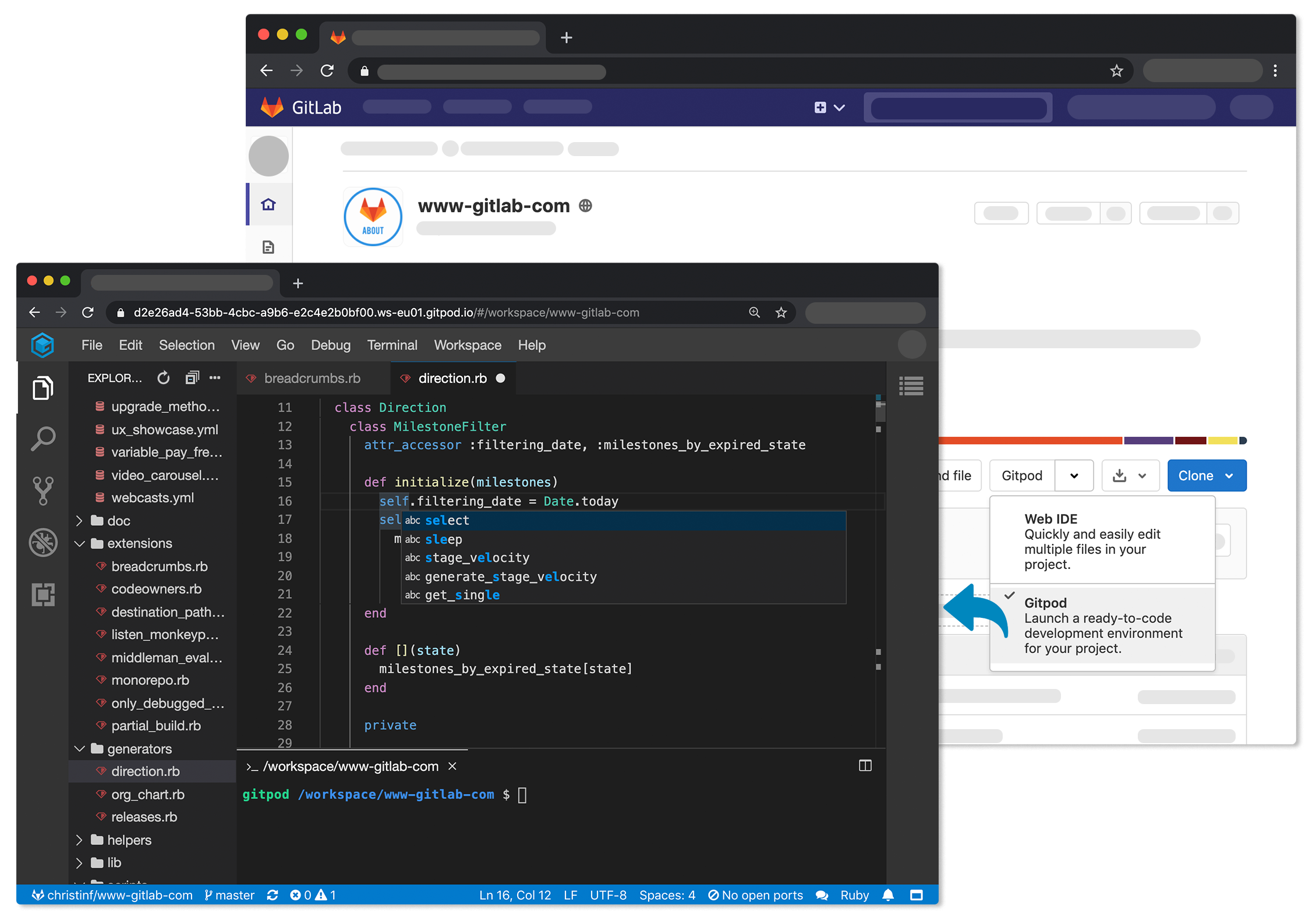
The Gitpod platform treats a version control system as the canonical source of truth from which it then automates everything a developer needs to start coding, including the integrated development environment (IDE), plugins, compilers, build tools, code generators, databases and application servers.
Fresh off raising an additional $3 million in funding, Gitpod CEO Sven Efftinge said instead of wasting a half an hour or more waiting for a bunch of libraries and tools to get installed, a developer can click a button that allows them to begin coding within a few minutes.
With the next release of GitLab, developers will also be able to connect their self-managed installation of GitLab to gitpod.io, which is a capability through which multiple git repositories can be registered. In addition, it’s possible to self-host Gitpod on a Kubernetes cluster in a way that integrates with GitLab or install the GitLab VS Code Extension in Gitpod to interact with GitLab.
Efftinge said Gitpod provides DevOps teams with a tool to automate the setting up of development environments across any Git repository that is equivalent to the Codespaces tool that GitHub recently made available. Rather than having that capability for only one repository, Efftinge noted most developers work on projects spanning multiple types of repositories.
By automating that process of setting up development environments it also become easier to align them with production environments. One of the reasons why code doesn’t work in a production environment when it is first deployed is because the local development environment has been manually configured in a way that doesn’t accurately reflect the production environment. That issue becomes even more problematic when developers are working on multiple projects involving, for example, separate microservices constructed using different repositories that might not even run in the same production environment. Collaboration also becomes easier when the members of the teams have standardized on the same instance of a local desktop environment.
Gitpod, formerly TypeFox, collaborated with Google, Ericsson, Arm and Red Hat to develop the open source Eclipse Theia project, which provides a foundation for building IDEs in the cloud using TypeScript, CSS and HTML. Theia, now being advanced under the auspices of the Eclipse Foundation, consists of a front end running in a browser or in the local desktop application and a back end running on any host. Both communicate through JSON RPC over WebSockets. Gitpod leveraged that project to build its own cloud-based service in addition to the core open source project.
In the wake of the COVID-19 pandemic, there’s naturally a lot more focus on automation and developer productivity. Most developers will be working from home for the foreseeable future to help combat the spread of the virus. Of course, most developers have been writing code outside the office for years. The challenge now is enabling teams of developers to develop applications as efficiently as possible regardless of where they are located. Eliminating inefficient manual tasks such as maintaining development environments is emerging as a significant step in that direction.
Mainframe developers have an easier time testing with the Wazi Virtual Testing Platform
Working with test data is tricky. If you’re a developer working in a distributed environment, things are difficult enough. It seems as though you’re forever replenishing test data on a database in your local system or one that’s dedicated to you out on the network.
You run tests that twiddle with that data and when things go wrong that data gets so corrupted. It’s useless. So you have to go through the whole replenishment process again. This is no big deal if you’re working with a few gigabytes of data, but when you’re running a test against a database that is really big—on the order of hundreds of gigabytes or a few terabytes of data—the replenishment process can take hours or, in some cases, days. It’s a lot of time-consuming work, even when a good deal of the process is automated.
As if this isn’t challenging enough, things get even more difficult when you’re executing tests that run in a multi-user scenario. You have a whole bunch of users making a whole bunch of changes to shared datasets that, in turn, affect the application’s overall state. When tests fail not only do you have to figure out if the problem is with the code, the data or both, you also have to determine where the failure occurred.
Remember, a distributed application is intended to run multiple instances of application logic that gets distributed over a cluster of machines. Figuring things out requires a lot of very detailed monitoring of all activity in all the instances of the application running over the network. And, determining the root cause of each failure requires a good deal of expertise to do the analysis successfully.
It’s a lot of work despite the fact that developers working on distributed applications have a lot of direct control over their environment. For mainframe developers, working with test data can be more than tricky; it can be a staggering challenge that tests the mettle of even the most gifted developer.
Understanding the Problem of Data Sharing on a Mainframe
There is a fundamental difference between the way data is managed in mainframe testing and distributed testing. Whereas a distributed developer “owns” the data in their environment, mainframe developers really don’t have such luxury unless they are working in dedicated subsystems. Typically a mainframe programmer’s programs are compiled binaries that are usually part of a larger unit of execution. An example of a larger unit of execution is the work that sets up a worker to receive unemployment insurance.
Let’s say that Sarah is a COBOL developer who has written a program that is part of the process that determines a worker’s unemployment benefit. Sarah’s program discovers all the worker’s employers over the last five years and adds the income from each employer to a table in a database that is shared with that other programs that are part of the unemployment benefits process.
Of course, Sarah will unit test her code. If she is working on a z/OS mainframe, she might use a product such as zUnit to do the testing. But, just testing Sarah’s code is only part of the work of the entire process; a broader range of testing is needed.
Now here’s where things get tricky: Sarah’s code is but one of many programs doing the work needed. So, while it’s entirely possible that her unit testing might be fine, once her program changes data and those changes are applied to the bigger picture things might go haywire. In such a case, if Sarah’s data corrupts the overall state of the unemployment benefits process, the data of all the other programs that interact with Sarah’s data might be corrupted, too. Thus, the entire database will need to be replenished. Remember, Sarah does not “own” that shared data; she is one of many users.
Sarah’s example is but one instance of a real problem that is a common, time-consuming headache for mainframe developers. If the data transformations made by Sarah’s program could be isolated and made reusable on demand, that capability would have far-reaching benefits that could change the way mainframe testing is conducted in the enterprise.
Fortunately, the capability exists. It’s the test recording feature of the Wazi Virtual Testing Platform.
Understanding the Mechanics of Test Recording
Test recording as implemented by the Wazi Virtual Test Platform (VTP) addresses two fundamental problems around managing data in a mainframe testing environment. The first problem is creating a way to isolate and make reusable the test data that is the result of the actions of one or many mainframe users. The second problem is creating a way to update that test data should it go stale.
Wazi VTP allows a developer or test practitioner to record the terminals of one or many users executing data query commands against a database. Wazi VTP saves the results of those queries for reuse as test data.
Wazi VTP has the capability to record CICS transactions or JCL batch jobs. CICS transactions can use any combination of CICS commands or Db2, DL/1 as well as MQSeries calls. Batch jobs can use dB2 or DL/1. Recording can be started from CICS by using the BZUS transaction command or from batch by running the application. All of this is done without any change to the user’s application programs.
Once the recording has completed, the CICS transactions or the batch job can be replayed entirely in batch, completely standalone and free from any subsystem. Since the data was originally recorded and then fed back to the replay process, it maintains the state of the data for all subsequent testing.
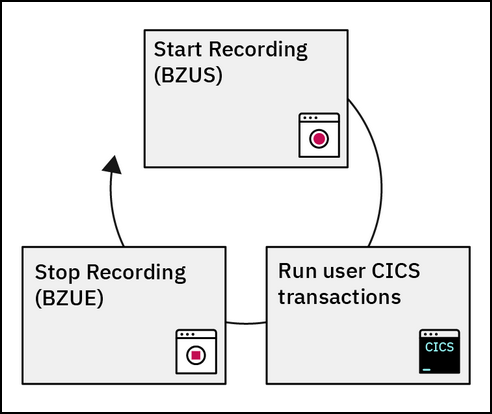
To stop recording using CICS, the developer enters the command, BZUE. Figure 1 below shows the command sequence from a conceptual point of view:
Figure 1: Running the Wazi VTP Test Recorder
The commands to start and stop recording can be entered from a mainframe terminal as shown in Figure 2, below. The developer enters the command BZUS without any parameters to record only the queries executed from the terminal in which the command is invoked. This is shown in the upper-left portion of Figure 2 below. If the developer wants to record the activities of many terminals, they add a wildcard parameter as shown in the lower right of Figure 2. In this case, BZUS AB* is the command invoked to record the activities of terminals that have an ID starting with the characters AB. Also, the developer can record activity coming from a specific terminal by using the name of the specific terminal instead of a wildcard parameter.
Figure 2: Wazi VTP can record activity from either single or multiple terminals
When a developer wants to stop the record they enter the command BZUE.
Using Wazi VTP is not confined to 3270 terminals or terminal emulators. The Wazi VTP also supports an API that can be used to perform integration testing within a CI/CD workflow.
The important thing to remember is Wazi VTP does a lot more than capture screen activity. In fact, screen capture is but one tiny aspect of the data collected. Wazi VTP captures all of the arguments on all of the CICS, DB2 or DL/1 subsystem calls. And, as mentioned above, the data it collects can be used as test data.
Figure 3 below shows an example of recorded data and program call arguments. Notice that Wazi VTP has recorded both CICS and programs (PGMS) that are written in COBOL, PL/1 and Assembler, as indicated on the first column on the left of the screenshot shown below.
Figure 3: The data that is a result of a Wazi VTP recording session
In addition to simply recording data that is then available as reusable mock data, Wazi VTP detects and then reports when data is changed. Detection is based on changes made by program logic. Wazi VTP allows those changes to the programming logic to continue to execute, until either a new, unrecorded path is attempted or until the program’s end.
This is a big difference from test data in the world of distributed computing. Unless precautionary measures are taken, once cloned instances of the test databases have no real insight into the state of those databases from which they were derived. Things might go well in unit, integration and performance testing only to blow up in production because the test data is completely out of sync with the real-world production data. Mainframe developers running Wazi VTP don’t have this problem.
Tracing Behavior and Gathering Statistics
One other advantage that Wazi VTP brings to mainframe testing is the ability to trace query behavior and gather statistics about the query behavior executed.
Figure 4 below shows how to invoke tracing under 3270 emulation. The image on the upper left shows invoking a standard trace. The image on the lower right of the figure shows the call that invokes a deeper internal trace.
Figure 4: Wazi VTP supports standard tracing as well as lower, internal tracing
Figure 5 below shows the details that are the result of a standard trace.
Figure 5: Standard tracing shows a broad range of information including information from recorded tests
Figure 6 below shows the richer set of details reported when an internal trace is invoked.
Figure 6: Wazi VTP Internal tracing provides a deeper level on reporting, including the address and memory usage of calls to a program
As mentioned above in addition to tracing, Wazi VTP will report statistics around test activities. Figure 7 below shows a set of statistics from a typical testing session conducted using Wazi VTP. Wazi VTP can report not only the number of times a program has been called but also the identifier of the caller. In addition, Wazi VTP reports status code that goes with different aspects of a CICS transaction.
Figure 7: Collecting program statistics using Wazi VTP
Wazi VTP recording is a powerful feature. Being able to record and reuse test data reduces a significant amount of the burden that goes with data management for mainframe testing. Tracing and statistics-gathering capabilities add even more power—so much so, that mainframe testing using Wazi VTP in many ways surpasses the capabilities present in current distributed computing paradigms. This is no longer the “coders code, testers test,” waterfall-driven approach to testing that was common only decades ago. It’s a modern approach to the way that enterprise testing works in today’s world. In short, it’s very cool!
Mainframes Development Offers Opportunities for Everyone
I am a big fan of the opportunities presented by mainframe programming. The machines are powerhouses. They’ve been designed from the get-go to handle thousands of users simultaneously. Mainframe computers still handle over 80% of corporate data.
There remains a real need for mainframe programmers now and well into the foreseeable future, particularly as the existing workforce continues to age into retirement. I’ve counseled more than a few younger programmers to consider spending a year or two doing mainframe development. Mainframe programming experience provides a great fallback to get through the ups and downs of an increasingly volatile job market.
As the mainframe and distributed communities continue to cross-fertilize, it’s entirely possible for developers from all walks of life to work in either environment provided they have a clear, competent understanding of the general principles of software development as well as a solid appreciation of the best practices that are general to any type of programming environment. Once the basics are in place, all that remains is taking the time to learn the particulars of the programming landscape. In the past, this might take years. Today, with tools such as Wazi VTP, the learning curve can be reduced to a matter of months provided the developer is committed to doing the work necessary to get the skills required to contribute effectively to the work at hand.
Wazi VTP is a compelling, state-of-the-art testing platform for mainframe developers. But it’s potential is much broader: Wazi VTP brings mainframe development into a common development landscape. In many ways, Wazi VTP is a door that opens into a world of opportunities for all developers from any computing environment.
The Eclipse Foundation has made available Theia 1.0, an open source alternative to Microsoft’s Visual Studio (VS) Code tool for editing code.
Mike Milinkovich, executive director of the Eclipse Foundation, said Theia will provide IT teams with a no-cost option to editing code that can be deployed on-premises or on the cloud alongside the Eclipse integrated development environment. In contrast, VS Code today only runs on a desktop, he said.
While many developers still prefer to write code on their desktops, Milinkovich noted that more code is now being written in collaboration with other developers in the cloud. The pace at which that transition has been occurring is only likely to accelerate with more developers working from home as part of the effort to mitigate the impact of the COVID-19 pandemic, he added.
To provide access to a code editor in the cloud Theia runs in two separate frontend and backend processes that communicate via JSON-RPC messages over WebSockets or REST APIs over HTTP connections. Both processes expose a dependency injection (DI) container to which extensions can be made. Those extensions will also be available via the Eclipse Foundation marketplace, noted Milinkovich.
In fact, he said, the Eclipse Foundation expects more developers will be exposed to Theia first via third-party application development platforms. Early adopters and contributors to the Theia project include ARM, Arduino, Ericsson, Gitpod, Google Cloud, IBM, Red Hat, SAP and TypeFox. Microsoft, however, has thus far not expressed any interest in participating in the Theia project. In many cases, those vendors will be making Theia an extension of the DevOps environments that these vendors already provide as a cloud service, noted Millinkovich.
The future of writing code is clearly becoming more hybrid. Application developers will always want to be able to write code locally whenever inspiration strikes. What’s changing is the level of collaboration that is now possible thanks to the rise of the cloud. It’s become a lot easier for small teams of developers to edit code together, which in theory should lead to less debugging because better code is being created at the front end of the process. The degree to which that theory pans out naturally will vary based on the individual skills of any development team.
In the meantime, Millinkovich said the Eclipse Foundation remains committed to expanding the range of open source tools that can now be accessed via the cloud, including Che, an integrated development environment (IDE); CodeWind, a project that adds support for containers to IDEs based on Eclipse; Eclipse Dirigible, a cloud-based development platform developed by SAP; Eclipse Sprotty, a diagramming framework; and Eclipse Orion, a browser-based integration platform.
It may take a while for all these projects to reach the level of maturity required to drive mainstream adoption. However, as work on these projects continues, the number of open source application development tools heading into the cloud is only going to accelerate in the months ahead.
The past decade has seen digital transformation change nearly every aspect of our lives, and banking has proven no exception. Indeed, proprietary data from Avoka shows that in mid-2017, mobile overtook desktop as the most popular channel for applying for new deposit accounts at one top 10 U.S. bank. Banks have accordingly ramped up their IT departments and technology investments to adapt to this brave new world and digitize their offerings, with the aim of making their financial products just as accessible and convenient as products offered by tech customer service giants such as Amazon.
The push to make banking products digitally ready (and very quickly) has spurred the old “buy versus build” debate in bank IT departments: Should we build our own digital onboarding software from scratch in-house, or do we buy off-the-shelf solutions from third parties that may be generic and not customizable to our brand and product offerings? While this dichotomy may have been a suitable mentality years ago at the start of the digital transformation revolution in banking, it no longer fits with the reality of today’s more complex development landscape and is starting to cause significant problems in bank IT departments.
It’s no mystery that the majority of today’s banking IT projects use elements of both “build” and “buy.” But banks tend to opt for the “build” option in the main, reasoning that in-house development drives better outcomes. But this is a serious misconception—recent research from Forrester shows that more than half of all banking customer experience projects take longer than expected, leading to a blown project budget an overwhelming 88 percent of the time. A critical point: Projects using or re-using internally built components are far more likely to suffer these issues.
This inevitably leads to a spiraling buildup of technical debt—a concept that banks should familiarize themselves with and treat just as seriously as actual debt (after it, it ends up in the bottom line—total cost of ownership is higher for internal builds around 64 percent of the time, as per Forrester’s research). A snowball effect takes hold: Projects with problematic delivery are far more likely to require endless catch-up fixes and high maintenance costs, draining time and resources from the development team that otherwise could be put to use on the increasingly crucial work of updating the offering to meet the continually evolving needs of the market and customers. On average, one-third of customer-facing software releases are updated only once a year or less, a number that rises closer to half for projects that are over-budget.
Forrester’s research shows that this isn’t a matter of under-resourcing; teams report being allocated the right amount of time and resources. Rather, stumbling blocks stem from architectural inflexibility and poor technology, as well as changing business priorities sapping stakeholder enthusiasm and project velocity.
Neither “build” nor “buy” in the older sense of the two approaches provide an adequate strategy for today’s development environment. The aversion to buying mainly took hold during a period when third-party products were fairly self-contained black boxes—off-the-shelf offerings that provided none of the flexibility of in-house and came at a cost to branding. However, this is no longer true of the third-party vendor landscape. The advent of platforms and APIs means it is now far easier for banks to bring in multiple fintech integrations to fill the gaps in their offering in a modular, “mix and match” manner—all fully customizable, extendable, flexible and capable of being brought together on an organized, neat platform.
Banks need to embrace this change and ditch the old “buy versus build” debate that so often prioritizes internal builds as a knee-jerk reaction. The constraints of the old build or buy choice means that the tendency is still to think of digital transformation as a series of off-one projects, when the most successful efforts treat it as a holistic, continuous evolution. After all, customer needs and expectations are constantly evolving, and so should customer-facing software.
So, how should bank development teams and their stakeholders approach a new digital transformation project? The answer lies in BBEA: Buy, Build, Extend and Assemble. The rule of thumb here is that where services and capabilities are generic and not unique to the bank, they should be sourced from expert vendors with a proven ability to get the job done quickly and in an expert manner (why incur a longer development cycle and higher TCO by reinventing the wheel and building internally?). This frees up the bank’s own internal resources to work on building elements that are truly unique to the bank’s value offering. While it used to be prohibitive to pursue both of these approaches simultaneously, this is precisely what the new world of APIs and platforms enables.
Sourcing and extending components in this way reduces technical debt significantly, and spreads the cost of R&D across external players. The platform approach makes it far easier for banks to tailor these external components to their own brand and specific circumstances, and makes adaption to changing future needs far less onerous, removing the tendency to revert to big and costly start-from-scratch projects on a regular basis.
Banks that want to get ahead in their digital transformation strategies must their ditch old development habits and embrace the new platform approach. Buy vs. build is dead; long live BBEA.
Multi-cloud computing is now an everyday reality for most IT organizations. Because of that, most DevOps teams are trying to figure out how to apply a repeatable set of processes against multiple clouds; rather than having to manage a unique pipeline for each cloud, DevOps teams want to be able to deploy application workloads on any cloud as necessary.
With that goal in mind, Quali has extended its CloudShell tools for modeling production environments in a sandbox to include support for both Azure and OpenStack environments. Previously, CloudShell only supported Amazon Web Services (AWS) and VMware.
Shashi Kiran, chief marketing officer for Quali, says version 8.0 of CloudShell makes it possible for developer, test, QA and compliance teams to create a truly authentic replicas of a production environments. That replica can then be used to create a blueprint of an application spanning all the physical or virtual infrastructure, data, applications, tools and services in that environment.
CloudShell 8.0 also includes support for application configuration management using either a custom script or playbook created using the open-source Ansible IT automation framework. In addition, DevOps teams now can edit some app details directly within blueprints.
Via a CloudShell web portal, shells now can be centrally managed, updated and removed. The new version also offers enhanced single sign-on (SSO) support, enabling more SAML security features and integration with third-party identity management tools. Finally, CloudShell 8.0 includes increased control of blueprint max reservation time, advanced search improvements and access to new table views.
Kiran says CloudShell is unique in that it gives DevOps teams access to a model that eliminates the surprises that commonly occur when developers attempt to move an application into a production environment. Given the level of scale involved in modern applications, it’s not possible for developers to effectively replicate a production environment on their own machines. The result is a lot of rolling back of applications after they’ve been deployed into production. CloudShell eliminates that problem, says Kiran, by giving developers and IT operations teams access to a sandbox in which to make sure that applications work as expected once they are deployed in production.
Rolling back applications in a multi-cloud world has become especially problematic. IT organizations now need to deploy applications locally on a private cloud and in a public cloud. But from an IT operations perspective each of those clouds is becoming more complex, which means the opportunity is greater for something to go awry when it comes time to deploy an application into production. Include the number of target platforms in the age of the cloud and the probability that an application will work seamlessly the first time it’s deployed is virtually nil. Multiply all the application deployments and updates an IT organization is trying to manage, and it quickly becomes apparent how much time and effort is being lost.
Production environments need to be as pristine as possible. The only way to make sure they remain that way is to make sure that every application that runs on them doesn’t ever get the chance to adversely affect their condition.



 As if this isn’t challenging enough, things get even more difficult when you’re executing tests that run in a multi-user scenario. You have a whole bunch of users making a whole bunch of changes to shared datasets that, in turn, affect the application’s overall state. When tests fail not only do you have to figure out if the problem is with the code, the data or both, you also have to determine where the failure occurred.