Welcome to The Long View—where we peruse the news of the week and strip it to the essentials. Let’s work out what really matters.
This week: Nvidia’s CEO grabs headlines by saying your career is toast, and Intel is still fighting. (more…)

Welcome to The Long View—where we peruse the news of the week and strip it to the essentials. Let’s work out what really matters.
This week: Nvidia’s CEO grabs headlines by saying your career is toast, and Intel is still fighting. (more…)

I was excited when I started writing my first end-to-end tests years ago. The idea was promising; create an automated test suite that spins up a browser and mimics your user’s behavior. Test your website end-to-end. Frontend, backend, your database—you name it. All these automated tests would cover everything! Unfortunately, it wasn’t all roses and sunshine. The implementation was more complicated than expected and the results were not as stable as I had hoped. On one hand, I expected that learning a new testing framework would take time. But on the other hand, investing time and money just to end up with flaky tests and countless false positive alerts was not acceptable.
Luckily, testing frameworks evolved, and new libraries make end-to-end testing more approachable and, most importantly, less flaky. One of the more recent solutions is Playwright. Let me tell you more about it!
While Playwright’s default choice is Node.js, it offers support for three other languages: Java, .NET and Python. You’re in good hands if your team uses one of these languages because no one wants to learn a new language just to write some tests, right?
Contrary to other solutions, Playwright doesn’t use the WebDriver protocol. It leverages the Chrome DevTools protocol to communicate with Chromium browsers (Chrome/Edge) directly. This approach allows for more direct and quicker communication. Your tests will be more powerful and less flaky.
But Playwright doesn’t stop at Chromium browsers. The team behind the project understood that cross-browser tests are essential for an end-to-end testing solution. They’re heavily invested in providing a seamless experience for Safari and Firefox, as well, and even Android WebView compatibility is in the works.
Testing your sites in Chrome, Edge, Firefox and Safari is only a configuration matter. And this saves time and headaches!
It’s not only about automating multiple browsers, though. If your tests are hard to write because you have to place countless “sleep” statements everywhere, your test suite will take hours to complete and become a burden.
To avoid unnecessary waits, Playwright comes with “auto-waiting.” The idea is simple: Instead of figuring out when a button is clickable by yourself, Playwright performs actionability tests for you.
Let’s look at an example:
“`
await page.click(‘[data-test=cta]’)
“`
There’s nothing fancy about clicking a button, right? Except in Playwright, there is. This innocent “click” call includes additional convenience functionality. When you call “click,” the framework checks and waits for a matching DOM element to be:
– attached to the DOM
– visible
– stable (it’s not animating or moving)
– able to receive events (not hidden or obscured by other elements)
– enabled
All these checks guarantee that your target element is ready to roll when you want to interact with it and, more importantly, it’s clicked as quickly as possible. Don’t worry about DOM elements. Just interact with them and let Playwright figure out the rest—no more wait statements!
Auto-waiting is built into all of Playwright’s interaction methods so that you don’t slow down your test suite. Your tests will be easier to write and run as quickly as possible.
But that’s not all! While I use Playwright via the command line, it also comes with handy tools to make end-to-end testing easier.
Playwright provides additional commands and visual tools to make the writing of end-to-end tests as accessible as possible.
To give you a head start with your first test, use Playwright’s test generator.
“`
npx playwright codegen playwright.dev
“`
Only a single CLI command is necessary to spin up two new windows: An interactive browser and the Playwright Inspector. The fun part is that every interaction in the browser window will be recorded and shown in the inspector.
If you want to create a Playwright test that navigates somewhere, clicks a button and fills out a form, these tools are perfect for creating an initial setup.

Replay the generated script, adjust your selectors and assertions, and you’re good to go!
Congratulations! You just created your first end-to-end test, and I bet it didn’t take you more than a few minutes to get there.
When your test suite grows, you’ll find yourself in situations where you must debug complex scripts. For these cases, Playwright provides a handy debug view.
Enable debug mode by explicitly calling `test –debug` or defining the environment variable `PWDEBUG=1`.
“`
npx playwright test –debug
PWDEBUG=1 npm run test
“`
Playwright then opens a browser and the inspector walks you through your test case, similar to your editor’s debugger. Additionally, it highlights the touched elements with a little red circle so you can see what was clicked or filled.

This approach is perfect for debugging tests during local development. But what about debugging failed tests that run in CI or on a different machine? There’s a solution for that, too!
In an ideal scenario, you’ll run your tests automatically on commit or deployment in your CI/CD pipeline. But debugging failed tests from a different environment can be a massive challenge.
Luckily, the Playwright framework allows you to enable a trace mode. Trace mode records all script actions while screenshotting and keeping the website’s state.

Then, if your tests fail on your remote servers, use the provided Playwright tooling to load a generated `trace.zip` file and inspect the test to find out what failed. Method calls, a timeline and screenshots will be available—it’s time travel debugging at your service!
These are only a few things that make Playwright my testing framework of choice today and the team behind it develops fast and ships new releases every month.
If you want to learn more about the Playwright framework or to chat with the maintainers, there’s a very active community Slack channel with many friendly people.
So, do you still avoid end-to-end tests because they used to be slow and flaky? I hope that I could convince you to give it another try. Because there’s nothing better than knowing that you didn’t break things while developing and shipping software.

How Software Delivery Management Clears Up the Confusion of Embracing and Implementing DevOps
Since the term was coined back in 2009, it wouldn’t be a stretch to describe DevOps as an impactful if not tectonic shift in software development and delivery in the past two decades. The move to implement DevOps has encouraged, among other things, better collaboration between siloed Dev and Ops teams, more reliance on automation, more focus on culture and better use of feedback loops to refine delivery processes.
In theory, DevOps has been a game-changer. But, in practice, its usefulness is more difficult to define. As DevOps enters its teenage years, the idea of a fully integrated software delivery function aligned toward a common goal of generating business value is more illusion than reality.
Are DevOps teams themselves as connected as they should be? The reality is that developers and operations personnel tend to have their own versions of “dev DevOps” and “ops DevOps,” working against each other inside supposedly integrated teams. Though they may have set up deployment pipelines, each side tends to use its own tools, access its own information and follow its own cadences, leading to occasional missed handoffs and delays in delivery schedules.
Looking across the enterprise, DevOps cultures fray further. A perfect DevOps practice envisions teams in different departments, business units and geographies all in sync, delivering value via software on a reliable cadence. In reality, enterprise DevOps is difficult to pull off because most organizations haven’t implemented shared languages, comment processes and best practices across all of their teams with management buy-in.
Then there’s the issue of connecting DevOps functions with the rest of the organization. Some definitions of DevOps extend the concept of collaboration to other stakeholders beyond conventional engineering functions, such as quality assurance, testing and security. But how extensively does a DevOps culture tie together the goals, needs, resources and processes of others in the organization that rely on software delivery, such as product marketing, sales and executive management?
Gartner describes DevOps as being focused on “rapid IT service delivery through the adoption of agile, lean practices in the context of a system-oriented approach.” In other words, delivering faster and in a more organized manner. But has DevOps helped software-first organizations deliver better software? Has it helped them institute the right processes to deliver the right software at the right pace to drive the most value possible to the organization’s bottom line? Paraphrasing the “If a tree falls in the forest …” proverb: If you deliver software and no one is there to consume it, have you truly delivered value?
Even if you’re doing DevOps relatively well, there’s a level of integration that’s missing from today’s software cultures. It’s the mission to tie together all functions of software delivery—not just those relating to what goes on in the labs. It’s the commitment to do more than just deliver better metrics. It’s the mentality to define everything relating to software delivery as a discipline all its own, like finance or sales—not just serving other disciplines.
A new technology category is emerging that aims to build on what DevOps has accomplished and extend those gains across the software delivery function. It’s called software delivery management (SDM). An SDM strategy is based on four foundational pillars that elevate software delivery to a core business priority, reflecting the level of importance software has achieved in today’s business environment:
Adopting an SDM strategy on top of an existing DevOps culture can help an organization in a number of ways.
Having disconnected tools, disconnected data and a lack of common language make it difficult for one side of the organization to know what the other wants. Even in mature DevOps implementations, software delivery ends up being a patchwork of different processes for different teams.
It’s also difficult to determine if our teams are delivering the right end product if there’s no shared visibility and insight. SDM helps by establishing common data and common processes, giving visibility and insights across teams of different maturities, different tools and different technologies so you get all functions to collaborate. That way you can be sure you’re not just deploying more—you’re actually delivering continuous value.
You can’t manage what you can’t measure. What SDM offers is a model to understand how you’re performing with DevOps by and large, what teams are performing well and what teams aren’t, and how you can leverage those insights to improve.
Here are five ways SDM build on the successes of DevOps:
DevOps has taken software delivery a long way and implementing an SDM strategy can take it the rest of the way. It won’t change DevOps, but it could reinvigorate the practice. Deploying both strategies in concert, software delivery management and DevOps can focus less on automation and tools and more on the outcomes and on the people and steps involved in driving those outcomes.
DevOps has quickly gone from being a niche concept to a widespread practice that is gaining traction rapidly in both large and small organizations. As it becomes a key part of many development teams, administrators must work to integrate DevOps techniques, tools and practices into a wide range of teams, from operations to development, support and management.
The seamless completion of this implementation, together with the overall change in methodology and culture from top to bottom, provides a smoother workflow. The issue, however, is that admins are being asked to do more with less. DevOps administrators from large companies are struggling to keep pace, partly due to the newness of the practices, and in part out of a need to provide a competitive advantage for the business. Additionally, they find themselves in the middle of many different cultural pressures. All of this is leading to problems in fully implementing and reaping the benefits of a fine-tuned DevOps machine.
That said, working through the implementation of a DevOps techniques will be worth it in the end and to make the transition easier, here are some specific pitfalls that administrators should try to avoid.
One burden that is often faced by DevOps admins is an organization’s over-reliance on technology. In theory, technology is the easy part, but too often organizations become enamored with the newest shiny automation tool and find themselves in a cul-de-sac of isolation, forgetting to bring the rest of their organization with them.
The wave of digital transformation that many organizations are experiencing can present additional difficulties as new technology is being implemented throughout different business units and administrators find themselves in high demand.
Automation is awesome, but it isn’t the answer—it’s part of the recipe. The solution requires attention to processes and culture. According to a Gartner study, 73 percent of what organizations should focus on consists of attention to culture and communication, information exchanges and building operations process and organizational consistency. Only 27 percent should be on tooling.
As the growing emphasis on DevOps places an added burden on infrastructure teams already struggling to cope with the digital transformation in their organizations, unification will be key to success. Ignoring the importance of creating a harmonious culture that embraces DevOps and processes that foster the methodology can be costly. Ensuring that tools are utilized in a smart way alongside people and processes will ultimately lead to more success.
DevOps trust and transparency is at the core of release management. This level of collaboration and trust ensures that both sides of the equation agree when it comes time to ship software.
Both sides in Dev and Ops frequently misunderstand the other’s motivations around production control and release management. Stability is king for Ops, and they would love nothing more than preserving uptime in each release, even if it means a blockage of imperative software updates. Dev, on the other hand, wants to move quickly, and they often make assumptions about what is required to support software in production. To help unite the two requires administrators have the ability to fill in the information gap that exists between Dev and Ops.
In a way, DevOps admins work as the therapist for a severed relationship between Dev and Ops. Bridging the divide between these two departments can, at times, feel like counseling an organization to communicate better. But doing so through integration and collaboration is a surefire way to make life easier for everyone involved. DevOps doesn’t force people to become who they’re not; instead, it promotes cooperation, tolerance and shared responsibilities between the teams.
What many administrators also lack is a way to clearly understand, prioritize and utilize the data they have. From an agile practice perspective, that level of visibility should be established early on in a data reporting structure—project, initiative, etc.—and with the proper software solution. A solution that combines application release, environment, quality and deployment data across the portfolio to drive continuous improvement of software delivery.
Being able to utilize this data makes a world of difference for delivery teams to be able to quantify, correlate and predict outcomes to help solve problems and make better decisions. The most basic, yet beneficial, insight you can have when making these decisions for an organization is to have the transparency to know that what you are doing is working.
Application release delays costing hundreds of millions of dollars can be caused by poor management of complex enterprise software releases. A big part of the issue is that the very nature of agile and DevOps is to work in smaller teams, which can naturally create silos. For a given release, there can be many teams and, in some cases such as test environments, teams from different projects can collide due to lack of oversight. This complexity presents significant management problems and, without insights across the entire process, release trains are bound to crash.
A culture of working in small teams on a single release lends itself to working in silos, and that isolationism often conspires against organizationwide success. This construct needs to be broken, as it produces an additional level of complexity and unification that will be a key point of emphasis for organizations in their road to digital transformation success.
This unification will be especially important in large organizations that see frequent changes to their software release cycles, sometimes daily. It is imperative for these organizations to avoid silos and favor better communication with pronounced team roles, especially with the added confusion that the rapidly evolving delivery cycle can bring.
Creating a cohesive and harmonious DevOps culture will benefit everyone in an organization in the long run. To be successful at this, though, it’s imperative that DevOps admins are given the rein to institute the change that they see fit. Admins must educate themselves on the latest technology, learn how to use and monitor it and bring in the rest of the teams so everyone can work together. But the burdens they are up against need to be dealt with on an organizational level from the top down, creating the ultimate DevOps working environment for all.
In this DevOps Chat we speak with Dr. Kristian Stewart of IBM’s Cloud Event Management team. Kristian has some keen insights into the role of dev and ops and how they interact. Kristian calls it Shift Ops left, shift dev right. An interesting way of looking at things.
As usual the streaming audio is immediately below and the transcript of our conversation is below that.
Alan Shimel: Hello, everyone, this is Alan Shimel, devopsy.kinsta.cloud, here for another DevOps Chat. Got a really hot chat today and my guest joining me is Kristian Stewart of IBM’s cloud event management team. Kristian, welcome to DevOps Chat.
Kristian Stewart: Thanks very much for having me, Alan.
Alan Shimel: And I just wanna make sure I got it right – it is Kristian Stewart, right?
Kristian Stewart: Last I checked.
Alan Shimel: Okay. Well, sometimes my funny French accent throws people off, but, anyway – and, Kristian, I mentioned you’re working with IBM in cloud event management, but give our audience a little bit behind that. What exactly does that mean?
Kristian Stewart: Well, let me give you a bit of a background ’cause there’s some history here, in particular with respect to the topic of the podcast, which talks about operation tools. So I’ve been with IBM for ten years. I’m one of the lead architects for a suite of IT service management tools, and my own specialization is in event management, as part of IBM’s Netcool brand, okay? So I’ve been in this industry for 18 years.
I worked for a small start-up back in the late ’90s – the company was called “Micromoves,” and we were focused on introducing tools for disciplined fault management into telcos, into communication service providers, during the dot-com boom of the late ’90s. And then, in the early ’00s, we pivoted and successfully sold into enterprise, finance, retail, as their IT infrastructures became larger and more complex and as they matured, from an IT operations perspective. So we were acquired in 2006 and we started to work towards applying interesting mathematical and analytical techniques, for increasing the value provided by our tools, and applying machine learning and problems to this space. So that was my background up until about three years ago.
So what do I mean by “cloud event management”? Well, more recently, as part of the movement of the industry that we serve, as they move into cloud and their investment in cloud has increased, I’ve been working with teams to build software-as-a-service offerings capabilities we had, till that point, only available on-premise, so it includes alert notification tools, runbook automation tools, and cloud event management. And so our particular interest in DevOps is twofold, right? So our transition itself, from going to shrink-wrapped client service software, that was originally deployed on-prem, has gone through to the development of cloud-native, cloud-scale, public cloud resident offerings, and with our guys embracing paradigms like micro-service architectures, 12-factor apps, and, of course, DevOps.
And one of the biggest challenges or one of the biggest changes our teams have had to endure is that they now have to operate these deployments themselves, right? So they’ve gone from shrink-wrapped, “Give it to the client. Now it’s their problem,” – well, kind of – through to “Now we’re hosting this for you.” So we’ve had folks from development and QA transitioning to operations roles, and they’re required to apply software engineering skills and work with app developers to ensure that we’ve got robust capabilities in private cloud. And we’re providing 24/7 ops to support these offerings.
But we find ourselves in a fairly unique position because we’re running operations but as a service product that themselves are designed to help people responsible for running operations for their own apps and services. So it’s just sort of a renewed empathy for our end users, especially as we start to angle our offerings towards teams that are embracing DevOps. Does that answer your question?
Alan Shimel: Yeah, and then some. [Laughs] But good stuff, Kristian. Thank you very much. So wanted to talk a little bit today bringing this back home to DevOps, right? And one of the trends that we’ve been seeing over at devopsy.kinsta.cloud recently is, really, around kind of putting the “ops” in DevOps, right? ‘Cause we’ve spoken now to a few folks in the DevOps space from both the vendor and practitioner side, who are really emphasizing the role that ops plays in DevOps. And one of my things about it, though, Kristian, is I get the opportunity to speak to a lot of people like yourself, a lot of people who are heavily invested in DevOps, but I also get a lot – the chance to talk to a lot of people who aren’t and are new DevOps or just dipping a toe in the water and planning their DevOps migration and transformation.
And one of the things that I try to remind people is that “Don’t leave your common sense at the door,” at the DevOps door, right? Bring it with you, number one. And, while you’re bringing something with you, it doesn’t mean everything you’ve done in ops to this point and all the lessons learned and best practices accumulated get thrown out – you know, the baby with the bathwater. With DevOps, we evolve. We’re not necessarily revolutionizing; we’re evolving. And so building on best practices and time-tested ops practices and methodologies and processes is probably a better solution than, you know, scrapping the whole thing and starting from scratch. And who has the opportunity to do that anyway? What do you say to that, Kristian?
Kristian Stewart: Oh, I agree completely. And, you know, amongst our clients, we’ve got a whole array of clients, from telcos to finance to retail, right? You name it. Across those clients, we have people on varying points on the curve of maturity, with respect to adopting DevOps. But what I say to those clients, as they look at those paradigms, is that the business objectives of operations teams haven’t changed substantially, certainly since I’ve been in the business. There’s a lot that has changed, but the business objectives continue to be measured by KPIs like mean time to repair, mean time between failures, and pressure on costs, right?
So disciplines – so, within a, let’s say, a mature enterprise that have invested heavily in ITIL, they adopt disciplines like event and incident management, and that leans on a key set of capabilities, which are equally applicable when you transition to DevOps. You know, the proximity of your developers to your operations and the smoothing of the processes and the interactions between those organizations, if anything, are enhanced by some of the traditional methodologies and tools. So, you know, to list some of them, you need tools which can consume events from highly heterogenous environments; you need to minimize the amount of management noise that’s presented to the people who have to respond to events; you need to be able to integrate with other systems; you need to be able to help pinpoint probable causes, drive efficiency in operations, do things like apply machine learning and advanced analytics to gain insight from your event and incident data.
So, if you look at the evolution of these practices, historically, right, ITIL emerged in parallel with the practice of event incident management. It didn’t dictate it. You know, these standards emerged as – sorry, event and incident management emerged as de facto practices, driven by the availability of practical tools to solve real problems, and they still solve those problems. You know, if you look at the way that operations has evolved, look at telecom from the late ’80s and early ’90s, right?
So, in a telco network operations center back then, you might have had dozens of very highly-skilled people, _____ network engineers, with training on dozens of different management tools, and these guys and girls were expensive, right? I mean, their time cost a lot of money, and then the introduction of event and incident management tools helped transition from that to having perhaps the same number or even more operations staff of a substantially lower skill. And so the first thing event management and incident management did was to try and lower the cost of entry for running an efficient operations team.
But now, if you look at the changes in IT management now – so I was chatting to a large enterprise just the other day, and, ten years ago, they – so these guys have always been driven by those same metrics – MTTR, MTBF, cost, right? A few years ago, their job was to provision physical hardware, static middleware, and the management of that stuff from an operations perspective. Now these guys are having to provide platform-as-a-service tools, distributed runtime container and orchestration systems, and they still have responsibility for the existing infrastructure – the network, the physical servers, the legacy monolithic applications. And all that still requires management. So, mainly, they’ve got the challenge of managing hybrid cloud, coupled with extremely tight expectations on time-to-market that working practices like DevOps and Agile software development allow for.
So I’d say that event and incident management tools are as relative now, if not more so, than they ever were because, when you shift to practices like DevOps and site reliability engineering, you know, back to the olden days where you have ops employing of hundreds of you know, low-skill operators, best practice is transitioning to one where you have a substantially lower number of substantially higher-skilled operations staff. Right? So these guys and girls are highly skilled, but they’re time-poor. You know, your typical operations professional, in an organization that’s embraced DevOps, wanna be concentrating on automation, on liaising with dev early on in the release life cycle, on prepping for new rollouts. They don’t wanna be grappling through log files and sifting through performance metrics to find out what happened just so they can restore a broken service.
And I think the eventual goal of the kind of tools that we provide – event and incident management – isn’t just to help the operator find the needle in the haystack; I think it’s to hand them the needle. And that’s useful, whether you’re a low-skilled junior operator in old-school operations or a time-poor, hyper-technical site reliability engineer with 20 years’ experience. Alan, you still there?
Alan Shimel: Yes. Kristian, I’m sorry. I had a little internet issue. So all really good, but, you know, one of the things I wanted to touch on, Kristian, is the subject of empathy, as part of kind of your DevOps mantra, right? Sometimes, people give cultural things short shrift, but empathy is important in DevOps. And what I wanted to ask about was the idea of “How do we get developers?” Right?
For a long time, the ops people have sort of had to empathize with developers are doing and what they’re doing in terms of development to help in deployment and stuff, as part of DevOps, but now, putting that on the other foot, right, getting developers to empathize with what the ops folks are dealing with, as part of this DevOps equation. I mean, I’ve heard of some organizations where they’ll actually embed developers on the ops teams for short periods of time so that they get empathy the hard way, if you will, right?
Kristian Stewart: Yeah.
Alan Shimel: They gotta live it. What do you think about something like that?
Kristian Stewart: I think, in terms of getting the development professionals involved, I think – so you mention role rotation, right? And I think that’s one tactic. You know, I like to think of this as much as “shift-right dev,” as it is “shift-left ops,” right?
Alan Shimel: Yeah.
Alan Shimel: Good. Good.
Kristian Stewart: And, actually, you know, it reminds me of the situation in shrink-wrapped software development, maybe 20 or 25 years ago, between development, who were the coders, and QA. Right? So there was sort of a brick wall, prior to Agile software development, where it was throwing a pile of code over the wall. And I think Agile, with that shift-left testing, really helped to remedy that, to the extent that I see, today, developers and quality assurance engineers working really, really closely together and not depending on, you know, reams and reams of documentation to communicate with each other.
So, I think, with DevOps, I think a similar thing is happening, and I think you need shift-right dev, as well as shift-left ops. So operating an application or a service, I think, has to be a shared responsibility, and I do think that dev need to get skin in the game. So that’s gonna include dev as an escalation point, when an incident occurs. It can also include role rotation. But, for mutual benefit, I think they both need to use the same operations tools, right, so that they see what each other are doing, when an incident or a critical event occurs in the environment. And then they’re motivated to improve the use of those tools for themselves, as well as for the sake of operations.
I think, you know, a 3:00 AM incident notification, you know, like a page at 3:00 AM, is a great motivator. So, for ops people, it’s an incentive to get runbooks and automatic incident responses written so that service restoration is as quick as possible and, preferably, automatic. With dev, it’s an incentive to make their services or applications operable, right, so they need to get the right amount of instrumentation into the app so that ops can manage an incident or, better still, that some script can, so that neither of them get the 3:00 AM escalation. So I think there’s a – with all due respect to my dev and ops colleagues, there’s a carrot-and-stick approach there.
Alan Shimel: Mm-hmm. Yeah, that makes perfect sense. Kristian, I want you to repeat what you said before. We need to shift ops left and shift devs right or did I have that backwards?
Kristian Stewart: Yeah, no, yeah, that’s what I said. Shift-right dev and shift-left ops, right?
Alan Shimel: Got it.
Kristian Stewart: So get them to have a degree of overlap with respect to their responsibilities. And, of course, what they do in response to those responsibilities can be quite different. You know, let me see if I can think of an example. So, for devs, under those circumstances, when they’re being involved in responding to an incident, it can be stuff as simple as being really clear in their application logs.
So, if you think about events that are generated by, say, a container-based app deployed on Kubernetes, okay, so the event and incident management system is gonna be presented with logs from the app code; they’re gonna be presented with logs from middleware; logs from Kubernetes itself; logs from, potentially, external technologies and monoliths – NFS mounts, databases, legacy apps, network; and they may also be getting alerts from monitoring systems that are watching performance metrics for the running container, so transaction request rate between micro-services, CPU utilization, response time.
So, if devs can make sure that something as simple as the concept of criticality or severity is included in the logs, that really helps with filtering _____ ops figure out whether or not something’s really a problem. You know, for example, is this event classed as a trace message? A debug message? A warning? An error? Is it known that this is service-affecting? Right?
Alan Shimel: Yeah.
Kristian Stewart: And, you know, how better to motivate devs to implement those sorts of practices than to make them consume log messages that are completely uninterpretable, right?
Alan Shimel: Agreed. Agreed. Hey, Kristian, we’re over time already, but, as I told you before we started, the time here goes quickly. But, you know, boiling all of this down, the last – whatever – 18 minutes down, really, I wanna make the point of – and I loved what you said about ops shift left, dev shift right – that our ops and devs can work together. And, as you said, they each will have different reactions with different roles and responses to given incidents or given stimuli, but they can work together and we can build on what ops has built over the last 50 years of the IT industry. And –
Kristian Stewart: Mm-hmm.
Alan Shimel: Right? We don’t leave that at the door of DevOps; it’s part of it. And one thing I want – you know, if we can ask people to take that with them. And you agree that’s key takeaways here for them?
Kristian Stewart: Absolutely. Couldn’t agree more.
Alan Shimel: Fantastic. Hey, Kristian Stewart, IBM, thank you for joining us on this episode of DevOps Chat. Love to hear more in the future about what you and the IBM team are doing around cloud and hybrid and some of the other stuff kicking around. And we’ll have you back again soon, but, for now, thanks for being our guest this episode.
Kristian Stewart: Alan, it was an absolute pleasure.
Alan Shimel: Great. Hey, this is Alan Shimel, everyone, for devopsy.kinsta.cloud, DevOps Chat. Thanks for joining us and we’ll see you soon on the next chat.

If “Dev” and “Ops” are the power couple of tech, “DevOps” is the holy matrimony that takes innovation from trainwreck to fast and repeatable. At most businesses, however, Dev and Ops still sleep in separate rooms and agree only on their mutual contempt.
Dev (Development) and Ops (IT Operations) usually are divorced or ready to serve the papers because their incentives clash. In Ops’ opinion, Dev is an idiot—always out late drinking with friends, he comes up with wild ideas and wants to implement them immediately. Dev can’t make anything work on real servers and can’t write scalable, stable code.
To Dev, Ops is a total code-blocker—she makes Dev go through “change management boards” and slows down progress. She lets the competition get to market first. So every day, Dev and Ops have an angry shouting match that ends in tears.
I wish I were exaggerating. My coworker Brandon Cipes once walked into an interview for a product development position. The interviewer broke down crying because the relationship between Dev and Ops had gotten that nasty. They refused to meet with each other, let alone be in the same room.
When Dev and Ops have a dysfunctional relationship, they struggle to communicate, collaborate and get results. Their organization will fail at innovation because it lacks the cultural, technological and procedural base to do otherwise.
The missing base is DevOps. It’s a unified strategy for Development and IT Operations, and implementing it can have the following effects:
Normally, Dev and Ops play “telephone” because they’re physically separated and have too many points of communication. Emails, IMs, grudgingly accepted meetings and passing conversations ensure Dev and Ops never get the full message.
DevOps fixes communication by assigning Dev and Ops personnel to the same teams. They sit in one room and work in a single squad (a.k.a. a pod or team) of no more than eight to 10 people. If they turn their heads, they see each other’s beautiful faces. Until promotions or career change do them apart, they can’t avoid talking and working toward common goals.
In essence, DevOps puts “cross-functional” teams together and thereby eliminates hand-offs. Fewer points of contact, less telephone, better communications.
For many Dev and Ops teams, “collaboration” is another word for bureaucracy. It’s TPS report-ish stuff characterized by change review board meetings and laborious documents that tell Ops how to deploy new code. Dev and Ops might accidentally (or intentionally) withhold information from each other.
In DevOps, collaboration is automated. Instead of change review board meetings, you use version-controlled software. The hand-offs from Dev to QA and QA to Ops are done by machine. A script deploys the code for Ops so there’s no risk of misfiring.
“Collaboration” is no longer an ordeal or choice. Documenting and sharing the squad’s collective knowledge is wired into the process.
Normally, a software deployment is like a sloth trying to cross US 101: slow, awkward and soon to be roadkill. That’s all thanks to bad communication and bad collaboration.
With DevOps, you catch problems before they go live. Test automation prevents any need for manual checks. One person corrects the problem in a matter of minutes whereas before, a team of five might spend eight hours tracking down and fixing one bug. Ops feels confident that tested code won’t cause havoc.
Thus, the upshot of DevOps is speed and stability. Before, Dev and Ops delivered maybe a few times a year and faced regular breakdowns. DevOps can deliver multiple times daily without a hitch.
DevOps is a cultural, procedural and technological transformation. As in a marriage, both partners are responsible for good outcomes. Linked as they are on one squad, Dev learns to care about stability and Ops begins to value innovation.
If “agile” is about making businesses nimble and quick, DevOps is about applying agile principles to technological development and operations. Ultimately, it’s about beating your competition to the next big thing.
Dev, easy on the drinking escapades. Ops, live a little. Tie the DevOps knot and make some innovation babies.
 Zubin Irani is co-founder and CEO of cPrime, a full-service consultancy that focuses on agile transformations and project delivery solutions for hundreds of software teams, including more than 50 of the Fortune 100. Connect with him on LinkedIn.

In my first article in this series, “Using Guilds to Combat Information Silos,” I reviewed the adoption of guilds at xMatters. As our company has grown, we’ve used guilds to keep critical information from languishing in silos—as often happens when an organization scales. Guilds have helped our engineers apply their creativity and critical problem-solving skills to other channels and contribute to areas outside their normal scope. It’s a win-win situation for everyone who participates—and especially for the company.
Implementing guilds began as a grand experiment. We quickly learned a lot about what enhances or hinders a guild’s success, making adjustments and adding a necessary dash of protocol along the way. But, as is the case with any growing organization, new needs and pain points challenged us to adapt and tackle them. One attempt to solve a critical problem led to an entirely new team model: a body we call the Swarm.
The Swarm arose as a result of key changes in our release protocol. We used to be very focused on getting new features out the door as fast as we could. As it turned out, many of our customers prefer a more predictable schedule. So we gave our customers flexible options by maintaining continuous delivery of code to production, with flags to stage larger features or more visible changes. Now, customers who wanted more predictable updates could opt for a quarterly release model while others could continue to access features as they became available and were being iterated on.
While the quarterly release model improved our rhythm for customers, it also created stricter deadlines. A project that just missed a quarterly release could get delayed by almost another full quarter before our customers could start using it. Throwing more engineers at a problem doesn’t necessarily solve it faster—but, being the engineers we are, we thought about ways to parallelize the problem.
We knew that guilds were very good at collaborating around a shared problem, so we adopted temporary guilds, which “swarmed” around a shared problem, completed work at an accelerated pace and disbanded. Centered around a specific initiative with a definitive start and end, multiple teams from Dev to Ops collaborated to complete a defined project. For instance, we might form swarms to create new product features, and their lifetime would span a finite number of sprints across multiple teams until completion. Due to its nature of focusing on new product features, swarms differ fundamentally from Guilds in that they are typically not self-forming; each one is an entity intentionally designed for a specific purpose.
We began our swarms experiment with a large architectural change to roll out a new format for our customer hostnames, which involved six Engineering and Ops teams. We realized immediately that this would be an incredibly challenging undertaking on our tight deadline. A slew of teams was working on different stacks in different programming languages, so there were many competing visions and different contextual understandings of the end goal. It became very apparent that the swarm could not be left to operate in a completely flat hierarchy, as a guild usually does. We needed a leader to help ensure there was no duplication of work, things weren’t falling through the cracks and necessary dependencies were completed in the scrum storywriting between teams.
Having someone take care of all the logistical problems is one thing, but we realized that in-person communication between all the teams in the swarm is absolutely necessary. We tried staying in the loop with each other by defining a process of posting updates from each team in our swarm’s Slack channel, but this was not enough to keep the project on track. Mattius, one of our very talented operations leads, initiated regular in-person meetings across all the teams, which led to far greater clarity. It was absolutely crucial to have all of the teams together and face to face on a regular basis.
In the end, swarming on this massive endeavor allowed us to get the project delivered a week before the deadline. It was a challenging and imperfect first run, but it absolutely paid off.
I leave you with these three recommendations:
The lessons we learned were invaluable for refining (and continuing to refine) our approach to tackling projects for faster release, and we’re continually working to improve and enhance this model. Good luck with all your future swarms.
 Nick Fletcher, Engineering Manager at xMatters, started designing and developing websites back in 1998, when the World Wide Web was the Next Big Thing. In the time since that first website, he’s mastered all the aspects involved in creating great products: design, development and strong leadership. Connect with him on LinkedIn.

Scheduling is a large part of making the data center go, and more to the point of making the virtualized (be it VMs, cloud, containers, or clustering) portion of the data center work.
While there are a lot of variables to virtualization performance, scheduling impacts performance all of the time. And yet we only really talk a lot about it in clustering (where a robust scheduler on par with an OS scheduler is required).
There’s a reason for that, and it is worth exploring.
 (Side note: I was talking about this blog with Lori while I was writing it, and she reminded me of when we took our Masters’ courses, the Operating Systems class used Homer Simpsons greedily wanting donuts as our scheduling project. So whenever we think scheduling, we mentally hear one of the many Homer processes being denied a donut and going “D’oh!”)
For virtual machines, scheduling is largely forgone in favor of other resource utilization. Virtualization only cares about CPUs and memory requirements when the virtual machine is created. You tell it then, and the only time you worry about it again is if you demand more CPU cores than the physical hardware can provide—and in some cases, CPU virtualization will allow you to keep spinning up VMs even after that. Only the real scheduling mechanisms actually can be at odds with each other in a heavy load situation. The host OS scheduler, for example, could swap out your VM’s active thread at the same time the guest OS has raised the level of importance for an app to “insanely high, do it now.” Although this only begins to show if basic rules about servers and loads are ignored, it does happen.
You get the same issues with private clouds. Why? Because even though everyone in the marketing world pretends it isn’t true, private cloud and VMware ESXi essentially are the same underlying toolset. And usage patterns in the enterprise show not only does everyone know that, but also the differences are less substantial than any of the organizations involved want to admit. Not that they are the same code, but in practice, they do the same things.
The one place where these two (and public cloud for that matter) really make use of scheduling is when automatically responding to spikes in usage that threaten to bury a system. However, solutions to usage spikes are not part and parcel of these systems; they are crafted by DevOps (or Dev, or Ops) folks who work at places where dropped connections are lost money and, thus, a quick response of growing the pool of available servers and then later shrinking it is important. But because they are using their own metrics to determine the need, more of these systems are implemented in application provisioning tools than in cloud or virtualization software. We could argue about where this functionality actually belongs, but not really where it is implemented today.
I kind of bled into public cloud there, so will address it. When people talk about it being more “agile” or “adaptive,” they mean “with this quasi-scheduling code we wrote to spin up instances at need.” It doesn’t matter if the “code” is a python script or an Ansible playbook—they did the scheduling, not the system.
That leaves clustering software (such as Mesos). Because clustering software treats many machines as one big thing, it requires a scheduler to manage the resources. In the case of Mesos, the central scheduler really isn’t that smart, and I think that is a genius implementation. It knows what resources (CPU, memory) each machine has available, it knows what resources have been assigned from that machine, and for each of the “frameworks” (think of them as job executors; though that’s a bit simplistic, it’s perfect for this discussion) what it needs to get its work done. Then it does a best match, offers resources to frameworks and waits for more resources to come available from finished executions.
So in the world of VMs, if you have 50 unique applications that need resources, you create 50 VMs to service them. In either cloud environment, you do the same. It is a joke we like to make that because of microservices, containers are treated like VMs, except if you have 50 unique applications, you create 500 containers, but the reality is that they are exactly like VMs in many use cases, and make 50 containers when containerizing existing apps. Taking a look at MesoSphere’s 2016 survey of clustering users, you can see that a fair number of clustering users are using containers with Mesos and DC/OS, while many of them are not doing it exclusively with microservices.
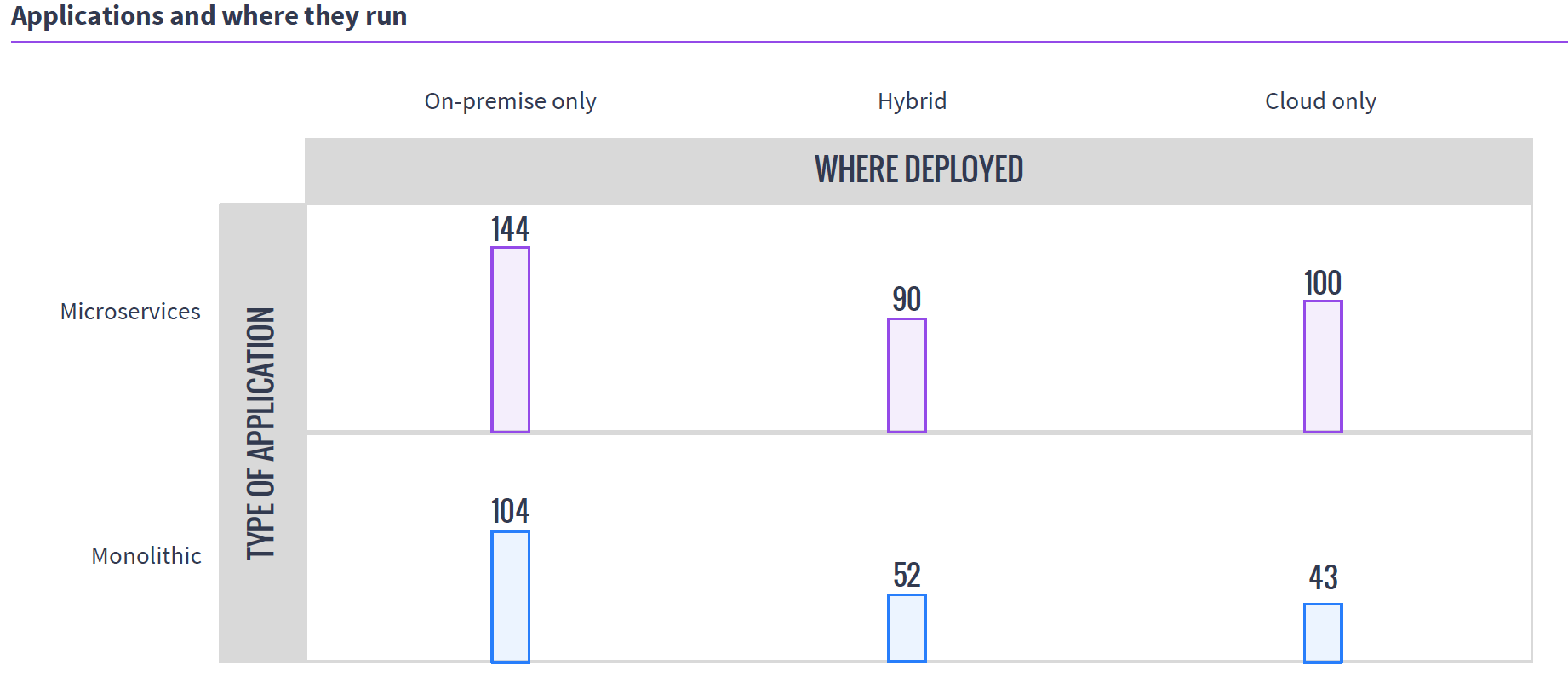
Source: MesoSphere user survey, August 2016
In the clustering world, you have what presents as one big monster machine that is going to run these applications as resources come available, so if your 50 applications require fewer resources than the cluster offers, they simply execute in parallel; if you don’t have enough hardware to run them, unlike with VMs, you can just queue them up and, assuming the cluster isn’t over-burdened, eventually they all will run.
This gets more interesting when containers are added to clustering (a common environment), because then you do have discrete containers, but the scheduler still manages how many resources are available/in use, and the container architecture allows the app to carry its requirements with it across the cluster.
Why do we care? Because you know what your workloads are and which scheduling methodology is more important to your organization. If there are 50 applications that all have steady resource needs and run all of the time, then virtualization might be right for you, but if the organization’s workloads are shifting constantly and resources need to be cycled at a high rate, clustering might be right for you. Either way, knowing what’s out there is never a hindrance.

As the New Year kicks off, it is a time for reflection and a chance to look ahead and plan for what is to come. While many are making personal resolutions pertaining to their physique, job performance or travel plans, there is a lot of chatter in the software delivery space around what DevOps will look like these next 12 months.
Looking back on 2016, suffice to say it was a big year for DevOps. There was no lack of resources for those in any phase of a transformation, with global conferences touting its name to weekly (if not daily) podcasts and webinars designed to share the latest expertise with the community. However, as DevOps moves from buzzword to phenomenon, it will be held to even higher standards and scrutiny, becoming ever-more polished and perfected as challenges are faced and overcome. But don’t just take my word for it.
Electric Cloud recently hosted a live, online video podcast featuring notable DevOps luminaries discussing their own reflections and conjectures. The panel included Nicole Forsgren, CEO and chief scientist at DORA; Robert Stroud, principal analyst at Forrester; Chris Riley, analyst at fixate.io; Manuel Pais, author at InfoQ and SkeltonThatcher; Alan Shimel, editor in chief at devopsy.kinsta.cloud; Sam Fell, VP of Marketing at Electric Cloud; and yours truly. This article highlights 16 different insights from our discussion with these great minds in DevOps. Here’s to what has been, and what is to come!
Bonus 17th quote for 2017, from Shimel: “I think the story of 2016 is DevOps has gone mainstream. We’re seeing pockets of DevOps come together as bubbles, but we still have the majorities in front of us, going forward.”
For more reflections and predictions, watch the full episode:
 Anders Wallgren is Chief Technology Officer of Electric Cloud. Anders brings with him more than 15 years of in-depth experience designing and building commercial software. Prior to joining Electric Cloud, Anders held executive positions at Aceva, Archistra, and Impresse. Anders also held management positions at Macromedia (MACR), Common Ground Software and Verity (VRTY), where he played critical technical leadership roles in delivering award winning technologies such as Macromedia’s Director 7 and various Shockwave products. Anders holds a B.SC from MIT. Connect with Anders on LinkedIn or Twitter.

Working closely with Automic, an international wholesaler and retailer of jewelery transformed a department of project managers, developers and operations responsible for all of the customer-facing websites into a DevOps organization. As a result, project delivery was completed with 90 percent fewer delays, and first customer-facing releases of projects could be delivered in less than half the time. The usability of its websites increased significantly, resulting in more customer traffic, longer average time spent on the sites and increased revenue.
Prior to the DevOps implementation, new projects were delivered by “waterfall” project management means. The cyclical resource planning process was based on the project portfolio and business priorities. Project managers then planned project milestones working closely with business stakeholders, business analysts and application developers. Analysts created specifications and developers were assigned to work on packages and tasks to implement them.
Different web technologies were used with varying levels of dev and ops expertise in each technology. The Operations team members usually fulfilled requests made during the course of a project as part of their overall daily tasks—for example, to provision a new environment, deploy a package or change the environment configuration.
This approach had a major disadvantage. Delays in one project impacted the overall resource planning and could have a cascading effect on other projects. Delays in projects could be for multiple reasons, such as waiting for business stakeholder impact, frequently changing requirements, unexpected sick leaves of developers or poor estimates. Other frequent causes included delays in operations tasks such as a deployment or provisioning of a new environment. These delays were caused by unaligned planning as well as a mismatch in priorities between projects and operations. Besides delays, some developers were underutilized, which also was exacerbated because they were specialized in a technology or component.
Working closely with the customer, Automic restructured dev and ops by:
By standardizing, this customer has transformed its dev and ops teams, creating an agile, scalable environment that can drive the business forward. The company achieved the following specific results:
 Michael Schmidt heads DevOps Practice at Automic, a management and technology advisory service established to help Automic customers to prepare for and transform their organizations toward DevOps. Michael spent his carrier as consultant, entrepreneur and in several product-related leadership positions. He has a passion for building lean IT organizations. Michael holds a joint MBA from New York University, London School of Economics and HEC Paris and a Master of Computing Science.