Tag: deployment automation

  • In DevOps, Chatbots are a People Problem

    In DevOps, Chatbots are a People Problem

    By now, you are undoubtedly aware that you can call up a chatbot or install an AI assistant into your IDE and generate entry-level code and deployment scripts.

    Indeed, if you just go to a site like ChatGPT and enter “generate Python code to do X” where X is something you need to be done–or an example like “read a file and print out the contents one line at a time,” it will do it. And if you keep it simple, it will do it well. If you say “again, in Java,” it will comply and do it well.

    Then say “new chat,” and tell it to “write a bash script to deploy an app named X written in Java and using Gradle to a cluster named Y,” it will do that also, informing you of the names of the deployment and service YAML files. Then you can say, “generate the deployment file mentioned,” and it will. And then you can say, “parameterize the Java version,” and it will do that, too. This iterative revision can continue until the deployment code, containers and deployment files are complete. If you have not yet, I urge you to spend the half hour going through these steps once required, so the potential is obvious.

    It is not yet to the point where I would (or you should) trust it with complex systems, but all of that busy work we’ve been trying to overcome with templates and preconfigured containers? We can actually get around the bulk of it now. The same is true for testing of all kinds. There are tools that will auto-generate test scripts for a given set of source code. They will also generate test execution code. That means that the only step left—and the one that has held testing back because of the volume of work—is reviewing results … But wait, there’s more! In security testing, AI can help eliminate false positives. In performance or QA testing, it can filter out all but the most egregious issues (as defined by the org or by a larger pool of apps).

    The problem we need to address today is the people issue. What we have traditionally used entry-level people for—and trained them in Dev/Ops/DevOps with—is no longer necessary. Because the AI can do it. That is stunning and really very cool, if you think about it.

    But it heralds a danger that every org needs to be aware of. What we do and how we do it is changing. For the better, but change always brings uncertainty, and the foreseeable bit we need to confront is, “Now that we don’t need entry-level people for these steps, how do we recruit and train them?” I do not yet have a definitive answer for this question, because I am a product of my time, so I see things in terms of learning the bits that make up the whole—advising people interested in DevOps to learn at least one Linux command shell, to understand how networking works in containers, to write the scripts to get containers (and/or public cloud instances) up and running, etc.

    I do think that every org should start using these tools at a pace that makes them comfortable because it allows us to continue our “more with less” growth without significant pain. But we need to make certain we are training the next generation of DevOps engineers in the process. For the foreseeable future, we’ll still be the ones bug fixing and troubleshooting, so we need to understand the environment and the applications. We are starting to get some sweet tools to help us at a higher level, though. Anyone who has inherited complex systems knows that the learning curve of tons of source files that make up many subsystems and all of the spaghetti code that these can be comprised of is painful. I don’t normally mention brand names here, so I’ll just say there is at least one tool out there that you can ask to “describe what this code does” and it will run with it and give you an answer in plain English. This might be the training tool of the future, with the ability to compare what you see in code with what the AI describes in English.

    But for now, even if you don’t hunt down app description AIs, having entry-level people review the files that the AI generates will serve two purposes: First, to validate what the growing AI space is capable of and second, to get entry-level engineers into the entry-level bits of the systems.

    And keep rocking it. Make sure you have a path for DevOps in the AI future, but remember that the creation of the calculator did not statistically change the number of mathematicians, just made the bulk of them more productive. That’s all we’re doing here, just a bit more flexibly … But in the end, like a calculator, the AI has an equation that it fills and reports back with.

  • We Are Living in an Ephemeral World

    We Are Living in an Ephemeral World

    We are lucky to live and work in the times that we do. Oh, we have our challenges, and I talk about them a fair amount here on these pages. But the things we can do in IT today have not been possible in the past, and the change isn’t over. Soon you will be able to relegate pretty much all of the busywork of IT to automated systems, Note that I did not say “AI/ML”–some of that automation will be, but we throw the term around too much right now, and not all automation will be based on AI/ML. In fact, quite a bit of the best automation is simply rule-based systems that we finally have things standardized enough to write up. And I intend to talk specifically about automation that is not AI/ML today.

    We have reached the point in DevOps where we can automate the entire build/release process using containers. The CI tool, running in a container, can spawn a container that performs the build. Then, when it is done, if it passed, it can spawn another container to run tests, do security scans, etc. Finally, the product can be promoted and released … in a container. Human involvement is only required for approvals and then only for organizations that want checkpoints on the way to production (which is definitely most but not all of us).

    If you take the totality of what is going on out there in DevOps, it is finally catching up to DevOps. The biggest issue will be making it efficient and doable for the DevOps team. To date, by focusing on DevOps, teams have been able to avoid the simple fact that complex deployments on infrastructure that spans environments and uses external resources is hard. By keeping the DevOps side simple (or not part of the DevOps process), developers can crank out code faster, facilitated by DevOps tools and Agile methodologies, and operations can continue to wrangle the beasts of networking, storage, etc. to get the app running in production. Once ops has completed the process, then it can be automated based on steps taken.

    But we now have Software-Defined Everything ™ combined with containers. That means that for many–though not anywhere near all–applications, a commit that updated a constant in a single source file can spawn the entire process in iterative containers all the way through release. That is very cool, and we should take a second to appreciate how far we’ve come in a short time.

    Then we need to talk about those worker containers. They need a ton of centralized logging and reporting. Spinning them up, letting them run and then automatically destroying them is fine—as long as the organization has access to the information it needs to review and analyze the results. In-application tooling will cover the released product and even the test environment, but not an ephemeral build process. By not keeping a ton of build tools running all of the time, the enterprise is, by definition, more secure—the blast radius is reduced if build tools are only available when they’re active, and logging of who/what kicked of a build is kept. But don’t forget the reporting. At build time, our tools know exactly which error failed a build; the container needs to submit a ticket before being destroyed or log heavily. I say, “Always create a ticket,” but I’ve worked in enough environments to know that your reality may not make that possible. As long as notifications occur, it doesn’t really matter how they occur.

    So crank it up; start super-automating. Tool up those build environments, then make them into disposable container instances. Others have been doing this for a while, so there is help available for setting it up, but it is just now taking off, so it is a good time to dive in. And keep rocking it. How the apps are built and deployed is only important in the sense that you are driving the company forward. Keep doing it.

  • Manual Intervention or Release Automation? That is the Question

    Manual Intervention or Release Automation? That is the Question

    When it comes to launching nuclear weapons, there are a variety of steps and a variety of fail-safe mechanisms, all designed to ensure that those pushing the button really want to do what the nuclear launch system is designed to do.

    I fear it is some sort of mini-Godwin argument to equate nuclear warfare with releasing code, but bear with me, since we do say, “That nuked the system!” when things go horribly wrong, so I am willing to make the argument.

    There are those in the DevOps community—and more in the ARA community specifically—who want you to automate every step between development and release. While I fully understand the mentality, there are definitely applications for which you don’t want to go live without someone saying, “Yes, this is truly ready,” just as you don’t want to launch nukes without the president (in the United States) saying, “Yes, we really intend to do this.”

    It’s a Tiny Bit

    An associate of mine pointed out the obvious fallacy of “eliminate manual intervention”: both infrastructure as code and the code itself is manual. The biggest bottleneck to release is still actually creating something. So telling people not to insert the occasional sanity check at a critical juncture in the process is kind of … silly.

    Manual Intervention is Warranted at Times

    Take the easy example. Do you want nuclear plants to release new code to their controls without final review and approval? No? Well, if your application is your breadbasket, or even has a significant impact on the business, why would you want code released without a manual approval step? You shouldn’t. The belief in DevOps circles that anything is recoverable, and speed is everything has a built-in self-destruct. Pendulums swing on the type of chaos that can be created if you release and your customers lose the ability to use your app.

    Just prioritize the approval process, and make the process push-button—a “Yes, we are ready to do this,” that authorized individuals can push and finish the deploy. We’re talking about minutes in the most well-run environments, and days (pessimistic estimate, weeks) in more complex, less-thorough environments. It’s not a huge investment, and it’s a step outside of CI/CD that really only impacts release automation. Most enterprise grade companies aren’t deploying a zillion times a day, so it won’t have to be a bottleneck.

    In short, relaxing what we tolerated, reducing short-term goals and automating large portions of the develop/test/deploy environment are all great steps forward. But take a look at your business and determine what possible impacts a given app can have on your business, and the state of the automation, before deciding whether releasing to the wild without approvals is a good idea. Quite often it is not, no matter what the pundits say. But also quite often it is. I don’t want to leave the impression I’m against full process automation; I’m just in favor of getting approvals when the organization’s livelihood is on the line and the solution is a complex one.

    Seek Balance

    As always, you have to ask yourself, Who knows your business and your business’ systems better, the pundit or you? There is a balance here; the pundits have some great ideas, but the business has balancing needs.

    As automation continues to grow, the number of apps requiring approvals before release no doubt will continue to decrease, but don’t let the fad impact your bottom line. DevOps is not about itself, but rather the business and its needs.

    — Don Macvittie

  • Continuous Monitoring: The Role of DevOps and APM

    Continuous Monitoring: The Role of DevOps and APM

    To enable faster and better response to changing customer needs, enterprises are increasing their release frequency for applications. This, in turn, demands tighter alignment and collaboration than traditionally has been seen between the line of business, development and IT operations, driving the need for enhanced collaboration, automation and information transparency among these groups. To achieve seamless internal collaboration, many enterprise customers are adopting a DevOps approach.

    DevOps is an enterprise capability that enables the continuous delivery and continuous deployment of software. It reduces the time needed to address customer feedback. DevOps brings once-siloed Dev and Ops together to improve agility and achieve these benefits:

    • Improves collaboration between developers and operations specialists by using shared DevOps tools.
    • Facilitates continuous delivery of software by enabling collaborative testing throughout the development and release processes.
    • Automates the manual processes of release management, infrastructure provisioning, orchestration, monitoring, containerization and virtualization.
    • Corrects misalignments of people and goals by building closer links between developers and operations.
    • Incorporates customer feedback in the development process to facilitate agile development.

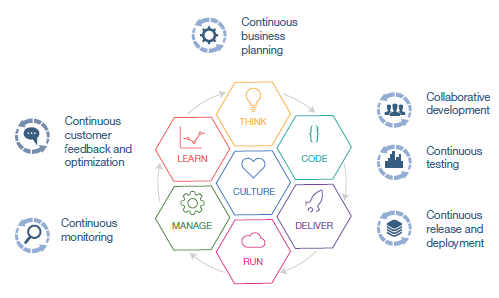
    IBM has identified six phases in the DevOps life cycle, plus necessary cultural considerations, for successful implementation of a DevOps approach (Fig 1).

    pic

    Fig. 1 – Six phases of the DevOps life cycle

    In the Manage phase of the DevOps life cycle, continuous monitoring of applications in production environments is typically implemented with application performance management (APM) solutions that intelligently monitor, analyze and manage cloud, on-premise and hybrid applications and IT infrastructure. These APM solutions enable you to monitor your users’ experience and improve the stability of your application infrastructure. It helps identify the root cause of issues quickly to proactively prevent outages and keep users satisfied.

    With a DevOps approach, we are also seeing more customers broaden the scope of continuous monitoring into the staging, testing and even development environments. This is possible because development and test teams that are following a DevOps approach are striving to use production-like environments for testing as much as possible. By running APM solutions earlier in the life cycle, development teams get feedback in advance of how applications will eventually perform in production and can take corrective action much earlier. In addition, operations teams that now are advising the development teams get advance knowledge and experience to better prepare and tune the production environment, resulting in far more stable releases into production.

    Applications are more business critical than ever. They must be always up, always fast and always improving. Embracing a DevOps approach will allow you to reduce your cycle times to hours instead of months, but you have to keep ensuring a great user experience! Continuous monitoring of your entire DevOps life cycle will ensure development and operations teams collaborate to optimize the user experience every step of the way, leaving more time for your next big innovation.

    This continuous monitoring blog is the first in a series that focuses on collaboration between development and operations teams. We will explore this topic in detail in upcoming blogs:

    • Synthetic Monitoring: Developers, testers and operations staff all need to ensure that their internet and intranet mobile applications and web applications are tested and operate successfully from different points of presence around the world.
    • Alert Management: Developers, testers and operations staff all need to send notifications via email, voice mail, text, mobile push notifications and Slack messages when specific situations or events occur in development, testing or production environments, to get the right people’s attention and to manage their response.
    • Deployment Automation: Developers, testers and operations staff use different tools to schedule and deploy complex applications and configure them in development, testing and production environments. We will discuss the best practices for these teams to collaborate effectively and efficiently and avoid potential duplication and erroneous information.
    • Analytics: Developers need to be able to look for patterns in log messages to identify if there is a problem in the code. Operations need to do root cause analysis across multiple log files to identify the source of the problem in complex application and systems.

    Stay tuned for the next blog on synthetic monitoring in the series and register for an upcoming interactive webcast, “Learn Why We Must Shift APM Left in the DevOps Lifecycle.”

    About the Author / Arun Biligiri

    Arun Biligiri

    Arun Biligiri is the leader of the Application Performance Management Offering Management team at IBM. Arun has over 20 years of experience in technology in various different roles including entrepreneurial, development, product management and sales engineering. He has worked closely with innovative enterprises and has extensive experience in addressing cloud, analytics needs in efficiently managing their data centers and clouds. He has an MBA from the Wharton School, and MS from the University of California, Berkeley. Connect with Arun on Twitter / LinkedIn

  • Balance: The Key to Successful DevOps

    Balance: The Key to Successful DevOps

    In the realm of IT buzzwords, DevOps is in a league of its own. The pervasiveness of the word is matched only by the variety of its definitions. Over time, much like the parable of The Blind Men and the Elephant, it has slowly taken shape out of the void, albeit in a backwards fashion. Associated terms such continuous delivery, integrated quality assurance and deployment automation have helped backlight the beast’s silhouette, but there is much more to discover.

    Generally, DevOps is defined by how it is used rather than what it is. This is helpful for those already familiar with the amorphous nature of the movement, but can be a confusing introduction for the uninitiated. To achieve a better understanding, it is important to grasp the underlying need driving the shift to a DevOps model.

    Currently, the world of IT is barreling toward a future dominated by increasingly specialized and inherently complex automated solutions. Software is taking a front row seat in ways never before possible. (Insert here)-as-a-service offerings and the demand for instantaneous and consistent deployment turnaround is at an all-time high. The days/weeks required to shuffle a solution between development and engineering is a luxury that most companies can no longer afford and is less tolerated by customers. This level of expectation is something that the traditional IT org chart was not designed to cope with. Tech companies everywhere have felt the strain of this increasing momentum, with many at a loss of how to handle it. Demanding that teams work harder, faster, longer will only get so far. And inevitably, increased intensity results in a rise in mistakes and an inferior product.

    Balance: Dev’s Yin to Ops’ Yang

    Clearly, change was and is needed. The path from development to operations needs to be streamlined at a fundamental level. However, dissolving the barriers between two longstanding departments is not without its perils. As any IT veteran will tell you, development and operations each have their own cultures, quirks and personalities. But the differences in each help create the perfect balance.

    In its purest form, development is the trailblazer, forging into uncharted territory and unearthing hidden gems. Ever the innovator, Dev values progress and change above all. This constant forward momentum is Dev’s greatest asset as well as its Achilles’ heel. The habitual urge to tinker, tweak and create can lead to frivolous or wasted effort. The results of this misguided effort can be seen in retrograde patch releases, hotfixes and other “band-aid” measures needed to undo the damage.

    On the other end of the spectrum, the operations mantra can be summarized with the idiom, “If it ain’t broke, don’t fix it.” Pragmatic to the core, stability and consistency are the guiding forces behind Ops. Change requests are usually met with a Treebeard-esque, “Don’t be hasty.” Taken to the extreme, this mindset can quickly lead to an environment running outdated, unpatched software and end-of-life hardware.

    On the surface, the differences between these two groups appear to be on the verge of irreconcilability. However, in this diversity the beauty of DevOps emerges as the strengths of each team balances out the weaknesses of their counterpart. Development is free to innovate and create knowing that their efforts will be guided by feedback from operations. Like stabilizers on a rocket, operations is able to focus on maintaining a reliable infrastructure with development providing the forward momentum. Working in unison, this duo forms a unit far greater than the sum of its parts. And with it, a company is left with an agile and stable launch pad from which to tackle the latest wave of IT challenges.

    Admittedly, the combining of development and operations into a single cohesive unit is just a piece of the entire DevOps puzzle. However, it is an important piece that is frequently overlooked. Understanding the forces and motivations at work within your teams is a pivotal step on the road to a successful DevOps transition.

    About the Author / Jared Perry

    Jared PerryJared Perry is a cloud engineer at iland, where he is responsible for maintaining the virtual infrastructure and a number of disaster recovery solutions. He holds a Bachelor of Applied Science in technology management and a Bachelor of Science in IT administration and management from Texas A&M University.

  • Advanced Automation – Getting Your Systems to Work for You

    Advanced Automation – Getting Your Systems to Work for You

    In my previous post I discussed how to take your DevOps to the next level by taking it beyond infrastructure automation, to the automation of your deployments and code pushes, through patches and updates.

    And then I promised to make it interesting…so here is the next stage – actually using the extracted data to get your systems to work for you.

    Monitoring Like IT’S YOUR BUSINESS

    Let’s start by discussing what it means to monitor your application, and what kind of data you can extract from it.

    At the most basic level, you want to know whether your application is available for your users. It sounds very basic and simple, but setting it up properly is actually not an easy task. It is intended to give you an answer to the most important question to your business: can my users use the application? Think of it as a big red or green light on your dashboard. Although the answer may seem obvious and simple, but it is not at all. There are all kinds of parameters to take into account when answering this question, for example, what if the system is apparently up and running but the response time is very slow, or what if only parts of the system are actually running. At the end of day, you want to have that kind of an alert “traffic light” that tells you whether your system is functioning – yes/no, up/down.

    System, Application, and Business Metrics

    The green-red traffic light is an aggregation of multiple levels of monitoring. The most basic one is system related. It contains indicators like process availability, CPU and memory utilization, etc.

    The next level of monitoring is application related and is composed of application level KPIs (key performance indicators). KPIs can be anything from the average response time for a user for a certain request, to the number of concurrent database connections. In other words, anything that’s specific to the application and its architecture.

    And then above these, comes the highest level of metrics, which are business metrics. Ultimately these are what’s really important. If your business metrics are ok, then you can assume everything is running fine. Sample business metrics include the rate of failure to register to your website, how many users did a certain operation in the website or how many users executed a specific transaction. If we want to be really specific, then take Google hangout for example, a business metric of theirs would be how many people in a certain timeframe joined or started a hangout.

    Logs to the Rescue

    Logs are often used here as means to collect your metrics and alert about erroneous conditions. Logs usually contain a lot of useful information, but you need to be able to extract it and make sense of it. This means gathering all of the logs emitted from all of your servers, parsing them and looking for specific patterns that will help you generate the KPIs over time. For example, you look for a log message that says “User X signed in”, and by counting these messages you can produce a business level metric for how many users register over time. If you add some more data to the log message, such as the user’s location, or operating system, or anything else for that matter, you can slice and dice data and get deeper insights into how your application is behaving. When logs are emitted in a structured and consistent way (e.g. in a JSON format), it becomes very easy to analyze them and produce the relevant KPIs. There are many toolsthat can help with that.

    From Simple Automation to Orchestration

    That’s where orchestration comes into the picture. At the most basic level, orchestration is a higher form of automation, which helps you setup all the pieces that are related to your application, starting from the infrastructure (VMs, networks, block storage volumes, security groups, etc.), to the platforms your app runs on (database, web server, etc.), and all the way up to the application modules and code. This entire setup is often referred to as a topology. The role of an orchestration framework is to materialize a certain topology. More advanced orchestrators go beyond materializing the topology, and change it to meet the current workloads and needs of the application.

    As you probably gathered by now, monitoring and log gathering are an essential part of any running app, so they should be an integral part of the orchestrated application topology. Since the orchestration process is topology aware, it can wire and configure monitoring for your application components very easily, which is one of its greatest benefits. Going through these process without a global view of the topology can often be time consuming and error prone. Moreover, as the topology changes , you need to reconfigure and rewire your monitoring tools, and a good orchestrator will that for you as well.

    Next Up: Reactive and Proactive Orchestration, The Devops Holy Grail

    Hopefully by now you see the value of orchestration as a higher form of automation. In the next post I’ll dive deeper into the post-setup phase, and discuss how orchestration tools can react to events and monitoring data and adjust the application’s runtime topology to best fit the current workloads.