“DevOps Got Me Through It” – Organizations all around the world went through an overnight digital transformation due to a worldwide pandemic and the shift to remote work. The businesses that embraced DevOps methodologies were able to pivot much faster with their digital strategy, allowing them to drive innovation, speed and adaptability, while providing greater value to their customers.
DevOps has helped businesses thrive during these uncertain times by bringing an agile mindset, tooling and processes, and fostering a collaborative culture that helps teams move faster while delivering high-quality software.
The bottomline is that we couldn’t have survived the impact of the pandemic and wouldn’t have been able to successfully speed up digital transformation without DevOps. Hosts Alan Shimel and Mitch Ashley are joined by Tracy Ragan (DeployHub), Brian Dawson (Linux Foundation) and Stephen Chin (JFrog) as they discuss how DevOps has helped their organizations grow and why DevOps is so essential for business.
Tag: deploy
-

DevOps Got Me Through It – DevOps Unbound EP 22
-
Securing Immutable Servers in a Serverless World
Snowflakes are beautiful, unique creations. But, let’s keep them in nature. They don’t belong in our server infrastructure. Snowflake servers, where every configuration is just a little different, can introduce unnecessary security vulnerabilities and complications. While common in IT infrastructure, in the DevOps realm they are gradually becoming ancient history.
At All Day DevOps 2016, Erlend Oftedal (@webtonull), with Blank and head of the OWASP Norway chapter, discussed the benefits of immutable infrastructure practices within serverless architectures. Erlend walked us through the positive effects on security as well as offered insight on potential problems.
Erlend outlined the progress from physical servers to immutable servers, discussing the benefits of each step and the concerns that lead to the next phase, ending with immutable servers—that is, they can’t be changed. Once set up, they are set. Automated processes coupled with immutability principles can eliminate snowflake servers.

Immutability isn’t a new concept. Some classic examples include live Linux CDs, internet cafes, schools, libraries and hotel business centers. To set up immutable servers, Erlend outlines these steps:
- Find a suitable base image
- Build a specific image for the application
- Dependencies
- Application
- Secrets
- Deploy image to the server(s)
- Repeat steps 2-3 for new versions

Of course, this immediately raises questions:
- What about data? He notes that because data inherently changes, data has to be stored externally.
- How do you deploy changes? Well, you don’t change the server. You take one out and put a new one in. What if that one fails? Roll back to the previous one.
- How do you manage secrets? You can build secrets in, leverage cloud key management, or use third-party services.
- How do we apply security patches? If truly immutable, you deploy a new server with the patch. However, you can have a semi-immutable server that allows for automatically installing patches but still doesn’t allow for logins or manual changes.
- Speaking of security, what are the security advantages? For starters, if an attacker is in your server, it will be thrown out when you change servers, although it may come back if the vulnerability isn’t patched. It also allows for very specialized images by removing all unnecessary packages. With these specialized images, you can more easily audit and monitor the system for unexpected file changes, logins and connections.

Erlend discussed containers because they are a step closer to a serverless world. Containers isolate processes and all run on the same OS. Of course, you can make them immutable, but regardless of whether they are, there are some key security best practices you’ll want to consider:
- Don’t run as root inside container
- Implement user namespaces so the root account within the container is separated from the root account outside the container
- Utilize the least privileges necessary for capabilities and resources
- Keep them up-to-date
- Automate scanning using tools such as Sonatype Nexus, Twistlock, Clair, or Aqua
- Separate untrusted and trusted containers
Erlend also dove into serverless architecture. While there is debate over what exactly qualifies as serverless, there are five principles that Erlend highlighted:
- Use a compute service to execute code on demand
- Write single-purpose, stateless functions
- Design push-based, event-driven pipelines
- Create thicker, more powerful front ends
- Embrace third-party services
Migrating to immutable, serverless infrastructure is a topic to be discussed well beyond this blog post and even Erlend’s session. Whatever you do in the future, though, take his parting words to heart: “The cloud can solve many of your problems, but in the end you cannot transfer your responsibility for security.”
Erlend’s session was packed with information. If this piqued your interest, you should watch his complete session from All Day DevOps 2016 (just 30 minutes). The other 56 presentations from the conference are also available online, free-of-charge here.
Also, this year’s All Day DevOps is Oct. 24. It’s online and free, so be sure to check out www.alldaydevopsy.kinsta.cloud to learn more and register.
-

All Day DevOps: Capital One Gives Credit Where It’s Due
Listening to his talk, it seems as though George Parris and his team at Capital One aren’t keeping “banker’s hours.” George is a Master Software Engineer, Retail Bank DevOps at Capital One. At the All Day DevOps conference, George gave a talk, titled “Meta Infrastructure as Code: How Capital One Automates our Automation Tools with an Immutable Jenkins,” describing how the team automated the DevOps pipeline for its online account opening project for Capital One, a major bank in the United States. Of course, there is a lot to learn from their experience.

George started by pointing out that software development has evolved, coming a long way even in just the last few years. Developers now design, build, test and deploy, and they no longer build out physical infrastructure—they live in the cloud. Waterfall development is rapidly being replaced by Agile, infrastructure as code and DevOps practices.
Where we see these technologies and methodologies implemented, IT operations teams are acting more like developers, designing how we launch our applications. At the same time, development teams are more responsible for uptime, performance and usability. And, Operations and Development work within the same tribe.
George used the Capital One Online Account Opening project to discuss how they automate their automation tools, now a standard practices within their implementation methodology.
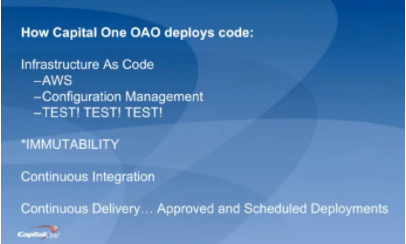
For starters, George discussed how Capital One deploys code (hint: they aren’t building new data centers). They are primarily on AWS; they use configuration management systems to install and run their applications; and they “TEST, TEST, TEST, at all levels.” Pervasive throughout the system is immutability; that is, once created, the state of an object cannot change. As an example, if you need new server configurations, you create a new server and test it outside of production first.
They use the continuous integration/continuous delivery model, so anyone working on code can contribute to the repositories that, in turn, initiate testing. Deployments are moved away from the scheduled release pattern. George noted that, because Capital One is a bank, regulations prevent its developers from initiating a production change. They use APIs with the product owners to automatically create tickets, and then product owners accept tickets, making the change in the production code. While this won’t apply to most environments, he brought it up to demonstrate how you can implement continuous delivery within these rules.
Within all of this is the importance of automation. George outlined their four basic principles of automation and the key aspects of each:
Principle #1 – Infrastructure as Code. They use AWS for hosting and everything is in a Cloud Formation Template, which is a way to describe your infrastructure using code. AWS now allows you to use CFTs to pass variable between stacks. Using code, every change can be tested first, and they can easily spin-up environments.
Principle #2 – Configuration as Code. This is also known as configuration management systems (they use Chef and Ansible). There are no central servers, changes are version-controlled, and they use “innersourcing” for changes. For instance, if someone needs a change to a plugin, they can branch, update and create a pull request.
Principle #3 – Immutability. Not allowing changes to servers once deployed prevents “special snowflakes” and regressions. Any changes are made in code and traverse a testing pipeline and code review before being deployed. This avoids what we all have experienced: the server that someone, who is no longer around, set up and tweaked differently than anything else and didn’t document what was done.
Principle #4 – Backup and Restore Strategy. A backup is only as good as your restore strategy. You know the rest.
George also dives into how they do continuous delivery/continuous integration in his talk, which you can watch online here.
If you missed any of the other 30-minute long presentations from All Day DevOps, they are easy to find and available free of charge here. Finally, be sure to register you and the rest of your team for the 2017 All Day DevOps conference here. This year’s event will offer 96 practitioner-led sessions (no vendor pitches allowed). It’s all free, online Oct. 24.
-
Integrating ARA into traditional RM
Application Release Automation (ARA) is terminology that includes several DevOps constructs from a singular, application-centric point of view. In essence, ARA implies the automation of a single app from build through deployment (even if that deployment is to production). Of course, embedded or implied in that automation terminology is build automation or construction; deployment automation, which may include provisioning; and governance automation, which includes testing and approvals.
If your company’s portfolio of applications is small, or if the applications are fully independent from each other, using ARA to describe your DevOps continuum is more or less a complete vernacular. However, if your application portfolio contains interdependencies; you need a coordinated/scheduled release event of multiple applications into production in a particular sequence or timing;or you are required to meet blanket compliance governance requirements that exceed the scope of a single app; you will need to learn how to integrate an ARA-based DevOps strategy with the more traditional discipline of Release Management (RM).
Clarifying ARA
One of the nicer implications of ARA thinking is that it places the value—or, accentuates the value—where it should be; that is, on the application. Automating infrastructure is great, but if no application rides on top of it, the infrastructure is essentially nothing more than unexplored capacity. Most CIOs are not fond of having excess computing capacity sitting idle. So the idea of ARA sets the focus of the automation where it should be: moving an “application” from construction to production release.
ARA is also development methodology-neutral, which means the build, deployment, and releasing automation will look the same regardless of whether the code was prepared using Agile or Waterfall. Mind you, Agile tends to drive the need for speedier delivery systems, but even legacy development teams can find value in consistent delivery system automation once a build is ready to begin. It is, after all, consistency that reduces support costs by reducing errors and creating predictability, thereby improving quality. It also is consistency within the automation that permits scale, whereas variability in the automation deters scale.
ARA also allows for depth within the stack. If code reigns at the top of the stack, then the operating system of the server reigns at the bottom (perhaps networking in the wine cellar and facilities management in the root cellar). ARA incorporates the notion of automating dependent layers of technology under the code such as database services, middleware or messaging services, perhaps the provisioning of a virtual machine, even down as far as configuring the OS, if needed.
The practicality of moving down the stack however, is that the scope of change will continue to have a broader impact than a single app. I usually do not install a single instance of Oracle for each application I create; more often, I have several applications relying upon a single instance of my Oracle setup. So the actual changes I automate as I move down the stack tend to be more of a configuration adjustment. It is more likely my particular app needs a config change to accommodate it rather than a completely new install of a supporting technology component underneath my app. It is also worth noting that the frequency of change as you move down the stack slows down considerably compared with app code riding on it, and the cost or impact of change increases greatly, as you begin to impact a wider number of things riding on it.
Deconstructing ARA
ARA automation, then, includes all the traditional DevOps disciplines, but limiting them to the viewpoint of a single application as follows:
Build Automation: This includes version-controlling each particular build. It also includes packaging all the component technologies to create a deployable package used for deployments throughout the software development life cycle (SDLC). The golden rule here is create a “build once, deploy many” philosophy in your build automation. Changes to code, included configuration files or dependent technology components down the stack must occur in the DEV class environment. Once the deployable package is completed to satisfaction in DEV, it will move unaltered through any other layers of testing environments before it gets to production for ultimate release.
Deployment Automation: Since each deployable package is tightly version-controlled during its construction in build, there is now an ability to roll forward (normal deployment) or roll backward (revert to a prior version) in the event of failed testing in a given SDLC environment. Some of the common environment classes include integration testing, performance testing, user acceptance testing and pre-production quality assurance (QA) testing. Smart DevOps deployment tools utilize the ability to deploy (or overwrite) only the components that are out of sync with the versions listed within the deployable package. This smart deployment capability reduces time and ensures consistency with what “should” be there.
Provisioning Automation: This is an offshoot of deployment automation. For those using virtual machine or cloud technologies, the deployment automation can include the ability to provision or set up an environment of any class on the fly. When testing is completed, the same environment can be decommissioned to not waste capacity or budgets. Provisioning bare-metal servers is precluded by human interactions, although what should go on them also can be fully automated once engineering is done with the physical work.
Governance Automation: Even though substantial testing can and should occur in development, a significant amount of it must occur in other testing-class environments later in the SDLC progression. It is, therefore, a good idea to have the ability to isolate testing automation outside of both build and deployment templates or scripts, still making it callable or executable from an overall workflow manager (often included in the release orchestration or release automation tooling within DevOps). This gives the flexibility to run a series of tests without having to rebuild the application or redeploy the application just to kick it off. In addition to testing evaluation, there may be other process regulations driven by a governance team or compliance entity within the organization. All of these flags must be met and passed before final promotion to production.
Integrating ARA with RM
Dependency is the hobgoblin of simplicity. Applications that are fully independent of each other can utilize an ARA strategy and deploy into production as often as they want. No one else is impacted by this. But if a given application has dependencies upstream—I get my data from, or transact with, someone else—or downstream—my data is provided to someone else—then my path to production must include testing an application different from my own. Determining where the responsibility for failure lies now requires policy instead of just common sense. Synchronizing in-state changes where two dependent applications are now undergoing change at the same time requires policy to govern as well as more sophisticated SDLC testing environments to manage.
When a wider view than just a single application is required, the traditional DevOps discipline of RM or its synonym release orchestration (RO) becomes the solution. RM allows for the sequencing of applications going into production to occur as needed. It allows for testing to occur when a dependency spiderweb is kicked off. RM allows for corporate governance to be applied universally to all applications attempting to enter production, instead of having to build it over and over again in each deployment script or template. RM can produce sophisticated logs designed to satisfy outside regulators for compliance history automation. These kinds of tools become invaluable when there must be a wider view of deployments to production beyond a single app at a time or in a small portfolio.
Given this reality, the key to integrating ARA with RM is to ensure automation is constructed independently by discipline, and can be executed by discipline as needed. ARA encompasses or groups four disciplines together: build, deploy, provision and governance. RM uses the ARA package and extends it with other applications to create a needed sequence, or kicks off selective smaller units such as a testing package when needed to meet certain outside app change conditions based on dependencies. RM can selectively execute the automation ARA creates as it needs to to accommodate larger goals, while ARA continues to focus on keeping its own app as efficient as possible.
Impacts to the Bottom Line
There is no one right answer. There is only the perspective you hold within the DevOps continuum. Knowing that both ARA and RM are ultimately dependent on traditional DevOps disciplines offers flexibility on “how” you think about delivering innovation. In my opinion, ARA is simply the next evolution of automating build and deploy. It is a logical next step.
There are other disciplines within DevOps, however, that might benefit from a wider view of the workflow required to move innovation to production. Take, for example, the integration of monitoring automation in the process, capacity on demand provisioning, security oversight and configuration management database (CMDB) integration—a wider view of how and where these services are integrated with DevOps might reduce the labor required to create them for each app, reinventing the wheel—or worrying the wheel has not been updated properly in a while. At its heart, DevOps attempts to create singular automations to perform tasks, increasing speed, reducing risks and improving quality.
There is no immediate financial impact of this other than to pursue a strategy of single-app focus in an environment where a wider view would have been more ideal. Calculating the cost of that error is akin to picking six lotto numbers from the sky: It is always hard to know what might have been; at that point all one can do is wish.
To continue the conversation, feel free to contact me.
-
The DevOps Scorecard
Mid-last year our team switched from doing Agile to doing DevOps. As we forayed into the journey trying to learn about DevOps and practice it at the same time, a lot of questions arose in the team. How was this different from agile and most importantly How were we going to be successful?
That’s when we wrote down what would be the success criteria for our team: “Ship code frequently without causing a customer outage“.
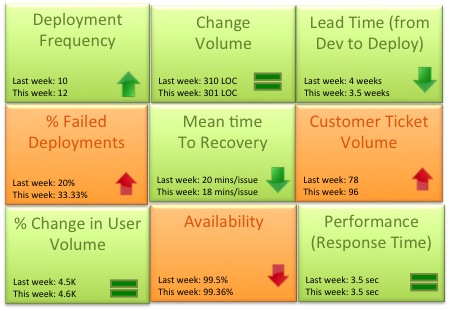
As the team matured we started evaluating a more granular way to track success. Could the team mantra be broken down into quantifiable success metrics that could be represented in a scorecard? Based on our experience the DevOps scorecard should contain these 9 metrics to track DevOps team success:

- Deployment frequency: How often were we deploying code and getting new code in the hands of our customers? This metric should trend up or remain stable from week to week. Example: Twice a week, 50 times a day
- Change volume: For each deployment how many user stories and new lines of code were we shipping? Example: 3 new features per day, Average 500 lines of new code per week. Another parameter to consider in addition to volume is complexity of change.
- Lead Time (from Dev to Deploy): How long does it take on an average to get the code from development complete through a cycle of A/B testing to 100% deploy and upgrade on production? Lead time should reduce as the team gets a better hold of the lifecycle.
- Percentage of failed deployments: What percentage of deployments failed causing an outage or a negative user reaction? This metric should decrease over time. Example: 9% deployments failed this month as opposed to 15% last month. This metric should be reviewed in combination with the change volume. If the change volume is low or remained the same but the percent of failed deployments increased, then there maybe a disfunction somewhere.
- Mean time to recovery: When we did fail, how long did it take us to recover? This is a true indicator of how good we are getting with handling change and this should ideally reduce over time. You can expect some spikes in this number due to complex issues not encountered before. Example: On an average it took the team 15 minutes to resolve each last week, 14 minutes this week.
- Customer Ticket Volume: Number of alerts generated by customers to indicate issues in the service. This is a basic indicator of customer satisfaction. Example: 54 tickets were generated this week as opposed to 38 while the user volume remained steady is not a good thing
- % Change in User Volume: Number of new users signing up, interacting with my service and generating traffic. As new users sign up is my infrastructure able to handle the demand? Example: This week the number of customers spiked by 30% due to an external event causing volume of requests to go up
- Availability: What is the overall uptime for my service and did I violate any SLAs? Example: 99.9% uptime consistently for the last 3 months even with change in user volume
- Performance (Response Time): Is my service performing within my predetermined thresholds? This metric should remain stable irrespective of % change in user volume or any new deployment. Example: Sub 5 second response time from all geographies and devices
Would love to hear thoughts on what other critical metrics DevOps teams are using
-
Closing the Deltas Between Development and Production
Who hasn’t heard the classic statements “It works on my machine!” or, “Man that would have been easier with real data!”? In either case, had the development happened in production, problems would have been avoided! Fortunately, in a DevOps world, the walls between production and non-production get broken down making the reality of developing and testing in production more tangible. In no particular order, here are some of the things I’ve done to breakdown those walls.
Develop on and deploy from a single code line.
Many times we find ourselves in complex processes around deployments and production bug fixes. For example, the code is branched for release candidates and deployments are done from the branches. Branching before release by itself isn’t complicated, however, when there is a production bug, engineers find themselves repeating or merging the fix into at least two, if not several, different places. Repeat that a few times over and, uh oh, now there is a problem because there are many moving parts and questions about what exactly is in production. Unfortunately, the differences are most likely unintentional.
Instead, simplify the process and have everyone work off the same code line and have that same code line deployed directly to production. Now there is only one code base, therefore no question about what code is running in production. Production isn’t static, so change will still happen after deployment. Notation is required indicating what version was deployed, so you can still reproduce production.
Let testing happen on the production database.
Ok, even I’m not that crazy, but let developers use a copy of the production database. There are two very important aspects to this. First, refresh it often. I suggest daily. I have had very good luck using EBS snapshots to get a copy of the database on a different server, but if your database is small, good old SQL dumps also will work. Second, make it safe. Put some safe guards in place to make sure a change doesn’t accidently get made to the real production database. Keep your ACLs tight, change the passwords and practice proper database user management. Lastly, a bonus outcome is that you are constantly testing your database backups and recovery procedures.
Minimize the steps between development and production.
Each step, especially the manual ones, between the developer’s machine and production is another point where unexpected changes can be introduced. It sounds obvious, but the gates code must pass through before entering production must be purposeful and prove their usefulness. For example, if code must go through a regression, but no regressions are being found, then that step is not useful and just increases the probability of unintended change. I have been a part of a process where code had to be deployed to “staging” where it was then hooked up to the live production database, but was only to be exercised in a read-only manner. After doing that for many, many releases and very rarely finding defects before production, we decided to just get better at deploying to production and eliminated the deployment to staging. In the end, we got faster and with no impacts to quality. Less can be more.
Depending on your situation, database size, regulatory compliance, etc. you might to be able to do all of them, but breaking down those walls will yield better code, fewer bugs, happier engineers and fewer sleepless nights to name a few. So, grab that wrecking ball and break down a few walls.