Tag: database migration

  • Database Migration From Microsoft Azure to Snowflake on AWS: Part 2

    Database Migration From Microsoft Azure to Snowflake on AWS: Part 2

    In part one of this blog series, we looked at our approach to migration by leveraging the Azure data factory, tuning the performance of Data Factory Pipeline, using Parquet files and increasing computing power. 

    In this blog, we’ll look at some of the challenges encountered during the migration, cost-saving actions and our approach to data validation.

    Challenges Encountered 

    • Data Factory export failed for tables if the column name had spaces or special characters. In such cases, aliases were used (replacing spaces with an underscore) for column names and the query method was used as a source.
    • Data Factory export failed for the column data type “Geography” and had to be cast to varchar and then exported to Blob.
    • Some column names in SQL server were keywords in Snowflake, which didn’t allow it to migrate. For example, ‘LOCALTIME’ is a column name in SQL but is also a keyword in Snowflake, and it is addressed using inverted commas as escape characters (“”) while creating the Snowflake table.
    • During ingestion into Snowflake, the flat files were named after tables, listing files based on the name pattern. For example, if we wanted to list the file with table name test_1, Snowflake would list all the files starting with the name test_1. It is essential to make sure that each file name is unique.
    • If the file to be ingested was incorrect with respect to the table, Snowflake did not return any error messages or warnings. It simply ingested the file and put NULL wherever column mapping was not found.
    • While creating the tables, if the column name had spaces, escape characters were used so that the same spaces could be maintained. But for ingestion of such columns, the column mapping from a flat file would be the same aliases that were used in the source query.
    • Triggers and compute columns were not supported in Snowflake and had to be eliminated while creating the tables.
    • Also, data types that did not exist in the Snowflake schema had to be changed, keeping in mind the correctness of data.

    Cost-Saving Actions

    • Use of the Parquet file facilitated a compression rate of up to 75%. The 800GB of data was compressed to 234GB in multiple files which reduced the storage cost of Blobs.
    • Detailed POC and analysis discovered that Snowflake ingestion was optimal with Small for moderate sized tables and Medium for large sized tables which kept Snowflake costs in check.
    • Self-hosted IR saved on the data pipeline operating cost as the compute power of Azure VM was used.

    Cost Estimation 


    Data Validation

    The vital part of the project was ensuring that the integrity and correctness of the data were maintained during the migration process. As a part of standard DataOps best practices, a thorough data validation activity was performed to make sure that the data stayed meaningful and remained of use to drive business decisions.

    The approach to data validation was two-fold:

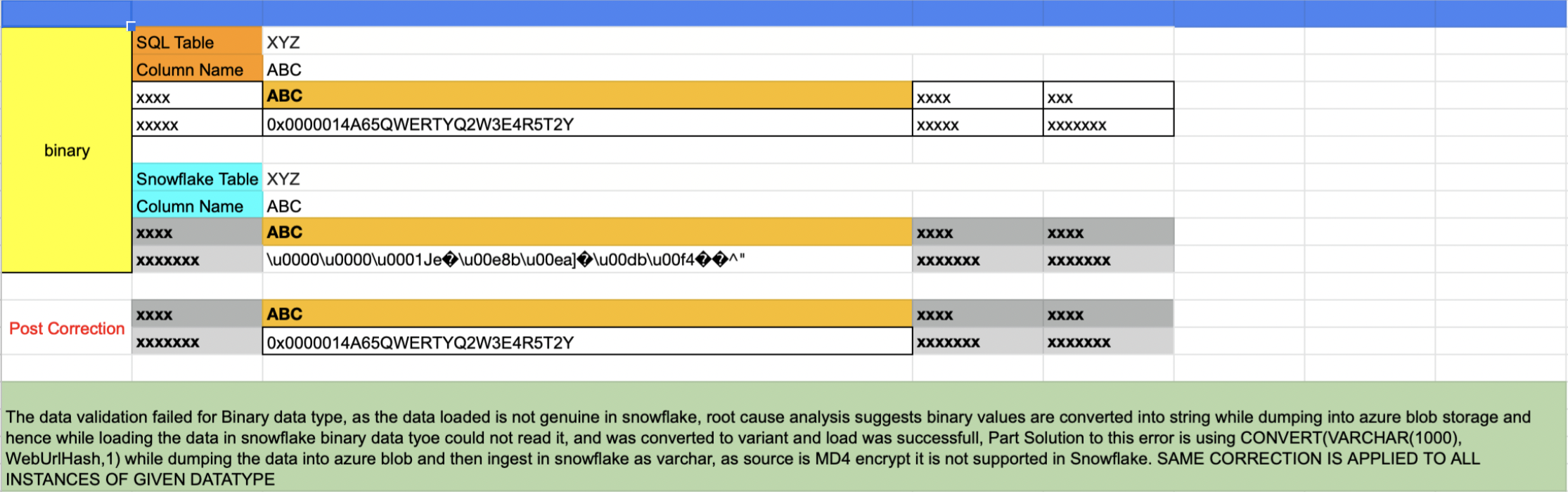
    In the first approach, all the distinct data types in the SQL server that were part of the db migration were listed and sampled randomly across one row per data type. The same row was fetched from Snowflake and matched.
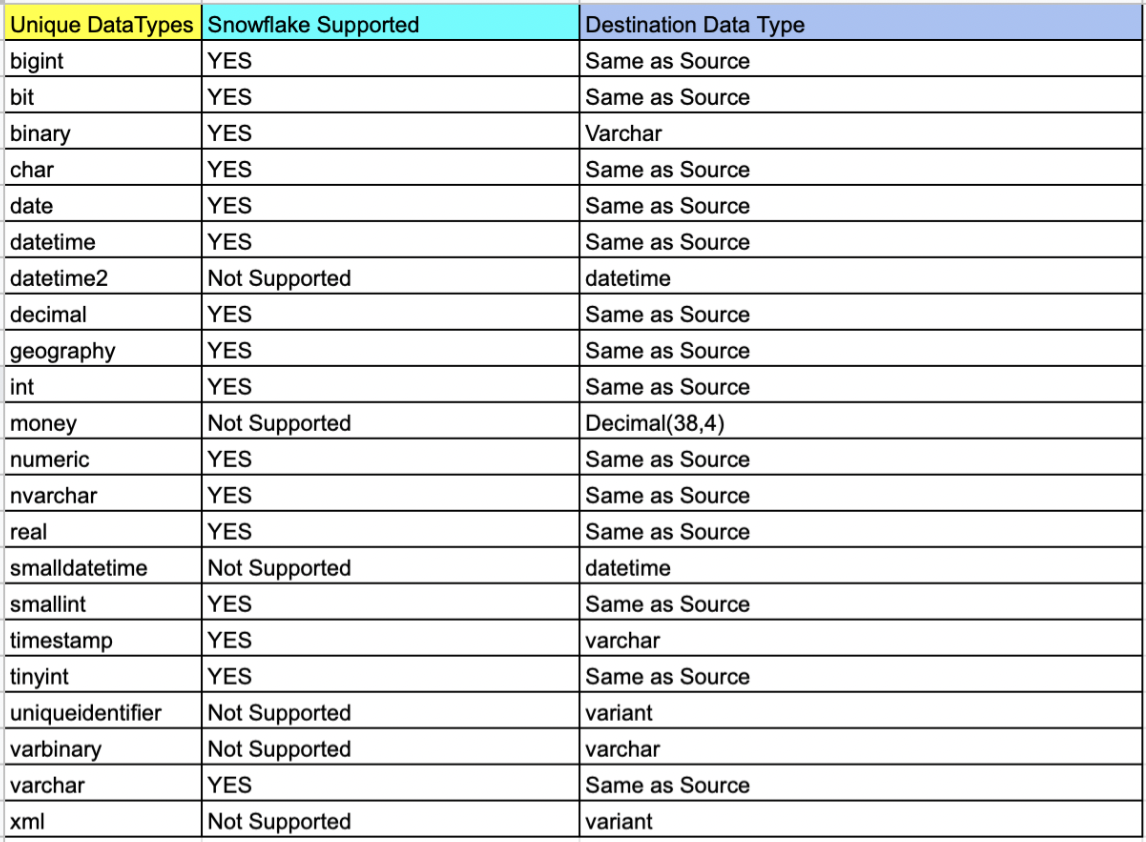
    List of tables based on data type

    select table_catalog,table_schema,table_name,COLUMN_NAME,* from
    INFORMATION_SCHEMA.COLUMNS
    where DATA_TYPE = 'money' and TABLE_NAME not like 'sys%'

    Issues like that shown below were uncovered in this validation process and were corrected for all instances of the data type.
    The second approach involved writing an automated script that accomplished the following results (More details can be found here):

    • Script touched each table of each database
    • A set of five records were randomly sampled from both sides and matched
    • If the tables were empty, it was recorded as tables with zero records
    • If the sample sets did not match the script, it wrangled the sets and sorted them one column at a time. If the sample matched the script, it was recorded. This wrangle took care of the scenario wherein the first n number of columns had duplicate records
    • Any failed validation attempt would be visible in a generated log report:

    Validation Started for Table: Test1

    —-> Validation Passed for table Test1

    Validation Started for Table: Test2

    —-> Validation Passed for table Test2

    Validation Started for Table: Test3

    —-> Table has 0 records

    Validation Started for Table: Test4

    —-> Validation Failed for table Test4

    Validation Started for Table: Test5

    —-> Validation Passed for table Test5

    ============= Report =============

    # Total Number of Tables Scanned: 5

    # Tables with 0 records: 1

    # Passed: 3

    # Failed: 1

    # Percentage 60.5556123
  • Financial Drivers for Cloud Migration in Enterprise

    Financial Drivers for Cloud Migration in Enterprise

    Clouds are a vast pool of usable and manageable virtualized means such as development platforms, hardware and services. These assets can be animatedly reconfigured to adjust to a flexible load, which helps in the optimal utilization of resources. Your enterprise breathes through IT—to keep your business moving forward, you must modernize and be more flexible to break the shackles of the orthodox technologies that are holding you back.

    The cloud’s pay-as-you-go business model enables enterprises to cut capital spending by leveraging the cloud service. It also offers several benefits required by the enterprise, including lower operating cost, no upfront investment, great scalability and much more.

    To gain the benefit of cloud computing and guard the current investment to the legacy system, companies are keen in migrating their legacy systems to the cloud. The cloud provides a cost-effective corridor to transforming legacy systems to more modern technologies. It offers modern efficient development structures, improved supervision of IT resource supply and demand and enhanced scalability, and it provides access to these assets from almost any part of the world. With this upgraded dexterity, you are able to respond more swiftly to the changes in the market, exploit newer business prospects, surge financial growth and drive innovation.

    However, to benefit from what the cloud could offer, you are required to spend money and time on launching your cloud and migrating data and applications to the newer environment.

    Migrating databases from on-premise machines to the cloud has a few crucial advantages: Cloud elasticity delivers instant flexibility in scaling up or down. And, the cloud model saves money by shifting companies from early heavy capital expenses (CapEx) of on-premise hardware to constant, known operational expenses (OpEx) on cloud facilities and more.

    Migration Ahoy

    But migrating live applications to the cloud is not an easy task. Listed below are few methods to migrate to the cloud.

    Rehost: This term refers to redistributing applications to a diverse hardware setting and changing the application’s structure configuration. Rehosting the application while making no changes to its construction can offer a faster migration to the cloud. The key benefit of infrastructure as a service (IaaS) is that the systems can be migrated by the teams quickly, with no modification to their architecture.

    Refactor: This term refers to applications run over the cloud provider’s infrastructure. The main benefit is combining innovation with awareness, as “backward-compatible” platform as a service (PaaS) means developers can reuse frameworks, languages and containers in which they have invested. Its biggest drawbacks include transitive risk, missing capabilities and lock-in framework.

    Revise: This method requires extending or modifying the present code base to assist the legacy transformation requirements, and then using the refactor or rehost options to position the cloud. This method enables enterprises to enhance the application to influence the cloud features of providers’ infrastructure. However, this method requires upfront development work, which needs upfront outlays to assemble a development team.

    Rebuild: This term refers to rebuilding the solution on PaaS, discarding code for the current application and restructuring the application. Though rebuilding involves dropping the familiarity of present code and frameworks, the benefit of rebuilding the application is admission to advanced and innovative features in the platform of the provider. They increase the productivity of the developer. Still, lock-in is a major drawback: Should the provider make a pricing or technical change, breaches the service level agreements or goes out of business, the customer is required to switch, possibly deserting some or almost all its application resources.

    Replace: This method requires discarding the present application and using the commercial software offered as a service. This method reduces or eliminates any investment in assembling a development team when there is a change in the business function. Issues may include issues in accessing the data, unpredictable data semantics and vendor lock-in.

    The Bottom Line

    Projects relating the migration be of any size entails careful planning. Evaluating its existing applications portfolio could help an organization understand the complexity, challenges and amount of effort required in migrating its databases to the cloud. Many tools assist application and database migrations, and each method differs in the amount of automation they provide and in the accurateness of the migrated system. Carrying out proofs of concept using these tools to understand their abilities will be constructive in the longer run for larger projects related to migration.