Tag: data storage

  • Using Microsoft Azure as a Backup Repository

    Using Microsoft Azure as a Backup Repository

    Every year, the amount of data that needs to be backed up increases. There are two ways to store backups – using on-premises facilities or trusting cloud-based solutions. Having an on-premises storage infrastructure can be costly for a company. This is because of the high prices for storage equipment and the expenses to maintain this equipment, e.g., hiring a storage engineer. Depending on a company’s rules, Microsoft Azure could be an alternative to traditional ways of keeping data. If the amount of data is relatively small (less than 4 TB), there is no problem with making use of this solution; you can either use Azure Blob as a CIFS or NFS storage, or you can create your own virtual machine by adding a disk to store your data and then configuring it as a file server. However, this blog post focuses on cases where space limits are more than 4 TB.

    Microsoft Azure allows you to create VMs and add disks with a maximum capacity of 4 TB for each disk. It is suitable for application servers but very often doesn’t work if you require a big file or backup server.

    However, we can exceed this limit by using Windows software RAID array. The idea is to use RAID5 as the software RAID which contains arrays starting from three disks.

    Why RAID5? Because it has a good read speed limit. It is also economical to use X disks, where X starts at three and you only lose one disk space for the total RAID result space. Furthermore, this should give you redundancy if one of your disks were to fail. However, if we build a RAID array in Azure, we already have the virtual disks as blocks of our array and they are protected by Microsoft Azure Cloud. Thus, the chance of failure in our RAID array (which is based on disks that are already in the RAID array) falls significantly.

    Here’s how to create an Azure-based backup and replication repository server.

    1. Log in to your Microsoft Azure account or register a new account at https://azure.microsoft.com/en-us/

    2. Create a new Windows Virtual Machine:

    In this example, we choose Windows 2008 R2 SP1, since we don’t require any advanced services, just software RAID5.

    3. Type in your VM name, username and the password according to MS Azure rules of complexity.

    4. Choose your VM size. Please note that the VM type depends on the number of attached disks. Thus, if you require more than 8 disks (over 24 GB in RAID 5), the only option is to choose DS2_V2 Standard:

    5. The settings for available storage are some of the main options for our future repository:

    At this point, you have created a new VM; now it is time to add disks. On the Disks page, you can add as many disks as you need for your future disk array. In our case, we will build software RAID5, which will require seven disks in total.

    We need to have our SMB share available from the internet, so we have to configure the Azure Firewall settings.

    In the Networking section, click the Add inbound port rule button and create a new rule allowing you to make port 445 (SMB) accessible to everyone (for testing). Alternatively, you can only make the port accessible to the backup software instance’s external IP as in the Source field (for production).

    The next step is to connect to the VM via RDP using the IP and credentials you created during the VM creation process.

    Next, you need to create a RAID5 volume. In Storage Manager, you`ll see all 4 TB disks you attached. Right click Disk Management > All Tasks > New Raid 5 Volume:

    Select all available 4 TB disks to add them to your array and move them to the right column:

    Follow the standard wizard; choose a letter for the disk and perform a quick format by NTFS.

    Next, create an SMB share on a new logical disk and add write permissions to the future repository.

    At this stage, you can use your entire 24 TB volume as a remote repository in your backup system.

    If you use the NAKIVO backup to Azure solution, just add a new repository using the server’s IP path to your share as well as the credentials you set for the SMB share:

    Then, create a new job using the new repository as the backup target and run it.

    Conclusion

    The amount of data organizations need to back up is growing exponentially. Therefore, it is important to store that data in the most economical way. Using a data backup system like NAKIVO and RAID5, you can make sure your VMs are reliably protected and that there is enough space to store them in Azure.

  • What Should Business Owners Know About SSDs?

    What Should Business Owners Know About SSDs?

    Without a doubt, SSDs have become the latest trend in hardware storage, and you can expect their use to increase over time. Implementing SSDs in your business can improve productivity and make it more efficient by increasing the speed of your PC long enough to extend its useful life. Here is all you need to know about using an SSD for your business.

    What is an SSD Storage Device?

    An SSD is a storage device that functions similarly to an HDD. But instead of having moving parts, an SSD stores data on interconnected flash memory microchips that continue to store information even when there is no power flow. These microchips are known as NAND and are more reliable and faster than the HDD.

    SSDs are fast because they use the Non-Volatile Memory Express (NVMe), which allows high data exchange speeds of up to 2,600 MB/s, almost five times faster than a standard SSD. The NVMe SSDs are more recent than SATA SSDs and use the peripheral component interconnect express (PCIe).

    SSDs Vs. HDDs

    SSDs and HDDs differ in several ways, and you should understand the fundamental differences between the two. HDDs are mechanical and use magnetic heads to read and write data while spinning the platters. The number of rotations per minute determines the speed of an HDD.

    Meanwhile, SSDs are electronic and use flash memory chips, which makes them faster than HDDs. They also use NOR or NAND flash memory as their storage medium. The NAND is smaller and faster than NOR in read/write operations and can store data when off.

    What is the Lifespan of an SSD?

    Cells wear out faster when they write more data, and a standard SSD cell has a lifespan of around 3,000 write cycles, which may seem small at first glance. But the SSD uniformly distributes the write operations across all cells, reducing the chances of the cells dying and increasing the drive’s longevity.

    SSDs also have backup cells that regenerate dead cells. For this reason, large SSDs have an extended lifespan.

    How SSDs can Help Your Business: Speed, Longevity, Energy

    SSD is ideal for businesses that handle and store vast amounts of data due to its high performance, speed, and reliability. Here are more reasons why you should use an SSD for your business:

    1. Faster Read/Write Speeds
    SSDs are faster at accessing your business data, reducing the startup time for programs and operating systems. Compared to a traditional HDD, an SSD runs up to 30 times faster, allowing you to boot your PC in seconds instead of minutes.
    2. Longevity
    An SSD may be suitable for upgrading drives in a portable PC. It has no spinning drive, which means better durability and a lower likelihood of damage or losing data when you drop your business laptop.
    3. Energy Saving
    When it comes to going green and reducing energy consumption, SSD storage devices should be at the top of your list. SSDs usually generate less heat and energy since they don’t have moving parts. Therefore, you will save substantial power when using your PC, and more battery life means more productivity.

    Challenges of an SSD Storage Device

    It has always been expensive to store enterprise-level data on servers, with SSDs being slightly more expensive. As business storage capacity increases, SSDs become more expensive, and an HDD may be suitable if you want to archive a significant amount of data. Apart from archiving data, SSDs are generally the best option for storing and transferring data.

    Bottom Line: Speed, Reliability, Improved System Cooling

    Modern businesses cannot function without storage devices, and an SSD offers a unique solution that significantly increases productivity by reducing loading times. An SSD promises faster system performance, increased reliability, and improved system cooling. Due to these advantages, your business will save both time and money.

  • How to Select the Right Volume Type/Storage for Your Workload

    How to Select the Right Volume Type/Storage for Your Workload

    AWS services are at the top of the cloud services food chain, and a hot topic for nearly every business considering migrating to the cloud. Along any cloud migration journey, many hidden traps await the unprepared. The volumes you’ve already provisioned might seem like a perfect match—but are you sure they suit your workload and carry the best price for performance delivered? Today, we’ll make the difficult task of choosing a storage class for your workload a bit less complicated.

    In the World of EBS

    AWS EBS currently provides three categories of considerable storage: Hard disk drives, general purpose SSD, provisioned IOPS, and one that you will most likely never need to use—magnetic. Although I’ll provide brief descriptions of each, I’ll focus on the most widely used volume types—general purpose.

    GP Storage – the Common Choice

    This is the staple storage for pretty much all AWS users. It gives you the best bang for your buck and is commonly used for tasks that don’t require heavy lifting from a drive perspective. GP storage ranges from 1 gibibyte (GiB) to 16 tebibytes (TiB), providing from 128 to 1,000 mebibytes per second (MiB/s) of throughput, which will most probably fit your use case, unless the workload is significantly specific.

    There are multiple types of GP storage, each with different pricing and characteristics that I’ll provide a few details on below.

    GP2 – Old-Gen SSDs for the Masses

    GP2 is the typical solution for boot volumes of EC2 instances, development environments, and lighter/less important databases. This is one of the most popular options out there, although its popularity comes from old habits rather than actually being a perfect shot. GP2 volume performance scales with its size—the bigger they are, the faster they go. Still, these might seem a good option, but to be honest, they aren’t so perfect. And the biggest elephant in the room is the term you’ll have to remember – “burst credits.”

    Burst Credits – Math Homework for Your Business Work

    Provisioning a GP2 volume, you get a one-time grant of 5.4 million burst credits, which you can use to make it handle input/output better during spikes in demand. More of those tokens means you’ll be able to sustain bigger performance demand for longer, boosting your storage up to 3,000 IOPS as long as you have enough of them in your pocket.
    While depleted when you go “turbo,” they accumulate when you’re not using your disks at full speed—saving up unused performance for when you need it most. Burn them all, and your IOPS performance drops to base value and throughput falls to the baseline IOPS multiplied by max I/O size.

    The performance of GP2 storage volume can be calculated with this formula:
    Throughput in MiB/s = ((Volume size in GiB) × (3 IOPS per GiB) × (I/O size in KiB))

    Until you reach the point where your volume is so big that its base performance exceeds burstable, you’d have to learn them by heart. Where is this point? Quite high, at about 1.1 TB (1024 GiB)—a lot of disk, even for a medium-sized business, especially since those volumes can’t be mounted to multiple targets.

    Figure 1: Graph of Max IOPS available for certain volume sizes (Source: AWS documentation)

    Unless you’re deploying a disk-devouring monster such as an EC2 host instance for dozens or hundreds of Docker containers, or you plan to run an enormous Elasticsearch node for the next few years with no clean-up routines in place, you’re not likely to need this much space. Also, in either of the two cases mentioned, you’d probably run out of CPU and RAM first; there are better alternatives for these cases as well, not to mention that the lack of maintenance is definitely not a good practice.

    In addition, for practically every use case—web serving, web applications, databases, casual EC2 instances for use with Docker, and more—pretty much anything is better than GP2.

    Luckily, in 2014, the introduction of GP3 brought some great improvements.

    GP3 – The “Newcomer”

    While not really a “new” player, GP3 volumes are a welcome improvement after experiencing the inner workings of GP2. They perform better and cost less in comparison, allowing you to easily scale your operations according to your needs much easier. Gone are the days of burst credit balances.

    The golden rule of this storage class is “mix n’ match.” Baseline performance here is the maximum burst performance of a GP2 volume, 3,000 IOPS, and 125 MiB/s. If your business needs more, you can purchase additional amounts of either, paying extra only for what you’re interested in.

    The limits are quite generous. You can purchase up to 500 IOPS per GiB (for at least 32 GiB volumes, capping at 16,000 IOPS), or up to 0.25 MiB/s per GiB (for volumes of at least 8 GiB, 4,000 IOPS or more, capping at 1,000 MiB/s).

    If you were previously happy with your GP2 volume, it’s almost guaranteed your company will be just as happy with GP3, and you’ll save a decent percentage of the storage cost, even up to ~20%.

    Assuming that you don’t need more than what GP2 provided you with, make the switch. To make it even easier to cut those costs down, AWS is now automatically setting the IOPS and throughput of your new GP3 volume to the exact same as your GP2. Less guessing, less messing around, more good stuff. Just click a few buttons and save some cash, no strings attached.

    This is the storage class I would recommend for every “generic” or “typical” workload. It’s a good starting point for almost every business use case that doesn’t expect huge amounts of disk operations, but is ready to scale up when the dreaded flood of demand for disk power comes.

    GP3 can easily handle the role of boot volume for EC2 instances. It can host both simple and a bit more complex applications, databases such as MySQL and PostgreSQL, or a blend of those in a containerized environment, especially in a multi-node configuration or as part of a Kubernetes cluster. Zesty Disk for Kubernetes handles this switch automatically if you have the CSI driver installed

    When the time comes, it can scale in tandem with demand. In certain cases, it might even be cheaper to provision high-speed storage with GP3 than the IO1/IO2 types, which are dedicated to speed and next on our list.

    IO Storage Class – Need for Speed

    The IO storage class was introduced to cater to the needs of businesses based on extreme durability, high read/write speeds, and the lowest latency available. It requires certain criteria to be met to show its true potential and costs significantly more. But, in turn, it provides unmatched speeds and reliability, as well as some features you won’t find in any other storage type.

    This volume type is great if you seek a volume to provision for your high-speed disk-based database, for example, or to create a single MySQL database host for multiple large-scale e-commerce instances, although there are multiple options available for this from RDS to multi-instance DBs (e.g., MySQL Galera). It’s also a fit if you need to accept a lot of data fast to process with an ML algorithm.

    IO1/IO2 Vs. IO2 Block Express – Which Type of “Fastest” do you Need?

    IO2 Block Express is pretty much IO2 on extremely potent steroids. You get limits that are four times as high for IOPS and throughput, latency of less than milliseconds, and surprisingly, no additional fee. Yes, you read that right, they’re priced the same. Plus, provisioning additional IOPS/throughput above the limit of a standard IO2 instance actually costs less.

    If you decide to use IO2 and meet the requirements (a certain type of EC2 instance), you should definitely consider Block Express—if it’s not already running by default.

    And when would you run IO2 anyway? Well, with its power and hefty price tag, this class is dedicated to the most disk-dependent, throughput-hungry, and IOPS-dependent monstrosities. For example, a data-crunching machine for a stock exchange, a global log-ingestion mainframe, or a multi-pod Kubernetes node prepared for very demanding workloads—the titans of storage, no doubt. It’s a go-to when you need a single machine that’s going to pack as much punch as you can get.

    How about IO1 then? It’s a compromise between low latency, high IOPS, and price. A good choice when you need a bit more than general purpose, but still not enough to go for the fastest storage out there. Keep in mind there’s also one additional drawback—less durability. A 0.2% failure rate annually does not sound like a lot, but if you’re thinking about dozens or hundreds of drives, absolutely critical workloads, or both, it definitely makes a huge difference.

    So, Which Should I Choose for my Workloads?

    As you can see, the world of EBS is quite complex, to say the least. So, I made a chart that should ease the selection process for your use case:

    Fantastic Disks and How to Tame Them

    Choosing the right storage class is a tough decision to make—but the benefits are worth it. With just one shot, you can both improve the performance of your instances and save on costs as soon as your next invoice.

  • SaaS Data Backup and the API Bottleneck

    SaaS Data Backup and the API Bottleneck

    The need to protect SaaS data has never been greater. A recent global survey from Odaseva found that 51% of ransomware attacks are targeting SaaS data, and they are more likely to succeed (52%) than were attacks on cloud, endpoint and on-premises data. 

    But there are plenty of reasons beyond the threat of ransomware to protect SaaS data. Employees accidentally—and maliciously–delete data. And while outages are not common, they do happen, and when they do, it can cause a lot of pain. Atlassian, for instance, suffered a two-week outage in April. If the data isn’t backed up, the organization is completely at the mercy of the provider to get the service back online before they can access it.

    And though all respondents said their organizations say they have some form of SaaS data protection in place, 57% said they still have SaaS data that remains unprotected. Likely, that’s why only half of respondents whose SaaS data had been successfully encrypted by an attack said they were able to recover all of it, compared to more than eight in 10 (81%) who were able to do so for on-premises data.

    That’s not surprising, because backing up SaaS data is very different from on-premises data protection. For starters, of course, IT has limited control, at best, over the application and data. IT will need to rely on APIs to back up and restore SaaS data, and those API calls will have hard caps. SaaS providers almost always run their services on a multi-tenant architecture, so they need to make sure API resources are available for everyone. To accomplish this goal, they set hard caps on API calls, typically over a 24-hour period, which means that IT must carefully manage API usage for backup and restore operations. And with many different APIs with different capabilities and limitations to choose from, IT will need to make some hard, complex choices. 

    Navigating APIs With Hard Caps

    Managing API usage is important, and not just for backup. These same APIs are also vital for connecting other applications integrated into the SaaS application. And for core SaaS apps, such as CRM or ERP, there will likely be many such integrated applications that require the use of those APIs. 

    To get the best performance, IT needs to be very careful with the APIs it uses for backup and recovery. Let’s take Salesforce as an example. The Salesforce REST API can transfer up to one million records per hour, while the BULK API can do up to ten times more in the same amount of time. And if you use parallel calls to multiplex data, the BULK API can do up to 300 million. The upshot is that the API you use can make a huge difference in your recovery point objectives (RPOs) because transferring more data faster means more backups throughout the day.

    Unfortunately, Salesforce customers won’t be able to depend on BULK API for all their backup and recovery needs. Some objects can only be accessed via the REST or other APIs, for instance, and that BULK API will also be useful to other apps—you don’t want to hit that hard cap and leave other applications unable to connect. And you can’t always use the same API to write data as you do to read it.

    The SaaS backup infrastructure has to achieve a balance of API usage, which must be closely managed. And don’t forget about restore, which can consume a ton of API resources. Make sure you have enough to account for a big restore—you really don’t want to hit the API cap while you’re trying to get your users back in business after a data loss event.

    Lastly, APIs change over time and the backup system has to be able to adapt. You’ll need to make sure you keep up with API documentation so the system can be updated regularly; otherwise, data may go unprotected.

    It’s now becoming widely accepted that SaaS data needs to be protected, but building a SaaS backup solution that meets an organization’s RPOs and RTOs is more complex than many in IT may realize. A strategic plan for API management is a must-have for any SaaS backup management solution. 

  • Database Observability: How to Circumvent your Weakest Link

    Database Observability: How to Circumvent your Weakest Link

    Today, IT pros field an increasing number of assets they need to monitor to secure systems and understand what’s happening in their database and applications. This is further complicated as organizations adopt hybrid IT strategies and IT pros are tasked with managing tech stacks that span across on-premises and public clouds. 

    To cut through complexity and create end-to-end visibility into their IT systems, organizations must enact an observability approach.

    Monitoring Vs. Observability

    When it comes to observability, many think it means the same as monitoring. Whereas monitoring is a verb; observability is a measure of how well the internal states and conditions of a system can be inferred from its external outputs. 

    When monitoring systems are set up, dashboards are built around certain assumptions that an IT pro may expect will happen. When monitoring databases, teams are building multi-level component IP systems. The algorithms must process that data, and the user interface must interact with it. 

    However, to make that system highly observable, performance information and other kinds of metrics across all kinds of different endpoints must be incorporated. Especially since IT pros must deal with microservices, mesh, IoT or containers orchestrated through Kubernetes.

    How to Monitor Effectively 

    In the past, IT pros would typically monitor a SQL Server or even other database platforms like PostgreSQL or MySQL. In this new era of observability, on the other hand, IT pros need to do something different with the front-end code with regard to the different kinds of algorithms processed against that data set. Typically, developer teams would write the code, but there wasn’t anything written in that code to send out debug signals.

    Today that has changed. To make sure our systems are fully observable (because we can’t anticipate all possible problems!), we must log different steps to keep track of the many moving pieces. Organizations must collect as much of everything as possible. The more data, the more information organizations have about what’s happening in their application, from the database through the virtualization or containerization layer to the virtualization host or the orchestration to the bare metal. If organizations can get visibility into those elements, we can enable our systems to be fully observable and more easily diagnose any problem or anomaly that happens.

    An Observability Approach

    When using the observability approach, high-level dashboards are handy. They can help IT pros roll up everything that’s happening and get to a root cause analysis if there is a problem. However, sometimes there’s not a specific problem; there’s just a general performance issue. With observability platforms, teams can quickly discover, map and understand dependencies in ways that make it easier to achieve and maintain service level objectives (SLOs). 

    As IT teams increasingly distinguish between merely monitoring IT environments and achieving observability, they can proactively surface anomalies using machine learning algorithms and other forms of data science. And the depth and insight that can be applied to managing IT is increasing dramatically. Observability is quickly becoming table stakes for any modern IT organization. 

  • Container Storage for DevOps: New Options With NVMe

    Container Storage for DevOps: New Options With NVMe

    The DevOps world is ripe for a storage paradigm change, both in how it operates within the enterprise and how it implements applications. 

    NVMe, especially NVMe-over-fabrics (NVMeoF), is both a tool and a host target that can provide such a change—especially in the new world of microservices and containerization. NVMe can drastically improve application performance over classic implementations and, given the right tools, transform the process of writing those implementations to be faster, more robust and more flexible. 

    I/O-Intensive Work

    A quick recap shows why this is so. The DevOps build toolchain, especially for large codebases, has always been heavily I/O-dependent and storage access has classically been the biggest bottleneck for building an image. The ability to cluster small, inexpensive Linux x86 servers connected to SANs twenty years ago was a first step in separating storage hardware from compute, but I/O latency was pretty awful. Build/link operations could actually take longer than the compilation of object files. 

    Virtualization helped make hardware utilization better and cheaper but didn’t really improve throughput. Cloud infrastructures such as OpenStack and CloudStack made those infrastructures simpler and more elastic to manage but, again, the IOPs bottleneck remained. 

    Containerization for DevOps made it even simpler from the applications level—just deploy the app and ramp up container instances as needed—no more dedicated infrastructure needed. And it’s cheaper for incremental functions. 

    However, not much was done to clear the I/O bottlenecks for largescale storage and increasing overall performance. 

    When the new nonvolatile memory technology of NVMe came to market in 2014 for the single server world, it delivered two game-changing capabilities. 

    1. An increase of 5x disk access I/O speed. This was, arguably, the biggest single performance improvement since multicore processors with onboard cache (think Opteron) emerged. With Linux adding support for standard, open source NVMe drivers in 2021, the options increased beyond Windows and Mac users.However, SANs and their protocol stack were still an issue. SATA- and SCSI-based SANS performance was gated to the 1.2GB limitations of those technologies and big iron to head-end the SAN still dictated high-cost infrastructure.
    2. Unlike SATA or iSCSI, NVMe has the native capability for TCP/IP or fibre channel addressing. This allows NVMeoF to be an autonomous point for data storage in a normal network. A user can now keep control of their data but use network-attached compute as a utility with roughly 6Gb speed for I/O—greatly lessening the big penalty for disk I/O.  

    Applying Containers

    The dramatic uptick in container deployments and the debut of container attached storage (CAS)—software that includes microservices-based storage controllers that are orchestrated by Kubernetes—represented another industry milestone. These storage controllers can run anywhere that Kubernetes can run, which means any cloud or even bare metal servers or on top of a traditional shared storage system. Critically, the data itself is also accessed via containers as opposed to being stored in an off-platform, shared scale-out storage system. 

    Since container-attached, cloud-native storage enables the use of small, disaggregated architecture without the need for large-scale SANs or storage controllers dovetails nicely with DevOps work. 

    Container-based applications can benefit enormously from NVMe-based storage. As experts have pointed out, since DevOps applications are all about scalability, the parallelism embedded in the NVMe spec fits nicely to support them. 

    While SANs are good for large-scale contiguous operations, they’re expensive chunks of capacity and not nimble to deploy. They’re also bound to the slower I/O storage protocols, which can negate performance gains possible by adding NVMe to that array (as opposed to discretely).

    Container-based storage with NVMe gives DevOps teams the opportunity to add storage at low cost with deterministic management of that stateful storage—in theory, of course. In practice, the temptation to add like infrastructure to current infrastructure is powerful, even with all its limitations.

    To make that theory a reality, a control plane with the fast data plane is necessary—and the market is beginning to address this need.  

    As one example, OpenEBS recently introduced an upgraded engine, MayaStor (now part of DataCore Software), which enables use of NVMeoF at impressive speed: Benchmarks with Intel SPDK architecture show a 5x read/write speed improvement over SATA.

    OpenEBS debuted a few years back as a containerized storage solution for Kubernetes-based applications. With an optimized storage engine, Kubernetes has the opportunity to perform like other, more specialized hosting and development solutions. 

    Impact for DevOps

    What does this mean for DevOps teams? Firstly, using NVMe in containerized DevOps applications speeds up the time required for large builds, thereby speeding iterations of writing software. It also removes the need for complex and expensive SANs to host build environments. This double whammy of benefits means that development is quicker and cheaper and, in turn, applications can deploy faster while using more flexible tools.

    Second, NVMe greatly mitigates I/O concerns for how application code is designed and how environments are implemented. No more being beholden to the storage trunk—NVMeoF drops the performance penalty for I/O ops and distributes traffic across a normal TCP/IP network. This is now a triple whammy—faster, cheaper and more flexible containers built atop a fast, flexible virtualized infrastructure.

    Backed by innovations in container-attached storage, DevOps teams can achieve the agility and flexibility that are paramount to its mission—and act as a proving ground for the rest of the IT team to consider alternative paths to greater efficiency and performance.


    Join us for KubeCon + CloudNativeCon Europe 2022 in Valencia, Spain (and virtual) from May 16-20—the first in-person European event in three years!

  • SQL Server MDF to NDF Distribution

    SQL Server MDF to NDF Distribution

    Do you have massive MDF files on your database? Have you noticed that your SQL Server disk stall metrics for these data files are higher than the storage latency metrics exhibited on the underlying operating system? It could be that your SQL Server data files are being hammered too hard and you don’t have enough data files to help the SQL Server storage engine distribute the load. We do this for tempdb, right? Let’s do this for our user databases as well. It’s easy for a brand-new database. But existing databases may be out of control with a single data file. Let me show you how to adjust this for existing databases without an outage!

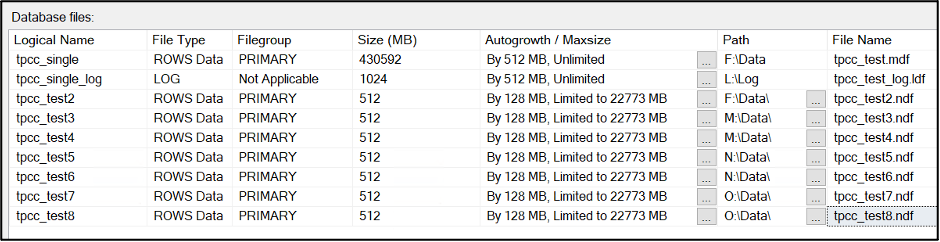
    I’ll be taking the SQL Server database generated by the HammerDB benchmark, appropriately named tpcc_test. It’s just a backed-up-and-restored copy of the (appropriately named) database tpcc_single to represent a single MDF file present. 

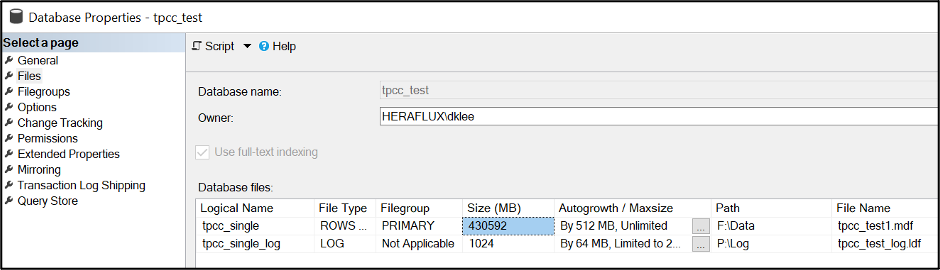
    I did a restore onto the F: drive of this server. The MDF size is rather substantial at 420GB. The log size is inconsequential for the purposes of this task.


    Here’s the interesting part. Take a look at the current file system size versus the internal fill size. Record the internal fill size, as that’s what we’ll be using to help with some math shortly.

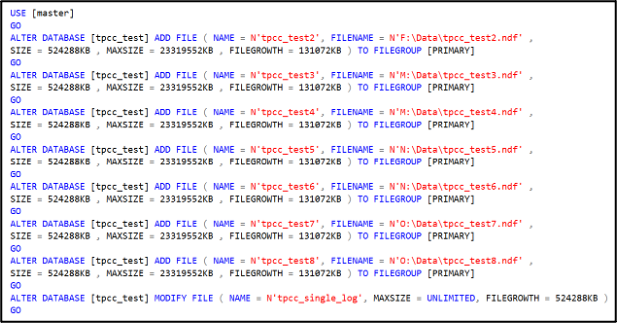
    Now, how many files do you need? Here’s my standard DBA response—it depends. For the purposes of this test, I’m going to add seven NDF data files to complement the primary MDF. Your mileage may vary based on your workload. 

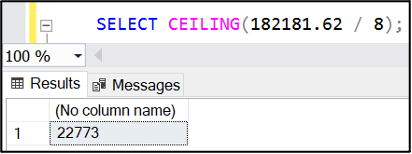
    How large do these files need to be? Take the internal fill size on the MDF, divide by the number of data files you want in total and round up to the nearest megabyte. If the database is active with a lot of data being added, you might want to add a bit more just to have it balance by the time we’re done with this task.

    SELECT f.name AS [File Name] , f.physical_name AS [Physical Name], 

    CAST((f.size/128.0) AS DECIMAL(15,2)) AS [Total Size in MB],

    CAST(f.size/128.0 – CAST(FILEPROPERTY(f.name, ‘SpaceUsed’) AS int)/128.0 AS DECIMAL(15,2)) 

    AS [Available Space In MB], f.[file_id], fg.name AS [Filegroup Name],

    f.is_percent_growth, f.growth, fg.is_default, fg.is_read_only, 

    fg.is_autogrow_all_files

    FROM sys.database_files AS f WITH (NOLOCK) 

    LEFT OUTER JOIN sys.filegroups AS fg WITH (NOLOCK)

    ON f.data_space_id = fg.data_space_id

    ORDER BY f.[file_id] OPTION (RECOMPILE);

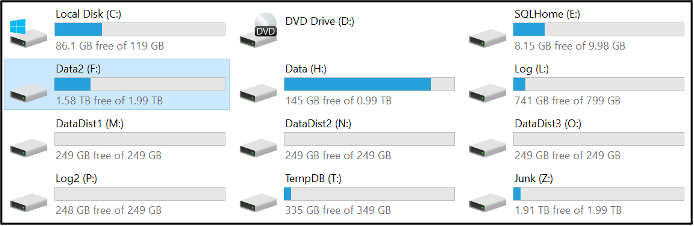
    Now is the time to determine if these should be placed on the same disk or if they should be distributed across more disks. I’m doing that on this server to leverage the disk controller queues to more widely distribute the storage activity and see better overall performance when under pressure. I’ve attached three more virtual disks to this virtual machine, and the four are spread on the four disk controllers on this virtual machine. All disks are formatted with a 64KB NTFS allocation unit size with the large FRS flag enabled. Let’s place two of these files on each disk with the fourth holding the last NDF with the MDF. 


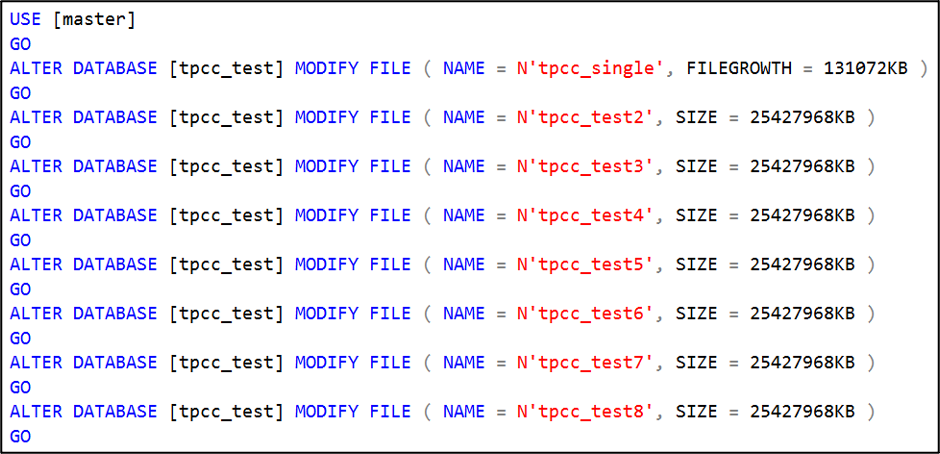
    Here’s a trick: I set the maximum file size of each of the new NDF files to be the percentage of the current main file space consumed. 

    Now, we’re going to use a little-known command to empty the MDF file. It’ll drain the file completely, but since we capped the file growth of the NDF files that we attached to limit their growth rate, this command will run until we have filled the NDFs, then fail. It will take longer to perform this operation, but it keeps the database online while it runs. You might have a bit of a performance hit from the CPU and I/O impact of this running process, so it’s important to think about timing when running this operation.

    You can watch the process work with the internal used space query listed above; the primary MDF is draining while the other NDF files are slowly filling up.

    Again, it takes time for this process to finish. When it finally ‘completes’, the EMPTYFILE command will fail due to maximum file size limit on the NDF files.

    FYI—Index optimization routines can cause a circular block with this process that I have encountered twice while running this process, so keep an eye out if you see this occur.

    Now, your internal data consumed space rates are almost identical. 

    Verify the autogrow rates are now the same between the data files. Remove the file growth limit on the NDF files. 

    Perform a one-time shrink of the primary MDF file to shrink it down to where it is the same size as the others.

    It will most likely be slightly out of balance. SQL Server does a pretty good job with the round robin algorithm for internal file fill rates, and it will finish balancing and then round robin filling internally as you continue to add data through normal usage. If you need to increase the size on some of the files so they match, go for it, and SQL Server will fill accordingly so it finally balances.

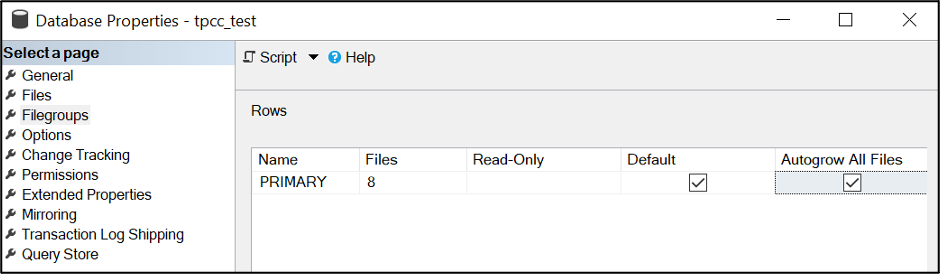
    You might also check if you need to enable autogrow all files at the same rate. This could mean that the database users might need to be punted from the database to enable the change.  Do this during a maintenance window.

    Sample your SQL Server disk stall rates and see what different you experience once this goes live.

    I hope this helps you improve the operational efficiency of your SQL Server database data files, and you get better performance as a result. Let me know how this works for you!

    Update: If you encounter an error like the following, just shrink the main MDF file down and repeat the emptyfile operation.

  • Does Your Organization Need a Data Diet?

    Does Your Organization Need a Data Diet?

    The scenario is all-too-familiar: There’s a security breach, and afterward, the affected organization asks what it must do to better protect its data.

    But what if that organization never collected and stored that sensitive information in the first place? Often, the best defense against an embarrassing and costly breach is to collect only data that is essential to an entity’s mission.

    Some who work in computer privacy circles refer to this as “going on a data diet.” They know the temptation is great for organizations to bulk up on data of all kinds. After all, storage costs are low. With the move to the cloud, an organization doesn’t even need to invest in hardware and upkeep to store the information it collects. So why not grab whatever data a customer or client is willing to provide?

    Because we live in a time when the only sensible approach to computer security is to wonder when your entity might be breached—not if. That’s why it pays to not only go on a data diet, but to adopt a regimen for keeping your organization’s databases lean and, as a result, your customer relationships healthy. 

    Too often, companies collect data just because there’s a chance it might be useful or they think it’s harmless. I’ve seen this play out firsthand. Sales departments seek any small edge they can find; who knows what small shard of data might prove useful in the pursuit of potential customers? The same is often true of an organization’s marketing unit, whose people are working hard to reach a broader audience for their product or message. If information flows freely from the potential and current customers, they collect it in pursuit of any leg up in the competition for people’s attention.

    But there are costs to an organization beyond the price tag of data storage. That includes reputational risk and exposure to lawsuits and the distractions these and other problems bring. More info might seem better—until hackers have broken into a system and the head of an organization is forced to explain why that data was gathered in the first place.

    Weaponizing Seemingly Harmless Data

    It was not that long ago that there seemed to be two distinct types of data: In one bucket there was personally identifiable information (PII) such as a name, address, phone number and email address and critical financial information like bank account and credit card numbers. Throw in personal health information (PHI) and other obviously sensitive information; everyone knew this sort of data must be zealously safeguarded.

    The second bucket was everything else: The seemingly extraneous bits we all leave behind living in a digital world such as what time you visited a website, the language you choose for a website, what products you viewed. Think of it as a mop bucket—messy if spilled, but not vital to corporate security.

    But those distinctions have blurred in recent years. An individual piece of data might seem innocuous, but not when combined with other sets of data that do not fall under the definition of PII as set out by law. What makes Big Data so promising to an organization’s sales and marketing teams is also what makes it potentially dangerous to collect: The connections that a clever algorithm and today’s awesome computing power can deliver crawling through vast data stores. If you link information that is personally sensitive (a person’s tastes or habits or activities) but not technically PII, it can be weaponized to harm individuals.

    As an example, think of the tracking data offered by people’s cell phones. If a person leaves the same street address at around 8:30 every morning and makes the same drive back and forth, it’s quickly obvious where someone lives and where they work. Given other open records, a hacker with dark motives can find our commuter’s name and other information. It’s not a big jump to connect this information to crimes like theft or even stalking and blackmail.

    Adopting a New Data Discipline

    Given the risks, forward-looking organizations are now adopting privacy programs that force their teams to ask the hard questions before collecting information. For these privacy practitioners, any time someone internally proposes that a new piece of data be grabbed or used in a new way, a conversation ensues about its usefulness and the validity of collecting it.

    Maybe the policy is conducted through an internal privacy committee that meets to debate its appropriateness. Maybe it’s a rigorous process that means checks and balances throughout an organization. But whatever the method, only data that can be justified as fundamental to an organization’s operation is collected.

    Another idea gaining popularity among those focused on privacy concerns: A process for jettisoning old data. (An example: Does an organization need to know a person’s last several addresses or just the current one where they can be reached?)  Under such a data diet, all information that an organization continues to store beyond its immediate use requires a specific justification.

    After all, the information you don’t have is the easiest to protect.

  • LogicMonitor Introduces Unlimited Log Data Retention

    LogicMonitor Introduces Unlimited Log Data Retention

    LogicMonitor today announced it will provide an option that allows IT organizations to retain an unlimited amount of log data on its software-as-a-service (SaaS) platform.

    Tej Redkar, chief product officer at LogicMonitor, said one of the issues that is holding back advances in observability is the cost of storing log data. LogicMonitor has decided to remove that issue by allowing IT teams to store log data on its LM Logs service for as long as they require, Redkar said.

    That data will also always be readily available as hot storage with no need to wait for data that has been stored offline to be rehydrated, he noted. Instead, that data is readily accessible alongside the metrics and distributed tracing data that LogicMonitor also collects, said Redkar.

    In general, LogicMonitor is making a case for centralizing observability for the entire IT organization via a SaaS platform infused with machine learning algorithms that automatically surface anomalies in real-time based on millions of events captured via log data. The issue many organizations encounter today is silos of decentralized observability data that are more complex to maintain while providing less visibility at a higher total cost, said Redkar.

    The LogicMonitor platform, in contrast, is designed to be equally accessible to, for example, a network operations team as it is to a DevOps team, he noted.

    Not every organization needs to store log data forever, but Redkar said as IT management continues to evolve, more organizations are moving toward storing metrics, traces and logs for longer periods of time. The rise of open source agent software is also making it less costly for organizations to capture that data in the first place.

    It’s not clear to what degree other providers of observability platforms will provide unlimited retention of data, but as the cost of storing data in the cloud continues to drop it’s apparent that billing IT organizations for storage costs is becoming untenable. There is always going to be some cost associated with storage, but it’s not enough to charge extra beyond the core cost of the service. The only thing accomplished by billing separately for storage is discouraging IT teams from storing the data required to both attain observability and better train the machine learning algorithms that surface anomalies.

    Observability, in one form or another, has been a core tenet of DevOps best practices for years. Initially, DevOps teams focused on continuous monitoring as the most effective way to proactively manage application environments. Observability platforms infused with machine learning algorithms make it possible to correlate events so that analytics tools can more easily identify anomalous behavior in real-time. Armed with those insights, it becomes a lot simpler for IT teams to resolve issues faster.

    In fact, there may even come a day when the so-called “war room” meetings that are convened to identify the cause of an IT issue via a painstaking process of elimination are no longer required. In the meantime, however, the total number of IT incidents that actually lead to disruption should steadily decline, even as IT environments become more complex.