
Tag: data query

  • Managing GraphQL at Scale

    Managing GraphQL at Scale

    GraphQL, the query language invented by Facebook, has attracted a lot of interest as a means to conveniently access data programmatically. GraphQL structures internal services with a unified schema for data, empowering product engineers to easily grab what they want from many microservices to populate the user interfaces (UIs) they’re creating. By unifying company data into a single graph, GraphQL combines the benefits of SQL with the ubiquity of API access.

    However, GraphQL does introduce some challenges when you’re trying to scale it across a large enterprise and partner ecosystem. For example, since GraphQL channels all requests through a single endpoint, security must carefully segment access to all the underlying infrastructure to avoid data overexposure. Matt DeBergalis, Apollo’s co-founder and CTO, also identified potential issues around changeability and performance when adopting a graph at scale.

    As the use of GraphQL within large organizations grows, development teams will have to overcome these obstacles—especially if companies intend to productize public APIs and reuse the same single graph company-wide. I recently met with DeBergalis for an update on managing GraphQL at scale. According to DeBergalis, we’re still in the early days of the graph revolution. And, future GraphQL maturity will require more rules-based declarative architecture, efficiency improvements and the adaptability to enact agile iteration of graph schemas.

    State of GraphQL Adoption

    So, what is driving the rise of GraphQL? Well, DeBergalis noted three key contributing factors:

    1. Many many microservices. In recent years, there has been an explosion of microservices. These modular services can be challenging to wrangle and are often exposed inconsistently throughout a software ecosystem.
    2. The rise of omnichannel platforms. Product engineers must now port the same data across disparate devices, whether streaming in a browser or on a Peloton screen.
    3. Users expect a hefty, data-rich experience. Expectations are at an all-time high. It’s now expected that an e-commerce shop, for example, will include product recommendations, auto-fill keyword search, pricing by geography and many more advanced features.

    Juggling all these factors creates a “complexity bottleneck,” DeBergalis explained.

    GraphQL responds to such complexity, helping unify the backend to enable product developers to fetch precisely what their client applications require. And, GraphQL adoption took off pretty quickly, particularly among product engineering teams, DeBergalis added. GaphQL plays nicely with familiar languages and frameworks like JavaScript, React and Relay. It’s also a bit different than previous trends, with demand being driven more by the database folks; “query people are really leading the charge,” he said.

    With the right technology stack, developers can add a graph layer between the underlying core APIs and the UI they are building, creating a universal API with a self-documenting schema. “For the developer, the amazing thing about GraphQL is throwing away all this boiler code,” DeBargalis said. GraphQL acts as “a foundation for tomorrow” to help deliver future business requirements, he said.

    With regard to architectural styles for APIs, 94% still use REST and 31% use GraphQL, according to the 2021 State of API Report from Postman. Though this percentage may seem small now, GraphQL adoption is steadily growing among large companies, such as PayPal, Netflix, Shopify, GitHub and Airbnb.

    Three Issues When Scaling GraphQL

    Using GraphQL is like using a mobile phone. You wouldn’t want to use a different phone every time you called a different number, would you? You would rather have all your contacts accessible from the same device. Similarly, GraphQL excels the more functionality is added.

    “Due to the network effect, a graph becomes more interesting as we publish more into it,” said DeBergalis. “What we have found is that GraphQL is most interesting and valuable at scale.” So, what are some inevitable consequences of GraphQL at scale? DeBergalis outlines three main architectural issues.

    Performance

    Performance downsides are one disadvantage that developers often cite when considering GraphQL. GraphQL has no built-in caching features, and the payload query could introduce additional latencies. Mitigating lower-level issues around throughput and reliability will likely require additional tooling from the community, DeBargalis said. This is partially why the Apollo team has begun to embrace Rust in new attempts to make infrastructure for GraphQL routing hyperefficient.

    Changeability

    A second problem enterprises may encounter when scaling GraphQL is embracing agility for such an all-encompassing fabric. “The companies that do GraphQL really well change it all the time—they treat it like a product,” said DeBergalis. This agility is at odds with the traditional REST API approach of building for longevity, which makes that approach extremely averse to breaking change.

    The reality is that when a company embraces a single graph, it may be pushing hundreds of schema changes every day. Different internal teams may maintain their own slice of the graph, defining it differently. Plus, maintenance roles may shift from team to team over time, noted DeBergalis. “If you try to waterfall what your inventory model should look like, you won’t get anywhere,” he said.

    Balancing change and stability will likely require a two-pronged approach to GraphQL. You want to continually iterate the graph with experimental features but also depend on certain functionality to preserve backward compatibility for client integrations. Satisfying both sides will likely require a change management strategy for iterating quickly, as well as enterprise-grade service level agreements (SLAs) to retain a firm bedrock on which to build more permanent data models.

    DeBergalis also described how observability is important for obtaining a clear picture of graph environments. This is one area where GraphQL shines—since clients request precisely what they need, you are never left wondering which methods are fetched but not implemented in production, as could happen with REST API management. According to DeBargalis, tracking fine-grained GraphQL usage with KPIs can help direct how the data model should evolve over time.

    Authorization

    Finally, perhaps the most significant concern surrounding GraphQL at scale is apportioning the appropriate access to users and devices. As a single unified endpoint can connect to a vast array of data behind the scenes, large GraphQL implementations will require a strategy for how that one unified graph can be implemented in parts.

    Without the proper access control, GraphQL could improperly expose personally identifiable information (PII). For example, a FinTech company may have a rule that requires a customer service representative to only have visibility into a customer’s transaction history if the customer has filed a support ticket in the last few days. Or consider data custody—a business working in the EU must comply with regulations on where data can and can’t live.

    Safeguarding GraphQL will require a declarative setting that integrates authorization control and context into GraphQL queries. To implement this, DeBergalis advocated for a command-and-control style. First, you build the schema around the data and problem statement. Next, you integrate rules field-by-field, marking sensitive touchpoints as PII.

    With rules baked into the query, you can have a more solid understanding of the surrounding context. “Authorization is actually a lot better at graph level,” said DeBergalis. “It’s the layer that has semantic understanding.”

    Future of GraphQL Scalability

    “Once you have a graph, you want to use it for everything,” said DeBergalis. The heritage of GraphQL is JavaScript, the language of the product world. And, the graph approach delivers an excellent experience for product engineers. The sheer usability and productivity benefits of GraphQL indicate incredible potential for projected use in the years to come.

    As we’ve discussed, scaling GraphQL across an enterprise will likely require performance improvements, a path for schema adaptability, policies to handle authorization for queries and greater accountability for business metrics. While GraphQL certainly has existing momentum among a subgroup of engineers, there are plenty of opportunities to introduce more training and educational curriculum to spread greater awareness.

    Furthermore, for those coming from a traditional REST API mindset, GraphQL is a bit of a new paradigm that will require some massaging to expose graph endpoints as a productized API. Doing so will likely involve marking select parts of the larger graph to expose to partners. “Starting with an internal GraphQL use case works really well, but productization around GraphQL is coming,” said DeBergalis.

    The value of a unified graph is so strong, and the bottom-up hunger for a graph environment is so intense that increased GraphQL adoption feels like a given. “At this stage, the focus is on expansion,” said DeBergalis. “How do we roll this out to more teams?”

    “We know there’s going to be a graph in every company—not a lot of little ones,” said DeBergalis. “Every company’s going to need a graph.” When that day comes, the architectural challenge will be breaking apart the graph into pieces. “That’s the next big frontier.”

  • The Power and Potential of Stored Procedures

    The Power and Potential of Stored Procedures

    One way of saving time when writing code is with stored procedures; prepared SQL code that you can save so the code can be reused over and over again. Stored procedures are a powerful vehicle for speeding up your code and giving you gains in performance. 

    Stored procedures have many benefits—they can be easily modified, are reusable and they possess the ability to automate a task that requires multiple SQL statements. Another advantage of stored procedures is the ability to access or modify data in a database.

    Before incorporating stored procedures, it’s important to know exactly what a stored procedure is, how it differentiates itself, how to create a stored procedure and how to use them in embedded analytics.

    Performing Tasks With Stored Procedures

    A stored procedure is defined as a set of SQL statements and other PL/SQL constructs that are stored in a relational database management system as a group that you can save and reuse. A stored procedure can be comprised of multiple SQL statements like SELECT, INSERT, UPDATE or DELETE. These statements run as a unit and are used to solve a specific problem or perform a set of related tasks.

    Stored procedures are among the most frequently used and most popular database subjects. Using stored procedures can help simplify and speed up the execution of SQL queries.

    Stored procedures can reduce network traffic between servers and clients, for example. This is a result of the commands being executed as a single batch of code rather than multiple. Rather than every single line of code being sent for execution individually, only the call to execute the stored procedure is sent to the server.

    The other benefits of using stored procedures include maintainability, performance and efficiency and complex business logic. And maintaining one stored procedure is easier on the server than maintaining copies on multiple machines. Procedure scripts are stored in one location and they can be freely used in other applications, too. In the event of a definition change, only the stored procedure will be affected—not the application that calls it.

    Advantages of Stored Procedures

    Once you compile a stored procedure, it can then be used many times. This can save a lot of time writing, especially if you are doing ad-hoc queries. This also gives you a slight performance edge on the first execution of a stored procedure over the first execution of an ad-hoc query.

    A stored procedure is ultimately a function call on a database. You may include IF statements, LOOPS, security checks and more to ensure the correct data is being sent back to the call of the stored procedure.

    Another advantage of stored procedures is that they are easily modified. Simply change one or more statements in a stored procedure with the ALTER PROCEDURE command and it quickly updates the results sent back to the calling app. Unlike a middle-tier component which includes business logic that would need a potentially costly re-deployment, a quick change to a stored procedure takes seconds.

    Another benefit of using stored procedures is the security it provides to its data source. The security of an application can be enhanced when using stored procedures by restricting unauthorized access. You may grant someone access to a procedure that updates the database table without allowing access to the table itself. You may also use stored procedures to “hide” the underlying table names from the end user of the stored procedure. Since the caller of the stored procedure has the name of the stored procedure and not the name of the tables used in the stored procedure, they cannot directly access the tables with your data.

    Best Practices For Creating a Stored Procedure

    Creating a new stored procedure is fairly straightforward. Here are the three basic steps:

    1. Within the SQL Server Object Explorer, right-click on the Stored Procedures node under Programmability.

    2. Within the New Stored Procedure Template, modify the CREATE PROCEDURE statement to include the tables, parameters and query options to return the desired data from the stored procedure.

    3. Within the Toolbar, click the Execute button to compile and save your stored procedure.

    There are multiple tools you can use to create stored procedures. Using the interactive SQL Server Management Studio is the easiest, as it gives you an easy way to start connecting to many different types of database servers, including Azure and SQL Server Analysis Services.

    Behind the Scenes in Embedded Analytics

    More organizations are using data to predict future outcomes and stay competitive, offering their customers what they want when and where they want.

    Embedded analytics business intelligence software holds the key to unlocking the power of data. Stored procedures can be incorporated into embedded predictive models and continuous computational language code for data streaming scenarios.

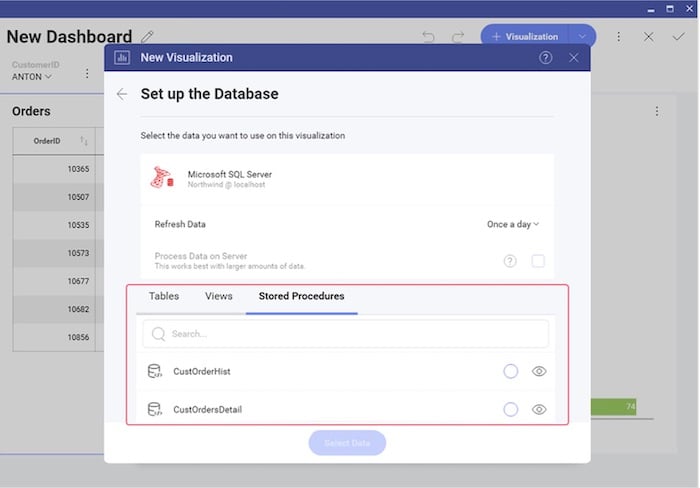
    To create a new visualization on a database that supports stored procedures, first review the list of stored procedures that are available. You will treat the stored procedure you select just like any other data source. The only difference is a parameterized stored procedure, which you can use in a Filter by passing variables to the stored procedure.

    Some embedded analytics platforms, for example, offer complete programmatic control over stored procedures and parameters via code. To pass a stored procedure name, as well as any required parameters, use the ChangeVisualizationDataSourceItemAsync function. This is an example of passing a stored procedure named CustOrderHist and passing the CustomerID parameter in the Reveal platform.

    The Power of Stored Procedures

    Stored procedures are a powerful tool to query a database and return results to a calling app. They are secure, offer performance advantages and are easy to maintain and modify. Stored procedures can be a good avenue for simplifying the way you present data and deal with parameters in your application code versus using error-prone and lengthy ad-hoc queries. As you develop applications, you may want to consider incorporating useful stored procedures in your next project or visualization database.

  • An Analytics Workload is a Critical Data Management Tool

    An Analytics Workload is a Critical Data Management Tool

    From an organizational perspective, an analytics workload is a way to gain a data-driven business advantage. Analytics workloads can serve a primary objective that translates to an actionable business impact (such as analyzing A/B testing results, understanding user retention or finding anomalies in a flow, for instance) or can serve in a supporting role for analysis (such as improving dataset quality, preparing a dataset for user consumption or adhering to a data-related regulation).

    Ideally, a workload should have a measurable ROI and should be monitored on key performance metrics such as business impact, time to deliver, cost of execution and total spend versus allocated budget. Managing workloads this way is extremely challenging for data teams. In reality, the impact of big data analytics projects – and the effort and resources spent on them – tends to be unpredictable.

    You can place workloads on a spectrum: on one end, you have workloads that are very close to their business consumers. On the other end, you have workloads that serve auxiliary and support purposes. The latter are the hardest to track, budget and measure their return on investment (ROI).

    Query vs. Workload

    When data platform teams are tasked with evaluating and implementing the infrastructure needed for an analytics workload, they tend to look at it from a technical requirements perspective. An analytics workload is a set of queries that read and write datasets; it consumes compute, storage and memory resources and has an expected level of availability, robustness and performance.

    One traditional approach for improving cost and user experience in a workload is to focus on specific queries – identifying the slow, heavy and expensive ones and optimizing them one by one. While many single queries can be made better (faster, cheaper) by rewriting and optimizing, this approach often misses the big picture, leaving money on the table.

    Knowing Which Queries to Focus On

    Stripped of workload context, queries can only be evaluated on cost or response time. But business-critical queries may not be the most expensive, nor the slowest ones. Having the full view of the workload allows for prioritizing efforts much more effectively.

    Behavior Fluctuations

    The most important query on Mondays is probably very different from the most important query on Fridays, so the effectiveness of optimizing one or both queries may be small. The workload perspective enables you to identify patterns and leverage insights for effective optimization.

    Cloud Elasticity

    Unlike legacy data platforms, the cloud enables a brute-force approach to solving performance problems by adding elastic resources on demand. While this approach can work to improve a specific query, cost quickly gets out of control when applied to all queries. Understanding the workload is key to distinguishing when a brute force solution is right, and when you need to spend the time to build a different data flow.

    Cloud Decoupling

    In legacy IT environments, where queries were competing for a limited pool of resources, optimizing a single query had significant impact. But in cloud environments where resources scale elastically, queries compete with each other on a much smaller scale, if at all. Therefore, optimizing single queries has very little impact on the overall performance of workloads.

    Measuring Performance by Looking at the Median

    The heaviest or slowest queries are in the top percentile of queries. When trying to improve the overall user experience, the median performance can matter more, but it is indirectly affected when handling the extremes, so it tends to be less effective.

    The Long Tail

    In many workloads, a few highly visible queries can paint a misleading picture. It is common to have less than ten queries responsible for 20% of the load, and thousands of undistinguished “simple” queries responsible for 80%. Therefore, when data teams are trying to reduce cost, focusing on the most expensive queries may draw attention away from lower-hanging and easier optimization opportunities in “simple” queries.

    “Big Picture” Optimization

    Actions that improve a query (such as changing the layout of a dataset) may result in unintended consequences to other queries. Only a workload perspective can help evaluate the wider impact across other queries.

    The Cluster Approach to Optimizing Big Data Analytics

    Another traditional approach to optimizing data platforms is analyzing behavior from the cluster perspective. Most data platforms offer decent cluster monitoring of technical metrics, such as CPU load and RAM usage.

    But, focusing on cluster-based KPIs will draw attention away from the elements that have the highest impact. Understanding the workload entails understanding the business logic of queries: repeating query patterns, hidden dependencies, failure modes.

    Looking at this from a cluster perspective limits you to technical parameters, such as CPU usage. Without understanding the workload, data teams will miss issues such as a repeating calculation (to be made into an ETL flow) or an inconsistent calculation flow (like having different ways to compute the same business KPI).

    In environments where clusters are shared between different workloads, data teams often encounter additional challenges:

    Workloads Have a Business Context, Clusters Don’t

    From a cluster perspective, there is no inherent prioritization between queries, and data teams find it difficult to focus only on business-critical workloads. The outcome is often reverting to focusing on specific queries, which doesn’t offer an effective solution.

    Workloads Have Different Needs

    Take, for example, an ETL workload which may require a large amount of RAM, run hours and which must be finished by 7 am. An interactive data product workload may be composed of thousands of queries that each must return in under 2 seconds. Analyzing the cluster as one unit can lead to suboptimal behaviour of both workloads. While this example can be considered simple to detect, many workloads that seem similar can have widely divergent needs.

    As data lakes gain momentum as production-grade, big data analytics architecture, data teams need to shift attention from optimizing queries to measuring, analyzing and optimizing workloads. In the early days of big data, data warehouses were isolated data platforms tasked to deliver insights for a very specific set of business questions. But as the cloud rapidly evolved, the mere migration of data warehouses to the cloud is not enough. The next stage is moving production workloads to the data lake.

    Storage is so much cheaper, and organizations want to run queries on any dataset, whenever they need it. It’s this heterogeneous collection of many different queries that requires workload-level visibility to ensure each workload can truly meet performance and budget requirements.

  • Apollo GraphQL Brings Caching to Client Software

    Apollo GraphQL Brings Caching to Client Software

    Apollo GraphQL this week updated its namesake GraphQL client software that among other things improves performance using in-memory caching application programming interfaces (APIs).

    GraphQL has emerged as a popular alternative to REST APIs because it provides developers with a query engine that provides more control over what data is requested. Similar in concept to SQL, developers GraphQL also makes it possible for developers to describe the data they are exposing via an API.

    Finally, GraphQL APIs are organized in terms of types and fields rather than endpoints. That allows developers to organize APIs within a graph that makes them available via a single request rather than requiring every communication between APIs to occur on a point-to-point basis.

    Apollo GraphQL has created client software that allows developers to employ GraphQL to both query external data in addition to making use of a graph to catalog the services made available within the front end of an application.

    Version 3.0 of Apollo GraphQL client software addresses a caching limitation that stems from the fact generic HTTP caching doesn’t work with GraphQL. Every time an HTTP request is made for slightly different data the cached value is invalidated. When the Apollo GraphQL client fetches data from your server it caches that data using a normalized structure that matches the Apollo GraphQL schema, which allows it to locally reconstruct a subset of the back-end data graph. The next time Apollo Client queries any of that same data it can fetch it directly from the cache.

    Developers can now also define a field policy for any GraphQL field that appears in your cache. A field policy can include a read function that customizes what occurs when the field is read from the cache and a merge function that customizes what occurs when it’s written.

    Apollo Graph CTO Matt DeBergalis said by defining all of this custom field logic in one place developers can avoid repeating code. Other developers can also interact with the types and fields without needing to understand how they’re stored or fetched, he said.

    Version 3.0 of the Apollo client library also now includes support for a reactive variable value that registers a dependency when read.

    Originally developed by Facebook, GraphQL is gaining a lot of traction on backend systems because it allows developers to describe the data that can be accessed. However, because it also makes it more efficient to query data it’s also now being more widely deployed on clients as well. It’s not clear to what degree REST APIs might be replaced by GraphQL, but at the very least reliance on REST APIs in new application development projects is likely to decline significantly.

    The implications of that transition for DevOps teams are significant because the overall performance of applications that rely on GraphQL versus REST APIs should substantially improve. In fact, the biggest inhibitor to GraphQL adoption at this juncture may be simple inertia. Too many developers simply build REST APIs as a matter of reflex without necessarily investigating alternatives. However, it should not be too long before everyone on the DevOps teams starts to appreciate just how much the end user experience really is when GraphQL is employed.