Tag: data backup

  • US DoJ Makes PyPI Give Up User Data ¦ Tape Storage: Not Dead

    US DoJ Makes PyPI Give Up User Data ¦ Tape Storage: Not Dead

    Welcome to The Long View—where we peruse the news of the week and strip it to the essentials. Let’s work out what really matters.

    This week: PyPI complies with a “string of subpoenas,” and LTO continues to grow, despite predictions of its demise. (more…)

  • Cloud Disaster Recovery Best Practices

    Cloud Disaster Recovery Best Practices

    It’s increasingly common for companies in all sectors to use the cloud to store their data. The cloud provides scalability, security and flexibility that was often inaccessible to businesses only a few years ago. But just like any other technology, it has its limits.

    What happens if a severe thunderstorm knocks out power to a data center or if an employee accidentally deletes critical files? These are the types of scenarios that, however unlikely, can still happen and cause significant disruptions to a company if they’re not prepared.

    That’s where cloud disaster recovery comes in. In this article, we’ll discuss why cloud disaster recovery is critical for businesses and the different strategies you can implement to ensure your data is always safe and accessible.

    What Is Cloud Disaster Recovery?

    Cloud disaster recovery (CDR) is a strategy that helps businesses keep their data safe in the event of an unforeseen disaster. This can be anything from a natural disaster like a flood or earthquake to a man-made disaster like a power outage, fire or cyberattack.

    There are many different cloud disaster recovery strategies that businesses can implement, but the most important thing is to have a plan in place so that you know what to do if and when something goes wrong.

    One Company’s Story of Cloud Impact: OVHCloud

    Before providing strategies, we wanted to give you a real-life example of a cloud disaster that impacted multiple businesses, big and small.

    In 2021, OVHCloud, one of the world’s largest cloud service providers, suffered a catastrophic fire at one of its data centers in Strasbourg, France. The fire destroyed the facility, causing widespread damage and leaving many businesses without access to their critical data.

    In the aftermath of the fire, it quickly became apparent that OVHCloud did not have a solid cloud disaster recovery plan. As a result, many businesses were left scrambling to find alternative solutions for their data storage and backup needs.

    The moral of the story is that even the biggest and most well-known companies can be caught off guard by a disaster. This is why it’s so important for businesses of all sizes to have a cloud disaster recovery plan.

    Now that we’ve seen the importance of cloud disaster recovery, let’s look at strategies you can implement to keep your data safe.

    Cloud Disaster Recovery Strategies

    When discussing cloud disaster recovery strategies, many options are available, but not all of them will be right for every business. The key is to find the strategy or combination of strategies that work best for you and your company.

    Here are some of the most common cloud disaster recovery strategies:

    1. Know Your Infrastructure

    The first step in any cloud disaster recovery strategy is to understand your current infrastructure and what assets and data you have. Your assets can include everything from physical servers and hard drives to cloud-based applications and data. 

    Do the homework necessary to understand what you have and where it’s located. For example, take inventory of all of your assets and determine which ones are critical to your business operations. 

    Once you know what you have, you can start to develop a plan for how to protect it. Yes, this may take some time, but it’s an essential step in protecting your data.

    2. Conduct a Business Analysis

    Data breaches within the cloud can come in many different forms. From unexpected data loss to malicious cyberattacks, it’s important to understand the different ways your data could be compromised. This is where conducting a business impact analysis comes in.

    A business impact analysis (BIA) is a process that focuses on identifying and evaluating the potential risks to your business. Rather than focusing on the causes of the breakdown, a BIA focuses on the potential impact of the disruption. The impact can include things like loss of income, damage to reputation and compliance issues.

    By conducting a BIA, you can better understand the risks your business faces and what steps to take to protect against them. For example, using endpoint security vendors can help protect your data by preventing attacks on endpoints on or off the network.

    3. Draft a Disaster Recovery Plan Based on RPO and RTO

    Once you’ve conducted a BIA and clearly understand the risks your business faces, you can start to draft a disaster recovery plan, specifically around the recovery point objective (RPO) and recovery time objective (RTO).

    Your RPO measures how much data is lost during a disruption, while your RTO measures how long it takes to recover from it. By understanding these two factors, you can start putting together a plan that meets the specific needs of your business.

    It’s important to note that your RPO and RTO will likely differ based on the type of data you’re working with. For example, if you’re working with data that can be easily recreated, your RPO may be relatively low. However, if you’re working with mission-critical data that can’t be easily replaced, your RPO will be much higher. The same is true for RTO.

    Regardless, you want to ensure that your disaster recovery plan is based on your specific RPO and RTO so you can recover from a disruption promptly and with minimal data losses.

    4. Have a Strong Cloud Backup Solution

    No matter what cloud disaster recovery strategy you implement, it’s essential to have a strong backup solution in place. It will ensure that you can quickly pivot to a different strategy and dodge the hefty price tag that often comes with data loss and encrypted files when there’s no backup.

    There are several different backup solutions available, so you must find one that meets the specific needs of your business based on the type of data you have and how often it changes.

    5. Test Out Your Disaster Recovery Plan Regularly

    Once you have your disaster recovery plan in place, it’s important to test it out regularly. Testing will ensure that your plan works as intended and that you can recover from a disruption quickly. Things to test for include data backups, file restores and application availability.

    You should also involve your entire team in the testing process so everyone knows what to do in the event of a disruption. Look for collaboration software that comes with important tools such as chat, video conferencing and task management so your team can easily communicate and work together, even when they’re not in the same place.

    Final Thoughts

    There you have it! These five cloud disaster recovery strategies can protect your business from data loss and keep your operations running smoothly. We suggest starting this process as soon as possible so you can be well-prepared for whatever comes your way.


  • Veritas Looks to Reduce Data Protection Costs

    Veritas Looks to Reduce Data Protection Costs

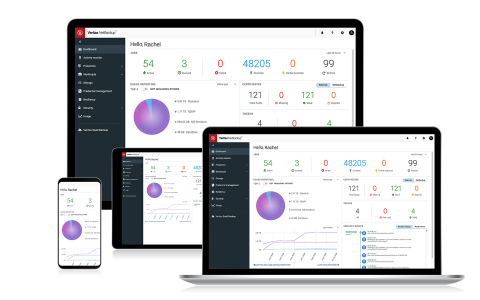
    Veritas has extended the capabilities of the company’s NetBackup software as part of an effort to reduce the total cost of data protection.

    Version 8.3 of NetBackup now includes Veritas Resiliency Platform (VRP), a disaster recovery tool, and CloudPoint, a tool for backing data up on a public cloud. All of these tools are part of what Veritas calls its Enterprise Data Services Platform (EDSP).

    In addition, Veritas has integrated hardened NetBackup appliances and vendor-agnostic immutability for storage via its NetBackup OpenStorage Technology (OST) to help organizations recover from a ransomware attack more easily.

    Veritas is also adding support for 2048-bit encryption and integration with third-party key management systems (EKMS) along with more flexible enhancements to the role-based access control (RBAC) it provides.

    Other capabilities in this release of NetBackup include more granular recovery of virtual machines, the ability to orchestrated rehearsals to verify effectiveness of recovery procedures, and the ability to move data between cloud platforms.

    Veritas has also extended discovery, backup, restore and automation at scale for Microsoft SQL, Oracle and Oracle Real Application Clusters (RAC) to simplify data protection processes spanning multiple classes of databases.

    Finally, Veritas claims with this release, data protection via auto-discovery of resources and load balancing is now 25% faster and the discovery of VMware vCenter and vCloud platforms is 50% faster.

    Doug Matthews, vice president of data protection and compliance for Veritas, said with the expansion of EDSP it’s now much more cost-effective to protect data residing on multiple platforms. In the wake of the economic downturn brought on by the COVID-19 pandemic, there’s much greater sensitivity to IT costs, he said.

    At the same time, Matthews said Veritas is seeing DevOps teams become much more involved in automating data protection processes. Veritas has defined more than 600 application programming interfaces to enable DevOps teams to programmatically invoke its data protection software, he said.

    Cybersecurity teams are also becoming more involved as backup and recovery becomes a core element of ransomware defense strategies, Matthews added. In an ideal world, anytime a ransomware attack occurs, a pristine copy of any impacted data would be readily available on another unaffected platform.

    The convergence of data protection and cybersecurity has been a long time coming. Symantec once owned Veritas in the hopes of achieving that goal. Now Veritas is working with a much broader array of third-party partners to achieve that same goal, Matthews said. It may wind up being the rise of DevOps that finally forces that issue as data protection becomes one more IT task to be automated.

    In the meantime, IT organizations may want to revisit their entire approach to data protection. Chances are good that most of them have multiple redundant data protection tools and services in place that have been acquired over time. Consolidating those functions ultimately not only reduces licensing costs, but it also creates an opportunity to automate a set of mundane tasks that all too often IT staff forget to perform consistently at a time that will prove crucial.

  • Veeam Updates Backup and Recovery Platform

    Veeam Updates Backup and Recovery Platform

    Veeam today announced the general availability of version 10 of the Veeam Availability Suite, which, among more than 150 enhancements, adds support for network-attached storage (NAS) systems, additional ransomware protection via an ability to create immutable backups in the cloud, an ability to recover multiple virtual machines simultaneously and a set of application programming interfaces (APIs) for mining data.

    Danny Allan, chief technology officer and senior vice president of product strategy for Veeam, said IT organizations are looking for more efficient methods of protecting data, as there is no longer enough time in the day to back up petabytes of data.

    Veeam now provides the ability to back up massive amounts of unstructured data residing in NAS systems by only updating the primary backup file with the most recent changes made to data on the NAS platform, said Allan. That approach, he noted, also curtails costs because it substantially reduces the amount of data that needs to be replicated across a network.

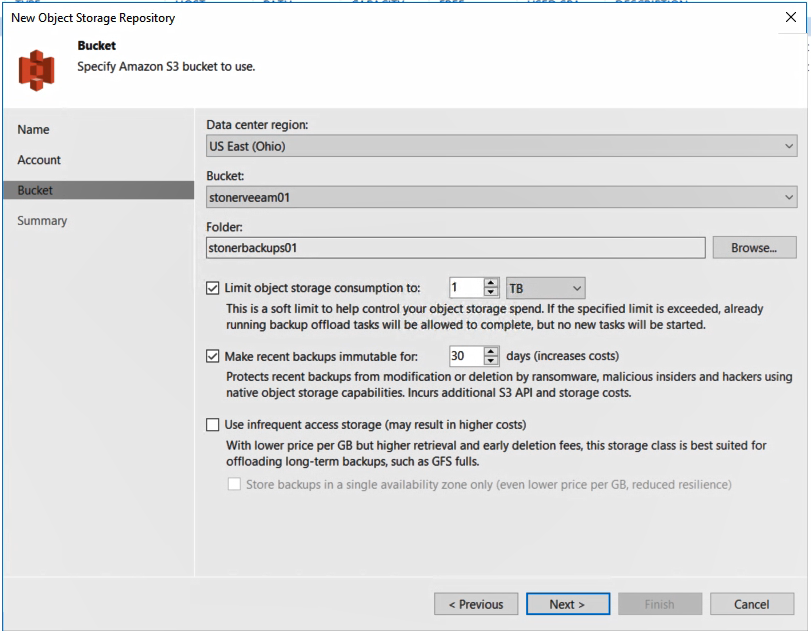
    backup and recoveryAt the same time, Allan said backup and recovery platforms are playing a more strategic role in the battle to combat ransomware. Veeam Availability Suite v10 users can create an immutable copy of data that can reside in any platform that supports the S3 API defined by Amazon Web Services (AWS). Dubbed S2 Object Lock, the offering was developed with the goal of creating a pristine image of a data set that can be recovered in the event of a ransomware attack that a cybercriminal or malicious insider has employed to encrypt an organization’s data.
    In addition, Veeam is moving to lower disaster recovery costs by making it possible to recover multiple virtual machines simultaneously in the event of a data center outage.

    Finally, an API now makes it possible for analytics applications to access data stored using Veeam Availability Suite.

    Fresh off being acquired by the venture capital firm Insight Partners for $5 billion, Veeam is moving to expand its core capabilities for backing up virtual machines to create a data management platform that will span multiple clouds. The goal is to create a platform for managing data across a hybrid cloud computing environment, Allan said.

    With organizations now routinely managing petabytes of data, competition among backup and recovery vendors has never been more fierce. Each provider of backup and recovery tools is, to one degree or another, evolving into becoming a data management platform, a process that largely began when IT teams stared using backup tools to migrate large amounts of data into the public cloud. Now the providers of those tools see an opportunity to enable IT teams to move data not just in and out of clouds but also between them.

    It’s too early to say how this battle will play out. Backup and recovery is one of those rare categories of software that refuses to be consolidated even as new startups launch regularly. It’s not uncommon for most IT organizations to employ multiple backup and recovery tools from different vendors. Less clear is how long the tendency to employ multiple tools will persist, but as new capabilities are added to each backup and recovery tool the pressure on the other tools to continue to prove their value continues to intensify.

    — Mike Vizard

  • Using Continuous Backup to Keep Pace in an Increasingly DevOps World

    Using Continuous Backup to Keep Pace in an Increasingly DevOps World

    How continuous backup can help DevOps teams keep working with the right data

    The world of software engineering has changed; in fact it’s constantly changing. We’re moving on from the days of waterfall when big-budget releases with multiple features per version were the norm. Now, to compete, organizations have to implement agile development, with shorter release cycles and fewer improved or new features at a time. Modern software development has evolved to a practice of continuous development to the point that each new release feels like a simple patch rather than a dramatic overhaul.

    This has completely upended the testing process. Release cycles are a fraction of the time they used to be and the previous QA methods don’t stand a chance to keep pace. The latest model combines developers, operations, testing and security into close-knit teams. Development cycles are shortened and testing and deployment are automated from the source. All of this blending of teams and processes has been dubbed DevOps.

    This new paradigm for operations and development has been made possible by the flexibility ushered in by virtualization and the snapshots that can be made for a point-in-time failback. Yet, limitations remain that can keep technology from supporting the advanced needs of DevOps teams. More is still needed to keep environments up to date because once a snapshot is deleted, the data that it represented is gone.

    New tools have emerged including Docker, Kubernetes and Puppet to help on the operations side, but development teams can still be expensive if they aren’t used efficiently and effectively. Any amount of downtime or idle waiting for a database to be refreshed from production or for any sort of regression testing environments to be instantiated is burning money. DevOps processes can do this, but they aren’t effective if they don’t have a continuous stream of recovery points.

    The Quality of Code

    Development can only be as good as the copies of production data that a developer has to work with. The challenge is to get a current copy of production data in a reasonable amount of time. If it uses simulated test data designed to mimic production, results can be shoddy and defects can occur more frequently.

    A continuous backup solution with search and recovery across data, files or VMs from any point in time can make development and testing easy. Spinning up a clone of production environments is simple if you have multiple copies of data in different locations in a one-to-many configuration. Production data can then be replicated to DR facilities for protection, but also to development, test and QA environments to assure that developers and testers are working on the same, latest version of production data.

    Production replicas along with the simultaneous use of a proper API can allow the orchestration of test builds and deployments without manual intervention. This is essential because being able to perform tests on good, reliable data can significantly reduce the amount of code defects deployed into production.

    Confidence in Changes

    Because you can spin up real-time replicas of production workloads with ease, developers don’t have to guess what might happen when they push a new code update into production. Instead, the can reproduce an exact replica of production that has the latest data to an isolated area where it can’t affect production users. In this environment, they can observe the results without any risk.

    — Gijsbert Janssen van Doorn