Tag: DaaS

  • When DevOps-as-a-Service (DaaS) Meets Security

    When DevOps-as-a-Service (DaaS) Meets Security

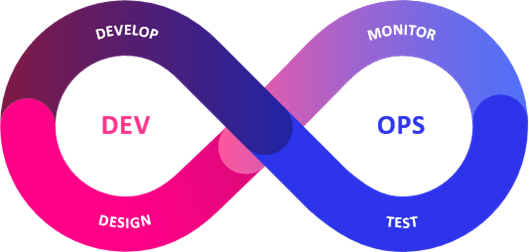
    One of the most recent IT methodologies to be offered as a service is DevOps, a cultural and practical approach that brings development and operations teams together under one umbrella of work. DevOps-as-a-Service (DaaS) ensures that everything related to the selection, management and maintenance of DevOps tools and infrastructure, including all policies and procedures, are addressed through a centralized team who are able to provide this service to development teams across the organization. 

    From a 30,000-foot view, DaaS represents DevOps capabilities made accessible to practitioners through portals and APIs. Because DevOps capabilities vary among organizations, there is no standardization of these services. For the business, DaaS enhances competition. Application users and developers find DaaS improves overall software development, while specialized DaaS teams say it improves the management of DevOps capabilities.

    What Are the Other Benefits of DaaS?

    DaaS offers many benefits, especially to development teams who no longer want to spend all their time configuring and deploying the necessary security tools to run DevOps pipelines. This means it’s no longer necessary to understand all the differences between DevOps tools and the underlying infrastructure, as the appropriate tools and technologies are automatically deployed for development teams. As a result, developers are able to focus their efforts on creating innovative software at the speed of business. 

    Further, Daas delivers clear business and operational benefits in the form of a more streamlined process for facilitating DevOps across the enterprise. Daas supports governance while also enabling centralized oversight and visibility into development workloads and productivity. As we know, this shift leads to increased accountability among teams and an overall optimization of business processes. Add on resource efficiency and cost savings through tool selection, and it’s easy to see why DaaS has found a home in the world of software development. 

    But despite the benefits, Daas also presents new security challenges that can’t be fully addressed by traditional management solutions. These approaches are often sluggish, expensive, and/or incredibly complex to manage.

    What About Security and DevSecOps?

    Because the principles of DevSecOps proactively address the risks and threats associated with DevOps processes, it has seen rapid adoption in recent years. By integrating AppSec tools and strategies within a DevOps pipeline, developers are able to find and fix security vulnerabilities earlier within the software life cycle—not after the fact. This ability is what allows developers to generate secure and high quality software from the beginning, while also preventing any deployment delays stemming from last-minute security checks in production. With DevSecOps processes in place, AppSec testing becomes seamless and transparent for developers, who need a frictionless experience to facilitate steady and reliable software development and deployment. 

    DevSecOps is a  natural fit for the as-a-service delivery model. Similar to DevOps, AppSec involves various tools, policies and processes that demand a certain degree of professional expertise—not to mention the time and resources it takes to to select, maintain, and deploy them to drive DevSecOps practices. Security and development teams looking to  implement and manage DevSecOps can reap major benefits from a centrally defined and managed process, to be administered by a specialist team and delivered “as a service” to those in charge of DaaS.

    Standardizing AppSec through a DevSecOps-as-a-Service offering would guarantee security is applied evenly across all DevOps activity, thereby allowing businesses to produce secure and high-quality software consistently while also supporting AppSec compliance demands. This shift also establishes a foundation where a holistic and homogenous view of AppSec can be found, one that is critical to the assessment and management of application and business risk. 

    Developing DaaS Metrics

    First, don’t try to boil the ocean by measuring all applications at the same time. Instead, choose an application that’s supported by DaaS processes and appoint a specialized team to develop metrics for the application. This team can look many ways—but would likely include stakeholders, developers and other DaaS-supporting roles. Service-level indicators (SLIs) and service-level objectives (SLOs) are also baked into this model, which are chosen to best suit the requirements of an individual application. 

    Once the most valued SLOs of DaaS are determined, the service can be tailored to identify the most critical SLIs. With this knowledge, things like instrumentation, telemetry and analysis requirements can be identified and used to design alerts, dashboards, analyzers and more. Next, setting up policies and procedures around accountability establishes a complete solution. And once the solution for the chosen application is tested, confidence kicks in and creates an easier process for adapting and expanding the process around other applications. 

    This means DaaS can provide many key capabilities to both the organization and the teams who rely on them. A specialized DaaS team can then figure out the best metrics for larger implementation on any application. As a result, SLOs can be evolved for other future applications, to be used as a baseline for future improvements. 


  • Citrix® and Google Cloud Simplify Shift to Flexible Work

    New Citrix DaaS solutions available on Google Cloud Marketplace deliver cost and time-savings in making transition from procurement to deployment.

    Fort Lauderdale, FL, May 4, 2022 — Last year, Citrix Systems, Inc. (NASDAQ: CTXS) and Google Cloud announced their commitment to helping customers accelerate and embrace hybrid work models through Desktop as a Service (DaaS) solutions. And they’re delivering on it. The companies today announced that two new Citrix DaaS solutions are available for purchase in the Google Cloud Marketplace, making it easier than ever for organizations with Citrix VDI solutions to transition to Citrix DaaS on Google Cloud.

    And the timing couldn’t be better.

    “Organizations are rapidly moving to adopt hybrid work, and IT needs a way to get there that’s efficient, cost-effective, secure, and flexible,” said Carisa Stringer, Vice President of Product Marketing, Citrix.

    Simplifying Procurement

    Google Cloud Marketplace makes it easy for companies to quickly purchase and deploy market-leading digital workspace solutions designed to enable secure remote work, including Citrix DaaS solutions purpose-built for Google Cloud:

    • Citrix DaaS Standard for Google Cloud – Designed for organizations or departments that are newer to DaaS or VDI and need an affordable, yet comprehensive hybrid work solution to deliver virtual apps and desktops quickly, easily and securely.
    • Citrix DaaS Premium for Google Cloud – Ideal for organizations with existing VDI investments that need to modernize their deployments, Premium edition provides IT admins with rapid migration and provisioning tools, streamlined management of Google Cloud and/or on-premises resources, advanced security capabilities and exceptional monitoring and cloud optimizations.

    Citrix DaaS spend purchased through Google Cloud Marketplace counts towards a customer’s Google Cloud commitment and is included in their Google Cloud invoice, simplifying the transaction to just one bill.

    Enabling the Future of Work

    Citrix Systems Integrator and Google Cloud partner Wipro is looking forward to using the solutions to help advance the future of work.

    “Wipro is very excited and keen to position the DaaS solution from Citrix and Google Cloud by deploying a true hybrid cloud solution for hybrid work,” said Seshu Venkata, General Manager and Global Head of Wipro VirtuaDesk, Cloud and Infrastructures services.

    Speeding to the Cloud

    In addition to these new offerings and simplified transaction process, Citrix and Google Cloud are continuing to develop tools and resources to make it easier than ever for customers to transition from on-premises VDI deployments to DaaS with Google Cloud, including:

    • Image Portability Service for Google Cloud – Automates the deployment of a master image from an existing on-premises PVS/MCS-provisioned Citrix environment, targeting a Citrix DaaS resource location hosted within Google Cloud to reduce re-work when moving to the cloud, as well as burst-to-cloud capabilities for capacity management, improved disaster recovery and business continuity plans, and streamlined image management.

    “Transitioning to the cloud is a top priority for IT, and it takes a lot of careful planning and considerations,” Stringer said. “Together with Google, we are committed to providing solutions and resources that simplify and speed the process and deliver results.”

    Citrix and Google Cloud have been helping organizations make work more accessible, flexible and secure for more than a decade. Click here to learn more about their partnership and the value they can deliver for your organization.

    About Citrix

    Citrix (NASDAQ: CTXS) builds the secure, unified digital workspace technology that helps organizations unlock human potential and deliver a consistent workspace experience wherever work needs to get done. With Citrix, users get a seamless work experience and IT has a unified platform to secure, manage, and monitor diverse technologies in complex cloud environments.

    For Citrix Investors:

    This release contains forward-looking statements which are made pursuant to the safe harbor provisions of Section 27A of the Securities Act of 1933 and of Section 21E of the Securities Exchange Act of 1934. The forward-looking statements in this release do not constitute guarantees of future performance. Those statements involve a number of factors that could cause actual results to differ materially, including risks associated with the impact of the global economy and uncertainty in the IT spending environment, revenue growth and recognition of revenue, products and services, their development and distribution, product demand and pipeline, economic and competitive factors, the Company’s key strategic relationships, acquisition and related integration risks as well as other risks detailed in the Company’s filings with the Securities and Exchange Commission. Citrix assumes no obligation to update any forward-looking information contained in this press release or with respect to the announcements described herein. The development, release and timing of any features or functionality described for our products remains at our sole discretion and is subject to change without notice or consultation. The information provided is for informational purposes only and is not a commitment, promise or legal obligation to deliver any material, code or functionality and should not be relied upon in making purchasing decisions or incorporated into any contract.

    © 2022 Citrix Systems, Inc. Citrix, the Citrix logo, and other marks appearing herein are the property of Citrix Systems, Inc. and may be registered with the U.S. Patent and Trademark Office and in other countries. All other marks are the property of their respective owners.

  • Measuring the Value of DevOps-as-a-Service (DaaS)

    Measuring the Value of DevOps-as-a-Service (DaaS)

    The late great W. Edwards Deming, statistician, professor, author, lecturer, and consultant said, “In God we trust. All others must bring data.” The point is, if you want people to trust your information, then you need to present measured data. This is true for countless circumstances. As a DevOps consultant, I am often asked by my clients what data should be used to show the value of their DevOps capabilities, in a way that is acceptable to the stakeholders of those DevOps capabilities. A lot of excellent research results, published by DORA and others, describes metrics that demonstrate the value that DevOps provides to application development. More and more enterprises are embracing the idea of providing DevOps capabilities, such as pipelines, tools, hardened containers and tech stacks, as a centralized service to support their many application teams. The question then becomes, “What metrics should be used to show the value of DevOps-as-a-Service (DaaS)?”

    Before measuring the value of anything, you need to know two things: “What is it?” and “Why is it important?”

    What is DevOps-as-a-Service?

    In high-level terms, DaaS is DevOps capabilities made available to the users of those capabilities through portals and APIs. There is no standard set of services; DevOps capabilities offered vary from organization to organization. In my SlideShare, DevOps-as-a-Service (DaaS) Values, I illustrate a generic blueprint for DaaS.

    The DaaS blueprint has four layers, as follows:

    • Stakeholders – There are three types of stakeholders: business, app-dev users and DaaS teams.
    • Service access layer – This layer consists of user portals, APIs, and access security.
    • Service layer – The service layer consists of user services and management services. User services include things such as repositories, CI/CD pipelines, sandboxes, test data, configuration data, guides and training. Management services include service catalogs, issues and change requests, SLOs, SLIs, governance policies, experience monitoring and automated tasks.
    • Resources layer – This layer includes application stacks, infrastructure resources, tools, infrastructure code and topology data.

    Why is DaaS Important?

    The value of DaaS, as perceived by different stakeholders, can be summarized as follows:

    • Business – DaaS makes the business competitive.
    • App-dev Users – DaaS improves application development.
    • DaaS team(s) – DaaS improves management of DevOps capabilities.

    What Service Level Objectives (SLOs) Demonstrate the Value of DaaS?

    The SLOs need to be chosen to best fit the requirements of each application. The following are examples.

    Business value can be demonstrated by:
    ROI based on tracking cost savings relative to a benchmark comparing prior non-DaaS, trend cost per developer and per release.
    SLO agility of services – Lead time for changes, and frequency of releases.
    SLO reliability of services – change failure rate, time to restore services.
    SLO governance, compliance and security scores.

    App-dev user value can be demonstrated by:
    SLO availability of DaaS, service level indicators (SLIs) depend on service components and architecture.
    SLO service response time.
    SLO experience scores.
    SLO change request response time.

    DaaS team value can be demonstrated by:
    SLO scope of applications – number of apps supported, number of users per month.
    SLO number of requests served per month.
    SLO critical events per month.

    How Does an Organization Develop DaaS Metrics?

    Start by picking an application that is supported by DaaS. Do not try to boil the ocean and measure all applications at once. Then, appoint a DaaS SLO/SLI team to work on metrics development for the application. The team should include stakeholders from business, app-dev and DaaS support teams associated with the application.

    DaaS SLO/SLI team members determine the SLOs of DaaS that each class of stakeholder values the most, and then decomposes the services to identify sources of data that will form the most important service level indicators (SLIs).

    With the SLIs in hand, instrumentation, telemetry and analysis requirements can be determined and used to design monitoring agents, communication, analyzers, alerts and dashboards.

    Then, roles, policies, playbooks and responsibilities will complete the solution. Test the solution for the chosen application. As you gain confidence in the solution, adapt and expand the solution for use with other applications.

    Continue to monitor the progress and performance of the SLO metrics, and continuously improve them with experience and as newer technologies become available.

    What This Means

    DevOps-as-a-Service provides many valuable capabilities to business, app-dev users and DaaS teams. Metrics that demonstrate value to each class of stakeholder should be determined for each application that consumes the capabilities offered by each unique DaaS. A DaaS SLO/SLI team can determine the best metrics and system design for the implementation for an example application. The SLOs can be adapted and evolved for other applications in the organization, and used as a basis for continuous improvement.

  • DevOps as a Service: Migrating Your Entire DevOps Stack to the Cloud

    DevOps as a Service: Migrating Your Entire DevOps Stack to the Cloud

    DevOps as a Service (DaaS) enables teams to centralize their tooling and workflow into one unified solution. This solution typically contains all necessary DevOps pipeline features, which replace legacy tooling. This article explains how DaaS works, including pros and cons, and an example showing how to migrate from Azure DevOps Server to Azure DevOps in the cloud.

    What Is DaaS?

    DaaS is a managed, cloud-based service that provides a unified DevOps toolchain. All or most of the tools necessary for a continuous integration/continuous delivery (CI/CD) pipeline are collected in a single platform. This platform is then provided to teams with the support of dedicated DevOps professionals.

    The goal of DaaS is to enable organizations to focus on developing and delivering software without having to worry about managing or maintaining tools. It is designed to abstract away the intricacies of tool integration, deployment and maintenance. This enables teams to focus on higher-level tasks, and outsources significant manual effort.

    DaaS can provide small to medium businesses with enterprise-level infrastructure and tooling without needing to hire more staff or build extensive expertise. Instead, these businesses can rely on the experience of DaaS providers to create, deploy and optimize a pipeline for them. These pipelines are created to be intuitive and to facilitate the smooth collaboration of all team members. 

    DaaS Pros and Cons

    If you are looking to migrate your development processes to the cloud, there are several migration strategies you can use. One involves moving existing tools to cloud resources as microservices, which you must then integrate. The other may involve scraping existing tools and adopting a DaaS. Whichever the case, you need to understand the pros and cons of DaaS before you can make the right choice for your organization.

    Pros of DaaS:

    • Managed services provide access to dedicated DevOps engineers for support, expertise and optimization.
    • Provider teams have experience across a range of organizations and industries, and can customize solutions for you based on that experience.
    • DaaS teams can provide mentorship and guidance which helps your team improve their own skills. This enables teams to learn from the mistakes of others and prevents repeating mistakes.

    Cons of DaaS:

    • The importance of pipeline management and availability requires you to partner with a service provider that is reliable and can ensure zero to minimal interruptions.
    • Outsourcing infrastructure demands and providing access to source code and other sensitive data and systems. This can create a security risk that you are not in control of.
    • DevOps teams still need to understand the tools being implemented and the basics of how to manage and use those tools. 
    • Managed services often cost more than self-implemented pipelines and the costs may not be offset by an in-house reduction in IT responsibilities.

    DevOps Cloud Migration Example: Migrating from Azure DevOps Server to Azure DevOps in the Cloud

    Azure DevOps Server, formerly called Team Foundation Server (TFS), is a server hosted on-premises that enables you to build DevOps pipelines. While based on similar services to those offered in the Azure cloud, it requires you to manage and maintain your infrastructure and provides limited support for your configurations.

    By migrating to the cloud, you can outsource many of your infrastructure responsibilities, focusing instead on producing quality software. Azure DevOps Services are an example of partially managed DaaS that you can use.

    Below is a brief guide for how to transfer your data and projects from DevOps Server. This guide is adapted from the full DaaS guide provided by Microsoft.

    1. Preparation: Planning your migration requires taking an inventory of how you are currently using your tools, what data you need to migrate and how migration will impact your productivity. You also need to determine if you need additional licenses. For this step and those to follow, there is a tool you can use to assist you in the process.
    2. Configure Your Prerequisites: Before you can migrate your pipeline data you need to set-up a few prerequisites. You should synchronize your local Active Directory (AD) with Azure AD for authentication. You also need to set up security and compliance measures to ensure that your infrastructure remains secure.
    3. Update and Validate Your Server: Check to make sure that your server is up-to-date with the latest version of Azure DevOps Server. If you are still using TFS, this may mean a series of updates. Once you’re fully updated, you can use the migrator tool to validate the collection databases of each of your projects. If any errors are found, you need to fix those issues during this phase.
    4. Ready Your Cloud Resources: After all errors are eliminated, you can begin preparing your cloud resources for import. This requires assigning, activating and mapping your DevOps Services subscriptions. You also need to generate a template for your import settings through the migrator tool. These settings should be saved in your Import Specification file. Finally, you need to create a container instance in the data center you want to use your DevOps Services in.
    5. Migrate Your Pipelines: After all of your preparatory and planning stages are done, you are ready to migrate your workloads. During this phase, you should first run a test import to ensure that all configurations are correct and that the import process goes smoothly with no data corruption. This helps ensure that you don’t create unnecessary downtime.

    Provided your test run goes smoothly, you can then proceed to import your data. Once uploaded, you need to assign your organization name, set up billing and redirect your on-premises build servers to the new cloud resources. After you are done, you can resume operations and begin operating your pipelines directly from the cloud.

    Conclusion

    DaaS is typically not just a centralized platform, but also a managed service that comes with certain levels of support and optimization. If you are short on DevOps talent and tooling, DaaS can fill this gap or even help you and your team learn DevOps skills.

    However, since you are giving the DaaS of your choice control over your pipeline, you need to investigate and research. You will be giving your DaaS access to source code and security. Before signing a contract, make sure this service is trustworthy and meets your standards.

  • Adding users to Google Apps quickly

    Adding users to Google Apps quickly

    With over 5 million organizations using Google Apps (yes it’s that many), the market is demanding enterprise-class solutions for administration and management of the Google productivity suite. Yeah sure you can have a decent word processor with with collaboration features, even a spreadsheet and presentation program. But if you want to play with the big boys you need management and administration built around it.  Only then can Google Apps really rival MS Office for the mainstream market.

    Beyond that though, Google Apps is only part of the story. There is the whole “Google Infrastructure”.  One of Google’s aims seems to be to bring Google like capability to IT teams the world over. This is one of the aims with Kubernetes, as well as CoreOS Tectonic (see our article in ContainerJournal on this).

    So what is holding you back?  There are 5 areas that you need to focus on according to a recent ebook by JumpCloud:

    1. SECURITY AND COMPLIANCE
    2. SSO
    3. DEVICES AND SERVERS
    4. WIFI
    5. DIRECTORY SERVICES

    The directory services can be added to the mix via integration with JumpCloud’s Directory-as-a-Service (DaaS). This gives Google Apps an equivalent to Microsoft’s AD except in the cloud and available as a service. Think about it, you don’t just set up a user to use Google Apps, you want them to use your entire infrastructure where appropriate. Also you don’t want to be setting up users one at a time in an enterprise setting. Both of these use cases are handled by a directory-as-a-service solution like JumpClouds’. 

    Two keys to effective directory management using Google infrastructure are authentication protocols and device management. Directory-as-a-Service can deal with both of these issues if done correctly. Once you have bridged this gap, it opens up a wide range of uses and interactions with the rest of your Google infrastructure, other infrastructure, your users and your devices.

    The book by JumpCloud featuring devopsy.kinsta.cloud’s own Ericka Chickowski does a great job of explaining this along with how to overcome some of the security issues that using Google infrastructure can present. You can download the book below.

    jumpcloud ebook
    There is also a good infographic with some metrics around this topic here.


  • JumpCloud Introduces Directory-as-a-Service

    First Cloud-based Directory Service Builds upon the Company’s Strong User Management, Orchestration, and Security Foundation

    BOULDER, Colo.–(BUSINESS WIRE)–JumpCloud today announced the availability of the industry’s first Directory-as-a-Service (DaaS) solution. Through a SaaS-based offering, organizations can move the last vestiges of their legacy, on-premise IT systems to a fully-managed cloud service, providing an alternative to solutions such as Microsoft Active Directory® (AD) or Lightweight Directory Access Protocol (LDAP).

    “As we have seen with the transitions from Siebel to SalesForce, Exchange to Gmail, and file servers to DropBox, JumpCloud is enabling the transition of one of the last on-premise technologies to a fully managed service: the user directory”

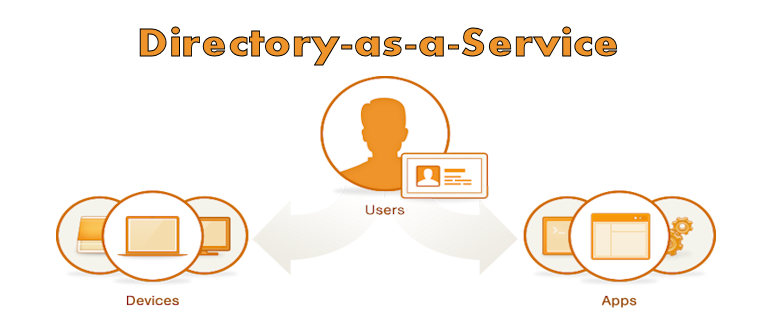
    JumpCloud’s DaaS is the first cloud-based directory with the ability to authenticate, authorize, and manage users, devices, and applications. The service acts as a single-user store for an organization or can extend existing AD/LDAP user stores to the cloud. Further, it integrates with single sign-on (SSO) providers without forcing IT admins to manage multiple directories.

    “Jumpcloud understands the need for directory services in the cloud,” said Salvatore D’Agostino, CEO of IDmachines. “Building on their secure shell configuration management tools, this offer puts in place cloud-to-machine, user authentication and other directory services. At IDmachines, we see this as a big need in current XaaS.”

    “As we have seen with the transitions from Siebel to SalesForce, Exchange to Gmail, and file servers to DropBox, JumpCloud is enabling the transition of one of the last on-premise technologies to a fully managed service: the user directory,” says Rajat Bhargava, JumpCloud’s President and CEO. “Directory-as-a-Service brings IT teams the simplicity, ubiquity, and security of user and device management, all from the cloud.”

    A single, secure user directory is a foundational element of any company. By moving the directory to the cloud, organizations are more agile, efficient, and secure. Further, DaaS enables IT admins to take advantage of major IT innovations, including cloud services such as IaaS and Gmail, and additional device/operating system combinations, such as Linux and OSX, among others.

    JumpCloud has reimagined the directory for the cloud era. The company’s new Directory-as-a-Service meets three critical enterprise needs:

    • Organizations who need a user directory – With the combination of a hosted LDAP offering as well as an agent-based authentication mechanism, this offering takes the heavy lifting off of IT and places it on JumpCloud while enabling the customer to authenticate and authorize cloud infrastructure, servers, IT applications, and internal devices.
    • Organizations extending their AD or LDAP to the cloud – With the adoption of Infrastructure-as-a-Service (IaaS), managing server users is largely a manual process and can create reliability and security issues due to the complexity introduced around networking and security configurations. JumpCloud easily, reliably, and securely extends an existing user directory to cloud-based servers and infrastructure.
    • Organizations replacing AD – Many organizations have migrated to Gmail from Microsoft Exchange, but are still forced to leverage AD for continued management of devices (functionality not available with the Google Apps Directory). JumpCloud’s DaaS gives IT admins a fully cloud-based solution that connects and manages users, their devices and IT applications.Pricing and availability
      JumpCloud’s Directory-as-a-Service is available immediately. Pricing plans start at $10 per user per month, and the first ten users are free forever. JumpCloud supports the LDAP protocol and works with Windows, Mac, and Linux devices.About JumpCloud
      JumpCloud, the first Directory-as-a-Service (DaaS), is Active Directory® and LDAP reimagined. JumpCloud securely connects and manages employees, their devices and IT applications. Try JumpCloud’s cloud-based directory free at jumpcloud.com.
  • JumpCloud launches new Directory-as-a-Service offering

    JumpCloud launches new Directory-as-a-Service offering

    The cloud is a great equalizer that enables startups and smaller companies to scale quickly, and play on a more or less even playing field with larger organizations. Managed cloud services free businesses up from implementing, configuring, and maintaining the underlying infrastructure, and allow individuals to focus on the business. With all of the freedom cloud services provide, though, there is still a need for a directory service that defines who the users are, and controls which individuals have access to which resources. JumpCloud wants to move that to the cloud as well.

    JumpCloud has established itself as a leading solution for managing security across a vast, rapidly-changing, virtual ecosystem in the cloud. Today, JumpCloud is announcing a new offering that takes builds on that foundation, and applies its experience to deliver Directory-as-a-Service (DaaS). JumpCloud claims its new service will allow organizations to stop managing directory services locally, and enable them to move to a fully-managed, cloud-based alternative to LDAP (Lightweight Directory Access Protocol) or Microsoft AD (Active Directory).

    “As we have seen with the transitions from Siebel to SalesForce, Exchange to Gmail, and file servers to DropBox, JumpCloud is enabling the transition of one of the last on-premise technologies to a fully managed service: the user directory,” says Rajat Bhargava, JumpCloud’s President and CEO in a press release statement. “Directory-as-a-Service brings IT teams the simplicity, ubiquity, and security of user and device management, all from the cloud.”

    The JumpCloud DaaS services can act as the sole user store for an organization, or it can extend existing AD or LDAP user stores to the cloud. JumpCloud DaaS also integrates with single sign-on (SSO) providers so that IT admins are not forced to manage multiple directories.

    “JumpCloud understands the need for directory services in the cloud,” said Salvatore D’Agostino, CEO of IDmachines. “Building on their secure shell configuration management tools, this offer puts in place cloud-to-machine, user authentication and other directory services. At IDmachines, we see this as a big need in current XaaS.”

    JumpCloud DaaS promises to help organizations be more agile and more effective whether they’re just implementing a directory service, extending an on-premise directory service to the cloud, or migrating locally-managed directory services to the cloud.

    A cloud-based DaaS offering makes sense. No matter what size an organization is, managing the user directory through local, manual processes is an obstacle to realizing the full benefits of other cloud services. It creates complexity, and introduces reliability and security issues. Cloud-based services need a cloud-based directory service—a directory service that can keep up in terms of availability, scalability, and flexibility.

    JumpCloud DaaS—like other managed cloud offerings—takes the burden off of local IT to manage the backend of the directory services infrastructure, and places it on JumpCloud. Customers can focus on building things, and authenticate and authorize cloud infrastructure, servers, applications, users, and devices.

    JumpCloud’s Directory-as-a-Service is available immediately. Pricing plans start at $10 per user per month, and the first ten users are free forever. JumpCloud supports the LDAP protocol and works with Windows, Mac, and Linux devices.