Tag: continuous testing

  • A Holiday Tradition: 2017 Continuous Delivery Predictions

    A Holiday Tradition: 2017 Continuous Delivery Predictions

    It’s that time of year. As the calendar year comes to a close, many of us are following time-honored traditions: making preparations for the holidays, planning some much-deserved time off and enjoying time with friends and family.

    In the business world, the year-end also brings its own traditions, and first among those is making predictions for the coming year. I’m not one to forgo traditions, so in this article I’ll share my thoughts on the upcoming year within the context of the continuous delivery movement.

    To level set, continuous delivery is the most evolved and modern state of software development and testing—and is core to a successful DevOps strategy. Organizations that are able to achieve continuous delivery can rapidly develop, test and release applications—with higher quality and at lower costs.

    Simply put, the ability to more continuously deliver software is one of the biggest advantages to attain in the application economy, where the battleground for consumer loyalty is most often found in the ability to deliver superior applications.

    Now that we know what continuous delivery means, let’s get to my predictions for 2017:

    1. Continuous Delivery Means Continuous Everything

    Continuous delivery is still a relatively new concept, and one that many organizations strive to achieve. As a new concept, it suffers from some of the misconceptions that often plague emerging technologies or trends. Many technology providers latch on to the term and claim to provide “continuous delivery solutions” that in reality only address a small part of the continuous delivery challenge.

    Truly delivering software continuously means that all the tasks within the software development life cycle (SDLC) must be optimized to occur in parallel and continuously. This means development must be continuous, testing must be continuous, and likewise for release and operations.

    2017 will be the year that industry embraces the importance of an end-to-end continuous delivery value stream. In 2016, many organizations began their continuous delivery journey by addressing certain aspects of the SDLC; in 2017 many organizations will begin to realize a truly open and integrated continuous delivery workflow.

    1. Democratization of Continuous Delivery Tools (via the Cloud)

    Optimizing all aspects of the SDLC for continuous delivery, as mentioned above, means that related tools need to be easier to use and easier to access. Developers who have access to testing tools (left-shift) can improve the quality of code they produce. Similarly, QA engineers who have access to design requirements sooner can create more accurate test data and scenarios, earlier.

    However, for this to occur, the tools have to be both easy to access and simple to use. Developers have avoided complex testing frameworks, but with simple, easy-to-use tools available—often in SaaS forms—developers can certainly incorporate testing into their methodologies.

    In 2016, CA acquired BlazeMeter, which pioneered the notion of cloud-based performance testing employing a simple and easy-to-use (yet very powerful) product. We expect to see this trend expand into other tools within the continuous delivery value chain in 2017.

    1. The Industry Embraces Open Source (Really)

    In the past, we’ve noted that commercially motivated technology providers have tried to keep open-source technology “at arm’s length.” There may have been some lip service paid to openness, but in reality many commercial providers felt threatened by open-source solutions that were seen as competitive to their products.

    This perception has already started to change, but I believe 2017 will mark the tipping point where companies will truly embrace open-source solutions as part of their strategy; those companies that continuously resist (pun intended) will be at a significant disadvantage.

    Open source is important for many of the same reasons as the cloud: It is broadly adopted because it creates advantage in time to market, quality and cost effectiveness. Embracing open source—and by that I mean both integrating with open-source solutions and using them as part of a product strategy—only makes good business sense. It helps software development teams meet their objectives in delivering quality software faster, and at lower cost.

    Another year is rapidly coming to a close and we have a lot to look forward to in 2017.

    On the topic of continuous delivery, looking forward means spreading continuous delivery throughout the SDLC, using the cloud more and embracing open source.

    All of those things combined will help us advance the continuous delivery movement together as an industry. Here’s to another year of continuous delivery advancements!

    Don’t forget, you can also take a closer look at the ongoing evolution of continuous delivery and other DevOps-related trends by picking up a copy of my colleagues’ new book, “DevOps for Digital Leaders: Reignite Business with a Modern DevOps-Enabled Software Factory.” If you have some extra time over the holidays, you’ll find it to be an interesting deep-dive.

    — Jeff Scheaffer

  • Assembling the Key Components of Continuous Delivery

    Assembling the Key Components of Continuous Delivery

    As agile methodology was popularized at the start of last decade, engineering teams gained the opportunity to begin producing software in shorter cycles, while releasing it reliably at more frequent intervals.

    This concept garnered greater attention in 2009, when Tim Fitz published his thoughts on continuous deployment. By the time Jez Humble authored his seminal book, “Continuous Delivery: Reliable Software Releases through Build, Test, and Deployment Automation,” in 2010, the approach started to get significant mindshare. In the book, Humble advanced the three building blocks of continuous delivery: configuration management, continuous integration and continuous testing.

    Thereafter, Agile Operations—the practice of using end-to-end monitoring, fueled by analytics, to increase operational agility—appeared. This complemented continuous delivery, with the goal of increasing the quality and velocity of software delivery while minimizing overhead.

    Since then, and particularly over the last six years as DevOps adoption has exploded, there’s been significant discussion (and confusion) over the opportunity to embrace “continuous everything” across the software development life cycle (SDLC) to deliver functionality continuously and optimize end-user experience.

    Today, having spoken to hundreds of organizations employing agile and DevOps, it’s possible to expand on these concepts to better define the key components of continuous delivery.

    In this blog, I’ll detail the precepts of “CD” that CA’s customers recognize as critical in reducing the time, risk and expense of software delivery by frequently releasing smaller batches of code with extensive visibility and traceability.

    These building blocks of continuous delivery are:

    • Continuous development & integration,
    • Continuous testing. and
    • Continuous release.

    Continuous Development and Integration

    When it comes to delivering quality apps faster, every second counts.

    That’s why it’s important to automate the planning, development, unit testing and integration of code with different inter-dependent components, all while packaging it for quality assurance. We categorize these activities under continuous development and integration, as shown in Fig 1.

    This all starts with sprint planning and modeling of requirements in agile management software. Unit tests can be created automatically, based on requirements and use case stories. These unit tests then can be executed automatically based on pre-defined criterion, using automatically generated synthetic data.

    Fig 1: Continuous Development and Integration

    Next, virtual service interfaces can be generated automatically by simulating unavailable systems across the SDLC, allowing developers, testers, integration and performance monitoring teams to work in parallel—driving faster delivery, along with higher quality and reliability.

    The integrated code can be built and tested automatically against validation criterion, and upon passing, made available for continuous testing. This later phase, after code development and before QA, is also commonly referred to as continuous integration.

    Continuous Testing

    Continuous testing across app delivery not only enables enterprises to shift testing left, engaging it earlier in the SDLC, but it also helps them shift right, leveraging the same processes throughout staging and production.

    After the unit tests are passed and integrated builds are made available for QA, functional and performance tests can be completed—before the build is made available for staging and production. Various activities during continuous testing are shown in Fig 2.

    Before the functional and performance tests are performed, the build promotion criterion and configuration also need to be validated. Testers require provisioning of QA environments to deploy the build, along with virtual services and test data. Using test data management to create a subset of production data and mask sensitive information is another continuous testing requirement.

    Fig 2: Continuous Testing

    It’s also important to engage application performance monitoring in the QA environment before running automated tests, providing feedback about any problems back to developers.

    After the automated tests are executed and promotion criterion are met, the build is ready for deployment in staging or production environments.

    Continuous Release

    Continuous release matches release velocity to development velocity through controlled and scalable deployments.

    The goal of continuous release (sometimes referred to as continuous deployment) is to continually and automatically deploy the build into production; similar activities also can be performed in a staging environment.

    As shown in Fig 3, build configuration needs to be validated, with the production environment configuration updated before being sent to production. As with application code, configuration is also maintained in the version control system and can be automated for deployment.

    Fig 3: Continuous Release

    After the build is deployed into production, application monitoring should be initiated to track performance and customer experience. Feedback from the production environment can be passed back to developers to guide enhancements or sprint backlogs.

    This blog aims to outline core CD activities, and in subsequent articles I’ll provide additional details on entry and exit criterion, as well as metrics useful in tracking continuous development & integration, continuous testing and continuous release.

    In the meantime, check out, “DevOps for Digital Leaders: Reignite Business with a Modern DevOps-Enabled Software Factory,” a new book authored by my colleagues Aruna Ravichandran, Kieran Taylor and Pete Waterhouse.

    Based on learnings gained from numerous customers who have already embraced CD and DevOps, it highlights key practices for starting this journey, related ROI metrics and other useful tips.

    — Anand Akela

  • A Ferrari and DevOps: More Similar Than You Might Think

    A Ferrari and DevOps: More Similar Than You Might Think

    In a world where customers aren’t short of options, all businesses are characterized by the need to achieve customer delight. From a technological standpoint, a large part of that hinges on fast-tracking the release of high-quality software. A release every quarter is being replaced by a release every week and sometimes even sooner. Expectations have skyrocketed while the timelines have shrunk even more. It is now imperative for all the different components to sync together effectively to create a competitive advantage for the business that can be sustained over a period of time.

    All the water-cooler talk around DevOps notwithstanding, it’s true identity still varies vastly based on the passionate opinions of participants with varied schools of thoughts. It also bears mentioning that while all of their varied opinions carry a sliver of truth, they also are significantly separated from the heart of the matter.

    To better understand the situation, let’s jump into a story: Once upon a time there was a monk who owned a Ferrari and had no interest in selling it. Every morning when the monk left to teach his mindfulness class, there were three blind men who were captivated by the sound of its engine and the smell of burning rubber. And, yet, they couldn’t see the very object that had captured their fancy. So, one fine day they decided to touch the Ferrari and exchange notes.

    The first man touched the broad wheels of the Ferrari and exclaimed that it was a large contraption made of soft rubber. The second man ran his hands across the exquisite curves of the car and said it was like an ancient Greek statue, while the third one placed his hand on the Ferrari’s windows and concluded it was a moving glass palace on wheels. Although each was right in his own way, none came even remotely close to capturing the essence of a Ferrari.

    By now, you don’t need a monk to tell you that the story of DevOps is very similar. For some, DevOps is all about inculcating the right culture so that different groups can work together seamlessly to achieve a unified goal. For others, it is about establishing the right processes and practices that are in sync with an organization’s business goals. And for those with an axe to grind or proprietary tools to sell, DevOps is all about achieving automated nirvana.

    However, the ground reality is that software development teams constantly are facing increased pressure from business leaders to deliver faster than ever before. The business leaders, in turn, are under the hammer of market forces that require them to accelerate or die. The need of the hour is to deliver high-quality software at the rate of knots, while untangling any that might impede the time to market.

    Continuous Everything

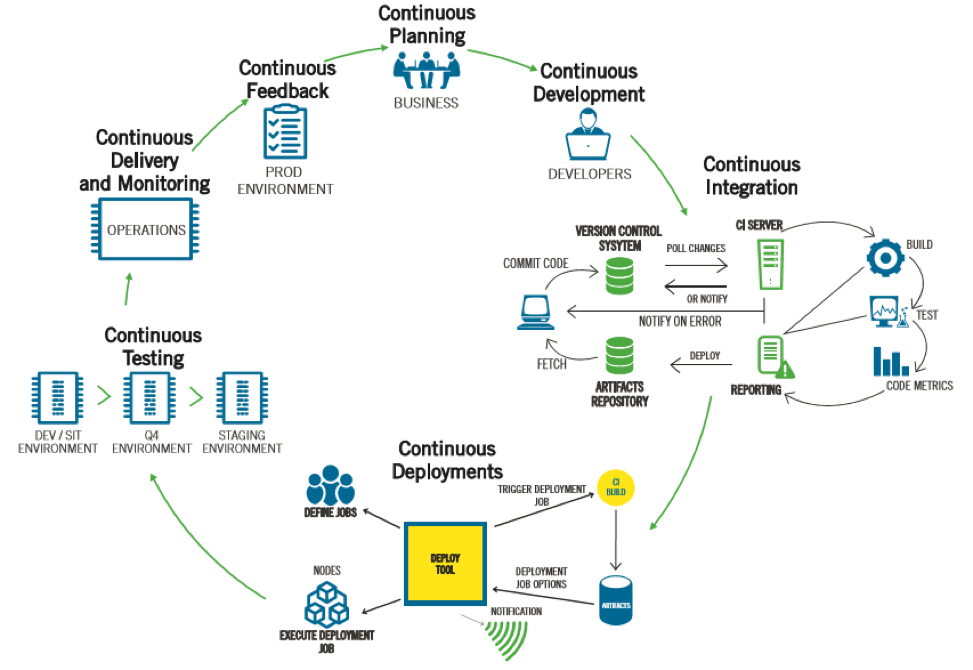
    We at Happiest Minds believe the simple approach to DevOps is one that is “continuous” and at its core has the agile mantra of “people over processes and processes over tools.” The idea of continuously evolving and adapting to changing requirements and demands has been captured in what we call the 7Cs of DevOps:

    picture1The main objective is to ensure agile delivery by embracing continuous planning, continuous development, continuous Integration, continuous deployments, continuous testing, continuous monitoring and continuous feedback.

    However, the cultural component of DevOps cannot be overemphasized. A large part of the success or failure of any DevOps engagement depends upon how willingly it is embraced within an organization and the kind of executive sponsorship it receives from the powers that be. The three widely recognized cultural models that most organizations come under are pathological, bureaucratic and generative. Needless to say, organizations that are riddled with a pathological or bureaucratic culture are likely to experience the least amount of success with DevOps because such organizations tend to cover up failures and eventually pin them on the most susceptible scapegoats.

    The breeding ground that DevOps needs to flourish is a generative culture where information is shared freely and openly, the leadership encourages employees to learn and experiment with new ideas and failure isn’t looked at as the end of the world but rather an opportunity to learn and grow.

    Eventually, organizations will have to embrace DevOps as an integral part of their strategy and not just as a liberal, forward-thinking experiment that scores them some brownie points. But it will take some doing, both at the grass roots and in the board rooms. One has to remember that a lot of people are easily attracted to a Ferrari, but perhaps not to the grind that goes into owning one.

    The idea of having a successful DevOps program is much the same—it’s not just about engaging the best vendor or choosing the right tools or paying lip service to creating the right culture; ultimately, it requires overcoming organizational inertia, resistance to change and making a long-term commitment to the philosophy that takes a larger view of how DevOps can help businesses stay one step ahead.

    About the Author / Arsalaan Kashif

    arsalaan-kashifArsalaan Kashif is associate director of Marketing, Product Engineering Services at Happiest Minds Technologies and has a keen interest in all emerging areas of technology and innovation. Having worked with Unisys, Oracle and HCL Technologies for over a decade, he has experience with taking to market products and services across areas as diverse as application services, cloud computing, DevOps and big data analytics to name a few. Outside of work, Arsalaan enjoys watching noir films and reading John Irving classics. Connect with him on LinkedIn.

  • You’re Not Doing DevOps if You Can’t Pull the Cord

    You’re Not Doing DevOps if You Can’t Pull the Cord

    There are many concepts in Lean manufacturing that have applicability with software development “factories.” One example is the Andon Cord.

    The Andon Cord concept involves using signals and alerts to indicate that a station on the assembly line has a problem. Alarms are activated manually by workers pulling a physical cord or automatically by the equipment itself.

    Developed as one element of the Jidoka quality method and pioneered by Toyota and the Toyota Production System, the Andon Cord empowers workers to notify co-workers and management of quality and process problems across the assembly line—and even stop production.

    While pulling the cord to stop production sounds crazy, if a defect is found and can’t immediately be fixed, then pulling the cord means stopping the problem from flowing downstream, where it will be costlier to fix and have a severe impact on the customer experience.

    But the point of Andon Cord pulling isn’t only to fix problems. As part of a continuous improvement program, much of the “pulling power” comes from how it helps teams build quality into products and processes. When production stops, improvement begins.

    Many would argue that the application of Lean management concepts such as the Andon Cord is more challenging in software engineering. With software, there are many more opportunities for defects, and testing for problems only occurs late in the development cycle. So late, in fact, that in some cases customers end up doing most of the testing.

    But as the digital and physical world becomes inseparable, excuses and outdated practices are no longer acceptable. Just as we wouldn’t ask a customer to test air bag deployment in a car, we shouldn’t expect them to test whether a new software-enabled telemetry system is subject to security hijacks.

    So having the power stop software development production line to prevent defects, security problems and safety issues during the actual development process makes perfect sense. But how do you start?

    Automate Andon with Continuous Testing

    In many organizations people are often afraid to speak up about problems. Even if bugs are suspected, teams will cover up problems by coding around them, even fudging tests. Owning up to problems doesn’t come naturally, so defects and crippling technical debt accumulates. DevOps practitioners need their own version of the Andon Cord: fully automated testing.

    With DevOps promising software throughput at dizzying rates, quality must accompany the velocity. Fail here and the continuous delivery glass can only be half-empty. This is why the process must incorporate its own automated testing Andon Cord to prevent problems moving downstream. Automation must be comprehensive, providing maximum coverage at every stage in the software pipeline—from requirements definition to full production and including code quality, performance, security, compliance and test data. Then, when a test fails, the system must be capable of stopping everything until the problem isn’t just fixed but can’t happen again.

    Eliminate Waste at the Source

    If you’re pulling the cord but not making improvements you don’t have an Andon Cord. Consider a factory scenario where machine operators always have to sweep up dust that’s clogging production equipment—obviously, they should be eliminating the source of the dust.

    Unfortunately, many software engineering practices involve lots of dust-sweeping.

    When developers need access to dependent systems for testing, they might mock up test code. If QA needs test data in a hurry, it could copy production data but fail to mask sensitive customer details. In IT operations, staff console watch in the hope of gleaning signals from all the noise—the list goes on. Lots of sweeping without ever eliminating the source of the problem.

    Fortunately, tools with Andon-like capabilities can help. Service virtualization techniques can emulate dependent systems to remove testing constraints, while automatically generating synthetic test data helps eliminate the possibility of costly compliance breaches. Modern performance monitoring systems also play an essential role. By providing performance insights before, during and after every software build, they help cross-functional teams swarm problems when the cord has been pulled by an automated test.

    Build the Ultimate Cord – Customer Experience

    If an organization considers itself in any way customer-centric, it will be able to “pull the cord” when it detects anything that detracts from the customer experience as delivered across multiple channels—web, mobile, call-center. The winners go further, using these events as fuel for continuous improvement programs.

    This all requires some serious smarts, not at the least application analytics to monitor the customer experience in real time. Such advanced systems become the ultimate Andon Cord, since they treat every sub-optimal customer experience (e.g. functional issue, usage behavior, performance problem) as both a defect and opportunity for improvement. Through advanced analytics and integration this improvement could take many forms—such as immediately prescribing code improvements to developers, or support systems notifying customers when a poor experience is about to occur—maybe even (shock-horror) compensating them financially for any inconvenience.

    A strong DevOps culture thrives when individuals call out mistakes and inefficiencies. Fail in this respect and organizations risk paying a heavy price, such as broken customer trust and lost business. Seek out automated methods that help you metaphorically pull the cord and keep on pulling it. Only then can teams truly excel in driving real improvements that will help business gain and retain customers.

    — Peter Waterhouse

  • Keep Applications Running by Testing Early, Continuously

    Keep Applications Running by Testing Early, Continuously

    Almost every product we buy or use today goes through some form of extensive testing before it’s released on the market; typically, these tests are designed to replicate the worst-case scenarios that a product may encounter under real-world conditions.

    Automobiles, for example, go through extensive hot and cold weather testing in remote locations, and are driven over obstacle-laden tracks designed to push the limits of their durability. Even seemingly mundane objects such as children’s toys are exposed to abusive simulations to ensure that they don’t harbor any potentially hidden and harmful effects.

    On the current landscape, applications are the face of your business, often serving as the battleground where consumer loyalty is won or lost. Given this reality, it seems crazy to think that any applications are released having only been exposed to a minimum of tests. Yet, in the name of getting to market quickly, that’s far too often the case.

    As disciplines including agile and continuous delivery continue to increase the speed at which development teams can release software, it’s easy to put the crunch on testing in the rush to get an update released. But that’s a costly mistake in the long run, as research has shown that it is 50 percent less expensive to find an error in testing than to address the same error once it has reached production, and more than 90 percent cheaper  when addressed in the development/coding phase.

    Given the dramatic cost savings of addressing errors in development, clearly the goal of any organization focused on continuous delivery should be to shift testing left so a greater number of defects are found early in the development process. This is what we refer to as continuous testing, and it’s a huge part of the reason why I am so excited about CA’s acquisition of BlazeMeter.

    Performance load testing should be a core element of any continuous testing strategy because it is a critical factor in determining system reliability. Similar to the worst-case scenario testing that consumer products undergo, performance testing can quickly uncover applications defects that might otherwise go unnoticed. After all, the manner in which a system operates with a few hundred concurrent users may be very different than how it runs with thousands of users.

    BlazeMeter enables today’s development, operations and DevOps teams to conduct this critical performance testing earlier in the development process, saving countless hours and resources. The company is also competing—and winning—in a highly competitive marketplace where it has been pitted against much larger, more entrenched competitors.

    Part of the reason BlazeMeter is winning is its focus on offering a SaaS-based solution that is highly cost-effective and easy to engage. Using this model, customers can try  out the testing software with a few clicks, and then quickly move forward to broadly adopt the system. Another catalyst to its success: BlazeMeter was built using open source tools, such as Apache JMeter, used widely in the development community for performance and load testing. As a result, BlazeMeter can easily run and analyze JMeter and other open source-based load tests—such as Selenium, Gatling and Locust—within a commercial-grade performance testing system.

    This combination of a SaaS delivery model and incorporation of open-source tools, augmenting strong performance testing functionality, make BlazeMeter very complementary to CA’s existing continuous delivery solutions, including its CA Service Virtualization, CA Test Data Manager, CA Agile Requirements Designer and CA Release Automation products.

    At CA, we’re committed to providing the most comprehensive, integrated and open continuous delivery ecosystem, allowing our customers to release swiftly, test agilely and constantly increase reliably. The addition of BlazeMeter will further enable customers test continuously, thereby increasing agility and the overall quality of their software, to ensure that applications don’t break down on the side of the virtual road.

    — Aruna Ravichandran

  • Design for DevOps – Best Practices

    Design for DevOps – Best Practices

    Without good design practices, a DevOps implementation has no hope of delivering on its promise of accelerating innovation with high quality and scale.

    Anyone who has been a designer knows that good design for DevOps is easier said than done. My blog, “7 Pillars of DevOps,” identified seven essential best practices areas that make up successful DevOps. One of the seven pillars is Design for DevOps. The blog explains that the pillars are not silos, but rather foundations that need to be kept in balance. It also can be said that a good design goes a long way to make up for shortcomings in the other pillars.

    This is true for any number of designs, including designs for legacy, greenfield or brownfield products. It is true for platform projects, feature enhancements or repairs. It is true for enterprise three-tier applications or multilayer products. And it is true whether the developers are using Agile, Waterfall or ITIL processes.

    In every case, a designer faces tough challenges and is expected to balance conflicting goals. Designers are expected to rapidly drive down the work backlog, yet produce quality products that avoid costly rejections and rollbacks. In addition, there is pressure to increase the percentage of effort spent on creative content over corrective content and do so with limited time and resources. These conflicting goals constitute tall responsibilities. If not supported with best practices, the overall design experience is a cauldron of stress and fast route to burnout.

    The following best practices improve the design experience and products of design in a way that is streamlined for the DevOps pipeline:

    Designers must thoroughly understand customer use cases

    Usability, reliability, scaling, availability, testability and supportability are more important than individual features! Quality over quantity is recommended. Designs that anticipate actual customer usage are the most successful.

    The culture needs to support designers

    Leaders must support the designers with motivation, mentoring and training. No designer can be expected to know everything. It’s OK for designers to make some mistakes if lessons are learned and improvement quickly follows. Good DevOps practices including continuous monitoring and quick remediation are examples of practices which help minimize the impact of any mistakes.

    Design coding practices are critical:

    • Products are architected to support modular independent packaging, testing and releases. In other words, the product itself is partitioned into modules with minimal dependencies between modules. In this way the modules can be built, tested and released without requiring the entire product to be built, tested and released all at once.
    • Where possible, applications are architected as modular, immutable microservices ready for deployment in cloud infrastructures, in accordance with the tenets of 12-factor immutable non-monolithic apps, rather than monolithic mutable architectures.
    • Software code changes are pre-checked using peer code reviews prior to commit to the integration/trunk branch.
    • Software changes are integrated in a private environment together with the most recent integration branch version and tested using functional testing prior to committing the software changes to the integration/trunk branch.
    • Developers commit their code changes regularly, at least once per day.

    Good DevOps design practices support QA:

    • Understand the QA process.
    • Software code changes are pre-checked with unit tests prior to commit to the integration/trunk branch.
    • Software source code changes are pre-checked with Static Analysis tools prior to commit to the integration branch. Static analysis tools are used to ensure the modified source code does not introduce critical software faults such as memory leaks, uninitialized variables, and array-boundary problems.
    • Software code changes are pre-checked with dynamic analysis and regression tests prior to commit to the integration/trunk branch to ensure the software performance has not degraded.

    Good DevOps design practices support Ops:

    • Understand delivery and deployment pipeline processes.
    • Software features are tagged with software switches (i.e. feature tags or toggles) during check-in to enable selective feature level testing, promotion and reverts.
    • Automated test cases are checked-in to the integration branch at the same time code changes are checked-in. Evidence that the tests passed are included with the check-in.
    • Tests are conducted in a pre-flight test environment that is a close facsimile of the production environment.

    Supporting tools are needed to realize Design for DevOps practices:

    • Elastic infrastructures that can be easily orchestrated, created and released as needed to support designers tasks on-demand with minimal delay.
    • Design, code management, monitoring and test tools readily available and scalable with minimal delay.
    • Monitoring tools that track application process performance and report the results to designers in easily consumable formats without delay.

    Design for DevOps Summary

    What do you think? Do you agree the above are important best practices for DevOps design? Are there others you recommend?

    While DevOps implemented with all seven pillars provides a strong foundation for long-term enterprise business improvements, it is important to understand DevOps is not an island. Enterprises implementing DevOps should be aware that DevOps interoperates with other IT systems and practices. Enterprises are well-advised to choose tool-agnostic IT partners that can provide solutions that best suit the needs of each unique enterprise and can integrate and evolve DevOps together with all of their IT systems.

    — Marc Hornbeek

  • Cobalt Merges Bug Bounties, Continuous Testing for Better Security

    Cobalt Merges Bug Bounties, Continuous Testing for Better Security

    The rapid pace of application development today can be hard to keep up with, especially when it comes to security. Combining the benefits of continuous testing with the incentives of a crowdsourced bug bounty program seems like a potentially effective way to address that volatility effectively.

    Companies need to keep up with demand while staying one step ahead of the competition. It’s very easy in such a dynamic environment for security to fall through the cracks, or be ignored entirely. Combining DevOps-style automation with crowdsourced intelligence is a good approach.

    Bug bounty programs have matured and gained mainstream acceptance in recent years, thanks in large part to the leading champion of bug bounty programs, Katie Moussouris. After launching Microsoft’s successful bug bounty program, she left to join Hacker One as Chief Policy Officer. She recently ventured out on her own as a bug bounty evangelist and consultant under the banner of Luta Security.

    The concept is simple: Rather than pretending vulnerabilities don’t exist, or sitting around waiting for the bad guys to exploit the vulnerabilities first, a bug bounty program provides financial incentives for hackers and/or security researchers to identify and report flaws. The net result is a win-win-win that results in more secure applications, happier customers and satisfied security researchers who feel appreciated—and paid—for the work they do.

    That is where Cobalt comes in. “I’m impressed by how Cobalt has built its model by taking the best elements from the bug bounty space, which offers rewards to those in the security community who can identify software vulnerabilities, and combining them with a scalable, continuous penetration testing platform,” said Robert Fly, an investor and advisor with more than 15 years of application security experience from Microsoft and most recently Salesforce, where he built the product security team and was VP of Security Engineering.

    “Companies building web and mobile applications need the flexibility to quickly develop new applications that delight their customers, while ensuring that their applications are secure,” said Jacob Hansen, CEO of Cobalt. “Instead of needing to invest in security tools, such as scanners and penetration tools that are expensive and vary in quality, and having to hire security staff or consultants, our customers rely on Cobalt to provide transparent continuous application testing services, leveraging a powerful platform along with a global community of security researchers.”

    There are a variety of well-known software-as-a-service (SaaS) companies already using Cobalt, including GoDaddy, Wix, Weebly, Nexmo and Optimizely.

    At face value, this seems like an awesome strategy. Only time will tell how it really plays out, but the success of bug bounty programs when it comes to finding and fixing vulnerabilities in general is indisputable, and continuous testing is a staple of DevOps environments. Combining the two should raise the bar for application security in general.

  • xMatters Sees Value in Continuous Testing

    xMatters Sees Value in Continuous Testing

    xMatters builds an intelligent communications platform that alerts and connects company stakeholders for IT incident response and in manufacturing line workflow support and DevOps systems scenarios. Customers who count on xMatters also count on the effectiveness of the vendor’s continuous testing mechanisms: A failure of continuous testing early on at xMatters could lead to a magnified impact on the customers’ crises response, resulting in costly repercussions.

    XMatters uses continuous testing to promote continuous delivery of its intelligent communications platform, delivering changes to a limited number of features in an accelerated fashion. “This reduces our risks of failures and makes it easier to resolve defects,” said Deepa Guna, QA Architect at xMatters.

    For xMatters, the proper use and placement of continuous testing in the DevOps pipeline is critical to ensure the intelligent communications solution does not introduce errors during customer crises.

    xMatters Software, Languages and Tools

    The xMatters platform consists of a service stack architecture with front-end technologies accessible via the web and back-end technologies that support it. According to Guna, the platform takes advantage of Java, RESTful JSON, Node.js and Postgres, which run on data centers that are geographically dispersed in North America, Europe and the Asia Pacific regions.

    “Our data centers are built on infrastructure as a service, which includes technologies such as OpenStack, Puppet, Fabric and Consul,” Guna said. XMatters also has a mobile application for iOS and Android platforms as part of its communication service.

    xMatters Testing Approaches, Before and After DevOps

    The company’s testing before the advent of the continuous delivery pipeline included manual test execution of regression tests in the midst of a slow process of releasing one large set of features per month and deploying customer-reported defects, Guna said.

    Today, xMatters uses automated and manual regression tests and unit test code coverage monitoring, releasing small sets of features and resolved defects weekly while enabling customers to provide feedback early in the feature development process.

    XMatters uses several tests during the development, test and release phases of the DevOps pipeline and when delivering the platform to the customer. The development phase includes the following testing tools and their associated types of testing:

    • SonarQube analyzes the quality of the code.
    • Jacoco measures the code coverage of the developer unit/integrations tests.
    • Git + Jenkins run the unit and integration tests before xMatters commits the changes.

    The testing phase, Guna said, runs tests as follows:

    • Jenkins deploys artifacts in test environments and runs automated tests.
    • An automation framework that includes Jmeter, Gradle, Java, TestNG and Selenium runs its tests.

    The release phase tests software after this manner:

    • Jenkins deploys artifacts in test environments and runs automated tests.
    • An automation framework that includes Jmeter, Gradle, Java, TestNG and Selenium runs its tests.
    • Splunk and Takipi do exception monitoring.

    When xMatters delivers the platform to its customers, Guna said, it performs the following tests:

    • Runscope monitors the health of the system to ensure critical services are running.
    • Pingdom monitors the status of the customer websites.

    Drilling Down into Release Testing

    “During the release testing phase, we put the application through 1,000 fully automated and manually initiated tests that we execute with every release cycle. We also have tools that are monitoring for exception during the release testing,” Guna said. Passing this phase successfully, the new software platform release is ready to be pushed into the production environment.

    XMatters uses the continuous delivery pipeline to deploy the new platform release first to the customer staging environment and next to its production environment, Guna said. “All production environments have ongoing smoke tests that we execute every five, 10 or 15 minutes, based on customer tier, to monitor the health of the services.”

    Results Metrics

    xMatters’ method of continuous testing seems to be working for the vendor. “We have reduced the number of major incidents in production due to application defects by 40 percent this year compared to last year,” Guna noted.

  • Checks and Balances to Build Stronger Code

    Checks and Balances to Build Stronger Code

    Every software development needs coding; without it, nothing can be developed. The quality of the software depends on the way its developers write code. It’s an essential part of the system and the behavior of the system depends on it. A small mistake in coding may make the software vulnerable and unstable.

    Quality engineering works hard to find bugs to avoid potential problems with the software. QA engineers spend numerous hours and put tremendous effort into finding any problems with the software and reporting it to the developers.

    Cost of fixing the defects at various level.


    The cost of fixing defects at a latter stage increases exponentially; hence, you need more hours of QA engineers and developers to fix and run the entire release cycle again. If we can save some amount of time and effort, we can utilize resources in a more productive way.

    Can we make sure code is better-written, more tightly secure and has no potential bugs, and the right libraries are used?

    If we can implement it, we can at least make sure developers are checking to make sure there is less friction in the code?

    Here are few checks that can be implemented during creation or before passing code to QA to ensure it’s less buggy.

    Code Review

    In code review, the coder sends it to someone else for the review. It’s really a great way to verify the written code by a second pair of eyes to catch any glitch, logic or possible mistakes overlooked by the coders.

    This is part of the development process to make sure nothing is released without a second opinion. There are many ways and tools available to perform code review. These can be implemented and integrated with the source control tool. More on code review and details can be found here.

    Unit Test

    Unit testing tests a piece of the code by writing small code around it via supporting data and mocking it to test scenarios. It commonly is written by developers during the development, then run during source code compilation or independently according to various languages.

    This testing provides extra early warning to find problems before handing it off to quality check. Unit test coverage could provide details on how much has been covered by unit test cases. There are many ways to figure out the coverage.

    Static Code Analysis

    Static code analysis is the way to analyze at a very basic level without running the software or performing any testing. It can be done at compilation time or at development time by using client-side tools.

    Analysis tools look for any possible or hidden bugs, such as never-ending loops, or programming flaws. These tools do analysis based on a similar pattern but each in a slightly different way.

    Coding Guideline

    Each developer may write code in his/her own style with varying degrees of differentiation. This may create big problems when it comes to handing over of a project to different teams or coders. It may take tremendous amount of time to understand what’s been written by somebody else.

    To reduce this potential headache, organization may implement a coding guideline, or style of writing code for developers, to make sure everybody follows one systematic way that can be understood easily by other team members. There are different tools available for various coding languages.

    Library Check

    Open-source projects and other freely available tools in GitHub are making life easier for developers to use them in their projects as libraries. At same time, they can introduce several other problems with the software if libraries are not tested properly, including security vulnerabilities, untested components or licensing issues.

    There are many tools to help developers to verify their libraries.

    In Summary

    There may be many other verifications and checks required by an organization. Above are the very basic checks that can be implemented during the development phase to rule out any discrepancies related to security or legal issues. Checks could be implemented at the client side, where developers write code or during the continuous integration phase.

    There are many tools available in the market or the open-source community that can be used to verify and secure code to avoid unrealized bugs. It’s in the best interest of any organization to keep its software bug-free and reduce the amount of unnecessary resources working on such issues that could be caught early.


    Other References – http://www.scmtechblog.net/2016/08/code-quality-check.html

  • Continuous Testing: Shift Left and Find the Right Balance

    Continuous Testing: Shift Left and Find the Right Balance

    You may have heard the term “continuous testing,” but are struggling to understand what it is and how to achieve it. Project teams need to improve their ability to test and perform test automation when needed, not just when possible. Service virtualization allows teams to test earlier and more often in the life cycle, or “shift left,“ by mimicking unavailable systems. Combining test automation with service virtualization enables teams to provide immediate feedback on quality—so issues can be resolved faster and cheaper. Encouraging and embracing this immediate feedback on the quality of the solution enables businesses to deliver high-quality innovative solutions to the market quickly.

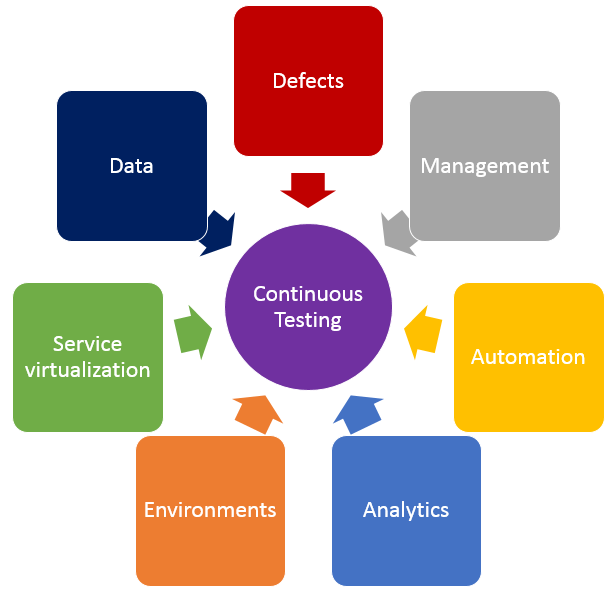
    In addition to shifting left by using service virtualization, finding the right balance of effort across all testing practices is crucial in achieving continuous testing. The diagram below shows the key test practices that enable continuous testing, and teams spend effort on each of these practices regardless of whether they want to. The questions below may help your teams understand where they are spending time, and perhaps where their time might be better spent.

    Testing

    • Defects – Are teams spending too much time logging, triaging or analyzing defects? What about time spent on defects that aren’t “real” defects—where there is a misunderstanding between the test and the code? Or what if they could prevent entire schools of defects from ever being created in the first place?
    • Test Management – Are teams spending time manually crafting status reports and rolling up test execution results? Or do they have a tool that provides that information in real time and allows stakeholders to drill down as needed? How do teams know if they are on schedule with their test effort, behind schedule or even ahead of schedule?
    • Test Automation – How efficient are teams at re-executing existing tests? Do they run most or even all of them manually? If they’ve automated tests, are they focused only on functional tests at the user interface layer, or are they running functional API-layer tests, performance tests and even security tests? Do they have a robust and maintainable test automation framework?
    • Analytics – How do teams know which tests they should run, when and even why they are running those tests at those times? How good is their test effectiveness–meaning, are they running the fewest number of tests that find the largest number of problems? Impact analysis is critical in selecting the right sets of tests to execute whenever they get a new build.
    • Test Environments – Are teams constantly waiting on test environments to be provisioned and configured properly? Do they run tests and discover after the fact that the test environment wasn’t “right,” so they have to fix the environment and then re-run all the tests again? Do they hear from developers, “It works on my machine!” but it doesn’t work in the test environment?
    • Service Virtualization – Are teams waiting for dependent systems to become available before they can “really” test? Are they using a “big bang” approach to conduct end-to-end system testing, where they throw all the components together and hope they work and interact properly? Can teams test exception and error scenarios before going to production? Are they testing the easiest parts first just because they are available, and delaying the high-risk areas for the end of the testing effort?
    • Test Data – Do teams have the needed sets of production-like test data to ensure they are covering the right test scenarios? Are there exception and error scenarios that we can’t execute because they don’t have the right sets of test data?

    If any of these problems or ideas resonate with you, here is guidance on how to get started on the journey to achieve continuous testing.

    First, identify your bottlenecks:

    • How good is your test efficiency – are you able to run the needed tests and provide feedback quickly?
    • How good is your test effectiveness – are you running the fewest number of tests that find the largest number of problems?
    • Bottlenecks may also be upstream or downstream from actual test execution effort – are you waiting on dependent systems, or test environment provisioning?

    Then, look at all aspects of your test effort and focus on the largest bottlenecks first.

    • How long are your delays in test environment provisioning, and are the environments accurate when they are provisioned? If delays are too long and environments aren’t correct, automate your test environment provisioning and configuration to eliminate manual errors and gain accuracy and reliability.
    • Are you waiting on dependent systems to start testing? If so, use service virtualization to simulate those unavailable systems so you can start testing sooner.
    • Are you unable to run all the needed tests before the next build is available? If this is the case, automate your high-risk regression tests to improve test efficiency.
    • Do you find performance problems late in the life cycle, or even in production? Outages can result in long-term damage to a business, so conduct load, performance and stress testing earlier in the life cycle.
    • Do you find significant problems when all systems are integrated? Identify and agree upon system interface and data definitions, and create automated integration level tests for the high-risk integration points.

    Teams that improve their test efficiency and effectiveness significantly reduce their expenses and the time it takes to get high-quality, innovative solutions to users. You can’t test everything, and you can’t automate all your tests, so it is critical to find the right balance. Also key is service virtualization, which allows testing to begin as soon as a build is made by mimicking missing dependencies. By combining test automation and service virtualization, teams can test earlier, or “shift left,” so they gather feedback faster than ever.

    Learn more about using service virtualization to shift left and avoid downtime in test environments in our upcoming webcast:  How Maersk Uses Service Virtualization to Shift Left and Avoid Test Downtime.

    About the Author / Marianne Hollier

    MarianneMarianne Hollier is an IBM and Open Group Master Certified IT Specialist in application development. She has strong, practical expertise in measurably improving the software development life cycle and driving the necessary cultural changes to make it work. She is instrumental in architecting, tailoring and deploying the IBM DevOps best practices as well as appropriate software development tools on many types of projects, from large to small, long to fast-track, agile to traditional. Marianne is especially passionate about all things testing—process, tools, culture and automation. Her experience is broad-based, spanning both custom projects as well as standard software packages that apply to many industries, including refining, pharmaceutical, telecommunications, health care, financial, automotive, government and retail. Connect with Marianne on LinkedIn or Twitter.