Tag: Continuous Test

  • Back to Basics

    Back to Basics

    We here at devopsy.kinsta.cloud do sometimes suffer from The Curse of Knowledge. We write about DevOps regularly for an audience that is doing or managing DevOps. We assume knowledge, but there are still a fair number of people and organizations who are unclear about some of the terminology/technology that we talk about.

    So if you are a regular reader of my blog, this might be a redundant post—but read on because it might have info you haven’t had a reason to consider yet.

    I’m going to start with the obvious—how most readers got here to begin with: DevOps. DevOps is automating the build process so that builds are automated and repeatable. Teamed with Agile development, DevOps means that development teams can rapidly iterate through development and generate regular updates to their applications. Everything else in this blog is based on the premise that it is running in a DevOps environment.

    Continuous integration: Typified by Jenkins, continuous integration (CI) is the part of DevOps that runs the automated builds. It includes reporting and defect resolution only in the sense that it feeds into other systems that track defects. With CI in place, a developer or DevOps engineer can say, “Okay, ready to test a build,” and with one command, can kick off a build that will result in a finished artifact. Or result in a built product, anyway. ‘Finished’ is optional, and the target of CI is not generally a running application.

    Continuous delivery: One of the most confusing things for new DevOps people is CD. The way that the space evolved, there are actually two things that CD could stand for; continuous delivery–automated build of the complete application —or continuous deployment—delivery of a running application onto infrastructure. Continuous delivery is straightforward and means all the bits of the application are code complete–or at least the current state of the application is complete enough to build an application. Continuous deployment is much more convoluted. It might mean deployed to a development environment for developer-level testing or a test environment for running automated (continuous testing) tests on or in production. It might be a staged rollout, where users are siphoned over, or it might be a hard rollout where the old version is replaced by the new in a manner similar to ripping a Band-Aid off.

    Continuous test: Automated testing is at the heart of continuous test (CT), and it is only now becoming a real possibility for most short-staffed enterprises. Advancements in machine learning (ML) mean that tests can be run, results filtered to eliminate false or duplicate results, and IT staff is only notified of the important bits. Unlike traditional testing, staff is required only to create the tests and to look at meaningful results.

    Infrastructure-as-Code: Infrastructure-as-Code (IaC) is the ability to define all relevant elements of infrastructure with text files. Often this is done in YAML and sometimes in a variety of other formats. The idea is that infrastructure provisioning can be on-demand and adaptable. It is certainly more agile to change a text file from port 80 to 8080 and then run a command to process the text file–now the port is documented and whenever needed the command can be re-run to move to a known state. IaC largely relies upon software implementations over physical. While the idea of software-defined networking (SDN) has fallen out of favor, the underlying principles are everywhere and part of IaC, for example.

    GitOps: All the rage these days, GitOps is probably best defined as applying DevOps to operations. That does sound weird, but I like to break it up as “traditional DevOps is DevOps, while IaC (to a lesser extent) and GitOps (to a huge extent) are DevOps.” The point being that GitOps uses the text files generated in IaC and worker nodes generally designed for continuous deployment and then performs operations tasks based on those text files. If IaC defines the entire environment that an application needs and DevOps defines all of the sources that an application is composed of, bundling the two together will enable full-on automation from conception to decommissioning. When a new version of a source file or configuration file is checked into Git, the system then makes certain that every instance of the application is updated with the new version. Of course, this process, like every one listed here, is far more complex than that in implementation; we are talking about ‘what, not how’ at this level.

    All of this really is the very tip of the iceberg, but that was the goal here – to offer readers a place to start if they’re finding themselves looking at DevOps for the first time. As you dig deeper, things like DevSecOps and test driven development (TDD), or defect tracking and Agile methodologies start to play into the landscape, and maybe I’ll write an intro bit for those also. But this time, we’re out of space.

    As always, keep rocking it. No matter which or how much of the above you are using, if the organization’s applications are up and running, that’s you. And you deserve more kudos than you are likely getting. But keep grinding through—the rest of us get it, and thank you.

    Image source: Photo by Towfiqu barbhuiya on Unsplash

  • This Has Been a Test

    This Has Been a Test

    For nearly the entire history of application development—certainly since application development became available to a larger market with the adoption of the personal computer for expansive business use—testing has taken a back seat across most of the industry. This is not because we don’t care about code quality but because it takes resources away from developing cool new tools—or even products—and slows down release cycles. Historically, both of these issues have been huge. Manual testing staff grows quickly from a few people to a massive department and waiting for that process to complete could take forever.

    So, we’ve not done a lot of it. Oh, when executives or someone in leadership demanded more thorough testing, IT management would promise to do so and then—to fit within budget and time constraints—would tell developers to test their own code. There are several areas where you don’t ask the person responsible for creating the final product to review that final product—because if they knew they were doing something wrong, they’d fix it. Writing is one such area—that’s why good editors are worth their weight in gold, even in the age of the internet where anyone can (and too many do) spew onto the digital page whatever they like without the benefit of an editor. Another is testing application code. I test as I write my code, and like every person who has spent time as a professional developer, I have made a couple of stupendous errors. If I’d known that the particular weakness I left in the system was there, I would not have said it was done.

    When DevOps came along, I expected things to change—until I understood that DevOps (and Agile, in lockstep) was all about delivering faster, not better. Anything that slowed down the process—testing, security, even compliance, to an extent, that cannot be avoided—was frowned upon. When test-driven development (TDD) came along, I instantly developed a love/hate relationship with it. We used it for a project I was on and, frankly, it shifted quality concerns to the tests—the code could be forced to pass all of the tests, but how thorough and accurate the tests themselves were—particularly as the project grew and changed—became the question. Done right, TDD would solve a lot of our testing problems. Heck, even done wrong it would have taken care of most problems that simple unit testing could cover.

    But after decades, I think we are finally at the point where we can demand and require thorough testing with acceptable and growing coverage numbers. And you need to consider it. Test automation has come a long way and far too many of you haven’t come along with it. If you struggle to justify investing in test suites, I get it. I’ve been the manager that had to choose between improving DB performance and testing. But the modern iteration includes security testing. So if, out-of-the-box, you could get a  tool that checked for valid inputs and alerted to places where invalid data might break the application, that might help. And that’s just the simplest case. I’m currently working in an adjacent space, so I don’t want to get too crazy selling you here. I’ll just say, “Testing isn’t what it was even a couple of years ago. Check it out.” Both application and security testing. And the changes will continue to come as claims of using AI/ML turn into applying actual algorithms that your AI or data science people can compare to help choose a high-quality product.

    We could debate all day whether DevOps made apps more or less stable and secure, but we don’t need to. Finally, continuous testing is real. Check out the vendors doing this, compare them and see how easy it is to fit them into your environment. More stable, more secure, not the hold-up you have stuck in your head. What’s not to like? You are already rocking it; automated testing could make you look even better.

  • The Right Toolchain Is the One You Build

    The Right Toolchain Is the One You Build

    One of several iterations that IT likes to go through is corporate standards for technology versus best tool for the job. We like to have standardization because it allows staffing portability between projects, but we like right tool for the job because from the moment you choose a standard, competitive factors and changes in needs make the standard less of a big win.

    DevOps is still struggling through this process, particularly in enterprises where standardization bears a bit more weight on important projects.

    The fact is that DevOps is well suited to the idea of iterating standards–somewhere between a wild west of everyone using their “right tool” and an organization dictating the tool of choice.

    Most of us use Jenkins, because it does what we need it to do. What needs doing is different from organization to organization–some use it for continuous testing, while others go all the way through application release automation. But the fact is we could iterate and replace some, or all, of the functionality we’ve decided to use Jenkins for tomorrow. Kind of like a “We have a standard that is evaluated regularly” approach.

    For those new to DevOps, the array of choices is downright bewildering. Xebia Labs has a toolchain diagram page to help those already doing DevOps, and several sources have spreadsheets/PowerPoint templates to help you work through your existing environment. While all of the options these tools try to organize for you are great for the industry to find better solutions, it makes for a confusing mess. Your toolchain could be all AWS with some scripting, all Jenkins with plug-ins or 15 different apps working independently. A surprising number of organizations are even using Git for the bulk of their toolchain.

    What matters is that you know what you have, and know what your options are. Build the best toolchain for your environment today, and keep half an eye on it to be aware when something more suited to your environment comes along. We still maintain python scripts that do a fair amount of our automation, but several toolsets in place also.

    There are objectively better tools out there, but for our purposes they are almost universally overkill. So we go with what’s best for our environment. As time has gone on, we’ve integrated more and scripted less, but it will be a while before out toolchain is actually just tools–if ever.

    If your toolset is doing the build/test/deliver/deploy cycle well enough, you’re covered. If it’s not, you need to look for alternate solutions. Even if it is, make sure you’re aware of what’s on the market and not just what’s “hot” right now. Be aware of those companies that are up and coming, maybe in spaces that are already flooded. What differentiates them, and in our environment would that differentiation matter? That’s all you need to know–there is no need for a super deep technical evaluation, unless you’re actually considering them. Just enough to know if their differences add value.

    Keep cranking out the apps that make business run. Perhaps with an updated toolchain, perhaps not. In the end, what works for your environment is all that matters.

    — Don Macvittie

  • Choose Your Toolstack — and Manage It — Wisely

    Choose Your Toolstack — and Manage It — Wisely

    Every DevOps toolstack has a control point, be it a bus, an app, a management app or whatever. Something always is in control and driving the other pieces of the architecture to do their part. It is a basic tenet of automation that jobs are mostly kicked off by something in the software hierarchy.

    In DevOps, most of us have defaulted to Jenkins for a large chunk of that automation. It was the center of the continuous integration/continuous delivery (CI/CD) side, and increasingly it is used to run both sides of DevOps (as I have called it previously, both DEVops and devOPS). CloudBees and recognized this trend, and an increasing amount of control and process functionality has been turning up in Jenkins.

    On the other side, there are organizations running all of devOPS from deployment tools such as Ansible or Puppet. Again, that’s not a terrible solution, since they can configure the software on the server and make sure all is ready to run.

    But neither of these toolsets was originally envisioned with the idea it would control as much of the DevOps stack as they currently do.

    If you read me regularly, you know I’m not a huge fan of this type of default control structure. There is a lot of functionality that can be laid over the CI/CD and environment automation tool. But to do some of it, the tool needs to be above the day-to-day functionality these tools specialize in.

    ARA can do it—and honestly, for a first brush at connecting the worlds represented by CI/CD and configuration management tools, is pretty impressive. Other vendors have come at it from a service bus perspective, allowing everyone to communicate through their tools and doing roll-up reports based upon what has been integrated. That’s not a terrible solution either, if it works with or can be made to work with your tools.

    ARA as a market is short on the monitoring and management end of the process when the app is deployed and clipping along. It’s getting better, and hopefully ARA that is fully integrated with monitoring tools will be the next step in this evolution, but for now most companies are handling tooling, monitoring and response to that monitoring outside of the ARA system.

    The queue systems tend to lag behind ARA in their ability to correlate and coordinate, but again this is getting better. They know only what is reported through them, so as they gain add-ons, expect they’ll handle the overall stack better.

    The long-term goal is, after all, to run from commit to release with only designed “go/no-go” checkpoints involving humans, and then to monitor, with humans getting notifications only as needed. How we get there may not be so important—or it might.

    In the market, the sand is still shifting too fast for vendors to keep up. In any given implementation, how fast you adopt all the new products is a function of choice. Use controlled chaos, changing things out for the better only when you have a quantifiable benefit and they fit into your overall architecture. Most importantly, no matter which toolset you choose to use to control the check-in-to-release cycle, new tools you introduce should integrate with it.

    So what am I recommending? That you choose a control tool that fits your specific environment and needs, and that you make certain when choosing new tools you have a path to get them integrated with that control tool. Nothing more. Don’t put a tool in charge of half or all of your DevOps toolstack just because it was there. Have a real reason, then use that reason as a gauge when adopting new tools.

    — Don Macvittie

  • Continuous Testing and Business Assurance

    Continuous Testing and Business Assurance

    As development moves ever faster, continuous testing can help further reduce the risk of introducing errors

    In IT circles, “risk management” implies information security. But in the business as a whole, risk management is a function that spans the organization. The risk that an application will negatively impact corporate image, sales or employee morale is very real in the age of automating everything.

    Once properly identified, these types of risks can be mitigated with continuous testing processes. The ability to set up a test to prove the login system works as expected keeps users able to get to the application.

    Increasing use of agile and DevOps offers the opportunity to receive rapid feedback. Among other things, that includes business (as opposed to InfoSec) risk management. Requirements from the business side can clearly delineate items that create risk for the business unit and the requirements to reach desired outcomes. Continuous testing can turn those requirements into tests that validate the application is not contributing to business risks.

    After all, there are enough risks in the business environment: competition, suppliers, coordination of marketing, legal, etc. Making application development less of an issue is good news for business owners and IT alike.

    By translating business risk management requirements into automated tests early in the development process, stability and risk aversion are built into the application from (or nearly from) inception. This offers stability and provable correctness in the application development cycle.

    As the pace of development continues to accelerate, there is a risk of negatively impacting the user experience. Whether that negative impact be through failures of critical parts of the system or degradation of performance, it harms the application and the business it supports. Continuous testing can help alleviate fears by testing for these scenarios and pointing developers at fixing them early.

    Test automation tools are becoming more prevalent, and the next step is to include business requirements designed to mitigate business risks at every step in the process. It is simple to say and test “valid users must be able to log in,” but as development progresses, if the login prompt takes more than 10 seconds to return, that adds the “in a timely manner” business requirement that is then refined by IT to a number, and a new test is run. Only by having the inputs from the business at each stage can such refinements be identified and implemented.

    Interested in this topic? Check out the ebook here to hear from experts on balancing speed of development with risks to the business.

    And consider it. The purpose of any given piece of software is to serve the business. Speed that introduces unwarranted risk to the business cycle is not the best answer. Continuous testing, and attendant business owner involvement, can mitigate those risks.

    — Don Macvittie

  • Automic Chart Maps Out Its DevOps Ecosystem

    Automic Chart Maps Out Its DevOps Ecosystem

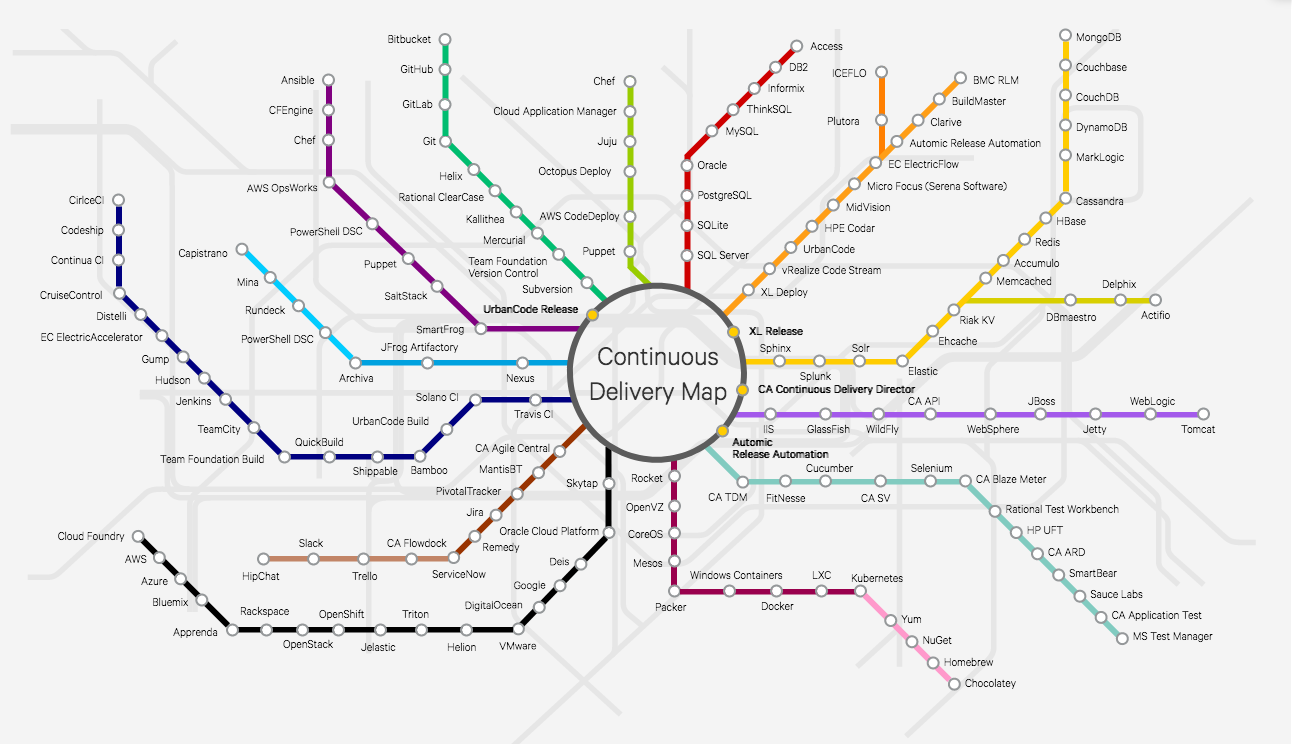
    Everyone who follows me knows that I’m a fan of XebiaLabs’ Periodic Table of DevOps Tools. It was the first attempt I am aware of to arrange things in a way that helped DevOps teams navigate the increasingly bewildering world of DevOps toolsets. In fact, my friend Colin Walker over at ExtraHop and I have been planning to pick some up for our offices for a year or so.

    (Add on note: It sounds like I’ll be getting a copy of the XebiaLabs poster. Woo hoo!)

    Visit the interactive version.

    So this week when I found out about Automic’s chart—let’s call it “The Spider” because of the way it branches out—I thought I’d let you all know that it is also out there. The cool part about The Spider, in my opinion, is the interactivity (which means I still want the XebiaLabs poster for my office). You can click on a node, get information about the tool and be presented with a link to the tools’ website—and, if they’re integrated with Automic, a link to the integration in their marketplace.

    For quick research, this is a nice chart. I wouldn’t want to have to maintain it, at the rate the market is changing, but it’s a useful starting point for “I need a tool that does X” and exploring short one or two paragraph descriptions of each of the options. It’s not complete, but it would be a full-time job to make such a chart complete and keep it up to date, and it’s pretty far along. You won’t miss any major vendors in a space by starting with The Spider.

    I clicked around and looked at the writeups for several products, and they read well. Considering that Automic is a vendor (they’re owned by CA, so kind of an über-vendor) in the space, it would not have surprised me to find they were limited or slanted in their writeups, but they weren’t. So I asked Scott Wilson, product marketing director for release automation, about that, and he told me they actually wanted to couch the details in the framing that each vendor used. Considering that Automic has a plug-in architecture that interfaces to many of these products, I suppose that makes sense. And making sense or not, it’s good for us, because we don’t have to pry apart two layers of vendor-speak to figure out how a product can help.

    If you’re trying to figure out the CD market, or a subset of that market, this is another good tool to have access to, so thought you all would be interested. The plan is to keep it up to date, so hopefully it is useful for a while moving forward.

    — Don Macvittie

  • Don’t Underestimate the Work

    Don’t Underestimate the Work

    It is relatively common in human endeavor to attempt to figure out how much work will be involved in a project, and be wrong. The more complex the work being done and the organizational system doing it, the further off estimates can be. This was one of the drivers for both Agile and DevOps: to take smaller steps with less dependencies and complexity.

    The complexity problem is true in the path to application release automation (ARA) as well. ARA merges continuous test/continuous delivery with deployment automation, but both of these toolsets are complex and continuing to evolve. When you think about it, it is somewhat amazing that ARA can handle the breadth of functionality it is covering, while both sides are shifting and growing as well as it does.

    Construction Crane
    Construction Crane, compliments of Pixabay

    When you approach ARA, you should make certain you have a handle on the amount of work that it will take to get the system up and running. It’s not simple, even if you’re already using a full CI/CD environment. But it’s worth the work, so here are some of the things to watch out for.

    Multiple Targets

    First on the hit list is on the deployment side. One of the strengths of ARA is the ability to deploy to any environment. The ARA system has to know about each environment in enough detail to enable deployment on it. It must know how to deploy servers, where to get OS, what needs to be added on to the OS, and how to get the application onto these systems. Increasingly, programmable network elements and security configuration fall into this category also. While tools such as Chef and Terraform can help in this regard, if you’re not already using them, they’ll have to be configured if not already, and then linked into your ARA tool. Understanding the path from here to there is critical to early success with ARA.

    Databases

    This is one of the more vexing problems. While most ARA tools offer the ability to configure databases and database connections, your datasets generally don’t hop around so easily. So if you’re testing and deploying on separate networks, you’ll need to make sure that the relevant tables are on those networks. This struggle impacts moves to the cloud, changes from a fully test network to production or any other change that requires the database server be accessible when it hasn’t been in the past. The work to solve these problems is pretty wide. In some cases, such as purely internal or purely cloud, merely routing from the relevant app instances to the database server will do it; but, in the case of across-the-internet changes, it will take a lot more work. Make certain you understand what challenges you will face before moving.

    Tooling Sets

    Much of the external needs of an application are baked into the app build process through tools such as NPM or Git. But those tools don’t cover everything necessary for the entire app ecosystem. Agents, per-tool databases, small tools used occasionally—make certain you have a list of what makes the app work, and make certain they’re configured to be built in by the ARA tool. This sounds obvious, but watching a team learn by trying to deploy and fix broken parts only to do it again is not only painful, it also leaves a “Did we get everything?” impression. I saw one app break on deploy because the team didn’t include curl. Yes, curl in the deployment. Test had it in the environment, production did not.

    Get an inventory of both application development dependencies (libraries, etc.) and deployment dependencies (databases, reporting tools, agents for monitoring, etc.), and save yourself some pain.

    Decrease Your Work by Asking Questions

    ARA gives you a repeatable build/deploy process that can be used to target the environments you need while reducing manual scripting and steps. But before you throw in, sit with your vendor’s tech people and ask them to walk you through stumbling points, they likely know far more gotchas than I do, because it’s their job, and unless you got the new guy for an SE, have probably seen more. And getting ARA up and fully functional quickly allows you to focus on other DevOps needs, such as improving automated testing.

    — Don Macvittie

  • Automated Testing: Remember Security

    Automated Testing: Remember Security

    Run down doors
    Insufficient Security.

    Between continuous integration (CI) and release automation (RA), we’ve come a long way in making testing both integral and automated. This testing has allowed QA staff and developers to spend more time adding value by looking at problem areas instead of running tests by hand. Shops that have CI well-integrated into their application processes and are using test driven development (TDD) claim they have improved both time to deployment and code quality.

    But we’re still struggling to get security adequately integrated into the overall system. Part of this is that some testing—such as application-level penetration testing—is very custom to the application being developed. There are tools to help, and they do offer some amount of automation, but they’re not yet to the point of being the only route to test. The other reason is that even today security and compliance are seen as road bumps that slow deployment. It is sad but true that the V-Tech data breach was a simple SQL injection attack. No doubt security was not involved in the deployment of that dozen or so websites/databases, or if they were, their ability to influence the product was limited.

    But automated testing can help in many of the standard attack vectors that SQL injection is just one example of. And for some reason, an automated tool informing DevOps teams that they have to fix a whole slew of vulnerabilities is taken much better than the security team doing the same thing.

    The breadth of security concerns mean that security must be involved at some level in every phase of DevOps. But tools can lighten the load, and the tools are getting better all the time.

    And the idea that a breach is a risk that should have a certain level of acceptance is no longer en vogue. Doing what you can to avoid them, and paying the price to do so, is increasingly the norm. Automation tools help to cover not just the employee time gap, but also the skills gap. If a tool can validate the entire deploy environment for your chosen cloud environment at the time of deployment, that relieves any shortage in knowledge about the security features of your given cloud environment. Of course, eventually security staff will need to know more, but just like a deployment tool can throw up an entire big data infrastructure in hours instead of weeks, leaving operations time to learn about configuration details as they need to, security automation can do the same for security teams.

    I highly recommend looking at building standardized controls into both the test environment and the deployment environment. While you won’t get perfect automation yet, you will get automation. The overall result of that automation will be increased security posture for the business, and since compromises are a business risk, that is in line with the overall point of DevOps: better serving the business. There will likely still be more work than there are hands/eyes/brains at this point (which says a whole lot about our pre-automation security posture), but you’ll be better off.

    As I and others have mentioned, a small security staff will likely have to be trainers/consultants to Dev/Test/Ops functions to properly support all of the needs of locking down an application. This is still true with a high degree of automation, simply because there is a large surface area, and we’ve traditionally gone with the “most urgent” issues first. But just as automating (with human controls/approval) updates where possible to get the newest protections has reduced workload, so can automation of other security goals. I chose the word “goals” on purpose. It’s not about today’s processes, it’s about achieving goals, so just as Dev was taken apart and re-assembled for agile, and Dev and Ops changed how they do things for DevOps, look for the best, most efficient way to achieve the goal. And like everyone else in IT, iterate on it.

    We all know we must increase the security posture of our organizations. We all know security doesn’t have the staff it needs. This is the type of conundrum that DevOps was designed to solve. Start looking into how your DevOps efforts can include security. At a minimum, look into more and newer automation (I’m currently enjoying playing with newer code scanning tools, to see how far we’ve come since last I looked close). Will it take an upfront investment? Yes. But if it saves security time every single week for several years before you have to move to new tech? It’s probably worth a learning curve or even an investment (be it CapEx or OpEx).

    — Don Macvittie