Tag: continuous integration

  • DevOps Storytime: The Line, The Loop and The Cube

    DevOps Storytime: The Line, The Loop and The Cube

    In a time not so long ago, but long enough to be before the mainstreaming of magical ideas such as “configuration as code” or “platform as a service (PaaS),” in a period where the enterprise IT shops were ruled by the one-two punch of Six Sigma and ITIL, there were three magical artifacts sought by the people who spent their working days lubricating the gears of the consulting, development and operations factories throughout the lands of corporatedom.

    The three mystical objects consisted of The Line, The Loop and The Cube. Each were first envisioned as possibilities by “automation zealots” as they roamed the corporate cubicle farms in vain attempts to provide enlightenment to their enterprise brethren. As the quest to drive evermore efficacy out of technology shops of all shapes and sizes has progressed, strategists, designers, architects and developers have been slowly creating these possibilities into being. Much like the legend of the Deathly Hallows, if these once-mythical objects come fully into being, the enterprise that can behold all three of the artifacts can create the nigh invincible product/technology factory as it becomes the master of time.

    Continuous Integration – The Line

    In conceptual land, The Line was just what it sounds like: a singular line, never bending and never deviating from its course. It connected the space from development to production. The idea of The Line has been around a long time—long enough for many shops to now have working implementations running as standard operating procedure. But it wasn’t always this way.

    circlesquareIn reality land, The Line was a patchwork of open-source frameworks, glue code, xml files and a few engineers unlucky enough to be tagged with role of “Build Master.” Woven together by the Build Master, these transformative robots and would take coders’ output, compile it into a workable build that merges all of the developed functionality, run and validate test harnesses against it. Once validated, the newly minted build then would be promoted to the higher-level environment, ultimately moving from dev to test, test to stage and, lastly, from stage to prod.

    The tools to build and manage The Line have been through many iterations since it first came into use and many shops have progressed far enough into the advanced territories of The Line to call themselves masters of the once-mythical Line. The shops exploiting The Line are now so prolific and the tools have advanced enough that it’s no longer an onerous task to get change-resistant enterprises to try it out.

    The Line has transformed from mythical artifact to concrete reality so much so that the believers now outnumber the holdouts. The end result is that shops not embracing the basics of continuous integration risk losing credibility in the eyes of their staff and any potential recruits.

    OODA is a Way of Being – The Loop

    When someone starts talking about “getting the right information to the right person at the right time,” that person is talking in fairly vague terms about the the long sought-after grail of The Loop. The Line is a good start, but the robot watching the line is only as smart as the humans who created and configured it. This is one of the many reasons to chase The Loop.

    What is the use in “shifting left” if you can’t get the alerts and metrics to the people who care? How can the metrics from “shifting left” be acted upon if they can’t be pushed into the view of those who can act upon them? The Loop is the answer, because it is the mechanism to determine many things beyond “the right person.” The Loop knows how to get messages to all interested and responsible parties. The Loop has mechanisms to account for an ever-fluid organizational structure and backup delivery methods for backup delivery methods.

    All enterprises have feedback loops. The key differentiator for moving toward mastery of The Loop is the degree to which you have automated the and abstracted the mechanisms inside the feedback loops.

    Many people and enterprises are resigned to life without The Loop. The signs are easy to see if you know where and how to look. Are mail distribution lists and org charts always a pain in your organization? Are executive-led fire drills the norm when systems are down? Are system alerts dropping on the floor rather than getting to the first responders and application owners?

    If you answered yes to any of the above, your enterprise has not committed to developing and leveraging The Loop. Basic “loop-like” alerting functionality is commonly available from alerting vendors, but true mastery of The Loop cannot be achieved without robust identity management and synchronization technology. Without this critical integration point, alerts and information flow can only be as effective as your manual processes that update the myriad data islands in each and every alerting system within your enterprise.

    When enterprises grow, being able to have the enterprise robot army seamlessly drive information flow without requiring sieve-like manual processes is also the key to tightening the enterprise OODA (observe, orient, decide and act) loop. Done with full mastery, one could imagine the possibility of acquiring the last of the three magical grails and maybe the most sought after: The Cube.

    Perceiving the Matrix – The Cube

    The story of The Cube begins with a question: “What defines the so-called ‘right’ information?” When enterprise technology and design evangelists talk of The Cube they often wax poetic and describe it as all things to all enterprise people at every level within the organization. It provides not only the integrated matrix of the fully faceted enterprise from an organization perspective, but also extends beyond operational information rights into decision rights, affinity groupings and cross-functional teams.
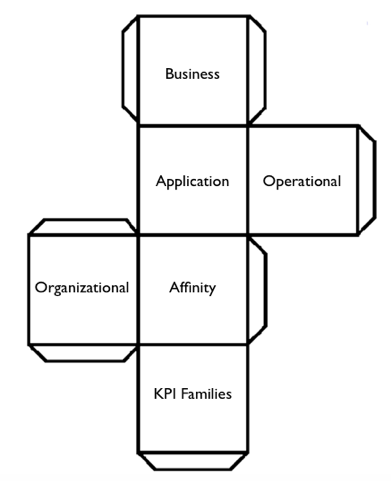
    cubeWe have begun to see promising beginnings of The Cube pop up within medium and large enterprises through popularizing algorithms and outfitting teams with ubiquitous mission control-style dashboards and screens in team areas. But it is only when these dashboards can integrate and harmonize wide varieties of development, operational and business KPI data that we will be able to claim that we have delivered full and timely context (i.e., “the Right Information”) to the staff sailing the enterprise ship.

    The hard part of creating The Cube is not so much the technology required to achieve its development and integration. The really difficult part is coaxing the organizational will to define and maintain the KPI taxonomies for each organizational unit and the integration points between them. Given that a fully mastered Loop doesn’t necessarily understand how KPIs, infrastructure and applications interrelate and affect each other, the Loop will forever be but a required stepping stone to The Cube.

    Will a Unicorn be Required for Unification?

    The current landscape of open-source and vendor tools to wield and tie together these ungainly enterprise models may not, as of yet, be sophisticated enough to both integrate and simplify the provisioning and cultivation of The Lines, The Loops and The Cubes. The sultry, siren-like call of the Unicorns, however, will likely beckon the cloud builders of today and tomorrow to create not just development to deployment pipelines, but also fully integrated feedback loops with intelligent understanding for how the data connects to form perspective.

    It is odd to think about, because with the idealized future state so close to actual possibility, it begs a new set of questions. Hordes of IT professionals around the world have been working to find faster and more fool-proof ways to deliver meaningful perspective into the hands of decision makers and first responders. We are so close now to that mission being accomplished that there are a few instances of the perspective itself not only being generated by “the robot” but also being handed to “the robot” to take the necessary remediation steps.

    The ending we are approaching, much like the beginning, circles around a question: “If we truly automate all the things, will there be any more work to do?”


  • Case Study: Stytch Before, After DevOps Culture, Tools

    Case Study: Stytch Before, After DevOps Culture, Tools

    Cloud analytics provider Stytch leverages its cloud-based analytics for customers who want to centralize, fuse and model their data. “Our mission is to make it easier and faster for business users to get insights and make decisions,” said Taylor Frost, cloud operations engineer at Stytch.

    Before the company implemented a DevOps approach, its primary software platform and some services were large monoliths maintained by disconnected teams. Stytch tested new features in isolated Jenkins jobs and performed quality testing and product releases manually in siloed realms that were out of sight and out of mind, Frost said.

    Stytch’s Dev, Ops and QA were walled  from each other, isolating the knowledge base of activities in any one group from members of the other two groups. Stytch teams did not share this information, and sister teams could not benefit from the insights this knowledge held.

    What’s more, developers did not have transparency into the products and tools that manipulated the cloud-based infrastructure or the build pipelines. “This fostered an attitude of ‘it’s an (Ops/Dev/QA) problem’ and discouraged a sense of ownership of or responsibility for success, which led to an increasingly lengthy feedback cycle and slower, less frequent builds,” Frost noted.

    Stytch lacked the orchestration and the down-in-the-weeds level of control it needed to enable real-time changes to labyrinthine back-end technologies without repercussions that could cause the customer base to suffer, and to speed and simplify deployment, she said. Standards such as Terraform or CloudFormation did not provide the fine-grained control of deployment that Stytch needed.

    The company’s Ops was in charge of Python software libraries, but other groups including Dev and QA needed access. Stytch also has a performance team that the company was eager to include in Python library development.

    Stytch After DevOps

    Stytch is using DevOps to unite teams and divide the various software monoliths into microservices for continuous integration (CI) and continuous delivery. The company has already fed its core software platform through the new build pipeline a number of times, and continues to create even more automated and efficient deployment processes.

    As it works to create homegrown Python orchestration libraries, Stytch is establishing a stronger grip on deployment. All teams connected to the pipeline including Dev, QA and Performance are actively expanding these libraries.

    Stytch increasingly intermarries its Dev, QA, Ops and Performance teams and enables and rewards collaboration across the stretch of the DevOps pipeline. “Our goal is transparent, scripted change integration, from check-in to testing and deployment. We empower our developers to take responsibility for their work, from check-in to production deployment,” Frost said.

    Stytch uses frequent meetings of a continuous delivery committee with members from all four groups to update the status of the pipeline. The company is swapping out Jenkins for Travis CI for builds and tests, making Dev more hands-on and able to gauge its work from start to finish.

    “Developers are iterating on their pipelines in the same way that they iterate on their projects,” Frost said. Stytch is able to find and fix problematic code earlier in the pipeline while accelerating development cycles. Customers are pleased with the faster rate of innovation on the software platform they use.

    New Infrastructure, Training = More Results

    Stytch has made cross-pollination of expertise common for pipeline teams. “We have an annual training allowance and our engineer-led ‘Ministry of Propaganda” holds regular afternoon sessions to introduce new technology and practices,” Frost said.

    As CI and continuous delivery processes grow, absorb and automate manual steps, related activities across the pipeline become more translucent for everyone. Both the Travis CI platform and the use only of scripted product releases and scripted tests for performance are increasing that transparency.

    The metamorphosis that has spread throughout the teams with direct access to the DevOps pipeline now extends to the rest of the company, as needed, such as with marketing. Frost provided an example:

    “Our marketing team was struggling to make good progress with regular releases of our WordPress-based website. Our engineers were fielding regular requests for basic tasks—starting and stopping servers, updating configuration files and retrieving logs,” she said. “We brought our engineers and marketing together on this. The result was a simple command-line tool that enabled our nontechnical marketing staff to perform complex actions on their own, including promoting their changes to the production environment.”

  • Test-First Development: Processes and Tools for Success

    Test-First Development: Processes and Tools for Success

    A lot of software development teams are talking about “test-first” methodologies. The practice involves moving testing up into the very earliest stages of development so automated tests can be written before code. Making this seemingly minor shift can result in much higher quality software and greater efficiencies. Integrating development and testing avoids needless late-stage bugs and complicated redevelopment efforts. It can help software development organizations focus on usability and features and achieve faster time to market. And because of test-first’s reliance on automated tests, organizations gain reusable tests, saving time and increasing standardization for testing and quality assurance overall.

    It’s no surprise, then, that 51 percent of organizations have begun using test-first methodologies, including 37 percent in the past year, according to a recent global survey of 200 software testers conducted by our company. But, despite the enthusiasm for this practice, there are concerns: 44 percent of survey respondents said their biggest fear about moving to this approach was forcing developers to contribute tests prior to completing code, while 19 percent said they worried about removing traditional testing checkpoints on the way to production. Other barriers include the lack of standard practices or tools. That said, test-driven development promises to bring ample benefits to software development teams, the business and, importantly, customers.

    Test-first development is recognized across three broad terms today: behavior-driven development (BDD), test-driven development (TDD) and acceptance test-driven development (ATDD). TDD is an umbrella term for the practice, although it has traditionally focused more on technical, unit testing. BDD and ATDD incorporate user requirements and business benefits along with technical testing. BDD differentiates through its adoption of specific automation frameworks and language for writing and running tests.

    Key Changes for Successful Test-First Development

    Getting started requires change across a few critical areas for most teams. First, evaluate your team for hiring and skills training needs. On the one hand, developers will need to learn basic testing skills, so they can write good tests and run tests before they develop code. Meanwhile, testers must become more proficient in automated testing tools, which usually entails acquiring a fundamental knowledge of programming. Many companies will need to hire key contributors from outside; in which case, leaders should look for well-rounded individuals with past experience using test-first methodologies successfully. An individual who is an expert at one skill, or who is too independent and can’t collaborate well, won’t be an ideal member of a team experimenting with test-first approaches. Leaders also may need to adjust by balancing the ranks more closely between developers and testers so that one group doesn’t rule over the other. Hiring additional experienced testers frequently will be necessary.

    Training of existing staff is paramount, best achieved through a combination of methods including internal training, mentoring, online courses and paired development, where developers and testers can sit side by side and collaborate. More than half of the survey respondents said developers and testers would be jointly responsible for automation test creation within their organizations.

    Beyond cross-training, the cultural challenge of moving to test-first methodologies can be overwhelming. It requires the development of incentives for creating quality products, not just delivering new features at speed. It requires an appreciation and respect for the practice of testing. Unfortunately, testing too often is viewed as a necessary cost of doing business, rather than bringing a clear benefit to the organization and its customers. That mind shift is not only inaccurate, but it doesn’t fly with progressive, Agile thinking. It will take strong leaders to help traditional teams understand the need to change and modernize practices. A leader may forego the buy-in process and instead decide to lay down the law to staff: Staff must move to TDD or BDD, or else. But the results won’t be ideal. Smart developers will find loopholes, such as writing tests that aren’t comprehensive or fully aligned with project goals, so the code will pass more quickly.

    On the process front, organizations that have moved or are moving from Waterfall to Agile and DevOps will have an easier time adopting test-first methodologies. In fact, it’s pretty difficult to implement test-first processes and tools in a Waterfall environment because of the siloed nature of functions and the long release cycles. The survey results support this premise: 55 percent of respondents said their testing process was Scrum/Kanban-driven before transitioning to test-first, while 21 percent said their approach was iterative-requirements driven and 18 percent was Waterfall-requirements driven.

    Along with that shift, test-first teams will need to adopt new metrics that align with this new way of doing business. Instead of looking solely at velocity, development leads should measure how long it takes the team to move a product from feature approval to code release. With a focus on quality and testing, companies also should measure and improve upon bugs, such as number of severe defects post-production. Those types of business and customer-oriented metrics align with the new set of Agile metrics that that many teams are working for today.

    Test-first teams will need to adopt DevOps toolsets, which are designed to push code out to the pipeline faster. Specific technologies that go hand in hand with test-first development include:

    • Continuous integration (CI) platforms such as Jenkins and Team City, to assist in running the automated tests immediately for quick build feedback.
    • Container technology for rapid deployment of test and pre-production environments, to capitalize on having features production-ready soon after coding.
    • Test management platforms including qTest Scenario or Cucumber Pro.
    • Test automation frameworks including Cucumber, SpecFlow , and other open source tools which enable easier support for customization and collaboration.

    There’s a lot to think about when moving toward test-first development. While it may seem overwhelming at first, all of this is achievable in a reasonable time frame if you have the right dedicated resources to see it through. One-third of survey respondents said it took them less than three months to complete the transition to a test-first approach, while 30 percent said it took less than one year. The payoff for software teams, in terms of improving quality, customer experience and reducing costs of innovation, can deliver higher customer loyalty and even faster growth in the marketplace.

    About the Author / Kevin Dunne

    Kevin Dunne picKevin Dunne is vice president of Business Development & Strategy at QASymphony.



  • Checks and Balances to Build Stronger Code

    Checks and Balances to Build Stronger Code

    Every software development needs coding; without it, nothing can be developed. The quality of the software depends on the way its developers write code. It’s an essential part of the system and the behavior of the system depends on it. A small mistake in coding may make the software vulnerable and unstable.

    Quality engineering works hard to find bugs to avoid potential problems with the software. QA engineers spend numerous hours and put tremendous effort into finding any problems with the software and reporting it to the developers.

    Cost of fixing the defects at various level.


    The cost of fixing defects at a latter stage increases exponentially; hence, you need more hours of QA engineers and developers to fix and run the entire release cycle again. If we can save some amount of time and effort, we can utilize resources in a more productive way.

    Can we make sure code is better-written, more tightly secure and has no potential bugs, and the right libraries are used?

    If we can implement it, we can at least make sure developers are checking to make sure there is less friction in the code?

    Here are few checks that can be implemented during creation or before passing code to QA to ensure it’s less buggy.

    Code Review

    In code review, the coder sends it to someone else for the review. It’s really a great way to verify the written code by a second pair of eyes to catch any glitch, logic or possible mistakes overlooked by the coders.

    This is part of the development process to make sure nothing is released without a second opinion. There are many ways and tools available to perform code review. These can be implemented and integrated with the source control tool. More on code review and details can be found here.

    Unit Test

    Unit testing tests a piece of the code by writing small code around it via supporting data and mocking it to test scenarios. It commonly is written by developers during the development, then run during source code compilation or independently according to various languages.

    This testing provides extra early warning to find problems before handing it off to quality check. Unit test coverage could provide details on how much has been covered by unit test cases. There are many ways to figure out the coverage.

    Static Code Analysis

    Static code analysis is the way to analyze at a very basic level without running the software or performing any testing. It can be done at compilation time or at development time by using client-side tools.

    Analysis tools look for any possible or hidden bugs, such as never-ending loops, or programming flaws. These tools do analysis based on a similar pattern but each in a slightly different way.

    Coding Guideline

    Each developer may write code in his/her own style with varying degrees of differentiation. This may create big problems when it comes to handing over of a project to different teams or coders. It may take tremendous amount of time to understand what’s been written by somebody else.

    To reduce this potential headache, organization may implement a coding guideline, or style of writing code for developers, to make sure everybody follows one systematic way that can be understood easily by other team members. There are different tools available for various coding languages.

    Library Check

    Open-source projects and other freely available tools in GitHub are making life easier for developers to use them in their projects as libraries. At same time, they can introduce several other problems with the software if libraries are not tested properly, including security vulnerabilities, untested components or licensing issues.

    There are many tools to help developers to verify their libraries.

    In Summary

    There may be many other verifications and checks required by an organization. Above are the very basic checks that can be implemented during the development phase to rule out any discrepancies related to security or legal issues. Checks could be implemented at the client side, where developers write code or during the continuous integration phase.

    There are many tools available in the market or the open-source community that can be used to verify and secure code to avoid unrealized bugs. It’s in the best interest of any organization to keep its software bug-free and reduce the amount of unnecessary resources working on such issues that could be caught early.


    Other References – http://www.scmtechblog.net/2016/08/code-quality-check.html

  • Tales of DevOps Discovery, Part 3: Q&A and Explanations

    Tales of DevOps Discovery, Part 3: Q&A and Explanations

    This is part three of the series, Tales of DevOps Discovery. To catch up, Read part one and part two.

    In preparing for a DevOps transformation a critical first step is to perform upfront discovery, often asking even the most fundamental, seemingly obvious, questions of stakeholders. The major portion of such discovery should be done in a group setting. Asking stakeholders these fundamental questions in a group setting can provide key insights into differing perspectives and even differing objectives regarding a planned DevOps implementation. Sharing these different perspectives during the discovery phase sets the stage for mutual empathy and enables stakeholders to identify and align, an important step to aligning on shared objectives. In this article we will outline common questions asked, share real-world answers and offer guidance on interpreting and applying the results.

    Discovery Question: What do you want to achieve with this transformation/DevOps?

    One of the first things to consider is, “Why are we doing this?” as this establishes the goals and objectives. Accordingly, I usually begin by asking the stakeholders during discovery what they expect to achieve through the transformation to DevOps. The answers I receive to this question often differ distinctly, depending on the role of of the person answering. Understandably, they are heavily influenced by the unique perspective of that role.

    Answers:

    CIO: “We want to increase our ability to “scale-up” delivery as we shift to a primarily SaaS (software-as-a-service) model and see a rapid increase in business. These means we have to increase developer productivity, and respond to customer requests faster, all while reducing our number of Severity #1 issues.”

    Operations:
    “We want to reduce technical debt, to minimize firefighting and increase our ability to adopt modern best practices such as Infrastructure-as-code. We have to be able to keep the lights on while delivering applications to production.”

    Development:
    “We would like to minimize customer-specific one-off work, which is resulting in painful complexity in development, QA (quality assurance) and deployment, and is an overall source of inefficiencies. We would like to be able to spend more time improving user experience, performance and increasing valuable functionality. But, instead, we are chasing bugs and reworking misunderstood requirements.”

    Guidance:

    Not surprisingly, executives often respond with a focus on business-oriented goals such as increased productivity and customer response, while Operations focuses on stability and minimizing firefights and Development wants to innovate. But within these differences we see some commonality that can be harnessed, such as productivity. For example, one point of commonality is productivity:

    CIO: “We have to increase developer productivity.”

    Operations: “… minimize firefighting and increase our ability to adopt modern best practices …”

    Development: ” … spend more time improving user experience, performance and increasing valuable functionality.”

    Another point of commonality in the CIO, Development and Operations answers is the focus on quality:

    CIO: “ … reducing our number of Severity #1 issues.”

    Operations: “We want to reduce technical debt … keep the lights on …”

    Development: “… instead, we are chasing bugs … ”

    These points of commonality can be used to establish common goals with cross-functional buy-in, such as:

    • Our effort will result in increased productivity and minimize overtime and firefights (across teams)
    • Our efforts will result in increased application quality and uptime

    They then can be used not just as driving principles that inform decisions such as process or tool choices, but also to establish key performance indicators (KPI), which will be used to quantifiably measure success of the transformation. Example KPIs may be:

    • Reduction in cycle time, from story acceptance to user acceptance (or release)
    • Number of Severity 1, or Severity 2 production issues per release
    • Defects per build
    • Defects per release
    • Hours worked by Development? Operations?

    Discovery Question: Do you practice agile today? If so, how do you define done for a story or sprint?

    Continuous delivery (CD) and lean practices are foundational to a successful, sustainable DevOps transformation (though not required to meet the some definitions of DevOps.) If we look at CD and lean practices as a pipeline through which we need to manage a continuous flow of changes represented by work, then it is important to consider what work is sent into the pipeline, how the work is initiated and how the changes are managed. Accordingly, it is important during discovery to ask customers high-level questions about development methodologies used and overall practices for definition, planning and coding.

    The answers given vary between different levels of, “Yes, we are agile,” “No, we are waterfall,” and, “We practice both.” Most Most often, organizations’ answers describe adherence to a form of agile with room for improvement.

    Answers:

    “We practice agile and/or scrum. We work in two-week iterations, planning the work for a sprint at the end of the prior sprint.
    We consider a story done once the code has successfully been committed and merged to a team branch, and is successfully built. We consider a sprint complete when all stories for that sprint are committed and successfully built.

    “Roughly every three months we integrate code from team branches to trunk and perform a mix of automated and manual regression and acceptance tests. Once the build passes QA we manually deploy to preproduction environment, validate and schedule a manual deployment to production.”

    Guidance:

    This is a classic story of agile adoption in traditionally waterfall organizations. The organization adopts agile within Development without involving other key functional teams such as QA or Operations. Usually, this is because it simply is easier. There are a number of obstacles to overcome in extending agile practices across organizational, technical and cultural boundaries, so the obstacles are avoided by limited the agile adoption to these boundaries.

    This is a case of confining the adoption to “agile upstream” while practicing waterfall or legacy “downstream.” Studies show that less than 33 percent of organizations have adopted “agile upstream” and exercise agile or iterative development practices for the planning, coding and team builds, yet only 13 percent of organizations have adopted agile downstream, and follow practices such as continuous integration (CI), CD, automated provisioning testing and deployment.
    Screen Shot 2016-07-18 at 11.07.34 AM

    The negative effects of limiting agile adoption to agile upstream are multifold, but can be summarized as, “You never really know when you are done-done.” As a result, you cannot accurately measure progress, introduce deferred risks or disrupt the development plan to address issues found during the downstream portion of the process, such as poorly understood requirements surfacing during acceptance testing or runtime issues discovered during deployment to a production-like environment or, in the worst case, issues found in production by the end user.

    A seminal book on DevOps is, “The Phoenix Project,” by Gene Kim, which presents three ways of DevOps thinking. The first way, “Systems Thinking,” addresses to this gap between agile upstream and downstream, Dev and Ops, business and customer by taking a systems view across the traditional boundaries and establishing “flow” of the system through the boundaries.

    Screen Shot 2016-07-18 at 11.05.09 AM


    Discovery Question: Do you practice CI today? What types of validation do you perform?

    As CD is foundational to DevOps, CI is foundational to CD. CI can be scene seen as the connection point for agile upstream to agile downstream, and the pump that fills the CD pipe. It is both the practice most organizations say they follow and the practice that most often is implemented incorrectly. So when surveying a customer’s current state during discovery, it is important to know whether CI is currently part of the picture.

    Answers:

    “Yes, we practice continuous integration. Each team has a Jenkins CI server. Developers commit their changes multiple times per week. Jenkins then builds the changes as part of a nightly build.”

    “We do some unit testing, but we do not track code coverage. If the nightly build fails we may continue to commit, but we usually fix the issues within a few days.”

    Guidance:

    This is a common answer and an example of how CI can be improperly implemented. CI is more than having a shared Jenkins CI server and running scheduled builds. CI can be defined as:

    “A a software development practice where members of a team integrate their work frequently, usually each person integrates at least daily – leading to multiple integrations per day. Each integration is verified by an automated build (including test) to detect integration errors as quickly as possible.” — Martin Fowler

    The benefit of practicing CI includes identifying integration and quality issues close to the source of the issue, thus reducing the time to correct and enabling higher-quality software to be developed more rapidly.

    Essential elements of properly implemented CI are :

    • Integrating changes frequently, ideally multiple times per day or even per change.
    • Performing consistent validation of quality through component level testing, code scans, etc.
    • Always maintaining a working build, suspending development when a build fails, and not resuming development until the issues is corrected or reverted.

    Teams that allow a broken build for “a few days,” deferring commit or builds to just “multiple time per week” or that do not validate consistently through testing practices are not practicing CI and will not yield the benefits of CI.

  • DevOps Chat: Steve Hazel, Sauce Labs

    DevOps Chat: Steve Hazel, Sauce Labs

    I recently had the chance to sit down and speak with Steve Hazel, CTO and co-founder of Sauce Labs. With so much being written and talked about the role of quality assurance (QA) and testing in a continuous integration/continuous delivery (CI/CD) world, it is good to hear from someone like Steve who is an actual thought leader in the space. Steve tells us what he thinks the limits of automated testing are, the future of QA and more. Have a listen for yourself to find out, or follow along with the printed transcript below!


    Alan Shimel: Hi, everyone. Alan Shimel, devopsy.kinsta.cloud here, for another DevOps Chat. Today’s DevOps Chat’s guest—that was a tough one—is Steven Hazel, co-founder, CTO at Sauce Labs. Steven, welcome to DevOps chat.

    Steve Hazel: Hi, Alan. Glad to be here.

    Shimel: Thank you. Glad to have you here, actually. So Steven, there might be some people listening who maybe aren’t familiar with Sauce Labs. So, before we start, why don’t we, if you don’t mind, give our listeners a quick overview? Tell us about Sauce Labs.

    Hazel: Yes. At Sauce Labs, we do automated testing for both web and mobile apps. We run a cloud service that gives our customers access to a wide range of platforms, whether that’s operating systems and browsers for web testing, or mobile devices and emulators and simulators for mobile testing. You can get access to all the different platforms you need to test on, and you can get access to a lot of platforms at once to run your tests in parallel to get through a large test suite rapidly, which is really what people need for today’s continuous integration and continuous delivery workflows.

    Shimel: Got it. Of course, Steven, Sauce Labs was closely linked with around Selenium and some of the open-source testing tools that are out there today, right?

    Hazel: That’s right. Selenium is the dominant web-testing technology. In mobile testing, there’s a variety of technologies, but we support Appium, which also uses the web driver protocol that underlies Selenium. We really think that fitting in with those open-source tools is the smart way to go. It fits with what people are doing.

    It gives people a lot of choices about how they want to do their testing, what kind of languages and frameworks they want to use on their end. So, we just plug right into Selenium tests, if you’ve already got Selenium tests, or Appium tests. You can just change the config and point them at Sauce Labs, and they’ll run unmodified on our systems.

    Shimel: Got it. Steven, we were talking before we started recording today, I was telling you about a recent article we had over on devopsy.kinsta.cloud. The gist of it was basically that DevOps was the death knell for QA. I told you I didn’t agree with that and you agreed with me. You said you didn’t agree with it, either. But for our audience—they’ll respect you a lot more than they respect me—why don’t you agree with that, Steven?

    Hazel: Yeah. I think that to suggest that there’s no longer a role for manual QA when you take on a DevOps process is just not in line with the facts. If you look at what we see large organizations doing, they’re not dropping manual QA for automation. They’re changing the mixture of what they have manual testers doing by quite a lot, but they still have manual testing teams. You still need a manual testing team.

    So, what I see happening, as you start to take on automation, your testing coverage improves dramatically because you can afford to do a lot more testing when you’re automating than was ever possible with a manual testing team. But automated testing, the classic example is exploratory testing. You’re just not gonna get the kind of creative, exploratory walk-through of your app with an automated test that a manual tester can do. I think there’s still a role for QA organizations, beyond just manual testing, in being the other side of the conversation, right?

    A lot of people have the concern that if developers are writing tests, it’s the inmates running the asylum. The exact developers writing the software are the ones deciding whether it’s high quality, and you want another perspective in there. You want a perspective that’s maybe closer to your end user. So, I think that the other side, beyond just manual testing, that you see with QA teams continuing to have a role is in deciding what cases should be tested, whether you have good test coverage, encouraging good testing practices, even when you are automating your tests.

    Shimel: Absolutely. Really, Steven, I guess the boogeyman in the room around the friction with DevOps and QA is automation. There’s some schools of thought that says, “Well, we can automate everything. The more we automate, the better we are.” There’s another school of thought that says, “Well, you can automate as much as you can and automation’s not a bad thing, but there are just gonna be some things that are not automatable, if that’s a word now, or may never be automated. Where do you go in on that continuum?

    Hazel: Well, being someone who’s pushing forward automated testing, I want to see automation go as far as we possibly can. I think that that’s very far. That said, I think that the way the mixture of tests changes as you adopt automation is maybe a little bit counterintuitive. You might imagine, well, we’ll automate some percentage of our manual test cases, maybe 80 percent or 90 percent. Maybe we could get to 100 percent if you’re a zealot for automation.

    But actually, what you see is, it’s not that you’re automating a percentage of what was there in manual testing. You’ll actually have more automated test cases than you were able to do with manual testing. So, if you just looked at the number of test cases, your automated cases are gonna way outnumber the original count of manual test cases just because you can, right? You can now cover a lot more edge cases, a lot more scenarios because of the power of test automation. So, that’s a real advantage to test automation.

    Shimel: Sure.

    Hazel: At the same time, certainly there are things, visual testing, there’s some interesting approaches out there, but I don’t think we’ve yet seen a way of making sure that the app looks right, especially as it changes. You really need a human being involved when there are deliberate visual changes to make sure that they came out right. I think it’s those things where automation really can’t give you an answer about, does it look right? Does it act in a way that’s gonna be acceptable to somebody?

    I think you still need a human being in there at some point, checking those things, but it’s a different process. It’s no longer this phase gate before every change is released that you used to have. It’s now a process that can be made asynchronous from the bulk of your development and release process.

    Shimel: Absolutely. If you don’t mind, Steven, a little bit of time on, you mentioned a little bit, but what do you think of the kinds of tests that lend themselves well to automation? Certainly, a visual test of an interface, different arts. What are the sweet spots for automated testing?

    Hazel: I think certainly at the bottom of the testing pyramid, unit testing brings tremendous value. It’s something that’s very easy to automate in a way that’s completely deterministic, very fast. Gives you really quick feedback as a developer as you’re making changes to the code on whether you’ve broken something. But the coverage with unit testing, the coverage of functionality that may be important to your end users, it’s really hard to achieve. It’s really hard to achieve good, solid feedback from your unit tests that you haven’t broken anything anywhere.

    Functional testing, the next layer up, which is what really we focus on, gives you that complete end-to-end check. You’re actually testing the features of your product and you’re making sure that end to end, with all the various components involved, they work properly. That’s more of a challenge for automation, but we’re seeing, I think, a majority of development organizations out there seeing success automating functional tests and real value from having that be something where you can run through hundreds of test cases in minutes and get feedback to your team. So, that works quite well for automation.

    I think it’s that next level up, as you start to get into the types of tests where you’re looking at, what’s an acceptable experience for the end user? User acceptance testing as distinguished from functional testing, where you’re really starting to look for, does it look right? Does it act right? Is the response time throughout the entire process acceptable?

    You can zoom in and measure a lot of these things very specifically, but getting the answer to, “Overall, though, was it a good experience?” That’s the kind of thing where it’s really tough to cover that with automation.

    Shimel: Yeah, agreed. Steven, if you don’t mind, I’m an old security guy prior to DevOps. One of the things within the security community that we’ve really pushed around is the idea of automated security testing shifting left in a DevOps environment and allowing security testing to be done in an automated fashion at a CI/CD-type of level. Where do you see that in this whole discussion?

    Hazel: Security testing isn’t what we focus on at Sauce Labs, so –

    Shimel: Right, I know.

    Hazel: I’m not an expert in this, but it is something that I follow and care a lot about. I think I see a lot going on with static analysis, with some of these tools that can help to constrain the types of mistakes that you could have in a program, type systems and things along those lines. I think really that’s very badly needed in making code secure. Some of the issues we’ve seen come up over the last few years, things like Heartbleed, the Glibc bug, really those kinds of things aren’t acceptable, aren’t something that we can continue to have happen, and I think the solution really is fully automated tools, like static analysis tools and type systems, that can lock down the code and just constrain the types of mistakes that could possibly happen.

    Shimel: Sure. You know, Steven, I see it as very analogous to the QA situation, which is I think a lot of security people get very territorial around job security because they’re afraid somehow that doing automated security testing earlier in the process—shifting left, so to speak—is somehow gonna affect their livelihoods, or make them obsolete.

    Hazel: I can see that. We see that among QA folks, for sure. To me, that’s a shortsighted view. If the world is getting more intense security problems, more intense quality problems, we’re shipping more software, you just can’t solve it 100 percent by throwing bodies at the problem. I think that what’s gonna happen is not that those people’s careers are in jeopardy; instead, as a society, we’re just gonna do more and better security and quality testing than we’ve been able to do in the past.

    Shimel: Yeah, agreed. Steven, we’re running a little low on time, so let me get just one or two more questions. Sauce Labs has been, in my opinion anyway, for what it’s worth, somewhat of a DevOps darling in terms of really encompassing—you’re living the DevOps model. You’re working with open-source tools, testing and automation, enabling automation. Sauce Labs is a player in the DevOps ecosystem. Where do you see it going?

    Hazel: Well, toward the enterprise is one big trend we’re seeing. Earlier on in the history of Sauce Labs, a lot of our customers were essentially software companies, companies that their primary focus is technology. Now, a lot of our customers are retailers, financial institutions—companies that you don’t think of as primarily a software company, but all of these companies have apps, they have complex web experiences. They’re really adopting DevOps in a big way. They’re moving to what is, for them, a very different process than what they’ve been doing and allows them to ship better software faster, with more complexity than they were able to handle before.

    Shimel: Absolutely. Steven, we are low on time. I’m gonna ask you the final question, which I ask most all of my guests here on DevOps Chats. That is, if you had to recommend one book to our audience that they should read, a must-read for them, over the next six months or a year, what would that book be?

    Hazel: Oh, wow. A book recommendation. I think the obvious choice in a conversation about DevOps is “The Phoenix Project.” If you haven’t read it, you’ve got to read it. It’s a quick, enjoyable read, but it really gets the concept across better than probably anything else is going to. It’s an obvious recommendation, but I still think it’s worth it.

    Shimel: Sometimes the obvious is good. I will just add to that, if you already have read “The Phoenix Project,” Gene Kim’s next book, I think co-written with John Willis and Jez Humble and someone else that I’m blanking on – oh, darn it, the guy who started DevOps, who coined the phrase. Patrick. Patrick Debois. Their new book, I think it’s called “The DevOps Handbook,” will be out, I want to say, in the fall. Not a sequel to “The Phoenix Project,” but another good book to look at.

    Anyway, Steven Hazel, CTO, co-founder of Sauce Labs, thanks for being this episode’s guest on DevOps Chat, and continued success with Sauce Labs.

    Hazel: Thanks a bunch. Thanks for having me.

  • Follow the Simple Path of Nirvana to DevOps

    Follow the Simple Path of Nirvana to DevOps

    Perhaps the title of this post is a misleading, as nothing is truly “simple. But there is a well-defined pathway to achieving DevOps goals for any size company. Just follow a step-up pattern by adopting the principles of agile, continuous integration and continuous delivery, and you will reach your goal of DevOps. This path is a natural progression of DevOps maturity that an organization can follow while adopting key principles and technology solutions along the way.

    pipe

    Agile Development

    Adopting agile development methodologies often is the first step maturing organizations take, as they no doubt have heard the resounding benefits of leaving behind waterfall software development life cycles. There is a reason this is the first step. It helps your organization’s employees mature into a tightly knit working machine that fosters improvements in driving down technical debt while also laser-focused on building key features.

    As agile teams continue their maturation, they’ve roped in key business stakeholders who are able to grasp the drivers of technology challenges and are able balance out the growth needs of the business with the sustainability requirements of the technology teams. Suddenly, teams are investing a minimum of 20 percent of their sprint time to dealing with technical debt and reporting out these victories to their product owner(s). These small wins become major victories as the unwieldy pieces of infrastructure and software of the business become relics and folklore of yesteryear.

    But there is an underlying reason why agile development is the most crucial first step: It truly empowers the developers to improve the customer experience and feel good about it. With the scrum master’s shields up protecting the team from burnout and ensuring sprint planning happens, team members are more likely to be passionate about their work and the results of their efforts to the business and customer. This is where the empowerment of DevOps really begins.

    Continuous Integration

    As teams mature along the agile development continuum, the next step in their DevOps maturation is moving on to  continuous integration. Continuous integration is the process by which a company automates its software build process: code check-in triggers a build job that then triggers a test validation job and so-on. This process enables teams to continuously integrate their code build with downstream processes, avoiding manual touchpoints.

    In addition, this paradigm allows for faster feedback loops to ensure a higher quality product, and empowers diverse teams to work together utilizing automation as the “middle man.”

    Continuous Delivery

    The third step in DevOps maturation is continuous delivery. Often businesses confuse “delivery” with “deployment”—in fact, continuous delivery is simply the process to ensure that at any given point a company’s software is in a state where it can be deployed. This is useful for quick iterations, A/B testing and a more mature way of delighting customers fast and often.

    A key component of continuous delivery is ensuring that software is ready for production. When a team is doing continuous delivery, they’re assured that they’re nimble and responsive and adhere to the highest quality standards.

    DevOps

    At this point, the company has reached the DevOps nirvana state. This is where software is not just delivered continuously, but all of the operational needs are constantly met. Monitoring, metrics, the ability to automatically roll back software releases, scalability and much more are the key building blocks to a powerful DevOps organization.

    With this thoughtful step-by-step process of DevOps adoption, organizations can meet the needs of business in a mindful and cohesive way without compromise.

    I’d love to hear any feedback or tips on DevOps at @jsin.

    About the Author/Jason Shawn

    jason-profileJason Shawn is a technology leader in DevOps and Cloud. His began his career as a software developer and has held multiple functional and managerial roles which has found him with a unique perspective on the software development lifecycle. He’s extremely passionate about Continuous Delivery, Agile software development, and empowering teams to adopt DevOps and Agile principles in their daily lives. He is also a member of the Cloudbees Customer Advisory Board and enjoys public speaking, travel, and time with his family.


  • On Building Self-Driving IT

    On Building Self-Driving IT

    More CIOs than ever are moving their data centers to the cloud. Some have decided to maintain their on-premises data centers and move cloud-first with all new deployments, while others are moving more aggressively to all-cloud and are retiring on-premises hardware and software as quickly as possible. Both types of enterprises also are working to automate as much as they can to not only cut costs, but also improve their user satisfaction and the productivity of their organization though higher efficiencies.

    Aater Sulemen, co-founder and CEO of Flux7, a DevOps and cloud consulting firm, is an expert in hardware architecture and performance optimization, and has spent more than 10 years working with cloud. He calls that hyper-automation “self-driving IT.” This push-button IT works much the same way many expect self-driving cars to work in the not-so-distant future: Push a button, summon a car, instruct it where you want to go and it takes you there.

    In this view, when business users wants an app, a database or even more infrastructure, they reach out and request it. They fill out a form, the system determines the proper security and governance policies that should control such systems and data, they push a button, and it’s delivered.

    And rather than IT enforcing these rules manually, developers build the right tools to enable this, enabling developers to be autonomous. As the theory goes, technology gets deployed much more quickly, and when the systems are built properly, compliance and security are improved.

    devopsy.kinsta.cloud: What does “self-driving IT” mean to you?

    Suleman: It’s about achieving successful DevOps through automation. It’s not about dictating rules, or what should be done, but making the processes associated with DevOps seamless.

    Self-driving IT means that the business does not wait for developers or operations to get things done, and they don’t wait for each other. If someone needs something, from an application, to expanded infrastructure, to test and development environments, they should be able to push a button and get it done.

    Self-Driving IT is a way of automating the repetitive events and all of the process overhead and the auditing and logging systems, when someone needs a new application or service they can just get it, and it’s ready. They don’t need to wait weeks, or longer, to provision the apps, storage, servers that they need. Just like a self-driving taxi, they call it and use it.

    devopsy.kinsta.cloud: What are some of the challenges that organizations face when moving to “self-driving IT?” themselves?

    Suleman: There are known hiccups, and there are areas companies know how to smooth very well. Typically, the hiccups within enterprises are in terms of skills necessary to essentially provision infrastructure and make infrastructure provisioning very automated. Then there are the skills needed to create the tests that need to be created, and the automation that can be done around that. We don’t see such a fundamental issue there. Usually the issue that people have is a skill-set issue—They don’t have the skills or the right mindset and place for building self-driving IT themselves.

    I think, generally, most organizations run into trouble when they have to make major changes to the infrastructure and how they will support that. There are a lot of changes that need to be made, and they may not be ready.

    In most cases, if you’re making such a major change that there is going to be a brand new infrastructure designed and built, organizations are going to need some guidance and support through that.

    Another aspect here is that the infrastructure isn’t always the highest priority. So the focus isn’t always there to automate it. But when you need a database, you need a database. There’s no getting around it. So it’s a higher priority and it actually gets done, and the underlying change to the infrastructure that needs to get done to automate doesn’t get done.

    devopsy.kinsta.cloud: Where do you see this heading in a year to 18 months? Do you see more companies moving down the path to self-driving IT?

    Suleman: That is a very interesting question. We have been having a lot of discussion around this very subject lately. There are actually two kinds of customer perspectives. There’s the, what I call, IT view of automation. So IT cares about, “I can create a server with one click, backups happen automatically and I don’t care what’s run inside the server, because to me, these are just boxes. I have 80 boxes on-premises and now I have 80 boxes in the cloud. And this is self-driven IT because I can press a button and spin up a new server.” That’s a fair definition from an IT perspective.

    This is where the continuous integration/continuous delivery and (CI/CD) becomes interesting. When you wear your DevOps hat is when you see that there’s a whole new world inside those boxes. Well, what IT likes to think as boxes. And self-driving IT now has a whole new meaning: code deploy, configuration management, patch management … the stuff that is inside the virtual machines becomes very different.

    A new class of customers has started emerging. This is as recent as early this year. They used to think of virtual machines as boxes. “I don’t know and don’t care what’s in there. What I care about is I have a box in the cloud,” they’d think. And now they have evolved to just wanting to move huge segments of their enterprise to cloud.

    We’re actually working with a lot of this right now. It’s not DevOps, because it’s automated Ops. This is a new level of discussion; this isn’t an app team moving to the cloud or modernizing. It’s CIOs calling and saying that they don’t want to build another data center, that they want 5,000 virtual machines migrated.

    devopsy.kinsta.cloud: That’s fascinating. This sounds like it’s the natural evolution of cloud and DevOps?

    Suleman: Exactly. To us, self-driving IT has been synonymous like cloud, just like DevOps is. In fact, cloud has always been means to achieve DevOps, and CI/CD and configuration management follows. Now it’s a different mindset. They’re looking for a way to not deal with the servers. So, now what is happening is, when it’s time for a refresh, they are either going to call a hardware provider and ask for 5,000 boxes, or they’re going to decide to move to the cloud. And if they have a tight deadline, like under a year or six months, they don’t have enough time to “DevOpsify” 500 applications. They end up wanting a one-to-one migration, so that they don’t have to invest in a new data center or upgrade their current data center.

    It’s a very interesting conversation, and it’s front and center with a lot of enterprises now.

  • Give Test Automation the Respect It Deserves

    Give Test Automation the Respect It Deserves

    One of the key mantras of DevOps is “continuous.” Effective DevOps relies on automating routine tasks. Any step in the process that requires human intervention or manual input becomes a roadblock that can slow or halt productivity. To the extent that it’s possible, anything and everything should be automated—and that includes testing.

    Test is like the Rodney Dangerfield of DevOps—it gets no respect. It should, though. Test—and test automation—is a crucial element of a successful DevOps program. A recent Gartner survey found that 50 percent of respondents listed test automation as one of the top enablers of DevOps success.

    Joan Wrabetz, CTO of Quali, is focused on automating test capabilities and ensuring that testing gets the respect it deserves in DevOps. DevOps isn’t really a process with a beginning and end. It’s a continuum—a self-perpetuating cycle. When test teams take the lead, they need to find ways to push automation back into development and forward into staging and production. “In fact, the problem of test automation is particularly difficult, and this means that the team that implements test automation is in a great position to lead DevOps initiatives beyond test,” Wrabetz says.

    That self-perpetuating cycle “starts” with planning and development and “ends” with deployment into operations, but that flows right into monitoring and management, which leads to discovering issues and identifying new feature requests—and that takes you right back to planning and development. If done properly, test falls somewhere in the middle of that cycle, so it’s imperative to streamline and automate that functionality as well.

    “Sometimes test drives DevOps. Test organizations have been focused on automation already for 10 years, so often they are the driver for DevOps,” explains Wrabetz. “When test is the focus of DevOps, it is called continuous integration. However, it is also important to work to continuously expand automation outside of test.”

    Key Drivers

    According to Quali, there are five key components that are essential to successful automation in a DevOps environment:

    1. The infrastructure. It starts with one very important characteristic that is critical to testing and often is not automated—the ability to automatically mimic the production infrastructure in which the software (or hardware) being tested is expected to run. Having the ability to give each tester (or set of automated tests) their own personal replica of the target production infrastructure—a.k.a. a “sandbox”—is critical to ensuring that the software coming out of test can be deployed automatically and continuously into production. Automating tests is not nearly as difficult as automating the underlying infrastructure in which those tests run.
    2. The production environment workload. Often not considered in automating testing is the requirement to mimic the workloads that would be common in production. This includes the network traffic, other application workloads and network security profiles. These activities need to be automated within the sandbox to create a more realistic environment for testing.

    3. The Tests themselves. Of course, the tests themselves also need to be automated and there are a variety of tools to assist in this process. As software gets more complex, this continues to be a challenge, with mobile testing replacing GUI testing as the most challenging type of testing to automate.

    4. Reporting and result analysis. To provide continuous automation from development through testing to delivery, it is important to see and analyze test results automatically.

    5. Tool Integration. Automation into and out of testing needs to be enabled. This means sandboxes and test automation suites need to be API-driven so that they can be started by a previous tool in the DevOps tool chain and can also initiate a tool that follows testing in the tool chain.

    Show Some Respect

    Testing is a crucial part of the DevOps continuum. It needs to be done properly and effectively, but it also needs to be a streamlined process that drives DevOps forward rather than a hurdle that slows everything down.

  • DevOps Matchmaking: APM + CI = A Perfect Marriage

    DevOps Matchmaking: APM + CI = A Perfect Marriage

    As anyone who has ever been set up on blind dates by friends can attest, finding the right match in today’s world is a tricky feat.

    There’s a lot of evidence suggesting that the frantic pace of life makes such matchmaking more difficult than ever. That said, when the right set of complimentary traits exist and there’s a willingness to find common ground, things can work out.

    Spike Jonzian-notions of artificial intelligence aside, certain technological partnerships are increasingly being perceived as “a perfect marriage” within the context of DevOps automation.

    Register today for the upcoming webcast: “Using APM to Turbocharge Continuous Integration”

    These technological matrimonies closely support the underlying tenets of DevOps methodology—collaboration, experimentation and increased velocity. In fact, it’s easy to wonder why no one ever conjoined them before. But we were using traditional waterfall development and operations and so couldn’t conceive of such a thing. On the other hand, emerging availability of tooling supporting new integrated workflows represents a significant catalyst.

    Finding the Perfect Fit

    One such DevOps confederation getting a lot of attention is the matchmaking of continuous integration (CI) and application performance management (APM) technologies. Tying together these once-disparate systems makes a lot of sense, despite the fact that few tools would seemingly appeal to more (traditionally) polarized constituencies.

    Continuous integration has been a staple of the development community for many years. It emerged as teams evolved the practice of long build times into more frequent check-ins to deliver code and look for potential errors more quickly. Today, with the rise of CI tools such as the Cloudbees Jenkins platform, some development teams are touting tens of thousands of builds per day.

    On the other end of the spectrum, squarely on the turf of IT operations, APM has been evolving rapidly over the past few years as organizations have sought to improve use experience and applications reliability via dedicated monitoring. Enabling this ability to identify and address emerging issues has resulted in APM becoming the fastest-growing segment in the IT ops management market, according to Gartner.

    DevOps matchmaking factors in when you bring these tools together to create an automated workflow that spans their respective use cases. A cross-functional team can leverage APM-level monitoring and KPIs within the domain of CI and testing to identify potential performance obstacles introduced in new code. Doing so then rather than waiting to respond later in the applications life cycle benefits everyone.

    Reaping the Benefits

    For example, say an e-commerce applications developer has implemented a new inventory search functionality—something considered a key differentiator by business management. The developer knows this feature could rely heavily on some back-end database system and wants to ensure it’s tested properly, even as the code is being introduced.

    Integrating APM and CI allows the entire team to monitor the process and test various conditions related to the update, tracking multiple builds and looking out for related performance issues. Such integration also allows for centralized tracking of other key attributes such as build number, status and build date, to further ease management.

    Most importantly, by tying these two critical aspects of the applications delivery life cycle together, the collaboration and feedback loops required to truly embrace DevOps methodology become ever more valuable as these core Dev and Ops functions become intrinsically linked.

    If this type of DevOps advancement gets your heart pumping, you’re not alone. Later this month, we’ll host a webcast here on devopsy.kinsta.cloud featuring experts from CA Technologies and Cloudbees. They’ll be discussing the benefits of matchmaking with APM + CI integration. They’ll also detail real-world benefits organizations leveraging integration of our respective technologies (CA APM and Cloudbees Jenkins) enjoy.

    We obviously feel that this is a DevOps tooling marriage that will mature, change and stand the test of time. We’d love to garner your questions and feedback on the topic.

    Which is all good, because thankfully there’s no such thing as Tinder for DevOps … yet.