Tag: content delivery network

  • Cloudflare Adds Digital Experience Monitoring to CDN Portfolio

    Cloudflare Adds Digital Experience Monitoring to CDN Portfolio

    At an online CIO Week event, Cloudflare today added a digital experience monitoring capability to a portfolio of services layered on top of its core content delivery network (CDN).

    Corey Mahan, director of product management for Cloudflare, said the Cloudflare Digital Experience Monitoring service extends a Cloudflare Zero Trust platform based on agent software dubbed Cloudflare WARP. The solutions delivers a wide range of software-as-a-service (SaaS) offerings spanning everything from data loss prevention (DLP) to email security.

    He added that the overall goal is to reduce the total cost of IT by delivering SaaS application services more efficiently using a single agent rather than having to deploy multiple agents for each service.

    The Cloudflare Digital Experience Monitoring service, available as a private beta, will enable IT teams to leverage the Cloudflare CDN to measure and analyze controlled data flows to public or private resources by emulating traffic flows using synthetic data. Via integration with the Cloudflare Zero Trust platform, IT teams can also access real-time data visualizations highlighting anomalies in connectivity or performance that might, for example, be indicative of a security breach, noted Mahan.

    While there’s no doubt IT organizations are looking to streamline the number of IT vendors they need to manage, it’s not clear what the center of gravity will be for achieving that goal. Cloudflare is making a case for using the same global CDN that many organizations already rely on for networking services.

    The Cloudflare Digital Experience Monitoring service leverages the company’s CDN to make it simpler to understand, for example, why users in one geography experience sub-optimal application experiences compared to another, said Mahan. That’s especially critical when more organizations than ever have employees working from home across multiple geographies, he added.

    In the longer term, more networking and security functions will be consumed as a service. The challenge then becomes integrating those services into the DevOps workflows that are employed to deploy applications across a highly distributed computing environment. In many cases, what might initially appear to be an application performance issue winds up being a network connectivity problem that is more easily solved.

    One way or another, the management of IT services in the months and years ahead will continue to converge. Organizations of all sizes will need to determine whether it makes economic sense to acquire platforms they need to manage versus consuming a service that is managed on their behalf. Most of the time, a service will be easier to consume and free up resources that can be applied to other IT functions, such as application development.

    Of course, organizations will also need to take care to avoid locking themselves into a specific services provider. Ultimately, however, the question is whether managing a specific IT function provides enough differentiated value to be worth the time and effort when there is so much more to do.

  • Fastly Adds Observability Tools for Edge Computing Environments

    Fastly Adds Observability Tools for Edge Computing Environments

    Fastly, Inc. this week added a set of observability tools to its portfolio that are optimized for edge computing platforms connected to its content delivery network (CDN).

    Laura Thomson, senior vice president of engineering at Fastly, said the company is now providing a set of tools that enable DevOps teams to capture logging data and metrics in real-time via a single console.

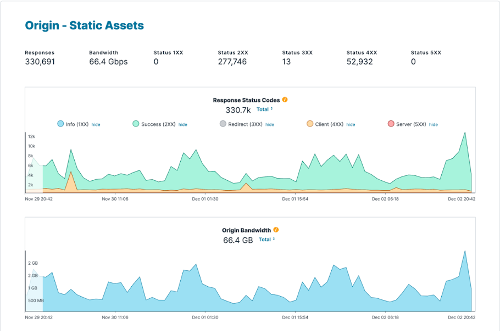
    The first two available tools are Origin Inspector—to observe network traffic flows including HTTPS response codes—and Domain Inspector—to access metrics based on both historical and real-time data. In total, Fastly is now providing access to more than 200 metrics spanning client, origin, cache, web application firewall (WAF), Compute@Edge, Image Optimization services and others that cover 100% of the data generated since the service was spun up.

    There is no sampling of data, and the company is also providing integrations with 33 storage and analysis services provided by either Fastly or a third party, noted Thomson. IT teams can now log any aspect of HTTP requests and responses through a large variety of logging formats, including the Common Log Format, JSON or as a key/value store. IT teams can also store their own logs to make sure they retain complete control over access.

    Over the next several months, Fastly will continue to expand this portfolio of observability tools, including an Edge Observer dashboard it is providing to customers that are deploying applications at the edge, added Thomson.

    In general, observability tools are being used to not only improve processes and overall customer experience but also identify and block suspicious activity. Fastly is making a case for observability tools that enable DevOps teams to achieve those goals without necessarily having to deploy a separate observability platform.

    Of course, most DevOps teams have been continuously tracking various pre-defined metrics for years. Observability tools, in contrast, are designed to make it feasible to interrogate logs, metrics and traces so that IT teams can discover issues before there is a disruption to services. The challenge, of course, is that not every IT team necessarily knows how to shape the queries required to discover the root cause of a potential issue.

    One way or another, DevOps teams will need to be able to remotely diagnose edge computing issues as the number of workloads deployed on these platforms expands. IT teams are not going to be able to travel to the physical location of every edge computing platform every time an issue arises. In many ways, the rise of edge computing will force a transition to observability tools that will enable IT teams to more proactively manage IT environments rather than respond after a metric has already exceeded its threshold.

    It’s not clear to what degree that approach will prevent IT issues from occurring, but the amount of time required to detect and remediate issues should dramatically decline as more visibility into IT environments, including edge computing platforms, is gained.

  • More and More Enterprises Go Headless

    More and More Enterprises Go Headless

    IT faces high expectations for building and supporting omnichannel digital experiences. Simultaneously, web developers hold an evolving toolkit of architectural approaches to deliver content. One such framework gaining mindshare is headless, a style that decouples front end user experiences from back end application logic.

    Legacy options for content delivery can be somewhat cumbersome in that they don’t apply well to scenarios beyond websites. On the other hand, a headless framework uses web APIs to communicate with clients, making it a more adaptive model to support new devices and use cases.

    WPEngine recently released global research on the state of headless. Below, we’ll review the top findings from The State of Headless: A Global Research Report. I also met with Matt Landers, developer relations manager, and Jason Bahl, principal software engineer at WPEngine to discuss the evolution of headless and its future implications for developers.

    What is Headless?

    First off, what is headless? Headless decouples the front end from the back end, thus separating the user interface (UI) from the data and code that powers it. The headless movement represents a shift from traditional content management systems (CMSs) such as WordPress, Squarespace and Wix.com. These platforms are less extensible, as they intrinsically unite the back end with user-facing representations. Traditional CMS is “typically not that easy to scale,” noted Landers.

    Headless challenges the status quo by offering more flexibility. As headless adopts API-based content negotiation, it could essentially deliver highly personalized experiences to any connected device. This could help support emerging platforms, like mobile, voice assistants or augmented reality (AR).

    Simply put, headless is “a CMS that is not responsible for rendering the site,” Landers explained. “What attracts people to headless is component-based architecture and the ability to build isolated components,” he added. For example, a headless framework could include an author bio component that is reused in any custom style across devices. By deploying to a CDN, headless could enable high-speed performance, as well.

    Headless Adoption Surges

    Interest in headless is increasing across the board. Currently, 64% of enterprises surveyed adopt a headless approach, representing about a 25% increase from 2019. Furthermore, headless use is expected to grow: over 90% of organizations not currently using a headless setup plan to evaluate a headless option in the coming year.

    The strong interest in headless likely represents a growing necessity for large enterprises to support various digital channels in a consistent manner. In fact, 92% of organizations credit headless with delivering a more consistent content experience, the report found.

    Benefits of Headless

    A key benefit to introducing headless is the decoupled nature of the approach. This makes it possible to support multiple platforms, such as websites, mobile apps, IoT devices, connected kiosks, smartwatches, voice assistants, AR and virtual reality (VR) from the same source.

    Respondents also cited additional benefits to adopting headless such as increased performance, quicker time to market and rapid innovation. These positive attributes make sense because, with headless, applications only request the data they need. Therefore, headless could certainly facilitate more dynamic applications and custom-tailored user experiences. If used effectively, headless setups reduce bloat to create fast-loading digital experiences that further the SRE agenda.

    Tech Choices and Use Cases

    An average organization is spending $2.6 million on their headless implementation, found the report. So, what are they spending it on? Well, some common headless frameworks and SaaS platforms include Contentful, GraphCMS, Atlas, DatoCMS, Cosmic, Netlify, Sanity.io and Prismic, among others.

    While the report didn’t query respondents on their exact headless stack, it revealed a general satisfaction with headless solutions, with relatively high net promoter scores (NPS). When selecting a headless provider, respondents tend to consider performance (41%), e-commerce (35%), scalability (33%) and APIs and extensibility (30%).

    Though headless spans many use cases, e-commerce is clearly a primary use case for the headless stack, with 51% of respondents adopting headless to support e-commerce. Other top use cases for a headless approach include a website (52%), IoT (47%) and progressive web apps (40%).

    Drawbacks of Headless

    Though headless provides impressive malleability, it does require a shift in thinking, and implementors must inevitably overcome certain drawbacks. API security, for example, is at stake as API attacks and threats increase.

    Headless could also require additional administrative burden in terms of data integration and upkeep. With headless, instead of using plugins, IT must enlist front-end developers to integrate data and build front-end behaviors. Debugging a decoupled front end and back end can also be an added development burden. “There is an opportunity in the headless ecosystem in general to mature the experience for the content publisher,” describes Bahl.

    Future of Headless

    Within today’s remote economy, most acknowledge that digital experiences are now crucial to supporting business at large. In fact, 92% of organizations believe digital experiences are vital to their organization’s success, found the report.

    Headless architecture promises to retain a stable back end to support these escalating digital demands — especially useful considering the ever-changing nature of front end clients. On that note, the report found that 32% and 31% of respondents adopt headless for VR and AR experiences, respectively. Therefore, the headless approach appears to be a valuable technique to future-proof current investment against emerging digital trends.

    The State of Headless: A Global Research Report, conducted by Vanson Bourne between January and February 2021, surveyed 400 IT/technical employees with knowledge of headless. For more insights, you can read it in full here.

  • Cloudflare Expands Range of CDN Alternatives to the Public Cloud

    Cloudflare Expands Range of CDN Alternatives to the Public Cloud

    Cloudflare, a provider of a content delivery network (CDN) based on more than 200 data centers, this week announced it has made available a Durable Objects capability in beta that makes it possible to run stateful applications across a distributed serverless Cloudflare Workers service.

    Company CEO Matthew Prince said Durable Objects provide a truly unified approach to managing storage and state that ensures low application latency across the CDN service.

    Cloudflare this week also launched API Shield, which employs client certificate-based identity and strict schema-based validation using hosted public key infrastructure (PKI) that only allows application programming interfaces (APIs) with known behavior and identities to access the CDN service.

    The company also added a Cron Triggers tool that enables IT teams to schedule jobs on Worker nodes rather than always having to make HTTP requests.

    Finally, Cloudflare this week added a free Cloudflare Web Analytics tool and a free Cloudflare Radar tool that allows IT teams to view global traffic and security trends across the internet as they happen using data gathered from a network that touches more than 25 million internet properties in more than 100 countries.

    As applications become more distributed than ever thanks to the rise of edge computing, there is a growing need to deploy stateful applications that process data closer to where it is generated and consumed. Rather than IT teams having to manually deploy those edge computing platforms, Cloudflare has been making a case for a serverless computing platform that enables IT teams to leverage platforms it manages on their behalf.

    A Durable Object, in the case of Cloudflare, is an instance of a class that can be written in any programming language. Each object has a unique identifier and exists in only one location. Any Worker running anywhere in the world that knows the object’s ID can send messages to it. Durable Objects can have persistent state stored on disk. Each object can also maintain a consistent copy of the state in memory to eliminate latency. The in-memory object will be shut down when idle and can be re-created later on-demand.

    The Cron Trigger tools provide IT teams with more control over how they consume capacity on the Cloudflare CDN, added Prince.

    The Cloudflare CDN ultimately provides a lower-cost alternative to cloud services for deploying edge computing applications that gives IT teams more control over where and when application workloads run, Prince said.

    In the age of COVID-19, the days when IT organizations dispatched IT staff to physically install and update physical infrastructure may be coming to an end. There’s no real need to incur the cost or put IT staff at risk of contracting the virus. The issue now is determining whether to employ a cloud service provider or rely on any one of several CDN options that have historically been employed to optimize web applications.

    Regardless of the path chosen, the ability to remotely deploy any type of application on IT infrastructure resources has never been greater or easier.

  • How FaaS Is Disrupting Workflows: New CSP vs. CDN Services

    How FaaS Is Disrupting Workflows: New CSP vs. CDN Services

    Function as a Service (FaaS), the popular incarnation of serverless computing, along with containers, has played an important role in the migration from monolithic application architectures to those based on microservices. Its introduction has changed the way developers think about infrastructure and application development. While at the same time, it has also driven evolution in the consumption-based infrastructure models we saw introduced with the advent of elastic computing.

    FaaS has simplified broad adoption of value-add platform services from the major cloud service providers (CSPs) such as database and authentication services. It has quickly grown to become a viable infrastructure option for developers and IT professionals alike, serving as another tool in the chest – perfect for short-lived or ephemeral tasks. In recent months, we’ve seen announcements from content delivery network (CDN) providers touting a new breed of FaaS offerings promising low latency, workflow customization and cost containment. 

    CSP FaaS vs. CDN FaaS

    CSP FaaS resides in regional hyper scale data centers with the number of data centers in a region typically in the low single digits. These are the same data centers where the myriad of infrastructure and platform services are offered. Enterprises spin up their applications in virtual private clouds in a single region, sometimes they configure a backup region but even with today’s tools it is still complicated to manage data replication/consistency and ensure environments are kept in lockstep.

    In contrast to CSP FaaS, CDN FaaS solutions are highly distributed with various PoP locations. These CDN FaaS architectures are typically integrated with the providers’ edge delivery locations. Depending on vendor architecture, there could be hundreds of edge locations. Whereas CSP FaaS benefits from being collocated with platform services, CDN FaaS benefits from being closest to CDN action, where end-user requests/responses are received and processed. This is where edge computing comes into play because it minimizes latency while allowing for custom content delivery workflows.

    Empowering Innovation by Enabling Customization

    Developers use functions to customize content delivery workflows to create more compelling user experiences. Up to this point, CDNs provided limited capability for developers to define custom workflows via their own code. Flexibility has been limited to predefined “rewrite rules” and custom behaviors are the product of professional services-led engagements, which is not exactly developer friendly. CDN FaaS changed this, handing power to developers to deploy code and create unique, differentiated user experiences.

    The Make Or Break Element: Latency

    It is important to minimize latency between application services that rely on FaaS to avoid program timeouts. CSP FaaS options typically offer a broad range of event-triggers and run-times/programming languages to support developer preferences and align with the other elements of the development environment. 

    CDN FaaS has request triggers that are integrated with end-user or origin server request/response flows. FaaS invocations are typically a result of an end-user requesting content or an origin server providing a response that needs to be customized on a per end-user basis to reflect their preferences. The scale and latency expectations are so demanding that the run-time options are often limited to those that provide the lowest memory footprints and highest performance. CDN FaaS can also take advantage of the caching technologies further improving latency to complete functions – especially when remote service or network calls are involved. 

    How Do the Costs Stack Up?

    For CSP FaaS, the pricing model is two dimensional. It is based on the number of requests combined with the allocated memory and the elapsed time of function execution. Some of the CSPs are offering generous free tiers to entice customer adoption – and remember, Function as a Service drives adoption of many of the CSP’s higher value platform services.

    When it comes to CDN FaaS, the pricing models are similar, some organizations are charging for requests only but they limit memory foot and the time a given function is allowed to run. However, there is typically a premium to run FaaS in those highly distributed edge locations. Which is no surprise because cost models are higher for distributed/global build outs than centralized models. Also, due to the nature and demands of web and video services, request volumes are likely to be an order of magnitude higher than CSP FaaS requests. 

    Not All Faas Services Are Created Equal

    Function as a Service is an important part of our infrastructure as a service (IaaS) choice but it’s unlikely enterprises make a CSP solely on the FaaS offering. Typically, the decision is based on what value-add platform servers are available to build and support the application, and how seamless can those services be integrated with FaaS.

    For CSP FaaS, it is all about the bigger picture, the infrastructure and platform choices. This is also true with CDN FaaS because it is unlikely a CDN purchasing decision will be made on that CDN’s FaaS capabilities in isolation. The selection criteria will include FaaS but the larger weighting factors will include the content delivery capabilities, such as global reach, capacity, origin offload, feature support and so on.

    Overall, CSP FaaS are optimized for flexibility, multiple run-times, broad range of request triggers and tight coupling with CSPs’ higher-value platform services. Latency is important but the focus is within the CSP region or customer’s VPC and the use cases are often enterprise applications for B2B technology companies. Meanwhile CDN FaaS is all about performance, run-time efficiency and latency. It’s about running the functions in conjunction with the CDN – closest to where end-user requests originate and media responses are delivered. CDN FaaS requires enormous scale – on a global scale versus a single, centralized region.

  • Akamai Extends Scope of DevOps Integrations

    Akamai Extends Scope of DevOps Integrations

    Akamai today extended its DevOps strategy to provide tighter integrations with continuous integration/continuous (CI/CD) platforms and IT automation tools such as Terraform from HashiCorp.

    In addition, Akamai is adding support for serverless computing functions to Akamai EdgeWorkers, a JavaScript-based framework through which application logic can be executed on the edge of the Akamai content delivery network (CDN) now as a microservice.

    Greg Griffiths, product marketing manager for DevOps solutions at Akamai, said the latest additions will make it easier for DevOps teams to view the Akamai CDN as a natural extension for deploying applications. Akamai launched its first DevOps initiative last year. The goal is to make possible for DevOps teams to spin up new properties and make configuration changes from within the context of their CI/CD workflows, he said.

    Terraform support, meanwhile, will make it possible for DevOps teams to programmatically provision and manage properties and DNS zones as code, added Griffiths.

    As part of that effort, the Akamai Pipeline can now synchronize with the Akamai Control Center to capture any manual configuration changes in a way that then allows them to be incorporated into a CI/CD workflow, he noted.

    Akamai has been making a case for deploying applications as close to the network edge as possible using its CDN to reduce network latency. As part of that effort, EdgeWorkers allows developers to spin up microservices as needed. Those microservices can now access data embedded in the function, including all the data from the HTTP request such as cookies, headers, URL and query parameters.

    DevOps teams can now also more easily conduct A/B testing and feature experiments using cached content in addition to delivering different application experiences by modifying the path to cached images and other content based on variables such as customer location or time of day.

    Other new capabilities being added by Akamai include the ability to modify both the path and query arguments for a request and determine to which origin any request should be routed.

    Griffiths said now that more organizations are leveraging the Akamai CDN as a vehicle for delivering applications at the network edge, the next big initiative will be to make it easier to leverage the company’s managed security services to embrace DevSecOps.

    It’s not clear to what degree DevOps teams have embraced CDNs as a vehicle delivering applications. Organizations have, however, been leveraging CDNs to deliver web applications for years now. By providing tighter integration with CI/CD platforms Akamai is essentially making the CDN just another target for deploying applications at the end of a DevOps workflow. That capability may prove critical as organizations move to deploy more application code on edge computing platforms involving use cases that require data to be processed and analyzed in near real-time.

    Of course, Akamai is not the only CDN providers with similar ambitions. It is, however, already the largest, so from a DevOps perspective most organizations will soon encounter an Akamai point of presence somewhere soon, if they have not already.

    — Mike Vizard

  • Is Your Digital Product Ready for International Prime Time?

    Is Your Digital Product Ready for International Prime Time?

    When a digital product is developed in and for a particular geography and market, the enterprise and developer/architect function is focused on getting it to market first. Once it matures and receives greater engagement, enterprise is then looking to continuously add and develop a stable product that is feature-rich, scalable and robust. So, when the opportunity to take the product global arises, the design and development of the product encounters a whole set of challenges that is not accounted for in the initial stages of development. This is when the localization-versus-internationalization challenges take root.

    We have compiled a few quick hacks that you can use as your checklist for a smoother transition.

    Let’s first define internationalization and localization. As per the World Wide Web Consortium (W3C), localization is defined as “the adaptation of a product, application or document content to meet the language, cultural and other requirements of a specific target market (a “locale”).” Internationalization is defined as “the design and development of a product, application or document content that enables easy localization for target audiences that vary in culture, region, or language.”

    So, what are the typical factors that teams of designers, architects and developers need to first establish, foreseeing internationalization?

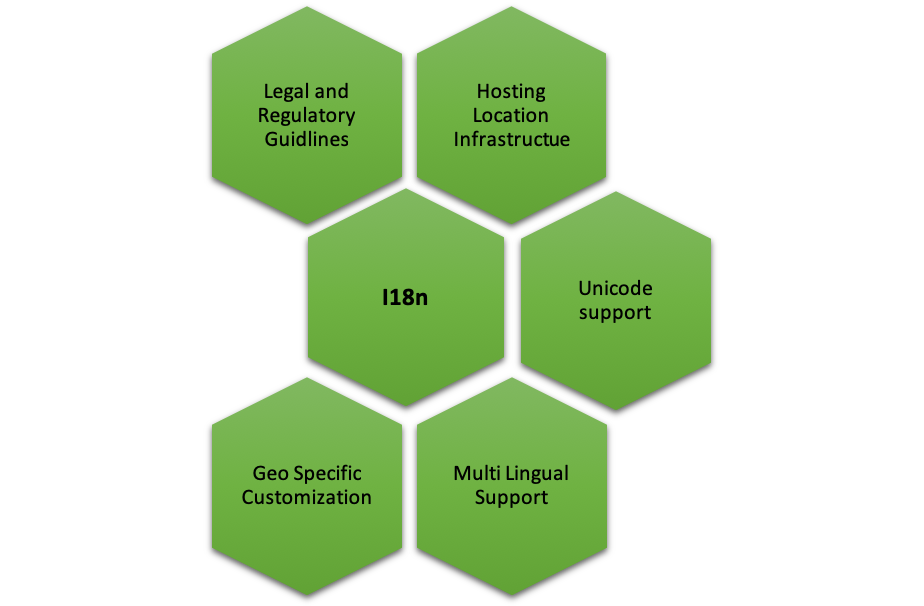
    Legal and Regulatory Guidelines

    Different regions, geographies, countries and markets have different regulatory guidelines that can extend to several facets including organization practices, trademark requirements, currency repatriation, tax compliance, regulatory compliance, duties and corporate agreements and contracts, currency repatriation and so on. If you’re working on a product that you need to go-to-market in China for instance, then it is important to understand the legal and regulatory framework within which you can operate.

    Hosting Location, Global Distribution/Content Delivery Network Infrastructure

    Different geographies, different networks and different internet speeds are factors one must consider when taking your product global. How can a product be designed to ensure that it “loads” quickly for customers across regions? Should there be a central database or should it be distributed? Who, where and how will distribution of data be managed? These are critical questions to ensure there are no customer drop-offs.

    Unicode Support

    Today, Unicode allows support in most of the world’s writing systems. Enabling its proper usage that can support local, regional or even cultural context is critical. For instance, supporting special characters from different languages that are outside the ASCII boundaries (defines 128 characters in a typical English keyboard) is extremely important. Unicode defines 221 characters (characters from all recognized languages in the world), thus, UTF-8/16 encoding format should be supported when you’re planning to release your product in different geos. This is a crucial requirement for database, DB connection, build setup and server startup options—just to name a few.

    If you’re fond of hard coding text, think again. Creating text and media that is easily editable, gives you the flexibility to easily localize and adapt your product for different regions.

    Multi-Lingual Support

    English may be one of the most spoken languages in the world, but that doesn’t necessarily mean every region or market thinks, reads and speaks English. For instance, if you’re releasing a product in Japan, China or even India (with its plethora of scripts for different languages), multi-lingual support for your product is essential. Here are a few things to follow:

    • Maintain language-specific resource files for each support language (eg. en-us.properties, ar-sa.properties) with key value pairs—the key is used in the code to place the text, and value is the language specific translated text.
    • All text on the screen, messages and label text must be sourced from resource files, and there should be no referencing of text directly in the code.
    • Choose to keep the resource files at the back end/front end. Front end is recommended as it helps improve performance, and by avoiding calls to the back end and toggling, it moves fast.
    • UI framework should support translation features.

    Think about text expansion in different languages, in terms of number of characters and how it can affect the UI and UX of your product. The same holds good for languages that are written from left to right, as well as translations.

    Scalable Framework for Geo-Specific Customization

    Development framework must consider the UI/UX, branding, orientation and size of the product when going i18n. For instance, the color red could mean different things in different countries and cultures—in China it could mean endurance, in India it could mean purity, in Europe it could mean self-sacrifice or in South Africa it could mean grief and sorrow. Therefore, it is extremely crucial to understand different nuances of cultural significance while designing the UI for a great UX. A few other factors to keep in mind:

    • Tag-based framework for content picks up where the content is tagged to language/country, and gets picked for users having matching profiles, for the tag values. This way, you may have content for various languages, but a user in Spain gets to see only the Spanish content just by setting his language preference in your system.
    • Orientation and sizing adjustments—specific CSS to handle alignment/size specific customization.
    • Navigation (left to right), enable/disable certain options through CSS customization.
    • Localization-based content.
    • Language-based content.

    Developing a framework for rapid transition to international markets requires a thorough think-through from a product enablement perspective, keeping in mind operational efficiency without impacting product behavior. Using this checklist will help you save time, money and rework when you finally decide to go i18n.

    — Ruchi Vaidya Tomar

  • Akamai Extends Scope of DevOps Reach

    Akamai Extends Scope of DevOps Reach

    Akamai today moved to further extend the number of capabilities it exposes via its content delivery network (CDN) that are designed to appeal to DevOps teams.

    Those enhancements include HTTP/2 performance optimizations and the ability to automatically load font libraries, as well as providing access to “middle-mile” logs that will enable DevOps teams to more precisely investigate performance issues and test logic in a local development environment before moving those changes into production.

    Akamai has also re-engineered Control Center to provide more detailed reporting across security, acceleration and delivery functions, and made TLS 1.3 the standard mechanism for establishing connections.

    Finally, Akamai is also looking to advance DevSecOps processes. Its CDN now can optimize or block access to content within a fully integrated virtual private network and domain name system proxy detection service. Akamai’s Token Authentication capabilities have been extended to include coverage for browsers and devices that do not support cookies.

    Ari Weil, vice president of product marketing for Akamai, said these latest extensions are part of an ongoing effort to make the company’s CDN a natural extension of any DevOps process. Developers today often wind up wasting a lot of time and effort writing code to load fonts that now can be automated using via the Akamai CDN, for example. The enhancements should free them to write code that adds more value to the business, he said.

    Akamai is also promising DevOps teams they will see much faster activation times across Akamai CDN, as well as have deeper visibility into application performance issues beyond what most application performance management (APM) tools offer, added Weil. Akamai is especially focused on any application development project where service level agreements need to be both achieved and maintained, he said.

    Thus far, Weil said Akamai is finding a higher level of appreciation for the role CDNs can play in DevOps. CTOs and enterprise architects who are typically held responsible for achieving application delivery goals in particular are now taking notice of CDNs’ capabilities, as most individual developers aren’t usually focused enough on finding ways to automate the routine aspects of building a modern web application, he said.

    Akamai will continue to focus on making its CDN a natural extension of the continuous integration/continuous deployment (CI/CD) platforms on which DevOps processes are implemented, with an eye toward making its CDN a preferred deployment platform for web and mobile applications. It may take while longer before DevOps teams view CDNs as a deployment platform for their applications. Much of the decision regarding what CDN to employ historically has been been left to application owners. But Akamai is clearly betting that if more applications take advantage of CDN functionality as they are being built, there’s a much greater likelihood those applications will be distributed on the Akamai technology.

    — Mike Vizard

  • Building Amazing Apps, Part 2: Optimizing the Back End

    Building Amazing Apps, Part 2: Optimizing the Back End

    This is part two of a series of three articles on building and delivering amazing apps at the edge. To read part one, click here.

    There are millions of apps available today, and it’s incredibly easy for any user to download and install any of them with just a few taps on a screen or click of a mouse. If you want to build and deliver an app that will amaze users, you need to be able to differentiate from the rest of the pack.

    Over the past 14 years, I’ve been working closely with the top companies delivering the most popular apps, helping them optimize their apps for speed and scale so users get a great experience. In this three-part series, we’ll explore the fundamental steps you must take to build and deliver your own amazing app at scale that will keep users coming back for more.

    We’ll break these steps down into three key areas:

    • Front end: Covers the parts of the app that end users interact with.
    • Back end: Looks at the required origin infrastructure to support the app, including databases, application, web servers and more.
    • Middle-mile: Explores the internet, where all the information needs to traverse back and forth between the front end and back end.

    In this article, we are going to explore five things you can do on the back end.

    Distributed Architecture

    In a nutshell, distributed architecture means having origin (back end) infrastructure that is geographically dispersed to maximize availability and performance.

    There are three main types of back end configurations:

    • On-premises: This is where the hardware and software are owned and managed by your organization. This type of back-end architecture is often more expensive and resource-intensive to maintain but offers a higher degree of security and flexibility because you have full control of the hardware and software.
    • Cloud-hosted: This is where the hardware and software are hosted on a third-party cloud provider. This type of architecture runs on dedicated or multi-tenant servers, and is usually more cost-effective to create and manage because some of the cloud providers include efficient infrastructure configuration/orchestration tools.
    • Hybrid: This is where your architecture is a mix of on-premises and cloud-hosted. This is the most flexible and common solution, since most companies that traditionally have relied upon all on-premises architecture are slowly migrating some of their back end to the cloud. For this type of solution, it’s best to use open source, multi-cloud tool solutions.

    The goal for your configuration should be having a back-end system that is geographically dispersed enough (with most locations close to your users) to ensure low network latency, while at the same time avoiding a single-point-of-failure to ensure the service runs, despite any localized outage.

    Regardless of your configuration, the general idea of distributed architecture remains the same: Using data centers where the load is distributed via a global load balancer, and where critical information is replicated across the data centers via fast, fiber-optic private links.

    Here are some concepts you can research that will help you to choose the most optimal, distributed architecture for your needs: virtual machines, containers, microservices, data replication, stateless apps, serverless, distributed processing, etc. devopsy.kinsta.cloud is an excellent resource to learn more about them.

    Generally speaking, you can simplify your origin infrastructure and maximize end-user performance by putting a content delivery network (CDN) between your end users and your back end. A CDN is a super-distributed network of reverse proxies that allows you to put your content very close to end users, minimizing network latency to achieve rapid app interactions, especially when the CDN caches your content on its edge servers.

    Auto-Scaling

    You can optimize costs and performance by choosing an architecture that auto-scales (up and down) depending on current traffic demands. To implement this effectively, you need to monitor global traffic and set triggers that launch infrastructure on-demand so it is ready when needed. Most of the largest cloud services companies support auto-scaling services, and some of them even allow you to tune your settings to favor either costs or performance. One of the easiest ways to implement effective auto-scaling is with CDNs, which can automatically scale traffic with minimal effort just by configuring a set of rules that define what content should be handled completely by the CDN (either dynamically generated at the edge or cached) and what content should be pulled from your origin infrastructure.

    Continuous Monitoring

    Continuous monitoring helps maintain the quality of service. There are many open source tools for continuous monitoring that fall mostly into the following four categories:

    • Infrastructure monitoring: This allows you to keep track of compute resources, storage, network usage, etc.
    • Cloud providers: Most of the largest cloud providers have integrated tools for monitoring your back end in each respective cloud platform.
    • Application performance monitoring (APM): To monitor your application’s framework.
    • Aggregators: Tools that allow you to aggregate and analyze data across several monitoring tools.

    In addition, it’s a good idea to complement server-side monitoring with real user monitoring (RUM) tools to identify whether a specific code deployment impacts performance.

    Performance

    A faster back end makes for a faster front end, and, as we know from part one of this series, performance is a major contributor to user experience. In addition to focusing on improving metrics including latency, throughput and errors (all of which are directly correlated with back-end performance), it’s critical to have a “culture of performance” in your company. José Pérez provides an overview of that concept in his article, “Fostering a Web Performance Culture.” This is a perfect example of how you could implement a culture of performance in your organization, by having performance tools integrated into your IDEs—this can provide instant feedback to developers on how new code performs against a defined performance baseline so that any code that might degrade performance is identified before it is deployed.

    For content that is not personalized, such as a product catalog, news or media assets, you can easily improve performance by putting a CDN in front of your back end (and caching that content on the CDN’s edge servers). Those edge servers are distributed around the world, located much closer to end users than your back-end infrastructure, to minimize network latency and maximize throughput.

    DevOps Automation

    Finally, a big part of setting up monitoring that works (and in responding to failures quickly) is DevOps automation. Building automated DevOps tooling allows you to react to changing conditions automatically, in real time.

    For example, you can use DevOps automation to alert your team via a chat system such as Slack when a deployment impacts the service, with an option to roll back easily the deployment within the chat app. Another great example of DevOps automation is Pinterest’s implementation of a “performance detective” that runs a binary search (similar to git bisect) to determine the offending commit that is degrading app performance after a release. If you combine these two automations, you could detect a performance degradation caused by a release; let the DevOps team know that it has been rolled back and track the offending code in the version control repository. That’s just one specific example among the many ways that DevOps automation can further optimize your back end.

    Coming up next in this three-part series: Everything you need to know about optimizing the middle-mile.

    — Javier Garza

  • Akamai Further Extends Reach into DevOps Realm

    Akamai Further Extends Reach into DevOps Realm

    Akamai is extending its campaign to make content delivery networks (CDNs) a natural extension of DevOps processes by adding more application programming interfaces (APIs) and other automated functions to simplify a variety of tasks.

    Specifically, Akamai has added an Akamai Sandbox that makes it simpler to conduct tests within the context of the Akamai continuous integration/continuous deployment (CI/CD) framework.

    In addition, the company now makes it possible to cache GraphQL responses using the Akamai application programming interface (API) gateway, which provides a more efficient mechanism for caching REST APIs using the Akamai Intelligent Edge service.

    Akamai is also making it possible to run a series of what-if analyses using the mPulse metrics it exposes now all the way down to specific resource levels. That real-time and historical data can be employed within the context of A/B testing on the CDN platform. Akamai has also made available Single Point of Failure (SPOF) protection within the Ion Script Management tool, which makes use of real user performance data to identify problematic first and third-party scripts on a user’s site. SPOF can automatically defers or blocks any scripts that don’t meet standards for performance.

    Finally, Akamai has added an API for securing entire web application footprints within a Bot Manager tools, in addition to support for OAuth protocols for securing API calls.

    Ari Weil, vice president of product marketing at Akamai, said the CI/CD framework that Akamai provides makes it possible to push updates to multiple CDNs. Akamai obviously would prefer all those CDNs to be provided by Akamai, but it recognizes that, in many instances, organizations will be taking advantage of CDNs provided by cloud service providers alongside Akamai, he said.

    Weil noted that Akamai is trying to position its CDN as the first tier on which a wide variety of applications will be deployed and secured. Rather than deploying those applications on a local web server, the Akamai CDN provides a layer of isolation between cybersecurity attacks aimed at web applications and the infrastructure the rest of the enterprise relies on, said Weil. As part of that effort, Akamai has been exposing its CI/CD platform with the CDN, which organizations can employ to apply DevOps processes to applications that are deployed and updated on the Akamai CDN.

    Many of the DevOps motions these days assume the application will be deployed either on a public cloud or in an on-premises IT environment. Akamai contends that a CDN not only provides a better platform for deploying and managing distributed applications, but those applications will be inherently more secure as Akamai absorbs the brunt of a distributed denial of service (DDoS) attack, for example, and less costly as the amount of data that needs to be moved in and out of a public cloud sharply declines.

    Naturally, not every developer may fully appreciate the role CDNs can play within the context of a larger set of DevOps processes. But as applications become more distributed, there may come a day when the CDN service chosen winds up being a lot more relevant than any of the platforms being connected to the web.

    — Mike Vizard