Tag: containers

  • Speaking for the Dead: Are ‘Agile’ and ‘Monolithic’ Actually Good?

    Speaking for the Dead: Are ‘Agile’ and ‘Monolithic’ Actually Good?

    What if Agile is the product of getting bored at work, microservices are the result of us needing a challenge and scrums are the result of an obsessive project manager? Do we all think waterfall development is a dinosaur whose extinction is deserved because of what we have been told and not because of reality? Do we think Agile is better because it simply sounds desirable?

    Michael DeHann (@laserllama), creator of Ansible, spoke at the 2016 All Day DevOps conference, which espouses the benefits of DevOps, and, by association, Agile and microservices. It essentially says, “Let’s step back and evaluate the past. Maybe waterfall development and monolithic architectures are actually a good thing?”

    Michael has been a software engineer and created a key tool in the IT automation toolbox: Ansible. His arguments deserve a look, because re-evaluation can keep you from making mistakes and improve processes going forward.

    Michael started his talk by making the point that in this day and age, it is waterfall versus Agile and monolithic architecture versus microservices. The assumption is that if you are still developing software with the waterfall method and/or developing monolithic applications, you might as well be riding a horse and buggy to work and dialing up coworkers on your rotary phone.

    Throughout his talk, he asked questions to make his points, beginning with, “Is big design up front bad?” with the conclusion, “I don’t think so.” His argument is that design and requirements at the beginning of the process enable a better production. Marketing and engineers hammered out requirements based on needs, abilities and budgets. There was plenty of time to research and design solutions. Both sides worked together, raising questions and comments and documenting mutual agreement. This presented an accurate view of the strengths of various team members and dependencies between tasks and task orders. And, perhaps most important, engineering was engineering—the engineers had greater responsibility and less hand-holding.

    Contrasting that with his view of Agile, big design up front is labeled as bad or counterproductive, engineers are viewed as interchangeable and scope is more unpredictable. Estimates are encouraged to not be time-based, which often results in a constant crunch time. Finally, meetings can consume a significant portion of team members’ time and often include “games reminiscent of Kindergarten, such as Fist of Five or Planning Poker.” Even in lightweight Agile systems, testing can suffer, requirements are more vague and there is no mutual sign-off.

    Michael argues that there can, in fact, be a middle ground where teams:

    • Do share design
    • Have an accessible, effective product owner
    • Know hard requirements versus soft requirements
    • See test-driven development and test automation as super important
    • Understand that Agile and iterative development can be closer than we think

    Agile and DevOps are also often associated with microservices versus monolithic applications, but according to Michael, “What’s so bad about a monolith?”

    Sample Monolithic Diagram

    dehann1.png

    Sample Microservices Diagram

    dehann2.png

    An example microservices shop has 150 services, many thousands of Jenkins builds per day, eight Amazon regions including dev, staging and production and thousands of EC2 instances. This can result in Jenkins configuration and security enforcement drifts, suboptimal code sharing and DevOps writing lots of custom code to manage it.

    Michael contrasts that with monoliths, which have:

    • Increased ability to develop on one laptop
    • Interfaces that benefit from static typing versus design-by-contract
    • Very small numbers of different server/image types in production
    • Local function calls that are much faster than RPC
    • Few instances sitting around with 5 percent utilization
    • No need for “containers” to get around above utilization problem
    • Greatly simplified debugging
    • Easy code-sharing
    • Very simple version upgrades

    Rather than argue that all applications should be monolithic, he makes the point that many of the concerns that resulted in microservices could be solved with improved communications. He contends that microservices are a tech solution to a people problem.

    Michael concludes that:

    • Labels cloud true meanings,
    • Monolithic architectures are more efficient,
    • Agile can be less efficient,
    • Microservices attempt to solve people problems but introduce new technical and people problems, and
    • We should try and separate the labels from the true meaning of things.

    Most importantly, though, is the fact that there is something to learn from everything. So, even if you don’t agree with Michael’s conclusion, you should listen to his talk online here. You might learn an unexpected lesson.

    If you missed any of the other 30-minute long presentations from 2016 All Day DevOps, they are easy to find and available free of charge here.  Finally, be sure to register you and the rest of your team for the 2017 All Day DevOps conference here.  This year’s event will offer 96 practitioner-led sessions (no vendor pitches allowed).  It’s all free and online Oct. 24.
    — Derek E. Weeks

  • VMware Ties Desktop Virtualization to DevOps Productivity

    VMware Ties Desktop Virtualization to DevOps Productivity

    It’s no secret that when it comes to building applications, many developers prefer to use the Apple Macintosh. However, that preference can create multiple DevOps challenges. VMware is moving to reduce the friction with the release of VMware Fusion Pro 10, a desktop virtualization offering for Apple Macs that now supports REST application programming interfaces (APIs) to more easily programmatically invoke virtual machines on Macs.

    In addition, VMware has significantly improved support for graphical processors units (GPUs) and 3D graphics within VMware Fusion Pro 10 that are now more commonly being invoked by developers.

    At the same time, VMware is also updating VMware Workstation 14 and Workstation Player, which adds support for Windows 10 and Windows Server 2016 along with updated Linux support for Fedora 26 and Ubuntu 17.04 guest operating systems to the desktop virtualization software. Workstation Player is a subset of VMware Workstation 14 that IT organizations can employ to limit the size of a virtual machine running on a local workstation.

    Other new capabilities include support for Microsoft’s Virtualization Based Security (VBS) features of Windows 10 Enterprise and Windows Server 2016 guests, enhanced virtual networking and new support and controls for working with vSphere and the vCenter Server Appliance software.

    Michael Roy, product line marketing manager for VMware Fusion, says more organizations are making GPUs available to developers as part of an effort to build more robust applications. Support for GPUs make it easier for developers to build compute-intensive applications for multiple operating system environments within the context of a DevOps environment managed by an IT organization, he notes.

    Other new capabilities include a revamped user interface and support for the Apple Touch Bar to simplify moving between native applications and virtual machine environments, including applications hosted on the VMware PhotonOS distribution of Linux optimized for hosting container applications.

    In this release of Fusion Pro, VMware is also adding support for Microsoft’s VBS features—which include Credential Guard for Windows 10 virtual machines, unified extensible firmware interface (UEFI) Secure Boot and a virtual Trusted Platform Module—in the same way it supports them on VMware Workstation 14.

    Finally, VMware is providing access to enhanced networking controls to enable management of network address translation (NAT) rules, network packet loss and latency simulation and renaming of VM networks.

    The updates were announced ahead of VMware’s VMWorld annual conference, being held Aug. 27-31 in Las Vegas.

    Developers typically require more access to more IT environments than almost any other employee, so maximizing the number of operating systems that can be deployed on their systems is in the best financial interests of the organization. Even when an organization can afford multiple machines most developers don’t want to have to move files between physical machines. Desktop virtualization software provides a means to not only increase productivity but also reduce the amount of machine overhead associated with developing applications across multiple operating environments.

    — Mike Vizard

  • SecOps: The Next Stride for DevOps

    SecOps: The Next Stride for DevOps

    Global IT spending is now touching a figure of $4 trillion. In today’s technology-intensive environment, data is the biggest commodity, more valuable and powerful than ever. And like Peter Parker’s uncle Ben noted, “With great power comes great responsibility.”

    Security has always been a big concern for valuable things and IT is no exception. IT as a whole is trying to push security left in the development cycle—trying to involve it in every step of the development cycle. And just when development and operations teams are getting used to the “esprit de corps” we call DevOps, I think it’s time we add the third musketeer: security.

    What is SecOps?

    SecOps is a collaboration between security and operations teams, just like development and operations teams collaborate on DevOps front. SecOps is a set of practices organizations need to follow, processes they need to execute and tools they need to use to ensure the security of their application environment. SecOps is making sure organizations do not sacrifice security to attain set performance and uptime indexes.

    In a typical development cycle—requirements gathering, design, development, testing, implementation or deployment and maintenance—security normally is introduced in the later stages, somewhere between testing and deployment or even later. But SecOps is all about making sure to introduce aspects around security much earlier or at each stage of the software development life cycle (SDLC).

    I know what you are thinking: This is going to complicate things and increase the time to delivery. This is where operations and development teams need to join forces to uncomplicate the things and make it time efficient practice. Next thing you must be thinking of is, Why so much hassle? Think of it the other way. Wouldn’t it save more time when you address the security concerns at much earlier stages than at the time of delivery or implementation? All it takes is an amalgamation of the security group, development team and operations team; a little bit of planning; and a whole lot of execution.

    SecOps + Containers

    Containerization is slowly but steadily moving from an alternative to full virtualization to a serious platform for running your applications. Containers have some obvious advantages including scalability and flexibility, and this solves most of the problems related to resources in case of application development. Reduced size; reduced time to provision application environment and testing; platforms including Docker, Solaris Zones, BSD Jails; and orchestration platforms including Kubernetes, CoreOS Fleet, Amazon ECS and OpenShift make containers a more preferred option for application development environments.

    This increased traction toward containerization points to the increased need to concentrate on security aspects. Here are some best SecOps practices for container environment you and your organizational teams can follow:

    • Authentic sources and images: Always check for authenticity of container images. There are various tools such as Docker’s security scan. With Docker Cloud and Docker Hub you can scan images to check for potential security vulnerabilities. Most images are built from some base image and not built from scratch, so there is always a threat with the used images.
    • Vulnerability management tool: There are tools available in the market to analyze container image formats and libraries for threats before you actually start using them.
    • Follow benchmarks and hardening guidelines: Always make sure you do the checks and follow hardening guidelines for containers, images, hosts and platforms before you start with production. There are few standards and benchmark checks for containers such as CIS’s Docker security benchmark, PCI compliance checklist, etc.
    • Periodic auditing: Regular auditing of your application environment can help you save yourself from the future troubles. Moreover, automation of auditing process can help in detection of unused images and containers.
    • Use of management frameworks: Use frameworks that can automate behavior profiling and control all the users, authorize the access to the containers, images and hosts.
    • Security built in to container engine systems and third-party security solutions: Third-party vendors have a number of applications for container security in addition to security systems of container management platforms.

    Dev + Sec + Ops

    With the continuously increasing business demands for new applications and software, and new practices and development trends such as DevOps, Agile, cloud, automation, CI/CD and others, traditional security needs to upgraded in the new paradigm. Thankfully, some of these practices facilitate the security. Consider CI/CD as an example: Continuous integration requires continuous integration tools, or what we call build servers. Some popular examples are Jenkins, TeamCity, GitLab CI, Travis CI, Bamboo, Go CD, CircleCI and Codeship. The best SecOps practice is to check and fix vulnerabilities at early stages as a part of CI/CD workflow. Integration between authentication, scanning, management tools and CI/CD pipeline tools could be the best possible solution to your security-related problems. Some easy-to-implement solutions can include automated security testing, static code analysis, authentication checks and login tracking.

    SecOps enable organizations in lifecycle management, analysis of security threats, incident management, optimizing and measuring the effectiveness of security controls, reduced breach response time, reduced security risks and increased business security. The basic principle on which SecOps works is Avoid, Analyze, Respond, Review, Repeat. By analyzing the security events and data, you can build incident response plans to avoid future unwanted events.

    Frameworks and Tools

    Now that you have a clear understanding of why you need your security, development and operations teams to work together, let’s see what tools and frameworks you can use.

    • Docker-native tools: If you are using Docker as a platform then you can use few security tools provided by Docker itself for the security of production environment: Docker Bench and Docker Notary. Docker Bench is a script that checks common best practices around deploying Docker containers in production. Docker Notary enables you to check whether content is from a trusted publisher.
    • Chef: Chef provides different tools including Inspec to automate security testing.
    • Puppet: Puppet provides security compliance and policy defining frameworks.
    • Ansible: Ansible provides system tracking, setting up firewall rules, user lockdown and compliance automation solutions.
    • CoreOS Clair: CoreOS Clair is an open-source project for vulnerability analysis in applications and Docker containers.
    • SaltStack: SaltStack can help in orchestration and automation of security practices solutions for containers.

    This is just a look at some of the most popular ones. If you want, there are a number of others that can look after the security of your application environment.

    The main motive behind implying SecOps practices in any organization is involving security team at all possible stages to remove any ambiguity in any stage of development rather than security team providing analysis reports to the operations team and then sitting back and enjoying the show. When these teams perform in a synergistic manner, the business focus can be shifted to other important things.

    About the Author / Chaitanya Jawale

    Chaitanya Jawale is founder and CEO of Opcito Technologies, a leader in microservice-based product engineering and automation. Chaitanya comes with strong background in product engineering, data center automation, DevOps and multi-cloud orchestration and management.

  • Sonatype Report Spotlights Software Supply Chain Issues

    Sonatype Report Spotlights Software Supply Chain Issues

    Most application developers today don’t write much raw code. Rather, applications developed today are created mostly by combing various modules and widgets to create a custom application. But currently there is little oversight being applied to the provenance of application components, especially when it comes to open-source software.

    The third annual State of the Software Supply Chain Report published by Sonatype, a provider of tools for managing software supply chains, finds that the amount of time it takes for open-source projects to address vulnerabilities is considerable. The report states that only 15.8 percent of open-source software projects actively fix vulnerabilities, resulting in an average mean time to remediation of 233 days. In effect, that gives cybercriminals the better part of a year to exploit a known vulnerability. Of course, that’s usually longer simply because most IT organizations are not especially efficient when it comes to regularly updating all the components that make up an application once it’s been deployed in production.

    Based on an analysis of more than 17,000 applications, the Sonatype report estimates downloads of Java components grew 68 percent (52 billion) year over year in 2016, while JavaScript downloads (59 billion) grew 262 percent.

    Matt Howard, chief marketing officer for Sonatype, says managing all the components that make up an application will only become more challenging as developers increasingly start to leverage Docker containers. The Sonatype report estimates there will be 12 billion downloads of Docker containers in 2017, a 100 percent increase over 2016.

    The good news is that more awareness of DevSecOps issues appears to be having an impact. The report finds the percent of Java components downloaded from the Sonatype Central Repository that contained known security vulnerabilities fell to 5.5 percent (1 in 18), down from 6.1 percent the year prior. Of course, that improvement needs to weigh against the 68 percent increase in downloads, which would suggest that the total number of components with known vulnerabilities finding their way into production applications has never been higher.

    By way of contrast, the report claims that applications built by teams employing automated governance tools reduced the percentage of defective components in their application by 63 percent. The report also says organizations that are actively managing the quality of open-source components flowing into production applications are realizing a 28 percent improvement in developer productivity, a 30 percent reduction in overall development costs and a 48 percent increase in application quality.

    The report makes clear that DevOps processes are not being extended far enough to the proverbial left. Instead of focusing on only on the application release cycle organizations need to apply structured processes to the components that are being aggregated together during the application development process. In fact, Howard notes that application development is moving away from being an art to more of a manufacturing process. As that shift continues to occur, it’s only a matter of time before a much greater emphasis gets placed on quality control all the way down that manufacturing line to not only limit liability but also generally improve the overall application experience.

    — Mike Vizard

  • Q&A: Michael Beckley, CTO/CCO, Appian

    Q&A: Michael Beckley, CTO/CCO, Appian

    Recently I had the chance to speak with Michael Beckley, chief technical officer and chief customer officer at Appian, about his company’s move to go public and the DevOps space in general. For those of you who don’t know Michael, he is a founder of Appian and leads the company’s technology vision and oversees customer initiatives worldwide. He also serves on the Industrial Advisory Board for the University of Virginia’s Computer Science Department and is a member of the University of Maryland Advisory Board in Computing. He has an interesting take on the IT space and DevOps in particular. Read on for our discussion.

    Alan Shimel: Michael, what do you think has been the “special sauce” that has led to Appian’s success to date?

    Michael Beckley: With Appian, companies build unique business applications up to 20x faster and mobile-enable and modernize existing systems. For example, a company like Ryder was able to build a web and native Android tablet application that cut the time it took to rent a truck in half.

    But the “special sauce”? That’s Appian’s culture of innovation. Our engineers think long-term and invest in breakthrough tech like our patented SAIL UI technology for zero code native mobile apps. Thanks to SAIL, the web apps you configure in Appian automatically deploy to iOS and Android as native, full-featured apps or specialized micro apps we call “Sites.” As long as we get the culture right, we expect to continue to deliver enduring value for our clients.

    Shimel: With becoming a publicly traded entity, some companies have found “managing to the street” does not match their own long-term business plans and their customers needs, how does Appian avoid this?

    Beckley: Companies, like people, are an aggregation of their habits. Appian’s habit has always been to hold to our long-term vision of enabling every company to be a software company. We are not your typical Silicon Valley tech company. Our roots are in DC, we largely bootstrapped this business, and learned to be good stewards of capital while helping to support the core missions of federal agencies and some of the world’s largest brands. The proceeds following this IPO will be invested back into our business to benefit our customers.

    Shimel: What do you see post-IPO being the biggest areas for growth as it relates to new products and services?

    Beckley: We  plan to invest in innovating and enhancing our platform. While our platform is industry-agnostic, we have recently made, and plan to continue to make, investments to enhance the expertise of our sales and marketing organization within our key industry verticals of financial services, health care and government. We have made, and will continue to make, investments in research and development to strengthen our platform and expand the number of features available to our customers. As we continue to increase the functionality of our platform and further reduce the amount of developer skill that is required to build robust applications on our platform, we believe that we have the potential to expand the use of our platform.

    Shimel: Digital transformation is a term that is being used a lot these days. How far along the adoption curve are we on digital transformation?

    Beckley: While many speculate that digital transformation is just a tech industry buzz word, in reality, digital transformation is a living, breathing effort. According to a recent survey, digital transformation is a C-level priority and is considered a top focus for almost 50 percent of all companies this year.  From Appian’s perspective, we believe that the utilization of low-code software to drive digital transformation is still relatively new and our customers will be able to succeed in their digital transformation efforts by incorporating low-code development.

    Shimel: Where does the DevOps market intersect with the Appian business model?

    Beckley: Organizations are turning to DevOps to accelerate development and bring an application’s capabilities to a user quicker. The Appian low-code development platform fits into the DevOps model and supports the seven major DevOps categories including code, build, test, package, release, configure and monitor.

    Overall, our business model supports the DevOps market; we’re living in a world where citizen developers are playing such an important role in the enterprise and our platform empowers the citizen developer while alleviating developer resources to focus on the more challenging, business-critical developer work.

     Shimel: What about containerization and microservices? How do these technologies affect Appian?

    Beckley: Appian already uses containers and microservices. Appian’s enterprise customers often require a mix of cloud, hybrid cloud, and on-premise installations. We view containers and microservices as enabling technologies to support the diverse workloads and deployment models required by our enterprise clients.

    Shimel: What about security? What challenges does cybersec pose to Appian’s development of their platform?

    Beckley: Appian works with some of the nation’s most important and highly regulated industries, therefore we have built a comprehensive security and compliance structure that meets several industry standards. We frequently undergo third-party audits to ensure that we are always operating effectively to protect our customer data.

    — Alan Shimel

  • Container Considerations on Your DevOps Journey

    Container Considerations on Your DevOps Journey

    Containers are things for your things. That is true in the development world, too—containers are things for your software, and, like containers for your things, software containers can help you be organized, efficient and secure.

    Chris Morgan (@cmorgan_cloud), the Technical Director, OpenShift Partner Ecosystem at Red Hat, delivered a keynote at the 2016 All Day DevOps conference. Chris lives and breathes containers and recently discussed how they are transforming DevOps pipelines.

    Chris started with an encouraging figure: DevOps has a 74 percent adoption rate (at least on a path toward full adoption) at the enterprise level. The reason is that DevOps helps solve issues around:

    • Slow service delivery
    • Poor service quality
    • Frequent down times

    However, the needs of development and the desires of IT can often hamper full DevOps adoption, which is where containers can help. Containers allow apps to be easily shared and deployed with:

    • Consistent environment and tools
    • Predictable building tools
    • Faster deployment

    In short, containers can act as a common language between development and IT operations. And when configured properly, the operations team can utilize containers to assemble environments without compromising security.

    The survey that revealed a 74 percent adoption rate for DevOps in the enterprise also shows an 18 percent adoption rate of containers in the enterprise. Why the difference? Containers sometimes can be difficult to implement across multiple hosts.

    If you are gearing up to consider the use of containers across your IT environment, Chris offered up some things to consider:

    • Where do you store the container image?
    • Which container on which host? Which has enough capacity?
    • How do you monitor the health of the containers?
    • What do you do if a container crashes?
    • How can I address scale?

    When you have large apps that span multiple containers?

    • Which containers can access others?
    • Which containers should be deployed together?
    • How do I limit certain containers?
    • How do they find each other?
    • Is there malicious software on any containers?
    • How do I handle persistent storage?

    The bottom line is that you need more than just containers. You need a host, a platform, management and persistent storage.

    Is your organization ready to at least consider containers for DevOps? Chris reminded us, “Technology should not dictate the process. Identify the ideal process first, and then ensure the technology is flexible enough.” Start by finding some low-hanging fruit, assess skills and capabilities on your team and engage in a discovery session.

    Chris’ full keynote went into more detail, notably some solutions to implementing containers at the enterprise. You can watch Chris’ full All Day DevOps conference session (just 40 minutes) or you can view the other 56 presentations from the 2016 conference online and free of charge here.  This blog series is reviewing sessions from the 2016 All Day DevOps, which hosted over 13,500 registered attendees. Next week, look for “Ops Happens: DevOps Beyond Deployment” with Damon Edwards.

    Finally, be sure to register you and the rest of your team for the 2017 All Day DevOps conference here. This year’s event will offer 96 practitioner-led sessions (no vendor pitches allowed).  It’s all free, online Oct. 24.

    — Derek E. Weeks

  • 5 Common Misconceptions of Serverless Technology

    5 Common Misconceptions of Serverless Technology

    The rapid growth in serverless technology affords companies opportunities to save money on server costs and allows developers to save time and focus on coding rather than back-end operations. A challenge with such swift adoption is the difficulty in maintaining a standard understanding. In anticipation of the Serverless Conference, which was held last week in Austin, Texas, we asked experts in Heavybit’s community about common misconceptions.

    Myth #1: Serverless is a Revolutionary New Direction for Software

    “A common misconception is that it’s a revolutionary new direction for software,” says Nick Martin, co-founder and CTO at Meteor. “Really, it’s just the next step in the evolution of making software development faster and easier. Like the compiler, the database and cloud computing did in previous eras, serverless further abstracts away the complexities of modern app development and is part of an ongoing trend to free developers from entire classes of concerns.”

    As for the benefits for developers, Martin notes that developers can now “focus on their application logic and avoid undifferentiated work like provisioning, server management, or load-balancing.” Serverless ultimately “promises to let developers ship apps faster and at a lower cost,” he says.

    Myth #2: Serverless is a Gadget Technology for Hobbyists

    Nick Gottlieb, head of Growth at Serverless Inc. believes that one of the biggest myths is that it’s a ‘gadget’ technology that’s not mature or only for a hobbyist. “While serverless compute is still a very early technology, it’s built on the same core infrastructure that providers like AWS, Google, and Microsoft have been investing in and selling to enterprises for years,” says Gottlieb. Furthermore, “because the underlying infrastructure is battle tested, and the value it provides around cost savings and faster time to market are so great, there is already huge amounts of mission-critical enterprise workloads being done on serverless compute.”

    Myth #3: Serverless Will Hurt the Movement Toward Containers

    “Containers will continue to be front and center in terms of the underlying infrastructure, but that doesn’t mean they will be the primary unit of deployment for developers,” says Lawrence Hecht, author at The New Stack. “Take, for example, a cloud provider that may build its FaaS (function as a service) on top of containers and use Kubernetes to manage that deployment,” he says. “Individual developers would then deploy application components to functions instead of to container images.”

    Hecht notes that this will not happen right away and in the meantime, “We’re seeing emerging companies build dashboards that allow developers to choose which VM, container or function they want to deploy to. Those dashboards are becoming the gateway to the CI/CD pipeline.”

    Myth #4: Serverless is Free of Security Vulnerabilities

    “The biggest security misconception is thinking you no longer need to worry about known vulnerabilities,” says Guy Podjarny, co-founder and CEO at Snyk. While serverless addresses the risk of known vulnerabilities in OS dependencies, such as OpenSSL’s Heartbleed vulnerabilities, “These ‘unpatched servers’ account for the vast majority of successful attacks today. Serverless applications still contain a large and growing number of application dependencies, pulled from npm, Maven, PyPI and more. These components often carry known vulnerabilities, and require diligent monitoring and preventative tools.”

    Myth #5: Serverless Means No More DevOps

    “A common misperception is that it completely absolves development teams from the harsh realities of operating software,” says Joe Ruscio, partner at Heavybit. “While it does promise to almost completely do away with the ‘undifferentiated heavy lifting’ of provisioning and managing infrastructure, understanding how your application code performs in production remains of paramount importance.”

    — Malia Powers

  • VMs, Containers, Cloud, Cluster: Scheduling Differences

    VMs, Containers, Cloud, Cluster: Scheduling Differences

    Scheduling is a large part of making the data center go, and more to the point of making the virtualized (be it VMs, cloud, containers, or clustering) portion of the data center work.

    While there are a lot of variables to virtualization performance, scheduling impacts performance all of the time. And yet we only really talk a lot about it in clustering (where a robust scheduler on par with an OS scheduler is required).

    There’s a reason for that, and it is worth exploring.

    (Side note: I was talking about this blog with Lori while I was writing it, and she reminded me of when we took our Masters’ courses, the Operating Systems class used Homer Simpsons greedily wanting donuts as our scheduling project. So whenever we think scheduling, we mentally hear one of the many Homer processes being denied a donut and going “D’oh!”)

    For virtual machines, scheduling is largely forgone in favor of other resource utilization. Virtualization only cares about CPUs and memory requirements when the virtual machine is created. You tell it then, and the only time you worry about it again is if you demand more CPU cores than the physical hardware can provide—and in some cases, CPU virtualization will allow you to keep spinning up VMs even after that. Only the real scheduling mechanisms actually can be at odds with each other in a heavy load situation. The host OS scheduler, for example, could swap out your VM’s active thread at the same time the guest OS has raised the level of importance for an app to “insanely high, do it now.” Although this only begins to show if basic rules about servers and loads are ignored, it does happen.

    You get the same issues with private clouds. Why? Because even though everyone in the marketing world pretends it isn’t true, private cloud and VMware ESXi essentially are the same underlying toolset. And usage patterns in the enterprise show not only does everyone know that, but also the differences are less substantial than any of the organizations involved want to admit. Not that they are the same code, but in practice, they do the same things.

    The one place where these two (and public cloud for that matter) really make use of scheduling is when automatically responding to spikes in usage that threaten to bury a system. However, solutions to usage spikes are not part and parcel of these systems; they are crafted by DevOps (or Dev, or Ops) folks who work at places where dropped connections are lost money and, thus, a quick response of growing the pool of available servers and then later shrinking it is important. But because they are using their own metrics to determine the need, more of these systems are implemented in application provisioning tools than in cloud or virtualization software. We could argue about where this functionality actually belongs, but not really where it is implemented today.

    I kind of bled into public cloud there, so will address it. When people talk about it being more “agile” or “adaptive,” they mean “with this quasi-scheduling code we wrote to spin up instances at need.” It doesn’t matter if the “code” is a python script or an Ansible playbook—they did the scheduling, not the system.

    That leaves clustering software (such as Mesos). Because clustering software treats many machines as one big thing, it requires a scheduler to manage the resources. In the case of Mesos, the central scheduler really isn’t that smart, and I think that is a genius implementation. It knows what resources (CPU, memory) each machine has available, it knows what resources have been assigned from that machine, and for each of the “frameworks” (think of them as job executors; though that’s a bit simplistic, it’s perfect for this discussion) what it needs to get its work done. Then it does a best match, offers resources to frameworks and waits for more resources to come available from finished executions.

    So in the world of VMs, if you have 50 unique applications that need resources, you create 50 VMs to service them. In either cloud environment, you do the same. It is a joke we like to make that because of microservices, containers are treated like VMs, except if you have 50 unique applications, you create 500 containers, but the reality is that they are exactly like VMs in many use cases, and make 50 containers when containerizing existing apps. Taking a look at MesoSphere’s 2016 survey of clustering users, you can see that a fair number of clustering users are using containers with Mesos and DC/OS, while many of them are not doing it exclusively with microservices.

    Source: MesoSphere user survey, August 2016

    In the clustering world, you have what presents as one big monster machine that is going to run these applications as resources come available, so if your 50 applications require fewer resources than the cluster offers, they simply execute in parallel; if you don’t have enough hardware to run them, unlike with VMs, you can just queue them up and, assuming the cluster isn’t over-burdened, eventually they all will run.

    This gets more interesting when containers are added to clustering (a common environment), because then you do have discrete containers, but the scheduler still manages how many resources are available/in use, and the container architecture allows the app to carry its requirements with it across the cluster.

    Why do we care? Because you know what your workloads are and which scheduling methodology is more important to your organization. If there are 50 applications that all have steady resource needs and run all of the time, then virtualization might be right for you, but if the organization’s workloads are shifting constantly and resources need to be cycled at a high rate, clustering might be right for you. Either way, knowing what’s out there is never a hindrance.

    — Don Macvittie

  • Addressing Container Security Challenges

    Addressing Container Security Challenges

    From month to month or even week to week, more organizations are developing with containers. The concept of containers isn’t all that new, but the dramatic rise in adoption of container technologies and the support from major tech vendors and platforms has helped containers become mainstream quickly. As with most emerging technologies, now that containers are hot there is a greater focus on some of the security issues of containers. So devopsy.kinsta.cloud worked with leading vendors to address that issue.

    A new report from devopsy.kinsta.cloud, sponsored by Aqua Security and Microsoft, examines the weaknesses of containers and that the security concerns introduced by using containers, and provides a look at some of the approaches to addressing those issues. “Containers: Security Challenges and How to Address Them” contains insights from DevOps and containers experts to help you understand the challenges and how to solve them.

    The report explains, “There is a general lack of awareness of existing container security concerns and best practices. Organizations need to understand the security issues that arise due to the differences in how VMs and containers function. Enterprises need to prepare for the glut of additional files that need protection with containers and the unwieldy nature of third-party libraries that containers use. Businesses also must consider configuration mistakes including those that grant root status to containers or simply make containers overly complex. Most importantly, organizations that adopt containers need to accept responsibility for security them, and should expect to keep tabs on new container vulnerabilities as the industry discovers them.”

    “Containers add a layer of obscurity that reduces visibility,” warns Amir Jerbi, CTO of Aqua Security. “You have an operating system running a container engine, which in turn runs containers. The OS is not aware what containers are running—it only sees the container engine. The container engine knows what containers are running, but has no clue what the containers are actually doing. So, if you’re running a host-based security tool to monitor the OS, you will not see what containers are running and what they’re doing.”

    Thankfully, there are solutions and best practices you can employ. The report describes how to use a combination of preventive measures, active detection and active response to protect container environments. It also covers some of the approaches to creating a more secure container in the first place using concepts such as isolating the containers with virtualization, as Microsoft does with Hyper-V Containers.

    “What’s really important about Hyper-V Containers is that rather than trying to close existing holes, now we can implement a solution that is secure by default and already meets compliance requirements,” explains Taylor Brown, principal lead program manager at Microsoft.

    You can download the free report from devopsy.kinsta.cloud by clicking here: “Containers: Security Challenges and How to Address Them.”

    — Tony Bradley

  • Mesos Usage Survey: Big Clusters, Big Workloads

    Mesos Usage Survey: Big Clusters, Big Workloads

    Mesosphere, purveyors of DC/OS, recently released a survey of Mesos users focused on Mesos deployment information.

    There were some interesting results, and a few things I wish they’d dug a little deeper on. If you’ve ever given a survey, then you know that the results inevitably spawn more questions. No doubt Mesosphere has the same new questions I do.

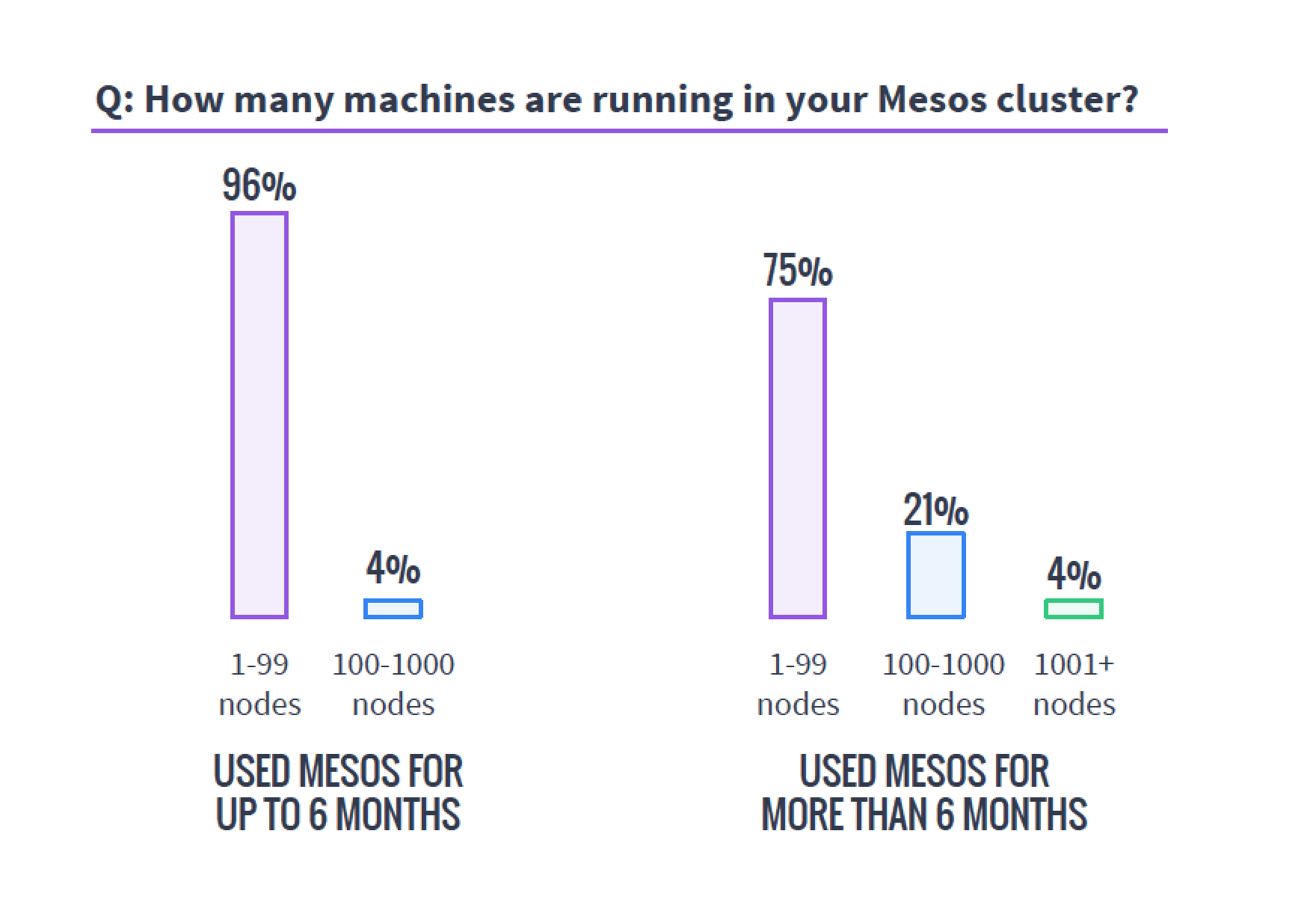
    The first important tidbit I would like to highlight is a cautionary tale. I’ve been around clusters—big data, cloud and, more recently, Mesos-style clustering—for years, and there is one truth this survey shows that is far more global than just Mesos. Clusters always end up bigger than you’d planned. The survey shows that of those using Mesos for more than six months, 25 percent have more than 100 servers backing the cluster.

    mesosservercountsWhen planning a cluster, always assume it will be bigger than you plan and grow faster than you think. Organizations that need this type of technology need it to perform and find themselves using it more than they’d planned, so the clusters always grow. I’ve seen orgs do a 20-server cluster that within six months numbered well over a hundred servers and headed to 200. I’ve heard of faster/larger unexpected growth rates, but not seen it or talked to those responsible. Plan for bigger than you think you need—worst case, you’ll have overplanned, which is easier to handle than being caught with too small a cluster.
    This is one of the areas I think it would be interesting to have a follow-on question delving into how big survey respondents had planned their clusters to be versus how big they were at this point in their deployments.

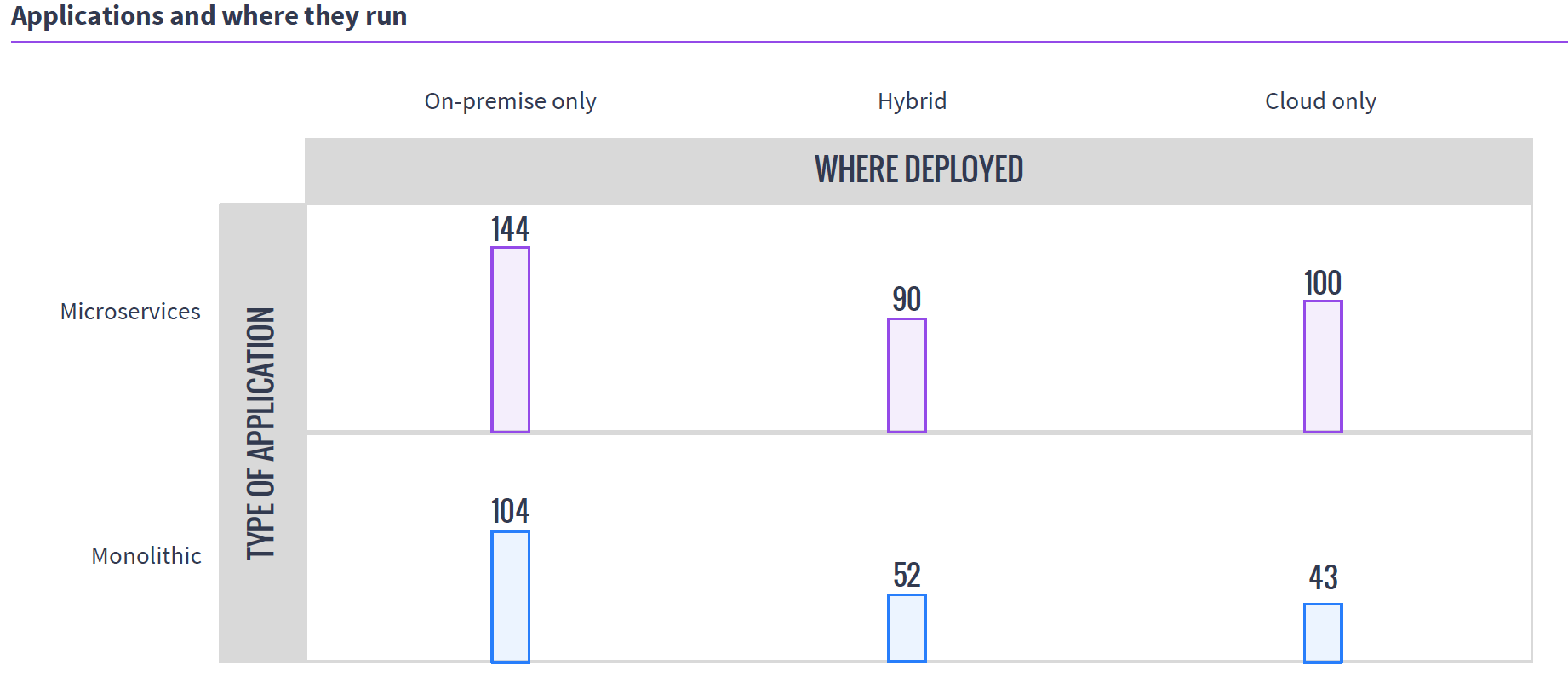
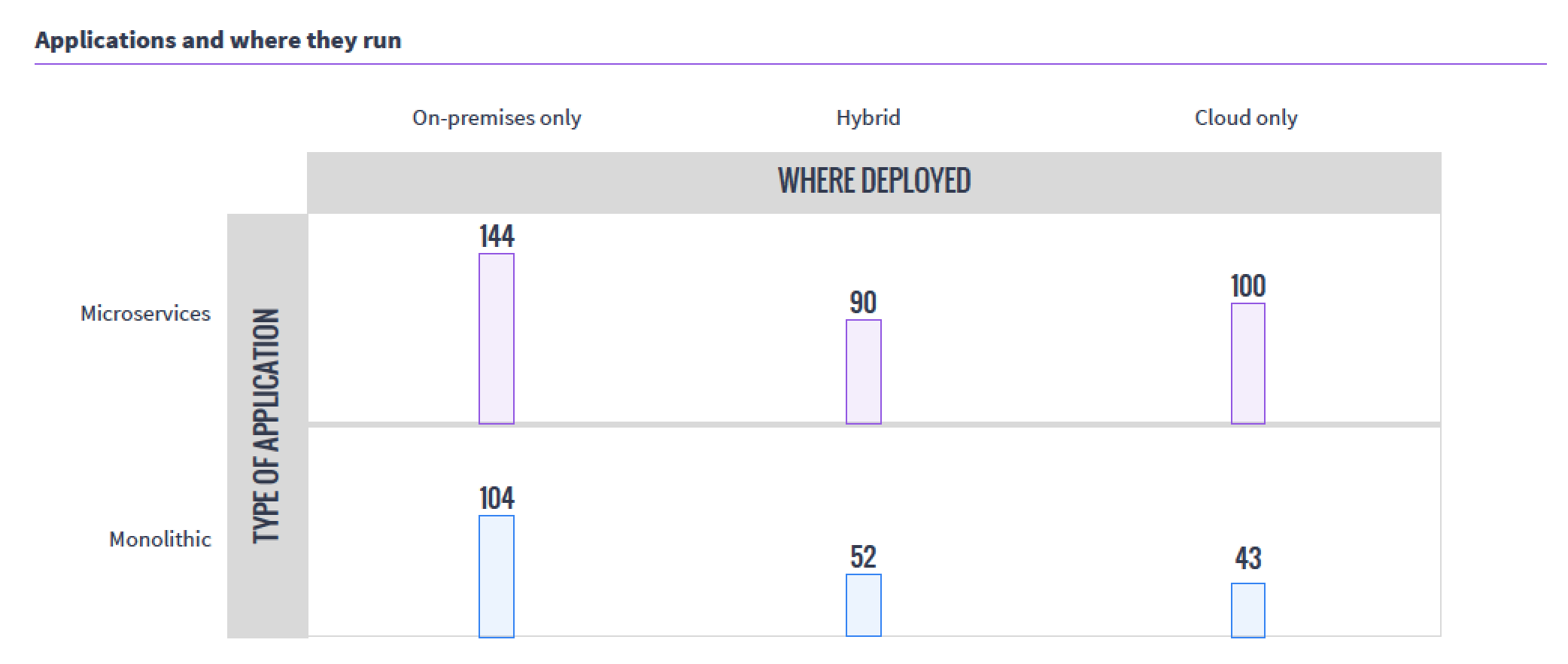
    The next interesting takeaway from the survey was the usage patterns. While internal/external/hybrid cloud is not a surprising distribution, the fact that so many organizations have moved monolithic workloads to Mesos was a bit of a surprise. The sample size of the survey was relatively small, but still, that’s a lot of “We have Mesos, let’s start running it there” going on.

    mesoswhereappsrun

    I think I’ll work with Mesosphere to talk to one of the organizations running monolithic apps on Mesos and see if we can’t get an interesting interview.

    For the health of open-source projects, I like to see what is happening with those involved—is the audience growing? Are the number of developers growing? Supplemental survey data says yes.

    mesoscontributors

    I double-checked this information, since it should be available publicly, and although the move from GitHub to Apache Git made it more difficult to track down, this Apache post from July does verify the graph above, and offers even more interesting data.

    The thing that still intrigues me about Mesos is that instead of allowing users to pool servers to create virtuals, it pools servers to make a massive parallel system. But running containers on it (as this data indicates most are for resource isolation) carves it up into virtuals, of sorts. Very esoteric.

    I won’t bore you by going over what I think of each and every question. Follow the survey link at the top of the article and you can get the survey response summaries to support your work.

    — Don Macvittie