Tag: configuration

  • Configuration-as-Code: Trends and Predictions for 2024

    Configuration-as-Code: Trends and Predictions for 2024

    Configuration-as-code, often abbreviated as CaC, is an innovative approach to managing and provisioning computing resources. It refers to the practice of handling changes, deployments and updates to software and systems via code rather than manual processes. CaC allows for a version-controlled, reproducible and automated method of managing environments, leading to more consistent and reliable systems.

    The essence of configuration-as-code is to treat system configurations the same way that software code is treated. This means that configurations are written in a code format, stored in a version control system and applied through automated processes. This approach brings several benefits, including consistency, repeatability and the ability to test changes before applying them to live environments.

    This concept is not just a theoretical approach but rather a practical tool for managing modern digital infrastructure. It’s a key component of DevOps practices, enabling teams to move faster while maintaining control and minimizing the risk of operational issues. Configuration-as-code is a critical tool for managing complex systems and achieving the highest levels of operational efficiency and reliability.

    The Evolution of CaC in Recent Years

    Over the past several years, configuration-as-code has grown from a niche concept into a mainstream practice adopted by many leading technology companies. This evolution has been driven by several factors, including the increasing complexity of digital systems, the rise of cloud computing and the broader adoption of DevOps practices.

    In the early days, system configurations were often managed manually or through ad-hoc scripts. This approach was prone to errors, hard to scale and lacked visibility into changes. As systems grew more complex, the need for a more robust, scalable, and reliable method of managing configurations became apparent. This led to the creation of configuration-as-code.

    The rise of cloud computing has been a significant driver in the adoption of configuration-as-code. With cloud platforms, resources can be provisioned and managed via APIs, making it possible to handle configurations through code. This has allowed for much greater scalability and flexibility enabling companies to manage large, complex environments more effectively.

    The adoption of DevOps practices and increasingly mature automation frameworks have also contributed to the growth of Configuration as Code. As infrastructure-as-code (IaC) becomes the norm, CaC is becoming a staple of modern DevOps practices.

    Trends in Configuration-as-Code for 2024

    Looking ahead to 2024, several trends are likely to shape the future of configuration-as-code:

    Increased Adoption of Cloud-Native Environments

    As more companies adopt cloud-native technologies, the use of configuration-as-code is set to increase. Cloud-native environments are inherently dynamic and complex, making them an ideal fit for configuration-as-code. With CaC, teams can manage these environments more effectively, ensuring consistency, scalability, and reliability. Cloud-native technologies like Kubernetes and Docker also natively support configuration-as-code, making it easier for teams to adopt this approach.

    Use of AI and Machine Learning in Configuration Management

    Artificial intelligence and machine learning are set to play a significant role in the future of configuration management. With AI and ML, teams can automate even more aspects of configuration management, reducing the risk of human errors and freeing up time for more valuable tasks. For example, AI could be used to predict the impact of configuration changes, while machine learning could help automate the process of optimizing configurations for performance and cost efficiency.

    Shift Toward Immutable Infrastructure

    Immutable infrastructure means that servers are never modified after they’re deployed. Instead, any changes are made by deploying a new server with the desired configuration. This approach reduces the risk of configuration drift and ensures a consistent environment. Configuration-as-code is a key enabler of immutable infrastructure, making it easier to manage and deploy servers in a repeatable, automated way.

    Collaboration and Democratization of CaC

    Finally, the trend towards collaboration and democratization in technology will also influence configuration-as-code. With CaC, configurations become more visible and accessible, allowing for greater collaboration between teams. This can lead to better decision-making, less siloed working, and improved overall outcomes. At the same time, configuration-as-code also enables democratization by making it easier for non-technical stakeholders to understand and participate in configuration management.

    Predictions for Configuration-as-Code in 2024

    CaC is Becoming a Cornerstone in the DevSecOps Approach

    The integration of development, security and operations—commonly known as DevSecOps—aims to embed security practices into the DevOps process. As we look towards 2024, configuration-as-code is set to become a cornerstone in the DevSecOps approach.

    By treating infrastructure as code, teams can apply the same security practices they use for application code to their infrastructure. This includes performing code reviews, using automated testing, and tracking changes to the environment. With configuration-as-code, security can shift left—being considered earlier in the development process—leading to more secure systems.

    Moreover, configuration-as-code can help bridge the gap between security and operations teams. It allows for a shared language and shared tools, fostering better collaboration and communication.

    Growth of CaC-as-a-Service

    Configuration-as-code-as-a-service is an emerging trend that is set to grow significantly by 2024. This approach allows businesses to outsource configuration management to a specialist third party, which uses configuration-as-code to automate the process. Cloud-based configuration management solutions provide advanced capabilities such as secrets management, centralized configuration management and orchestrated workflows.

    Version Control Features Specifically Designed for CaC

    Version control systems are a key component of configuration-as-code. They allow teams to track changes to their environment, revert back to previous versions if necessary, and collaborate more effectively. In 2024, we can expect to see the evolution of version control systems with features specifically designed for CaC.

    These features might include support for infrastructure-specific languages and better integration with infrastructure tools. Version control tools might also introduce improved support for collaborative configuration workflows, making it easier for teams to work together on infrastructure configuration.

    Increased Role of CaC in Managing Edge Computing Environments

    As we move into 2024, we can expect to see an increased role for configuration-as-code in managing edge computing environments. Edge computing is rapidly growing due to its ability to bring computation and data storage closer to the location where it is needed, improving response times and saving bandwidth.

    With the rise of edge computing, managing these environments becomes increasingly complex. CaC can automate the process of setting up and maintaining these environments, reducing human error and increasing efficiency. This also allows for consistency across different environments, leading to more reliable systems.

    In conclusion, the future of configuration-as-code looks promising. As we move towards 2024, we can expect to see an increased role for CaC in managing edge computing environments, its evolution as a cornerstone in the DevSecOps approach, the growth of CaC-as-a-Service, and the evolution of version control systems specifically designed for CaC. These developments promise to bring about greater efficiency, security and collaboration in the realm of infrastructure management.


  • The Path to App Modernization: Benefits, Pitfalls and the Route to Success

    The Path to App Modernization: Benefits, Pitfalls and the Route to Success

    There are many reasons an organization may find itself on the path to considering the risky journey of application modernization. It could be to gain an edge or to build a more competitive positioning, or a business could have a legacy system running on infrastructure that is no longer viable, leaving them no other choice. But the conundrum for organizations still resurfaces when considering app modernization; they must select one of these two routes: Either “the failure rate is high, and failure is simply not an option” or “Everyone is still doing it, so let’s forge ahead.”

    The Benefits of Choosing Application Modernization

    Whether an organization chooses this path out of necessity or ambition, modernizing an old IT environment can deliver several benefits, ranging from reducing outdated hardware and software to creating new value through innovation. Specifically, the key benefits are:

    ● Reducing technical debt and improving the underlying infrastructure: Improved security, operations, reliability and scalability.
    ● Decreasing expenses: Lowering the cost spent on expensive hardware and software improves the utilization of resources, thereby decreasing the total cost of ownership of technology operations.
    ● Accelerated time to market: Modernized IT and product development gain value from technological improvements that decrease the time it takes to develop and deploy new products and services.
    ● Agility in the market: Modernization enables an organization to react to changes at an accelerated rate, providing a competitive edge in the market.

    Choosing the Best Path to Application Modernization

    There are different paths to modernization, each with its own focus. On the one hand, there’s the infrastructure aspect of building your platform engineering practice versus adopting a service approach with a platform-as-a-service (PaaS). On the other hand, there is the actual process of modernization with options like refactoring, re-platforming or rewriting your systems, either in-house or through outsourced services. It ultimately starts with modernizing the relationship of the application with its infrastructure and changing some assumptions.

    Once you have a baseline, running everything else should come from a cost-benefit analysis. A scalable, well-managed monolith is valuable despite its age. Ensuring horizontal scalability and a robust backup strategy are key to effectively managing mutable data.

    First, understand the blockers in your current implementation that would complicate a shift to the cloud. Or identify where the result may not deliver any value.

    There are very common anti-patterns that remain anti-patterns, whether on the cloud, running on managed hosting or on-premises. Identifying them allows you to start absorbing technical debt regardless of whether a move to the cloud happens as intended.

    Anti-patterns to look out for are:
    ● Weak separation of code and configuration: You want to be able to run many parallel instances of each application as separate environments. Telltale signs are hard-coded URLs and service credentials. The dependency is the capability of running ephemeral preview environments that are quick to launch and quick to destroy, such that you know that you are “cloud ready.”
    ● Weak separation of the read/write domain from the read-only domain: In a cloud deployment, you want a build step that creates immutable artifacts that are not modifiable in production, and you need to know where all the actual data resides. Older applications tend to “believe” they own the whole disk.
    ● Manual configuration of services: You should be able to run “stock” services without any manual configuration in case the need for a specific database configuration arises and signals the likelihood of an application issue that requires debugging.

    Simply packaging a Docker container or a VM image and deploying to an IaaS won’t create any benefit and only increases costs. The first step to success is a thorough clean-up and update of the documentation to start the process.

    The one basic rule to follow is the ability to run an arbitrary number of instances of every element. Achieving this will allow everything else to flow. There is no need to rush to transform all Crons into “separate workers” and break the monolith into microservices. But the proof that it is possible now exists.

    The Best Approach to Application Modernization: In-House or Outsourced

    A mixed approach between in-house and outsourced is often optimal. There are many elements to consider. If you have a minimal in-house understanding of what the cloud imposes as constraints, you may be tempted to go for the simplistic lift-and-shift approach. Outsourcing everything can lead to huge amounts of lock-in.

    There are ways to cut corners that could simplify and accelerate the initial project, but this could increase the costs down the line. There needs to be a level of abstraction where using a PaaS is a winning proposition and can provide quite a bit of abstraction at no cost.

    Without control, the project may end up as something that “runs on the cloud” without the actual benefits. But there are many ways to do that.

    The Right Mindset Will Help Avoid Pitfalls Along the Way

    By neglecting constraints and skipping the necessary preparation, the costs may escalate. Running big chunks of hardware continuously versus using small ephemeral resources as needed typically leads to significantly increased costs over time. Full rewrites often go wrong when trying to obtain all the benefits immediately.

    A simple four-step approach for success is:

    ● Start with modernizing the relationship of the application with its infrastructure and changing assumptions.
    ● Identify and address the blockers in the current implementation–this makes a shift to the cloud less complicated and enables a smoother transition.
    ● Set a baseline that allows everything else to run from a cost-benefit analysis. Ensure horizontal scalability and implement a robust backup strategy to effectively manage mutable data.

    Accepting that app modernization will be a journey and that the initial implementation is a slightly more scalable and resilient version of the original. This is often a better mindset that leads to a more effective process.

  • GitLab Releases Updates to CI/CD Platform

    GitLab Releases Updates to CI/CD Platform

    GitLab this week made available a 13.9 update that adds more than 60 new features and updated capabilities to its namesake open source continuous integration/continuous delivery (CI/CD) platform.

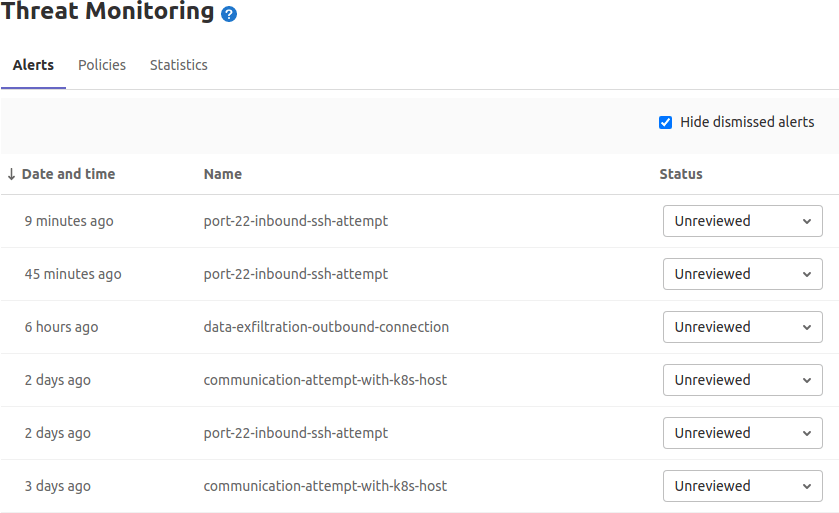
    Brian Glanz, a product marketing manager for GitLab, said chief among those capabilities is a Security Alert Dashboard that enables DevOps teams to triage high-priority alerts more easily. As more organizations embrace DevSecOps best processes, application development teams need to be able to prioritize which security issues are more pressing than others, Glanz said.

    Other new capabilities include the ability to reuse a pipeline of a CI/CD configuration, and a maintenance mode option that keeps instance available while administrative tasks are being performed.

    Additionally, it’s now possible to view group-level analysis of release metrics, in addition to the ability to view a version of a pipeline configuration with all of the include and extends configurations merged together.

    Glanz said GitLab continues to gain traction, because all the capabilities it provides are based on the same integrated code base. The effort a DevOps team needs to exert to take advantage of new capabilities is substantially less than rival platforms, Glanz said.

    At the same time, Glanz noted that the number of contributors to GitLab coming from outside the company also continues to increase. The latest version has 299 merged contributions from the wider GitLab community.

    It’s not clear how much of an appetite organizations have, these days, to replace an existing CI/CD platform. However, it’s not uncommon for organizations to have multiple CI/CD platforms employed by different DevOps teams. In the meantime, the number of teams within enterprise IT organizations that are embracing DevSecOps processes to advance digital business transformation initiatives continues to rise. As more organizations realize how dependent they are on custom software to differentiate themselves from rivals, more enterprise IT organizations will opt to standardize on a single CI/CD platform to both reduce costs and increase overall efficiency.

    A report published last year by GitLab noted organizations can improve application development and delivery by 87%, resulting in a savings of more than $23 million. Overall, the report claims organizations can see a 407% return on investment (ROI) on the GitLab platform.

    Naturally, competition among CI/CD platform providers remains fierce. With most developers working from home to help combat the spread of the COVID-19 pandemic, these platform providers have been touting their ability to support remote work. It’s not clear if developers will be returning to the office en masse now that COVID-19 vaccines are being distributed. However, it’s clear that even once the pandemic subsides, the way application code is created and maintained will be a lot more fluid. Many organizations are now more comfortable hiring developers wherever they can find them.

    Of course, many of those developers are going to be wary of joining organizations that have disjointed workflows, especially when it comes to shifting responsibility for application security further left toward developers. In fact, the ability of any organization to effectively recruit developers is now directly tied to the overall sophistication of their DevOps workflows.

  • Overcoming Cloud Asset Management Challenges

    Overcoming Cloud Asset Management Challenges

    Twenty years ago, no one in IT could have predicted the monumental role that cloud computing would play in our everyday lives. To play off the words of Back to the Future‘s Doc Brown: “On-premises? Where we’re going, we don’t need on-premises.” As technology continues to evolve, though, security teams face greater challenges.

    Infrastructure is no longer server rooms and boxes; it is dynamic, changing constantly to support fluctuations in demand. And moving to the cloud introduces new third parties into the digital mix. Although AWS, Google, and other cloud providers have a lot at stake when it comes to protecting customer data, security responsibility is never completely out of an organization’s hands. Compliance considerations are yet another complicating factor. In many cases, regulations around data access, privacy and residence were created for an on-premises world.

    Looking to the future, companies want to maximize their investments in the cloud, while better addressing these security challenges. However, the rapidly changing nature of the cloud makes it difficult for security teams to fully understand the scope of assets they are responsible for at any given point in time, which is an absolute necessity in order for companies to truly be secure. After all, how can a company make sure it has no gaps in its cloud security if it can’t account for all cloud assets – especially when working with multiple cloud providers?

    Security teams need to inventory their entire cloud infrastructure, understand what controls are in place and find ways to detect and mitigate any vulnerabilities or misconfigurations in a timely manner.

    Understanding Cloud Workloads

    When moving assets to the cloud, it can be incredibly difficult to try to inventory devices with dynamic IP addresses, which constantly change, compared with more static devices. The mass adoption of containers and microservices, some of which exist for just seconds before disappearing, make dynamic systems even harder to track.

    One of the most important improvements that have come out of cloud growth is that everything has an API, which can be a massive advantage when inventorying assets. Because each cloud provider is self-contained, finding out when a new bucket or instance is created is certainly possible. Organizations that have advanced development capabilities can write and maintain their own applications to identify every new cloud instance for each provider – but doing this for multiple cloud providers and correlating cloud asset inventories with other security control data becomes a major investment of resources. The ability to access all resources in the cloud makes asset management a more achievable goal.

    Security Controls

    It is essential for organizations to carefully manage their assets and understand the security controls in place to know exactly what they cover. By categorizing their resources, companies not only better understand what they have, but can make informed decisions about exactly what additional security measures need to be taken. For example, vulnerability scanners may not be scanning critical workloads – or perhaps dedicated cloud workload protection platforms need to be deployed for certain cloud assets. It can be incredibly difficult for security systems to keep up; since cloud assets can be created so quickly, they need security systems tailored specifically to keeping them safe.

    A security tool can only secure devices that it knows exist. Once an organization understands the assets it has, it can expand the coverage of any existing tools to devices that were previously unknown. When that coverage is fully adopted, asset management can help the organization find gaps in its coverage to identify areas for additional protection and the right tools to secure them.

    Addressing Vulnerabilities and Misconfigurations

    Once an organization establishes a comprehensive asset inventory and visibility, the next step is to address vulnerabilities, gaps in coverage or misconfigurations that are found. With the ability to spin cloud instances up or down at will, it is inevitable that instances may be forgotten and inadvertantly left unprotected. Since cybercriminals automatically scan public cloud infrastructure to exploit these types of vulnerabilities, public-facing cloud workloads are especially at risk.

    Similarly, finding and addressing misconfigurations in cloud workloads becomes more complex. With the highly configurable nature of the cloud, mistakes happen often, and without proper security controls in place to detect these misconfigurations, attackers can easily access and steal data. Organizations must implement a process to continuously detect cloud workload misconfigurations.

    A great place to start is the Center for Internet Security (CIS) Benchmarks, which provides objective security guidelines. By comparing data from each cloud provider with the rules in the CIS Benchmarks, security teams will be able to identify assets that don’t adhere to best practices.

    The key to maintaining security in a modern cloud environment is to implement continuous discovery and interrogation, which requires automation. This includes the ability to create tailored alerts when certain conditions are met, and automatically deploy and change security controls as needed. Teams should set restrictive access controls by default so that non-approved users don’t have access to sensitive data. Any time a cloud workload deviates from policy, there should be a plan in place to automate the corrective action.

    Computing technologies continue to evolve at a staggering pace. The computing environment 20 years from now won’t resemble even the most far-fetched, futuristic ideas today. The evolution of cloud adoption from justified skepticism to ubiquity taught us an important lesson: change is constant. It is incumbent upon technology and security professionals to  constantly challenge the expectations of security solution coverage and adherence to controls to keep data and systems protected.

  • Top 5 Issues Curtailing DevOps Adoption

    Top 5 Issues Curtailing DevOps Adoption

    DevOps may seem simple and logical on the surface, yet most of the companies we talk to are struggling in one aspect or another. This is no surprise: Successful DevOps initiatives require putting together a full toolset and simultaneously creating a smart team of developers, testers and project managers who are well-versed in cloud and agile technologies.

    Those tasks alone can take many months of trial and error until you are ready to start DevOps in earnest. After a period of experimentation, it’s time to refine and optimize. Focus shifts to more mature issues such as creating a fully integrated tools stack, supporting a rich test data environment that doesn’t undermine privacy and security, and determining the best DevOps infrastructure strategy for your company.

    Regardless of your DevOps maturity, we’ve outlined some top issues to consider and mitigate, as your DevOps practice evolves.

    Integrating Tools

    As the practice of DevOps matures, we have seen an explosion of tools, both open-source and commercial. These tools serve every discrete need in the process: requirements management, test management, defect tracking, agile planning, source code management, build, deployment, monitoring and more. We calculate there are at least 1,500 such tools available today.

    So, while developers, testers, project managers and business analysts have many sophisticated capabilities to streamline DevOps, those tools must work together. It’s imperative that tools and groups don’t work in silos, but are part of an integrated pipeline. This allows the code to flow seamlessly according to business objectives, from requirements definition to test and dev, production and deployment. Organizations may choose to create these integrations themselves—although that gets costly fast, both at the onset and with ongoing maintenance. Some vendors offer out-of-box integrations with popular tools, although you must consider if these will fit your workflows and needs. A few vendors now offer the best of both worlds—connectors that are simple to set up and with the ability to easily customize the integration when needed.

    Configuration as Code

    A common problem in DevOps is the need to align the environment configuration present when/where the code is written with the environment configuration used in production. By adopting configuration as code (consisting of tools and processes), you can store all configuration data as a file alongside the code. This is valuable because if there are bugs or UI issues, your staff can quickly locate the version of the configuration that matches the code/feature in question and load it into that environment quickly. If we are confident that the environment configuration is accurate, we can narrow down the app failure being most likely due to the code itself.

    Having both code and the configuration setup information in one place is also useful for testing purposes, as infrastructure configurations sometimes differ between development and testing worlds.

    Fast is Not Free

    Software teams have always wrestled with the need to balance speed with quality and cost. You can’t get the best of everything, so teams should figure out where they can compromise and where they can’t. In DevOps, however, the emphasis is almost always on speed. Once you reach maturity, you usually go fast and achieve high-quality results, yet this requires investing in tools, process and people.

    Working smartly can go a long way toward moving faster without sacrificing quality. If your team can figure out how to be efficient and precise, with clear objectives, then you won’t have to do much rework, which adds cost and time. Many people will flaunt the benefits of full automation to work faster. In many cases, however, automation ends up being a more expensive solution to the problem. Automation adds additional maintenance and overhead that needs to be outweighed with saved effort; you will have more tools and integrations to maintain, and more pieces that will break.

    Justify how much automation you need and acquire only the tools necessary to meet your goals. Ideally, organizations should determine the need for speed based on business requirements. Many industries are not driven by speed to market and benefit more by working in a steady, iterative fashion. Make sure you have a sound business reason for working faster and releasing faster, and that you can effectively manage the automation and staff needed to work at that pace.

    Acquiring Test Data

    For high-stakes applications, such as a new e-commerce site or mobile customer app, there is a great deal of risk in launching an app that hasn’t been tested on representative data. Accumulating enough high-quality test data to find bugs and optimize all the key features and scenarios before going live can be a monumental task given today’s big data initiatives, fragmented DB technologies and data privacy/security concerns. Specifically, when companies are dealing with sensitive data, such as customer information and credit card numbers, this is a tricky endeavor.

    One common option is to use real customer data and “scrub” it to remove identifying characteristics. If the cleansing process is not thorough, however, you’re creating tremendous security risks for customers. Another basic option is to create fake data that’s representative of production data. However, that data might not be accurate in all key scenarios, nor comprehensive enough to meet your QA objectives.

    Our analysis is that test data is a complex problem that no one tool can solve, and should be handled with importance as a cross-functional initiative. It’s not unusual to see security, compliance, testing, development and business personnel involved in test data management activities, especially for companies handling sensitive data.

    Internal vs. External Hosting

    DevOps environments seem to run optimally in the cloud. Cloud infrastructure gives organizations the optimal scale, flexibility and speed to run more builds and test faster through highly automated services. Top providers including AWS and Azure offer a full range of DevOps-oriented services to manage infrastructure for you, such as load balancing, log and instance monitoring and automatic backup/failover. With many DevOps vendors hosting their products and services in the cloud as well, it’s logical to host the entire environment there.

    However, this isn’t possible for many organizations with strict security and compliance requirements. Running a DevOps infrastructure internally requires a great deal of configuration, maintenance and software, not to mention staff to maintain it all. Automated testing often can be time-intensive when limited machines are available in the internal network for testing. Running those tests may require waiting for the weekend to free up resources, given the many hours required to complete those jobs. This, in turn, causes significant delays in testing and code quality feedback.

    One solution to this problem is using containers to scale the internal DevOps infrastructure. This allows more tests to run at once and reduces the overall build process time. Companies strictly doing web development can use open-source tools to do this. Conversely, large enterprises with apps on multiple platforms will need to build out a great deal of their own infrastructure.

    It’s a Process

    All of this might seem overwhelming to organizations just getting started with DevOps. But remember that DevOps is a journey taken over time; it is more than just new tools and skills. DevOps is a dramatic and evolving way to develop software and services that meet the frequently changing demands of customers. DevOps is the only way organizations can truly become data-driven operations, supporting new revenue streams and product innovation. When viewing it through this lens, we know that change will be gradual. Celebrate the small wins with low-risk projects first, and work to drive efficiency wherever possible.

    About the Author / Kevin Dunne

    Kevin Dunne pic

    Kevin Dunne is vice president of strategy and business development at QASymphony. Prior to joining QASymphony, Dunne was a business technology analyst at Deloitte. He can be found online at Twitter and LinkedIn.


  • Embedding security testing to avoid headline-inducing configuration fails

    Embedding security testing to avoid headline-inducing configuration fails

    When news broke earlier this month about the nation’s largest bond insurer exposing sensitive account information to Google’s indexing spiders due to a server misconfiguration, many an IT professional wondered how such a massive fail could have been neglected for so long. Security experts called it out-and-out negligence by the company, MBIA. But the truth is that plenty of other businesses with traditional IT departments could have just as easily suffered the same fate. MBIA was just unlucky enough to have caught the eye of security researchers and inquiring journalists.

    The fact of the matter is that most IT shops today still stink at configuration management.  According to a survey out by Avaya earlier this year, 82 percent of organizations today still experience network downtime due to human error around configuration changes. In MBIA’s case, it wasn’t downtime but a data exposure that MBIA suffered as the result of a misconfigured Oracle Reports server tied to a web application. The issue allowed back-end data such as account numbers, routing numbers and other sensitive data to be indexed by Google, along with administrative credentials that would let attackers access any other data not already out there for the world to see. Avoiding these kind of blunders stands as one of the big value propositions of DevOps processes and the orchestration toolsets that support them.

    “If they’d used DevOps, they’d probably have caught this issue much sooner,” says Rajat Bhargava, CEO of JumpCloud. “They should have controlled configs and change management, and DevOps is generally useful for those things. You make a change, you make it in code and theoretically people ought to be able to document these changes and then apply them across the board. So it is a little more controlled than someone going in manually and changing a setting and forgetting about documenting it.”

    However, when it comes to reducing the overall risk posture of infrastructure managed by the constant flux of DevOps’ fast iterations, Bhargava believes many organizations could stand to take their practices to the next level. He says they can do that by better embedding security testing into the DevOps cycles.

    “Clearly, DevOps shops are already doing automated testing around their code,” he says. “So there’s no reason why we can’t embed automated security testing just as we’ve automated QA and so on.”

    This means not only testing the security of the code itself, but also of the configurations and overall system security once that code goes live. Doing so acts as a backstop to the already automated configuration management process, which can be huge since a human error at the top of the orchestration stack could prove even more disastrous than the kind of one-off configuration error that hurt MBIA.

    “With great orchestration and configuration management tools, comes great responsibility. A simple misconfiguration of a system is only going to be compounded to the nth degree when you introduce DevOps configuration tools,” says Andrew Storms, a security and DevOps expert.

    Just as DevOps can speed up update cycles for software and configuration, adding security automation and testing into the equation can speed up response to problems—whether they come from internal human error or news of new threats that need immediate attention from both dev and ops teams.

    “For example, I know of companies that patched their entire DevOps enterprise for Heartbleed in a few hours,” Storms says. “Security best practices dictate that the security of systems be continuously checked in all environments — from early in the development process all the way into the production environment. Security is struggling to retool their processes and mold their staff to fit into the new ever changing DevOps world. It’s not just DevOps shops that need to do a better job at incorporating security into their processes. However, combining DevOps automation tools with security products is a true force multiplier that is our next best hope to get security right.”

    Rich Mogull, CEO for analyst firm Securosis, agrees. He sees the kind of embedded security testing that Bhargava is advocating for as a huge opportunity for DevOps organizations.

    “If you’re using the DevOps pipeline, to be able to go ahead and add security testing to that is a massive opportunity, and there are a bunch of tools out there to do some awesome testing (whose effect) would be extremely difficult to replicate using non-DevOps, traditional deployment testing,” Mogull says. “Not only is there an opportunity to get security engaged with automated testing, but you combine that with the building of a secure DevOps pipeline and I think we can wipe out entire categories of security issues.”
    For example, at Black Hat Europe this week, Mogull says he talked to a company that no longer has to deal with the traditional firefighting exercise of patching machines.

    “When they have to patch for something they actually just push the updated instances through their automation,” Mogull says. “So they’ll rebuild a new image and when they’re done with that, Jenkins will push it out into production and terminate the old instances.”

    Mogull also believes that security testing of code is a big part of the value proposition of embedding security into DevOps. Security vendors like Veracode are now starting to tie into Jenkins to let developers know code has security issues and where to find those issues before pushing them into production. And tools like Gauntlt are making it possible to spin up cloud environments and automate vulnerability assessment, network scans and configurations and flag policies through a Jenkins plug-in. Additionally, in the same vein as the patching example, incident response to viruses can be completely rethought, because “if an instance gets infected or something along those lines, they blow them away,” Mogull says.

    On a different security front, Mogull says the early adopter he spoke with at the conference also disabled SSH for admin log-ins to their production systems.

    “Because, with DevOps, nobody should ever log into a production system,” Mogull says. “Any changes you make, you make at the beginning of your pipeline and then that gets pushed out and flows into production.”

  • Simplify and expedite server management

    Simplify and expedite server management

    Deploying, managing, and maintaining servers can be tedious. Deploying, managing, and maintaining thousands, or tens of thousands of server instances is overwhelming—bordering on impossible—without the right tools. Thankfully, the right tools exist.

    The Pain of Doing Things the Hard Way

    I know I am dating myself, but when I was an IT admin for a dot.com startup, I had to deploy servers the old-fashioned way. UPS would show up with a box from Dell. I’d unpack it, and mount it on the rack in the datacenter. Then, I’d begin the process of configuring the operating system, and installing the application software. Each server was essentially a full-day project, and we seemed to constantly be adding new servers, so my full-time role was basically “racking and stacking” for a while.

    Adam Jacob was experiencing similar obstacles when he developed Chef. Working as an IT infrastructure consultant, Jacob was frustrated by the configuration tools that were available, and the lack of a simple, repeatable process. Rather than starting from scratch and reinventing the wheel for each client, he developed Chef to enable IT admins to create modular, reusable “recipes” that automate the process.

    Server management doesn’t end with deployment and initial configuration, though. You also have to maintain the servers, and resolve issues that might occur. When an issue arises, it could mean hours of troubleshooting to identify the root cause, and another few hours to work out and implement a resolution.

    I used to get into philosophical debates with management and other IT personnel because it was my opinion that we should just skip the troubleshooting and rebuild the server from scratch. My theory was that it might be nice to know what caused the problem, but from an operational perspective I knew I could rebuild the server and restore normal operations in a couple hours. Troubleshooting, on the other hand, was an unknown—both in terms of whether or not it would even be successful, as well as how long it would take.

    The Beauty of Doing Things the Easy Way

    Tools that automate configuration and deployment of server instances automatically solve both of these problems. They expedite deployment and configuration, and simplify management and maintenance—freeing IT admins and IT personnel to focus on more important, less mundane tasks.

    Tools like Chef help IT manage complexity. It is great from a DevOps, automation perspective to have a tool that enables you to quickly deploy and configure servers, but the real value comes from the ability to maintain a stable, dependable network with minimal effort.

    Chef nodes “phone home” periodically to ensure the configuration matches the recipe it has been assigned from the Chef server. Any deviations are automatically overwritten—so any changes that may have been made locally on the node are erased, and the server remains configured as it should be.

    In order to implement lasting configuration updates, the changes have to be made to the recipe at the Chef server level. The bonus is that once the recipe is updated, all Chef nodes working from that recipe will be automatically updated.

    When an issue occurs on a server instance, it should ostensibly be corrected automatically when the node communicates with the Chef server and overwrites the configuration. However, even if that doesn’t happen for some reason, the use of DevOps tools like Chef still makes the task of troubleshooting and/or resolving server issues much more efficient.

    With the push of a button, you can just deploy a new server—properly configured and ready to go. You could choose to kill the server experiencing issues and just replace it with the new one, or you could launch a new server to take over the roles and responsibilities of the affected server while you take the time to troubleshoot if you really need to understand what the root cause of the problem was.

    Embrace simplicity

    Apparently, I was an IT admin at the wrong time, and I got out of that career path right when things started to get interesting. Necessity being the mother of invention and all that, Adam Jacob created a platform with Chef that reduces the complexity and tedium of deploying and managing servers.

    Chef isn’t alone. Tools like this form the foundation of DevOps because a culture that combines development and operations, and iterates new releases on a rapid scale needs to have this sort of automated IT infrastructure to keep up.