Tag: collaboration tools

  • Stacklet Embeds Collaboration in Compliance-as-Code Platform

    Stacklet Embeds Collaboration in Compliance-as-Code Platform

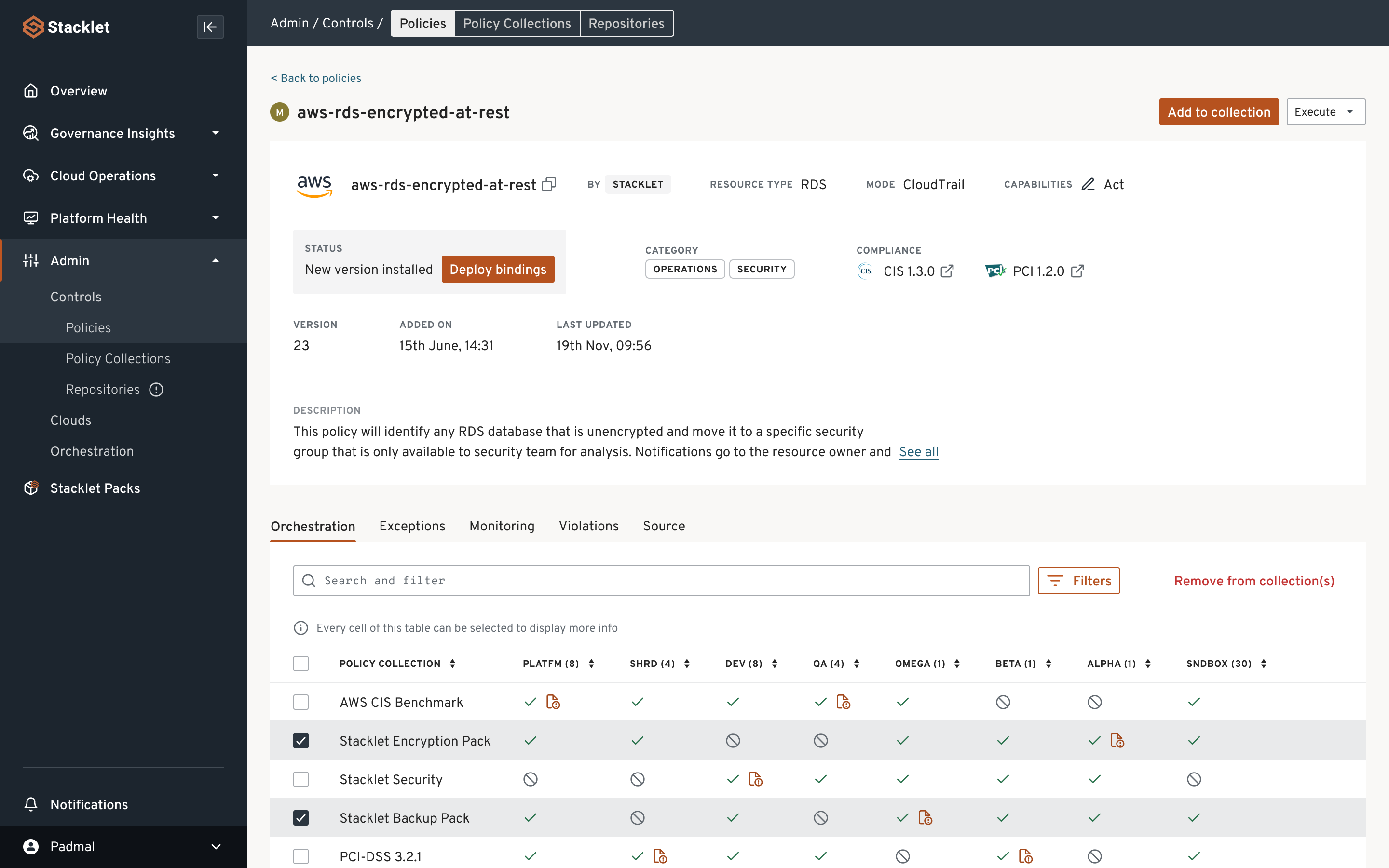
    Stacklet has added collaboration capabilities to its security and compliance platform that automatically groups related notifications, routes them to the right stakeholders and integrates with existing workflows and collaboration tools.

    The Stacklet platform is based on Cloud Custodian, an open source project that provides access to a domain-specific language that enables an IT team to employ YAML files to manage compliance-as-code.

    Stacklet CEO Travis Stanfield said that approach makes it simpler for organizations that have embraced DevSecOps best practices to comply with a wide range of mandates by shifting responsibility for achieving compliance further left toward DevOps teams.

    The latest version of the Stacklet Platform adds communications capabilities that leverage cloud resource configuration and policy metadata to automatically route notifications and escalations. Customizable notification templates add context for teams to collaborate either via email or integrations with Slack, Microsoft Teams and Symphony instant messaging. The Stacklet Platform can also trigger external workflows in tools such as Jira and ServiceNow to track issue resolution and generate reports.

    Ultimately, the goal is to make it simpler for IT teams to prioritize their compliance remediation efforts by keeping everyone involved continuously updated, said Stanfield.

    The number of compliance and security issues that organizations are experiencing in cloud computing environments is especially problematic. Developers often employ infrastructure-as-code (IaC) tools to provision cloud infrastructure. Unfortunately, they typically lack security and compliance expertise, which then results in large numbers of misconfigurations.

    The Stacklet platform is designed to give DevOps teams a way to prevent compliance and security issues using a compliance-as-code framework that spans multiple cloud platforms rather than requiring DevOps teams to employ a different set of compliance tools for each cloud platform on which applications are deployed.

    It’s not clear yet how far left responsibility for compliance will shift. In theory, organizations could avoid penalties if compliance issues are addressed before an application is deployed in a production environment. However, the teams that manage compliance in larger enterprises today are even further removed from DevOps teams than their cybersecurity counterparts. It may be several years before the cultural divide between these teams is bridged. In the meantime, many DevOps teams are taking it upon themselves to manage compliance as code to prevent unexpected issues from arising at the last minute before deployment.

    Overall, the goal is to enable DevOps teams to enforce compliance policies without slowing down the rate at which applications are built and deployed. The hope is that the adoption of compliance-as-code and DevSecOps best practices will address that issue. In fact, as the pace at which applications are deployed continues to accelerate to support digital business transformation initiatives, the number of potential compliance issues steadily increases. More troubling still, the greater the number of compliance issues there are, the more likely it becomes that cybercriminals will find a vulnerability to exploit.

  • Pinpoint Simplifies Managing Remote Dev Teams

    Pinpoint Simplifies Managing Remote Dev Teams

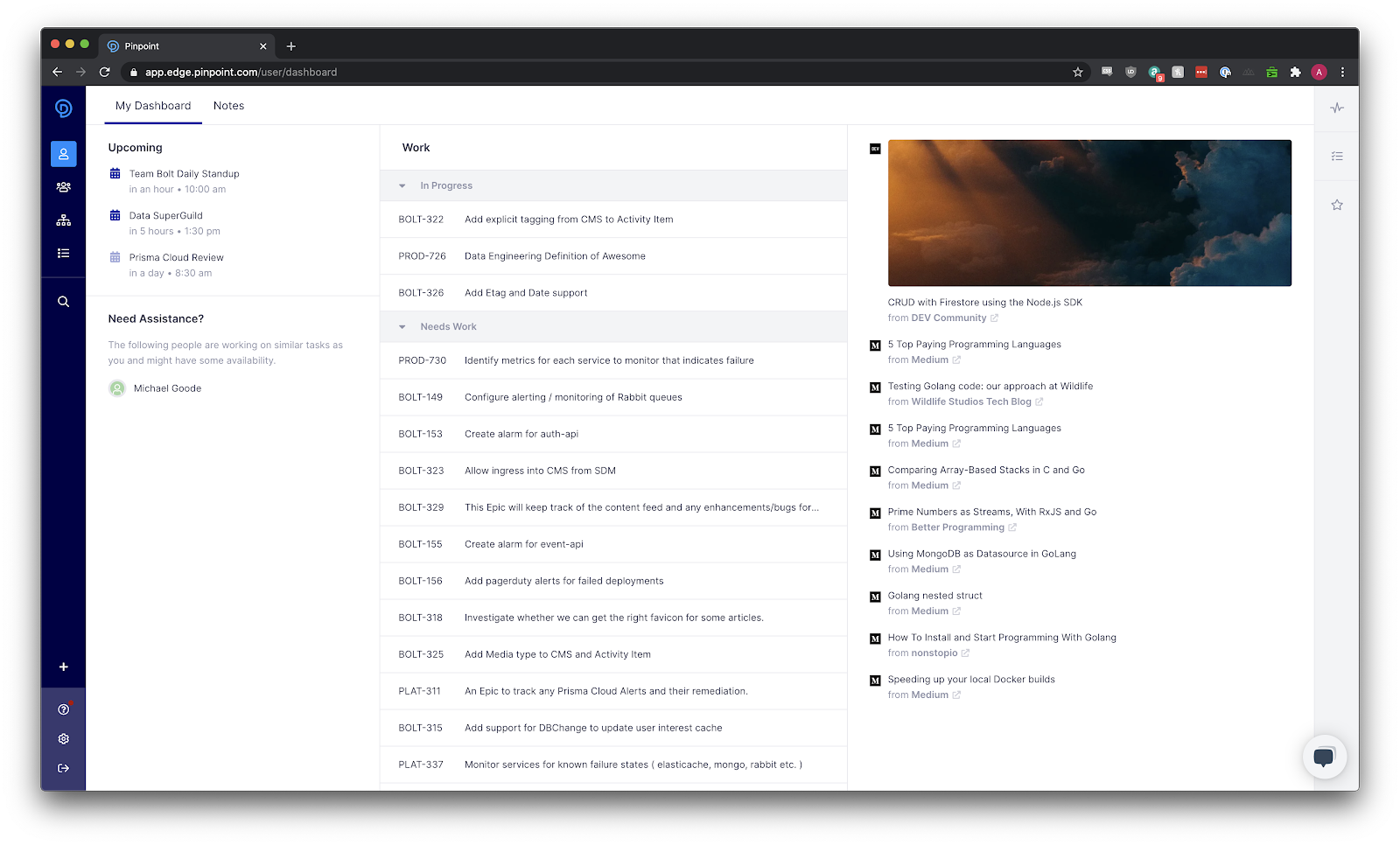
    Pinpoint today added a User Dashboard to its namesake platform for managing software projects that makes it easier for remote developers to stay focused.

    Company CEO Jeff Haynie said the User Dashboard provides developers with a personalized view of their work priorities and schedule for the day. It also provides a means to employ their Pinpoint Profile to highlight personal achievements and engage other engineers on the Pinpoint Platform.

    The Pinpoint platform is designed mainly to identify software development bottlenecks that could delay a project. Most recently, the company added machine learning algorithms and advanced analytics to surface additional insights and recommendations.

    This latest update extends the use of machine learning algorithms via a Recommended Content feed that curates content from blogs, podcasts and other media based on the observed interests of developers. Much like a built-in RSS feed, Recommended Content is an experiment to see whether the platform can save developer time by eliminating the need to scroll through less-relevant news, said Haynie.

    In the wake of the COVID-19 pandemic, he said, many organizations are struggling even more to manage distributed or remote developers. It’s also now much easier for developers to become isolated from the rest of their team. The User Dashboard provides a way to engage developers through the same platform managers employ to track projects.

    While there is no shortage of collaboration tools, Haynie noted they all tend to be tied to a specific DevOps platform. Pinpoint is designed to automate the process of collecting data from multiple tools, which the platform then analyzes to surface potential bottlenecks in the software development process. As software development projects become more complex, there is a need for a tool to visualize how hidden dependencies might upend delivery schedules, he said.

    The User Dashboard now extends that framework out to individual developers, who can view how to prioritize their specific tasks in keeping with a larger set of goals, Haynie added.

    Developers don’t typically have a lot of visibility into how their efforts ultimately impact the organization. In the absence of that information, it can become difficult to stay motivated, especially when working from home. Project leaders are now always going to be able to personally engage each developer every day, especially if members of the development team are located in different time zones.

    The User Dashboard isn’t a substitute for personal interactions, but it does provide a means for developers to quickly learn at a glance what needs to be done next in a way that serves to minimize miscommunications. It’s not all that uncommon for developers to lose valuable time by being told to do one thing when they should have been focused on a different task.

    Less clear is to what degree Pinpoint might be able to flatten management hierarchies within development teams. As a general rule, the fewer managers required the more an organization can allocate funds to hiring developers who, with the aid of the right platform, might one day manage themselves.

  • AWS Aligns With Slack to Foster Dev Team Collaboration

    AWS Aligns With Slack to Foster Dev Team Collaboration

    Amazon Web Services (AWS) and Slack Technologies have formed an alliance through which they are moving to transform the way development teams collaborate.

    Under the terms of the multi-year agreement, Slack will migrate voice and video calls to the Amazon Chime real-time communications service.

    In addition, AWS and Slack are integrating Amazon AppFlow integration with Slack, which enables data to be transferred securely between Slack and AWS services such as Amazon Simple Storage Service (Amazon S3) and Amazon Redshift. The two companies are also promising to make it possible to transfer data bi-directionally between multiple Slack channels and AWS services in a single flow.

    AWS and Slack have also integrated the AWS Key Management Service with Slack Enterprise Key Management (EKM) to distribute and control cryptographic keys. That capability builds on an instance of EKM for Slack’s Workflow Builder automation tool that was released last month.

    Finally, the two companies are committing to make the AWS Chatbot service accessible from directly within Slack.

    Slack, which already makes extensive use of the AWS cloud, has emerged as a de facto collaboration tool within many organizations that have embraced best DevOps practices. Eron Kelly, head of product marketing for AWS, said this alliance will make it easier for development teams to employ a wide range of communications tools at scale.

    Many DevOps teams already rely on Slack Calls to launch video and voice calls whenever a subject being discussed using text messages requires a deeper level of interaction. As reliance on Slack Calls increases, the software development kit (SDK) for the AWS Chime service that Slack will invoke will ensure the quality of the video and voice calls, said Kelly.

    In many ways, DevOps processes revolve around a mix of asynchronous and synchronous communications. The challenge has been to find a way to enable DevOps teams to use those tools in a way that enhances rather than detracts from productivity. Managing multiple Slack communications channels can easily become overwhelming, especially if developers are working on multiple projects at the same time.

    Ideally, DevOps teams will eventually become more adept at determining, for example, what messages, such as status updates, are best delivered asynchronously versus urgent requests that need to be made via a communications medium such as Slack.

    In the meantime, the COVID-19 pandemic has clearly increased reliance on communications services delivered via the cloud. With most members of DevOps teams working from home, tools such as Slack have become a virtual substitute for walking over to the next cube in an office to resolve an issue. Once development teams return to the office, it will be interesting to see to what degree tools such as Slack have become the default means of communication, even with fellow employees who may be only a few feet away. In fact, such tools may play a critical role in helping organizations adhere to social distancing policies even after employees return to the office.

    As philosopher Marshall McLuhan once observed, the medium is the message. Today, however, those messages increasingly are being delivered within a stream of real-time communications that is becoming more challenging to manage.

  • LaunchNotes Adds Communications Tool for App Release

    LaunchNotes Adds Communications Tool for App Release

    LaunchNotes today launched a namesake software-as-a-service (SaaS) platform for managing the communications surrounding the release of an application.

    Company co-founder Jake Brereton said LaunchNotes streamlines internal and external communications for DevOps teams, eliminating the need to employ a collaboration tool such as Slack or a project management application.

    Each message can be designated as either a private communication for the internal DevOps team or shared publicly with business shareholders. Instead of having to subscribe to yet another Slack channel, business stakeholders now have a dedicated and easier means to track the progress of application releases, said Brereton.

    Communications surrounding application releases have always been problematic. Most applications are developed using multiple platforms, so standardizing the communications tools provided by those platforms isn’t usually practical. LaunchNotes is designed to provide an easy way to manage communications regardless of the platform employed to build and deploy an application, Brereton said.

    DevOps teams can also post things such as articles that might, for example, explain the history of any given application development project, he added.

    Interest in application release timetables has never been higher. In the age of digital business, more organizations than ever have come to equate with revenue the rate at which applications are deployed and updated. However, it’s not always been easy for business leaders to decipher the release notes that DevOps team members routinely share with one another. LaunchNotes is meant to provide a means for DevOps teams to communicate privately with one another while creating a separate channel within the same platform to share frequent updates in plain language in real-time with other members of the organization.

    The issue with Slack and other communications platforms is they have become too noisy, noted Brereton. In the stream of updates being provided about things going on inside the organization and beyond, it can be easy to miss a critical update about an application release.

    LaunchNotes has been available through a private beta involving 60 organizations. The company views its platform as a complement to project management applications rather than a replacement. The sole focus is on streamlining DevOps communications, said Brereton.

    To one degree or another most DevOps teams suffer from a failure to communicate. Most of the time that failure is not because a message wasn’t shared; rather, the medium employed to deliver that message made it easy to miss or be misconstrued. If the medium is the proverbial message, then DevOps teams might be better off employing a medium designed specifically for optimizing application release cycles.

    Of course, many organizations will continue to employ the communications tools that are most readily available. However, those general-purpose communications platforms also make it easy for users to be distracted by everything from messages from human resources about the latest form to be filled out to who won the football pool this week.

  • Unnatural DevOps Delivers Supernatural Results

    Unnatural DevOps Delivers Supernatural Results

    DevOps is not necessarily a “natural” process. Asking people to function outside of their comfort zones and prescribed roles is a challenging task for any organization, and requires a shift in organizational behavior. At Trace3, we believe that while DevOps is not natural, a supernatural result is achievable with the right cultural transformation supported by good tools that drive collaboration and automated flow between people and tools in the application delivery workflow.

    We define DevOps as the application of the principles of continuous flow, feedback and improvement to people, process and technology for increasing agility, stability, security, efficiency, quality and satisfaction. Or, to quote from Michael Schmidt’s article, “Ten ways DevOps will benefit your IT department“: “When implemented properly, DevOps can transform your software engineering process and create value for both employees and customers, producing business performance and value.” These are huge “supernatural” benefits that every business would like to achieve.

    Implementing DevOps properly is challenging. DevOps depends on collaboration; smooth process flow from conception through deployment; and feedback between people, processes and technologies. It’s more natural for people and departments to hoard information and centralize control—traits that are contrary to DevOps best practices. People tend to trust their own abilities and are skeptical when they need to trust dependencies on others. People view competition with others as a means to personal advancement. Compounding this, organizations often manage, measure and reward success at the silo level instead of recognizing a successful delivery as a result of successful execution across the end-to-end DevOps value stream.

    Breaking down silos through transparency and the free exchange of information helps organizations implement the unnatural DevOps processes needed to achieve supernatural results. Fortunately, the transformation is assisted with technology. For example, continuous automation tools liberate sharing of infrastructure, application and compliance information. Pauly Comtois, Hearst’s vice president of DevOps, describes the role of strong tooling in successful DevOps transformations in his article, “Enterprise DevOps at Hearst Digital Media“: “Tools can be an incredible asset in this regard. We deploy Chef across multiple teams in the value stream, automating the deployment, configuration and state of environments in Dev, QA and Production.”

    In scenarios such as the example above, tools support integrated and automated processes for builds, configuration, infrastructure and deployment management. Information managed by continuous automation tools is available for DevOps uses by providing a single “public yet controlled” source of truth for configuration data useful by all processes and tools in the toolchain across the end-to-end pipeline. Those who were concerned and hoarded configuration data can trust that the tools will keep the information secure, reliable and available on demand as readily accessible code.

    Moving beyond the natural behavior of organizations and individuals is difficult, but success can create supernatural results for long-term growth and team effectiveness.

    — Marc Hornbeek

  • 4 Essential Practices to Succeed at ChatOps

    4 Essential Practices to Succeed at ChatOps

    We know enterprises are embracing messaging apps and incorporating so-called “ChatOps” into their workflow. ChatOps is, potentially, a powerful way to facilitate more swift decision-making and problem-solving and to receive quick, expert guidance. “With the rise of cloud services that can be easily deployed, and increased awareness and importance given to productivity and collaboration within the workspace, enterprise chat is gaining priority,” says Narain Muralidharan, a market analyst at online customer support software and help-desk software maker Freshdesk.

    As most readers are aware, ChatOps has been fueled by the growth of tools such as HipChat, HuBot, Slack and others for chat-style and instant collaborative software development and project management. But these tools also execute scripts and automate tasks and get workflow approvals to deploy code, kick off software tests and more. As an added bonus, within the chat application exists a clear record of all discussions and scripts executed—something very handy for root cause analysis and troubleshooting.

    With all of that in mind, how are enterprises embracing chat?

    Chatting Down Silos

    “At Threat Stack, we’ve long embraced Slack as a collaboration tool that removes silos within the organization and helps busy operations teams to move quickly and have a fully informed view,” says Pete Cheslock, senior director of Ops and Support at Threat Stack. “We’re seeing this migration toward ChatOps with our customers.”

    Bhaskar Roy, head of growth at Workato, sees chat being embraced at companies ranging from small businesses to Fortune 500 firms. “There are groups in large enterprises who are adopting different chat products and are always looking for what they can do to make chat the center of all communication. When we talk to these companies we find that they believe that chat is a more natural, human, fast way to communicate—which can help in getting things done faster,” Roy says. Chat, he adds, is becoming a “command center for business apps. [Organizations] are using chat to get information from various applications and are looking for ways where they can easily interact with the application from the comfort of their chat/conversational interface.”

    According to the most recent VictorOps State of On-Call survey, ChatOps continues to grow, with 40 percent saying they practice ChatOps during event remediation. That’s up significantly from 28 percent last year.

    Getting the Most Out of ChatOps

    With the tremendous growth in ChatOps, what practices have enterprises learned to bring the most success? Below we list the four essential practices that will help organizations succeed in their ChatOps engagements:

    Embrace adoption: “The main problem that enterprises have in chat penetration internally is adoption. People are resistant to change, and it is usually difficult to change user behavior, especially in the way people work every day,” says Muralidharan. “Some practices are set in stone, like emailing or the good old face-to-face meetings. Start small with pilot teams, get buy in, and create evangelists within the company. A lot can be gained by having a top-down approach to adoption; hence, management buy-in is very crucial.”

    Fine-tune notifications: “The biggest problem that we see is that bots and app notifications that are being pumped into the chats today are making things very noisy, resulting in loss of productivity overall,” says Roy. “What we believe is needed is utilizing bots to enhance the overall individual productivity, where people are notified only for things that are urgent, relevant and something that they need to act on right away. And bots are intelligent so that they understand and learn based on user interactions and are proactively prompting / helping as and when required.”

    Adopt a DevOps mentality: Eric Sigler, head of DevOps at PagerDuty, suggests that “to make the most of chat within your enterprise, it is important to adopt a ‘DevOps mentality,’ where individual teams are more responsible for, and empowered to maintain, their own services. Without this, it’s too easy for teams to ‘throw things over the wall’ and for ChatOps-based tooling to remain restricted to a limited set of users.

    “Existing infrastructure teams need to be a part of this ride as well,” he adds. “If they don’t take the time to understand how their engineers—their user base—want to interact with the tooling and invest in ‘making the easy things easy, and the hard things possible,’ then ChatOps-style tools will get relegated to shiny demos with little practical utility.”

    Avoid DevOps fatigue. Chat alerts can be nagging distractions throughout the day, sucking worker concentration and clamoring for their time. “Customizing notification preferences in your chat client can help enterprises reap the benefits of chat. By personalizing notifications, it ensures that they see the most important chats and are accessible when it matters, but still have the ability to focus without being disrupted by constant pings,” Sigler says.

    What Does the Future Hold for Enterprise Chat?

    What does the future of ChatOps look like? Most of the experts we spoke with say it’s bright. “In an age of digital transformation where slow is the new down, conversationally driven interaction with software is going to play an important role for collaboration and increased agility,” says Sigler. “Overall for founders, hackers and investors, there’s room to innovate when it comes to humans and bots, and there’s a lot of really poor user experiences and bad workflows out there that can be improved by thinking about them through the constraints chat provides.”

    — George V. Hulme