Amazon Web Services (AWS) has made generally available a tool dubbed Amazon CodeGuru that employs machine learning algorithms to recommend ways to improve code quality and identify which lines of code are the most expensive to run on its cloud service.
Peder Ulander, director of open source for AWS, said Amazon CodeGuru not only helps improve performance and resource utilization but also reduces the time and effort spent optimizing applications before and after they are deployed.
Amazon CodeGuru is based on a set of AWS machine learning algorithms to identify best practices for deploying code. It creates a profile of the code deployed and then surfaces recommendations to improve performance and reduce costs by employing the most appropriate tier of the cloud service.
That latter capability is critical because developers don’t always factor costs into deciding which tier of a cloud service to employ. Amazon CodeGuru enables IT teams to proactively optimize their cloud usage, noted Ulander.
Amazon CodeGuru can pull code from either GitHub or CodeCommit repositories, with support for other repositories planned. It requires developers to insert agent software developed by AWS into their code. Once a pull request is made, Amazon CodeGuru automatically starts evaluating the code using trained artificial intelligence (AI) models developed using data gathered from thousands of different open source software projects by AWS and its parent company.
Once the analysis is completed, Amazon CodeGuru will generate a graph showing such metrics as latency issues and CPU utilization rates, as well as human-readable recommendations to surface specific issues and remediations that include example code and links to relevant documentation for any line of code. Amazon CodeGuru can observe application runtimes and profile application code every five minutes.
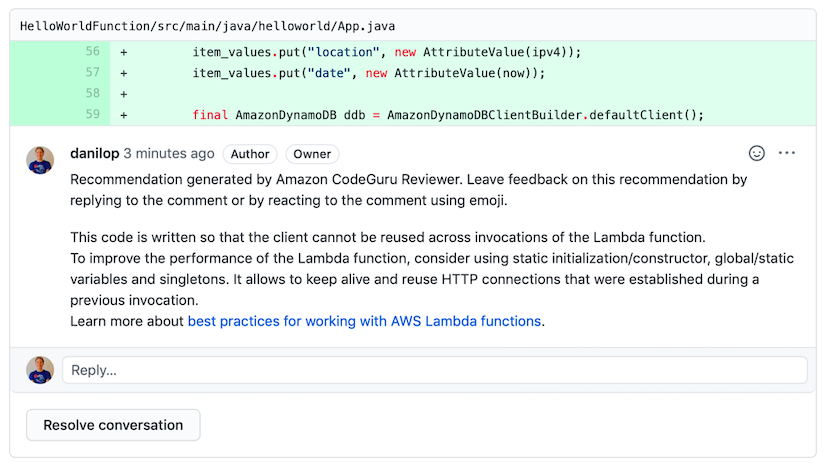
Amazon CodeGuru has two core components. Amazon CodeGuru Reviewer automatically flags common issues that deviate from best practices and provides recommendations to fix them, including example code and links to relevant documentation. It then opens a pull request and automatically starts evaluating the code using machine learning models to identify the line of code, specific issue and recommended remediation, and provides access to a pull request dashboard that lists all the information gathered by all code reviews.
IT teams can provide feedback on CodeGuru Reviewer recommendations by clicking on a thumbs up or thumbs down icon, which helps improve recommendations over time using machine learning.
The second component is Amazon CodeGuru Profiler, which identifies the most expensive lines of code by analyzing the runtime behavior of their applications. Armed with those insights, IT teams can identify and remove code inefficiencies, improve performance and decrease compute costs.
IT teams today spend an inordinate amount of time debugging code to address a broad range of issues. The paradox is the more applications they deploy, the more time they spend debugging. Perhaps the time has come to finally let machines discover code issues in the hopes that developers will use their time writing new code, not fixing it.
The evolution of DevOps teams and a greater reliance on cloud-based computing has completely changed the coding process. Now, with Integrated Development Environments (IDEs), coding can be done entirely online. This is convenient, but are online IDEs secure? To answer this, we will focus on two popular cloud-based IDEs: AWS Cloud9 and Visual Studio Online.
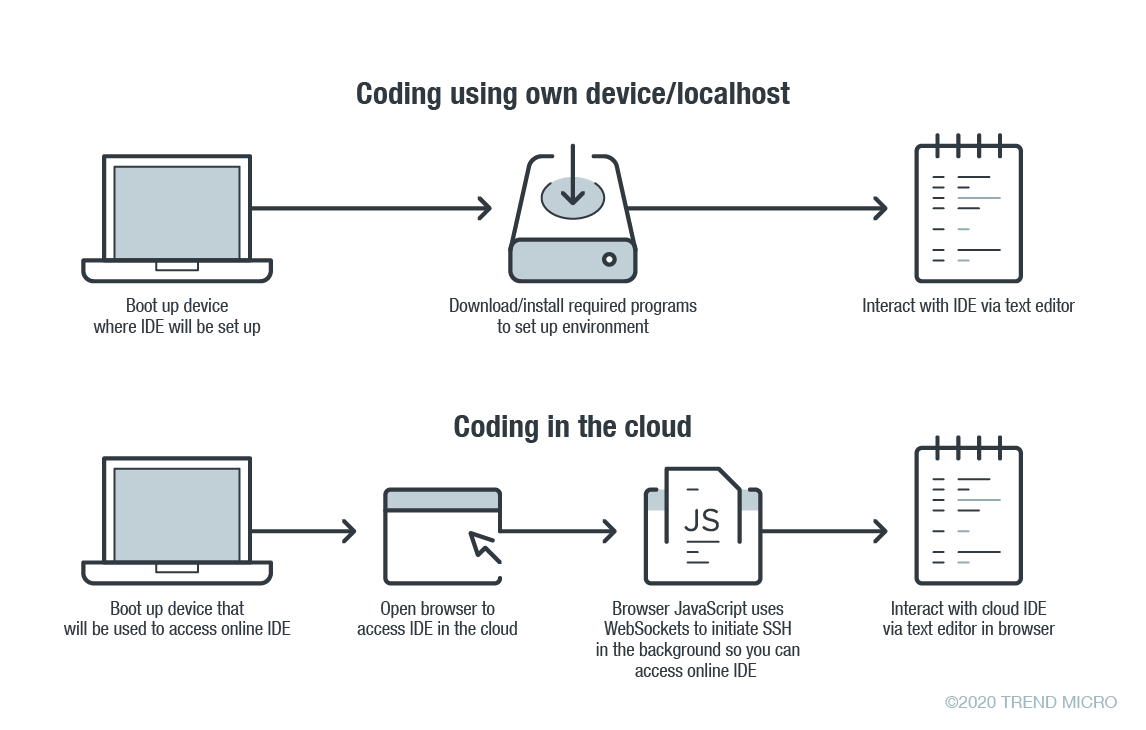
In online coding, the IDE is rendered inside your browser, the browser JavaScript engine uses WebSockets to initiate an Secure Shell (SSH) connection to your linked device in the background—e.g. virtual private server (VPS)—providing you with the familiar terminal interface to execute commands. The environment—meaning the linked cloud VM/VPS or SSH-accessible device—includes tool configurations (like which tokens are included, or cloud configuration files), a copy of the source code, compilers and other tools that you want to use.
Figure 1. Local versus cloud-based IDE. Source: Trend Micro.
The main difference between local and cloud-based coding platforms is where the bulk of the environment resides. In cloud IDEs, the environment is a virtual machine instance inside your cloud provider. In terms of security, this means you are delegating trust to the cloud provider, but you are responsible for preventing any backdoors from opening or introducing misconfiguration issues to the VM. In the case of using your own device with AWS Cloud9, you are responsible for configuring the device securely.
Linked Devices/VMs Are Not Always Secure
What is running on the backend often dictates whether linked devices and VMs are secure. As previously described, an SSH-linked device is necessary to use these online coding platforms. In the case of Visual Studio Online (still in preview mode as of this writing), we can find a Visual Studio (VS) Code server running on the machine.
The code server itself is a Node.js application to which your browser will connect. You can also download the whole ~/.vscode-remote folder and run the server inside your local environment.
As the owner of the linked device, you have permission to promote yourself to root and install or configure whatever you think you will need. You also have, by default, both Docker and Git pre-installed.
In the case of AWS-hosted Cloud9, the situation is a little more complicated. The backend necessary for platform communication is located inside the linked device while the frontend remains hosted on a different location. But, like in VS, you can also promote yourself to root.
This brings us to our first security concern:How secure or private are linked devices/VMs?
The linked device contains confidential information—access tokens, application configurations, source code, etc., which should be protected against unauthorized access.
By default, the platform is secured by the provider. However, you should keep in mind that, together with your root access availability, you are also responsible for preventing misconfiguration issues, especially when using third-party plugins. AWS does not provide plugin support for plugins not developed by them.
There are possible misconfigurations you might make that can lead to security issues. For example, if you set your IDE to be accessible from outside, either intentionally for ease of sharing, or unintentionally, that change can have major consequences.
In addition, it is not common for access tokens to be stored in encrypted token vaults. A lot of them can be viewed via plaintext configuration files. Without additional security measures, your access tokens can end up exposed to outsiders.
Once unauthorized access is acquired by cybercriminals, they can compromise your code for their own gain. An example would be the supply chain attack against a software company that modified software updates with malware.
Browsers Can Introduce Malicious Extensions or Vulnerabilities
The next security concern is the browser itself. As online coding platforms are accessed from web browsers, you should be very careful when accessing these sites from public, non-domain, shared or unprotected computers.
Malicious browser extensions are a well-known phenomenon. While an untrusted computer possibly infected with malware presents an obvious risk, it is also possible for an attacker to steal code using a malicious web browser extension.
Code Extensions and Plugins Can Also Contain Malware
The main advantage of Visual Studio Online and, generally, the VS Code platform, is the number of extensions available. This in and of itself is yet another possible attack surface.
Let’s imagine a malicious VS Code extension—a useful-looking extension with an embedded backdoor. The lack of permission checking (such as disk access, network access, process access, etc.) for extensions during installation or use, becomes a security problem. The extent of security checks during extension publishing is limited to having a valid publisher ID and a few image-related restrictions. This means you have to trust the extension developer entirely.
No Software Application Is Error-Free
The ever-present possibility of vulnerabilities in any kind of software must be considered as well. In the case of online coding platforms, they can be affected by web-class vulnerabilities since IDEs are web applications. For example, a vulnerability that allows an attacker to execute their own JavaScript code can have control of the IDE or remote linked devices.
A recent vulnerability affecting the Visual Studio Live Share extension, which is also available for VS Code, shows that we can expect to see another vulnerability affecting online coding platforms in the near future.
Securing Cloud IDEs Is a Must for DevOps
Threat modeling allows us to understand the different factors at play that can affect the overall security of a computing environment. Cloud IDEs should be no different from other software, if not more critical to secure.
Here are some recommendations for each of the security issues we raised:
For linked device security — Install trustworthy software. Keep that software updated. Don’t indiscriminately open ports to the internet.
For browsers — Work inside trusted and secured environments. Try to avoid using shared computers. Install browser extensions from trusted vendors only.
For VS Code extensions — Avoid installing extensions from unknown sources or authors.
For vulnerabilities in general — Make sure your environment is updated to the most recent version.
Although historically technology professionals were among the most adaptive specialists in the job market, a recent survey from SolarWinds found that DevOps teams, web product managers (WPMs) and developers lacked confidence in their current ability to effectively manage their current environments while engaging in future technologies. This balancing of current trends with future innovations is a necessity of having any technical role, as things change quickly in technology.
SolarWinds recently published the latest edition of its annual IT Trends Report, IT Trends Report 2019: Skills for Tech Pros of Tomorrow, which explores confidence, current and future skill sets, career development and barriers to career success to reveal how DevOps teams, developers, WPMs and the businesses they serve can better manage future technology realities. How do these tech pros personally feel about their current and future skill sets? Coinciding with SolarWinds Cloud Confessions: The Trouble with Troubleshooting,the IT Trends Report found that tech pros have an appetite to prioritize career development on a weekly basis, but are hindered by factors such as time and cost. How can they prioritize career development while confronting the barriers to career success and develop the skills necessary to make future tech implementation a reality?
The DevOps findings are based on a survey fielded in December 2018, which yielded responses from 100 DevOps practitioners (teams, developers and WPMs), managers and directors in the United States and Canada from public and private-sector small, midsize and enterprise companies.
Among many other key findings, this year’s survey revealed:
Most tech professionals in DevOps, web product managers and developer roles are not fully confident they have all the skills needed to manage their environments into the near future, especially when it comes to emerging tech.
75% of all DevOps teams, developers and WPMs surveyed are not “completely confident” in having all the necessary skills to successfully manage their IT environments over the next three to five years—even though 98% have worked to develop a skill over the past 12 months.
When it comes to the idea of implementing or managing specific technologies, emerging tech is a pain point (despite how much mindshare these buzz-worthy technologies get in headlines). The top three technologies DevOps teams, developers and WPMs feel unequipped to manage with their current skill sets are:
AI (55%)
Blockchain (50%) and quantum computing (50%)
Machine and/or deep learning (45%)
According to the Gartner list of strategic technology trends that have the potential to disrupt and are on the verge of becoming more widely used in the next five years, AI, blockchain and quantum computing all rank in the top 10.
There is a great opportunity for DevOps teams, developers and WPMs to increase their knowledge of these technologies and to have productive conversations with businesses on the reality of implementation in the near future.
DevOps teams, developers and WPMswill continue building skills in daily operations with an eye toward areas such as data science.
In the next three to five years, the top two skills developers and WPMs plan to develop are security management (45%), data science and analytics (41%).
DevOps teams’, developers’ and WPMs’ instincts are correct when it comes to the top skill set area as they’re expected to see continued growth. Gartner research analysts estimate that global revenue for the information security market will grow at a compound annual growth rate (CAGR) of 7.8% between 2017 and 2022, reaching $143 billion in constant currency terms.
Hybrid IT deployment monitoring and management rounds out the top three skill sets DevOps teams, developers and WPMs plan to develop in the next three to five years.
Gartner also predicts that the worldwide public cloud services market will grow by 17.33% in 2019, going from $175.8 billion in 2018 to $206.2 billion this year.
DevOps teams, developers and WPMssay cloud and/or hybrid IT, big data analytics and AI are the key technologies for career development, which will help achieve higher goals such as innovation.
DevOps teams, developers and WPMs say the most important technologies for their career development are (by weighted rank) aligned with the top three technologies for organizations’ transformation over the next three to five years.
Cloud and/or hybrid IT (59%)
Big data and analytics (55%)
AI (54%)
When it comes to career development goals over the next three to five years, DevOps teams, developers and WPMs will look to prioritize (by weighted rank):
Technology innovation (49%)
Programming, coding and/or scripting (33%)
Data analytics and/or data science (38%)
Management/leadership skills (people management) and IT security protocol and/or processes round out the top five career development goals for the next three to five years.
DevOps teams, developers and WPMshave an appetite to prioritize career development on a weekly basis but are hindered by factors such as time and cost.
Nearly 8 in 10 DevOps teams, developers and WPMs (79%) say their day-to-day IT tasks extend into time earmarked for career development, with 20% saying this always happens.
This is alarming considering DevOps teams, developers and WPMs enjoy technology skills training, with 49% finding it informative, 32% saying it’s engaging and interactive and 27% reporting it’s not long enough.
Currently, DevOps teams, developers and WPMs engage in IT skills training and/or career development programs ranging from a few times a year (25%) to monthly (23%) and weekly (19%); however, if there were no schedule or workload restrictions, most (42%) would prefer weekly training.
Developers and WPMs cite time and availability (48%) and cost (25%) as the biggest barriers affecting their current ability to participate in IT skills training and career development programs at the frequency they would like.
When it comes to their primary sources for training, DevOps teams, developers and WPMs turn to:
My organization and/or coworkers (20%) and online communities/forums (20%)
Industry events/trade shows (17%)
Vendor training sessions (16%) and industry publications (16%)
However, the ideal delivery format for IT skills training according to DevOps teams, developers and WPMs is (by weighted rank):
Self-guided online course
In-person workshop/user conference (full-day)
Webinar
Final Thoughts
For tech pros to continue helping businesses revolutionize current technology while proactively adapting for future disruption, it is imperative that business and technology leaders provide the training that tech pros seek, through courses, self-guided training and webinars.
SolarWinds 2019 survey results emphasize the importance of empowering tech pros through training and focusing on career development. Emerging tech should not be a pain point for these tech pros—rather, they should have the opportunity to embrace strategic technology trends and have productive conversations with businesses on the reality of implementation in the near future.
2019 is the year of integrating career growth, skills development and business transformation to empower tech pros with the skills necessary to help lead the business they support into the future of tech innovation.
At a conference, I heard a speaker remark that “Dev people are from Mars while Ops people are from Venus.” That’s catchy and captures what a fair number of managers believe instinctively. But is it really true? I’m not convinced.
We all know that DevOps enables us to deliver software faster, with fewer bugs and much less downtime than traditional approaches. But DevOps is new, complex and often challenging for teams to embrace. Developers often guard their tools and operations shake their head each time they hear about some new asset bundling package they have to support. I think the first few meetings of Dev and Ops probably do a lot to build the notion that they are from different planets.
In my experience, however, the opposite is true. To borrow a different popular catchphrase, they are more “brothers (or sisters) from a different mother.” When you examine the makeup of Dev and Ops people, you find more similarities than differences. Here are some examples of their common ground:
Consistency and Standards. Both Dev and Ops are technical endeavors that place a huge premium on things being “precisely” correct. Whether coding a service or setting up an AWS instance, “in the ballpark” doesn’t cut it. For this reason, both camps try to establish standards for how they work. Whether keeping Dev teams all using the same environment or Ops trying to keep Dev, testing and products all running the same, both need to benefit from building consistent environments.
Coding Skills. Whether coding or scripting, Devs and modern Ops teams need to be comfortable in a variety of highly technical tools. Build scripts, deployment, automated testing and reporting all require some coding skill.
Common Tools. If you look at the DevOps ecosystem, you’ll increasingly see tools that are intended for both Dev and Ops tasks. Dev people, for example, use Git for reusable code; Ops uses Git as well for configuration of things such as Docker. Also, Dev uses Jira to track bugs while Ops uses Jira to track tasks.
Shared Metrics. While their focus may be different (code versus pipeline), both Dev and Ops share many metrics of success—consistent delivery, fewer errors, responsiveness to customers and uptime, to name a few.
Test-Driven. Dev and Ops both embrace the “fail fast” mantra. They want to know if a change will break anything as soon as possible, long before it ever impacts a customer. Both often start with automated tests, which are run on Dev or local instances, to verify the changes are non-breaking.
Love of Automation. Neither Dev nor Ops enjoy manual, error-prone work. Both gravitate to tools that automate routine tasks, reducing variances and errors.
Star Wars. Finally, both groups are avid “Star Wars” fans. Just watch how they open automatic doors using the force or name servers or other things with sly “Star Wars” references (such as “Secret Rebel Base”). In fact, next time you’re in a DevOps meeting and somebody is wondering if Dev and Ops can get along, bring up Jar Jar Binks and marvel at the immediate—there will be a completely concordant reaction from both sides.
So, are Dev and Ops from different planets? I don’t think so. I see Dev and Ops as being like those twins separated at birth, who, when reunited decades later, laugh the same, have the same twitches and both married spouses with the same first name. And in the best DevOps shops I have seen, that’s a really good thing.
When a digital product is developed in and for a particular geography and market, the enterprise and developer/architect function is focused on getting it to market first. Once it matures and receives greater engagement, enterprise is then looking to continuously add and develop a stable product that is feature-rich, scalable and robust. So, when the opportunity to take the product global arises, the design and development of the product encounters a whole set of challenges that is not accounted for in the initial stages of development. This is when the localization-versus-internationalization challenges take root.
We have compiled a few quick hacks that you can use as your checklist for a smoother transition.
Let’s first define internationalization and localization. As per the World Wide Web Consortium (W3C), localization is defined as “the adaptation of a product, application or document content to meet the language, cultural and other requirements of a specific target market (a “locale”).” Internationalization is defined as “the design and development of a product, application or document content that enables easy localization for target audiences that vary in culture, region, or language.”
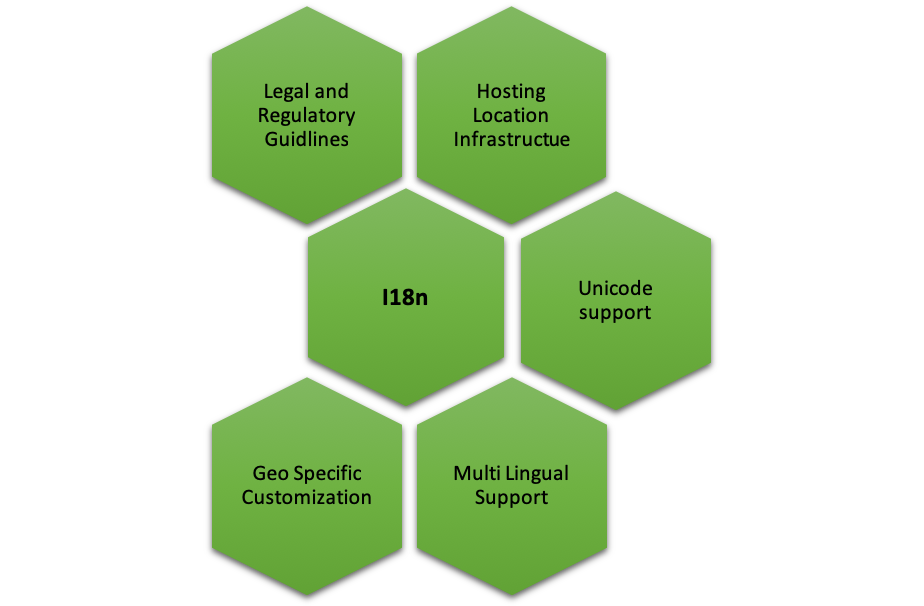
So, what are the typical factors that teams of designers, architects and developers need to first establish, foreseeing internationalization?
Legal and Regulatory Guidelines
Different regions, geographies, countries and markets have different regulatory guidelines that can extend to several facets including organization practices, trademark requirements, currency repatriation, tax compliance, regulatory compliance, duties and corporate agreements and contracts, currency repatriation and so on. If you’re working on a product that you need to go-to-market in China for instance, then it is important to understand the legal and regulatory framework within which you can operate.
Hosting Location, Global Distribution/Content Delivery Network Infrastructure
Different geographies, different networks and different internet speeds are factors one must consider when taking your product global. How can a product be designed to ensure that it “loads” quickly for customers across regions? Should there be a central database or should it be distributed? Who, where and how will distribution of data be managed? These are critical questions to ensure there are no customer drop-offs.
Unicode Support
Today, Unicode allows support in most of the world’s writing systems. Enabling its proper usage that can support local, regional or even cultural context is critical. For instance, supporting special characters from different languages that are outside the ASCII boundaries (defines 128 characters in a typical English keyboard) is extremely important. Unicode defines 221 characters (characters from all recognized languages in the world), thus, UTF-8/16 encoding format should be supported when you’re planning to release your product in different geos. This is a crucial requirement for database, DB connection, build setup and server startup options—just to name a few.
If you’re fond of hard coding text, think again. Creating text and media that is easily editable, gives you the flexibility to easily localize and adapt your product for different regions.
Multi-Lingual Support
English may be one of the most spoken languages in the world, but that doesn’t necessarily mean every region or market thinks, reads and speaks English. For instance, if you’re releasing a product in Japan, China or even India (with its plethora of scripts for different languages), multi-lingual support for your product is essential. Here are a few things to follow:
Maintain language-specific resource files for each support language (eg. en-us.properties, ar-sa.properties) with key value pairs—the key is used in the code to place the text, and value is the language specific translated text.
All text on the screen, messages and label text must be sourced from resource files, and there should be no referencing of text directly in the code.
Choose to keep the resource files at the back end/front end. Front end is recommended as it helps improve performance, and by avoiding calls to the back end and toggling, it moves fast.
UI framework should support translation features.
Think about text expansion in different languages, in terms of number of characters and how it can affect the UI and UX of your product. The same holds good for languages that are written from left to right, as well as translations.
Scalable Framework for Geo-Specific Customization
Development framework must consider the UI/UX, branding, orientation and size of the product when going i18n. For instance, the color red could mean different things in different countries and cultures—in China it could mean endurance, in India it could mean purity, in Europe it could mean self-sacrifice or in South Africa it could mean grief and sorrow. Therefore, it is extremely crucial to understand different nuances of cultural significance while designing the UI for a great UX. A few other factors to keep in mind:
Tag-based framework for content picks up where the content is tagged to language/country, and gets picked for users having matching profiles, for the tag values. This way, you may have content for various languages, but a user in Spain gets to see only the Spanish content just by setting his language preference in your system.
Orientation and sizing adjustments—specific CSS to handle alignment/size specific customization.
Navigation (left to right), enable/disable certain options through CSS customization.
Localization-based content.
Language-based content.
Developing a framework for rapid transition to international markets requires a thorough think-through from a product enablement perspective, keeping in mind operational efficiency without impacting product behavior. Using this checklist will help you save time, money and rework when you finally decide to go i18n.
Right around this time of the year, the gym starts to get a little less crowded. Throughout January, it’s packed to the gills with folks freshly motivated by their New Year’s resolutions to get in shape. But by mid-February, the commitment seems to have all but dissipated.
Why is it so hard to just commit?
During my last workout, it occurred to me that the set of vacant treadmills next to mine was eerily reminiscent of the state of enterprise DevOps. According to Forrester, 50 percent of digital transformation efforts stalled in 2018. It seems commitment and follow-through are difficult in both personal and professional arenas. Admittedly, adopting and scaling DevOps is no easy feat. While reflecting on what does work, I found some parallels between the transformation process and DevOps itself.
What Success Looks Like
According to DORA’s “2018 State of DevOps report,” organizations with the highest level of DevOps execution, as measured by throughput and stability, also achieved the highest level of business performance in terms of profitability, market share and customer satisfaction. In a true case of going fast without breaking things, elite performers realized impressive performance gains:
46 times more frequent deployments (throughput)
2,555 times shorter lead times (throughput)
7 times lower change failure rate (stability)
2,604 times shorter time to recovery (stability)
These metrics underlie a key tenet of DevOps transformation, which is breaking up large chunks of work into many small pieces.
Shrinking the Change
Smaller changes mean getting work out faster, with less risk. They take less time to plan, less effort to execute and are easier to troubleshoot. But, smaller code changes alone aren’t meaningful unless they are coupled with shorter release cycles. In essence, agile without CD doesn’t work.
Stockpiling a few months worth of agile code iterations into a single monolithic release reintroduces an enormous amount of risk and negates much of the work done to adopt agile software development in the first place. Big queued-up releases often mean someone is stuck working the weekend to iron out all of the things that inevitably go wrong and no one should be stuck with weekend release duty. As Jez Humble put it, “The most important metric for continuous delivery is the number of person hours spent outside of business hours doing releases… and the goal for that is zero.”
At GitLab we use the phrase, “just commit” as a shorthand for continuous delivery and deployment. The idea is that when you have a completely automated CI/CD pipeline, all a developer needs to do is commit code to their branch, and everything else needed to get that code running live in a production-like environment—from containerization to security testing—is automated. Similarly, getting code to production is as easy as merging the feature branch back into trunk with the entire production deployment automated. The message to the developer is, “Just commit your code and let your DevOps tooling do the rest.” This is CD in a nutshell.
With this type of automation in place, the cost of making a change significantly decreases. This means the cost of getting started is very low, but so is the cost to keep going. Instead of spending a massive effort to map an entire path to your solution, you simply need to figure out your next step and keep iterating. According to GitLab’s “2018 Global Developer Report,” 67 percent of developers report the top challenge to getting work done is unclear direction. By shrinking the change, business leaders will find it easier to set direction for the next step without having to map the entire path. This brings us back to digital transformation.
Commit to Digital Transformation
Just like a monolith being decomposed into microservices, the practice of breaking large chunks into small pieces applies to driving digital transformation as well. Like Creighton Abrams said, “When eating an elephant, take one bite at a time.”
How can enterprises shrink the change?
For most organizations that achieve successful digital transformation, the initiative usually starts with a single team or innovation unit. This group proves the success for the rest of the organization. It develops that culture, tools and processes that other parts of the organization can then adopt. One example of this principle in practice is the transformation that Chris Hill, Head of Systems Engineering, Infotainment, led at Jaguar Land Rover. When Chris came on board, only three build engineers had the ability to release to production and it took four to six weeks to complete each release. Chris gradually scaled a CI/CD platform, step-by-step over two years, until every team across the organization was able to complete a release in less than 30 minutes. Today, the Jaguar Land Rover completes 50 to 70 deployments per day. This iterative pattern is seen over and over again with enterprise digital transformation. It’s encouraging because it means successful digital transformation can be driven by either executives top-down or engineers bottom-up.
So, how can organizations keep going and avoid the stall out?
If I can make a confession, I am also one of those New Year’s resolution makers who just started working out in January. How it is that I’m still hitting the gym while others have dropped off? I have found that taking a “DevOps” approach is a key to my success. Instead of broad sweeping changes, I make small incremental improvements one day at a time.
It turns out the strategy for getting started—“just commit”—is the same strategy to keep going.
By starting small with a single project and gradually expanding scope in iterative steps, an organization can continue to improve over time at a rapid pace. Small, single-commit code changes coupled with CD increase throughput and stability. In the same way, small, incremental process improvements bring about the greatest success with digital transformation.
The 2018 Topcoder Open (TCO), the world’s ultimate programming and design tournament, took place in Dallas Nov. 13-16 and featured the best technologists from around the globe competing for cash prizes and international rank. Companies of all sizes shared perspectives on digital transformation and caught a glimpse of the most coveted programmers on the planet. A handful even provided current software development challenges their in-house IT teams face for Topcoder Community members to solve.
I caught up with Dave Messinger, chief architect of Topcoder, for his take on why 2018 brought one of Topcoder’s most challenging tournaments.
Jessie D’Amato Ford: What’s your history with Topcoder?
Dave Messinger: I’ve been with Topcoder since December 2001. It’s a fast-paced, innovative environment that thrives on creativity and speed, which mirrors the spirit of our unequaled Topcoder Community members. Today I run Topcoder’s technology platform, which is the core of our crowdsourced software development work with enterprise customers.
Ford: What were a few highlights from the 2018 TCO?
Messinger: This was Topcoder’s 17th annual event and it was especially competitive. We had 100+ finalists from 34 countries, with first-time competitors coming from Morocco, Hungary and Nicaragua. Topcoder ran 1,600+ challenges and awarded more than $2.5 million in prize money. The companies attending were impressed by not only the caliber of technologists competing and how much they accomplished in such a short period of time, but also at the efficiency, accuracy and speed of crowdsourced software development.
Ford: Tell us about one finalist you kept an eye on while at the TCO?
Messinger: Thomas Kranitsas (Topcoder handle: thomaskranitsas), from Greece, graduated from school and served in the Greek Air Force. Now in his third year as a Topcoder Member, thmaskranitsas has been a Code Review and Copilot on crowdsourced software development projects for companies. He sees Topcoder as an opportunity to work with the newest technologies, solve real-world business problems, earn money and meet the “best developers and designers in the world.” He finished 5th in the TCO’s First2Finish competition, with only 4.55 points separating him from the winner.
Ford: How has crowdsourcing changing the way software is developed?
Messinger: When Topcoder first opened its doors, the skepticism surrounding crowdsourced IT was overwhelming. Like many technology innovations, crowdsourcing had an uphill battle. It was a completely new way of developing software and managing teams—it, too, changed for the better over time. Fast forward to 2018 and now crowdsourcing is mainstream. The internet and cloud computing helped democratize development by allowing anyone in the world to access to the same resources and become familiar with multiple platforms. Other technology advancements and techniques, like microservices and DevOps, have also allowed more developers, designers and data scientists to collaborate on software projects with little ramp up time, which reduces costs and increases efficiency (both important to global organizations).
Ford: What industries have been quick to catch on and why?
Messinger: Topcoder has customers in almost every vertical imaginable because the methodology for developing high-quality software with a crowdsourced model is applicable to anyone. Crowdsourcing works best when developers can easily access SDKs, APIs and development environments. The 1.4 million (and growing) Topcoder Member Community has been working on projects that drive significant industry change.
Ford: How does the TCO recognize and reward Topcoder Members?
Messinger: There are multiple rounds to champion before Topcoder Members earn a finalist spot at the TCO in the U.S. (and we’ll fly the finalists in from wherever they are in the world). The collective intelligence in one place is astounding! It’s also a great opportunity for technologists and companies to pick up new software development techniques, as well as discuss the latest trends. Topcoder Members are passionate about helping businesses solve IT challenges.
Ford: What skills are companies looking for in today’s developers?
Messinger: Companies are not only looking for the best developers, but also for those who can clearly document code and collaborate well with the rest of the team. Topcoder’s viral nature and crowdsourcing methodologies hone in on those skills no matter where someone is working.
Ford: What’s ahead for The Topcoder Open in 2019?
Messinger: 2018 marked Topcoder’s first use of automated testing as part of our TCO development track and we’ll be expanding it in the future. TCO 2019 will bring Topcoder’s first test-a-thon competition: our QA community will participate in a live QA challenge to identify bugs in live tournament style. It will be exciting, for us and the Community, as well as companies watching these master technologists at work.
Any DevOps professional worth their salt inherently understands how inextricably tied the future of work is with coding, scripts and automation. It’s already a development-oriented world out there and is increasingly growing so. As a result, today’s kids need to at least understand the fundamentals of programming if they want to succeed later on in life—even if they have no interest in becoming full-fledged developers themselves. This knowledge is what educational professionals call “computational thinking.”
Learning this mode of thinking doesn’t have to be a drudge, though! Fortunately, there are tons of awesome STEM toys and games out there to get kids into the coding mindset from a very early age—all while having fun in the process. We’ve gone through the trouble of sifting through the offerings to give the DevOps community a good head start on their holiday gift giving, no matter the age of kids they’re hoping to bring into the fold.
What’s not to love about a programmable caterpillar? Very young children pick up planning and sequencing skills by experimenting with the way the Code-a-Pillar moves. Each segment of the toy controls its movements such that different segment sequences create a route for it to move.
Inspired by the Montessori emphasis on the accessible simplicity of wooden toys, Cubetto gives little ones the chance to physically manipulate a programming language via a wooden robot. Putting wooden blocks on the Cubetto tells it where to go.
Built from a massively popular Kickstarter campaign, Robot Turtles distills the basics of coding into a fun board game tailored for preschoolers on up through grade school kids. Kids learn sequencing and even subroutines by moving the robot turtles around on the board. It’s what the creators call ‘stealth learning.’
Believe it or not, the creators of Let’s Go Code have managed to figure out a way to teach programming principles in a kinetic activity that doesn’t even require a computer. This is a game that has kids use coding precepts to build mazes that they’ve got to hop, skip and jump through—perfect for bubbly young grade schoolers.
Much like the Code-a-Pillar does for younger kids, Botley teaches screen-free coding by having kids create more advanced routing programming for a little robot. This adds more complicated challenges such as creating obstacle courses, looping commands and more to require a higher level of critical thinking for the grade school set.
Get kids well and truly pumped to code with the Kano Computer Kit, a complete box kit that comes with everything they need—including detailed instructions—to build their very own computer and then code on it. The software platform comes built with over 100 coding challenges and teaching tools for kids to create their own games, websites, art and music.
This handy starter kit comes built in with multicolored LEDs, environmental sensors and more to get kids into experimental embedded programming. The platform runs MakeCode, Circuit Python, Adruino and Code.org CS Discoveries, giving tons of runway to create unique projects. The Playground’s creator has a very extensive online knowledge base and maker community to give teens some ideas to get started.
Pick up this design-based puzzle game on Steam for cheap to get older kids into programming in a fun and engrossing format. The game has players acting as a “reactor engineer” in a sci-fi space colony building out chemical synthesizers to transform raw materials into chemical products. As they solve puzzles they start to learn about basics like sequencing, loops, branching and subroutines.
One of the most versatile robot kits for teens on the market, this one comes with more than 160 parts that can be combined into more than 10+ forms that are then programmable via a number of methods. Beginners can use drag-and-drop function blocks, and as they learn more kids can program it using Python, Arduin IDE and NodeJS.
Open source languages are part of almost every business these days. In fact, according to Opensource.com, open source will be the driving force behind a great number of technology innovations due to its pervasive use. From development to quality assurance (QA) to DevOps, all kinds of coders have embraced open source languages. In doing so, though, enterprises have given up easier-to-adopt, general-purpose languages in favor of more niche-oriented languages.
Those who are enthusiastic about open source languages have been contributing to open source language projects and building versions of languages including Perl, JavaScript, Go, Tcl, Ruby and Python. There has been a massive shift in the adoption of open source languages and genesis of new ones in the last 20 years. Even large corporations such as Microsoft, Google and IBM contribute to open source projects that are hosted on GitHub, and Spotify, Dropbox and Reddit are among the big names that use Python.
This mainstream adoption speaks to the enormous popularity of open source languages. This has brought about the proliferation of new languages co-existing with older languages, which creates more and more challenges for various stakeholders in the software development life cycle (SDLC)—and more tension.
The tension between these two groups exists because of the gap between their needs. Addressing this tension requires a convergence of the needs of two specific stakeholder groups: coders and the enterprises for which they work. There are ways to fulfill what both coders and enterprises need, create better experiences for coders and make things easier for all stakeholders in the SDLC.
Enterprises require security, control and compliance. Coders need speed, want to create and crave a frictionless environment. Roadblocks and restrictions need to be removed for coders while ensuring the needs of the enterprise are being met.
Strength in Uniformity
What would it look like if you could gain all of the potential benefits of open source languages while still fulfilling coder needs and resolving your enterprise requirements? What if uniform tooling could be provided across open source languages? And what if enterprises could use a single uniform tooling set regardless of open source language? It would solve needs for the coder and the requirements of the enterprise.
Using uniform tooling, an enterprise’s open source languages can be compiled and installed; dependencies found and installed; and code written, tested and updated complete with security and license compliance needs being addressed. However, tooling currently isn’t uniform across open source languages. And the maturity and best practices of tooling wildly vary. Enterprises create a workaround by creating policies to mitigate for deficiencies in tooling. This workaround is sub-par because it happens too late in the SDLC after threats and issues are introduced into your code.
Establishing a Single Ecosystem
The quality that makes open source so useful—its openness—and its lack of controls makes it something of a digital wild west. Fewer restrictions enable faster innovation, but they come at the cost of quality and cohesion for the enterprise. Many of your installed libraries have holes and security threats. Enterprises are faced with time-consuming license reviews to ensure adherence to third-party license rules as well as internal policies restricting certain types of licenses. In addition, license reviews happen at one point in your code’s life cycle versus in an ongoing, automated way. Enterprises are burdened with high administrative overhead and stale information.
However, there is a different scenario possible. What would it look like for a company to have a uniform and high-standard ecosystem for their package management, with no vendor lock-in, all based on open source? What if a company could be guaranteed the same quality and types of packages for every language they use? What if a company could easily have visibility for what is being used across all of their environments, from concept to development to testing to production? It would be easier for the coder and fulfill the requirements of the enterprise.
The wild west quality of open source language ecosystems makes them somewhat unreliable; updates and deletions can occur. And there are different package management solutions with differing degrees of sophistication, complexities and required expertise to use. Today an enterprise can easily end up with multiple package management solutions and have different packages of the same open source programming language. There is no single or consistent source of truth.
Working with a technology provider is an effective way to mitigate your open source language risks and solve your coder need for speed. A provider can offer more than just support, inlcuding:
The appropriate licenses based on usage and policy requirements
The right packages for each specific application
The best notification and remediation based on Common Vulnerabilities and Exposures (CVE) security threats
The indemnification that fits, based on usage
The expertise to build you the language distros you need based on usage, environment, security and compliance requirements and applications.
The right builds, standardized for all of your teams and ready to go out of the box
Thriving in the Wild
Sometimes, using the “right tools” for the job involves coders building many programming languages in an environment. The resulting “polyglot” situation creates benefits as well as challenges. Better products are made, and products are shipped faster, but it’s difficult to build a core competency in a particular programming language. And it’s impossible to centralize support and difficult maintenance requirements.
What’s needed is a single, uniform tooling set that can work across multiple languages. This makes open source languages easier to use and implement in the enterprise, addressing the needs of developers as well as those of the enterprise. Working with an expert advisor will help you not just survive but thrive in the wild and woolly world of open source.