
Tag: codebase
-

5 Reasons DevOps Teams Need Code Mapping
Before we delve into the benefits and importance of code mapping, it’s essential to understand what it is. Code mapping is a visual representation of the structure and flow of your code. It’s like a roadmap, laying out the entire landscape of your code, showing all the paths, intersections and dead-ends.
Just like a physical map gives you a bird’s eye view of a geographical area, a code map gives you a high-level view of your code. It helps you understand the dependencies, connections and interactions between different parts of your code. This high-level overview is crucial for understanding how your code works and identifying any potential issues or bottlenecks.
Code mapping is not a new concept. However, with the advent of DevOps and Agile methodologies, its importance has grown. We’ll discuss why code mapping can be a powerful tool for DevOps teams and how to best use it.
5 Reasons DevOps Teams Need Code Mapping
Let’s explore the top five reasons why DevOps teams need code mapping.
Enhanced Collaboration
In a DevOps environment, collaboration is key. Developers, operations teams and quality assurance all need to work together seamlessly for the smooth execution of projects. Code mapping facilitates this collaboration by providing a clear, visual representation of the code. Everyone on the team can look at the map and understand the structure and flow of the code, regardless of their technical expertise.
Code mapping can also act as a communication tool. Team members can use it to explain their ideas, discuss problems, and propose solutions. It’s like a common language that everyone on the team can understand and use.
Efficient Troubleshooting and Debugging
Troubleshooting and debugging are an integral part of software development. However, they can also be time-consuming and frustrating, especially when dealing with complex codebases. Code mapping can significantly simplify this process by visually highlighting the problematic areas and dependencies in your code.
With a clear map of your code, you can easily trace the flow and identify where things are going wrong. You can see how different parts of your code interact with each other and where potential bottlenecks or issues might be. This makes troubleshooting and debugging much more efficient and less stressful.
Simplified Onboarding Process
Onboarding new team members can be a challenging task, especially when dealing with complex codebases. It can take weeks, if not months, for a new developer to fully understand the code and start contributing effectively. Code mapping can significantly speed up this process.
With a clear code map, new team members can quickly get a high-level understanding of the code structure and flow. They can see how different parts interact with each other, where the dependencies are, and how everything fits together. This gives them a solid foundation to start diving deeper into the code and start contributing sooner.
Improved Code Quality and Maintainability
Maintaining high code quality is crucial for the long-term success of any software project. Poorly written or structured code can lead to numerous problems down the line, from performance issues to security vulnerabilities. Code mapping can help prevent these problems by improving the quality and maintainability of your code.
By visualizing your code, you can easily spot areas of complexity or redundancy that might impact the quality or maintainability of your code. You can identify parts of the code that need refactoring or optimization and make informed decisions about code improvements. This leads to cleaner, more efficient, and more maintainable code.
Efficient Release and Deployment Management
In a DevOps environment, frequent and reliable releases are critical. However, managing these releases can be a complex task, especially when dealing with large, interconnected codebases. Code mapping can simplify this process by providing a clear view of the code structure and dependencies.
With a clear map of your code, you can easily see how changes in one part of the code might impact other parts. This helps you plan your releases more effectively and prevent potential deployment issues. It also makes it easier to track changes and roll back if needed, making your release and deployment process much more efficient and reliable.
Best Practices for DevOps Teams
Here are a few best practices that can help DevOps teams make the most of tools like Microsoft Ignite and CodeSee.
Prioritize Clarity
Clarity should be a priority when it comes to code mapping. A clear, well-structured code map can make it much easier for developers to understand the codebase and how its various components interact with each other. Conversely, a cluttered or confusing map can make the task of understanding and working with the codebase significantly more difficult.
With a clear map, developers can easily identify the parts of the code they need to work on, understand how these parts relate to the rest of the codebase, and avoid potential errors or issues that might arise from a lack of understanding.
To prioritize clarity, it is important to adopt a consistent style and structure for the map. This might involve using a specific naming convention for the different parts of the code or adopting a specific color scheme to differentiate between different types of code.
Version Control
Just like with the code itself, implementing version control for your code maps is highly beneficial. Version control enables developers to keep track of changes made over time. This is important because it allows for easy rollback to previous versions if a newly introduced change leads to unforeseen issues or complexities.
Moreover, version control provides a historical record of the evolution of your codebase. By looking back at previous versions of the code map, developers can gain insights into how the codebase has evolved and grown over time. They can identify patterns and trends and use this information to make informed decisions about the future development of the codebase.
Use Interactivity
Modern code mapping tools offer a variety of interactive features that can greatly enhance the usefulness and usability of your code maps. For instance, some tools allow you to zoom in and out of different parts of the map, enabling you to focus on specific areas of the codebase. Others offer the ability to add notes or comments, making it easier to share insights and observations with the rest of the DevOps team.
Interactivity can make code maps more engaging and intuitive. It can transform them from static, one-dimensional diagrams into dynamic, interactive tools that offer a wealth of information and insights.
Integrate With Documentation
Finally, integrating code maps with documentation can greatly enhance their usefulness. Documentation provides detailed information about the codebase, including the purpose of different parts of the code, how they function and how they interact with each other. By linking this information with the visual representation, developers can gain a more complete and in-depth understanding of the codebase.
Integrating code maps with documentation also makes it easier for new members of the DevOps team to get up to speed. They can use the code map to visually understand the structure of the codebase and then refer to the documentation for more detailed information. This can significantly shorten the learning curve and help new team members to become productive more quickly.
Conclusion
In conclusion, code mapping is a powerful practice that can greatly enhance the effectiveness and efficiency of DevOps teams. By adopting best practices such as integrating feedback loops, prioritizing clarity, implementing version control, leveraging interactivity and integrating with documentation, teams can optimize their code mapping processes and reap the many benefits that this practice has to offer.
-

CodeSee Unveils Enterprise Codebase Visualization Platform
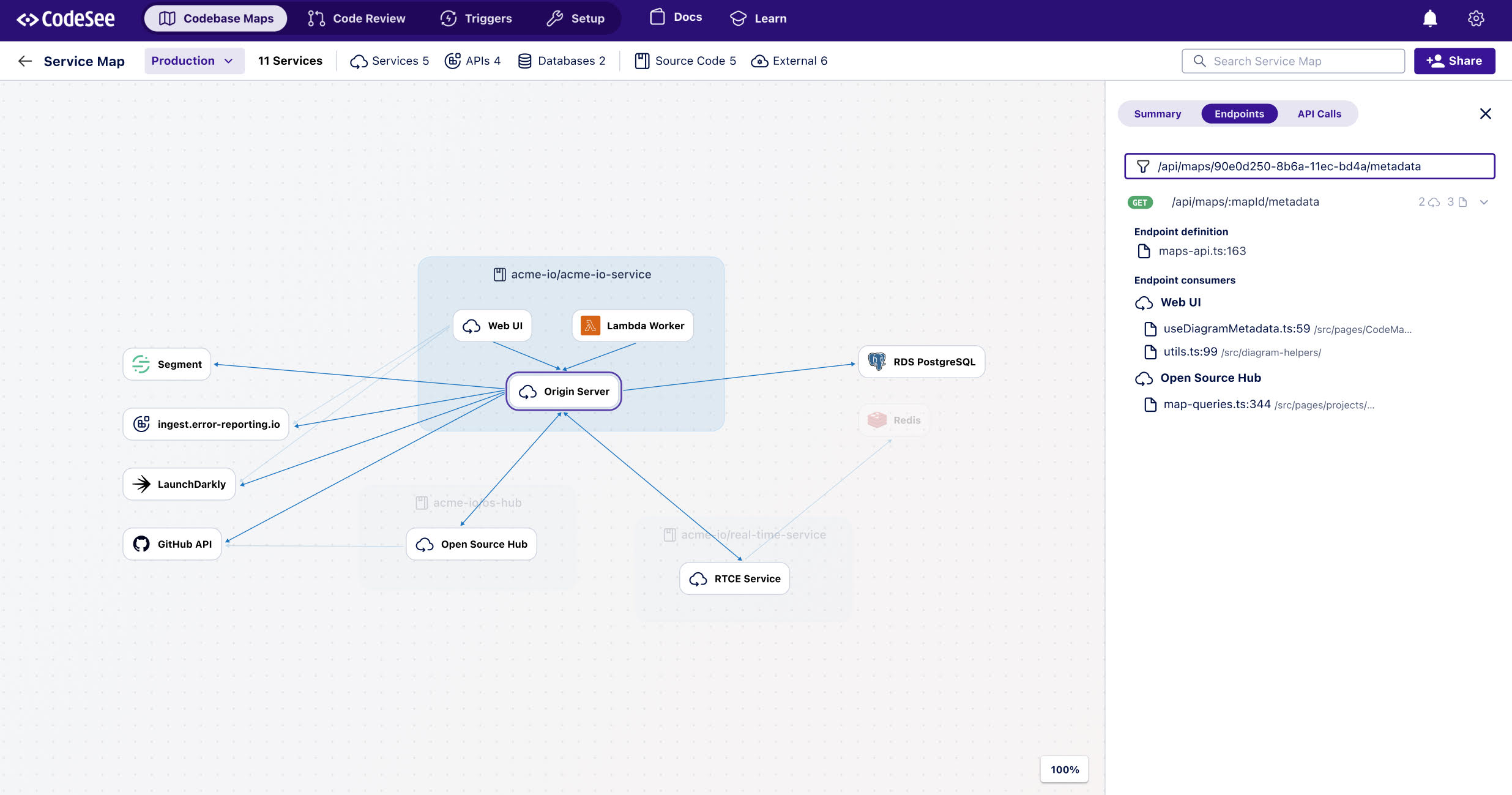
CodeSee this week launched an enterprise platform based on its codebase visualization and mapping tools that makes it easier for developers to navigate and learn how an application was developed.
CodeSee CEO Shanea Leven said this capability makes it simpler to understand how a codebase is constructed, including the application programming interfaces (APIs), without having to read each line of code. Organizations can use the CodeSee Enterprise platform to review code in addition to making it easier to add new developers to a project, she said.
The CodeSee Enterprise platform makes it possible to automatically detect, visualize and link to the code used to create every connection between the services that make up an application. That capability is especially useful for any security review of an application before or after an application is deployed.
A code automation feature codifies and automates the code knowledge that previously could only be passed from one developer to another, Leven noted.
It takes a significant amount of time for developers to pore over a codebase to understand where they might contribute. The larger a codebase is the more challenging it becomes to make meaningful contributions.
By definition, application development in the era of microservices is now a group effort. The days when a lone developer cared for an entire application are long over. The issue is finding a way for teams of developers to more easily collaborate when most of them may have never actually met in person.
The amount of focus on developer productivity has increased substantially since the start of COVID-19 pandemic spurred organizations to accelerate a wide range of digital business transformation initiatives. Developers are generally challenging to recruit and retain, especially individuals familiar with the latest cloud-native platforms for building and deploying applications. Making it possible for developers to more easily contribute to multiple application development projects has never been more critical.
Of course, most developers would rather spend more time writing code rather than studying it. The amount of time devoted to understanding codebases and maintaining development environments far exceeds the amount of time spent writing code. Many developers are not always going to be able to take advantage of advances in application development without the aid of a DevOps team to provision new tools and platforms.
One way or another, the rate at which applications are being developed and deployed needs to accelerate. An uncertain economic outlook is increasing the pressure on business leaders to digitally transform processes in a way that increases both revenue and profitability. The application experience is especially critical because customers are not inclined to patiently wait for organizations to finetune their digital processes over an extended amount of time.
Less clear, however, is the level of stress individual developers might be willing to tolerate. There’s no doubt most of them are sympathetic to the needs of the organizations that have hired them but that does not necessarily mean they’re willing to continuously work overtime to achieve goals that might not be attainable using the tools they have at hand.
-

Accelerating Software Testing
Yves Junqueira is the CEO of YourBase, a software testing accelerator for large codebases. He talks with Alan Shimel about the company, accelerating software testing and the impact on developer productivity. The video is below, followed by a transcript of the conversation.
Alan Shimel: Hey, everyone. Thanks for joining us here on another segment for our TechStrong TV. My guest this segment is a new company, first-time guest on our TechStrong TV, Yves – and I’m gonna really mispronounce his last name, Junqueira. I’m supposed to have that rolling R, and I just don’t do rolling R’s. Yves, I’m sorry, man. Welcome to TechStrong TV.
Yves Junqueira: Thank you, Alan. It’s great to be here. You did it good.
Shimel: Not so good. You know what? In case your mom or your family’s watching, say your name correctly for ’em.
Junqueira: Yves Junqueira.
Shimel: Junqueira. Okay. We’re gonna call you Yves, and we go from there.
Junqueira: Sounds perfect.
Shimel: So, looking from your background, are you up in Seattle, Toronto? Toronto?
Junqueira: That’s Seattle.
Shimel: Seattle. Yes, the mountains. And you know what? Welcome. I’m gonna let you give a little introduction to your company, and you’re a cofounder of it, but go ahead.
Junqueira: Gladly, yeah. Our company’s called YourBase. We build developer tools for very large code bases. Specifically, we are a software-testing accelerator for large code bases. I used to work at Google for almost ten years, and my cofounder, John, was a principal engineer at Amazon, at AWS. And, yeah, we’re excited to – I’m very excited to be here, Alan.
Shimel: Absolutely. Well, I’m excited to hear about what you’re doing. So you’re a code accelerator?
Junqueira: We are a software-test accelerator, yeah.
Shimel: Software-testing accelerator, excuse me. What exactly is that?
Junqueira: Yeah, so it’s very important when you’re building software that you actually know that the software is working. You usually have very large teams that’re creating code, and you don’t want one developer to be stepping on each other – on the other’s toes. And so you need a lot of testing to make sure that when you make changes to the software, it’s still working. But as you’re adding new features, you’re adding new tests, and you add new features, and you add new tests, and over time the number of tests in your code base can grow very, very quickly, and it can become a very big problem for developer productivity and developer happiness, because it can take a very long time to actually test code. If you’re making even a small change sometimes in a large code base, it can take hours to ensure that that change works, to run all the tests. So that’s what we help with.
Shimel: So you’re automating testing. Is that fair?
Junqueira: We automate the test selection of testing. So, yeah, we help run the tests, but most importantly we help select what are the right tests that are safe but that have to be run for each change. Without having to test the entire world, we use a process called – we use tracing of code to build a dependency graph to then select the right test to run and then just make things more productive for developers.
Shimel: Sure. Of course, our audience is a very technical audience, familiar with QA and testing and developing. So you’re running a trace route on the code as it’s entered into Git or – because it’s pre-deployment code, right?
Junqueira: That’s right. It’s pre-deployment code, yeah.
Shimel: So as the code is put into Git or some other sorta repository, you select what’re the right tests to run and run it on the code. So this all takes place within the repository like a Git-ops kind of thing?
Junqueira: Yeah. It can take place in the repository connected with a CI, with a continuous-integration tool, or it can also happen during local development. You can have multiple developers working at the same time on the same code base but perhaps making slight – different code changes. And with your base, they are testing their code but also using their colleagues’ testing to – so that they don’t have to repeat the test that their colleagues already ran for the same code base. So they only have to test exact the small changes that they made on their code.
Shimel: I love it. Sounds great. And then I don’t wanna use the buzzwords, but is it some sort of AI/ML that is picking what’s the right code – what’s the right test to run for this particular code for these particular changes?
Junqueira: That’s an important question. It’s not AI. We use just simple data structure and algorithms that we collect when doing tracing. And this is actually important, because if we were using just AI or any sort of statistical approach, we would only get a limited confidence that we are testing the right things. So imagine that you’re a financial institution, right, or a hedge fund, where tests are very important. If you don’t catch certain bug, it can cause millions of dollars in losses, right, in lost revenue, for example. So it’s very important that you actually detect the correct regressions in your code, and if we were using just a simple AI approach, we would only, let’s say, have 90 percent confidence that we were running the right tests in your code. That is not enough. So our customers need assurance. They need full confidence, so we use an approach that is a little bit more intrusive, let’s say, because it’s detecting every single function called that is happening during the tests. So it has a little bit of a performance impact during the initial test. But on the other hand, it just provides full confidence rather than being 90 percent confidence that an AI approach would have.
Shimel: Got it. I mean, big companies using this, small companies, anyone? Who’s the target user here?
Junqueira:Fortunately, we can scale from small to very large code bases. So we have customers that are very small, just small startups that are getting started but that really want to have the fastest possible development process. But we also have very large code bases of very large companies, public companies, Fortune 500s, that want to keep moving fast. It’s difficult. Imagine if you have a software product that really needs to evolve quickly. Customers these days demand that software developers – that software companies evolve their products quickly. The customer needs are changing fast, and so they need to be able to make software changes very quickly and do it at – have high velocity with the most productivity possible. So what we allow those companies to have is even though they have a very large code base, the larger companies, they can be almost as productive or as productive as if they had a small code base, and this is really magical. This is something that we’re very proud of providing to these companies.
Shimel: Absolutely. You know what? People always wanna know this, and I realize it might be coming outta left field. Interesting. You worked at Google ten years. Your cofounder’s an AWS guy. How did that come together?
Junqueira: Yeah. It’s actually a funny story. We met at a random coffee shop. After I had left Google, I was working at random coffee shops here in the outskirts of Seattle, and I had my laptop with me with a bunch of developer stickers there like Linux and Python and GOAL like developers often have. And John had the same, and so we just looked at each other’s laptop. We were at this coffee shop here, and we – okay, we should chat, ’cause we us a lot of the same technologies. So we started talking, and over time I invited John to come to my weekly table games at my house. I host a game night every week, and John started coming, and I started talking about my project, and he was fascinated by it, and he said that software testing and developer productivity are a huge thing for him. And over time, he decided to join. I’m very lucky that he joined me at YourBase.
Shimel: Love it. And then talk a little bit here about going to market. How’s it been so far?
Junqueira: Yeah. We spent a long time perfecting the technology. This is a very tricky software. If you get things wrong, you may end up – your customers may end up shipping bugs. My customer’s gonna end up shipping bugs that should have been caught by the tests. But if I don’t decide to run a test or if I don’t give them right insights, they might actually introduce bugs and be less reliable than they were before. But we started just last month. We launched our first public beta now, and we’re very happy about that. So we have a number of design partners that are working with us on this initial release, and people – customers are very happy. The feedback has been fantastic. So last month we launched it to the outside world, and we made a public beta. Now people can just download it from just going to the website, yourbase.io. Anyone can download and test it. We currently support Python as – for code bases. Our technology has to be implemented on a language-by-language basis. So for now we support Python, but we’re going to support Ruby sometime soon. And we’re very excited. The reception from people has been amazing. It’s really fun to be at this stage of the company, where we actually are ready to talk about it to the outside world.
Shimel: Excellent, man. It is. Having founded more than one company, more than four companies, five companies, it is an exciting time, and I wish you nothing but great luck and success with this. I want to get into the kinds of testing you’re doing, functional testing, unit testing. Is it selenium kinda stuff? What are the kinds of tests you’re doing there?
Junqueira: That’s a great question. We are very good at tests that don’t cross process boundaries for now. This can be sometimes unit tests and functional tests. We don’t currently support UI tests yet, in part because there are good companies out there that’re already serving this market, and there was just nobody that was focused on the backend and in unit testing and functional testing. But this is a big space, and we’re just getting started. We have feedback from folks that we – they want support for more things, so that’s something that we’re excited to work on.
Shimel: Excellent, man. Yves, I wanna thank you for coming on and telling folks about YourBase here on TechStrong TV. Come back. Keep us posted on your progress, and best of luck.
Junqueira: Thank you so much, Alan. It was great to be here, and, yes, absolutely, I would love to come back.
Shimel: My pleasure. Say your name for us one more time so I don’t – just after I mangle it, at least they got it right.
Junqueira: Yves Junqueira.
Shimel: Junqueira. Yves, thank you, man.
Junqueira: Thank you, Alan.
Shimel: Oh, the website, yourbase.com?
Junqueira: Yourbase.io.
Shimel: IO, yourbase.io, Y-O-U-R-B-A-S-E-dot-I-O. This is Alan. We’re gonna take a break. We’ll be right back with our next guest.
[End of Audio]
-

Why We Need a Software Bill of Materials Industry Standard
The SBOM concept is part of is an industry-led, multi-stakeholder process to improve software component transparency
Have you ever gotten a recall notice for the vehicle you drive? Perhaps your car or truck was part of the big recall on airbags a few years ago. It’s standard procedure for auto manufacturers to notify owners of their vehicles when a component is defective and needs to be repaired or replaced. This is true even if the component was made by a third party because it’s still part of the overall makeup of the vehicle.
Such recalls are possible because manufacturers keep a bill of materials to know every single original thing, including physical parts and internal software, that goes into each vehicle. Title registration records kept by government agencies keep track of current owners of the vehicles. When a recall is necessary, it’s possible to identify which vehicles are affected and who owns them.
Now the computer software industry is undertaking a similar effort to track individual components such as libraries, executables or source code that go into a software program. Initiated by the National Telecommunication and Information Administration (NTIA), the effort is an industry-led, multi-stakeholder process to improve software component transparency. The NTIA working group is establishing a shared vision of transparency and a “software bill of materials,” or SBOM.
What Is a Software Bill of Materials?
An SBOM is effectively a list of ingredients that makes up a software program or application. Like the auto industry, where components come from hundreds or thousands of suppliers, modern software is stitched together from bits of code and subroutines from numerous sources, including open source and commercial solutions. Reusing software code like this means developers don’t have to create everything from scratch themselves. It’s a great time-saver and a very efficient way to develop applications.

Fig. 1: Software component relationships Source: www.ntia.gov
A software bill of materials identifies and lists all software components, information about those components and the relationship between them. Figure 1 below illustrates this concept. The chart on the left shows the information that is tracked, while the diagram on the right illustrates the relationships of the software components.
As the NTIA working groups go through their development phases, they are mindful of the inherent complexity of building and maintaining a verifiable software components list. Issues they are currently working on include how to automatically generate an SBOM and keep it up to date; what standard data format to use for the information; how to distribute an SBOM to someone who acquires a software program or application; and how to verify the authenticity of the data in the components list and their inherited dependencies. The intent is to define specifications that can be used worldwide by both developers and consumers of software. The adoption of SBOM by individuals and companies writing open source software will be key to the initiative’s success.
The Need for a Software Bill of Materials
There are several benefits to establishing greater transparency of what code components are in software. Most importantly, it allows companies to control risk by enabling earlier identification and mitigation of vulnerable systems or license infringing source code. Further, it incentivizes secure software development practices by enabling developers to better vet the code they are embedding into their own work. For software consumers, greater transparency supports informed purchasing decisions, especially where compliance with software licensing requirements is concerned.
Perhaps the greatest value of having a verified SBOM is in the realm of cybersecurity and risk mitigation.
According to industry studies, the average codebase contains hundreds of open source software components, and the majority of those codebases contain at least one vulnerability. Thus, having insight into code components and their vulnerabilities is critical.
Once you know precisely what components are in your software, you can get a clear vision of the risk factor this specific bill of materials brings to your environment when it runs. What’s more, the risk factor can change whether or not something in the software bill of materials changes since new vulnerabilities are discovered on a daily basis. The only way to know if you are affected is by having this level of transparency.
This means of risk assessment is especially relevant when changes are attributed to insider or outsider threats. An insider threat occurs when an internal employee changes something without understanding the full impact of that change on the overall risk; for example, installing a foreign application to SBOM considered to be shadow IT. An outsider threat occurs when an attacker injects malware into your server or a device and tries to make it look like a legitimate component of your system by replacing or introducing a new software component. Either way, expecting to have one component and actually having another introduces a lot of risk to your system.
Cybersecurity companies will be able to develop solutions that can consume the SBOM in a standard way and cross-reference it with everything running on the system, including the reference to known or new vulnerabilities in the listed software components, and augmented by threat intelligence. Recommendations for mitigations such as software patching can then be put forward. This is commonly called a healing process. In some cases, auto-remediations steps can be taken, such as blocking the malicious software from running until it can be removed.
Governance over software licenses can be improved through SBOM adoption. Every bit of software comes with a license that dictates the legal use and distribution of the software. The snippets of code in a supply chain that comprises a complete application can have many different licenses for the individual components. Any company that deploys that application has a legal obligation to comply with the licenses. Without a software bill of materials, there may be no way to know what the licenses require, or how to comply with them.
Beyond Software: Devices, Too
There’s another concept that goes beyond just software known as a digital bill of materials, or DBOM. A DBOM extends to the hardware configuration and its embedded firmware and includes the interaction between the components, i.e., the behavioral context. A DBOM would collect the same sort of knowledge about hardware devices and network communication patterns to understand the context of the software materials running on the device. This would apply mostly to IoT devices that otherwise are challenging to monitor, update and protect.
When you buy a device, you are essentially buying a black box because you don’t know exactly what’s going on inside. If you install it on your network, you don’t know what risks come with this black box. If you knew the risks, you could put mitigations in place. Thus, it’s important to motivate the device manufacturers to get behind the adoption of both SBOM and DBOM specifications and help them recognize how it can improve their operations and security posture. There is value in complying with security certification requirements such as ETSI, allowing their end users to understand the risks they are assuming, and empowering them with the ability to mitigate these risks.
The medical technology industry has been at the forefront of creating a proof of concept initiative in 2019 to understand the role that SBOMs can play in managing the operational and cyber risks associated with medical devices. Working together, device manufacturers and healthcare providers demonstrated the feasibility of SBOMs by generating, sharing, and using data to improve security practices in pre-defined use cases. NTIA is applying the lessons from that PoC to develop industry-agnostic specifications for the applications of software bills of materials.
-
How Important Is Open Source for DevOps, Really?
Depending on your perspective, you might believe that DevOps and open source go hand in hand. Or you may think that, quite to the contrary, the two have little to do with each other. There are good arguments to be made for both interpretations.
Let’s explore these two ways of thinking about the relationship between DevOps and open source.
Match Made in Heaven?
In certain respects, the two share a great deal of core philosophical overlap. Both movements emphasize collaboration and rapid innovation.
That is part of the reason why many major DevOps tools are open source. Examples include Kubernetes, Docker, Git and Jenkins, to name just a few.
Indeed, it’s hard to imagine any modern DevOps team or CI/CD pipeline that doesn’t rely to a significant extent on open source tools.
The Tension between DevOps and Open Source
On the other hand, it’s an undeniable fact that many other tools and resources that are commonly used by DevOps professionals are decidedly not open source. There are plenty of closed-source CI servers and release automation platforms, for example. (There are also many tools in this category that are built on an open source codebase but require commercial licenses and proprietary extensions for real-world use.)
There is also the public cloud, without which it’s hard to imagine anyone doing DevOps today. Most public cloud services are very proprietary in nature. Not only can you not inspect the source code behind services such as Azure Functions or EC2, but users also have no control over how those services operate. And porting a workload from one cloud to another can be a big challenge.
In these respects, DevOps is far removed from open source.
How They Really Intersect
What to make, then, of the relationship between DevOps and open source? What does it mean that they share important cultural affinities on the one hand, yet DevOps teams hardly shy away from closed-source tools and resources?
The most obvious conclusion, I think, is that DevOps teams are committed to openness, but they balance that priority with an equal commitment to getting results. In cases where production-quality open source tools exist, such as Kubernetes, most DevOps engineers will eagerly adopt them in place of closed-source alternatives.
In some cases, however, closed-source solutions are superior. And sometimes proprietary solutions are the only type of solution available, as in the case of the cloud. There is no open source alternative to AWS, unless you build your own cloud, but that requires having infrastructure.
Some DevOps teams may wish that they could achieve the results they need using only open source tools. But they can’t, and that’s why the relationship between the two can seem contradictory and inconsistent at times.
-

Feature Branching vs. Feature Flags: What’s the Right Tool for the Job?
A dev team’s branch management strategy can have a significant impact on the rate at which it can release high-quality software. In this article we’ll explore the pros and cons of several different approaches for enabling multiple concurrent streams of dev work in the same codebase. We’ll see that two major factors—the cost of merge conflicts and the ability to release streams of work independently—are often in tension, but that Feature Flags provide a way to resolve that tension.
Merge Conflicts
New products start off as a small codebase, usually only being worked on by a handful of developers. This situation doesn’t call for much formal process. However, even when a team consists of just two devs, it’s still preferable to avoid working on the same files at the same time to avoid merge conflicts.
Unfortunately, even when we’re trying to avoid stepping on each other’s toes, it’s still pretty common for work streams that seem unrelated to end up touching the same files. Sometimes it’s these unexpected merge conflicts that can cause the most pain—any iOS developer who’s been around the block a few times probably has acquired some scar tissue from an epic three-way XIB merge in their past. In this article we’ll explore some different ways to deal with the challenge of merge conflicts when multiple developers are working on the same codebase.
Some people might argue that merge conflicts aren’t that big a deal these days and mostly are solved if you just use modern tools such as Git. This is unfortunately not true. Git certainly makes creating branches trivial, but it does not always make merging parallel changes within those branches trivial. It has some powerful features to automatically merge changes when possible. These automatic merge heuristics can feel almost magical at times, but they are not actually magical. If you make parallel changes that affect a large XML file—for example, a XIB or an IDE project file—Git likely will not be able to merge those without human assistance.
Most importantly, Git cannot automatically resolve semantic conflicts. For example, imagine that in one branch Alice renames a method and in another branch Bob adds a new usage of that method. When those two branches are merged, Git will do nothing to help resolve the fact that Bob’s branch is calling a method using the old name. Bob’s code is calling a method that no longer exists. In fact, Git will not give Alice or Bob any clue that there is a conflict, since these semantic conflicts aren’t detectable by our current set of tools.
We’ll only find semantic conflicts when we try to compile our merged codebase, and even then only a subset of them. If the codebase is in a dynamically typed language such as javascript, we might not find out until our users start reporting app crashes in production.
Beyond the productivity hit of having to manually resolve these inevitable merge conflicts, the spectre of introducing a conflict can have a more pernicious, long-term effect on a codebase. A developer who sees an opportunity to incrementally improve the quality of the codebase is slightly disincentivized to do so if they sense that it could lead to a merge conflict.
The calculus for whether the effort of making a small improvement is worth the investment gets shifted as the cost of that change becomes higher. This introduces a subtle drag working against the internal quality of a codebase over time. What’s more, the type of small but broad refactorings that can gradually improve a codebase—or stop it gradually degrading—are exactly the type of changes that often lead to a merge conflict. In my opinion, this is the true hidden cost of branch-based development—it disincentivizes the sort of “boy scout rule” improvements that can prevent areas of a codebase from gradually degrading into no-go zones.
So, having established that merge conflicts are a Bad Thing, let’s look at how we might avoid them.
Working Directly on Master
A small team starting out on a new app might initially try to mitigate the risk of a big unexpected merge conflict by having all devs push frequently to a shared master branch—one of the central tenets of continuous integration. When everyone is frequently synchronizing their changes in a shared master branch, an unexpected merge conflict is revealed earlier and is easier to deal with.
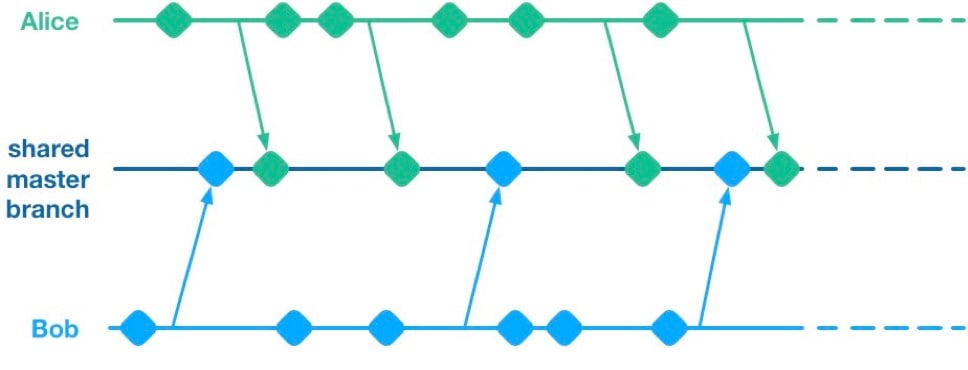 Unfortunately, having multiple streams of work landing on a shared master branch comes with a big drawback: If any of the streams of work are not ready for release, then nothing on the shared branch can be released. Let’s see why using a hypothetical example.
Alice and Bob are a two-dev team working on a mobile app. They have two streams of work in progress. Bob is working on a big overhaul of how user preferences work, while Alice is finishing off a critical new feature for the app which the big bosses have decreed must be pushed to the app store by the end of the week. This team is trying to avoid big merge conflicts by frequently pushing their code changes to a shared master branch as they go.
On Thursday, Alice is wrapping up her changes and doing some testing. While giving the app a general run-through she notices that the user preferences section is crashing. She asks Bob if he knows why. Bob explains that he’s in the middle of overhauling that area of the code. It’s taken a little longer than he expected and it might be buggy for a while. Alice gives Bob a look. She explains to him that her feature has to get to the app store this week. Bob gulps. Over the course of two long days Bob and Alice are able to roll back Bob’s changes, some of which had gotten tangled up with changes that Alice had been making as part of her new feature. They manage to ship to the app store by Saturday, and a crisis is averted.
We see here that because Alice and Bob were both committing to a shared branch, their independent streams of work became entangled. Alice could not release her changes without Bob’s and vice versa. This is the huge drawback of working on a shared branch—although we will discover later on that there are ways to mitigate this.
Feature Branches
To avoid this issue of coupled work streams, dev teams very often will move away from pushing in-progress code onto a shared branch. Some teams will opt to continue working on master on their local machines but only push to the team’s shared repo once the work is complete. Other teams will opt to use Feature Branches, maintaining separate streams of work on isolated branches and only merging them into master once they’re complete.
As an aside, it’s interesting to note that when using a distributed source control system like Git, these two approaches are essentially equivalent; the only difference is whether the unmerged in-progress changes are visible in a remote feature branch or hidden on a dev’s local master. As such, I’ll talk about both variants as Feature Branching.
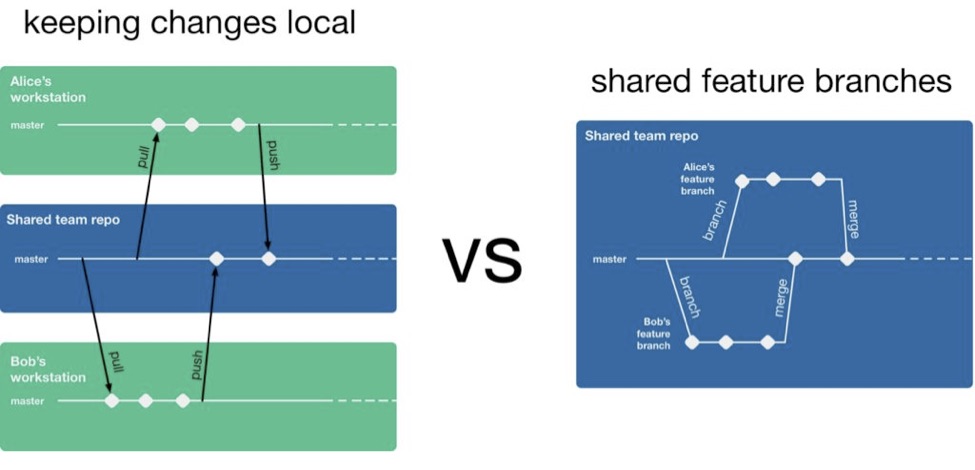 So, if a team is using feature branching, then all their problems are solved, right? Unfortunately not. We’ve now re-introduced the risk of painful merges. Work that is being done on a feature branch is not integrated with other changes until it is merged to a shared master branch. Whenever two streams of work both touch the same files, either inadvertently or intentionally, there is a latent merge conflict which continues to grow in size until one of those stream’s branch lands on master. Some teams will try to mitigate this issue by frequently merging changes from master back into in-flight feature branches.
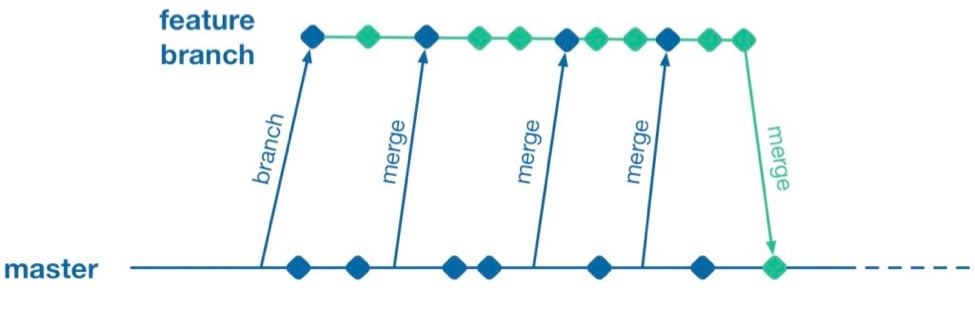 However, this does not help when parallel changes are occurring on isolated branches. Alice’s branch will only see Bob’s changes when his feature branch lands on master. The latent merge conflict between these parallel changes is now waiting for Alice the next time she merges from master.
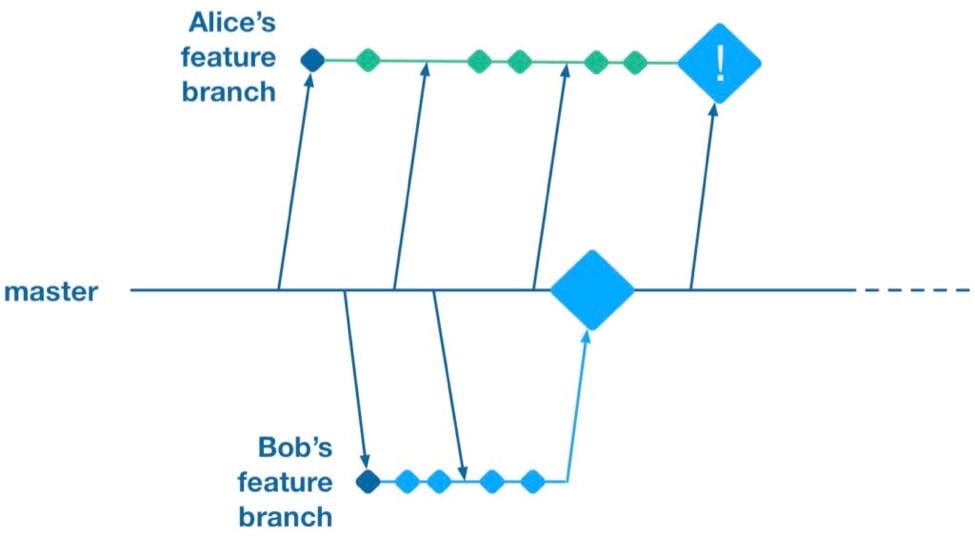 (Thanks to Martin Fowler’s feature branch writeup for inspiring the above illustration)
Some teams attempt to solve this problem by “cross-merging”—pulling work on one feature branch across into another feature branch to break down the size of latent merge conflicts between those branches.
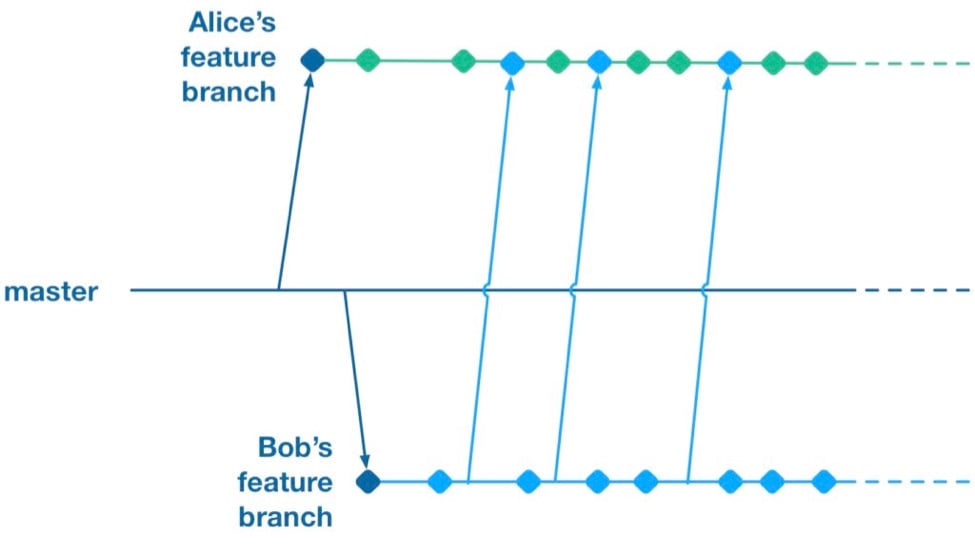 However, as soon as you merge two feature branches together you’ve essentially created a shared branch of in-progress work, and are back to the same problem as teams who are pushing in-progress changes to a shared master: Code changes from both work streams are now intermingled. Your features are now coupled together and cannot be released independently.
To summarize, feature branches allow teams to decouple streams of work such that they can be released independently. However, they introduce a risk of large merge conflicts when parallel feature branches contain large sets of changes. Remerging from master into feature branches only helps once parallel work has already landed, and cross-merging between branches couples features together in the same way as working on a shared master.
Feature Flags
What alternative does a team have if they want to avoid the merge conflict risks Feature Branches introduce? They could go back to frequently integrating changes on trunk, but we established that this has the major drawback that formerly independent streams of work are now coupled together and cannot be released independently. This is where a technique called feature flags (aka feature toggle, bits or flippers) can help.
A feature flag is a way to isolate work-in-progress code by placing it behind a “flag” or “toggle.” The work-in-progress code will only be exercised if the flag is flipped on. Otherwise, it will sit within the codebase as “latent code.” Here’s a sketch of how a basic feature flag might be used:
if( featureFlags.isOn(“my-new-feature”) ){
showNewFeatureInUI();
}Unless the my-new-feature flag has been configured as “on,” the new feature will not be exposed within the app’s UI. This means the app can be released even if the code implementing new feature is totally bug-ridden, as long as that feature’s flag is flipped off.
By using feature flags, in-progress changes can be pushed into a shared branch without blocking release from that branch. If Bob is halfway through his feature and Alice wants to push a release of her feature, the team can do that by creating a release where Alice’s completed feature is flipped on while Bob’s half-finished feature is flipped off. We get the benefit of continuous integration of developer work streams (reduced risk from merge conflicts) while still keeping release of those work streams decoupled.
This technique is not particularly new. It is part of a family of techniques sometimes referred to as trunk-based development (you can tell the technique is not new because the name uses trunk rather than the mastermoniker, which is more common today due to git’s predominance). Flickr, Etsy, Github and Facebook are some better-known proponents of the technique. Facebook’s use of feature flags is one of the key enablers for its famous ability to deploy facebook.com from a shared branch twice daily.
Drawbacks of Feature Flags
As with the other approaches discussed so far, feature flags have their share of drawbacks. They introduce a fair amount of noise into a codebase as we now need to explicitly implement some sort of branching logic for any incomplete feature. This noise can lead to some messy code over time unless care is taken to retire old feature flags once they are no longer necessary. Testers can take a while to get comfortable with feature-flagged apps—the idea of shipping unfinished, untested code to the app store takes a while to get used to. If the flags can be controlled remotely at run time, then teams need to understand that the new configuration of flags must be tested before being applied to apps deployed to end users.
Finally, certain types of changes are particularly hard to protect via feature flags—broad but shallow changes that touch a lot of files can be a challenge. Happily, feature flagging is not an all-or-nothing approach; feature branches can still be used for a change that would be particularly fiddly to implement behind a flag.
Succeeding with Feature Flags
When a team starts to adopt feature flagging they will usually run afoul of some of the challenges discussed above, and eventually figure out ways to mitigate them. Here are some of those techniques for working successfully in a feature-flagged codebase.
Expire Your Flags
A lot of teams get a bit flag-happy when they first start using the approach. They tend to introduce a lot of flags, but not take the time to retire the flags once they not longer need to control whether a feature is on or off. Make sure to take the time to retire old flags—they introduce design drag in your codebase and confusion when managing flags. Some teams take quite aggressive approaches ensure old flags are expired, such as setting “timebombs” when they create a flag, or having it throw an exception if it’s still in use after a certain period of time. Other techniques include adding a flag removal task to the team’s backlog at the time the flag is created as a reminder.
Flags Aren’t a Silver Bullet
It doesn’t always make sense to use a feature flag for a new stream of work. Flags lend themselves best to a new feature or alternative feature where access to the feature can be controlled from a single point in the code—often by showing or hiding a button or changing what happens when you tap some part of the UI. Other types of work, such as internal refactoring, is hard to protect behind a flag. For that type of work, consider using a feature branch, ideally breaking the work down into smaller chunks that can be implemented incrementally in a series of branches rather than one long-lived branch. This will reduce the risk of a large merge conflict growing over time.
Summary
Feature flagging and feature branches are both ways to decouple parallel code changes and allow teams to release changes with less coordination overhead. Feature branches are easy to get started with, but can lead to painful merge conflicts. This risk of merge conflicts tends to disincentivize making incremental improvements to a codebase, and can lead to areas of the codebase becoming “no go” zones. Feature flags allow teams to practice true continuous integration and totally decouple code changes from feature release, at the cost of some complexity in implementing each flag.
Feature flags are not a silver bullet and aren’t always the right choice, but it’s easy for a team to experiment with the approach. You can get started simply with a single hard-coded if/else statement, see how it goes and take it from there.
About the Author / Pete Hodgson
 Pete Hodgson is a consultant to Rollout.io, a software engineer and an architect. His clients range from early-stage San Francisco startups to Fortune 50 enterprises, focused on enabling continuous delivery of software at a sustainable pace via practices like test automation, feature flags, trunk-based development and DevOps. Pete is a frequent podcast panelist, regular conference speaker in the US and Europe, and a contributing author.
 -

Getting the Most Out of QA in Complex Environments
We live in a world in which software is increasingly dominant. Not only do we rely ever more on software, but its complexity is becoming even greater. And with increased complexity, bugs are more likely to be intermittent, making failures difficult to reproduce. Sometimes this non-determinism results in failures never getting fixed. Any unfixed bug is potentially a security breach or catastrophic customer outage waiting to happen. With such risks on the line, ensuring your software is of the highest quality is essential to running a successful operation.
To cope with this complexity while still providing some assurance of delivered software quality, the DevOps industry has embraced a variety of automated testing regimes. A development team of a given size is able to run many more tests than it could before and must triage, and attempt to resolve, a correspondingly larger number of test failures. Diagnosing the cause of each test failure can still take a lot of time, particularly if the problem is intermittent or otherwise not easily reproducible. In fact, developers can spend on average as much as 50 percent of their programming time debugging, not coding. Think of all the innovation that could occur if that time were reallocated.
Traditional QA
When it comes to Quality Assurance (QA), developers and testers are all aware of the sequence of deliverables, beginning with development delivering an untested product to QA, which releases the tested and approved product to the end user. However, when a bug is found, QA and Development must communicate with one another to solve the issue quickly. The effectiveness of the delivery channel between QA and Development hinges on the quality of the information about the failure.
Some common challenges raised by inefficient QA processes include:
- Complex control flow – Difficult to make inferences about how a failure unfolded
- Non-deterministic failures – Hard to reliably reproduce a failure to investigate the root cause
- International R&D – Collaboration is made more difficult by geographic separation
Conventional test systems inform that there is a bug but offer limited information about the cause. Workflows such as continuous integration (CI) often offer clues, such as informing which commit to the codebase caused the failure. However, there are several cases where CI cannot directly help identify problematic code changes. For example, the triggering code change may be entirely correct, yet cause a pre-existing bug to manifest. The developer cannot simply stare at the modification in the expectation that the source of the bug will eventually appear. Conversely, the failure may not easily reproduce for the developers even if they run the same test again. In short, CI is often very good at making the easier bugs very easy to fix, but typically is of little help with the more difficult bugs, particularly intermittent ones.
The Next Evolution of QA
To bridge the gap between identifying a failure in the QA process and resolution by development, DevOps teams have adopted a variety of technologies to complement their automated testing setups. New to this scene is technology capable of recording all or part of a program’s execution for subsequent replay and analysis, capturing test failures as they happen. The recording contains all the information a developer needs to understand the exact set of conditions that led to the test failure. It can be analyzed on different machines to the one on which the failure occurred, facilitating collaboration between colleagues who can work on separate machines to resolve the same issue—a particularly useful benefit for large software companies with geographically distributed teams. By gaining the ability to debug an exact replica of the failure, developers immediately reduce the time and effort required to diagnose and fix failures, therefore speeding the development cycle.
Being able to generate recordings of failed tests, especially those intermittent issues which might not otherwise get fixed, coupled with the productivity gains of increased collaboration between development and QA allows companies to maintain a competitive advantage in a volatile marketplace.
About the Author / Greg Law
 Greg is the co-founder and CEO of Undo. Greg has 20 years’ experience in the software industry and has held development and management roles at companies including the pioneering British computer firm Acorn, as well as fast-growing startups, NexWave and Solarflare. Greg left Solarflare in 2012 to lead Undo as CEO and has overseen the company as it transitioned from the shed in his back garden to a scalable award-winning business. Greg holds a PhD from City University, London, that was nominated for the 2001 British Computer Society Distinguished Dissertation Award. He lives in Cambridge, UK with his wife and two children.
 -

Are You Paying a ‘Wait-Time Tax’ on Your Global DevOps?
Business increasingly is global, so DevOps has become global as well. In fact, for many enterprises, DevOps entails collaboration between development, test/QA and ops teams across multiple continents.
This is in part due to the economics of IT labor and in part because applications for global enterprises have to be deployed globally.
Unfortunately, enterprises executing DevOps globally must confront the physical realities of global code distribution. And those physical realities impose a “wait-time tax” that fatally undermines Agile processes and culture.
But they don’t have to. There’s a tax-free way to share large volumes of code across globally dispersed DevOps teams.
The Wait of the World
Every time you ship a massive build worldwide, you have to wait. Assume, for example, that you’re sending a 10GB build to five different locations over a 10Mbps MPLS connection. If a couple of your remote locations have 5Mbps connections, it will take them five hours to get each build. But if you have three locations with only 2Mbps connections (as is likely the case in Asia), they will have to wait 12.5 hours.
That wasn’t a problem when you iterated your builds with limited frequency. But as you try to become more aggressive about highly iterative Agile development and testing, this “time tax” becomes punishing.
For one thing, you lose productivity as your overseas developers and test teams wait idly for new artifacts. And these chronic wait times fundamentally undermine the Agile culture you’re trying so hard to build across your organization.
In fact, if your current model for distributing code globally remains as-is, you’ll never achieve the speed and iterative frequency your business needs. And you’ll certainly never come anywhere close to continuous delivery.
Faster Cycles from Dublin to Dubai
Fortunately, you can eliminate DevOps wait times, regardless of how globally dispersed your teams are and how thin their connections to your enterprise network may be.
The solution entails a hub-and-spoke model that:
- Lets you maintain a “gold copy” of your current codebase(s) in the cloud;
- Provides all your remote locations with their own local codebase copies that get continuously and automatically updated with any incremental changes as they occur; and
- Leverages each location’s high-throughput internet connection.
The combination of small, incremental code updates and high internet bandwidth dramatically changes the rules of the global DevOps game, allowing even the most geographically dispersed teams to work with even the largest codebases extremely iteratively and without delay.
It’s difficult enough to sync dev and test teams on different continents. And the pressures on your organization to respond immediately to ever-changing market and regulatory demands will only intensify. So now’s the time to consider abandoning your obsolete approach to global code distribution and adopt a model that better enables you to be fast, super-iterative and global.
-

Deep Art of Scaling for Cloud Environments, Part 2
In Part One of our two-part series on scaling for cloud environments, we looked at some of important factors for scaling and best practices for code storage. Let’s continue the discussion.
Auto Scaling for Next-Generation Applications
There are a few very good-looking cloud hosting service providers that provide the features mentioned in Part One: AWS, Google Cloud Platform (GCP) and Microsoft Azure. If you are going to auto scale, it’s best to use one of these cloud hosting services. There are other cloud hosting service providers in my knowledge that follow similar approaches, but they are not widely used or are platform-as-a-service (PaaS) ecosystems so we will not cover them.
Also, it’s important to remember that in auto scaling, all app nodes are changing and created dynamically, with a new host, new IP, etc., so your synchronization mechanism needs to determine how to update the code with the new nodes that may change or be deleted later.
Options to Auto Scale and Not Die Trying
Lsyncd
Lsyncd allows you synchronize nodes across the cluster that are spinning up/down new instances, Work using this script, which monitors the auto scaling group for new nodes and updates the Lsyncd master with new auto scaled slaves. Discovering which IPs or instances are within the auto scaling group is the preamble auto scaling faces, but this script will help resolve the discovery.
GlusterFS
Another approach is to use GlusterFS, which ensures high availability and syncs between your web nodes. You need a minimum of two instances in case one fails. The other instance can jump in and still be tolerant for failures. Once the failed instance is back online, it’s added again to the cluster. GlusterFS works similarly to master/master or master/slave. I won’t cover how to configure GlusterFS, but I’m sure this approach was a very good option before AWS EFS was released. If you are not using AWS, this is an awesome option.
On the other hand, if you are using AWS environments with EFS, consider registering your web node to the master node using “AWS User data,” so every time a new EC2 instance is created by the ASG, it will register this new volume to the master and keep data synced with the rest of the nodes.
Pre-Baked AWS AMIs (Old Approach)
Given the fact that your code won’t change or barely changes, baking an AWS AMI and updating the auto scaling launch configuration will do the trick—this is an older but still-used approach. When you have a defined code release schedule and a defined development workflow, you could bake an AMI for every new code release and, once ready, recycle the nodes to use the new AMI with the latest code update. There are plenty of tutorials on this method.
Admin Server (mainly used for WordPress, Drupal, Magento and CMS-based apps)
Another wild approach is to use an admin or master server out of your auto scaling group. This is used commonly to sync code from the master to the scaling group, but I believe this a waste of server resources that can be used inside the auto scaling group. I would recommend this approach for WordPress or Magento sites; in addition to this, consider proxying the wp-admin or administrator URL to the admin server, or update the CMS directly to the admin server. As with NFS, AWS EFS will facilitate everything with WordPress, Magento, joomla and CMS-based apps. Click here for an example of what I’m talking about.
Implement AWS EFS
Finally, the easiest approach is AWS Elastic File System – EFS. Amazon Web Services released EFS a few months ago as a very promising technology—a distributed file system similar to NFS but improved—think of it as a sophisticated NAS solution. During AWS Re:invent, the company said EFS is based on NFSv4.1 but with better network performance, and is a pNFS workaround. I have waited for such a component in the arsenal of AWS for months, though early access was only available for the Virginia region. Today, though, it is supported across all AWS regions – Yay!
EFS can be mounted as a local mount point within fstab, similar to NFS, and you can share your code across your AWS auto scaling group: Set your EFS volume in/etc/fstab to load automatically in each reboot. Therefore, If you are in AWS, use EFS; it will facilitate everything—really. To accomplish this approach, make sure to update your user data in each EC2 instance with the EFS mount point, so every time a new instance is created it automatically will have the EFS volume.
Note 1: All EFS mount points should be in the same region; if an EC2 instance tries to mount from another EFS region, it won’t be allowed.
More Details can be found here.
Google Cloud Platform
Well, what do we have for Google Cloud Platform? I suggest GlusterFS, Lsyncd, rsync or Google Cloud Storage—although it shares a lot of features with Amazon S3, it is faster. Google states that its cloud storage is faster than Amazon S3 due to its infinite edge points across the world and, yes, it is correct. The easiest way to share the code across your auto scaling group is to use Google Cloud storage and GSutils. Additionally, you could use GSutils and call the bucket in each Google Instance—just make sure the visitor/user does not change the code or static content in the instances. Also, Gsutils helps sync the bucket data to your instance data to stay in sync. If your code changes dynamically with your traffic, you need to use gluster or Lsyncd, given that it is very complicated to deploy since Google auto scaling is always recycling instances/IPs and needs some workarounds.
Don’t Forget Scaling Databases!
Another topic that we didn’t touch was scaling a database, for AWS RDS, DynamoDB, Postgresql, Mysql and Nosql databases. All these modern databases are easy to scale; some of them are PaaS such as DynamoDB or RDS. For Postgresql, MySQL exists only for manual scaling, which is adding new database nodes to the master/slave cluster. In AWS RDS, with some clicks you can get a slave “replica” and you are scaling already. But I won’t go further about it as it’s out of scope for this piece.
Scaling Microservices and Serverless Apps
Definitely, these topics need another talk. There will be another time to explore this new architecture approach of splitting your application into pieces. Microservices is changing the IT paradigm, but to survive for this new paradigm, you need to understand first scaling for cloud before evolving to microservices with Docker, Consul, Compose, RancherOS, AWS ECS, Kubernetes and Serverless apps architectures.
Conclusion

As you can see, scaling an application can be challenging when you are dealing with a custom app or CMS-based application. With this article, you have the options and their pros and cons in tackling this constant preamble of how to scale with custom apps. Everybody uses their own scaling process and seriously, they never fit with other applications’ needs. Now that AWS EFS is out there, I’d recommend it every time you can, but in case you are not using AWS, implement Lsyncd or GlusterFS, but don’t forget the other methods that also can help accomplish your scaling goals.
About the Author / Alfonso Valdes
 Alfonso Valdes is the CEO and Founder of ClickIT Smart Technologies, a IT agency focused in the architecture and implementation of Modern Cloud Applications highly resilient in Linux and Open Source technologies. He combines more than 8 years of IT experience in the field of scalable architectures, distributed systems and developing cloud-native applications, and has worked for different U.S companies such as: Sprint Nextel, Texas Instruments and Nike USA. Nowadays he is encouraging enterprises to join the cloud. Connect with him on LinkedIn.