Tag: code

  • The Code Doesn’t Lie, and Other Operations Mantras

    The Code Doesn’t Lie, and Other Operations Mantras

    As engineers, we spend a lot of time talking about things such as release processes, QA environments and deployments. But at the end of the day, most software systems fail because the software itself is faulty. The code doesn’t lie—you can almost always find the solution to your problem within the code itself. Of course, looking to the code for answers is a time-consuming process if you’ve deployed too much in one batch. After all, sometimes the tiniest mistake can derail a whole string of code, and having to sort through a haystack of code looking for a tiny needle is not fun.

    There are a few corollaries to this mantra that “the code doesn’t lie”:

    • “Know your data like you know yourself.” Sometimes the quality of the data itself can cause a system to behave differently.
    • “A feature is a bug in a tuxedo,” which is largely for you product folks out there.
    • “Where there is one bug, there are many.” When you find a problem and it leads to a systemic set of problems, it may seem terrible at first, but the reality is, you have the opportunity to fix a lot in a short amount of time.

    I had a chemistry teacher who used to say, “A mole is a mole is a mole,” referring to Avogadro’s number. My version is: “A bug is a bug is a bug.” A feature that behaves incorrectly (even if built to spec) is a bug. A badly performing system is a bug. A transient failure is a bug. A race condition is a bug. No matter what they look like, it’s our job to squash the bugs.

    Branch Readiness is a Joke

    A very talented engineering director once made the comment, “Branch readiness is a joke,” about the branch/development model. As 23 different teams were preparing their branches for integration onto the main trunk, code changes were flying around with very little testing/certification. We even had code that would not compile.

    When all 23 branches hit the main release branch, all hell broke loose. And this is where the actual functional, integration and performance testing began. The key problem with this model is that integration and certification happened late in the game. The other problem was that we did not abide by our own criteria of what constituted branch readiness; instead, we were constantly softening the restrictions until bad code made its way into the system.

    We moved to a trunk-based model of development where check-ins are made directly to the trunk, and all code must compile and be pretested. Continuous integration and testing are run against the trunk all day and all night. We can ship from the trunk at any moment.

    Now you may be asking yourself, What does this have to do with operations? The answer is: everything. We can control what changes get to the site. We can certify what changes get to the site. We are assured at every moment of a minimum quality in the changes that do get to the site. These smaller changes give us the ability to move bits onto the site more frequently. We are not forced into large-scale, monolithic deployments, which inherently create more risk to the site itself, often with little ability to roll back.

    Learning from ‘Branch Readiness is a Joke’

    Just because the code doesn’t lie does not mean that you can always understand all of its implications. The key is limiting the amount of code being changed in any individual release to an amount an engineer or automated system can understand. By avoiding large, monolithic releases containing thousands of changes and instead testing, verifying and considering each change individually, we can understand what the code is telling us. We can release to the trunk with confidence that what we build and deploy is going to work.

    The One-Character Change

    We live in a world of bits and bytes (eight bits per byte). One byte is the equivalent of one character. In some cases, a one-character change is benign. For example, changing the number of members of a site on an informational page from 134M to 135M (4 to 5) will not cause any harm to the site.

    But sometimes, a one-character change can be disastrous. Consider a DNS change that has a one-character mistake for www.yourcompany.com. Get it wrong and you are off the air. It is very important to understand the impact of a change going awry. If it can cause a large impact, then we need to ensure we understand the change and have a clear plan to roll it back if we need to.

    Here’s a great example of a very small change going sideways very fast: We once scheduled a maintenance to test routing traffic through a European point-of-presence. Unfortunately, the time-to-live parameter was set to a large number (hours instead of minutes) on the DNS entry. The result was that the change, once implemented, couldn’t be fully undone for hours. It was a one-character change with a bad outcome.

    Learning from the One-Character Change

    The code doesn’t lie, but that only matters if we are paying attention. Put simply, not all changes are equal. By taking the time to think about what a change is intended to accomplish and the various ways it could go wrong, we will always be better off than if we didn’t do due diligence. The one-character change can be benign, or it can be catastrophic. It’s important to figure out the possible ramifications of any changes (no matter how small they may seem) before proceeding.

    Operations tends to be the first group to get called after hours when something goes wrong. As a result, we have a vested interest in quality of code shipping to our site. By working to improve the code quality before it hits production, you can significantly reduce the number of problems you encounter.

    Start with where the code gets committed into source control. For each change made ask the simple questions: Does the code still compile? Does your application still build correctly? Does it still work as intended? By automating the process of asking these questions for every change, we gain the ability to deploy new versions of our application based on any commit.

    Once we have good code quality making it into source control, we can begin making further improvements through the use of a canary process and start focusing on things such as performance. Remember, the code doesn’t lie. If we can understand each change, then we can start preventing problems before they begin.

    This post is part of the series “Every Day Is Monday in Operations.” Throughout this series we discuss our challenges, share our war stories and walk through the learning we’ve gained as Operations leaders. You can read the introduction and find links to the rest of the series here.

    About the Author / David Henke

    David Henke has more than 35 years of experience working in technology, including senior engineering leadership positions at LinkedIn, Yahoo!, and AltaVista Company. He’s also been a founder at two different software companies, both of which were acquired. Currently, David serves in a variety of board and advisory positions with organizations like NerdWallet and UC Santa Barbara.


  • Continuous Integration vs. Delivery vs. Deployment: What’s the Difference?

    Continuous Integration vs. Delivery vs. Deployment: What’s the Difference?

    “Continuous” is one of the most popular words in the DevOps lexicon. What does it really mean, and what is the difference between continuous delivery, continuous deployment and continuous integration? Keep reading for some perspective.

    Like many technological concepts, continuous integration, continuous delivery and continuous deployment are terms that DevOps teams tend to use without defining them precisely. For that reason, it’s worth taking a closer look at what each of these terms actually means.

    Continuous Integration

    Continuous integration can really mean one of two things, depending on the context.

    In the narrower sense, continuous integration refers to the work done by a continuous integration server, such as Jenkins or Bamboo. A continuous integration server automatically tests code written by individual developers to make sure it can be merged into the main code base. By automating this process, continuous integration servers help developers to write and test small chunks of code on an ongoing basis, which minimizes the risk that a code change could cause serious problems and force developers to revert their application to an earlier state.

    In a broader sense, continuous integration means the constant integration of changes to an application at all stages of the delivery chain. This includes but is not limited to the automated integration testing and code merging performed by an integration server. In this broader definition, continuous integration can include the integration of new design concepts to the delivery pipeline, for example. It also can involve other types of software testing beyond just automated integration tests.

    Continuous Delivery

    In most definitions, continuous delivery refers to the process of delivering software updates to users on a nearly constant basis. Continuous delivery is made possible by continuous integration and other optimizations at earlier stages of the development process. But the definition of continuous delivery gets a little cloudy when you start comparing it to continuous deployment.

    Continuous Deployment

    What’s the difference between continuous delivery and continuous deployment? For some DevOps teams, nothing. People tend to use these terms interchangeably. In fact, they are usually simply abbreviated as “CD,” leaving it up to the listener to decide what the speaker is actually talking about when he hears the term during a conversation about DevOps.

    Some developers draw a distinction between continuous delivery and continuous deployment, however. For example, Mirco Hering writes that continuous delivery requires that the DevOps team manually release updates to users. In contrast, the continuous deployment pipeline is fully automated; users get updates as soon as they are written and tested, with no manual intervention by developers.

    This distinction is a good way to think about the difference between the closely related concepts of continuous delivery and continuous deployment. It’s a distinction that will become increasingly important as technologies such as Docker make it easier to automate application deployment by allowing DevOps teams to drop new container images into production.

    What Does Continuous Mean, Anyway?

    It’s worth mentioning, too, that the word “continuous” is usually something of an exaggeration when used by DevOps folks. It implies that software changes roll down the pipeline in a totally constant, never-stopping fashion.

    That is an exaggeration. Integration, delivery and deployment are almost never completely continuous. In practice, a “continuously” integrated application is likely to be rebuilt and delivered something like every 24 hours, not every single time a code change reaches the end of the pipe.

    That rhythm is still a lot faster, and closer to continuous, than the “waterfall” delivery pipelines that were common before the introduction of DevOps. But it’s still important to understand that, even with all of the automation tools available today, software development is rarely completely continuous.

    — Chris Tozzi

  • PyMongo Pointers: How to Make Robust and Highly Available Mongo Queries

    PyMongo Pointers: How to Make Robust and Highly Available Mongo Queries

    In today’s clusters made of commodity servers, failures are the norm. Having your code fail because one data node happened to be down when you were querying it is frustrating and no fun. Based on my experience hardening our product, I wanted to share a few quick and easy pointers that can help make your MongoDB queries more robust to node failures. Let’s get started.

    Background for Beginners

    Note: If you are completely new to MongoDB, I would recommend reading the following links. They should give you a high-level understanding of the components that make up a MongoDB cluster.

    Let’s first start by understanding PyMongo and its advantages. As you already know, Python is a high-level programming language that provides code readability with object-oriented programming. Its ease of syntax and code written are more readable and smaller than code written in other languages. And MongoDB is a document-oriented scalable database designed for handling big data applications (such as content management systems). Since MongoDB supports dynamic schemas, it also provides the flexibility of storing any kind of data into your database without any rigidity.

    So, in case you have never used PyMongo before, the PyMongo distribution contains tools for interacting with MongoDB databases with Python. It is the most efficient tool for working with MongoDB using the utilities of Python. PyMongo was created to incorporate the advantages of Python as a programming language and MongoDB as a database. Since Python provides an easy-to-implement way of programming and MongoDB can handle large document repositories, the PyMongo tool can be of great use, since it provides the best of these two technologies.

    At the very core of PyMongo is the MongoClient object, which is used to make connections and queries to a MongoDB database cluster. It can be used to connect to a standalone mongod instance, a replica set or mongos instances. To specify which mongo endpoints to contact, you simply pass in the endpoints into the host argument of the object. For example, if we had a standalone mongod node on 10.0.0.3 listening on port 27017, you can contact that node as follows:

    import pymongo
    client = pymongo.MongoClient(host=“10.0.0.3:27017”)

    The node passed into the host is called a seed node. Once you initialize the MongoClient, it will connect to the specified seed node in the background. With some basics, let’s talk about how to make your queries more robust!

    Tip 1: Increase Your Host Seed List

    The first tip is very simple, but quite useful. Instead of passing in a single seed node, pass in a list of seed nodes. Passing in a list of seed nodes gives the MongoClient object more endpoints to contact in case the connection to one of the input nodes is down. This not only makes initializing a mongo connection more robust, but also makes the client robust to later connection failures occurring after initialization. Code-wise, it would look like the following:

    client = pymongo.MongoClient(host=“10.0.0.3:27017”) # Fragile; single point of failure 
    client = pymongo.MongoClient(host=[”10.0.0.3:27017”, “10.0.0.3:27018”, “10.0.0.3:27019”]) # More robust; can contact two other nodes in case one goes down

    Note that all nodes in your seed list must be part of the same logical group. For example, the seed list must contain mongod nodes belonging to the same replica set, or mongos query routers connected to the same config servers, or config servers in the same sharded cluster. Mixing these up will result in unpredictable behavior.

    Tip 2: If at First You Don’t Succeed, Try, Try Again

    After initializing a connection to a mongo node, the connection may fail at any time. This can be caused by a large variety of factors, ranging from network connectivity issues to actual mongo node failures. If one of these failures occurs, the next time a query is issued, the MongoClient will try to contact the unavailable node, determine it is unreachable, and then throw an exception. Afterward, the MongoClient object will automatically try to connect in the background to another live node in the seed list you provided, meaning your subsequent queries are likely to succeed. However, your code is still left with an exception to handle.

    A clean and easy way to handle these situations is to wrap all your queries in a retry decorator that will catch the exception and then retry your query. Here is some sample code:

    def retry(num_tries, exceptions):
        def decorator(func):
            def f_retry(*args, **kwargs):
                for i in xrange(num_tries):
                    try:
                        return func(*args, **kwargs)
                    except exceptions as e:
                        continue
            return f_retry
        return decorator
    # Retry on AutoReconnect exception, maximum 3 times
    retry_auto_reconnect = retry(3, (pymongo.errors.AutoReconnect,))
    @retry_auto_reconnect
    def get_count(client, db, collection):
        return client[db][collection].count()

    By wrapping your queries in a retry decorator, you can make them more robust to node failures and other temporary failures such as primary re-elections. Granted, this method isn’t a guarantee your queries will succeed in all cases as it assumes that there are other healthy nodes in the cluster to fail over to. However, assuming a relatively stable cluster, this method handles a large number of failures.

    Tip 3: Catch the Right Exceptions

    In the above example, we retried on AutoReconnect exceptions, which is raised when a connection to a database is lost. While this is one of the exceptions to catch, it is by no means complete. Other exceptions can be found in the pymongo documentation (see link below). A couple ones you may want to also catch include:

    • pymongo.errors.ConnectionFailure: thrown whenever a connection to a database cannot be made (actually the super-class of AutoReconnect above)
    • pymongo.errors.ServerSelectionTimeoutError: thrown whenever the query you issue cannot find a node to serve the request (e.g. issuing a read on primary, when no primary exists)

    These two exceptions are useful in both unsharded and sharded MongoDB clusters. However, there is some additional complexity in handling node failures for sharded clusters. In sharded clusters, most of your queries should be sent through the mongos because it can route your queries to the appropriate shard. If the mongos instance fails, then aConnectionFailure will be raised. However, what happens if your connection to the mongos is healthy, but the mongos fails to make a connection to a replica set? In these cases, the mongos will aggregate all the errors and send back an error which is then raised as an OperationFailure.

    While it may seem simple to just also retry OperationFailures, it’s not quite that clean because OperationFailures can represent a large variety of errors, ranging from retryable errors such as primary re-elections to non-retryable errors such as authentication errors. You can distinguish between different types of errors by examining the code field of the error. Although at some point in time there was a list of error codes and their meanings, they have since become outdated and removed (see SERVER-24047), which means you’ll have to do some trial and error to discover which codes you should retry on.

    Conclusion

    Hopefully, these tips were helpful for all you MongoDB lovers! If you have any questions, comments, or have your own tips to share, feel free to comment below and get the discussion flowing.

    — Brian Yin

  • Infrastructure’s Impact on Shifting Left

    Infrastructure’s Impact on Shifting Left

    If you lead big honkin’ software development projects at a big honkin’ enterprise, you’re probably doing everything you can to shift QA left. That’s because the earlier you discover defects and shortfalls, the faster and less expensively you can bring great software to market.

    Unfortunately, above a certain scale, it takes more than just better processes and a more aggressive culture to shift test and QA left. It also requires a different approach to the infrastructure you use to distribute your builds.

    Infrastructure and the Problem of Scale

    Most software developers understand the scale issue primarily as one of complexity. The bigger the project, the greater the chance that something won’t work with something else exactly as planned.

    But large software projects also canget badly impeded by the sheer physics of build distribution.

    Take, for example, a 10GB build that you have to distribute to five different domestic and offshore locations from your primary facility over your company’s 10Mbps MPLS connection. If your two of your locations are domestic and have 5Mbps connections, it will take five hours to get them each build. If the other three are offshore and have 2Mbps connections, it will take them each 12.5 hours to get their copies of the build.

    That’s a “time tax” you’ll have to pay again and again as you keep having to ship massive files over the network to your globally distributed test/QA team. Worse yet, the more Agile and iterative you get, the more you keep paying this “time tax” over and over.

    So hours expand into days, and days into weeks—constantly frustrating even your best efforts to more aggressively shift left.

    Avoiding the Scale-Driven Time Tax

    Here’s how you can successfully avoid the time tax that chronically prevents you from shifting your biggest projects further left.

    Instead of continuing to use IT infrastructure that was never designed to support time-compressed software development at scale, you can instead implement a hub-and-spoke build distribution system that virtually eliminates network-related delays.

    This hub-and-spoke model lets you maintain a “gold copy” of your current build(s) in the cloud—while providing all your remote locations with their own local copies that get continuously and automatically updated with any changes as they occur.

    This model eliminates network-related bottlenecks while allowing your geographically dispersed teams to collaborate without tripping over each other’s work. As a result, you can shift left much more aggressively.

    Of course, infrastructure decisions typically aren’t made by the same folks who lead software development. So the two groups have to collaborate closely to make sure the network doesn’t impede critical development processes.

    But both parties have lots to gain—because hub-and-spoke saves infrastructure owners lots of money in storage, bandwidth costs and network acceleration hardware at the same time as it empowers development to shift further left.

    That’s why DevOps leaders and enterprise infrastructure owners need to work together ASAP. The digital success of the business depends on it!

    — Barry Phillips

  • An IT Practitioner’s Guide To DevOps

    An IT Practitioner’s Guide To DevOps

    Two technology innovations of the past decade have fundamentally changed how IT works and given rise to the “DevOps” phenomenon. Before we dive into what DevOps is and how IT organizations should adopt this culture, let’s review what gave rise to it in the first place.

    Pull from Agile Development

    The last decade has seen many organizations abandon the traditional “waterfall” software development process in favor of “agile” development. Agile is all about small, specific user-centric stories, described by a product owner and delivered in short sprints of two to four weeks by small, focused development teams.

    Agile development led to the emergence of more frequent code drops from software engineers, which needed to be deployed more quickly. No longer was it okay to take days or weeks to deploy a new software version; developers working in two-week sprint cycles want deployment to work within minutes with a high degree of predictability.

    Enabled by the Cloud

    Before the cloud came along, access to infrastructure required human interaction and manual operations. Processes typically could not be automated effectively. This meant that operations were slow and error-prone and created a huge point of friction in the software development life cycle.

    Around the same time that developers were adopting agile development, the cloud became real, and infrastructure could be orchestrated effectively using APIs to provision everything from machines and networks to storage, routing policies and firewalls.

    DevOps: Closed Loop Automation Between Development and IT

    Agile development and cloud computing created the perfect storm in which DevOps was born: this new way of doing IT is all about ensuring closed loops, with 100 percent automation.

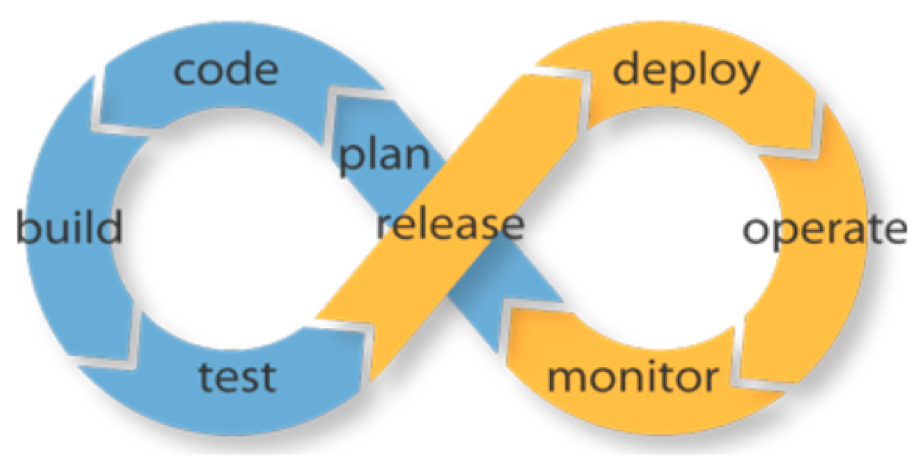
    picture2

    Figure 1: DevOps is about ensuring a closed-loop, fully automated workflow between software development and deployment.

    In the simplest terms, this meant that each of the steps outlined in Figure 1 need to be fully automated, and integrated with preceding and following steps. Doing this ensures software can be developed faster, deployed quickly, and iterated upon more rapidly.

    Benefits

    Done right, DevOps leads to a virtuous cycle of greater productivity across development and IT, greater agility in bringing new experiences to market and greater impact on the business.

    Adopting DevOps: You Can Phase It In

    Organizations looking to adopt DevOps should do so in phases and define metrics for each phase. Here’s a typical phased approach that you can use as a baseline and customize to your organization’s unique needs.

    Phase 1: Adopt Agile Development and Cloud Computing

    Agile development and cloud computing are profound technology shifts and create the underlying culture in which DevOps can thrive. So, the first step is to ensure organizational buy-in for both of these trends:

    1. Agile development can be adopted in stages. The most important is to agree that software will be built and shipped in short, two-to-four-week sprint cycles, and with a focus on user stories.
    2. Cloud computing can be adopted no matter what your IT infrastructure looks like today. Use hybrid cloud platforms such as OpenStack to provide programmatic access to a VMware or Linux environment, or use a public cloud platform such as Amazon Web Services.

    Phase 2: Commit to a CI/CD Workflow

    Continuous integration (CI) systems such as Jenkins or TeamCity provide a way to pipeline and integrate the various steps in a DevOps workflow. The choice of system doesn’t matter as much as ensuring that all steps of the workflow will be integrated (eventually) into this workflow.

    Phase 3: Repeatable, Automated Software Deployment

    Many organizations tend to have some manual steps in the packaging and deployment of their software, especially for getting it into production. This often reflects underlying assumptions about manual oversight and intervention, and it breaks the closed-loop philosophy of DevOps.

    To succeed with DevOps, you need to fully automate the software packaging and deployment process. In addition, ensure that production builds are deployed in the exact same manner as developer builds, using identical environments.

    Cloud technologies such as orchestration (OpenStack HEAT or AWS CloudFormations) and configuration management tools such as Ansible, Puppet or Chef can be used to implement this phase.

    Phase 4: Automate Software Testing (Continuous Delivery)

    Once software deployment has been automated, the next phase is to automate the validation process for new software releases. If you’re like most organizations, testing involves several rounds of back and forth with QA teams and product managers, and it often takes weeks to resolve the last few bugs in each release. To reach the next level of DevOps automation, this process has to be completely lights-out and automated.

    This requires a fully automated software test suite, across the back-end and front-end, so that product managers have confidence in the quality of the software being released. Once implemented, you finally have a closed loop between the critical elements of the DevOps life cycle. While release to production may still require someone to approve it or “push a button,” this is a very respectable state in the DevOps journey.

    Phase 5: Continuous Deployment

    To get to the most advanced DevOps phase, you need to automate the “go live” process for software releases. This in turn will allow you to take even smaller, more frequent code drops and push them into production.

    The most advanced software teams in the world now operate this way, and the organizational implications can be transformative: Developers come into work feeling that they can implement a feature and have it go live immediately, and product managers can make commitments to the business with the confidence they can deliver, because they have this incredibly efficient software delivery machine backing them. Most importantly for you, IT is no longer seen as a cost center; it’s seen as the fundamental enabler for business productivity and time-to-value.

    Closing Thoughts

    Getting to Phase 5 represents the state-of-the-art in the industry today. However, another significant breakthrough promises to raise the bar even higher.

    In each of the prior phases, the DevOps workflow is integrating software development with IT operations; but there is nothing influencing software architecture to take operations into account.

    In other words, we’re still bolting IT operations automation onto software development.

    This is about to change. We’re on the cusp of a new era in software: instead of bolting operations onto the software development process as an afterthought, a new framework promises to bring development and operations together by design. With declarative, infrastructure-agnostic constructs to describe how applications are composed, interact and managed, Kubernetes promises to increase the operability of modern software systems by an order of magnitude.

    Everyone interested in the DevOps journey should be learning about Kubernetes and evaluating how it will improve your software development and operations workflows.

    About the Author / Sirish Raghuram

    sirishr_platform9Sirish Raghuram is co-founder & CEO of Platform9. As CEO, Sirish quarterbacks the team at Platform9 in realizing the company’s vision, which, on a given day, can range from strategy and road map to shipping code and running tests. Before co-founding Platform9, Sirish was an early engineer at VMware, where he held technical and management leadership roles and helped ship multiple vSphere products. Sirish’s work was reflected in several patents, VMworld talks and internal product innovations within VMware Engineering. Sirish has a B.E. in Computer Science from the University of Pune, India. Connect with him on LinkedIn.

  • Continuous Integration vs. Continuous Delivery: There’s an Important Difference

    Continuous Integration vs. Continuous Delivery: There’s an Important Difference

    If you read DevOps blogs today, it can be easy to assume that Continuous Integration (CI) and Continuous Delivery (CD) are synonymous terms. People often use them that way. But that’s a mistake.

    As an example of conflation of the terms CI and CD, take this page, which purports to be a “history of CI/CD tools.” The author does provide a truly excellent history of CI platforms.

    But CI tools are the only subject that the page discusses. It’s not a history of CI and CD. It’s just a history of CI platforms. To work the history of CD into the picture would require discussion of how software testing and delivery practices have changed over time, not just an overview of the history of CI software over the past several years.

    I don’t mean to knock the page. It’s a great read, and the mistake the author makes in treating CI and CD as synonymous is hardly rare. He or she is just repeating a common confusion. You see the same lack of distinction between CI and CD on Docker’s discussion of CI/CD, for instance.

    The Difference between CI and CD

    It’s unclear how this conflation of the two terms originated. But it’s easy enough to clear up.

    Simply put, CI is the process of integrating code into a mainline code base. In almost all scenarios today, CI is done using platforms designed specifically for the purpose. Implementing CI is, therefore, as simple as using the right tools.

    CD is more complicated. CD is about the processes that have to happen after code is integrated for app changes to be delivered to users. Those processes involving testing, staging and deploying code. There is no single type of tool that does all these things. These processes take different forms, depending on the culture of the team and the type of app it is creating.

    In actuality, then, CI and CD share little in common. Besides starting with the same word (“continuous”) and being different stages in modern software delivery pipelines, they don’t have much to do with one another.

    Why the Difference Matters

    Why is it important to steer clear of this confusion? The main reason is because, by conflating CI with CD, organizations can end up doing only the former but thinking they have implemented the latter.

    Setting up a CI server such as Jenkins or Bamboo to integrate code changes continuously does not mean you are doing CD. It just means you are using a CI server.

    To get to CD, you also have to organize your software testing, staging and deployment processes in a way that automates them as much as possible and makes them continuous. Doing so requires more than simply turning on a certain type of tool.

    How you actually do CD is fodder for a separate, much longer article (or you could just read the book about it). But recognizing that CI is not CD, and avoiding confusing formulations including CI/CD, is a start.

    — Chris Tozzi

  • Why your Company Should Load Test

    Why your Company Should Load Test

    The main reason your company should load test its websites and mobile applications is to learn how the site performs so you can improve the user experience and make smart web infrastructure decisions. Sounds obvious, doesn’t it? Above all else, load testing is a learning experience that provides a wealth of insight into how your website performs from both a user experience and technical perspective.

    How can it be done? Running a load test involves creating a small or large number of virtual users via programming script, running a simulation in which those virtual users access your site, and gathering information about how well the website performs under the traffic load.

    How Your Website Operates and Why it Matters

    If you are curious to learn more about how your website operates, contact a specialized load test company that offers load tests with up to 50 users for free over a 30-day period. Such a smaller test will provide insight into how well your company’s site performs for a typical user during light traffic situations. Free application monitoring tools often can be downloaded if your business does not already have one.

    Longer load times hurt conversion rates: According to Amazon, every 100ms of page load time latency reduces sales by 1 percent. So your business could be losing out on 10  percent of sales because your pages take a second longer to load. Testers can learn all sorts of interesting things about how a site operates with varying virtual traffic loads.

    Primarily, the load test tells you how long it takes a page to load on your site for users at different traffic levels. You can find out how quick load times are during normal, peak, spike and overwhelming use rates.

    The load time data helps identify not only problems in your website code that could be slowing down individual pages, but also problems with the infrastructure itself. Load testing lets your business know exactly how much load times increase when the site gets busy relative to normal use. The tests also can determine how much traffic a site’s infrastructure can handle before load times get outrageously high—and when the site will crash.

    Proximity Performance

    A load test provider can offer testing from server locations all over the globe. A guest in Chicago visiting a site that is hosted in New York City may have fast load times, but Los Angeles-based visitors may have to wait an extra second for pages to load. This data can help your company make an educated decision when purchasing a content delivery network (CDN) service that mirrors content, so site guests farther away from the original host server have a better experience with your site. Look for a load test provider that can offer synthetic load traffic of up to 500 Gbps bandwidth and a million concurrent virtual users. Loads should be generated to your breaking point, and fast!

    Get the Ideal Amount of Power and Learn How to Scale

    Once your business is able to see how your site performs under various traffic loads, that information can help determine where the infrastructure needs upgrades at various traffic levels. This helps with capacity planning—the ability to scale different infrastructure elements to meet demand without wasting money on power that is not going to be used.

    Running load tests on your company’s site will teach you invaluable information about how your site works so your customers can have a better experience with your platform. Improved website performance equals improved business.

    About the Author / Sven Hammar, CEO, Apica

    SvenHSven Hammar is co-founder and CEO of Apica, a provider of powerful, best-in-class technology for testing, monitoring, and optimizing the performance of cloud and mobile applications. Mr. Hammar he has decade-long experience and expertise in web performance and web optimization, e-commerce, cloud services, IT entrepreneurship and the Internet. He is also a serial entrepreneur who has founded several successful IT companies over the years.


  • Pokémon Go Shows DevOps Changes Human Behavior

    Pokémon Go Shows DevOps Changes Human Behavior

    Everywhere you go lately, you can see people acting strangely. They’re walking streets they never walked before. They’re waving their smartphones around in odd ways. And they’re high-fiving each other for no apparent reason.

    And they’re doing it because of DevOps.

    Of course, not everyone immediately thinks about Pokémon Go as an artifact of DevOps—but that’s what it is. It is code written, continuously modified and continuously promoted to production based on changes in workload performance and user feedback, implicit and explicit. It is also the most downloaded app on iTunes ever.

    More importantly, Pokémon Go is visibly changing human behavior. That’s something worth considering as organizations seek to survive and thrive in the application economy.

    Doing Things Differently vs. Doing Different Things

    Most development is done so that customers or employees can do things differently. There are lots of apps that make shopping easier or deliver better analytic insight for decision-making. And those apps certainly provide business value by removing obstacles to revenue or by helping companies optimize allocation of resources.

    image003_v1But Pokémon Go doesn’t merely allow people to do something differently. It drives them to do something entirely different—location-based and augmented reality gaming.

    Pokémon Go isn’t the first or only app that changes human behavior. Uber and Zipcar changes how we get from place to place. Square changes how we do retail. Pokémon Go, however, is an especially dramatic manifestation of how apps change behaviors. People are doing something they’ve never done before because of some software—and because that software “went viral.”

    That’s an important concept to bear in mind as organizations seek to optimize the effectiveness with which they leverage technology in their businesses. Are you just trying to write apps that help your users do something a little better? Or can your apps enable and inspire entirely new behaviors that people will find worth embracing—and therefore will also promote across their social networks?

    The Role of DevOps

    DevOps is central to this endeavor in several ways. First, when you’re doing something new, you by definition don’t know what you’re doing. So you have to keep going through cycles of testing to get things right. If those cycles are slow and you don’t take the time to test all possible use cases—such as geolocations, devices, operating systems, hardware, diverse transaction, etc.—because you have trouble putting the right test data together or it takes too long to provision the necessary environments, you will either be late to market or release something nobody likes.

    To avoid these types of pitfalls, you need a streamlined and automated end-to-end DevOps pipeline that optimizes your delivery value chain and eliminates constraints and dependencies across the software development life cycle. Implementing this type of continuous delivery tool chain will allow your DevOps teams to continually improve the quality of your applications in a shorter time frame.

    Second, even once you get things right, they won’t stay right for long. The folks at Niantic were most certainly surprised by just how viral their app went, so they had to scramble to overcome performance issues in the field. They also are dealing with some negative feedback from true Pokémon aficionados who are not so smitten with how gameplay diverges from their long-beloved Nintendo brand.

    Niantic’s ability to keep riding its initial viral download success will be closely tied to its ability to address these issues. And that’s also best done with an automated DevOps process—along with Agile disciplines—that allow the company to keep refining both its code and the way that code runs in production and ensuring the performance of the IT infrastructure that supports the user experience of the app.

    Luring the Wild ‘Customon’

    Perhaps the most powerful lesson from Pokémon Go isn’t for developers. It’s for business leaders. Unfortunately, many non-IT executives still view DevOps and related investments in digital capability as an operational issue for technologists—rather than as an existential issue for the business itself.

    But it is decidedly the latter. Pokémon Go isn’t just about having a good idea for a game—any more than Dollar Shave Club, which Unilever just bought for $1 billion—it’s about having a good idea for a company. You have to be able to execute. And in the application economy, you can’t have execution with speed and quality without DevOps.

    So if you’re still struggling to get upper management to invest in funding your DevOps initiative, maybe it’s time to put away the PowerPoints and pull out the Pokémon instead. We’ve rarely had a more dramatic example of how applications can impact human behavior—and how the ability to get code into production quickly and successfully can impact your business.

    About the Author / Aruna Ravichandran

    Aruna_CAAruna Ravichandran is vice president of DevOps Solution Marketing and Management at CA Technologies, responsible for cross-portfolio solution marketing for DevOps across the Application Performance Management, Infrastructure Management and Continuous Delivery product lines. Before joining CA Technologies, Aruna held several management positions in product marketing and engineering at Juniper Networks and HP. Aruna earned an MBA and master’s degree in Computer Engineering from Santa Clara University and holds a Bachelor of Science degree in computer science from Bangalore Institute of Technology.

  • Follow the Simple Path of Nirvana to DevOps

    Follow the Simple Path of Nirvana to DevOps

    Perhaps the title of this post is a misleading, as nothing is truly “simple. But there is a well-defined pathway to achieving DevOps goals for any size company. Just follow a step-up pattern by adopting the principles of agile, continuous integration and continuous delivery, and you will reach your goal of DevOps. This path is a natural progression of DevOps maturity that an organization can follow while adopting key principles and technology solutions along the way.

    pipe

    Agile Development

    Adopting agile development methodologies often is the first step maturing organizations take, as they no doubt have heard the resounding benefits of leaving behind waterfall software development life cycles. There is a reason this is the first step. It helps your organization’s employees mature into a tightly knit working machine that fosters improvements in driving down technical debt while also laser-focused on building key features.

    As agile teams continue their maturation, they’ve roped in key business stakeholders who are able to grasp the drivers of technology challenges and are able balance out the growth needs of the business with the sustainability requirements of the technology teams. Suddenly, teams are investing a minimum of 20 percent of their sprint time to dealing with technical debt and reporting out these victories to their product owner(s). These small wins become major victories as the unwieldy pieces of infrastructure and software of the business become relics and folklore of yesteryear.

    But there is an underlying reason why agile development is the most crucial first step: It truly empowers the developers to improve the customer experience and feel good about it. With the scrum master’s shields up protecting the team from burnout and ensuring sprint planning happens, team members are more likely to be passionate about their work and the results of their efforts to the business and customer. This is where the empowerment of DevOps really begins.

    Continuous Integration

    As teams mature along the agile development continuum, the next step in their DevOps maturation is moving on to  continuous integration. Continuous integration is the process by which a company automates its software build process: code check-in triggers a build job that then triggers a test validation job and so-on. This process enables teams to continuously integrate their code build with downstream processes, avoiding manual touchpoints.

    In addition, this paradigm allows for faster feedback loops to ensure a higher quality product, and empowers diverse teams to work together utilizing automation as the “middle man.”

    Continuous Delivery

    The third step in DevOps maturation is continuous delivery. Often businesses confuse “delivery” with “deployment”—in fact, continuous delivery is simply the process to ensure that at any given point a company’s software is in a state where it can be deployed. This is useful for quick iterations, A/B testing and a more mature way of delighting customers fast and often.

    A key component of continuous delivery is ensuring that software is ready for production. When a team is doing continuous delivery, they’re assured that they’re nimble and responsive and adhere to the highest quality standards.

    DevOps

    At this point, the company has reached the DevOps nirvana state. This is where software is not just delivered continuously, but all of the operational needs are constantly met. Monitoring, metrics, the ability to automatically roll back software releases, scalability and much more are the key building blocks to a powerful DevOps organization.

    With this thoughtful step-by-step process of DevOps adoption, organizations can meet the needs of business in a mindful and cohesive way without compromise.

    I’d love to hear any feedback or tips on DevOps at @jsin.

    About the Author/Jason Shawn

    jason-profileJason Shawn is a technology leader in DevOps and Cloud. His began his career as a software developer and has held multiple functional and managerial roles which has found him with a unique perspective on the software development lifecycle. He’s extremely passionate about Continuous Delivery, Agile software development, and empowering teams to adopt DevOps and Agile principles in their daily lives. He is also a member of the Cloudbees Customer Advisory Board and enjoys public speaking, travel, and time with his family.
  • A DevOps Coders Time Allocation

    A DevOps Coders Time Allocation

    Developer Time Allocation


    Here are some other ROELBOB’s you might like

    RoelBob150x120


    A Unit Testing Dillema 

    The Pink Slip

    Another Pink Slip


    Hot off the Press – Other great devopsy.kinsta.cloud content

    HotPress

    DevOpsSec: 1 in 16 Chances

    CIOs Must Fight for Relevance in Face of Tech Storms


    Upcoming devopsy.kinsta.cloud Events

    Events

    Webinar: SecDevOps: The Marriage of SecOps and DevOps


    — ROELBOB