Tricentis this week added a generative artificial intelligence (AI) capability, dubbed Tricentis Copilot, to its application testing automation platform. It aims to reduce the amount of code that DevOps teams need to manually create.
Tricentus Copilot is based on an instance of the large language model (LLM) created by Open AI which has been deployed on the Microsoft Azure cloud. It’s the first iteration in what will eventually become multiple AI assistants is Tricentis Testim Copilot, which makes it possible to use natural language to describe a test that is then automatically generated in JavaScript. Additional Tricentis Copilot solutions for the Tricentis Tosca and Tricentis qTest platforms will be added later this year.
Mav Turner, chief product and strategy officer for Tricentis, said the user interfaces that the company created for each platform will also continue to evolve, to make it simpler to launch the appropriate prompts during any workflow.
The goal is to make it easier to create tests to improve application quality, said Turner. For example, organizations that have been using the beta editions of the Tricentis Copilot have already seen a 20% to 50% increase in the number of tests created, while reducing test failure rates by 16% to 43% so far, he added.
Generative AI should also make it easier for DevOps teams to reuse tests once created and understand how they are being run using the summarization capabilities enabled by generative AI platforms that will also be able to provide recommendations to improve testing code. Collectively, those capabilities will make it possible to run tests faster, have fewer errors, reduce costs and increase productivity.
Those capabilities can all be provided in a way that doesn’t result in any of the testing code being used to later train any update to the core LLM provided by OpenAI, noted Turner. Longer term, Tricentis will continue to research which LLMs might be best applied to any given use case in a way that is transparent to a DevOps team that might not be interested in which LLM is being employed to automate a task. Currently, however, it doesn’t make much economic sense for Tricentis to build its own LLM, said Turner.
It’s not clear yet to what degree generative AI will democratize application testing, but as they become easier to create there should be more time to run more complex tests that might, for example, address cybersecurity issues. Most of the tests that are run today typically surface common programming mistakes. However, as testing becomes faster in the age of AI there should be more time to run a wider range of tests to ensure the best application experiences possible.
At the same time, Tabnine also announced that Tabnine Chat, a tool for interacting with the large language models (LLMs) at the core of the Tabine platform using a natural language interface, is now generally available.
Data that resides in a codebase or an integrated developer environment (IDE) can now be used to extend the large language models (LLMs) on which the Tabnine platform is based using retrieval augmented generation (RAG) techniques. Previously, the Tabnine platform would only generate test code based on the data that Tabnine had exposed to its LLMs.
Tabnine president Peter Guagenti said RAG makes it possible to provide additional contextual awareness for the test code generated along with documentation and explanations of the test code created. The overall goal is to leverage generative AI to make it easier to shift more responsibility for application testing further left toward developers, he noted.
That approach enables developers to create and run more routine tests earlier in the software development life cycle, which should provide application testing teams with more time to run more complex tests before applications are deployed, added Guagenti. Rather than being a job killer, generative AI will eliminate rote tasks that most members of the DevOps team don’t really enjoy doing, he noted.
Tabnine uses a mix of LLMs it developed with Google to apply generative AI to application testing. Unlike general-purpose LLMs, the ones used by Tabnine were trained using a narrower base of testing code that the company curated using tests made freely available on the internet.
It’s now only a matter of time before generative AI is applied across the entire software development life cycle (SDLC). It’s not clear how automated testing will become in the age of AI, but the overall quality of applications should steadily improve as more tests are run. The goal is to make it possible to conduct more tests without slowing down the overall pace of application development.
There continues to be as much irrational exuberance about AI as fear and loathing. Still, DevOps teams that committed early on to ruthless automation will naturally be at the forefront of adoption. The immediate challenge is assessing what functions will be automated and the impact those changes will have on the way DevOps teams are currently structured. Ultimately, the goal is to eliminate as many of the bottlenecks that conspire to slow application development and deployment while simultaneously improving the quality of the application experience.
It may be a while before generative AI is pervasively applied across DevOps workflows, but one of the first places it will undoubtedly manifest is in test automation. The challenge and the opportunity now is determining how best to apply it in a way that augments DevOps teams that arguably have never had enough time to properly test code in the first place.
ForAllSecure is investing to make open source software (OSS) more secure and is making available free, personal-use versions of its Mayhem application security testing tools infused with artificial intelligence (AI) capabilities to anyone using GitHub repositories.
Company CEO David Brumley said anyone who integrates Mayhem into a qualified GitHub repository being used to build open source software will receive $1,000 as part of the company’s Mayhem Heroes program.
There are now two free, personal-use editions of Mayhem that can be used to analyze code or application programming interfaces (APIs). Those tools are based on fuzz testing technology, which randomly injects data into applications to detect vulnerabilities as part of an effort to automate DevSecOps processes.
In the wake of the discovery of zero-day vulnerabilities in open source software that have impacted enterprise IT organizations, more attention is being paid to how open source software is created, maintained and secured. Many of the developers who build and maintain open source software don’t typically have a lot of cybersecurity expertise, and don’t have the time and resources required to continually remediate vulnerabilities as they are discovered. The Mayhem application security testing tools are designed to make it faster to discover vulnerabilities using AI technologies to reduce the number of false-positive alerts.
It’s too early to say how quickly open source software might be made more secure, but tons of resources are being made available. The Open Source Security Foundation (OpenSSF), an arm of the Linux Foundation, has raised more than $10 million to build tools and define best practices for securing open source software projects. Google has pledged to spend $10 billion to improve open source security. The Biden administration has also made improving the security of open source software used inside (and outside) government agencies by expanding compliance mandates. The White House is also trying to encourage IT vendors and larger enterprises to contribute more to the effort to secure open source software.
The pressure is rising on both developers and consumers of open source software to make sure open source software is secure. However, many open source projects are maintained by a small number of programmers who contribute their time and effort to build components that others are free to use. Many of them argue it is the responsibility of the organizations that deploy that software to ensure the software is secure Many IT vendors and large enterprise IT organizations that rely on that code aren’t contributing anything meaningful back to the project, in terms of either financing or just helping open source maintainers find and remediate vulnerabilities. The irony is many of those same organizations are now assessing whether the open source software they employ is, from a security perspective, actually sustainable in the absence of those contributions.
For developers working with cloud-native technologies, software testing and quality assurance is a key part of product development. For most teams, testing has “shifted left,” so the quality of the code can be assessed as it moves through the CI/CD pipeline. This approach to quality assurance reflects the rise of DevOps and other modern development practices – developers today own their applications from end-to-end, and conducting testing early in the product life cycle is how they find potential bugs, save their organizations time and money and build products that delight their customers.
More recently, developers have added end-to-end API and browser tests into their CI/CD practices, extending the scope of their testing and quality assurance practices. By testing how code performs on different browsers and how it interacts with important data sources, developers have added another layer of quality testing to the early stages of their development processes. This has brought added benefits to other “shift left” practices, such as unit testing and security testing, and has led to a new understanding of quality assurance.
Traditional Approaches to QA Can’t Support the Pace of the Cloud
As companies have migrated to the cloud and adopted agile development methodologies that align with DevOps practices, they’ve encountered conflicting priorities between releasing code quickly and maintaining the highest level of quality on each release. Traditional manual testing techniques were not built for agile workflows, but instead supported older waterfall methodologies, in which testing could be conducted as a discreet instance before code went to production. With agile development, having a specific team in charge of all testing right before production is not the most sustainable approach, as it hinders the rapid pace of development that the cloud enables. This is why testing is “shifting left” to earlier stages of the development process, and why manual testing is being done by people embedded within each engineering team.
Cloud-Native Teams Have Shifted Left Into CI/CD Pipelines
As part of these agile methodologies, companies have moved toward leveraging CI/CD practices to ensure code is always in a state where it’s ready to be deployed. As code moves through these pipelines, developers want to ensure they are able to catch bugs earlier in the development cycle. To do this, they’ve taken to testing earlier and more often.
In particular, developers have increasingly recognized the value of end-to-end testing throughout their CI builds. API tests allow teams to verify end-to-end workflows by chaining HTTP requests and API calls, so they can validate all the layers of their systems from worldwide locations. Browser tests capture the user’s view during critical transactions, so teams can understand how UI changes are impacting web applications. Shifting both left into CI/CD pipelines saves time and money, as fixing a bug earlier in the development lifecycle is much less expensive than trying to fix it at the last minute, when it has grown in complexity and scope.
It also means many issues are caught by the developers, without the intervention of another engineer manually validating their work. This reduces the number of cycles required to find a bug, allowing the code to be circled back to developers, fixed and re-deployed to a testing environment. When regressions are caught early, developers can focus on the details that will make the product great.
Visibility of Metrics, Traces and Logs Drives Value
Running browser and API tests in your CI pipelines is beneficial, especially when teams can correlate these tests with data from across their stack – front end and back end, application and infrastructure. With correlated metrics, traces and logs that can be accessed easily without toggling between different products, teams will have the full context necessary for both detecting and troubleshooting failed tests. Detecting the failed tests allows for the rollback of bad code before it goes to production, and the correlated full stack data can be used to troubleshoot and fix any issues not caught during the development stage. This creates a new culture of quality assurance, in which maintaining quality is a holistic process that involves every part of the development cycle, and draws on data from every part of the stack.
Consistent Quality Requires Collaboration
This change in quality assurance goes beyond the practice of shifting browser and API testing left, and represents a fundamental change in how engineering teams collaborate within an organization. Testing happens before code goes to production, continues with robust monitoring once code is live, involves data from across the stack and is the responsibility of teams from various parts of the business. With this collaborative approach, for example, a front end engineer can easily identify an issue in the integration of their latest changes with the way the back end APIs are structured. They can then engage with the back end team owning this service to collaboratively iterate and find the best solution to resolve the issue. It may start with a shift left, but, ideally, it ends with the removal of silos and the opening of communication channels among teams.
Automated QA Delivers Customer Value Faster
A fully operational approach to quality assurance means that issues are resolved faster, or even resolved while code is still in development, so they never become issues at all. This creates a virtuous cycle – fewer regressions means less downtime, which makes customers happy, and frees up engineers to build new products, which makes customers happier still. That baseline of reliability and customer experience enabled by effective quality assurance is what allows for new innovation that delivers value to customers.
Whether a company is creating mobile applications for e-commerce, customer service or internally to boost employee productivity, the rapid development and effective deployment of mobile apps has become a business imperative.
The global mobile application market was estimated at $106 billion in 2018 and is expected to hit $407 billion by 2026; an annual growth rate of 18.4%, according to Valuates Reports. Growth is being driven primarily by e-commerce, gaming and IoT, according to the report. “The advantage of having a mobile application, even for a small business, is that it improves brand recognition and offers a whole new level of e-commerce user experience, helps create customer loyalty, gathers feedback and helps [the business] stand out from the crowd,” the report says.
Mobile App Developers Face UI Pressure
Unfortunately, mobile application users are a tough crowd with zero tolerance for bugs or user interface (UI) issues. In fact, one-fourth of end users abandon mobile apps after their initial experience, according to the report. In this highly competitive environment, the ability to effectively test mobile apps prior to launch is critical, but many organizations face challenges when it comes to creating a suitable test environment.
“Test environments and test data are the most cited challenges for core enterprise applications, as well as more fluid applications developed in short cycles, often deployed on smartphones, tablets or a web browser,” according to a recent Capgemini World Quality Report.
The percentage of organizations struggling to keep pace with mobile app testing requirements is increasing, according to the report. Respondents cited a slew of issues, including not having the right processes, methods or tools to test mobile applications; not having in-house mobile testing experts; not having an in-house testing environment and/or not having enough physical devices on which to test.
These challenges are pushing many organizations to cloud-based application testing platforms, which offer a way for developers to avoid common testing bottlenecks that slow mobile app deployment. The COVID-19 pandemic created another driver for adoption of cloud-based testing platforms, since mobile application testers lacked access to physical testing spaces where they could access and share an inventory of mobile devices.
Accelerating Demand for Mobile Apps
The shift to agile software development and continuous deployment methodologies is another factor ratcheting up pressure on developers to create new apps in weeks, or even days, without sacrificing quality.
Unlike traditional apps, mobile applications need to be tested on dozens, sometimes hundreds of devices to ensure they run anywhere. The proliferation and ubiquity of mobile devices means developers need to test on more than 350 devices just to cover 90% of the mobile device market. In a present-day enterprise BYOD scenario, for example, each employee might use three to five different devices – a number that’s only expected to increase as wearables and IoT gain mainstream adoption. Development teams must prove the app is hardware agnostic and functions as expected; otherwise, imagine the fallout if the company launched a BYOD app that didn’t run properly on the CEO’s smartphone, for instance.
This is where the value of cloud-based application testing platforms becomes clear. Cloud-based app testing platforms enable developers to manually test applications on an unlimited number of mobile devices, and to perform crucial measurements and tests of functionality like screen rendering. Mobile applications must seamlessly render in the tester’s browser without lag or latency to avoid poor user experience.
Beyond that, there are time considerations to think about. A large enterprise organization could have hundreds of testers working around the clock to validate an application, and a slowdown of even a few milliseconds per screen rendering could cost thousands of dollars a day in lost productivity. That’s why every millisecond matters.
Selecting a Mobile App Testing Vendor
Selecting a vendor that can deliver a cloud-based testing platform without lag or delay is critical, but there are other factors to consider, as well.
Some solutions use emulators or simulators to test application performance, but nothing can replace the real thing. Look for a vendor with the ability to perform tests on real, physical devices. Since most organizations operate in a hybrid world, look for a vendor that gives customers the flexibility to combine both cloud-based and on-premises testing.
Automation is also a major factor to consider in vendor selection. According to one survey of more than 350 mobile developers and software testers, 55% said automation would improve software quality, but the majority of respondents, 76%, are automating fewer than half of all software tests.
Look for a vendor with the capability to take an initial manual test and automatically create scripts for all of the devices under test, without requiring developers to write new code. Test automation scripts can be created and executed exponentially faster than manual efforts, which enables businesses to get to market faster with better quality mobile apps.
Here are ways organizations can reduce their test run times to improve speed and efficiency
Consult any recent DevOps survey and the same theme emerges: Testing remains one of the biggest roadblocks impeding organizations’ collective efforts to deliver better software, faster. Unlike days past, however, when agile development was still in its relative infancy and investments in testing lagged other areas of the delivery pipeline, organizations today are increasingly aware of the critical role continuous testing plays in delivering quality software at speed, and are aggressively investing in the requisite testing tools and technologies.
No, the problem today is not lack of awareness or tooling. The problem, quite simply, is that testing is difficult, and only gets more difficult as organizations look to drive automation at scale. Nowhere is this challenge more evident than in organizations’ ongoing struggles with test quality. A recent study showed only 24.37% of organizations pass at least 90% of their desktop tests and only 25.45% pass at least 90% of their mobile tests. Remember, the purpose of agile development is to accelerate application delivery and shorten the release cycle. Organizations can do neither if they constantly have to manually follow-up to determine the source of repeated test failures.
Doing It Right
Organizations must find ways to improve test quality and speed. A major reason so many tests fail is they take far too long to run. The longer it takes to run, the more likely it is to end with a failure. According to the aforementioned study, those that complete in two minutes or less are twice as likely to pass as those lasting longer than two minutes.
With that in mind, let’s take a look at four key steps testers and developers can implement to reduce test run times.
Script Atomic Tests
There’s no more important best practice to create a better and faster automation experience than to run atomic tests. These focus on just one piece of application functionality and are much faster and easier to execute than longer tests assessing multiple pieces of functionality.
Let’s examine what this looks like in practice. Suppose an online retailer needs to validate that users can log in, view their gift card balance, add items to their cart, proceed to checkout and successfully process a transaction. Even an experienced tester will often make the mistake of scripting a single test to validate those five functions. The far better approach, especially if the aim is to reduce run time and improve test quality, is to write five separate tests, each specifically focused on one piece of functionality. Running individually but in parallel, these five “atomic” tests will execute in far less time than one longer test.
Run Tests in Parallel
Of course, if those five atomic tests are executed sequentially—that is, one at a time, one after the other—they’ll take even longer to complete than the one screen flow test, negating any potential runtime benefit. That’s why running tests in parallel is an equally critical component of any strategy to reduce test run times. Consider the hypothetical example of a test suite with 100 atomic tests, each of which takes two minutes to execute. Run those 100 tests sequentially and they’ll take more than three hours to complete. Run them in parallel, and all 100 will complete in just two minutes.
Remember, too, not to get thrown by the volume of tests in a given suite. It’s tempting to think that a suite with 10 long tests that each take 5 minutes to complete will execute faster than one with 100 atomic tests that each take 1 minute to execute. But even if executed in parallel, the suite with the 10 long tests will still take 5 minutes to run—five times longer than the suite with 100 atomic tests.
Reduce the Number of Selenium Commands
Having too many Selenium commands in your test script flies in the face of atomic testing and is one of the most common underlying causes of long and unstable tests. Every single command takes time to execute and represents a new opportunity for something to go wrong. Minimize the number of commands required to execute a test case and run time will shrink accordingly.
Use Explicit Waits
Another effective way to reduce test run time is to use explicit waits rather than implicit waits. Implicit waits set a default wait time between each step or command across a test script, such that the subsequent step only executes after the pre-defined amount of time has elapsed. Explicit waits, on the other hand, enable the next step in a script to execute as soon as the preceding step is complete. Though more complicated to implement, using only explicit waits can have a significant positive impact on test run time.
Putting it Together
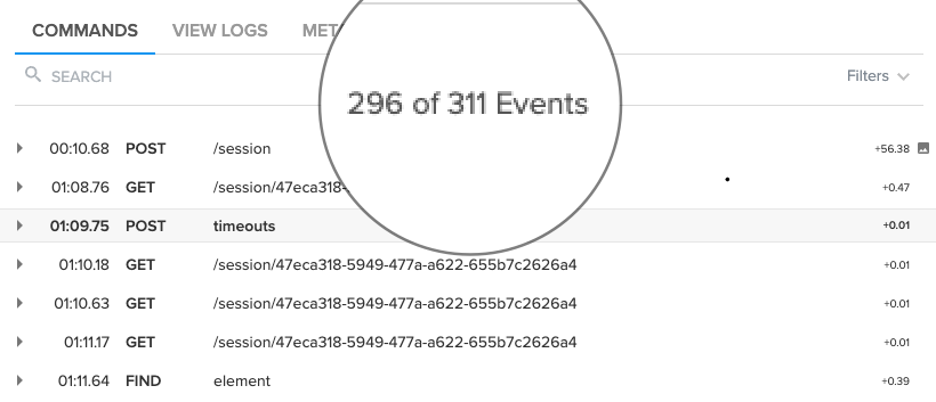
The example below shows an unoptimized test suite with 311 commands run against a mobile device. This example took 1,265 seconds (or more than 21 minutes) to execute. If delivering better software faster is the aim, that’s not going to work.
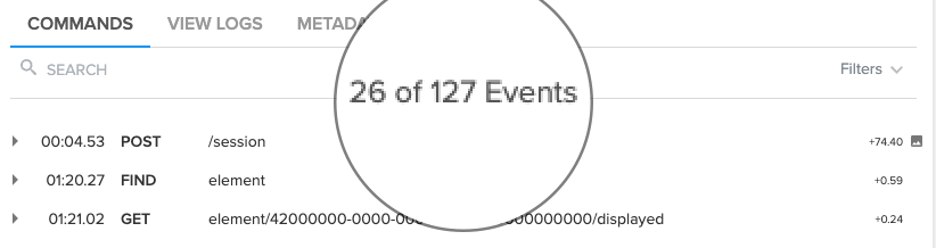
Applying the aforementioned tactics to the same test suite executed against the same device, however, drove the total number of commands down to just 127 and enabled the suite to execute in just 430 seconds (or just over 7 minutes), a 66% improvement in test run time.
Though the prospect of reducing test run time may be daunting, by focusing on a limited set of key tactics and best practices, the end goal of shorter, more stable tests is indeed attainable.
Mainframe developers have an easier time testing with the Wazi Virtual Testing Platform
Working with test data is tricky. If you’re a developer working in a distributed environment, things are difficult enough. It seems as though you’re forever replenishing test data on a database in your local system or one that’s dedicated to you out on the network.
You run tests that twiddle with that data and when things go wrong that data gets so corrupted. It’s useless. So you have to go through the whole replenishment process again. This is no big deal if you’re working with a few gigabytes of data, but when you’re running a test against a database that is really big—on the order of hundreds of gigabytes or a few terabytes of data—the replenishment process can take hours or, in some cases, days. It’s a lot of time-consuming work, even when a good deal of the process is automated.
As if this isn’t challenging enough, things get even more difficult when you’re executing tests that run in a multi-user scenario. You have a whole bunch of users making a whole bunch of changes to shared datasets that, in turn, affect the application’s overall state. When tests fail not only do you have to figure out if the problem is with the code, the data or both, you also have to determine where the failure occurred.
Remember, a distributed application is intended to run multiple instances of application logic that gets distributed over a cluster of machines. Figuring things out requires a lot of very detailed monitoring of all activity in all the instances of the application running over the network. And, determining the root cause of each failure requires a good deal of expertise to do the analysis successfully.
It’s a lot of work despite the fact that developers working on distributed applications have a lot of direct control over their environment. For mainframe developers, working with test data can be more than tricky; it can be a staggering challenge that tests the mettle of even the most gifted developer.
Understanding the Problem of Data Sharing on a Mainframe
There is a fundamental difference between the way data is managed in mainframe testing and distributed testing. Whereas a distributed developer “owns” the data in their environment, mainframe developers really don’t have such luxury unless they are working in dedicated subsystems. Typically a mainframe programmer’s programs are compiled binaries that are usually part of a larger unit of execution. An example of a larger unit of execution is the work that sets up a worker to receive unemployment insurance.
Let’s say that Sarah is a COBOL developer who has written a program that is part of the process that determines a worker’s unemployment benefit. Sarah’s program discovers all the worker’s employers over the last five years and adds the income from each employer to a table in a database that is shared with that other programs that are part of the unemployment benefits process.
Of course, Sarah will unit test her code. If she is working on a z/OS mainframe, she might use a product such as zUnit to do the testing. But, just testing Sarah’s code is only part of the work of the entire process; a broader range of testing is needed.
Now here’s where things get tricky: Sarah’s code is but one of many programs doing the work needed. So, while it’s entirely possible that her unit testing might be fine, once her program changes data and those changes are applied to the bigger picture things might go haywire. In such a case, if Sarah’s data corrupts the overall state of the unemployment benefits process, the data of all the other programs that interact with Sarah’s data might be corrupted, too. Thus, the entire database will need to be replenished. Remember, Sarah does not “own” that shared data; she is one of many users.
Sarah’s example is but one instance of a real problem that is a common, time-consuming headache for mainframe developers. If the data transformations made by Sarah’s program could be isolated and made reusable on demand, that capability would have far-reaching benefits that could change the way mainframe testing is conducted in the enterprise.
Fortunately, the capability exists. It’s the test recording feature of the Wazi Virtual Testing Platform.
Understanding the Mechanics of Test Recording
Test recording as implemented by the Wazi Virtual Test Platform (VTP) addresses two fundamental problems around managing data in a mainframe testing environment. The first problem is creating a way to isolate and make reusable the test data that is the result of the actions of one or many mainframe users. The second problem is creating a way to update that test data should it go stale.
Wazi VTP allows a developer or test practitioner to record the terminals of one or many users executing data query commands against a database. Wazi VTP saves the results of those queries for reuse as test data.
Wazi VTP has the capability to record CICS transactions or JCL batch jobs. CICS transactions can use any combination of CICS commands or Db2, DL/1 as well as MQSeries calls. Batch jobs can use dB2 or DL/1. Recording can be started from CICS by using the BZUS transaction command or from batch by running the application. All of this is done without any change to the user’s application programs.
Once the recording has completed, the CICS transactions or the batch job can be replayed entirely in batch, completely standalone and free from any subsystem. Since the data was originally recorded and then fed back to the replay process, it maintains the state of the data for all subsequent testing.
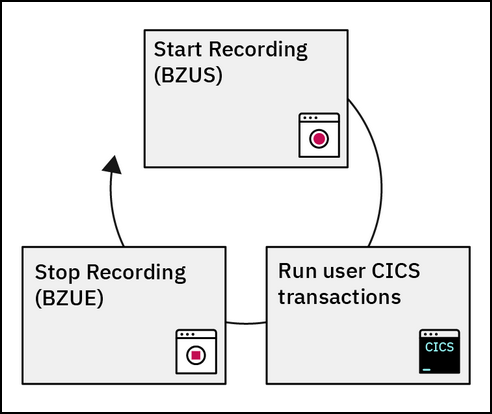
To stop recording using CICS, the developer enters the command, BZUE. Figure 1 below shows the command sequence from a conceptual point of view:
Figure 1: Running the Wazi VTP Test Recorder
The commands to start and stop recording can be entered from a mainframe terminal as shown in Figure 2, below. The developer enters the command BZUS without any parameters to record only the queries executed from the terminal in which the command is invoked. This is shown in the upper-left portion of Figure 2 below. If the developer wants to record the activities of many terminals, they add a wildcard parameter as shown in the lower right of Figure 2. In this case, BZUS AB* is the command invoked to record the activities of terminals that have an ID starting with the characters AB. Also, the developer can record activity coming from a specific terminal by using the name of the specific terminal instead of a wildcard parameter.
Figure 2: Wazi VTP can record activity from either single or multiple terminals
When a developer wants to stop the record they enter the command BZUE.
Using Wazi VTP is not confined to 3270 terminals or terminal emulators. The Wazi VTP also supports an API that can be used to perform integration testing within a CI/CD workflow.
The important thing to remember is Wazi VTP does a lot more than capture screen activity. In fact, screen capture is but one tiny aspect of the data collected. Wazi VTP captures all of the arguments on all of the CICS, DB2 or DL/1 subsystem calls. And, as mentioned above, the data it collects can be used as test data.
Figure 3 below shows an example of recorded data and program call arguments. Notice that Wazi VTP has recorded both CICS and programs (PGMS) that are written in COBOL, PL/1 and Assembler, as indicated on the first column on the left of the screenshot shown below.
Figure 3: The data that is a result of a Wazi VTP recording session
In addition to simply recording data that is then available as reusable mock data, Wazi VTP detects and then reports when data is changed. Detection is based on changes made by program logic. Wazi VTP allows those changes to the programming logic to continue to execute, until either a new, unrecorded path is attempted or until the program’s end.
This is a big difference from test data in the world of distributed computing. Unless precautionary measures are taken, once cloned instances of the test databases have no real insight into the state of those databases from which they were derived. Things might go well in unit, integration and performance testing only to blow up in production because the test data is completely out of sync with the real-world production data. Mainframe developers running Wazi VTP don’t have this problem.
Tracing Behavior and Gathering Statistics
One other advantage that Wazi VTP brings to mainframe testing is the ability to trace query behavior and gather statistics about the query behavior executed.
Figure 4 below shows how to invoke tracing under 3270 emulation. The image on the upper left shows invoking a standard trace. The image on the lower right of the figure shows the call that invokes a deeper internal trace.
Figure 4: Wazi VTP supports standard tracing as well as lower, internal tracing
Figure 5 below shows the details that are the result of a standard trace.
Figure 5: Standard tracing shows a broad range of information including information from recorded tests
Figure 6 below shows the richer set of details reported when an internal trace is invoked.
Figure 6: Wazi VTP Internal tracing provides a deeper level on reporting, including the address and memory usage of calls to a program
As mentioned above in addition to tracing, Wazi VTP will report statistics around test activities. Figure 7 below shows a set of statistics from a typical testing session conducted using Wazi VTP. Wazi VTP can report not only the number of times a program has been called but also the identifier of the caller. In addition, Wazi VTP reports status code that goes with different aspects of a CICS transaction.
Figure 7: Collecting program statistics using Wazi VTP
Wazi VTP recording is a powerful feature. Being able to record and reuse test data reduces a significant amount of the burden that goes with data management for mainframe testing. Tracing and statistics-gathering capabilities add even more power—so much so, that mainframe testing using Wazi VTP in many ways surpasses the capabilities present in current distributed computing paradigms. This is no longer the “coders code, testers test,” waterfall-driven approach to testing that was common only decades ago. It’s a modern approach to the way that enterprise testing works in today’s world. In short, it’s very cool!
Mainframes Development Offers Opportunities for Everyone
I am a big fan of the opportunities presented by mainframe programming. The machines are powerhouses. They’ve been designed from the get-go to handle thousands of users simultaneously. Mainframe computers still handle over 80% of corporate data.
There remains a real need for mainframe programmers now and well into the foreseeable future, particularly as the existing workforce continues to age into retirement. I’ve counseled more than a few younger programmers to consider spending a year or two doing mainframe development. Mainframe programming experience provides a great fallback to get through the ups and downs of an increasingly volatile job market.
As the mainframe and distributed communities continue to cross-fertilize, it’s entirely possible for developers from all walks of life to work in either environment provided they have a clear, competent understanding of the general principles of software development as well as a solid appreciation of the best practices that are general to any type of programming environment. Once the basics are in place, all that remains is taking the time to learn the particulars of the programming landscape. In the past, this might take years. Today, with tools such as Wazi VTP, the learning curve can be reduced to a matter of months provided the developer is committed to doing the work necessary to get the skills required to contribute effectively to the work at hand.
Wazi VTP is a compelling, state-of-the-art testing platform for mainframe developers. But it’s potential is much broader: Wazi VTP brings mainframe development into a common development landscape. In many ways, Wazi VTP is a door that opens into a world of opportunities for all developers from any computing environment.
My recent blog, “7 Pillars of DevOps,” identified seven essential best practices areas that make up successful DevOps and explained that the pillars are not silos, but rather foundations that need to be kept in balance. One of the pillars is continuous testing (CT).
For well-balanced DevOps, CT performs tests that are fast enough to just fit within the time budget, yet thorough enough to cover the quality needed for deployment to production. Despite the need for balance, CT can be considered the true backbone of DevOps because testing is the one pillar that proves the validity of changes needed to operate and validate the correct operation of the other pillars from end to end across the pipeline.
Compared to older testing strategies in which large software changes were tested as a complete product after “release to QA,” DevOps CT strategically tests changes incrementally over a series of DevOps stages. CT begins the moment a change is made in development and continues through all DevOps pipeline stages. Release readiness is judged on analysis of test results accumulated prior to deployment. With Blue-Green, A/B and Canary test strategies, some tests may continue into the live environment after deployment, and the results may influence future CT activities.
Like continuous integration (CI), frequent, small, incremental testing has many merits. Quick feedback on problems enables a release consisting of many individual changes to be tested incrementally with confidence. The root cause of problems can be isolated much faster when the changes are tested incrementally. The problem is determining which tests are most relevant to run at each stage of a DevOps pipeline with content, with the risk of changes varying widely from one change to the next.
Given that testing is a stochastic sampling process, there is no such thing as 100 percent testing in any absolute sense. Left unchecked, the content of tests will grow exponentially beyond the content of the product that is being tested. No number of test resources, even if elastic on-demand cloud infrastructures are used, will keep up with the growing demands to satisfy test requirements. The key is to create and choose tests that are most relevant to the changes that are being processed in the pipeline rather than attempting to run all tests with no regard to actual matter what the changes you wish to inspect. A strategy that chooses the most relevant tests at each stage in the pipeline is optimal.
Several strategies for creating and selecting relevant tests are described below. These relevant test strategies may be used standalone for specific DevOps stages or a plurality of these relevant test strategies may be used end to end across the pipeline.
Choose tests that focus on source code deficiencies. Metrics based on static analysis scans can determine which areas of source code have the highest number of defects. Test creation and selection algorithms can provide higher weight to tests written for those areas. This seems like a good idea; however, there are several limitations. Scan tools are limited to specific languages, may miss critical defects and do not have intelligence regarding the systemwide relevance of a specific defect.
Create and choose tests for areas of the code with low test coverage. This also sounds like a good idea, but it is not. The most obvious reason is that tests probably are not available to select or the coverage would have been higher in the first place. Also, code coverage algorithms, especially at the system level, are limited to simple metrics such statement coverage, which is not a good indicator of system-level performance.
Create and choose tests that match the artifacts of build changes including build dependencies. In this approach, tests are mapped to build changes and tests are selected that match the changes. This sounds logical, but unfortunately, a static mapping between test and build artifacts may not reflect system impacts of changes, as critical failures may occur due to interactions with modules outside the build dependency chain.
Create and choose tests per risk analysis. This approach keeps a running record of code changes correlated to test results. Tests that tend to fail the most when a code module is changed are selected. This approach has several advantages over the other approaches. Test selection is not limited to implementation language or build dependency maps. Empirical experience correlates to risk better than code structures in the stochastic context of testing. The same algorithms can be applied to every stage in the pipeline. And the pipeline metrics can be adjusted dynamically for each pipeline stage run.
The above CT practices indicate that relevant testing strategies reduces the time for CT execution and reduces the infrastructure cost for CT, without sacrificing quality delivered to production.
Summary
What do you think? Do you agree with the above relevant continuous testing practices? Are there others you recommend?
While DevOps implemented with all seven pillars provides a strong foundation for long-term enterprise business improvements, it is important to understand DevOps is not an island. Enterprises implementing DevOps should be aware that DevOps interoperates with other IT systems and practices. Enterprises are well-advised to put in place governance policies that encourage the selection of tool-agnostic IT partners with solutions that best suit the needs of each unique enterprise and can integrate and evolve DevOps together with all their IT systems.





 As if this isn’t challenging enough, things get even more difficult when you’re executing tests that run in a multi-user scenario. You have a whole bunch of users making a whole bunch of changes to shared datasets that, in turn, affect the application’s overall state. When tests fail not only do you have to figure out if the problem is with the code, the data or both, you also have to determine where the failure occurred.