
Tag: code review
-

Integral Makes Generative AI Code Review Tool Open Source
Integral this week launched an open source Robin AI project that leverages OpenAI’s generative pre-trained transformer (GPT) platform to review code changes and provide constructive feedback.
Integral is a data analytics platform used by health care providers. The company originally developed Robin AI using a set of Bash scripts to create a generative artificial intelligence (AI) tool to assist its internal development team.
Integral CTO John Kuhn said Robin AI is essentially a bot that functions like a coach for developers. It first reviews code and then surfaces optimization suggestions that developers can instantly apply, said Kuhn. It’s up to each developer to decide whether to accept those suggestions, but Integral is already using it to, for example, make sure all the code being written is human readable, he added.
Robin AI currently works best on JavaScript code repositories, but can be applied to any codebase residing in a Git repository. Integral has also already developed a GitHub Actions script.
In addition, as an open source project, Robin AI can be integrated with any number of generative AI platforms that might be built using more domain-specific large language models (LLMs), noted Kuhn.
Most developers are already using AI tools such as GitHub Copilot to write better code. Robin AI is now extending generative AI capabilities to the code review process as part of an effort to improve the quality of the code being written. In effect, it provides a means to surface common mistakes developers make and enables them to fix those before they are discovered by a colleague.
It’s not clear how much application development will be driven by AI, but Kuhn said he believes it’s only a matter time before the entire software engineering process is automated. As those advances are made, the cost of building applications will effectively drop to zero, he added.
Of course, not everyone in the application development community agrees with that assessment. But one thing that is clear is that generative AI capabilities will soon be pervasive. In fact, the next frontier will arguably involve integrating generative AI platforms with frameworks that make it possible to automatically apply suggestions and recommendations made by generative AI platforms across an entire enterprise IT environment.
In the meantime, DevOps teams should be evaluating generative AI technologies in terms of the capabilities they can provide today and their future potential. Many of the manual tasks that conspire to make application development and deployment tedious will become increasingly automated. DevOps teams committed to ruthlessly automating as many processes as possible will naturally be at the forefront of adoption. The challenge and the opportunity lies in determining whether AI platforms can be trusted or if a human must always be in the loop to ensure there are no unexpected outcomes.
After all, while AI can be applied to automate deployments, it’s not quite as clear whether they can be rolled back if a mistake is made.
-

How Engineers Can Contribute to API Security
I’m an engineer, not a security professional. I’ve worked at several startups over the years and have discovered ways to shift my engineering mindset to include a security focus and to incorporate security into my coding practice.
I’ve found that when you work with others, an engineering organization can significantly contribute to API security. But how we think about software makes it difficult to get started. There is an alternative perspective—a road not taken—that must be considered when it comes to securing endpoints from threat actors.
The Road Not Taken
Engineers create and optimize applications to solve problems for real users. Engineering time is often in short supply, so we optimize the speed at which we can write those applications. To speed up our processes, we simplify problems and find reusable patterns or techniques. Add a bit of glue, and you have software.
This perspective is constructive. Thoughts come first and software comes next. And when refactoring existing code for software, we need to think this way. But this utility comes at a cost: If the software works, we only see what it should do. The real story behind the scenes can be much more complex.
A few years ago, I worked with an engineer on new endpoints for an authorization API. We were working out an issue in the implementation where I could call the endpoints out of order and bypass a challenge. We worked through the example, and he said, “But they are supposed to be called in 1-2-3 order.”
Attackers don’t share this perspective. Instead, they want to manipulate the software to act in their own interests. They ask, “What is possible?” instead of “What is it supposed to do?” and find ways in which the system fails. To an attacker, the glue is more interesting than the design.
While probing, an attacker may be thinking some of the following questions:
“The password reset endpoint is on v2? Is v1 still running?”
“What happens if I skip the verify endpoint?”
“What happens when I pass null in the challenge? Empty string? SQL injection?”
As creators, we’ve converged on this constructive perspective. To build secure software, we need to consider the road not taken and incorporate greater security into our applications.
Playing Defense
When you are defending software, your limited time is a disadvantage. There are many engineers—and some have been writing software for many years—which means that you have a lot of code to defend. Each application depends on hundreds or thousands of open source projects, from libraries to deployment tools to server operating systems.
Security tools can help you think from both perspectives, especially those that automatically discover endpoints and track response statistics. You can use this data to understand how code maps to your public API surface.
In addition to tools, here are several suggestions for on the ground techniques that you could try out.
Read the Code
Pick an application, find out where the authentication and authorization code is and read it. Even if you aren’t a strong coder, you can learn something interesting. Better yet, try and take the attacker’s perspective and look for ways you can exploit the code and make it work for you. For instance, you may see the following:
“SQL injection might be possible in this area. I might be able to extract information about other accounts.”
“Authorization is complex and confusing in this area. I might be able to use my standard user account to execute actions on other accounts.”
“Logging is very weak in this sensitive area. I might be able to hammer this endpoint without being noticed.”
“Code or comments indicate the developer assumes the application is secure for a particular reason. Can I break those assumptions with an external request?”
The knowledge gained in performing an exercise like this is priceless. You can use it to guide the rest of your API/AppSec work (pentesting, scan remediation, etc.). Further, you’ll often find logical vulnerabilities that scans couldn’t detect.
Read Code Reviews
Engineers make decisions in pull requests (PRs). Content in past PRs and review comments have tons of context and can be used to help inform your decision-making. Look through the history, then think through some security-focused review questions:
“If the code tries to enforce security constraints, can I think of a way around them?”
“Are there obvious security mechanisms that should be part of this change but are missing?”
“Would unusual attacker behavior appear in logs?”
Examining these reviews and understanding the broader context can provide you with valuable information. You might find a sensitive action without any authorization logic, ways a user account can access data owned by other users, or a path through the password reset flow without a valid challenge token.
Work With Engineers
If your engineers are working on security-relevant code, ask for some time to talk. Find out what they are working on (and why). Help them think like an attacker, and explain some of the techniques an attacker might use to break their app. And remember to take the road not taken while you work to ensure the security of your applications.
-

GitLab Acquires UnReview to Further AI Ambitions
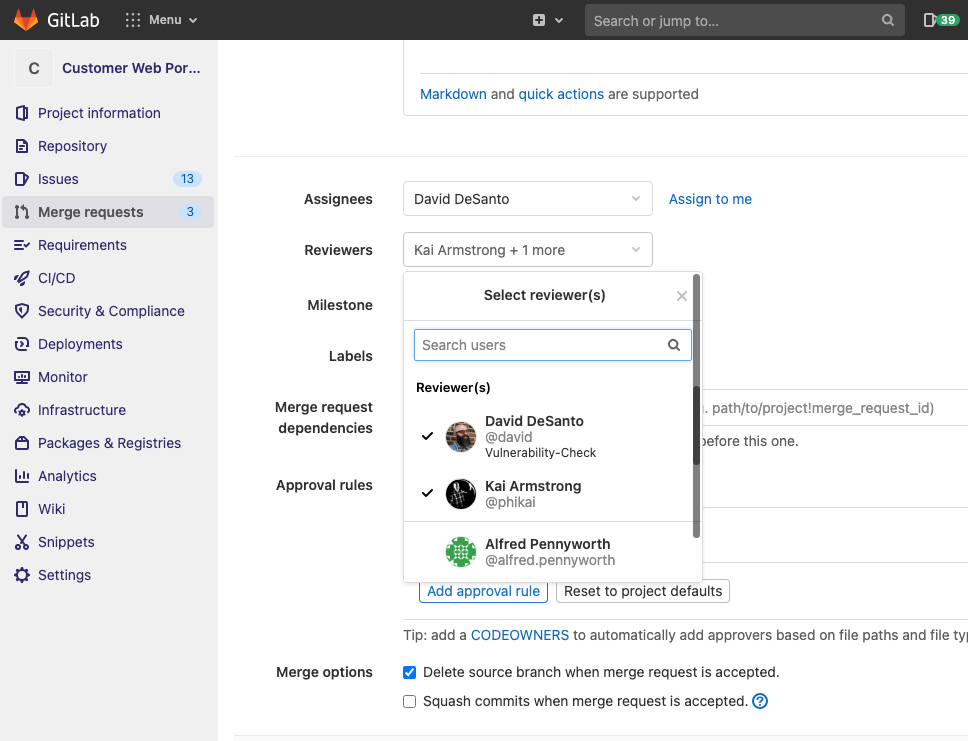
GitLab announced this week it has acquired UnReview, a provider of a tool that employs machine learning algorithms to identify which expert code reviewers to assign to a project based on both the quality of their previous efforts and current workloads.
David DeSanto, senior director for product management at GitLab, said the acquisition of UnReview is the latest step in an AI strategy that, in addition to optimizing DevOps processes, will eventually unify machine learning operations (MLOps) and DevOps workflows.
Accessed via the Dev section of the GitLab platform, UnReview will also be employed to manage the overall code review process.
DeSanto said GitLab is committed to employing AI technologies to automate workflows and compressing cycle times across all stages of the DevSecOps life cycle. The goal is to not eliminate the need for DevOps teams, but rather eliminate low-level tasks that conspire to hamper productivity while at the same time improving application security, noted DeSanto.
Providers of DevOps platforms are now locked into an AI arms race on two separate fronts. Each of them clearly sees the opportunity to leverage machine learning algorithms and other forms of AI to automate a wide range of processes. At the same time, it’s apparent providers of MLOps platforms are borrowing heavily from DevOps best practices to manage the development of AI models. However, from the perspective of a DevOps team, an AI model is just another type of software artifact. Rather than deploying two distinct platforms, the goal should be to bring the data scientists that build AI models into the larger DevOps community, said DeSanto.
The current challenge, of course, is the pace at which DevOps and data science teams work. It may take six months or more for a data science team to construct and validate an AI model that needs to be embedded within an application. Aligning the timetable for an AI model with the application development life cycle is difficult to accomplish if neither team has any meaningful visibility into each other’s workflows. As the rate at which AI models can be developed steadily improves, that alignment issue will only become all the more pressing.
Going forward, it’s hard to envision any application that won’t have some sort of AI model embedded within it. The issue is that, just like any other software artifact, an AI model needs to be updated. As new data sources become available, an AI model is likely to drift beyond the parameters intended. A rapid change in business conditions may also require the replacement of an entire AI model. The same processes that DevOps teams apply to update any software artifact can also be applied to an AI model.
It’s unclear how long it will take before some type of convergence of DevOps and MLOps inevitably occurs, as organizations look for more efficient ways to manage what will become thousands of AI models. The one certain thing is the longer it takes to make the effort, the more difficult it will become to overcome the organizational inertia that has been allowed to set in.
-

OverOps Taps Into Git Repos to Accelerate Code Reviews
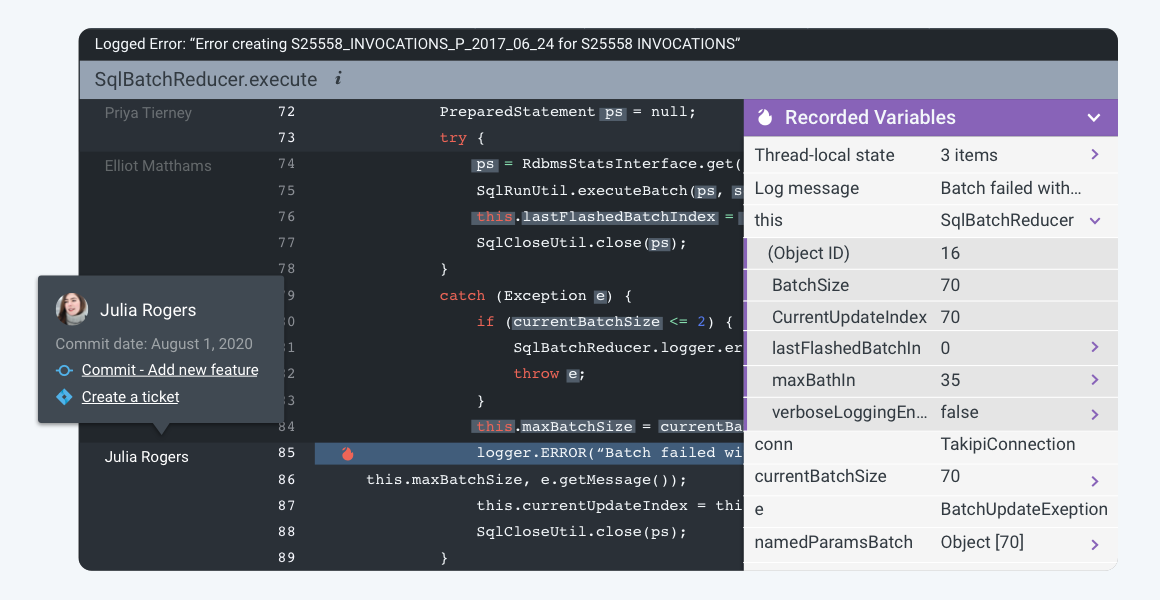
OverOps this week announced it has added support for a git blame and automated source attach capability to its namesake platform for analyzing code that surfaces both root cause data for every error as well as the identity of the developer who owns that code.
Eric Mizell, vice president of solution engineering at OverOps, said once those developers are identified, the OverOps platform will automatically alert them about the errors in the code.
Every Git repository provides access to a git blame tracking command that identifies the authors of source code and the last time files were modified source file. The git blame and automated source attach capability extends that tracking command to accelerate the process of fixing errors that are discovered by the OverOps platform, which leverages machine learning algorithms and other forms of advanced analytics to perform static and dynamic analysis of code to detect errors in code before a DevOps team promotes code into a production environment.
Mizell said this latest capability accelerates the remediation process by automatically routing critical alerts to the developers responsible for the last commit.
Ultimately, DevOps teams should be able to spend less time in “war rooms” trying to resolve issues in a production environment because errors in code will have been addressed much earlier in the application development life cycle, he said.
Naturally, there’s a lot of sensitivity when it comes to analyzing code. It will be up to each IT organization to determine the level of visibility into the quality of the code being created by each developer. Most organizations will simply route alerts to individual developers to address without making each issue the topic of a team review. However, organizations may want to track what types of errors are being made consistently to better inform training requirements.
Regardless of approach, most experienced developers don’t want to spend a lot of time discovering the same issues multiple times when reviewing code someone else wrote. Tools that automate the discovery of those issues should enable development teams to focus their efforts on the more complex issues that inevitably arise when building modern applications.
In the wake of economic downturn brought on by the COVID-19 pandemic, there’s a lot more pressure on DevOps teams to become more efficient. In many cases, the velocity at which applications need to be built, tested and deployed in the wake of the economic downturn has increased as organizations invest more in digital business transformation.
Not every developer will enjoy have the code they wrote analyzed by a machine. However, most coders take pride in their work and would prefer to address in their own way any issue that may arise. The challenge is putting in place a code review process that results in better code being deployed faster without unnecessarily antagonizing the most valuable contributors to the digital success of any organization.
-

Automation Hacks for DevOps Teams
DevOps teams are expected to do more work in less time. They need to plan, test, build, secure and release applications at a fast-paced rate. Of course, the DevOps team needs to achieve all of this while maintaining high software quality. This is why automation is a crucial part of the DevOps workflow. The goal is to delegate repetitive tasks to the machine, and free up dev time for more complex jobs.
Below are some helpful automation hacks you can apply to boost the effectiveness of your DevOps practices.
Automating Regulatory Compliance
Properly managing regulatory compliance is vital for many organizations to avoid fines and operate legally. Although compliance standards vary by industry, most focus on ensuring privacy and confidentiality. To meet these standards, companies must secure data and prove they are taking the appropriate measures. This proof is commonly accomplished with the maintenance of a clear digital trail.
You can use DevOps automation to log and store digital access trails for your protected data. You can also use automated testing and deployment to ensure that only code that passes compliance tests is deployed. This prevents compliance issues from being pushed to production and helps keep your data secure.
Automating Development Environments
DevOps workflows require frequent creation and elimination of environments, for testing, deployment and development. These environments can be created manually but it is more efficient to create environments automatically. This can be done using a golden image with your required configurations.
Using standardized base images ensures that you are working with consistent environments and standardizes configurations and privileges. These images can be used for local or remote machines and can be initialized automatically.
There are a variety of tools you can use to create and automate environment creation. Chef and Vagrant are two of the most popular. Both of these tools offer an accessible API and enable you to script automation using common languages and syntax.
Automating Code Review
Code review is an essential part of DevOps processes but it is also one of the lengthier and more tedious processes. Automation can help you perform this process more efficiently. Automatic code review works similarly to manual review except it is done using tools that integrate with development environments. These tools can check for styling, security, duplication, complexity and code coverage, and can auto-suggest corrections. Some popular tools for this automation include Codebeat, Code climate and Codacy.
Automating File Synchronization and File Uploads
Many DevOps and development teams use the public cloud for quickly spinning up development and test environments. However, what happens when the production environment, or other critical resources used in the dev/test process, are deployed on-premises? Having a fast, automated and reliable way to synchronize files between the on-premise data center and the cloud can save time and headaches.
There are a few approaches to synchronize files:
- Scripting file uploads and downloads. The most basic method is to use shell scripts and FTP or SFTP to upload and download files between local and cloud environments. However, this can be fragile, unreliable and difficult to scale.
- Using APIs of cloud storage services. You can move data to and from the cloud using cloud storage APIs, such as the Amazon S3 API, the Box API or specialized hosting services such as Cloudinary.
- Hybrid cloud. The ultimate solution is to create a hybrid cloud architecture where applications, developers and users view the local environment and the public cloud as one unit, and data is synchronized transparently in the background.
Collaboration Tools for DevOps Teams
There are a number of collaborative tools that teams can use to further boost gains from automation. These tools can help bridge gaps in automation and processes and ensure smooth workflows.
Slack: a chat tool that DevOps teams can integrate with automation tooling. It includes features for segregating discussions by topic, team or purpose; uploading shared files and documents; and initiating or receiving alerts from automated processes via integrations.
Jira: a tool that enables you to create and assign tasks. It includes features for scrum and kanban methodologies, unified reporting and backlog tracking. You can integrate it with many common DevOps tools, such as Jenkins.
Trello: a cloud-based Kanban board tool. It enables you to create project boards that can be shared across teams to track project progress. Through integrations, you can automate the updating of cards or initiate processes when cards are manually moved.
Asana: another cloud-based Kanban tool. Like Trello, it enables you to track and collaborate on projects across a team. Typically, when teams use tools such as Asana, they create multiple boards for different project aspects. These boards can then be viewed individually or from a central dashboard.
Conclusion
Hopefully, this article helped you figure out how to leverage automation for improved efficiency. There are many automation options for DevOps, including automated regulatory compliance, automated infrastructure, automated code review and automated file synchronization.
For DevOps project management, you can use collaboration tools such as Slack, Jira, Trello and Asana. Remember to make sure that any tool you introduce can be simply and easily integrated into your current environment. The tools of your choice also need to fit the skillset of all collaborators. For ease of use, keep your tooling ecosystem simple and minimalistic.
-

Hunting Down the Mythical High-Quality Code
The definition of high-quality code is hard to pin down. Depending on who you talk to, there are a lot of different theories on what makes code good or bad. Sometimes, this line is blurry, and that’s why hunting down the mythical high-quality code is a complicated process. Most importantly, how can you define high-quality code? This guide will share a strong definition of what makes high-quality code, as well as valuable tips for ensuring you find it in your own work and the work of others.

Created by GraphiqaStock – Freepik.com Defining High-Quality Code
While it’s impossible to find a single definition of high-quality code that every developer of all time can agree on, we can all agree on a few key things. First, the code needs to be correct to be considered quality. Next, it needs to be capable of handling error and different exceptional situations. How will the program react in an error situation? Finally, how maintainable is the code? Will it take time to change over time or is it something that has a long lifetime? These three things form the foundation for any high-quality code, so let’s break them down.
Code Correctness
The most common thing to look for when evaluating whether a code is high-quality is if the code is correct. Does it perform its intended function? If you’re creating a function that creates a new user account, you’ll need to have a function which creates a new entry in the account database, for instance, as well as follow-up actions. Do all of these steps work correctly?
When reviewing code correctness, it’s important to look for correctness in terms of this particular code function. Many types of code functions can serve different purposes depending on the situation. Testing the process or application is a clear way to analyze correctness.
Error Management
The next code quality is error management. Error situations are inevitable, but the right error management can prevent small problems from corrupting an entire application. Will the program instance fail on its own or will it continue to corrupt other data? Also important is how the error will be logged within the system.
To review error management, you can perform a series of actions to try to reveal any potential errors. From there, you’ll be able to find an error trace (or lack thereof) within the project’s log. What context is included within error reports? How are these messages revealed, and how will developers debug any code? How does the application or program manage current errors? Does it shut down or does it return an error report? Errors happen, but they can be embarrassing, especially when users are on the other end. Solid error management is essential to any high-quality code.
Code Maintainability
Finally, the more a code is able to be maintained, the easier it will be to grow as needed. Bringing new developers onto a new project is impossible is the code isn’t maintainable. How will the code be used in the future? Ask these questions when reviewing the code to ensure it’s easy to maintain in the long run.
Consider the following elements when looking into maintainability:
- Class and File Structure: Are things saved in the right files and the correct format?
- Function Naming: Are functions named in the style of the source code? It’s common to follow the already established style to be consistent.
- Use: All the classes, modules, and variables included in the code are actually in use.
- Comments: How many comments are included in your code and do these comments follow pre-established style?
Now that you understand the three aspects that form the foundation of quality code, you’re ready to learn how to review code! While many developers believe you’re unable to review your own code, there really is no right or wrong, as long as you have a strong system. Let’s continue to explore the best ways to review code!

Created by Iconicbestiary – Freepik.com Reviewing Code
How do you review code for the qualities above? There is a lot of disagreement among developers over whether it’s best to have a third party review your code or if you can review your code yourself. This is up to personal preference, but you should keep several tips in mind when reviewing code. Follow these tips to be efficient and effective with your review process.
Break the Code into Chunks
Always review small chunks at a time. Go function by function to avoid missing any small errors. Going slow helps you keep the context of each new function fresh in your mind. Don’t try to tackle more than three functions in a sitting, since you’re likely to lose focus. Take a break before reviewing another chunk of code.
Take a Break
Whether you’re reviewing someone else’s code or your own, take a break. Image your code like laundry. You need to hang it out on the line a bit before it can dry. When you’re actively working on it, you are too close to see any errors. Taking a break to grab a coffee, go for a walk or even just look at the sky is a great way to return with a fresh mind.
Save Your Edits
Avoid fixing issues while you’re reviewing. If you’re attempting to both write code and review code at the same time, mistakes are likely to happen. Instead, take accurate notes on your comments and questions while reviewing to look back with later.
Automated Checkers
While you shouldn’t rely completely on automated code checkers, they can be a great supplemental resource. Performance monitors can help you avoid errors and track performance over time.
Remember, there is no single correct way to review your own code or someone else’s. Remember the criteria for high-quality code, and find a way to find it that works for you. Raising the quality of your code and others’ code takes time and practice. Adapt the tips above as needed to create a system that works for you.
-

Code Review – Write your code right
Writing code is definitely subjected to individual thinking, logics and perspective. How one writes code is completely depend on their technical and logical skills. Two different people can write the same code in an entirely different tactic (May be both logics of the code are right in their own way). Even two persons can write bad code as well as good code as per the same standard.
In the real world it is most likely possible that one writes the code and same will be read multiple times by many other developers to fix the bugs, improve the features, understand the code. That is why each language has its own style of coding and guideline to make it more meaningful and understandable.
Most of time the Developers struggle to understand the code written by someone else on the team. I have even heard people saying that it’s difficult to read someone else’s code rather writing same from scratch.
I would like to highlight a few compiled techniques in once place to make writing code better.
Classical Method
Classical method is a tools based code review. Developers write their code and submit it for review in some 3rd party tool like review board, Rietveld, or Collaborator for somebody to review the code.
The tool will be used to track code changes comments, patches and review. Someone can merge code to the active branch once it is reviewed. Reviewers can have a look at the code and provide comments and inputs to the relevant piece of code.
The good side is that it can be used for almost all sorts of old source code tools and is very much compatible with most of the version control tools.
The problem with this mechanism is that it needs another tool other then version control system to maintain code review related information.
Integrated Method
To overcome the classical method downside, review systems have been introduced with in version control tools; a very good example of this is GIT. Where there is no (or rarely) 2nd tool needed to perform code review activity. Code review can be done via pull request even before merging. Comments, issues, patches can be tracked within Version control system with same workflow.
As mentioned earlier everything related to review remains with in the same system and that is the biggest benefit of this system.But this mechanist also needs the same time and effort for someone else to go through the code and sign off.
Extreme Workflow
Pair programming falls under this category. In this Technique, two programmers work as a pair together on one workstation. One writes code while the other, the observer, pointer or navigator, reviews each line of code as it is typed in. The two programmers switch roles frequently.
This way coding and its review happen at the same time by 2 programmers simultaneously.
Some say that 2 developers working on same code at same time doesn’t make any sense, as they will be end up spending double man hours. It may lead to problems with practical implementation of the technique.
But the good part is that they don’t need to spend extra time to understand and perform code review. It removes to and fro communication between developers. You don’t even need another tool for additional help to submit patch.
In conjunction with review techniques I would like to add one more point about who can review code.
- Leaders review the code: – One of the very common processes is that 2-3 leads will review the code always from the entire team (number depends on team size). They are always whole responsible for performing the review, checking the code before it goes for further consumption.
- Anybody can review the code: – Another technique is that anybody with in team can review the code. Only restriction is that the one is writing code cannot review his own code because this doesn’t make any sense to review your own written code. There is no leader who is responsible for code review. A junior programmer can also review code written by senior, as there is no reason to allot hard role and not allowing others to review code.
Whatever practice we use it is very necessary to have a look at code by another pair of eyes and have code reviewed.
References-
https://en.wikipedia.org/wiki/Code_review