Tag: code quality

  • 5 Unusual Ways to Improve Code Quality

    5 Unusual Ways to Improve Code Quality

    Code quality refers to how well-written and maintainable software code is. It encompasses factors such as readability, efficiency, scalability, reliability, maintainability and security. High code quality ensures that software is easy to understand, modify and extend, has fewer bugs and is less likely to break down. It also reduces development time and costs and improves the overall user experience. One common approach to determine code quality is to use automated tools that analyze the code based on predefined quality standards and generate a report with a numerical score.

    Why is Code Quality Important?

    Generating high-quality code ultimately enhances the end user’s experience. Focusing on creating quality code can also help consumers understand the safety and reliability of the software or program they’re using.

    Low-quality code can affect user experience and satisfaction, making it critical to write high-quality code that functions properly. When developers write low-quality code, it can create vulnerabilities that expose the software to cybersecurity threats, resulting in bugs and functionality issues and impacting the software’s reliability. 

    Here are some additional reasons high-quality code is important: 

    • Enhances code readability: Readability is important because it leads to higher rates of understanding among other developers. A code that’s easy to read is also easy to improve.
    • Improves the level of program sustainability: Program sustainability measures how long a code can survive with minimal changes. High-quality code can last for years, making it more sustainable.
    • Increases transferability: Transferring code from one platform to another is a complicated process. It’s much easier for developers to transfer high-quality code, as they only need to make minimal changes.
    • Lowers costs related to program or software: When software lasts for a long time with few errors, it can save a company money. Instead of paying for additional time to rewrite low-quality code, the company can rely on the original, high-quality source code.

    5 Unusual Ways to Improve Code Quality

    Here are a few ways you may not have thought of which can help your development team improve code quality and end-user satisfaction.

    Bug Bounty

    A bug bounty program is a type of crowdsourced security testing in which an organization offers rewards to independent security researchers or ethical hackers for identifying and reporting vulnerabilities in their software or systems. By offering rewards for vulnerabilities, organizations can incentivize security researchers to find and report security issues before they can be exploited by attackers.

    Bug bounty programs can improve code quality in several ways:

    • Incentivize security testing: Bug bounty programs incentivize security researchers to test an organization’s software or systems for vulnerabilities. This can increase the amount and quality of security testing that is done, leading to a more secure product.
    • Encourage responsible disclosure: Bug bounty programs encourage security researchers to report vulnerabilities directly to the organization rather than publishing them publicly or selling them on the black market. This allows organizations to fix vulnerabilities before they are exploited by attackers.
    • Provide feedback on code quality: Security researchers who participate in bug bounty programs can provide feedback on code quality which can help organizations to improve their development practices and write more secure code in the future.

    Auto-Generated Documentation

    Auto-generated documentation is a type of documentation that is generated from code comments and metadata as part of an automated development pipeline. It is typically generated using tools such as Javadoc, Doxygen, or Sphinx, which parse code comments and metadata to generate HTML, PDF, or other formats of documentation.

    Auto-generated documentation can improve code quality in several ways:

    • Improved code readability: Auto-generated documentation can provide clear and concise descriptions of code functionality, making it easier for developers to understand the code and its purpose.
    • Better code organization: Auto-generated documentation can help developers organize their code by providing a clear hierarchy of classes, methods, and functions, making it easier to navigate and maintain the codebase.
    • Consistency: Auto-generated documentation can ensure that documentation is consistent across the codebase, reducing the risk of errors and misunderstandings.
    • Quality assurance: Auto-generated documentation can be used as a quality assurance tool, helping developers to identify errors and omissions in their code comments and metadata.

    Coding Conventions

    Coding conventions are a set of guidelines and standards that outline how code should be written and formatted to promote consistency and readability. They typically cover aspects such as naming conventions, code structure, formatting, and documentation. 

    By following coding conventions, developers can improve code quality and make their code easier to read and understand, which makes it easier to maintain and modify. They also help ensure that code is consistent across a project or organization, which can make collaboration and integration of different code segments easier.

    Typical elements that coding conventions dictate include:

    • Naming conventions for variables, functions, and classes.
    • Indentation and formatting of code blocks.
    • Use of whitespace and comments to improve readability.
    • Guidelines for handling exceptions, errors, and input/output.

    Quality Gates

    Quality gates are a set of checkpoints or criteria that software must meet before it can progress to the next stage of development. They are typically used in software development processes to ensure that the software is of a certain quality and is ready for release.

    Quality gates can be automated or manual, and they are typically implemented at key points in the development process, such as after unit testing, integration testing, or acceptance testing. They can include metrics such as code coverage, code quality, functionality, performance and security.

    By enforcing quality gates, development teams can catch and address issues earlier in the development process, which can reduce rework, save time and ensure that the final software product meets the required quality standards.

    Smart Code Snippets

    Smart code snippets, also known as intelligent code snippets or live templates, are pre-written code fragments that can be inserted into a code file with placeholders for variables or user-defined inputs. They are designed to help developers write code more efficiently and accurately by reducing the amount of repetitive or boilerplate code they need to write and by providing contextual awareness and intelligence.

    Regular code snippets are static pieces of code that can be inserted into a file as needed. They typically contain pre-written code blocks or templates that can be customized to fit the specific use case.

    In contrast, smart code snippets are dynamic and can adapt to the context of the code being written. For example, a smart code snippet might include placeholders for variables that need to be defined or automatically fill in common code constructs based on the context of the code. 

    Conclusion

    The five lesser-known ways to improve code quality discussed in this article offer a starting point for teams looking to take a fresh perspective on their development process. Improving code quality is critical for the success of any software development project. While there are many established methods and best practices for improving code quality, there are also some less conventional approaches that can be surprisingly effective. By adopting a creative and open-minded approach to software development, teams can identify new ways to improve code quality and build more reliable, efficient and secure software.

    Image Source 

  • How to Improve Code Quality, Efficiently, with Static Analysis

    How to Improve Code Quality, Efficiently, with Static Analysis

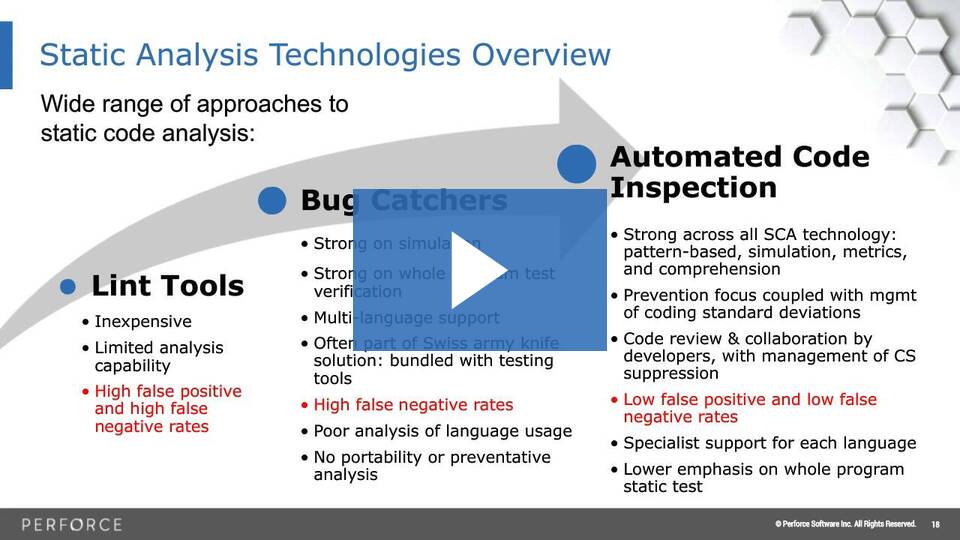
    As hard as they try, no programmer is perfect. Testing and manual code reviews cannot find every problem in their code, so software vulnerabilities and bugs persist.

    Unfortunately, the amount of software errors will only continue to grow as your systems get larger and more complex. Which begs the question: How can you find all of the critical problems present in your code while still releasing a quality product on time? Simple: Use a static code analysis tool.

    In this webinar, we will discuss the following topics:
    1. Why bug-free software is difficult to achieve.
    2. Why automated software tools are the most effective solution.
    3. How safe, secure and reliable software can be achieved at lower costs.
    4. How static code analysis and manual code reviews can work together.

    In addition, we will also provide examples of software vulnerabilities that are easily missed by manual code reviews.


    To read more, please visit: https://www.perforce.com/webinars/qac/how-improve-quality-static-code-analysis

  • Sonatype Advances Open Source Code Quality, Security

    Sonatype Advances Open Source Code Quality, Security

    Sonatype today launched an Advanced Development Pack service that surfaces dependencies between open source components in a way that makes it easier for developers to know which ones to employ to build the most secure application possible and what components offer the simplest upgrade path.

    Company CTO Brian Fox said the Advanced Development Pack service is an extension to the Nexus Lifecycle platform the company currently makes available to identify vulnerabilities in open source code.

    The Advanced Service Pack was created after studying development and cybersecurity practices across 30,000 software teams that Sonatype was able to analyze in its Maven repository, said Fox. The goal is to eliminate a vicious cycle that emerges as organizations develop applications using components that too often need to be either replaced or updated depending on the security and quality issues uncovered later in the development life cycle. By making it easier to identify the highest-quality modules available, the Advanced Development Pack serves to increase developer confidence in the quality of the open source components being pulled as they develop their application.

    A Component Chooser tool, currently in beta and slated for availability next year, will also make it possible to employ project hygiene ratings based on security and license compliance as well as identify where else that component may already be in use.

    The Advanced Service Pack makes it possible to evaluate open source components based on factors such as project quality, ease of upgrade and advanced knowledge of abnormal committer behavior, said Fox. Other factors evaluated include the cost of migrating to a newer or safer version of a module and whether it is possible to do so without breaking code, release frequency, the cadence of dependency updates, development team size and popularity.

    The Advanced Development Pack also furthers the adoption of best DevSecOps practices by identifying which dependencies have become vulnerable and have been remediated, as well as suspicious behavior involving project code commits that might be indicative of a malicious injection attack. It also applies machine and deep learning algorithms to automatically identify and block software supply chain attacks based on typosquatting and malicious code injection. In the past 90 days alone, the malicious code detection bots created by Sonatype have discovered 43 new malicious packages including electorn and loadyaml.

    Sonatype has also included a transitive solver capability that provides comprehensive remediation advice for solving both direct and transitive dependencies without violating policies or failing builds.

    Fox said that while there’s a lot of focus these days on making sure individual application components are secure, it’s also become apparent that cybercriminals are now targeting application development platforms as part of an effort to compromise the entire software supply chain. As such, DevOps teams now need to focus on securing both the components they employ and the platforms used to construct their applications.

    In the meantime, there may never be such a thing as absolutely secure open source code. However, it is becoming possible to greatly minimize the risks associated.

  • 4 Steps To Achieve a 66% Reduction in Test Run Time

    4 Steps To Achieve a 66% Reduction in Test Run Time

    Here are ways organizations can reduce their test run times to improve speed and efficiency

    Consult any recent DevOps survey and the same theme emerges: Testing remains one of the biggest roadblocks impeding organizations’ collective efforts to deliver better software, faster. Unlike days past, however, when agile development was still in its relative infancy and investments in testing lagged other areas of the delivery pipeline, organizations today are increasingly aware of the critical role continuous testing plays in delivering quality software at speed, and are aggressively investing in the requisite testing tools and technologies.

    No, the problem today is not lack of awareness or tooling. The problem, quite simply, is that testing is difficult, and only gets more difficult as organizations look to drive automation at scale. Nowhere is this challenge more evident than in organizations’ ongoing struggles with test quality. A recent study showed only 24.37% of organizations pass at least 90% of their desktop tests and only 25.45% pass at least 90% of their mobile tests. Remember, the purpose of agile development is to accelerate application delivery and shorten the release cycle. Organizations can do neither if they constantly have to manually follow-up to determine the source of repeated test failures.

    Doing It Right

    Organizations must find ways to improve test quality and speed. A major reason so many tests fail is they take far too long to run. The longer it takes to run, the more likely it is to end with a failure. According to the aforementioned study, those that complete in two minutes or less are twice as likely to pass as those lasting longer than two minutes.

    With that in mind, let’s take a look at four key steps testers and developers can implement to reduce test run times.

    Script Atomic Tests

    There’s no more important best practice to create a better and faster automation experience than to run atomic tests. These focus on just one piece of application functionality and are much faster and easier to execute than longer tests assessing multiple pieces of functionality.

    Let’s examine what this looks like in practice. Suppose an online retailer needs to validate that users can log in, view their gift card balance, add items to their cart, proceed to checkout and successfully process a transaction. Even an experienced tester will often make the mistake of scripting a single test to validate those five functions. The far better approach, especially if the aim is to reduce run time and improve test quality, is to write five separate tests, each specifically focused on one piece of functionality. Running individually but in parallel, these five “atomic” tests will execute in far less time than one longer test.

    Run Tests in Parallel

    Of course, if those five atomic tests are executed sequentially—that is, one at a time, one after the other—they’ll take even longer to complete than the one screen flow test, negating any potential runtime benefit. That’s why running tests in parallel is an equally critical component of any strategy to reduce test run times. Consider the hypothetical example of a test suite with 100 atomic tests, each of which takes two minutes to execute. Run those 100 tests sequentially and they’ll take more than three hours to complete. Run them in parallel, and all 100 will complete in just two minutes.

    Remember, too, not to get thrown by the volume of tests in a given suite. It’s tempting to think that a suite with 10 long tests that each take 5 minutes to complete will execute faster than one with 100 atomic tests that each take 1 minute to execute. But even if executed in parallel, the suite with the 10 long tests will still take 5 minutes to run—five times longer than the suite with 100 atomic tests.

    Reduce the Number of Selenium Commands

    Having too many Selenium commands in your test script flies in the face of atomic testing and is one of the most common underlying causes of long and unstable tests. Every single command takes time to execute and represents a new opportunity for something to go wrong. Minimize the number of commands required to execute a test case and run time will shrink accordingly.

    Use Explicit Waits

    Another effective way to reduce test run time is to use explicit waits rather than implicit waits. Implicit waits set a default wait time between each step or command across a test script, such that the subsequent step only executes after the pre-defined amount of time has elapsed. Explicit waits, on the other hand, enable the next step in a script to execute as soon as the preceding step is complete. Though more complicated to implement, using only explicit waits can have a significant positive impact on test run time.

    Putting it Together

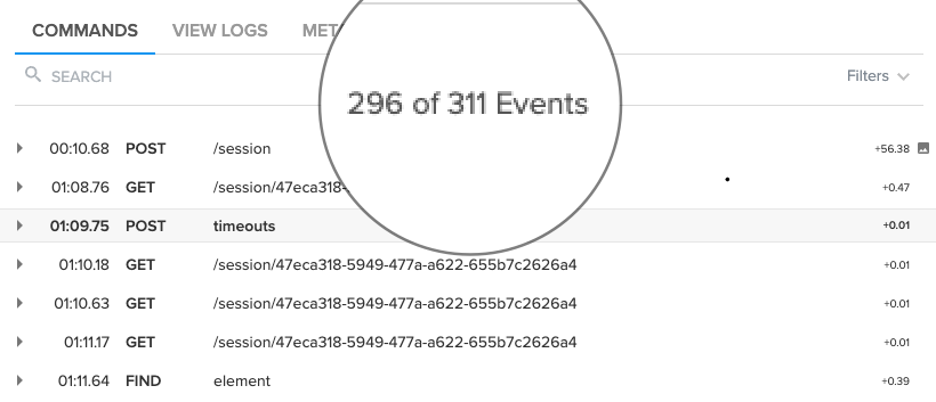
    The example below shows an unoptimized test suite with 311 commands run against a mobile device. This example took 1,265 seconds (or more than 21 minutes) to execute. If delivering better software faster is the aim, that’s not going to work.

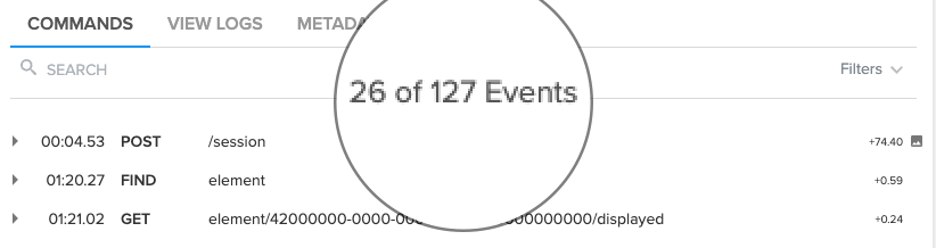
    Applying the aforementioned tactics to the same test suite executed against the same device, however, drove the total number of commands down to just 127 and enabled the suite to execute in just 430 seconds (or just over 7 minutes), a 66% improvement in test run time.

    Though the prospect of reducing test run time may be daunting, by focusing on a limited set of key tactics and best practices, the end goal of shorter, more stable tests is indeed attainable.

  • Code Quality Doesn’t Have to Be Like the Weather

    Code Quality Doesn’t Have to Be Like the Weather

    Sometimes code quality feels like the weather: everyone talks about it, but no one ever does anything. Of course, that’s not from a lack of good will; most folks would love to have a week or two set aside to just clean things up. Unfortunately, that’s not how the world works. The best course of action is to sneak in a little clean up here, and a little there as part of normal work. Fortunately, that’s actually the best way to go about it. At SonarSource, we call it the Clean as You Code methodology, and we’ve found that this behavioral approach to code quality is as important as the tools developers use to track it. 

    The idea behind Clean as You Code is to ignore the quality of old code and focus exclusively on the quality of new changes. This may sound radical, but bear with me. Why focus exclusively on today’s changes? Because dredging up legacy code for the sole purpose of addressing code quality likely requires layers of approvals and perhaps business testing that may be difficult to get. But developers have absolute control over the quality of the code they’re writing now, and they’ll take pride in setting and enforcing high standards for that code. Focusing exclusively on the quality of new code works in both legacy and greenfield projects, and for all quality axes. 

    Let’s take test coverage as an example. Many developers are on projects that have lower test coverage than they would like. But stealing an hour here and there to add tests for random methods is generally a frustrating and ultimately futile endeavor. Instead, start with today’s changes. Make sure they’re fully covered and don’t release until they are. That’s it, that’s all that’s required. Covering those one or two methods — or even one or two lines — may feel like a drop in the bucket, but over time it will have a real impact. In fact, that’s been exactly our experience.

    Since the early days of my company’s flagship product, we’ve had an internal standard of 80% unit test coverage. And yet in those early days, we routinely released with coverage in the ’60s. There was always the intent to write unit tests, but inevitably it was left to just before release. And then it became a scramble to find the biggest uncovered files and slog through their unfamiliar code to write tests. Among the problems with this approach was the fact that the developer who wrote the code often wasn’t the one who wrote its tests, and thus could never be quite sure of testing the right behavior. And of course, no one likes cleaning up after someone else.

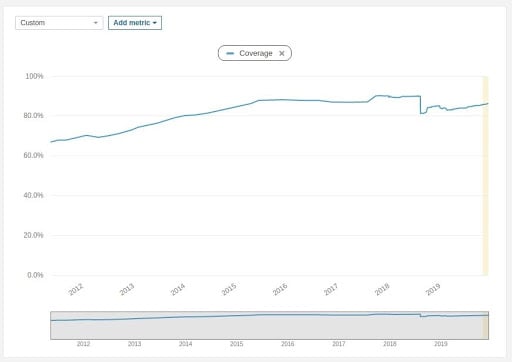
    In the end, it was a painful and ultimately ineffective routine; coverage didn’t break 80% until July 2014 — approximately seven years after the project started, and about a year and a half after we first formulated and adopted Clean as You code. You can see the October 2012 inflection point in this graph of project coverage (yes, the first few years of data are missing; victim of an early structural refactoring):

    On November 9, 2011 test coverage was at 66.9%. After rising to 70.3% on July 23, 2012 it fell to 69.3% by that October. From that October 2012 inflection point, it climbed steadily for more than three years, crossing the 80% threshold in July 2014. Coverage today is at 86.2%, comfortably above the 80% goal.

    Today, we’re at 86% coverage and rising. The formula for getting there was simple: 

    • Set standards on the quality of New Code. Here “new” means anything added or updated in the New Code period.
    • Define the New Code period. This is the scope of concern, i.e., how far back to go for the purposes of applying your New Code standards. We set it to since the last release. 
    • Don’t release unless your standards are met.

    Of course, the first two steps are a lot easier than the last one, especially if meeting the standards is left to just before release. Every developer has likely felt pressure to push business changes into production sooner rather than later. That’s why this strategy is most effective when it’s applied as granularly as possible. Meeting the standards before release is the bare minimum, but it should also be a non-event.

    We’ve found Clean as You Code to be most effective when applied:

    • At the individual level — Good developers want to write good code. When developers take personal responsibility for the code they write today, it saves time in the long run and no one has to clean up after anyone else.
    • At the pull request — If each individual PR meets your standards, sub-standard code will never be merged. That means no one will ever be pressed by management to release sub-standard code, because it simply won’t exist in the main code base.

    But what about the crufty old code that exists in every project? You’re probably thinking that it doesn’t just magically disappear. But actually — gradually — it does. The graph above is the graph of overall code coverage on the project. By focusing on the coverage of New Code, we organically and automatically raised coverage on all code. This is not a one-off; your results will be the same. Over the course of a few years, normal change requests will lead you throughout the code base. Make sure the code you write for those changes is clean, and the rest will take care of itself.

  • Release Automation: Delivering the Big Quality Payoff

    Release Automation: Delivering the Big Quality Payoff

    Have you ever gone down the path of testing the latest release of an application only to find out that you had the wrong version?

    Maybe you accidentally grabbed the wrong build or you didn’t have the correct configuration file for the environment you were testing against—or your database wasn’t updated correctly, or the script you were using was still pointing to a prior version of the software.

    Whatever the case, we can agree that keeping track of all the various artifacts, database schema changes, configuration parameters and other components needed to accurately test and deploy an application is both time-consuming and prone to errors.

    Today, many companies are looking to DevOps, continuous delivery and agile development methodologies to shorten their application delivery cycles and reduce the number of errors and the costs associated with application deployment processes. Nearly all enterprise companies are software companies, and their mere existence depends on delivering differentiating products and services via software to their customers.

    It’s imperative to be able to react to customer demands and competitive pressures quickly, if not immediately, to stay ahead of the competition. Gone are the days of yearly release cycles.

    Today we see companies deploying new capabilities into production environments on a monthly, weekly or even daily basis. At some companies, hundreds, if not thousands, of deployments are occurring across dev, test and production environments daily. The old methodologies we once used simply can’t support this type of volume and cadence.

    Employing Release Automation

    So, how are these companies transitioning to this new way of thinking? In a word—automation; specifically, by automating early and often.

    Everything about your release process is a candidate for automation. This includes environment provisioning and configuration automation, build automation, test automation and release and deployment automation.

    A customer of ours recently implemented CA Release Automation, and within eight weeks had automated 90 percent of its deployments. Deployments that once took more than five hours and a team of people now take a matter of minutes.

    “This not only saves us a huge amount of time, but it also mitigates the risk of human error being introduced by manual processes,” said Tim Dallmann, platform engineer at Jewelers Mutual.

    Another customer, a major airline, implemented CA Release Automation and immediately reduced their production outages from an average of 237 over a three-month period, down to 15, seven, six and five over the following four months.

    And Molina Medicaid Solutions reduced their cost of human error by 90 percent, all the while responding quicker to emergency deployment requests and improving deployment quality.

    Automation is critical, but I believe these results prove that implementing a framework to manage and deploy release processes in addition to automation works even better.

    Increased Flexibility and Visibility

    Continuous delivery helps break down barriers often seen between development and operations teams. It provides, even forces, a more collaborative approach and automation is a key enabler of this.

    “One of the best things about automation is that it gives us the flexibility to skill-up end users—deployments in our test environments are no longer solely the responsibility of the operations or IT teams,” explained Dallmann.

    With an application release automation (ARA) solution, artifact, build, configuration and release processes are no longer tracked with spreadsheets or embedded in complicated scripts.

    Increased visibility into these processes ultimately enables all stakeholders to take a more active role in the release process, and access to real-time information can significantly reduce the amount of time and resources needed to resolve and recover from problems when they do occur.

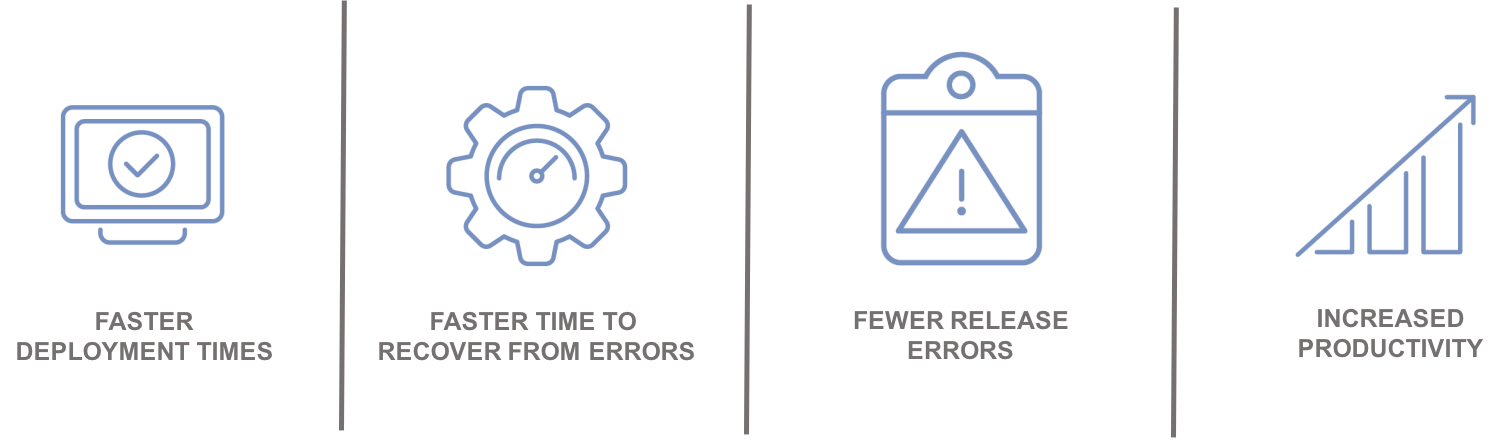
    Automation leads to:

    Integrating with the Ecosystem

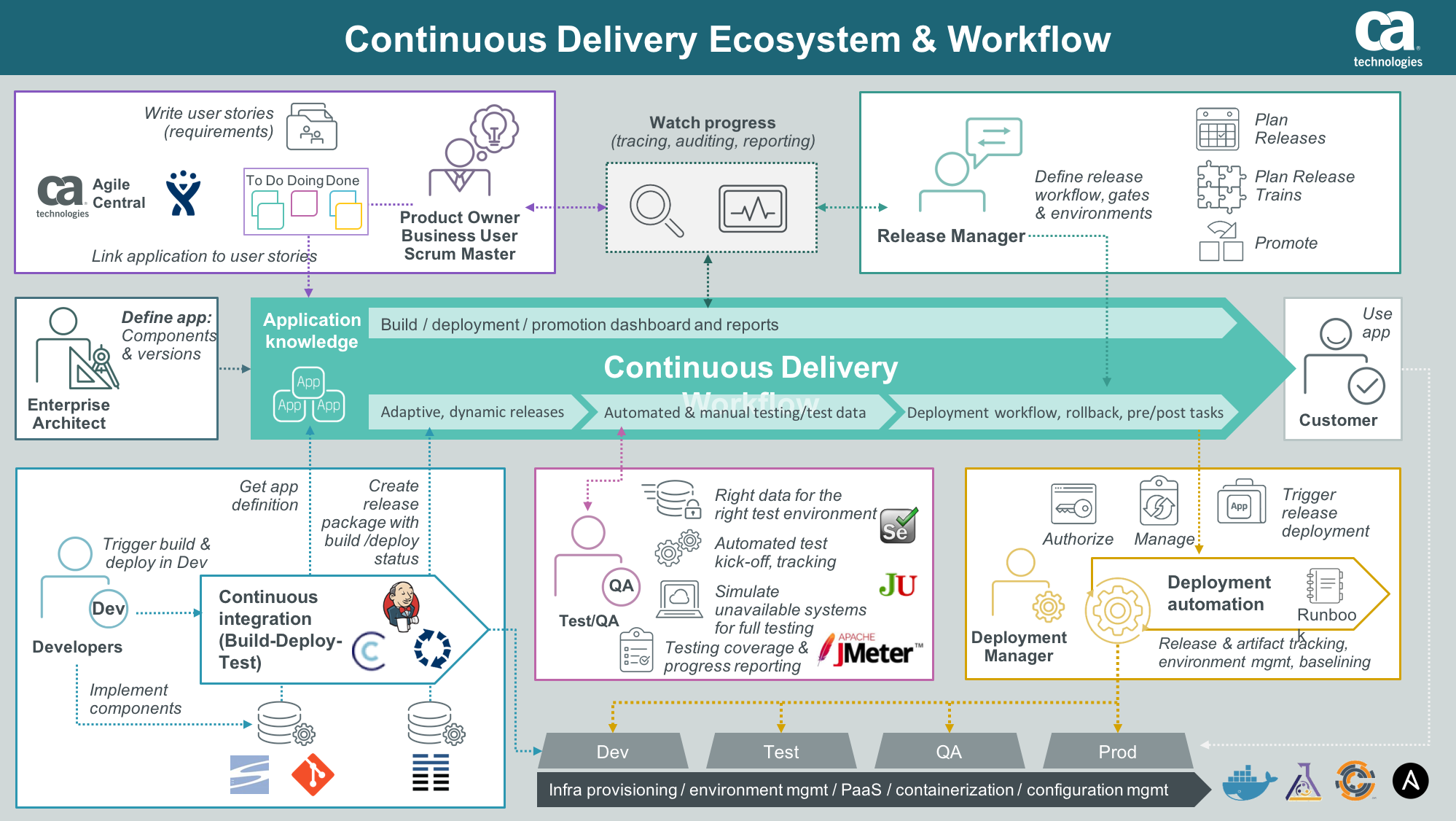
    An enterprise ARA solution can help you create a single control point to streamline all your application delivery processes for better predictability and reduced risk. A critical component of this is the ability to integrate and orchestrate tools and technologies required along the continuous delivery pipeline, including source control, automated testing tools, provisioning and configuration management solutions and change management and performance management solutions.

    Integration with an application lifecycle management solution can provide even further alignment, governance and traceability between development projects and what is ultimately being tested and promoted to production.

    “By integrating the two solutions, we will have a complete audit trail of deployments to help us understand how, where and by whom stories have changed,” said Phil Nickolai, director of application services at Jewelers Mutual.

    “What we really needed was a solution to streamline our whole way of working,” he said. “We had numerous people working on projects, competing for resources and causing complexity. Now we’re back in control and getting smarter every day.”

    The Time Is Now

    Let’s get rid of the problem that exists between the keyboard and information kept in spreadsheets, scripts or emails. Not only will you stop wasting time testing the wrong version of an application, but you can also ensure you have the right test data, the appropriate test cases and the correct configuration parameters for your environment.

    Stress-inducing release weekends and nights become a thing of the past. Developers can spend more time on developing innovative capabilities that generate revenue and keep customers coming back for more.

    — Tim Mueting

  • Automation Killed QA – It’s Time to Deal With It

    Automation Killed QA – It’s Time to Deal With It

    Quality assurance (QA) had a good run.

    From the time it was considered an afterthought by organizations and software vendors alike to the era of massive outsourcing contracts, followed by significant vendor investments in related tooling, and, finally, its recognition as a critical success factor among high-performing organizations, quality has evolved to become even more important than functionality to end users.

    Customer experience, today, is defined by speed and quality above all else. Namely, can I access the information and products that I want in the blink of an eye and get expected feedback based on input? As a result, customer experience has also shifted: It’s all about application experience, not the friendliness of a checkout cashier or sales/service rep.

    With this massive shift toward customer experience platforms (think omni-channel) and increasingly lofty expectations, the operative question becomes, How are we enabling velocity in our testing practices to ensure the highest quality while keeping up?

    We’ve tried everything from outsourcing to insourcing, investing in tooling, investing in people and even building testing architecture teams to oversee the automation, quality and consistency of testing results. Roughly seven years ago, my top priority for testing teams was to automate 30 percent of our tests. Today, if you are not 100 percent automated, or close to it, you are severely lagging in output.

    But what’s next? What if I’ve automated all of my tests and my manual testers have been replaced with automation engineers, but I’m still having quality issues and being perceived as a bottleneck?

    The answer is simple. Automate everything.

    Makes sense, right? Isn’t everyone telling you that? But what are we defining as “everything” from a testing perspective? Therein lies the problem; we are thinking about testing as its own factory within the larger software development life cycle.

    While we believe we are changing this perception by going agile and moving most QA functions into scrum teams, the reality is we still look at testing as a standalone function. Centralized or decentralized, this is the case, and we need to think differently.

    Automating for quality begins with defining requirements. How am I ensuring that I’m covering all cases? How do I ensure I’m translating the business requirements properly? These questions, the time it takes to answer them and the risk of human miscalculation all impact quality and velocity.

    We must start our automation for quality at the beginning, during establishment of business requirements.

    Let me introduce you to next-generation QA. Intelligent “continuous testing” platforms are replacing humans for testing, automating tests, creating data and building test cases. These platforms are able to translate model-based business requirements into complete automation—test cases, test data and test script automation.

    Orchestration across your software development life cycle creates your environments, lays down your test data, deploys your software, runs your test scripts and reports results. No more human error, no costly resources and guaranteed test coverage that ensures quality.

    Integrating your existing automation around continuous integration, portfolio management reporting, and execution reporting to this framework now gives you the ability to report and automate your ideas all the way through to outcomes.

    Early adopters are already doing this. QA as a functional organization is gone. If you aren’t already automating to this end, you are severely behind.

    Questions?  Comments?  Perspective?  Have at it in the comments below.

    — Ron DeCanio

  • Force Multiplication

    Force Multiplication

    Recently, I have found myself reflecting on the statement, “Be a force multiplier.” This usually comes to mind when faced with some sort of burnout: hearing it indirectly from a colleague or friend, or experiencing it firsthand. The intent is good and aligns well with some core tenants of DevOps. Force multiplication fits into the DevOps ethos by encouraging the need to cross-train and collaborate. By working together and sharing knowledge about respective domains (development or operations), team members gain empathy for each other. This in turn has a downstream effect of now enabling better collaboration around the repair/growth/operation/expansion of the delivery pipeline.

    The only challenge I have seen over and over again is that one or more major bottlenecks exist by the time this idea of “force multiplication” is needed in a team. These bottlenecks are often real and result from an imbalance of resources: servers arriving faster than there are resources to rack/stack/configure/turn up. Database administrators cannot handle the number of schema changes needed to be reviewed/tested/deployed. Developers must wait on a certain person or people who have access to publish a package before it can “go live.” You probably have your own bottleneck that you see very clearly in your own mind.

    The next question: Have you (or someone you know) attempted to be a “force multiplier”? The answer always is complex, but a there is always a common theme in noble attempts at team cleanup: lack of training. Think about it: Have you been taught how to be a force multiplier? How to build well-formed teams? How to effectively pass on knowledge? To compound issues even further, our current incentive structure actually celebrates the “heroes” and “unicorns” of the world, calling out these as examples of success. Our economy rewards those first to market, and team-building and normalization often are not high priorities for budding startups today. Unless improvement efforts have a direct impact on the bottom line, often it isn’t a priority. The folks that are brave enough to still even take on the challenge of being a “force multiplier” in these conditions often find little success because knowledge transfer must happen in synchronous fashions: code-pairing, over-the-shoulder demonstrations, etc. These are expensive activities in both time and energy. Opportunity cost is now lost because one resource is cross-training another. Eventually the benefits will be realized, but not today …

    The amount of work is too large. As a result, the can is kicked down the road until such a time that the pain is unbearable and something must be done. At this point, everyone wants to burn down the offending code and start again. But next time, we’ll learn. We won’t make the same mistakes we did last time.

    Bite-sized changes

    The problem is that when looking at the road in front of you, you’re constantly optimizing for the next day or week as opposed to months and years ahead. In the world of quarterly returns, this is the incentive that drives us. Thus, by the time problems are real problems, it is easy to immediately begin the bikeshed conversation and begin designing v2. The next step is to re-adjust the optimization factor. Growing the meat-cloud and getting additional resources often takes too long (three-to-six month onboard time, at least), the time cost of cross-training can be too much, and overworking resources can only go so far. What is the answer?

    Level the playing field

    One of the ideas that I share around ChatOps and Event Driven Automation is to expose small tasks to users. By doing this, you allow team members and others in your company to “consume” actions that you curate. As the curator, you can expose safe actions to users and allow them to do things once relegated to a single individual or team. I’d like to share a real-world story with you and show you how we solved it.

    Bottlenecks at StackStorm

    Recently, our team was bottlenecked in releasing updates to our Puppet module for StackStorm. The team could make changes all day long in the test environment, but getting changes out to the world depended on a single person releasing code to the Puppet Forge. Obviously, this was not ideal.

    Let’s break it down. To release a module to the forge, a user must know:

    • Know how to make a change to the puppet module
    • Update module itself
    • Update metadata
    • Update git repository (tags)
    • Know how properly package up the module for release to the forge
    • Know the credentials for the Puppet Forge

    At face value, this seems minor—just throw these commands into a README, and let others just copy/paste commands. But, my team is not full of Puppet experts. They are developers, eager to help solve interesting problems. But because of this barrier to release, the natural reaction was to shy away from making changes—not because of capability or willingness, but to avoid the pain of friction involved with releasing the code. This meant that any change to the codebase usually required at least two people (change and release). Likewise, any changes that were small or simple naturally got relegated to Puppet people because they knew how to manage the debt and navigate the waters.

    Instead, let’s sprinkle some magic ChatOps dust.

    The Setup

    First, let’s set up our user interface: ChatOps. User experience is a topic that will come up over and over again with ChatOps, so the best place to begin is to decide how to expose commands to colleagues and users. The first thing to set up is the ChatOps Alias.

    Screen Shot 2016-01-27 at 10.56.23 AM

    Source: https://github.com/stackstorm-packs/st2-publish_puppet_forge/blob/master/aliases/publish-puppet-st2.yaml

    I want an all-encompasing command that a user should have to input a minimal amount of information toward. The goal is to have a big red button that can be mashed, and magically a Puppet module is released. This should now happen anytime a user types in !puppet publish puppet-st2 … StackStorm will run the stackstorm.publish-puppet-st2 action with the branch attribute set to whatever the user types in. We choose to reuse the puppet namespace since it is already populated with similar actions.

    The next step is to set up some accompanying Action Metadata for the new stackstorm.publish-puppet-st2 action. We’ll want this to run a new workflow that will take care of all the actions we discussed above. The only variable that I need to get from the user is the branch parameter, so writing the metadata should be a snap. We’ll only take a look at the workflow today.

    Screen Shot 2016-01-27 at 10.59.04 AM
    Screen Shot 2016-01-27 at 11.00.26 AM
    Screen Shot 2016-01-27 at 11.01.04 AM
    Source: https://github.com/stackstorm-packs/st2-publish_puppet_forge/blob/master/actions/workflows/publish-puppet-st2.yaml

    At the top of the file includes our vars section. The puppet-blacksmith application was not built to be run with multiple users, so our workflow needs to be able to adapt. As such, we need to know that the gem will expect a credential file (forge_file) with a username (forge_username) and password (forge_password). We also need to know where our staging directory is (repo_dir), where the upstream target is (repo_url). Simple enough. The next few steps, clone-puppet-module-from-git, bootstrap-puppet-module, cleanup-vendored-gems and set-puppetforge-credentials ensure the build host is setup properly. These actions serially download the repository from Upstream, runs all bootstrap commands, attempts to ensure a pristine directory, and then sets up the puppet-blacksmith forge file. At this point, nothing has actually been done, just some preparation.

    It’s important to note the third step here (cleanup-vendored-gems): This was a small step that often was forgotten and ended up creating archives in the size of megabytes as opposed to kilobytes, which is more reasonable and expected.

    The final steps—tag-puppet-module, build-puppet-module, upload-module-to-forge and push-git-tags—are where the bulk of work occurs. The next steps are focused on running several rake tasks, as well as then tagging the git repository and republishing the package upstream. Most of these actions were enabled by the puppet-blacksmith gem, but now are encapsulated in a nice workflow that is easily consumable.

    And sure enough, if you build it, they will come …

    slack slack_1

    Techniques like this directly enable force multiplication within your team. Essentially, your role shifts from a person “responsible” for delivering to the person for “enabling” delivery. This is a very small example, but powerful. Enabling others on your team to be a force multiplier enables them to keep working, enables you to focus on more important things and also creates a new degree of transparency that may not have existed before. Everyone knows when software is released; anyone has the ability to do this. Add up enough of these small building blocks, and suddenly team members are more apt to take risk and help drive change knowing there is a safety net behind them.

    Worth consideration

    Two very interesting points were presented to me that are worth discussion here:

    Agile Manifesto, rule #1: Individuals and interactions over processes and tools. Tools that try to enforce a workflow of a human? GTFO!

    How far does this paradigm extend? For sure, “process” is the worst. When invoked, it usually means a large amount of paperwork or rules that must be strictly adhered to. The downside is that many of said process are manual in nature and, as a result, error-prone. Likewise, in companies that implement a tool before understanding what they want to achieve or, at the very least, defining a set of principles, the tools end up shaping how the company works rather than the other way around. The point here is that humans are in charge.

    Agreed. What is unreasonable here is the underlying expectation that exists here and across the IT industry: technologists must know an immense amount about an immense number of things. Even in my own domains of expertise, I can think of nothing more demotivating than trying to remember how to deploy code that I haven’t touched in three-plus months. Eventually I’ll remember, but it’s a drag and introduces unnecessary friction. Now, play that out in a larger team and multiply.

    ‘I will become redundant’: I have yet to see this happen. What instead happens is collaboration. Developers can focus on shipping and keeping their code up to date without bugging operations, and operations can care about aggregate problems (capacity, power, storage) as opposed to transactional tasks such as “push this code” or “reset this password.” Most devs I know are not afraid to get dirty, but it’s not where they would rather spend time. Devs want to develop. If you can enable them with better tools to do exactly that, everyone wins. The glucose you were once burning on smaller tasks can and often do become self-service, and you get to go and create even more cool interfaces for users to consume.

    Wrap Up

    Bottlenecks exist. They can and will continue to pop up as companies grow and expand. Sometimes you may find yourself in a situation where bottlenecks accumulate over time as a result of technical debt, while other times you join a new team and that debt may already be gaining interest on amounts owed. Either way, the situation exists where something needs to be done. Instead of going directly for the RPG, burning down the house and starting over, consider smaller approaches to enable others to do the things you do.

    Some thoughts to take with you today:

    • Tend your technology garden: curate, don’t operate
    • Make small, transparent changes for lasting effect
    • Grow it together: don’t control the change

    Until next time!

    About the Author/James Fryman

    jamesNow a senior DevOps engineer at StackStorm, James most recently worked at GitHub assisting in the development and curation of systems scaling within the Operations group. James is also a frequent speaker on the topic of automation at conferences throughout the world.

    Twitter: @jfryman
    email: james@fryman.io / james@stackstorm.com