
Tag: clusters

  • An Analytics Workload is a Critical Data Management Tool

    An Analytics Workload is a Critical Data Management Tool

    From an organizational perspective, an analytics workload is a way to gain a data-driven business advantage. Analytics workloads can serve a primary objective that translates to an actionable business impact (such as analyzing A/B testing results, understanding user retention or finding anomalies in a flow, for instance) or can serve in a supporting role for analysis (such as improving dataset quality, preparing a dataset for user consumption or adhering to a data-related regulation).

    Ideally, a workload should have a measurable ROI and should be monitored on key performance metrics such as business impact, time to deliver, cost of execution and total spend versus allocated budget. Managing workloads this way is extremely challenging for data teams. In reality, the impact of big data analytics projects – and the effort and resources spent on them – tends to be unpredictable.

    You can place workloads on a spectrum: on one end, you have workloads that are very close to their business consumers. On the other end, you have workloads that serve auxiliary and support purposes. The latter are the hardest to track, budget and measure their return on investment (ROI).

    Query vs. Workload

    When data platform teams are tasked with evaluating and implementing the infrastructure needed for an analytics workload, they tend to look at it from a technical requirements perspective. An analytics workload is a set of queries that read and write datasets; it consumes compute, storage and memory resources and has an expected level of availability, robustness and performance.

    One traditional approach for improving cost and user experience in a workload is to focus on specific queries – identifying the slow, heavy and expensive ones and optimizing them one by one. While many single queries can be made better (faster, cheaper) by rewriting and optimizing, this approach often misses the big picture, leaving money on the table.

    Knowing Which Queries to Focus On

    Stripped of workload context, queries can only be evaluated on cost or response time. But business-critical queries may not be the most expensive, nor the slowest ones. Having the full view of the workload allows for prioritizing efforts much more effectively.

    Behavior Fluctuations

    The most important query on Mondays is probably very different from the most important query on Fridays, so the effectiveness of optimizing one or both queries may be small. The workload perspective enables you to identify patterns and leverage insights for effective optimization.

    Cloud Elasticity

    Unlike legacy data platforms, the cloud enables a brute-force approach to solving performance problems by adding elastic resources on demand. While this approach can work to improve a specific query, cost quickly gets out of control when applied to all queries. Understanding the workload is key to distinguishing when a brute force solution is right, and when you need to spend the time to build a different data flow.

    Cloud Decoupling

    In legacy IT environments, where queries were competing for a limited pool of resources, optimizing a single query had significant impact. But in cloud environments where resources scale elastically, queries compete with each other on a much smaller scale, if at all. Therefore, optimizing single queries has very little impact on the overall performance of workloads.

    Measuring Performance by Looking at the Median

    The heaviest or slowest queries are in the top percentile of queries. When trying to improve the overall user experience, the median performance can matter more, but it is indirectly affected when handling the extremes, so it tends to be less effective.

    The Long Tail

    In many workloads, a few highly visible queries can paint a misleading picture. It is common to have less than ten queries responsible for 20% of the load, and thousands of undistinguished “simple” queries responsible for 80%. Therefore, when data teams are trying to reduce cost, focusing on the most expensive queries may draw attention away from lower-hanging and easier optimization opportunities in “simple” queries.

    “Big Picture” Optimization

    Actions that improve a query (such as changing the layout of a dataset) may result in unintended consequences to other queries. Only a workload perspective can help evaluate the wider impact across other queries.

    The Cluster Approach to Optimizing Big Data Analytics

    Another traditional approach to optimizing data platforms is analyzing behavior from the cluster perspective. Most data platforms offer decent cluster monitoring of technical metrics, such as CPU load and RAM usage.

    But, focusing on cluster-based KPIs will draw attention away from the elements that have the highest impact. Understanding the workload entails understanding the business logic of queries: repeating query patterns, hidden dependencies, failure modes.

    Looking at this from a cluster perspective limits you to technical parameters, such as CPU usage. Without understanding the workload, data teams will miss issues such as a repeating calculation (to be made into an ETL flow) or an inconsistent calculation flow (like having different ways to compute the same business KPI).

    In environments where clusters are shared between different workloads, data teams often encounter additional challenges:

    Workloads Have a Business Context, Clusters Don’t

    From a cluster perspective, there is no inherent prioritization between queries, and data teams find it difficult to focus only on business-critical workloads. The outcome is often reverting to focusing on specific queries, which doesn’t offer an effective solution.

    Workloads Have Different Needs

    Take, for example, an ETL workload which may require a large amount of RAM, run hours and which must be finished by 7 am. An interactive data product workload may be composed of thousands of queries that each must return in under 2 seconds. Analyzing the cluster as one unit can lead to suboptimal behaviour of both workloads. While this example can be considered simple to detect, many workloads that seem similar can have widely divergent needs.

    As data lakes gain momentum as production-grade, big data analytics architecture, data teams need to shift attention from optimizing queries to measuring, analyzing and optimizing workloads. In the early days of big data, data warehouses were isolated data platforms tasked to deliver insights for a very specific set of business questions. But as the cloud rapidly evolved, the mere migration of data warehouses to the cloud is not enough. The next stage is moving production workloads to the data lake.

    Storage is so much cheaper, and organizations want to run queries on any dataset, whenever they need it. It’s this heterogeneous collection of many different queries that requires workload-level visibility to ensure each workload can truly meet performance and budget requirements.
  • VMs, Containers, Cloud, Cluster: Scheduling Differences

    VMs, Containers, Cloud, Cluster: Scheduling Differences

    Scheduling is a large part of making the data center go, and more to the point of making the virtualized (be it VMs, cloud, containers, or clustering) portion of the data center work.

    While there are a lot of variables to virtualization performance, scheduling impacts performance all of the time. And yet we only really talk a lot about it in clustering (where a robust scheduler on par with an OS scheduler is required).

    There’s a reason for that, and it is worth exploring.

    (Side note: I was talking about this blog with Lori while I was writing it, and she reminded me of when we took our Masters’ courses, the Operating Systems class used Homer Simpsons greedily wanting donuts as our scheduling project. So whenever we think scheduling, we mentally hear one of the many Homer processes being denied a donut and going “D’oh!”)

    For virtual machines, scheduling is largely forgone in favor of other resource utilization. Virtualization only cares about CPUs and memory requirements when the virtual machine is created. You tell it then, and the only time you worry about it again is if you demand more CPU cores than the physical hardware can provide—and in some cases, CPU virtualization will allow you to keep spinning up VMs even after that. Only the real scheduling mechanisms actually can be at odds with each other in a heavy load situation. The host OS scheduler, for example, could swap out your VM’s active thread at the same time the guest OS has raised the level of importance for an app to “insanely high, do it now.” Although this only begins to show if basic rules about servers and loads are ignored, it does happen.

    You get the same issues with private clouds. Why? Because even though everyone in the marketing world pretends it isn’t true, private cloud and VMware ESXi essentially are the same underlying toolset. And usage patterns in the enterprise show not only does everyone know that, but also the differences are less substantial than any of the organizations involved want to admit. Not that they are the same code, but in practice, they do the same things.

    The one place where these two (and public cloud for that matter) really make use of scheduling is when automatically responding to spikes in usage that threaten to bury a system. However, solutions to usage spikes are not part and parcel of these systems; they are crafted by DevOps (or Dev, or Ops) folks who work at places where dropped connections are lost money and, thus, a quick response of growing the pool of available servers and then later shrinking it is important. But because they are using their own metrics to determine the need, more of these systems are implemented in application provisioning tools than in cloud or virtualization software. We could argue about where this functionality actually belongs, but not really where it is implemented today.

    I kind of bled into public cloud there, so will address it. When people talk about it being more “agile” or “adaptive,” they mean “with this quasi-scheduling code we wrote to spin up instances at need.” It doesn’t matter if the “code” is a python script or an Ansible playbook—they did the scheduling, not the system.

    That leaves clustering software (such as Mesos). Because clustering software treats many machines as one big thing, it requires a scheduler to manage the resources. In the case of Mesos, the central scheduler really isn’t that smart, and I think that is a genius implementation. It knows what resources (CPU, memory) each machine has available, it knows what resources have been assigned from that machine, and for each of the “frameworks” (think of them as job executors; though that’s a bit simplistic, it’s perfect for this discussion) what it needs to get its work done. Then it does a best match, offers resources to frameworks and waits for more resources to come available from finished executions.

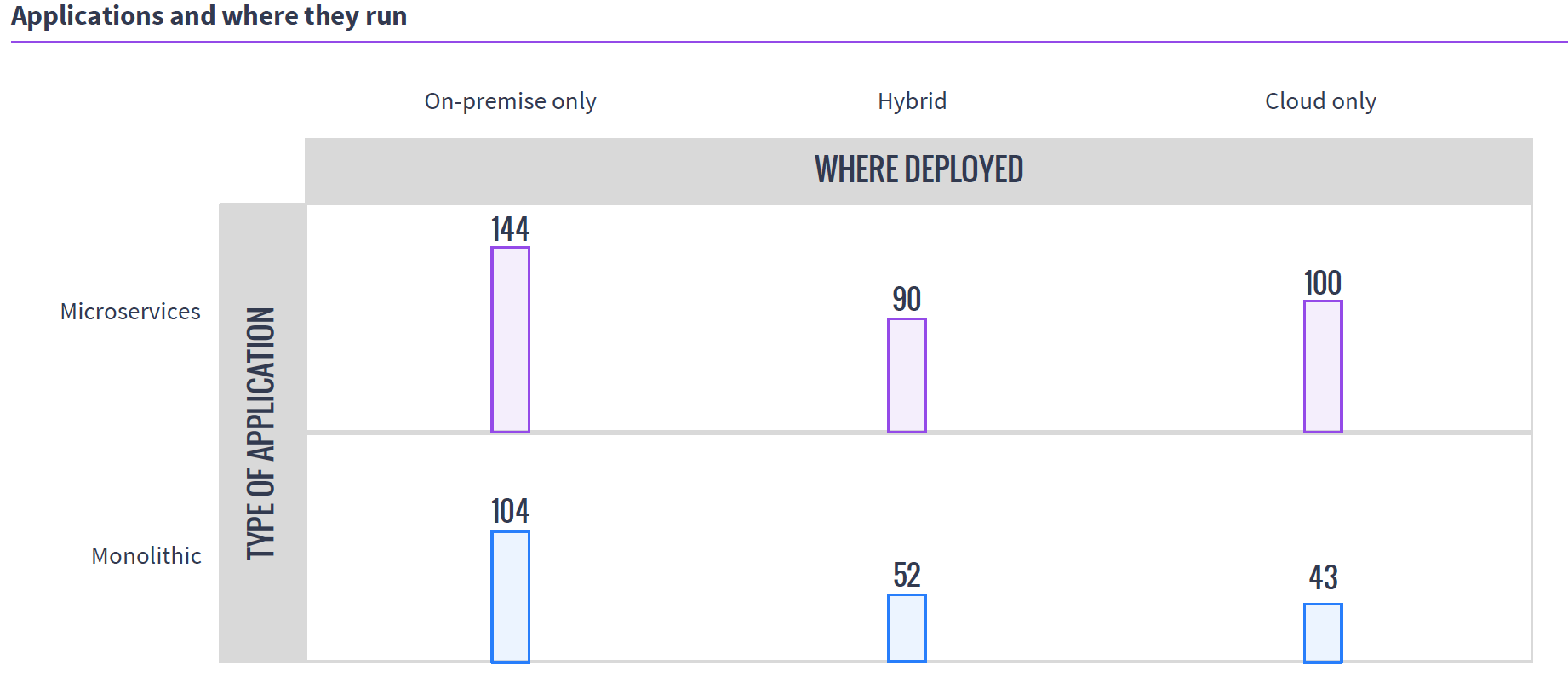
    So in the world of VMs, if you have 50 unique applications that need resources, you create 50 VMs to service them. In either cloud environment, you do the same. It is a joke we like to make that because of microservices, containers are treated like VMs, except if you have 50 unique applications, you create 500 containers, but the reality is that they are exactly like VMs in many use cases, and make 50 containers when containerizing existing apps. Taking a look at MesoSphere’s 2016 survey of clustering users, you can see that a fair number of clustering users are using containers with Mesos and DC/OS, while many of them are not doing it exclusively with microservices.

    Source: MesoSphere user survey, August 2016

    In the clustering world, you have what presents as one big monster machine that is going to run these applications as resources come available, so if your 50 applications require fewer resources than the cluster offers, they simply execute in parallel; if you don’t have enough hardware to run them, unlike with VMs, you can just queue them up and, assuming the cluster isn’t over-burdened, eventually they all will run.

    This gets more interesting when containers are added to clustering (a common environment), because then you do have discrete containers, but the scheduler still manages how many resources are available/in use, and the container architecture allows the app to carry its requirements with it across the cluster.

    Why do we care? Because you know what your workloads are and which scheduling methodology is more important to your organization. If there are 50 applications that all have steady resource needs and run all of the time, then virtualization might be right for you, but if the organization’s workloads are shifting constantly and resources need to be cycled at a high rate, clustering might be right for you. Either way, knowing what’s out there is never a hindrance.

    — Don Macvittie

  • The One Simple Reason to Consider Clustering

    The One Simple Reason to Consider Clustering

    As you may know, I’m pretty interested in the newest round of clustered computing these days. I’m digging in pretty deep to see how well-suited it is to the enterprise, and how it is best used/architected/implemented.

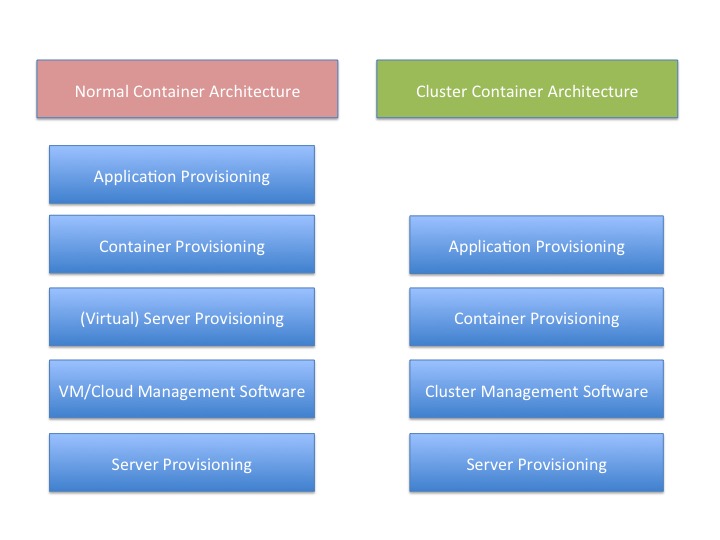
    There is a reason for that, and I think this graphic probably gives it away:

    You’ll note that “container provisioning” is in there. It doesn’t need to be. If your environment is running without containers at this time, then simply remove that block from both sides of the diagram and remove container from the titles.

    The fact is that there is one less step in any provisioning environment short of one app, one server.

    And remember that this abstraction doesn’t touch on storage provisioning, AAA or OS upgrades at two different levels (or in some scenarios three).

    And that’s a big deal. Not just because you have one less layer for deployment, you also have one less layer for maintenance, one less layer for security, one less layer for logging … It’s a big deal. As I’ve mentioned before, we have increased the complexity of the operations environment to the point that some form of DevOps is nearly required to keep a modern or cutting-edge data center running smoothly. The newest round of clustering solutions removes one layer from the architecture stack, reducing that complexity a little bit. Of course, it is just a slowing in the growth of complexity, but it’s better than a “Damn the torpedoes, full speed ahead!” approach to complexity.

    The thing is that clustering software has been around for a very long time—I was briefed back when VMware was just making a name for itself about a clustering solution that was aimed at gaming sites. I never wrote about it because VMware stole the thunder, and the company couldn’t reference any customers except gambling websites—not exactly an easy comparison to make with enterprise environments. This briefing was my first, but clustering existed long before that, even.

    But this round is different than most recent clustering solutions. It focuses on resources and scheduling, not on making a special-purpose large-sized computer. This round of clustering software makes a large computer that looks to apps like Linux. That’s a far more useful abstraction, if it works without a ton of overhead.

    And the overhead is what I’ll be digging into over the next few weeks.

    But yes, I think it’s a great idea. Give me a big old expandable Linux box, make it look exactly like Linux to my apps and let’s see what it means for app growth.

    — Don Macvittie

  • Mesos and Its Impact on the Data Center

    Mesos and Its Impact on the Data Center

    One of the things that many of us have been observing is that in the midst of a sea of other changes, data center architectures also are changing. By a lot.

    RAID array sales are down, even though unstructured data is still going up; networking is getting an application programming interface (API) makeover in some places and pure software-defined networking (SDN) in others; and the topic of this post—the concept of “server” in the data center—is becoming somewhat fluid.

    Until recently, “server” meant either physical hardware or a virtual machine (VM) on VMware. There were other definitions, but no one cared about them. Then came OpenStack, and while the same as VMware in terms of meeting enterprise needs, it brought with it more work and more options than VMware, and started people thinking more about servers and what that word means. Now we have Apache Mesos, and its various incarnations are gaining traction in the data center. This doesn’t even touch on specialized clusters such as those Hadoop requires.

    If you’re busting your tail every day keeping the systems humming and serving the needs of the organization, the differences might be elusive. I’ll take this blog to talk about the differences, and moving forward will focus more on Mesos and its variants because it is an area of DevOps that I think it underserved in the publishing arena.

    While VMWare and OpenStack let you pool servers and then carve them up into virtual servers, Mesos decided to eliminate that “carve up” portion and treat the pool of servers as one big system that can service applications. That is a simplification, but when it comes down to it, think of Mesos as Linux with the resources of many physical systems instead of just one.

    Because making a pool of servers into a single logical server means the server can do a lot more than a normal system, there are a lot of add-ons, bells and whistles. So for process isolation, containers are used to offer a bit of protection from rogues, for example. And since the Linux scheduler was not intended to handle cross-system processes, scheduling is handled by a system that, while not more complex, does require you to know a bit more about, so it seems more complex than just running it and letting the system take care of the rest. When you consider the volume of jobs a cluster of systems can handle compared to a single system, and the work of distributing jobs/apps/programs/whatever-you-call-them across the supporting hardware, it just makes sense that a scheduling and job submission management subsystem is required.

    Because the Mesos scheduler (and more) has an API, there are some definitely interesting DevOps possibilities here: Run all the processes you need and have the ability to hook the scheduler and reporting into your DevOps tool sets? Definitely interesting possibilities that we’ll explore at some point in the future.

    Why would you go with a clustered operating system instead of a cloud platform? That really is a valid question, and one the market is still working out. Early adopters like the fact that an entire layer of abstraction is removed as unnecessary. In VMware or cloud, you have physical hardware -> pool of resources -> virtual Servers -> application.

    Both physical and virtual servers are running copies of an operating system (OS). That’s a lot of overhead.

    With Mesos, it looks much the same, except that instead of VMs, the app is running on the pool of resources (or more correctly, the app is running in a lightweight container on the pool of resources). So there is less to maintain, less CPU/disk/memory overhead, and less install/configuration time.

    Of course, any highly complex system has issues of its own. I am still learning what the real issues that crop up and enterprises have to deal with, so I will promise to report back after I have a handle based upon reality, but they are there—I just need to get a solid enough understanding that I’m not misleading anyone.

    From a DevOps perspective, the ability to assume the configuration of the server the cluster presents itself as, no matter the app being submitted to run, and the management of an entire data center’s worth of applications on a common platform are strengths I intend to dig into.

    If you’ve evaluated or used Mesos (or DC/OS or Mantl or SuperGiant or any of the other tools based on it), don’t hesitate to reach out to me. My experiences are one thing; others might have different issues/concerns/loves.

    We do indeed live in interesting times, with changes in IT coming at a pretty astounding rate. Fun times. I’m actually pretty excited to learn how well Mesos serves the need and enables DevOps. It’s not a simple topic to discuss, there are a lot of moving parts, but we’ll get it covered, and help you figure out if it’s the best solution for your organization.

    — Don Macvittie

  • Will Deduplication Solutions Work for Cassandra?

    Will Deduplication Solutions Work for Cassandra?

    Cassandra is a popular next-generation database system (NoSQL) that powers the back end of high-performance web-scale applications in enterprises. It is database software for cloud applications that accelerates the organizations’ ability to power the growing number of cloud applications that require data distribution across data centers and clouds.

    While Cassandra offers high availability, it also provides significant opportunities for meeting data protection requirements. Creating cluster-consistent and space-efficient backup of a distributed database can be a challenging task. In this blog post, I will highlight existing deduplication solutions for Cassandra, why deduplication matters, and how to achieve deduplication in Cassandra.

    What is Cassandra?

    Here is a brief introduction. You might be curious, “Aren’t existing deduplication solutions enough to save space for Cassandra snapshot files?”  There are multiple deduplication solutions that can eliminate redundant data from the different levels of the storage layer. So why do we need a new one for Cassandra cluster backups?

    Let’s begin with some background information.

    Cassandra is a distributed database that is becoming increasingly popular with the emergence of big data applications such as software as a service (SaaS), internet of things (IoT) and real-time analytics. These applications require high availability and scalability over consistency. Cassandra supports eventual consistency rather than strict consistency, which is provided by traditional database systems such as Oracle, MySQL and IBM DB2. “Eventually consistent” means consistency will be achieved eventually rather than immediately. As well-known in CAP theorem, we cannot have following three properties in a single system: consistency, availability and partition tolerance. In short, Cassandra is an eventually consistent database that provides high performance, high availability and high scalability—but not strong consistency.

    Replication and its Role in Deduplication

    One of the most important mechanisms of distributed scale-out database systems such as Cassandra is data replication. By replicating the same data on different nodes across failure boundaries, distributed database systems can continue to service application requests even with a certain number of node failures. The downside is performance overhead to maintain multiple data copies; both write and read operations will be slower to create multiple copies and to check the consistencies among multiple copies. Although asynchronous data replication technique can be used to minimize the performance overhead of writes, it also would lower the level of guaranteed consistency level, which called is eventual consistency.

    As I just explained, replication plays a very important role in a distributed database system, and therefore we should not remove the redundancy from a live Cassandra cluster to save storage space.

    The situation becomes different when we think about backup files (or, secondary data) from a Cassandra cluster. Like any other database system in an enterprise organization, backups are needed for Cassandra; it is not because Cassandra is not reliable or not available enough, but primarily because people make mistakes (“fat fingers”) and enterprise applications sometimes have to keep the history of their databases. As they say, to err is human!

    Cassandra has a nice node-level snapshot feature, which can persist a complete state of an individual node to snapshot files. One very important point is that a Cassandra snapshot is a “per-node” operation, which does not guarantee anything about the cluster status as shown in the figure below.

    1

    Backing up a Cassandra Cluster

    To create a backup of a Cassandra cluster, we have to trigger a snapshot operation on each node, collect created snapshot files, then claim the set of collected snapshot files as a backup. In this backup, the replicated data exist as is, and the size of the backup will be N times bigger than the size of user data, where “N” is the replication factor. Replication has an important role in a “live” Cassandra cluster to provide high availability and scalability, but what’s the use of replication for backups? If we upload the backup files to an object store such as S3 or Swift, the “already replicated” data will be replicated again by the object store to provide reliability and availability for their own sake. In short, there are redundant data copies in Cassandra backup files (secondary data). If we can eliminate the redundant data copies we will save massive storage space for Cassandra backups without sacrificing retention periods. Saving on storage space directly translates to saving big bucks for the operational cost of maintaining and operationalizing a big data system across an organization.

    But, let’s return to the question of whether existing deduplication solutions would work for Cassandra backup files. You can test this by collecting and placing Cassandra database files to a deduplication system. Will the solution can save storage consumption? No! Existing deduplication solutions wouldn’t work for Cassandra data files for the following two reasons:

    • Cassandra has a masterless peer-peer architecture. Each node receives a different set of rows and, therefore, there are no identical nodes in a cluster, which means data files will look different, as shown in the following figure. Since different combination of rows are stored in Cassandra data files, each data file will be hardly identical even at the chunk level.2
    • Cassandra data files are compressed with 64KB-sized chunks regardless of row boundaries. If you know enough about deduplication algorithms, you can easily understand why Cassandra data files cannot be easily deduplicated. Fixed-length, chunk-based deduplication will not work because of the chunk alignment, and variable-length chunk-based deduplication will not work because of compression.

    Cassandra’s compaction and small record size are other reasons why the existing block- or file-level deduplication solutions will not work for Cassandra backup files. Compaction is an independent operation that merges multiple database files into a new data file; small-sized records can be hardly deduplicated with bigger-sized chunk.

    Summary

    The existing file- and block-level deduplication solutions will not work for Cassandra backup files because:

    1. Each Cassandra data file contains different set of records.
    2. Cassandra data files are compressed regardless of the row boundary.
    3. Cassandra runs compactions independently.
    4. Cassandra can have smaller record size than deduplication chunk size.
  • MongoDB Atlas: One Giant Leap, But More Steps Needed

    MongoDB Atlas: One Giant Leap, But More Steps Needed

    Atlas, holding up your databases in the cloud. I’m not sure if that’s what MongoDB was going for, but I personally like the analogy.

    At MongoDB World’16, MongoDB announced Atlas, a database-as-a-service offering (in the cloud) of the company’s popular open-source NoSQL database. Rather than dealing with the complexities of setting up, provisioning and configuring a MongoDB cluster yourself, Atlas allows companies to leave all those details for the masters of MongoDB to manage, freeing up application developers to focus on more important things (such as application development). Atlas currently is available on Amazon AWS, but there are plans to expand it to other public cloud platforms such as Microsoft Azure and Google Cloud Platform.

    Depending on the needs of your application, Atlas allows you to scale your cluster up or down, both vertically (with more powerful servers) and horizontally (with more shards in your cluster). You can also provision more disk space as your data grows. Simply tell Atlas and it will automatically update your cluster in the cloud to match your specifications. The documentation is unclear whether Atlas leverages AWS’ autoscaling features, but it appears that scaling must be done manually.

    Bringing Up a MongoDB Cluster

    When you first log in to Atlas, you’re met with a pretty simple user interface (UI). The very first thing you can do is to start up a new cluster in the cloud.

    2Before deploying a cluster, you need to know the AWS region to place the cluster, AWS instance size, amount of disk space needed, whether to use encrypted storage, whether to enable backups, the speed of the underlying storage (i.e. number of IOPS) and the number of shards and replica set members.

    You first specify the type of AWS instance you want to run your cluster on (ranging from M10 to M100) and how much disk space you want to provision, anywhere from 10GB to 16TB. All instances can be configured with encrypted storage with no additional cost. I first started by selecting the default settings from the M10 instance, which also happens to be the cheapest.

    3Instance sizes, specs, and configurable options. Details including cost are consolidated on the right.

    After specifying your instance, you can then configure the number of nodes in your cluster. For replica sets, you can have either three, five or seven members. Additionally, you can specify whether the cluster should be sharded and the number of shards in the cluster. Note that sharded clusters requires an AWS instance of M50 or higher, which is one of the more expensive instances, so the jump from a basic unsharded cluster to sharded cluster will be fairly expensive!

    4

    5The cheapest sharded cluster is 56 times more expensive than the cheapest unsharded cluster. You probably don’t want to be using Atlas for any sharded testing clusters if you can help it.

    After you’re satisfied with your cluster configuration, you can just click “Confirm & Deploy.” My cluster was spun up within a couple minutes, but your mileage may vary. After adding the IP addresses from which you’ll access the Atlas instances to a security whitelist, you can begin using your new mongo cluster. Something small that I really appreciated about Atlas is that it gives you the exact command and hostnames you should use to connect to your cluster (both through the mongo shell as well as through MongoDB’s many drivers). It makes connecting to your cluster incredibly simple. Just copy and paste.

    6Atlas gives you high-level stats of your cluster, including IOPS, read and write performance, disk usage, etc. You can also get more detailed metrics for each node.

    7Connecting to your cluster made easy! Just download an updated mongos binary and then copy and paste.

    After creating your cluster, it is fairly simple to scale your clusters horizontally by adding more shards. For me, the whole process of upgrading my 1×3 to a 2×3 cluster took around 10 minutes (again, your mileage may vary). Pretty slick! In this process, Atlas will automatically provision more servers and configure your cluster with new config servers, mongos and shards. Notably, once you decide to shard a cluster, you are unable to go back down to an unsharded instance, so make sure that you’re absolutely sure when you decide to scale up to a sharded cluster—you won’t be able to go back!

    Overall, outside of a few unsupported cases, the process of setting up a cluster and manually scaling it was quite smooth. While what has been achieved thus far in reducing cluster configuration to a few tunable options is definitely a step in the right direction in simplifying cluster setup for the user, Atlas can do much more. Compare with other existing cloud database services, such as Amazon’s DynamoDB or Microsoft’s DocumentDB, where all you need to specify is the IOPS requirement of your application (application IOPS, not storage IOPS as it is in Atlas). In these competing cloud databases, issues such as replication, number of shards, and high availability are hidden away from the user. Granted, DocumentDB has been out for a year already and DynamoDB many years before that, so it may just be a matter of time before Atlas catches up. Regardless, there is a lot more Atlas can do to be truly serverless and even simpler to use—a solid first step, but lot more needs to be developed to compete with cloud databases and to win enterprise customers.

    Under the Covers: Backup and Recovery

    Now since I work on something similar here at Datos IO, I was quite interested in Atlas’ backup and recovery options. At a first glance, it looks similar to the backup and recovery services provided by MongoDB’s earlier products such as CloudManager and OpsManager. After playing around with the feature, I’m more convinced that the backup technology Atlas uses is essentially the same as previous offerings, only that it’s applied to Atlas instances.

    Backups are free for the first 1GB and $2.50 per GB per month for every GB after that. Backups can be scheduled at set intervals but with a minimum interval of six hours. While I was initially put off by the minimum snapshot interval (after all, a LOT can happen in six hours!), after some investigation, Atlas also allows you to schedule “checkpoints” in between snapshots. Checkpoints can be used as restore points, but they take longer to restore because it requires applying all deltas since the last snapshot. It’s important to note that this feature is only available for sharded clusters. If you want to protect data on an unsharded cluster, you’ll be stuck with a minimum snapshot interval of six hours.

    Backup can be set when by toggling a flag during cluster initialization. During restore time, you can select a specific snapshot to restore. If you need a finer granularity of restore, Atlas also provides point-in-time recovery, which is pretty neat. You can specify a time between two snapshots to restore at a minute-level granularity. If you need an even finer granularity, you can specify the specific oplog timestamp and interval you want to restore.

    8Existing cluster snapshots and the types of restores you can do.

    As I performed a couple of backups and restores, I had a couple reservations about the feature. Most of my qualms arose from the fact that Atlas treats the entire cluster as its ‘unit’ of backup. What I mean by this is that backups created by Atlas are snapshots of the entire cluster. So there is no granularity at all, and this is problematic in a few ways.

    First, since Atlas takes snapshots of the entire cluster, you can’t control what data you want to back up. Say, for example, only a small portion of your database contains critical sensitive information that needs to be backed up. With Atlas, to back up your critical data, you’ll have to back up all your noncritical data as well! Considering that the cost of backup increases with the size of your data, you’ll end up unnecessarily paying a lot for backups of data you don’t really care about.

    Moreover, your options when recovering your backups becomes constrained by the fact that backups are at the cluster-level. By nature of being cluster-level snapshots, backups must restore back the entire cluster; you can’t restore back a specific database or collection. This can be problematic when, say, only one of your collections in your production cluster becomes corrupted. In that case, Atlas takes a very heavy-handed approach of bringing down the entire cluster and resetting every collection back to the point of the snapshot, as opposed to only restoring the problematic collection.

    Lastly, Atlas only allows you to restore snapshots to clusters with the same number of shards as the snapshot. For example, if you have a cluster with three shards, you can only restore to other clusters with three shards. One potential reason you may want to restore data to a cluster with a different topology is for testing purposes: Perhaps you want to measure application performance as you increase the number of shards in your cluster, or perhaps you just need a small, cheap cluster for basic tests. If you want to restore production data to a test cluster in Atlas, you’ll either have to spin up a cluster with the same topology as the production cluster (which is good for MongoDB, but sad for your wallet), or you’ll have to manually download from Atlas and then manually restore that data back to Atlas into a cluster of different topology. Both cases work, but are far from being ideal.

    Concluding Thoughts

    Atlas is a pretty good move by MongoDB to make it even easier to build up applications on top of its database by abstracting out a lot of the more mundane details of cluster configuration to the people who know MongoDB best. For me, Atlas was a simple and fast way to create and scale up MongoDB clusters. While a good step in the right direction, Atlas can do more to make it a truly serverless approach like other cloud databases in the market right now.