Staying up with the latest IT management tools is akin to keeping up on the latest Starbucks drink options. We simplify it here through a look at the most useful tools, from monitoring to DevOps orchestration and APM.
IT management tools have entered a new heyday, thanks to the advent of cloud, DevOps and mobile computing. With all of the new types of infrastructure, software and development methods, developers and IT managers need simple automation to get through the day. But with hundreds of IT management and DevOps tools on the marketplace today, both open source and commercial, it’s hard to know where to start.
The global DevOps tools market alone is expected to be worth $3 billion by 2019, according to Technavio. While there are many applications to choose from, we have compiled a list of our favorites below. Some of these are tried and true, while others are newfangled and still in their early days of experimentation.
Microsoft System Center Operations Manager (SCOM)
IT Operations Management and IT Service Management
Microsoft SCOM is a legacy enterprise infrastructure monitoring and management tool that delivers comprehensive coverage for the Microsoft ecosystem of assets and devices, whether they are installed on internal data centers or in the cloud. SCOM has evolved over the years to monitor network and storage along with Unix-based systems.
Cautions: Since SCOM is a deep monitoring tool that collects data from many different systems, it generates a large volume of data and alerts that can overwhelm systems administrators and IT managers.
Vistara
IT Operations Management and IT Service Management
Vistara is a comprehensive tool for monitoring heterogeneous multivendor assets and devices, whether installed on-premise or in the cloud. It covers a wide swath of Microsoft and Unix applications and systems, major enterprise vendors such as Oracle and Symantec, and top storage and networking technologies. Vistara also integrates well with other monitoring tools. A unique feature of Vistara is that it records all user sessions, which provides an audit trail for tracing system changes and other events.
Cautions: Vistara is a powerful, multifunctional tool and needs to be set up properly to derive the maximum benefits.
SolarWinds
Network Monitoring
SolarWinds is a leading tool for managing and monitoring performance of a multivendor distributed network environment. The tool delivers a lot of useful metrics, including performance, capacity and downtime. It is particularly useful in companies with many locations, such as a retail brand, or a national or multinational company with a large number of branch offices and locations.
Cautions: SolarWinds does not provide comprehensive monitoring for servers or storage systems.
(Editor’s Note: SolarWinds reached out to devopsy.kinsta.cloud to clarify that it does offer comprehensive monitoring for servers and storage systems through its Server & Application Monitor and Storage Resource Monitor tools.)
Nimsoft (CA)
Network Monitoring
Nimsoft is another excellent network monitoring tool, but is best-suited for an on-premise (internal data center) environment that has standardized on a few types of equipment and has a low rate of change. A company that is adding new technologies and devices frequently won’t find the tool to be flexible enough to adapt to evolving needs.
Cautions: This legacy tool is not ideal for diverse and fast-changing IT environments.
ServiceNow
IT Service Management
ServiceNow is well-known in the industry for comprehensive service management, including service level management, financial management, incident management, availability management, change and release management and more. ServiceNow has the broadest coverage for all ITIL activities, making it the de facto standard for service management and suitable for use in small companies up to the enterprise.
Cautions: Because this tool is so flexible, you can easily customize it to meet your organization’s specific needs. Beware that by doing so, you’ll need a full-time administrator to manage the customized system.
Chef/Puppet
DevOps Automation and Management
When it comes to tools for managing cloud application development and deployment, Chef and Puppet have near-cult status among developers. Companies occasionally use them both, but there is overlap between the tools. Chef is ideal for DevOps provisioning, orchestration and configuration management and is a more flexible platform overall, featuring auto rollback to previous versions. Chef also provides real-time visibility into metrics and messages. Puppet is best for DevOps automation and administration and is a highly prescriptive, process-driven platform that does not allow shortcuts, which should make IT Operations people happy.
Cautions: Chef and Puppet are used primarily by developers, not IT Ops, and therefore raise some level of caution if developers are spending too much time managing the tools vs. writing code.
Docker
DevOps/Containerization
Docker is the industry-leading tool for DevOps automation of application deployment inside software containers. It can be used for nearly any software project and infrastructure environment, and is especially helpful for managing dependencies and version inconsistencies. The application is a game-changer for simplifying the complexities of deployment. Docker containers wrap up a piece of software in a single, portable unit that contains everything it needs to run: code, runtime, system tools, system libraries and so on.
Cautions: Docker’s approach to security is still unproven, and some believe it is not up to enterprise security standards.
Apache Mesos/Google Kubernetes
DevOps/Clustering
Apache Mesos is best for cluster management and utilization for distributed applications in a DevOps world, while Google Kubernetes is ideal for automating deployment, scaling, and operations of application containers across clusters of hosts. Clustering tools sit on top of hardware and increase utilization through effective workload management and resource-sharing. They work in both public and private cloud infrastructure environments, across many different platforms, and allow IT organizations to run more workloads on the same hardware. While both of these tools are fairly new, Mesos has been around longer and is more appropriate for large environments with heavy management and scale needs.
Cautions: When looking at small clusters of say, fewer than a dozen nodes, Mesos may be an overly complex solution.
New Relic
Application Monitoring
New Relic is well-known for its real-time capabilities in monitoring and managing web and mobile applications within cloud, hybrid and on-premise infrastructure. For an APM tool, New Relic is strong at identifying server-based performance issues. It also allows for real user page performance tracking so you can see if certain classes of users (for instance, by region) are having worse performance than others.
Cautions: New Relic does not capture 100 percent of transactions, but does a sampling. This may or may not be important depending upon your business needs. It is also somewhat rigid, and may not be too flexible in an environment that has a lot of microservices.
Graphite/Grafana
Dashboards
Graphite and Grafana are two leading graph and dashboard builder for visualizing time series metrics. The tools are particularly useful for analyzing metrics and other types of data from on-premise systems, public cloud, private cloud and IoT systems.
Grafana is most commonly used for visualizing time series data for Internet infrastructure and application analytics but is also used in domains including industrial sensors, home automation, weather and process control.
Graphite is excellent at visualizing data and metrics.
Cautions: You will need a complex and elaborate configuration of databases to gather the data and a compute engine to generate the dashboard.
About the Author/Ravikumar Raghavenderrao
 Ravi RRK, as he is known, is the Vice President – Service Delivery at NetEnrich. Ravi’s responsibilities include service delivery management, customer satisfaction, and new service introduction. Ravi’s team also has the responsibility to ensure and enforce quality and policy standards across the NetEnrich organization.
Ravi has over two decades of experience in the IT industry in the areas of remote infrastructure management, delivery and large account management. Prior to joining NetEnrich, Ravi spent over 20 years at Wipro Technologies in various positions. Ravi holds a Bachelor of Engineering (Mechanical) degree from Osmania University and a Master of Engineering (Mechanical) degree from the Indian Institute of Science.

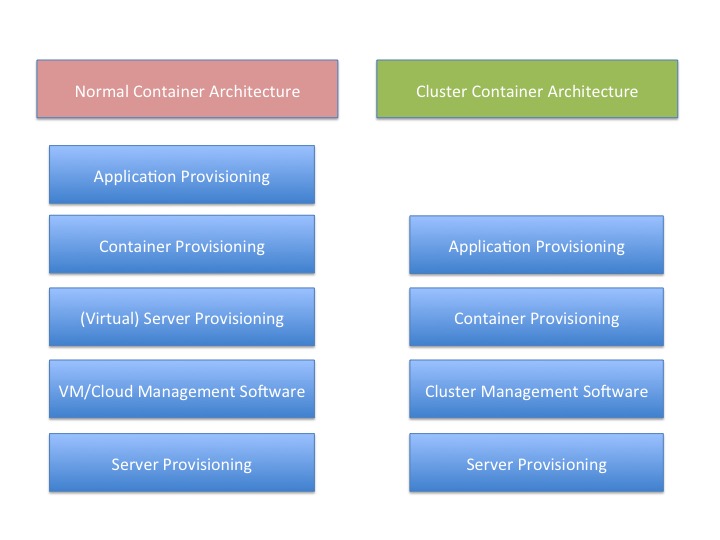

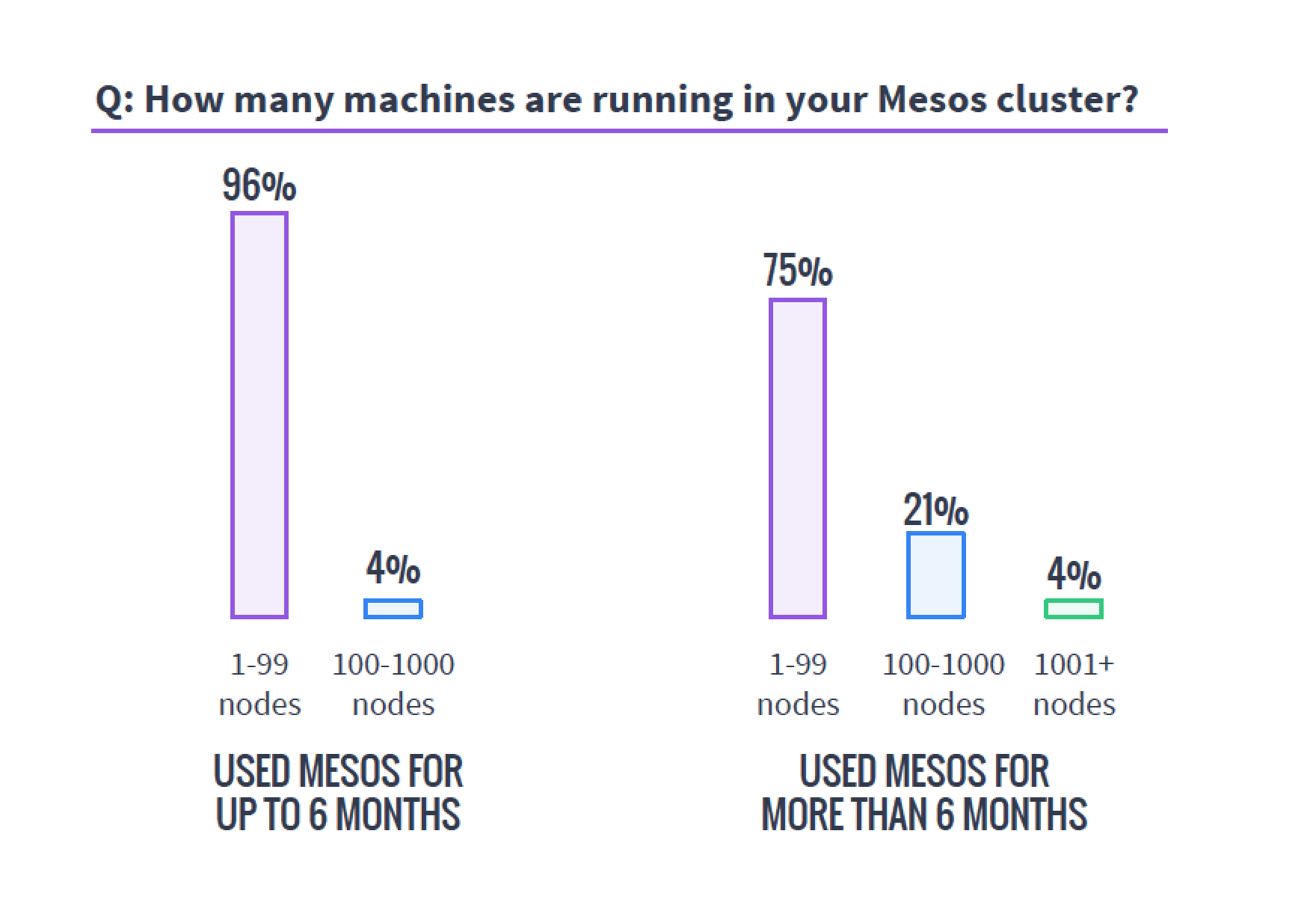 When planning a cluster, always assume it will be bigger than you plan and grow faster than you think. Organizations that need this type of technology need it to perform and find themselves using it more than they’d planned, so the clusters always grow. I’ve seen orgs do a 20-server cluster that within six months numbered well over a hundred servers and headed to 200. I’ve heard of faster/larger unexpected growth rates, but not seen it or talked to those responsible. Plan for bigger than you think you need—worst case, you’ll have overplanned, which is easier to handle than being caught with too small a cluster.