Tag: cloud

  • Complete Guide to AWS Savings Plans

    Complete Guide to AWS Savings Plans

    AWS Savings Plans are a flexible and cost-effective way to save on your Amazon Web Services (AWS) usage. These plans allow you to commit to a specific amount of compute capacity over a one- or three-year term in exchange for a significant discount on your AWS usage. Savings plans can help you reduce your AWS bill by up to 72%, depending on the type of plan and your level of commitment.

    Why Do You Need AWS Savings Plans?

    With the growing reliance on cloud infrastructure in modern IT, it is crucial for organizations to optimize cloud computing costs without compromising on performance or scalability. AWS Savings Plans address this need by providing a flexible and cost-effective solution that allows you to commit to a certain level of usage at a discounted rate.

    With AWS Savings Plans, by committing to a specific amount of compute capacity over a set time period, you can save up to 72% on your AWS usage. This can result in significant cost savings for your organization, freeing up resources to invest in other business-critical initiatives.

    Another benefit of AWS Savings Plans is the flexibility they offer. Unlike Reserved Instances, which require you to specify instance type, operating system and region, Savings Plans are more flexible and can be applied across different instance types, regions and operating systems. This flexibility makes it easier for you to optimize your cloud computing costs while still meeting your business needs.

    Difference Between AWS Savings Plans and Reserved Instances

    AWS Savings Plans and Reserved Instances are both designed to help you save on your AWS usage, but they offer different levels of flexibility and cost savings.

    Reserved Instances require you to commit to a specific instance type, operating system and region for a one- or three-year term in exchange for a discount on your AWS usage. While this can result in significant cost savings, it also limits your ability to optimize your cloud computing costs based on changing business needs.

    AWS Savings Plans offer a more flexible solution that allows you to commit to a certain level of usage across different instance types, regions and operating systems. Additionally, in most scenarios, Savings Plans can provide a higher level of cost savings compared to Reserved Instances.

    Types of AWS Savings Plans

    There are two types of AWS Savings Plans: Compute Savings Plans and EC2 Instance Savings Plans.

    Compute Savings Plans

    Compute Savings Plans are the most flexible type of Savings Plans, providing a significant discount on your AWS usage across any instance type, region or operating system. This flexibility makes it easy for you to optimize your cloud computing costs based on your changing business needs.

    Compute Savings Plans offer a discount of up to 66% compared to on-demand pricing, depending on the level of commitment you make. They can be used across all AWS services that are powered by Amazon EC2 instances, including Amazon EMR, AWS Lambda and Amazon ECS.

    EC2 Instance Savings Plans

    EC2 Instance Savings Plans are a more specific type of Savings Plan, offering a discount on your AWS usage for a specific instance type within a region. These plans provide a higher level of cost savings compared to Compute Savings Plans, with discounts of up to 72%.

    EC2 Instance Savings Plans are ideal for organizations that have a predictable workload and require specific instance types within a region. However, they offer less flexibility than Compute Savings Plans, as they cannot be applied across different instance types, regions or operating systems.

    AWS Savings Plans Pricing Models

    AWS Savings Plans offer three different payment options to suit your organization’s budget and commitment level: All Upfront, Partial Upfront and No Upfront.

    All Upfront

    With the All Upfront payment option, you pay for the entire term of your Savings Plan upfront, resulting in the highest discount compared to on-demand pricing. This option is ideal for organizations that have the budget available to make a significant upfront payment in exchange for maximum cost savings.

    Partial Upfront

    The Partial Upfront payment option allows you to pay a portion of your Savings Plan upfront and the remaining balance on a monthly basis. This option provides a balance between upfront commitment and ongoing flexibility, with a lower discount compared to the All Upfront option.

    No Upfront

    With the No Upfront payment option, you pay for your Savings Plan on a monthly basis, with no upfront payment required. This option provides the lowest discount compared to on-demand pricing but offers the greatest flexibility for organizations with limited budgets or uncertain future usage requirements.

    How to Monitor and Manage AWS Savings Plans

    Monitoring and managing your AWS Savings Plans, as part of your overall cloud operations strategy, is critical to ensuring that you are optimizing your cloud computing costs and maximizing your savings. AWS provides several tools and services to help you monitor and manage your Savings Plans effectively:

    • AWS Cost Explorer: A powerful tool that allows you to analyze your Savings Plans usage and costs, helping you identify opportunities to optimize your cloud computing costs. With Cost Explorer, you can view your Savings Plans coverage, utilization and savings, as well as forecast your future usage and costs.
    • AWS Budgets: This service allows you to set custom cost and usage budgets for your organization, helping you track your Savings Plans usage and ensure that you are staying within your budget.
    • Savings Plans Recommendations: This feature analyzes your past usage and recommends the optimal Savings Plans for your organization. It can help you make informed decisions about which Savings Plans to purchase and how much commitment to make.

    Conclusion

    AWS Savings Plans are an excellent solution for organizations looking to optimize their cloud computing costs and save on their AWS usage. With their flexibility, cost savings and easy monitoring and management options, AWS Savings Plans are a valuable tool for any organization using AWS services.

    To unlock the full potential of AWS Savings Plans, it’s crucial to understand the different types of plans, their pricing models and how to effectively monitor and manage your usage. By doing so, you can maximize your savings and ensure that your organization is getting the most out of its investment in AWS.

  • How Platform Engineering Bridges the IT and DevOps Divide

    How Platform Engineering Bridges the IT and DevOps Divide

    Ballooning lead and process time, with an opaque corollary relationship to fixed and marginal cost, is a significant and complex burden for any enterprise. And multi-cloud complexity and inefficient organizational and technical processes are some of the most wasteful areas companies face–so much so that Synergy Research reports organizations are cutting back on their cloud spend as tech budgets continue to fall under intense scrutiny, resulting in a Q1 2023 cloud spending growth rate of 19% compared to 32% just last year. With cloud cost containment a top priority, Forrester advised tech leaders to demonstrate to CFOs how they will stay on budget and demonstrate ROI at the board level. A key area where companies can eliminate expensive waste and increase time to value is the relationship and workflow between IT and developers, which, while being the DevOps charter for nearly 15 years, has gotten less attention among the viable cost-containment strategies for enterprises in 2023. Revisiting the latest iteration of this DevOps charter through the implementation of platform engineering strategies can help enterprises create a faster, leaner and more scalable dynamic. Let us examine why it’s now time for enterprises to consider platform engineering as a potent way to not only increase efficiency but also to bridge the divide between DevOps and IT.

    The Old Way: Forcing DevOps to Dance to the ITSM Tune

    In traditional enterprise organizations, IT typically dictates a top-down ITSM practice that limits the tools an organization can use for development and deployment; in many cases, it inhibits CI/CD and other core capabilities and practices of DevOps. This awkward attempt to accommodate modern DevOps practice through an aging ITSM paradigm has led to a suboptimal software delivery performance and poor developer experience (DX).

    McKinsey, highlighting the criticality of DX, found developers at a leading SaaS provider spent 20% to 30% of their time integrating different services such as firewall changes, DNS and security access to deliver code through its CI/CD pipeline. That’s a lot of time spent on low-value, repetitive tasks, ensuring a painful journey for a disappointing result. If the DX pain is high enough, developers often go around IT and create resources on their own, leading to shadow IT, adding new cost burdens and growing security exposures. Every minute and engineer count: Five minutes saved per day among 500 developers saves a week’s development time.

    Surely, there is a better way.

    Platform Engineering: Collaboration Through Composition

    Platforming engineering and “platform as a product” have been key to the PaaS ecosystem for years but are now gaining fresh traction in the industry. In Puppet’s State of DevOps Report, 51% of respondents said they had already adopted platform engineering and 93% said it was a step in the right direction. Gartner predicted 80% of software engineering organizations will have platform teams by 2026.

    The concept can be defined in several ways. Gartner reported platform engineering is “an emerging trend intended to modernize enterprise software delivery… designed to support the needs of software developers and others by providing common, reusable tools and capabilities, and interfacing to complex infrastructure.” PlatformEngineering.org’s recent blog post defines it as the discipline of designing and building toolchains and workflows for self-service capabilities in software engineering organizations during the cloud-native era.

    Regardless of definition, platform engineering is the latest iteration of IT centralization, though now attempting to retain all the benefits of distributed team empowerment through “composition” rather than converged control. As modernization continues, we experience the ebb and flow of composition and decomposition, both organizationally and technically. Microservices, Kubernetes, and GitOps patterns pushed the rational limits of decomposition and significantly raised the level of technical complexity in the enterprise. The natural counter pressure is a new cycle of composition that aims to simplify that complexity through platform engineering practices. Teams now look for these toolchains and workflows to be centralized in internal developer platforms (aka IDPs), exposing the development, deployment and maintenance of the entire life cycle of modern, cloud-native applications.

    IDPs can facilitate the flow, speed and innovation DevOps teams are demanding without sacrificing stability, security and control. They enable developers to configure their toolchain while meeting all controls through approved blueprints or “golden paths,” reducing lead and process time. Developers can focus on delivering business value instead of infrastructure tasks.

    Bringing IT and DevOps Back Into Alignment Saves Time, Money and Sanity

    Platform engineering creates a collaborative framework that connects IT and DevOps teams, so they can focus on outcomes rather than methods. Developers can use an IDP to follow conventions that speed up development and prevent anti-pattern creep. Guardrailing choices through golden paths reduce cognitive load and simplify execution context for security teams. The result? Developers can focus on what they were hired for and want to do–creating innovative, transformative applications and differentiated value. Security can sleep well knowing bespoke behavior isn’t opening new attack surface areas.

    On the Day 2 operations side, IDPs enable SRE and support teams to have a fleet-wide view and work effectively with developers to streamline the management of production needs across all applications, clouds and tech stacks.

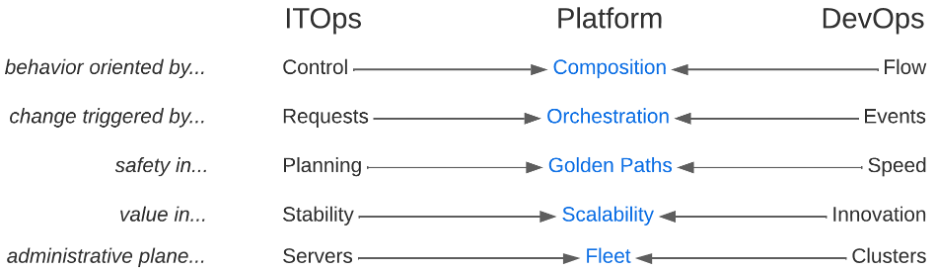
    The reframing of composition breaks the false dichotomies between IT and DevOps practices. You don’t have to choose between control and flow, change isn’t triggered by serial requests or async events, safety isn’t found in planning or speed, value isn’t found in stability or innovation and administrative plane primitives aren’t servers or clusters. Platform engineering practices allow you to prioritize composition, orchestration, golden paths, holistic scalability and fleet management to get teams out of entrenched myopia and embrace systems thinking that gets your business delivering strategic gain instead of tactical win/loss tallies.

    Finally, platform engineering positively impacts software delivery and operational performance metrics by streamlining development processes and reducing manual efforts. The bottom line is faster time to market while ensuring more consistency, less human error and improved software quality. This maximizes productivity, minimizes downtime and optimizes resource utilization, leading to cost advantages and increased efficiency for enterprises.

  • Defining ‘Best’

    Defining ‘Best’

    (Note: For the last few years, I’ve been sparse with naming vendors in blogs. This one will have more than usual as examples.)

    We all have a ton of tools at our disposal. From installed tools to products to open source, we can solve any given problem in fifteen different ways. Several years ago, I wrote a blog about using what you have to get the most out of your purchases. There are several “platforms” that solve a lot more problems than just what you are currently using them for. At the time, my shining example was F5’s BIG-IP. That thing can do everything: Networking in your data center and probably cooking your breakfast, too. At the time, most people used the box to handle load balancing but then were concerned about the cost. Duh? I mean, you have a tool that can solve a fistful of problems … and you’re using it for load balancing. I mean, it’s very good at load balancing, don’t get me wrong. But I feel like quoting Marvin from The Hitchhiker’s Guide to the Galaxy. “Here I am with a brain the size of a planet and they ask me to pick up a piece of paper. Call that job satisfaction? I don’t.” (Interestingly, at the rate that generative AI is advancing, it is only a question of time before a machine throws that quote out there.)

    The thing is, investors and the hype machine told all of your vendors three things. First, that they needed a recurring revenue stream. Second, that you wanted everything as-a-service and third, that they needed to be a platform. That means that those fifteen SaaS products you’re on the hook for now want to solve all of your problems because “they’re a platform.” Some of them do a kick-arse job of it and you might very well have a SaaS license that covers whatever you need to do today.

    This is screamingly obvious for some vendors. If you’re an Akamai customer, for example, the breadth of things you can do through them is stunning. Most customers do not seem to take advantage of that to the extent they should. This is no different than that BIG-IP in your DC; it’s just as-a-service. You’re already paying for both. You should make the most of them.

    Other vendors might surprise you but  they have done the same through M&A or expanding their “platform” from marketware to reality. I have hinted at this in the not-too-distant past but will say it point-blank here. Know what your products are capable of. Tomorrow you might need some of that functionality, and knowing if it’s already in the organization (but not being used) is a big deal. Also, if the “platform” already fits into your organization, then choosing a ‘best’ solution leans toward that product line already–less integration is the best integration.

    And keep those lights on. You may have more tools than you need, but you’re managing them and keeping the organization online. You should be getting kudos for that, so I’ll offer them. Thank you. I replaced my phone this weekend and had to reconnect everything and to all of those orgs I had to log back into, reinstall or reconfigure, let me say: I am grateful for each IT person there. Even my bank, who honestly pisses me off—I’m still grateful for their IT.


  • How to Keep Your IT Infrastructure Invisible

    How to Keep Your IT Infrastructure Invisible

    IT infrastructure is critical. IT infrastructure enables businesses to run—from day-to-day operational execution to visionary strategic innovation and everything in between. What’s interesting, though, is that people are only aware of it when there’s a problem: HR can’t access the payroll application, customers are complaining about how slow the transactional system is or this month’s cloud bill was double what you expected it to be.

    No one should notice a well-orchestrated environment, but once application performance slows or an outage occurs, people start to grumble. The same is true for IT infrastructure.

    The Top Four Ways Your IT Infrastructure Can Become Undesirably Visible

    Given the complexity of modern hybrid/multi-cloud environments and the applications they support, it’s no surprise that countless things can go wrong—and when they do, your IT team takes the flack.

    If your infrastructure is humming along nicely, that’s a testament to the IT infrastructure team’s hard work and expertise. Sadly, they don’t get the recognition because it’s all invisible to the rest of the organization. It’s only when *BAM!* something happens that the team is scrutinized.

    While there are many ways this can manifest, it usually falls under one of the following four categories:

    • Availability — This may be the most catastrophic because when systems are unavailable, people can’t do whatever it is they need to do.
    • Performance — A system might be available, but that doesn’t mean it’s performing to SLA or user expectations. The result can range from minor annoyance to lost revenue and customer churn.
    • Cost — Runaway expenditures don’t necessarily affect users, but you do not want to be called to account by the finance team or, worse, executive leadership.
    • Compliance — This is another area that may not have a broad impact on user experience, but the repercussions of non-compliance can be financially and reputationally significant.

    Common Infrastructure Culprits and How to Address Them

    To ensure the necessary availability, performance, cost control and compliance to keep your IT infrastructure under the radar, you must understand what can cause problems in these areas. Here are eight common culprits, along with ways you can address them, so your IT team stays invisible.

    Broken or Misunderstood Dependencies
    Your infrastructure is a complex web of interdependent applications and services. Every time you make a change, it could have a rippling effect on the categories mentioned above. Automated discovery and service mapping capabilities enable you to easily trace dependencies throughout your infrastructure to avoid unintended consequences.

    Cloud Waste
    Chances are very high that you’ve got cloud waste. This means that you could be getting billed for a storage block that’s attached to a stopped instance, for compute instances that are not being used, or for unattached load balancers. Finding idle and abandoned resources can keep your monthly cloud bill under control and on budget.

    Un-Breakdownable Cloud Costs
    Cloud bills are notoriously complex, and while cloud providers do offer tools to help you analyze your cloud spend, those tools often don’t answer all the questions your business might have. In addition to adding clarity to such opaque expenses, you need to be able to parse your cloud spend based on what makes business sense to your organization, not what makes technical sense to your cloud provider.

    Poor Capacity Planning
    Your infrastructure needs to meet your business needs, which are continuously evolving. As changes happen, whether it’s increased utilization of existing resources or modified/added resources to support new requirements, workloads could push current capacity and impact performance and stability. You need to be able to forecast infrastructure demands against business objectives to minimize potential issues before they happen.

    Poor Workload Placement Decisions
    Your infrastructure consists of various environments each with its own characteristics. If you migrate a workload without understanding the implications of that particular environment, you could risk performance problems or spiking costs. To prevent this, you need any-to-any migration insights to make better decisions about workload priorities, groups and deployments.

    Poor Reservation Planning
    Reservations (i.e., reserved instances or programmatic discounts) offer discounts for committing to a particular plan. If you plan well, the savings can be significant. But if you don’t use the capacity you’ve bought, the savings might not materialize. To improve cloud resource planning, you need to be able to evaluate your potential savings in varied scenarios.

    Workload Drift
    Over time, your workloads evolve due to changing demand, data volumes, etc. As a result, they can outgrow their current configurations, leading to performance issues or rising costs. This is a natural result of business growth, so the goal isn’t to prevent that drift. Instead, you want to optimize capacity and cost on an ongoing basis to keep your workloads right-sized.

    Slow Problem Troubleshooting and Remediation
    No matter how many precautions you take, something somewhere will inevitably go wrong. And once you become aware of the situation, the clock starts ticking to find the cause and fix it, all of which takes time. The longer the entire process takes, the longer your infrastructure will be visibly and painfully not working as expected. For those cases, you need full-stack visibility with application-centric, AI-based analytics to minimize impact duration as much as possible.

    Keeping the engine running behind the curtain can be a daunting task, but with proper planning and management, your IT team will remain visible to those responsible for managing it and invisible to those in the rest of the organization. Of course, the complexity of today’s cloud infrastructure makes that challenging, and there will be IT fire drills that take place, but it’s about how IT leaders react to the situation and resolve it in the quickest way possible, allowing themselves to return to their preferred place in the shadows.

  • How to Empower DevSecOps in a Complex Multi-Cloud Landscape

    How to Empower DevSecOps in a Complex Multi-Cloud Landscape

    Organizations are embracing cloud-based application delivery for speed of delivery and scale. However, the proliferation of multi-cloud systems to access and maximize the cloud’s capabilities is driving complexity in IT environments. Many organizations do not consider how multi-cloud adoption is expanding their attack surface—and the risk is growing: The 2023 CrowdStrike Global Threat Report found cloud exploitation cases grew by 95% year-over-year and cases involving threat actors targeting cloud environments were up 288% from a year prior.

    The expansion of cloud infrastructure and services has increased the pressure on organizations to protect assets within their multi-cloud environments. To alleviate this burden, more businesses are turning to DevSecOps, a practice that incorporates security at an earlier point in the development life cycle. This practice of shifting left helps improve the quality and reduces risk of applications, as well as makes the delivery of these applications more efficient since any potential issues are found earlier in the development process.

    DevSecOps is being adopted rapidly by organizations today to address the expanding array of threats and increasingly sophisticated attacks targeting multi-cloud environments. However, securing the cloud can be tricky due to its dynamic nature and multi-cloud makes shift left security even more complex. For DevSecOps to truly be effective, here are three things that organizations should consider doing.

    1. Strive for Complete Visibility in a Multi-Cloud Environment

    It is important that DevSecOps teams have a comprehensive understanding of their multi-cloud environment. Without it, they will not be able to identify a variety of security risks including vulnerabilities, privileged credentials, misconfigurations and other threats that may leave their organization’s cloud assets vulnerable.

    The best way to get full visibility across multi-cloud environments is through a cloud security posture management (CSPM) tool. With a CSPM tool, DevSecOps teams can identify misconfigurations and proactively detect threats. In addition, DevSecOps teams should also use a cloud infrastructure entitlement management tool (CIEM) to manage identities across all of their cloud infrastructure resources. The primary goal of a CIEM tool is to mitigate the risk that comes from the unintentional and unchecked granting of excessive permissions of user credentials.

    2. Visibility and Compliance Do Not Guarantee Security

    Organizations need to develop a comprehensive security strategy to mitigate issues within the development process. This may include implementing tools, automation and standards to enable developers to follow the desired security behavior. These approaches reduce developer friction, as well as diminish the likelihood that unsafe or default configurations will be used. Historically, DevOps teams have pushed back on integrating security since their concern is that it slows down the development lifecycle. However, DevSecOps is gaining traction in recent years because organizations are realizing integrating security sooner in the development lifecycle is more efficient than reactively patching problems as they arise.

    A tool that DevSecOps teams should look to leverage is cloud workload protection (CWP) because it offers breach protection for workloads, containers and Kubernetes, while enabling them to continue to build, run and secure applications with speed and confidence.

    3. Create Consistency With Security Tools

    Ideally, organizations should opt for a single platform that consolidates capabilities such as CSPM, CWP and CIEM. The reason for consolidation is to eliminate security gaps from having multiple security solutions. As a result, DevSecOps teams should turn to cloud-native application protection platform (CNAPP) tools to create more consistency within the multi-cloud environment.

    Securing multi-cloud environments can be complex. By empowering DevSecOps teams using these best practices, organizations will be able to move faster than today’s adversaries and have the agility to quickly adapt to present and future cybersecurity challenges in their multi-cloud environments.

  • Four Ways to Modernize Your Enterprise Monoliths

    Four Ways to Modernize Your Enterprise Monoliths

    In a perfect world, every application would run like Netflix–by which I mean every application would be cloud-native, microservices-based, containerized and, in all other senses of the word, modern. Unfortunately, not every application can be transformed in these ways. Some of the most important enterprise applications–like those powered by SAP or Oracle–don’t lend themselves to architectural transformations simply because the vendors don’t support that strategy. As much as organizations might wish that they could re-architect legacy apps from the ground up, the reality is that they just can’t.

    Fortunately, though, all hope is not lost if you have an enterprise app that you can’t containerize or “microservices-ize.” Even if you can’t “break down your monolith”–to quote the standard advice you’ll find if you read articles about how to modernize legacy apps–there are a variety of practical steps you can take to make legacy, monolithic applications look and feel (in most respects) like modern, cloud-native apps.

    Here are four ways to make your enterprise monolithic apps more cloud-friendly, even if they’re not technically cloud-native.

    Use Cloud Automation to Modernize Legacy Application Management

    Most enterprise apps are compatible with the cloud in the sense that you can host them on cloud-based virtual machine (VM) instances using services like Amazon EC2.

    By taking advantage of cloud hosting for enterprise apps, organizations can also leverage cloud automation tools, such as autoscaling policies and rules that automatically start or stop VMs. In this way, it becomes possible to deploy enterprise apps in a highly scalable, automated way. You get something that resembles Kubernetes-based orchestration, except your apps don’t actually run in containers on top of Kubernetes. They’re just monoliths that benefit from cloud automation tools.

    Deploy Load Balancers to Optimize Performance

    Load balancers, which automatically manage network traffic flowing to and from applications, are another critical tool that organizations can easily leverage when they migrate legacy applications to the cloud.

    Although configuring load balancers for enterprise apps hosted in the cloud is not a strict requirement, doing so can substantially improve application performance and reliability because load balancers help to ensure that requests are directed at application instances best able to handle them. They prevent situations where one instance of your application is overwhelmed with traffic while another sits idle.

    Again, this is something that platforms like Kubernetes also do for microservices apps. But, as I’ve explained, you don’t actually need your app to run as microservices to take advantage of load balancing. You can do it with monolithic legacy apps, too.

    Adopt an Everything-as-Code Strategy

    When your app lives in the cloud and is managed by cloud automation tools, it becomes possible to manage most aspects of application operations via code. Specifically, you can:

    ● Use infrastructure-as-code (IaC) tools to automate infrastructure provisioning and setup.
    ● Automate application configuration management using code rather than applying configuration changes manually.
    ● Codify operational processes, such as application updates and backups, instead of relying on manual operations.

    Practices like these, which enable a strategy known as everything-as-code, significantly reduce the amount of time and manual effort that engineers spend managing applications. They also provide consistency and minimize the risk of errors due to human oversight. And there’s no reason why you can’t leverage these practices for legacy apps as well as modern ones.

    Integrate Legacy Apps With Modern Toolchains

    If your enterprise app is hosted on-premises, you probably manage it using tools and processes designed solely for it. But when you move an enterprise app to the cloud, it becomes possible to manage the application using the same integrated toolchain you deploy for other applications and processes.

    You can, for example, take advantage of cloud-based monitoring tools to continuously collect data about application performance and generate automated alerts when something is wrong. Likewise, you can regularly create image-based backups of your application.

    This toolchain-based operational strategy is another way to streamline enterprise application management, even in situations where you can’t rewrite or containerize the application itself.

    Conclusion: Getting More From Legacy Apps

    Just because you have a legacy enterprise app that you can’t transform into microservices doesn’t mean you have to settle for legacy management and operational practices. Modern automation tools combined with modern operational strategies like everything-as-code make it possible to achieve an enterprise application management experience that closely parallels that of fully modern, cloud-native apps, regardless of which architecture your app actually uses.

  • VMware Streamlines IT Management via Cloud Foundation Update

    VMware Streamlines IT Management via Cloud Foundation Update

    VMware this week updated its Cloud Foundation platform and rolled up recent updates to the company’s virtualization portfolio all at once.

    Version 5.0 of VMware Cloud Foundation (VCF) encompasses the latest versions of VMware vSphere 8.0u1 for workload management, VMware vSAN 8.0u1 for scale-out storage, VMware NSX 4.1 for networking and VMware vRealize LifeCycle Manager 8.10 (Aria) for cloud management.

    In addition, VMware has added a single sign-on (SSO) capability, dubbed Isolated SSO Workload Domains, that enables administrators to configure new workload domains using SSO instances from different providers or platforms via NSX.

    Rick Walsworth, director of product marketing for the Cloud Infrastructure Business Group at VMware, said that as the management of IT continues to evolve in VMware environments, more organizations are opting to update their entire VMware software stack simultaneously rather than attempting to update components individually.

    The primary reason for that shift is that the company ensures that all the latest VCF component releases have been thoroughly stress-tested from an integration perspective, he noted.

    During uncertain economic times, VMware is seeing an increased focus on simplifying IT environments as IT teams are asked to do more with less, said Walsworth. As such, more organizations are looking to standardize on a stack of infrastructure software that can be managed more consistently, he added.

    More organizations are also looking to reduce the total cost of IT by employing the same stack of infrastructure software across hybrid cloud computing environments where workloads are deployed both in on-premises IT environments and public cloud, said Walsworth.

    The company is also seeing increased adoption of DevOps best practices to programmatically manage IT environments that need to respond to rapidly changing requirements, he noted. IT teams are looking to work more collaboratively rather than relying solely on specialists to manage specific functions, said Walsworth.

    Some of that shift is also being driven by Tanzu, a distribution of Kubernetes that the company makes available as part of VCF, he noted. Most application developers don’t have a preference for a specific Kubernetes distribution, so many organizations view Tanzu as an opportunity to extend their existing management framework to a de facto standard for building the next generation of cloud-native applications, said Walsworth.

    VMware is in the midst of being acquired by Broadcom. Nevertheless, VMware this week reported revenues for the first quarter 2023 of $3.28 billion, a 6% year-over-year increase. Subscription and software-as-a-service (SaaS) revenue for the first quarter was $1.22 billion, an increase of 35% year-over-year. That increase in revenue suggests any concerns about the future direction of the company are not impacting the willingness of IT organizations to continue to rely on VMware.

    It may be a while before all the dust settles around Broadcom’s acquisition of VMware. In the meantime, however, it’s clear that the way IT is managed in the cloud era is continuing to rapidly evolve regardless of who owns VMware.

  • What Is a Cloud Operations Engineer?

    What Is a Cloud Operations Engineer?

    CloudOps, short for cloud operations, refers to the processes, tools and strategies employed to manage, monitor and optimize the performance, security and availability of cloud-based infrastructure, applications and services. It encompasses a set of best practices and methodologies that ensure the smooth functioning of cloud environments, including resource provisioning, configuration management, automation, deployment, monitoring and incident response. The primary goal of CloudOps is to maintain reliable, scalable and cost-effective cloud solutions that meet the needs of businesses and their end-users.

    What is a Cloud Operations Engineer?

    A cloud operations engineer is a professional responsible for managing, monitoring and optimizing cloud-based infrastructure, applications and services within an organization. They play a crucial role in ensuring the smooth functioning of cloud environments by handling tasks such as resource provisioning, configuration management, deployment, automation and incident response. 

    Additionally, they collaborate with development and IT teams to design and implement scalable, secure and cost-effective cloud solutions that align with business objectives and end-user requirements. Cloud operations engineers must possess a deep understanding of cloud computing technologies, platforms and best practices, as well as strong problem-solving, communication and collaboration skills.

    Responsibilities and Roles of a CloudOps Engineer

    A CloudOps engineer plays a vital role in managing and maintaining cloud infrastructure and services. Their responsibilities and roles might include:

    • Cloud infrastructure management: Design, deploy and maintain cloud infrastructure, ensuring optimal performance, security and scalability.
    • Cloud migration: Responsible for planning, executing and managing cloud migration of applications, workloads and infrastructure from on-premises or other cloud environments to a target cloud platform.
    • Resource provisioning: Allocate and manage cloud resources such as compute, storage and networking to meet the needs of applications and services.
    • Configuration management: Define and implement infrastructure configurations and manage changes to maintain consistency across environments.
    • Automation: Develop and implement automation scripts and tools to streamline and simplify repetitive tasks, improving efficiency and reducing human error.
    • Monitoring: Set up and maintain monitoring tools to track the performance, availability and security of cloud services, proactively identifying and resolving issues.
    • Incident response: Troubleshoot and resolve incidents, collaborating with development and IT teams to minimize downtime and maintain service quality.
    • Security and compliance: Implement and enforce security policies, best practices and compliance requirements to protect sensitive data and maintain cloud infrastructure integrity.
    • Cost optimization: Monitor and analyze cloud resource usage to identify opportunities for cost savings, recommending and implementing cost optimizations.
    • Backup and disaster recovery: Develop and maintain backup and disaster recovery plans to ensure data and application availability during unforeseen events.
    • Collaboration and communication: Work closely with development, IT and business teams to ensure alignment with project goals and provide guidance on cloud best practices.
    • Continuous improvement: Stay up-to-date with emerging cloud technologies, platforms and trends, continuously improving cloud operations and adapting to changing requirements.
    • Documentation: Create and maintain comprehensive documentation of cloud infrastructure, configurations, processes and procedures to ensure knowledge sharing and team collaboration.

    How to Become a CloudOps Engineer

    Becoming a CloudOps engineer typically requires a combination of education, relevant experience and certifications. The following steps can help you pursue a career as a CloudOps engineer:

    • Gain foundational knowledge: To become a CloudOps engineer, you will need a solid foundation in IT infrastructure, networking and cloud technologies. You can gain this knowledge through a degree in computer science or information technology or through certifications such as AWS Certified Solutions Architect or Microsoft Certified: Azure Solutions Architect.
    • Develop cloud skills: CloudOps engineers need to have expertise in cloud platforms such as AWS, Azure or Google Cloud. You can gain experience by working with cloud technologies in your current job or by creating personal projects on cloud platforms.
    • Learn automation tools: CloudOps engineers need to automate infrastructure and deployments using tools like Ansible, Puppet, Chef or Terraform. You can learn these tools through online courses or tutorials.
    • Develop soft skills: CloudOps engineers need strong communication, collaboration and problem-solving skills. You can develop these skills by working in team-based environments, attending networking events or conferences and taking courses or workshops in communication and collaboration.
    • Gain experience: To become a CloudOps engineer, you need hands-on experience in deploying, managing and monitoring cloud infrastructure. You can gain this experience by working on cloud projects, participating in hackathons or contributing to open source cloud projects.
    • Consider certification: CloudOps engineers can demonstrate their expertise through certification programs such as AWS Certified DevOps Engineer or Microsoft Certified: Azure DevOps Engineer. Certification can help you stand out in a competitive job market and demonstrate your proficiency in cloud technologies.

    Conclusion

    In conclusion, a cloud operations engineer is an essential professional in today’s cloud-centric IT landscape. They play a critical role in managing, monitoring, and optimizing cloud infrastructure, ensuring that applications and services run efficiently, securely and cost-effectively. 

    With a deep understanding of cloud technologies, platforms and best practices, they collaborate with various teams to align cloud solutions with business objectives and end-user needs. As cloud adoption continues to grow across industries, the demand for skilled cloud operations engineers is expected to rise, making it a promising career path for those seeking opportunities in the ever-evolving world of cloud computing.

  • Consider Performance, Growth & Budget When Buying Data Analytics

    Consider Performance, Growth & Budget When Buying Data Analytics

    So, your business needs to invest in data analytics technology to improve efficiencies, competitive advantage or business outcomes. There are a ton of things to consider, but underlying each decision are three driving factors:

    • Performance – The need to meet service level agreements.
    • Growth – The need to accommodate success, as well as deal with inevitable industry changes.
    • Budget – The need to do both of the above while keeping costs low enough to not erode the profit gain from analytics.

    These three forces underpin nearly every technology selection decision, but what frequently isn’t noticed is how much these three drivers interact.

    1. Concurrency and Growth

    Test both for current levels of concurrency and the level you hope to achieve in the next few years as the organization grows.

    When evaluating benchmarks between vendors, consider that benchmarks are designed to make that company’s software look good. For example, if they are good at concurrency, you will see various levels of concurrency represented in the benchmark. If the benchmark shows only one workload at a time, or maybe ten, you can safely assume that concurrency is probably not something that technology is good at. Similarly, if the benchmark is done at 10 TB scale, the vendor probably isn’t that good at high-scale analytics.

    When bringing vendors in for a proof-of-concept, one mistake I’ve seen (more times than I can count) is testing the capabilities of the software with only one user at a time. People do not line up politely to use analytics one at a time.

    In addition to current levels of concurrency, over time, hopefully, the organization will grow, and the number of both internal analytics users and external customers will increase. Testing for the number of users you have now may not uncover problems that will invariably reveal themselves when a lot of people hit the system at once. The last thing your organization needs is to turn away customers because they’re overloading your systems.

    2. Performance & Price

    Evaluate price/performance, not performance alone.

    Everyone understands the importance of performance. Not one user has ever gone to a data architect or engineer and requested for their analytics to “please execute more slowly.” But performance isn’t simply how fast the analytical software can process queries, how fast the data pipelines can move data or how fast the response is between data input and reaction output. There’s also a monetary aspect of performance to bear in mind.

    In a recent benchmark, three data management and analytics stacks were compared with 60 simulated concurrent users/workloads. The difference in queries per hour on 250 TB of data was minor, perhaps 16 queries per hour for the slowest and 23 queries per hour for the fastest.

    (Mcknight Benchmark – SaaS Data Analytics Platform Comparison – vendor names removed)

    It looks like performance is just not that big a consideration for this technology. But there is no such thing as an unlimited budget. Let’s look at how much it would cost to get this level of performance out of each stack.

    (Mcknight Benchmark – SaaS Data Analytics Platform Comparison – vendor names removed)

    Price-performance is a far more useful metric of value to the organization. How much the software can do is irrelevant if the budget limits how much the business can afford to do with it.

    3. Software Efficiency

    Consider how much efficiency and control you’re willing to trade for ease-of-use.

    When you analyze data in the cloud, you’re not just paying for software, you’re also paying for hardware, a.k.a. cloud compute instances. Bundling the two costs in one bill makes things easier. But it also means that cloud providers make more money the more instances, or compute nodes, you use. You trade ease-of-use in billing for a higher price. And they no longer have a financial incentive to provide efficient software.

    Similarly, to make a cloud-based analytics software scale up in performance and concurrency with zero effort on your part, the software has to use only defaults for all settings internally. It can scale only by throwing more compute at the problem; compute that you’re paying for every time you use it. You’re trading control of the software–tuning, scaling guidelines, shut down conditions, etc.–for ease-of-use, again for a higher price.

    Throwing more compute at a problem isn’t always the best solution. Recently, I saw a POC where the customer implementation included 278 EC2 nodes on Amazon cloud. The organization didn’t initiate the POC because of inefficiency. They were having performance problems, even with that much compute power. A competing product was able to run on only nine EC2 nodes with the same workload and better performance. The company was paying 25 times as much for the compute hardware because it was convenient.

    Be aware of the tradeoffs.

    4. Affordable Scalability

    Paying for only what you use can become impractical when you use more and more.

    The volume of data that is being created, consumed and captured is growing exponentially. By 2025, it is estimated that nearly 30% of data being generated will be real-time. Instead of pulling data in batches, data will be pulled in continuously. Queries will be responded to in seconds, not hours, or in milliseconds, not seconds.

    Going to the cloud can make tremendous sense when a company or a workload in that company is new. But studies show that as businesses scale and growth slows, the pressure the cloud puts on business margins eventually outweighs its benefits. This is why most enterprises today are considering repatriating some or all of their workloads off the cloud.

    5. Flexibility for Change

    Make certain your stack will continue to work even as conditions change, and you won’t have to rebuild from scratch to do the same thing in a different location.

    When you’re building a long-term architectural strategy, you want to ensure you cover as many bases as possible because, the fact is, you really don’t know what the future holds. Ten years ago, maybe you had a Hadoop on-premises strategy or a data warehouse appliance. Today, you may have a cloud-focused strategy. Tomorrow, maybe you’ll move some or all of those workloads back on-premises due to performance, security, costs, regulations or other reasons.

    This is why you want flexibility that doesn’t mandate a “cloud-only” or an “on-premises-only” or a “this-cloud-only” architecture and which doesn’t integrate with only the same vendors’ software. You want an architecture that can work equally well both on the cloud as well as on-premises, hybrid or multi-cloud, providing the flexibility of going where business needs are best met.

    Containerization offers possibly the highest level of flexibility in deployment, but it can also add to deployment complexity, so again, be aware of what you’re trading. If the software you choose is platform-agnostic—not tied to any particular location, ecosystem or deployment model—then that will make future choices a lot more flexible.

    Regardless of what analytics you choose, what you decide to build or what use cases you have to meet, striving for balance in performance, growth and budget will create a strong data architecture, now and for the future:

      1. The analytics architecture is high-performance: it should meet SLAs, get things done on time and meet or exceed expectations and requirements.
      2. The analytics architecture is resilient to growth and change; even if there is rapid growth or sudden or extreme changes, it’s future-ready.
      3. The analytics architecture should control costs and live within an allocated budget.

    Keep these guidelines in mind when choosing an analytics provider. The decisions you make today will have direct ramifications on the growth, profitability and success of the business tomorrow.

  • Turning Software Testers Into 10xers

    Turning Software Testers Into 10xers

    How do you make technical processes faster and more scalable? If your answer is simply to automate them, you’re stuck in the 2010s. Today, automation is widespread, and automating processes in a basic sense is no longer enough on its own to maximize efficiency and velocity. Instead, teams who want to excel–who want to become 10xers, so to speak–need to look beyond automation in its simplest form. They must take automation to the next level in a way that makes processes not just a little faster but orders of magnitude faster. Allow me to explain by discussing how software testers can put this principle into practice.

    The Limitations of Basic Test Automation

    When I talk about “automation in its simplest form,” I’m referring to automation that helps to execute core processes.

    In the context of software testing, basic automation means using frameworks like Selenium or Appium, which provide a way for engineers to execute tests automatically. That saves a lot of time and effort compared to executing each test manually.

    To be sure, there’s nothing wrong with simple automation. But the fact is that by now, most teams have caught on to the value that test automation provides. Automatically executing most of your tests no longer makes you much faster than average. It might have been a big deal a decade ago, back when test automation was less widespread, but it’s hardly enough to make you a 10xer today.

    Going Beyond Simple Automated Testing

    What does set you apart? What can testers do to supercharge their efficiency and velocity?

    The answer, again, is to take automation to the next level. Rather than simply using test automation frameworks to execute tests, they can also use automated tools to generate the tests in the first place.

    For example, modern automated testing solutions can automatically create test scripts based on actions that testers perform manually, making it possible to generate tests without having to write any code. That means you can create many more tests in much less time.

    As another example, next-generation automation can supercharge the interpretation of test results. If engineers want to know, for instance, when a screen finishes rendering in an application or when a crash occurred, they don’t have to parse test results manually, or write custom scripts, to find that information. They can leverage modern automation tools that collect that data on their own.

    In a similar vein, modern test automation tools can accelerate the process of troubleshooting tests that fail to run. For example, imagine that an automated test fails because it is supposed to test an element that developers relabeled in the newest version of an application. Traditionally, fixing that issue would have required engineers to review the test, sort through application code and then update the test with the new element ID. But this process could instead be automated using tools that can identify the application elements that a test should assess and update test scripts with the appropriate element IDs, all without requiring manual intervention.

    A Copilot-Inspired Approach to Software Testing

    You could draw analogies between the types of opportunities that modern test automation software makes available to testers and those that AI-powered tools like GitHub Copilot have opened up for software developers.

    If you’re a software developer today, you don’t have to settle for basic automation tools, like continuous integration servers (which automatically integrate code into larger codebases) or source code management platforms (which automatically track changes to code over time). You can also benefit from a new breed of automation tools, like Copilot, which can automatically generate code, unit tests and much more.

    For developers, Copilot is a prime example of a next-generation tool that can dramatically accelerate software development. Developers who learn to use Copilot effectively can work potentially ten times faster than their counterparts.

    The types of next-generation test automation solutions I’ve described above do the same thing for software testers. Instead of relying just on basic automation tools to run tests, modern testers have a host of additional, more powerful automation at their disposal to help create, manage, interpret and troubleshoot tests. Those who learn to use those tools will become the 10xers of today’s generation of software testers.