Tag: cloud service providers

  • 90% Of Orgs Say Multi-Cloud Helps Achieve Business Goals

    90% Of Orgs Say Multi-Cloud Helps Achieve Business Goals

    Multi-cloud is the new normal. And thankfully, this new normal isn’t just happenstance—it’s driving positive outcomes.

    New findings show that most organizations benefit from using multiple cloud providers. Multi-cloud adoptions are helping achieve business goals, such as improving reliability and scalability and increasing overall security and governance. However, nearly all organizations (94%) admitted that they have some avoidable cloud spending and skills shortages continue to hold back a fully-realized multiple-cloud success.

    HaschiCorp recently released the 2022 State of Cloud Strategy Survey: Making Multi-Cloud Work. In addition to showcasing the positive outcomes of multi-cloud adoption, the report found a trend toward automation frameworks that help operationalize multi-cloud. Below, I’ll explore the report’s key takeaways to see what CloudOps and platform teams can garner from current multi-cloud trends.

    Multi-Cloud is Achieving Business Goals

    First off, the use of the public clouds is increasing dramatically—the majority of public cloud workloads will likely double in the next two years. To support this influx, more organizations are moving toward multi-cloud. According to the HashiCorp survey, 60% are already multi-cloud and 21% plan to use multiple clouds within the next year.

    The good news is that a multi-cloud strategy appears to be working. A full 90% of respondents said multi-cloud is helping their organizations achieve their business goals. This figure is an impressive jump from HashiCorp’s 2021 survey, in which only 53% of organizations said multi-cloud was helping them achieve their business goals.

    So, what exactly are companies extracting from multi-cloud adoption? Well, the topmost business goal driving multi-cloud is reliability, at 46%. This is followed by digital transformation (43%), scalability (42%), security and governance (41%) and cost reduction (39%). As we can see, multi-cloud equally benefits various areas.

    Centralized Automation Supports Multi-Cloud

    With the rise of multi-cloud, CloudOps is becoming its own discipline. As such, it’s common for an organization to build a dedicated Cloud Center of Excellence (CCoE) or strategy team to manage cloud operations—86% said they relied on a cloud platform team. Such a team is often in charge of standardizing cloud services, developing cloud best practices, creating operational policies and related duties.

    To aid cloud platform teams, cloud automation is becoming increasingly important. The survey found that 99% see automation as important for operationalizing multi-cloud infrastructure. Multi-cloud automation could help solve inconsistencies across varying cloud workflows. Respondents also found it can be applied to deliver more flexible infrastructure, improve security and governance and better utilize cloud resources. Improving security is especially important here, as 89% said security is a key driver of cloud success.

    So how are these automations built? Well, folks are rarely developing cloud automation tools from scratch—only 27% do so. It’s far more common to either use open source or commercial tools for cloud automation. It’s pretty equal across the board whether these tools are run ‘as-a-service’ or are self-hosted.

    Regardless of the tooling type, companies are experiencing a broad set of benefits from using middleware to manage their multi-cloud operation strategy. 49% rank scalability as a benefit. This is followed by infrastructure provisioning (42%), cost optimizations (40%) and more flexible deployment options (39%).

    (Nearly) Everyone is Overspending on Multi-Cloud

    Unsurprisingly to some, the study found that 94% of organizations are wasting money in the cloud. The following were the top cited areas that contribute to cloud overspending and waste: Idle or underused resources (66%), overprovisioning resources (59%), a lack of needed skills (47%) and manual containerization (37%).

    The cloud overspending dilemma necessitates forethought into optimizations and reduction of idle resources. As I’ve previously covered, some organizations are even tinkering with employing a cloud economist, or Cloud CFO, to keep escalating cloud fees in check. To help this mission, 43% say consistent and automated tooling has or would lead to better utilization of cloud resources.

    Although wasteful spending is pervasive, the majority of companies are forecasting their cloud spending correctly. More than half (57%) said that in 2021 their organization’s projected cloud spend aligned with their actual cloud spend.

    Getting the Most Out of Multi-Cloud

    Multi-cloud is becoming more common across all IT divisions—as is middleware to operationalize and standardize logic between multiple clouds. And, widespread business success with multi-cloud signals increased maturity in this area.

    Yet, multi-cloud doesn’t come without its challenges. Skill shortages rank as the highest factor impeding an organization’s ability to operationalize multi-cloud. Businesses must face other challenges, such as siloed teams, compliance and risk management and lack of training in order to fully realize multi-cloud. Standardized operating models, along with shared workflows and policies, are possible ways to combat these roadblocks.

    The HashiCorp study surveyed 1,000 technology practitioners and decision-makers from around the world. HashiCorp also partnered with Forrester to provide additional analysis of the findings. To read the results for yourself, check out the full report here.

  • How FaaS Is Disrupting Workflows: New CSP vs. CDN Services

    How FaaS Is Disrupting Workflows: New CSP vs. CDN Services

    Function as a Service (FaaS), the popular incarnation of serverless computing, along with containers, has played an important role in the migration from monolithic application architectures to those based on microservices. Its introduction has changed the way developers think about infrastructure and application development. While at the same time, it has also driven evolution in the consumption-based infrastructure models we saw introduced with the advent of elastic computing.

    FaaS has simplified broad adoption of value-add platform services from the major cloud service providers (CSPs) such as database and authentication services. It has quickly grown to become a viable infrastructure option for developers and IT professionals alike, serving as another tool in the chest – perfect for short-lived or ephemeral tasks. In recent months, we’ve seen announcements from content delivery network (CDN) providers touting a new breed of FaaS offerings promising low latency, workflow customization and cost containment. 

    CSP FaaS vs. CDN FaaS

    CSP FaaS resides in regional hyper scale data centers with the number of data centers in a region typically in the low single digits. These are the same data centers where the myriad of infrastructure and platform services are offered. Enterprises spin up their applications in virtual private clouds in a single region, sometimes they configure a backup region but even with today’s tools it is still complicated to manage data replication/consistency and ensure environments are kept in lockstep.

    In contrast to CSP FaaS, CDN FaaS solutions are highly distributed with various PoP locations. These CDN FaaS architectures are typically integrated with the providers’ edge delivery locations. Depending on vendor architecture, there could be hundreds of edge locations. Whereas CSP FaaS benefits from being collocated with platform services, CDN FaaS benefits from being closest to CDN action, where end-user requests/responses are received and processed. This is where edge computing comes into play because it minimizes latency while allowing for custom content delivery workflows.

    Empowering Innovation by Enabling Customization

    Developers use functions to customize content delivery workflows to create more compelling user experiences. Up to this point, CDNs provided limited capability for developers to define custom workflows via their own code. Flexibility has been limited to predefined “rewrite rules” and custom behaviors are the product of professional services-led engagements, which is not exactly developer friendly. CDN FaaS changed this, handing power to developers to deploy code and create unique, differentiated user experiences.

    The Make Or Break Element: Latency

    It is important to minimize latency between application services that rely on FaaS to avoid program timeouts. CSP FaaS options typically offer a broad range of event-triggers and run-times/programming languages to support developer preferences and align with the other elements of the development environment. 

    CDN FaaS has request triggers that are integrated with end-user or origin server request/response flows. FaaS invocations are typically a result of an end-user requesting content or an origin server providing a response that needs to be customized on a per end-user basis to reflect their preferences. The scale and latency expectations are so demanding that the run-time options are often limited to those that provide the lowest memory footprints and highest performance. CDN FaaS can also take advantage of the caching technologies further improving latency to complete functions – especially when remote service or network calls are involved. 

    How Do the Costs Stack Up?

    For CSP FaaS, the pricing model is two dimensional. It is based on the number of requests combined with the allocated memory and the elapsed time of function execution. Some of the CSPs are offering generous free tiers to entice customer adoption – and remember, Function as a Service drives adoption of many of the CSP’s higher value platform services.

    When it comes to CDN FaaS, the pricing models are similar, some organizations are charging for requests only but they limit memory foot and the time a given function is allowed to run. However, there is typically a premium to run FaaS in those highly distributed edge locations. Which is no surprise because cost models are higher for distributed/global build outs than centralized models. Also, due to the nature and demands of web and video services, request volumes are likely to be an order of magnitude higher than CSP FaaS requests. 

    Not All Faas Services Are Created Equal

    Function as a Service is an important part of our infrastructure as a service (IaaS) choice but it’s unlikely enterprises make a CSP solely on the FaaS offering. Typically, the decision is based on what value-add platform servers are available to build and support the application, and how seamless can those services be integrated with FaaS.

    For CSP FaaS, it is all about the bigger picture, the infrastructure and platform choices. This is also true with CDN FaaS because it is unlikely a CDN purchasing decision will be made on that CDN’s FaaS capabilities in isolation. The selection criteria will include FaaS but the larger weighting factors will include the content delivery capabilities, such as global reach, capacity, origin offload, feature support and so on.

    Overall, CSP FaaS are optimized for flexibility, multiple run-times, broad range of request triggers and tight coupling with CSPs’ higher-value platform services. Latency is important but the focus is within the CSP region or customer’s VPC and the use cases are often enterprise applications for B2B technology companies. Meanwhile CDN FaaS is all about performance, run-time efficiency and latency. It’s about running the functions in conjunction with the CDN – closest to where end-user requests originate and media responses are delivered. CDN FaaS requires enormous scale – on a global scale versus a single, centralized region.

  • Cloud Center of Excellence: Pivot for Enterprise Digital Transformation

    Cloud Center of Excellence: Pivot for Enterprise Digital Transformation

    Across industry verticals, enterprise cloud adoption has increased significantly. Enterprises are leveraging cloud models to transform applications, infrastructure and operations. According to a survey by LogicMonitor, 83% of enterprise workloads will be in the cloud by 2020. This, however, is also giving rise to concerns across areas such as security, cost management, compliance, governance, lack of cloud expertise, vendor lock-in and partner management.

    To address these issues, an enterprise requires common functions under one umbrella that can define architecture standards, security guidelines and governance policies, thereby establishing an industrialized transformation approach for applications and IT infrastructure across various cloud models. This central team, which defines cloud strategy, execution and operational approach, is called Cloud Center of Excellence.

    The Cloud Center of Excellence plays the role of a centralized team and acts as the guiding and governing unit for planning, executing and operating an organization’s cloud transformation process. The Cloud Center of Excellence (CCoE) owns an enterprise’s most important cloud initiatives and works on multiple dimensions to make the client transformation journey successful.

    Advisory and Evaluation

    Enterprises running legacy applications on traditional infrastructure require a cultural shift to enable their digital transformation journey. The advisory and evaluation function of CCoE works toward evangelizing cloud across enterprises, creating cloud awareness and providing solutions advice. It also assists in identifying applications for cloud fitment by discovering application data and assessing applications besides evaluating features of cloud service providers to ensure alignment with application reference architectures.

    Design and Build

    Cloud is being adopted at a very fast pace across enterprises. This necessitates defining common design standards, configurations guidelines and automating application environment build and operational support processes. This will not only save costs but also shorten time to market and improve service levels. This function of the CCoE defines architecture, network, security and integration design guidelines besides creating application blueprint templates, configuration parameters and deployment process.

    Develop and Deploy

    The ever-changing customer expectations lead to frequent changes in business requirements. This requires fast-paced development, error-free functionalities and releases in a shorter time. This function of the CCoE defines and designs CI/CD processes, identifies and configures CI/ CD tools and implements agile development processes.

    Governance

    The CCoE needs to monitor enterprise cloud spend, ensure efficiency and establish governance policies as a part of its objectives. It also needs to define and implement a process for cloud financial management, define security compliance controls, communication processes and change management. Technical (business continuity, architectural and performance, etc.) and operation governance are some of the other focus areas of a CCoE.  

    Operation

    Operating in the cloud efficiently requires proper planning combined with an operational strategy and discipline. The CCoE defines future mode of operation for applications running on cloud. It ensures ITIL compliant processes are followed for managing cloud environment.  It enables automation of operational processes such as monitoring, backup, patch and self-healing apart from others, and defines SLAs based on business criticality for application availability and business continuity requirements. Additionally, it also defines change management and incident service requests processes.

    Partner/Product Connect

    There are multiple cloud service providers (CSPs), a plethora of tools and SaaS products that exist in the market. This CCoE function focuses on coordinating with product and tool vendors for implementation and service realization. It works with cloud service providers’ technical teams to evaluate new services besides assisting the enterprise applications team. The CCoE liaises between applications teams and CSPs/external product teams to resolve technical challenges.

    Innovation/Ideation and Knowledge Management

    CSPs continually evolve to keep pace with innovation. This function of the CCoE evaluates new services by developing proof of concepts and publishes guidelines and best practices based on PoC learnings. It also creates a knowledge base leveraging past learnings. 

    Conclusion

    CCoE plays a critical role in implementing the cloud strategy of an enterprise. It defines a framework for governance, designs guidelines and manages the cloud-specific knowledge base. It is, however, of paramount importance that it should start with a small and right kind of team. As cloud adoption increases in an enterprise, responsibilities and scope of the CCoE will expand accordingly. It is important for enterprises to empower the CCoE team allowing them to teach and uphold best practices.

    — Akhilesh Laddha

  • Core Factors Influencing Java Memory Consumption

    Core Factors Influencing Java Memory Consumption

    Java is known for having an insatiable appetite for resources, requiring strict controls to not exceed budget limits. However, the latest JDK updates and other developments have helped to make Java runtime extremely flexible in terms of memory usage. When configured smartly, Java can be cost-effective for different types of applications—cloud-native or legacy, microservice or monoliths. Today, it’s possible to make Java very slim from the start and scale it up gradually without consuming unnecessary resources.

    Here we’ll take a closer look at the factors influencing resource usage inside JVMs, see what tools can help and how processes can be tuned to gain more elasticity and scalability, ultimately reducing TCO.

    Scaling Possibilities: Virtualization vs. Containerization

    Within JVMs there are several scaling options: vertical, horizontal and a combination of both. To maximize results, it is important to start with a vertical scaling configuration that optimizes RAM and CPU usage inside every instance, based on current load levels. As a next step, these settings will be replicated across all instances while scaling horizontally.

    VMs Scaling

    While starting to run a project inside a VM, it is important to pick the right size machine, as too small an instance can lead to performance issues or even downtimes during load spikes. However, over-allocating will result in wasted unused resources during normal load or idle periods that still must be paid for. This can be a tough choice.

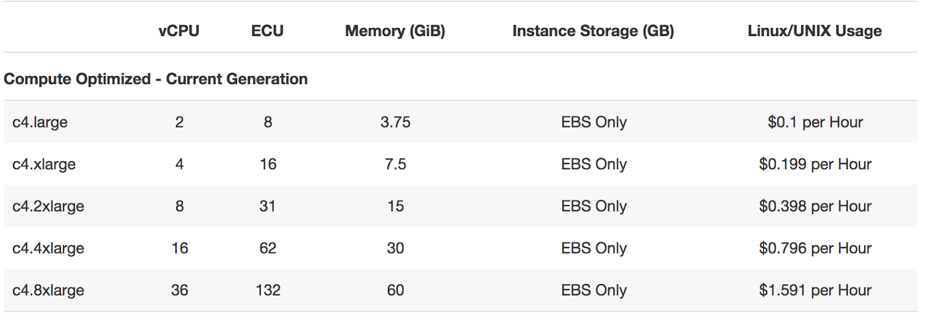
    Start with a smaller VM and scale it as the project grows. When just a bit more resources are required, the cloud vendor can offer you to double the size, as this is the most commonly used scaling step (e.g. see AWS offer below).

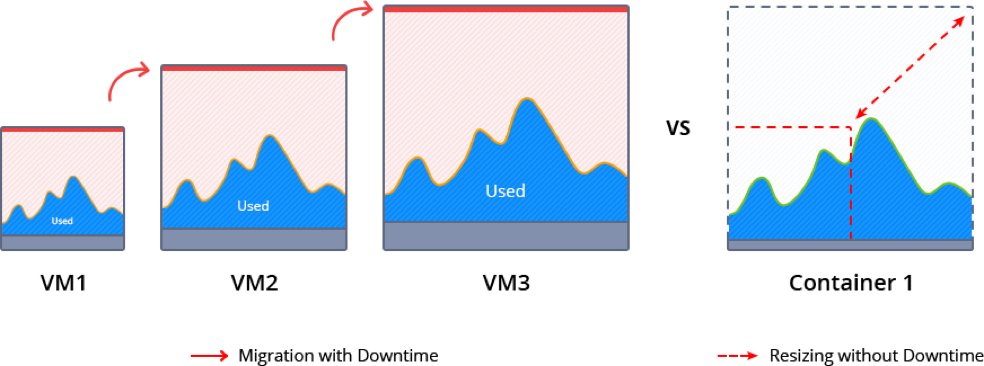
    During such scaling, the current VM normally is paused to migrate and redeploy the application. This inevitably causes some downtime and requires manual intervention.

    Memory ballooning provides a possible way (although rather complicated) to modify the amount of resources inside VMs on the fly without incurring downtime. However, this process is not fully automated and requires special tools to monitor the memory pressure in the host and guest OS and then activate vertical scaling based on the needs. As a result, memory ballooning doesn’t work well in practice, as the memory sharing should be automatic to present the expected advantages.

    Unfortunately, lack of VM elasticity and efficiency in terms of resource usage often leads to overpaying.

    Containers Scaling

    Containerization presents a new way of application packaging that makes resource consumption more granular and flexible, by automatic resource sharing among containers on the same host using cgroups. Unlike VMs, containers’ boundaries can be easily scaled up and down without the need to pause and reboot running instances.

    There are two types of containers: application and system containers. Both use the same scaling approach but they are intended for different purposes. An application container (such as Docker or rkt) typically is more lightweight, runs a single process and is used mainly for creating new projects, as it is easy to build them from pre-existing Docker image templates.

    A system container (LXD, OpenVZ) behaves like a full OS and can run full-featured init systems. This type of container is preferable for monolithic and legacy applications, as it can reuse the originally created design and important “old school” settings.

    Even system containers are much thinner compared to virtual machines, so scaling up and down takes much less time. And the horizontal scaling process is very granular and smooth, as a container can be easily provisioned from scratch or cloned.

    Garbage Collector Choice

    To maximize the efficiency of the above mentioned vertical scaling inside a Java-based container, it is important to select the appropriate garbage collector (GC) and tune it according to the project needs.

    Let’s review five widely used garbage collector solutions:

    • G1: From JDK 9, this modern shrinking garbage collector is enabled by default. One of its main benefits is the ability to compact free memory space without lengthy pause times and uncommit unused heaps. This GC is considered the best production-ready option for vertical scaling.
    • Parallel: A default GC in JDK8, it is a good option for low pauses but not for memory shrinking. This makes it inappropriate for flexible vertical scaling.
    • Serial, ConcMarkSweep (CMS): Both of these are shrinking garbage collectors with the ability to scale memory usage in JVMs vertically. But in comparison to G1, they require four Full GC cycles to release all unused resources. A new JVM option (-XX:-ShrinkHeapInSteps) in JDK 9 can  speed up memory release by bringing down committed RAM right after the first Full GC cycle.
    • Shenandoah: Shenandoah is a rising star among garbage collectors which promises to be the best solution for JVM vertical scaling. Its main benefit over the others is the ability to shrink in live mode without necessity to call Full GC, which helps eliminate significant performance degradation.

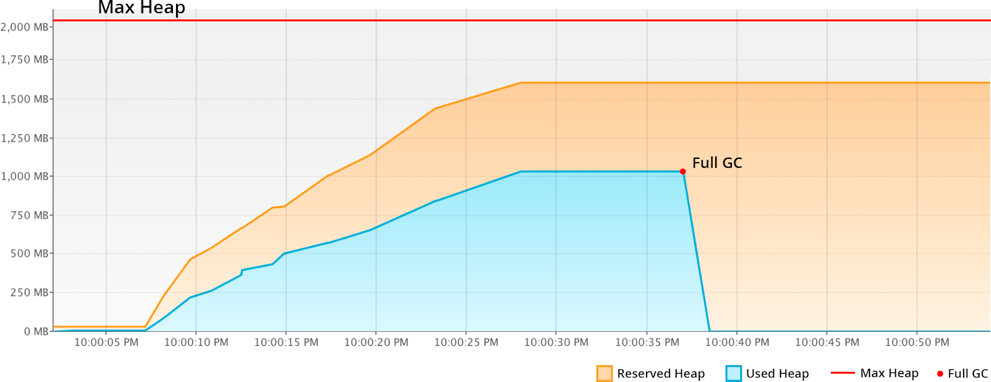
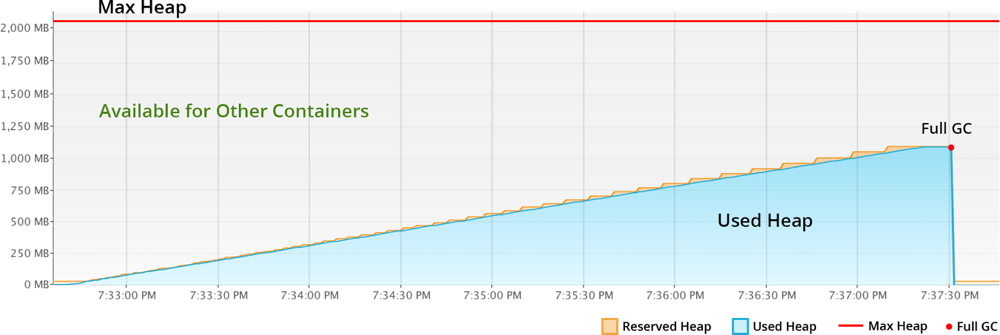
    Let’s compare memory behavior with shrinking G1 and non-shrinking Parallel:

    With Parallel, the unused RAM is not released back to OS. JVM keeps it forever, even disregarding the explicit Full GC calls. So even if your application has low RAM consumption, the unused resources cannot be shared with other processes or other containers as it’s fully allocated to the JVM.

    The modern shrinking G1 garbage collector significantly improves resource utilization compared to the previous example. The reserved RAM increases slowly according to the real usage growth. And all unused resources within the Max Heap limits are not wasted by standing idle, but made available to other containers or processes running in the same host.

    To summarize, Java applications with non-shrinking GC or non-optimal JVM start options hold all allocated RAM. For scaling Java vertically, the garbage collector should provide memory shrinking in runtime. In other words, it has to package all the live objects together, remove garbage objects, uncommit and release unused memory back to the operation system.

    Charging Model of Cloud Providers

    Nowadays, most of the cloud vendors offer a “pay as you go” billing model. This means that it is possible to start with a smaller machine and then add more servers or migrate to a twice-bigger instance as the project grows. But as described above, usually you reserve more than the application actually consumes to avoid the risk of downtime during the load spikes. As a result, many organizations overpay because the account is charged per VM but not based on the consumed resources inside.

    At the same time, there are providers offering  “pay as you use” billing approaches that became possible with the help of containerization, resource granularity and automatic vertical scaling. The payment is based on the resource units inside container. And the required capacity is provided and reclaimed on the fly in accordance with the load at the current moment. As a result, you are charged based on actual consumption and are not required to make complex reconfigurations to scale up or down.

    Taking into consideration all these factors and implementing the right settings can significantly reduce the costs for Java hosting resources, as well as positively influence application performance as a whole. Cloud and container technologies continue eliminating barriers and offering new opportunities for projects with different architectures and budgets.

    About the Author / Ruslan Synytsky

    Ruslan Synytsky is CEO and co-founder of Jelastic. He designed the core technology of the multilingual cloud platform that runs thousands of containers in a wide range of data centers worldwide. Ruslan worked on building highly available clustered solutions, as well as enhancements of automatic vertical scaling and horizontal scaling methods for legacy and microservice applications in the cloud. Ruslan is actively involved in various conferences for developers, hosting providers, integrators and enterprises. Follow him on Twitter.


  • The Cloud and DevOps: Like Peanut Butter and Jelly

    The Cloud and DevOps: Like Peanut Butter and Jelly

    Cloud is practically designed for DevOps. No matter which cloud provider you are using, each has set up systems designed to spin up/spin down on demand, has the ability to run pretty much what you need and offer APIs/command lines to achieve your DevOps goals on the infrastructure side.

    That means that the infrastructure side of DevOps can be handled by careful choice of base image, some scripts to configure network and other supporting infrastructure, and some scripts to install what’s needed once the instance is running and protected.

    Not All Roses …

    The problem is one of breadth and complexity. Yes, cloud is the perfect place to spin up DevOps, at least on the infrastructure side and, once you have a Jenkins instance, on the coding side, too. But the complexity masked by “spin up the infrastructure side” can be daunting. Different sets of APIs for servers, storage and networking, and sometimes different APIs for security versus accounts … It can get snarled quickly.

    So, What to Do?

    What can you do to make life in cloud automation/DevOps easier? There are numerous options available to you to simplify the operational part of cloud DevOps and allow you to focus on discussing issues and resolving them.

    First on the list is the growing amount of automation of cloud automation. Sound crazy? It’s not—just my way of expressing that cloud vendors provide you with APIs and tools such as Puppet are getting better at wrapping those APIs for you, so you can focus on problems, not what is supposed to be the solution.

    This idea is extended by companies that are tying disparate APIs together into a unified whole in one segment or another. One example of this is CloudCoreo, whose tools can do security audits of cloud deployments. The company takes the time to wrap the various security-related APIs and let you pick what is important for your team to monitor.

    There also is an entire market segment growing up of both consultants and VARs that will help an enterprise move to the cloud. Most of these companies focus on one vendor or another, but all share a desire to help make the shift to the cloud easier. By way of examples to get you started, consider Neoxia (in the EU) for GCE, Accenture (in North America) for AWS or Atmosera (in North America) for Azure. (Note: I have never used the cloud services of any of these companies; I’m merely offering you a sampling of what is available. Check your cloud providers’ partners page for more partners.)

    Another option that will reduce, but not eliminate, cloud-based complexity is to use containers to set up the application. The container can then be run on whatever cloud platform suits your needs (or in your data center, if that’s the preference). Any instances spun up still must be protected and given access, but most of the networking, security and instance complexity can be handled at the container management level.

    In fact, if you implement container management and choose for interoperability, a container management tool such as DC/OS can let you choose at deployment time where to put the container.

    Seeing what enterprises are starting to do with containers and entire build/test environments, it is possible that very soon you will be able to just kick off a job, have it build containers that will run your DevOps processes, run tests, deploy to other containers and then go away once the relevant data from them has been saved. The containers used along the way, by taking advantage of a multitarget container management platform, could be anywhere.

    To Sum It Up: Cloud is Good for DevOps

    The issue at hand—as it has been for DevOps and cloud for a while—is the rate of change. Here we’ve discussed a cross-section of ways to make DevOps in the cloud easier and more complete. But no doubt we’ve missed some great ideas and products, because there is so much going on.

    The point is, tools are coming available to make it easier. Don’t write a billion miles of scripts that are useful for only one provider if you can avoid it. Look into these options (and others that will crop up) to lighten your load of technical debt moving forward, and make getting DevOps roaring in the cloud easier.

    And as always, keep rocking it. The change has been constant, and you’re still cranking. That says a ton.

    — Don Macvittie

  • Platform9 Brings Workflows to Serverless Computing

    Platform9 Brings Workflows to Serverless Computing

    Serverless computing frameworks are widely regarded as the next big thing in enterprise IT because they are based on an event-driven architecture that makes servers, storage and networking resources dynamically available as needed using a programming construct known as functions. But DevOps teams are challenged in finding a way to orchestrate all those functions in concert with one another.

    To enable the orchestration of those functions, Platform9 has added support for Fission Workflows to its instance of a serverless computing framework. Platform9 CEO Sirish Raghuram says Fission Wokflows will make it possible for IT organizations to craft complex applications made up of thousands of functions.

    On the one hand, serverless computing frameworks promise to make DevOps easier by eliminating the need to provision infrastructure every time a workload exceeds whatever amount of capacity that has been assigned to it. On the other hand, attempting to manage what could easily become thousands of functions in an IT environment is likely to make DevOps even more challenging than it is today. While not a new concept, Raghuram says Fission Workflows provides IT organizations with a familiar construct for managing functions.

    Benefits of Fission Workflows include an ability to reuse functions as well as being able to upgrade entire related sets of functions all at once. There are also fault-tolerant capabilities that make possible to recover and restart a workflow in the event of an infrastructure failure.

    Platform9 is specifically making the case for a serverless computing framework based on Kubernetes clusters that can be deployed on-premises or in the cloud. Platform9 also provides support for containers on an instance of Kubernetes, and Raguham says the company expects that IT organizations will mix and match containers and serverless computing frameworks as they see fit. For example, a container might invoke a function via an API call to run a stateless process while Docker containers are employed for all the stateful processes that require access to primary storage, he says.

    Raguham notes the trouble with serverless computing frameworks put forward by cloud service providers such as Amazon Web Services (AWS) is that they lock an IT organization into a specific platform instead of taking advantage of a portable cluster technology such as Kubernetes, which is backed by the Cloud Native Computing Foundation (CNCF). Kubernetes also provides the added benefit of a common platform for both containers and serverless computing, he says.

    It’s still early days for the use of serverless computing frameworks in the enterprise. Nevertheless, it’s clear they will need to be managed from a DevOps perspective alongside cloud-native applications running on containers and platform-as-a-service (PaaS) environments and legacy applications running on virtual machines and bare-metal servers. Given the fact that none of these architectures is likely to supersede any of the others anytime soon, IT organizations would be well-advised to start crafting a DevOps strategy now on the assumption that the overall IT environment is about to become even more complex.

    — Mike Vizard

  • Cloud Computing in 2016 and Beyond

    Cloud Computing in 2016 and Beyond

    Few activities are more perilous than predicting the future of the tech industry. That goes double for cloud computing forecasts. Yet, with thoughtful deliberation and the appropriate amount of caution, you can get a fairly accurate read on what’s to come in the increasingly competitive cloud services market.

    Here’s a quick look at several trends evident among leading cloud vendors and technologies through the first half of 2016, along with a look ahead at what awaits us for the second half of the year, and on through the next decade.

    Google Makes a Major Cloud Play

    The company synonymous with search isn’t used to looking up at the leaders in its markets, yet according to figures compiled by Synergy Research Group, Google’s 4 percent share in the cloud services market in fourth quarter 2015 makes it an also-ran behind Amazon (31 percent), Microsoft (9 percent) and IBM (7 percent). Market Realist’s Puneet Sikka reports on the share numbers in a May 31 article.

    Google’s first-quarter 2016 earnings call highlighted three recent actions by the company that signal its intention to grow its cloud business:

    1. Google has gained experience through its internal cloud operations that it is now ready to share with its customers.
    2. The company is integrating its artificial intelligence (AI) and machine-learning expertise with its cloud services for enterprises.
    3. VMWare co-founder Diane Greene was appointed to lead Google’s cloud business in late 2015.

    AWS, Microsoft Azure Continue to Raise the Cloud Services Bar

    Even with its depth of technical expertise and seemingly endless resources, Google faces a formidable challenge in taking share away from Amazon and Microsoft in the skyrocketing cloud services market. Among the 722 new features added to AWS in 2015 was the Aurora relational database that Amazon claims is its fastest ever, according to Sikka. The Amazon QuickSight (AWS data analytics and visualization) tool has helped AWS sustain quarterly revenue growth near or above 50 percent for five consecutive periods.

    cloud report card
    Amazon Web Services racked up five straight quarters of revenue growth at or exceeding 50 percent through first-quarter 2016. Source: Market Realist

    Meanwhile, Microsoft’s 2015 revenue from Azure, Office 365 and Dynamics CRM increased a whopping 140 percent year over year. Microsoft’s continued ascendance, as well as that of other cloud service providers, is attributable in part to a trend highlighted in RightScale’s 2016 State of the Cloud Survey: Companies using the cloud run apps on an average of 1.5 public clouds and are experimenting with another 1.5 public clouds. They’re also using 1.7 private clouds on average, and they’re experimenting with 1.3 private clouds.

    Cloud Report Card 2
    Companies running apps in the cloud use an average of three different public and private services. Source: RightScale

    The RightScale survey notes that while AWS’s share of the public cloud market was flat at 57 percent in 2015, the number of workloads per customer increased, which helps account for the service’s 69 percent jump in revenue for the year over 2014’s figures. Venture Beat’s Jordan Novet digs into AWS’s 2015 financials in a Jan. 28 article.

    Vendors Called Out for ‘Cloudwashing’

    The rosy outlook for cloud services through this year and beyond is echoed in Gartner’s Cloud Computing Primer for 2016 (Gartner account required to access). Yet, cost and security continue to be two primary obstacles to cloud adoption. One other impediment to success identified by Gartner researchers is the tendency of cloud vendors to make unsubstantiated claims about their offerings. Gartner refers to this as “cloudwashing.”

    The industry has matured to a point where most obstacles to cloud adoption are non-technical, according to Gartner: adapting the organization’s culture, skills and management to a cloud framework; and winning the hearts and minds of end users, who often are hesitant to overcome their innate fear and mistrust of the cloud model. (Yes, your sensitive data is indeed safer on a cloud server than it is on your local hard drive.)

    Much of the confusion that Gartner lumps into the “cloudwashing” category relates to a lack of clear definitions of cloud terms such as “infrastructure as a service” and “platform as a service”—two categories whose distinctions will continue to blur.

    They’re All ‘Hybrid’ Clouds—or Soon Will Be

    Also becoming less discernable are differences between public and private clouds, both of which are morphing into versions of hybrid cloud, according to Gartner. In fact, it’s not unusual for enterprises to have multiple cloud strategies being implemented in parallel. An overarching aspect of this trend is that the fundamental role of IT is changing from a service provider to a service broker.

    The Gartner survey points out that IT pros now wear several hats and switch between roles in the course of a given day, from provider to broker to consumer. The hybrid model itself is evolving from “public/private” to “fast mode/safe mode,” according to Gartner. Confusion surrounding the term “hybrid” as it relates to cloud services is likely to continue with the rise of mobile devices, where “hybrid” refers to apps that are both web-based and native to the mobile platform.

    One way to ensure cloud customers and vendors are speaking the same language is to focus on cloud outcomes rather than the means of achieving those outcomes. Customers need to define what results they expect from their cloud efforts—financial effectiveness, tapping the expertise of cloud providers, delivering immediate results to business consumers and making overall IT operations more efficient, for example.

    What’s in Store for 2017 and Beyond?

    The popular buzzwords resurface when you scan the prognostications of the cloud experts: microservices, containers, open source. Yet customers—particularly those in enterprises—have the same concerns about cloud computing now that they had when the technology first emerged a decade ago: security, risk management, governance, compliance and disaster recovery. How much progress is being made on these fronts?

    Perhaps those areas will be addressed not by traditional IT providers but instead by web-centric services and other non-IT companies that develop and market cloud solutions for their vertical. You can’t blame non-cloud service providers from salivating at the prospect of grabbing a share of the booming cloud market. According to Forbes’ 2016 Roundup of Market Estimates, cloud forecasts are dominated by a single preposition: “Up.”

    2016 Cloud Report Card
    CLICK TO TWEET
    • Public cloud IaaS hardware and infrastructure software revenue up to $38 billion in 2016 from $25 billion in 2015 and jumping to $173 billion by 2026 (Statista)
    • Worldwide public cloud revenues up to $117 billion in 2017 from $80 billion in 2015 and $167 billion in 2020 (TBR)
    • Cloud’s share of annual IT budgets up from 29.8 percent as of January 2016 to 43 percent by January 2018 (IDC)

    No matter your organization’s current state of cloud adoption—whether dipping your toe, or in with both feet—you’ll future-proof your cloud investment by relying on vendor-agnostic application-management services. There’s no better way to take advantage of what the cloud has to offer now while ensuring you’re positioned to benefit from tomorrow’s cloud enhancements.