Tag: Cloud Provisioning

  • Self-Service Portal From env0 Reins in Public Cloud Costs

    A platform that provides IT teams with a self-service portal through which they can both control access to and the cost of cloud resource consumption is now available in beta for free from env0.

    Company CEO Ohad Maislish said that while many organizations have implemented self-service portals to control who can access resources on public clouds such as Amazon Web Services (AWS), Microsoft Azure and Google Cloud Platform (GCP), it’s apparent more workloads will be heading into the cloud in the wake of the COVID-19 pandemic to make organizations more resilient. As a result, there’s now a lot more sensitivity to cloud costs.

    Rather than relying on estimations or manual tagging, Maislish said env0 allows IT teams automatically tag infrastructure in a way that ties cloud resources to a predetermined budget using an engine designed for that purpose. All too often, organizations wind up spending a lot more on public cloud resources than planned simply because there is no way to track spending in real-time, he noted.

    In addition, it is common for organizations to find themselves being billed for “phantom workloads” that are created when developers forget to de-provision virtual machines, for example. The env0 platform provides automatic shutdown and time-to-live (TTL) options to eliminate that issue, said Maislish.

    Env0 is fresh off raising $3.3 million in funding. The env0 platform, expected to be generally available in the fall, also makes available policy controls for managing passwords, keys and tokens along with role-based access controls.

    Prior to the COVID-19 pandemic, there was a tendency for organizations to not pay a lot of attention to cloud costs. Achieving faster rates of building and deploying applications was considered a much higher priority. Most organizations will continue to put a premium on delivering applications faster. However, achieving that goal will be weighted more carefully against the total cost, especially as finance teams start issuing stricter cost mandates. In many organizations, the unfettered access to cloud resources that developers once enjoyed is likely to be more constrained.

    Of course, env0 is not the only platform promising to help organizations rein in cloud costs. However, it has combined access and financial controls in a way many organizations have been unable to achieve. In fact, the biggest challenge when it comes to containing cloud costs may very well turn out to be the will to enforce controls on developers who previously had a wide amount of latitude.

    It’s difficult to assess right now at what rate applications will be moving into the cloud. Many organizations may decide to lift and shift monolithic applications into the cloud as the first step toward making their IT environments more resilient. Others may accelerate the rate at which they are building and deploying new applications as once nascent digital business initiatives are transformed into business continuity strategies. Whatever the motivation, the days when many developers could spin up a virtual machine in a public cloud almost at will are most likely coming to an end.

  • Mission Makes AWS Expertise Available for Free

    Mission Makes AWS Expertise Available for Free

    Mission, a provider of managed services for the Amazon Web Services (AWS) cloud, this week announced it will make its cloud optimization expertise available free of charge for any IT organization that acquires AWS licenses through it.

    Alex Beal, director of product for Mission, said as cloud sprawl continues to be an issue, many internal IT teams simply don’t have the expertise required to rein in those costs. However, rather than charge extra for the expertise Mission will now make its tools and consultants available for free under the auspices of the Mission Cloud Foundation service to any organization that employs Mission to acquire AWS licenses, he said, noting every Cloud Foundation customer will get access to a designated Mission Cloud Analyst who will provide regular account reviews and guidance on implementing best practices.

    Mission can provide the free service because it acquires licenses from AWS at a lower cost. Effectively, AWS is paying for the services being provided by Mission, said Beal.

    As more workloads move into the public cloud, IT teams are struggling to navigate a complex mix of service levels from AWS that range from spot pricing options to reserved instances that can be licensed for specific periods of time at a deep discount. However, determining which workloads lend themselves best to various AWS pricing options can be challenging to determine, especially for developers who spin up virtual machines without consulting with internal IT teams. Collectively, organizations are wasting millions of dollars each year because of suboptimal usage of public cloud resources. Beal estimated that the average IT organization is wasting about $5,000 a year on cloud infrastructure resources that could be better allocated to other IT initiatives.

    Beal said Mission will work with those internal IT teams to identify unused resources and rightsizing candidates, set up budget alerts and recommend better options for specific types of workloads using a combination of monitoring tools from third parties such as CloudHealth and one developed by Mission. Those monitoring tools are also employed to enforce budget constraints and run security checks.

    Mission Cloud Foundation also includes tools to reallocate charges, reference purchase order numbers and set up automated custom reports.

    Most IT organizations could develop much of this expertise on their own. However, Beal said most IT teams also have better things to do with their time that add more value to their organization. Instead of acquiring licenses direct from AWS, Mission is making a case for an alternative approach that provides a level of service and support that AWS generally only provides to Global 2000 customers.

    Other managed services providers (MSPs) may or may not also provide tools and expertise free of charge. Savvy IT teams, however, may soon force the issue. After all, while public cloud represents the most widely employed form of IT infrastructure as code, from a cost perspective it’s also clear public clouds can also quite easily become too much of a good thing.

    — Mike Vizard

  • Perfect Sense Open Sources Gyro to Automate Cloud Provisioning

    Perfect Sense Open Sources Gyro to Automate Cloud Provisioning

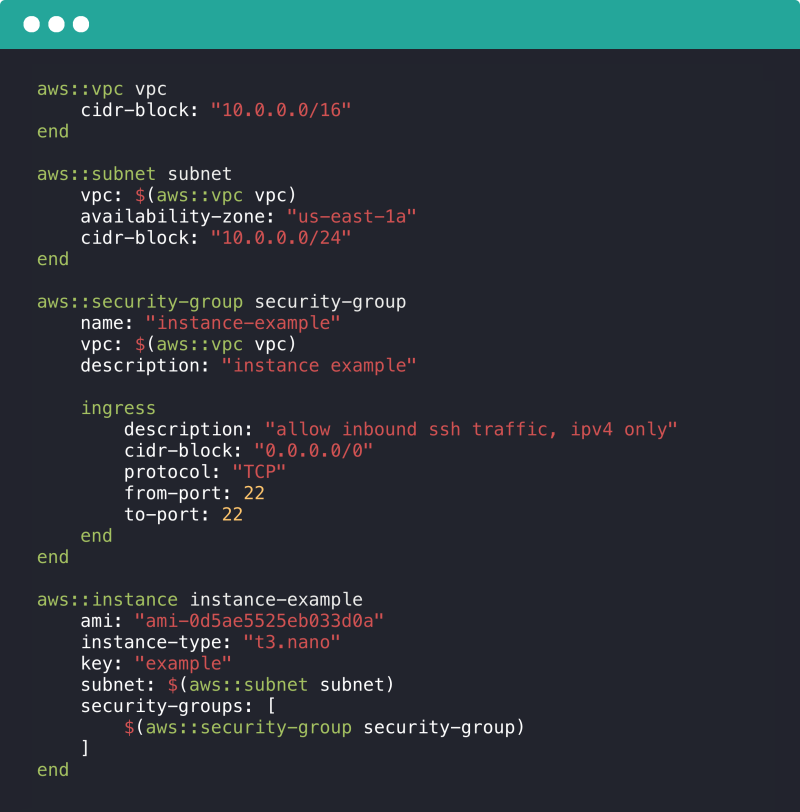
    Perfect Sense has launched an open source project dubbed Gyro that provides an alternative approach to automating cloud infrastructure provisioning and management.

    Gyro was developed as an alternative to other open source projects such as Terraform and Pulumi, said CTO Jeremy Collins. It is designed from the ground up around a programming language that allows DevOps teams to define infrastructure as code, and features logic built into configurations to make it easier to create more precise workflows, he said.

    Adding logic to create equivalent workflows in rival platforms is more complex, Collins noted, adding the ability to add logic makes it easier to not only provision cloud infrastructure but also to roll it back when necessary.

    Perfect Sense developed Gyro to make it easier to manage the infrastructure for its Brightspot content management system (CMS). As such, Gyro can support multiple cloud computing platforms.

    In addition to making it possible to add cloud platforms to an existing configuration, Collins said it can be used to create custom commands and define multiple extension points directly within the Gyro language.

    Perfect Sense Gyro

    Perfect Sense developed Gyro to automate the provisioning of virtual machines. Since then, the company has extended its capabilities to add support for emerging cloud-native platforms such as Kubernetes.

    Collins said Gyro provides a single extensible tool spanning a broad range of DevOps processes, from provisioning infrastructure to discovering what services already exist.

    Despite the popularity of rival tools such as Terraform, it’s still early days in the adoption of infrastructure as code. Most IT organizations are a long way from standardizing on any one platform for automating the provisioning of infrastructure. In fact, it may not be uncommon for different DevOps teams within the same organization to employ different platforms for provisioning infrastructure.

    Gyro’s ultimate success will depend much on Perfect Sense’s ability to foster an open source community. The Brightspot CMS is used by the Los Angeles Times, Walmart, Mattress Firm, Univision, Sotheby’s and US News and World Report, so Collins said there is a base of support for Gyro on which to build a community. Perfect Sense is looking to build a community that will continue to extend the reach and scope of the platform by adding additional plugins.

    Regardless of the approach taken, as the number and rate at which workloads are being deployed on cloud platforms increases, it becomes critical for IT organizations to find a way to automate processes. It’s not clear to what degree those workloads will be provisioned by developers themselves versus traditional IT operations teams that have learned how to program. However, one way or another the provisioning of cloud infrastructure is going to be automated.

    — Mike Vizard

  • DevOps: The Glue of Workflow

    DevOps: The Glue of Workflow

    The best tool in the DevOps continuum is the sticky wrapper that holds it all together. It is the workflow that binds it and makes sense out of the term “continuous.”  CIOs often are enamored with a build or deploy tool, but it is the workflow tool in every DevOps strategy encapsulating more than one function that is the real hero. Imagine having the perfect test automation scripts but no way to execute them outside of constructing a new build. Or imagine having the perfect CMDB integration scripts but no way to call them outside of the build process. Or even worse, imagine having the need for human approval before a deployment takes place (or is promoted), and no way to integrate it outside of a custom deployment process.

    Lean DevOps Construction

    Attempting to make very few tools perform these functions without a workflow engine ultimately forces automation engineers to create functionality within a tool it was never designed to perform. Conversely, when a workflow wrapper is available, build and deployment processes can remain small, elegant and consistent, allowing the workflow engine to integrate extended functionality into the continuous delivery cycle.  Size of the automation constructs you create does matter: the smaller the better.

    Using Lean methodologies in your DevOps services, it is better to break down automation constructs into the logical functions they are intended to provide. Build automation, for example, should not have to include extensions to turn monitoring functions on or off. Build automation also should not have to worry about the deployment process; its primary singular purpose is to construct a new build. Where that new build is then deployed becomes the single purpose of the deployment process.  Attempting to automate the entire cycle of an application into one automation construct from end to end (instead of smaller blocks that work together) increases both size and risk (as well as length of time to execute) of that one event.

    Dealing with Humans in the Automation

    Human integration is the bane of DevOps processes. Every time you have to pause automation to obtain a human approval, you introduce time delays that cannot be predicted or occur with consistency. Imagine a deployment process that requires a human to press “yes” before continuing. The introduction of a human approval can sit idle on a tooling screen for hours during lunch, or unexpected days off, or vacations (when others are afraid to take responsibility for passing a substandard build, even for further testing). Deployment tools can integrate human responses, but this is not their forte. They are generally ill-equipped to use multiple contact methods, go up the management chain when needed or ping a mobile device when preferred by the user listed as responsible. Workflow tools are ideal for all of these human-contact logistics.

    The challenge during DevOps service construction in utilizing a workflow wrapper is keeping human interaction to the absolute minimum required by outside regulating agencies and still achieve compliance. The alternative is to automate processes with such quality and consistency so that human interaction would merely become redundant and unnecessary. The workflow wrapper is not an excuse to simply automate what human interaction you have today. Instead, it is a highly functioning tool to allow you to redesign more-effective automation processes, limiting human interaction where possible. The goal is to build small, independent automation constructs that work together in a highly efficient manner.

    Hold the Presses

    Communication or notifications also can be handled in a workflow wrapper much better than in individual DevOps toolings. Imagine for a moment that I am a release manager, wanting to know the progress (or rather obstructions to progress) for my new application. To accomplish this notification process, it would have to be embedded within my build process (to know if it passed or failed). The alternative is that my workflow wrapper checks the build logs and can send me notification in the method I prefer (email, text message, an Instagram pic of Thelma and Louise over the cliff, etc.) In addition, I may not actually want to check the status of every build submitted, as that becomes noise after a while. I may want to know only when a build candidate has passed and is ready for promotion to a further testing environment. Since my workflow wrapper would be aware of this, it could automate the notification to me quite easily.

    Now add the consideration of management chain to this notification process. If I am out on vacation (which I expect to be able to do, since DevOps enables my personal life), my manager or my sponsoring executive may want to be notified if my application is not going to production for some reason during my absence. This is a level of automation that most build or deploy tools are simply not designed for. They have no idea who I report to and who that person reports to. But that departmental notification escalation chains can be incorporated easily into a workflow wrapper, and execute as expected while I am away (including pinging my cell phone just in case I need to jump in and fix something).

    Release Management Solutions

    Most release management (RM) or release orchestration (RO) tools have at least minimal workflow capabilities built into their offerings. Whether this capability is enough for your organization or whether you need a more capable workflow engine to wrap around it is a decision only you can make. Most release management tooling is designed to put an elegant wrapper around build automation and deployment automation. It usually contains the ability to segment by line of business or product, as well as role-based access controls (RBAC) for permissions and auditory compliance. And it usually contains at least elementary notification capabilities. What RM excels at are human interaction and tracking progress, and so it does meet the needs of many companies.

    When RM is not enough is usually when the DevOps services you provide begins to extend into ancillary services and secondary automation integration capabilities. Examples include monitoring systems integration, multiple testing tooling integration/evaluation, configuration management database (CMDB) integration and capacity-on-demand environment provisioning.  Highly evolved notification systems tend to require an external workflow wrapper beyond the normal capabilities an RM tool offers. A solid workflow wrapper acts as the glue that can hold disparate DevOps tooling (either from different vendors or performing different functions) together with further super-automation processes above them like an overarching umbrella.

    Impacts to the Bottom Line

    Choosing to offer DevOps services without any form of a workflow wrapper is like going hunting with an excellent rifle and no bullets: a lot of capability that can never reach the potential it was intended for. On the other hand, obsessing about replicating current processes within a workflow tool is like hunting a bunny rabbit with a bazooka: way too much damage caused when trying to keep things small and elegant. The key is to balance the use of a powerful tool (workflow), with Lean thinking in automation processes and constructs. Keep the building blocks small and functionally oriented; limit human interaction; and use workflow for the functions it is best-suited for—connection and communication.

    The technical capabilities a workflow wrapper will add to your DevOps solutions are substantial. Your services will be far more efficient and far more powerful. However, to truly assess the financial impact of a highly functioning workflow system, one must determine the value of time and decision-making. An elegant notification system can keep you informed without sending you countless emails you learn to ignore or flooding your text inbox with data that exceeds your cellular plan. In this way, notifications are meaningful, and you can begin to make meaningful business decisions based on the information you receive, only at the times you need to see it. What is that worth to you and your organization? Only you could really assess that.

    To continue the conversation, feel free to contact me.