Tag: cloud platform

  • Cloudflare Adds Digital Experience Monitoring to CDN Portfolio

    Cloudflare Adds Digital Experience Monitoring to CDN Portfolio

    At an online CIO Week event, Cloudflare today added a digital experience monitoring capability to a portfolio of services layered on top of its core content delivery network (CDN).

    Corey Mahan, director of product management for Cloudflare, said the Cloudflare Digital Experience Monitoring service extends a Cloudflare Zero Trust platform based on agent software dubbed Cloudflare WARP. The solutions delivers a wide range of software-as-a-service (SaaS) offerings spanning everything from data loss prevention (DLP) to email security.

    He added that the overall goal is to reduce the total cost of IT by delivering SaaS application services more efficiently using a single agent rather than having to deploy multiple agents for each service.

    The Cloudflare Digital Experience Monitoring service, available as a private beta, will enable IT teams to leverage the Cloudflare CDN to measure and analyze controlled data flows to public or private resources by emulating traffic flows using synthetic data. Via integration with the Cloudflare Zero Trust platform, IT teams can also access real-time data visualizations highlighting anomalies in connectivity or performance that might, for example, be indicative of a security breach, noted Mahan.

    While there’s no doubt IT organizations are looking to streamline the number of IT vendors they need to manage, it’s not clear what the center of gravity will be for achieving that goal. Cloudflare is making a case for using the same global CDN that many organizations already rely on for networking services.

    The Cloudflare Digital Experience Monitoring service leverages the company’s CDN to make it simpler to understand, for example, why users in one geography experience sub-optimal application experiences compared to another, said Mahan. That’s especially critical when more organizations than ever have employees working from home across multiple geographies, he added.

    In the longer term, more networking and security functions will be consumed as a service. The challenge then becomes integrating those services into the DevOps workflows that are employed to deploy applications across a highly distributed computing environment. In many cases, what might initially appear to be an application performance issue winds up being a network connectivity problem that is more easily solved.

    One way or another, the management of IT services in the months and years ahead will continue to converge. Organizations of all sizes will need to determine whether it makes economic sense to acquire platforms they need to manage versus consuming a service that is managed on their behalf. Most of the time, a service will be easier to consume and free up resources that can be applied to other IT functions, such as application development.

    Of course, organizations will also need to take care to avoid locking themselves into a specific services provider. Ultimately, however, the question is whether managing a specific IT function provides enough differentiated value to be worth the time and effort when there is so much more to do.

  • Multi-Cloud Computing is a Major IT Headache

    Multi-Cloud Computing is a Major IT Headache

    A CloudBolt Software survey of 500 senior IT, DevOps, security and finance leaders found 79% are struggling under the weight of managing multiple cloud computing environments.

    The survey from CloudBolt Software, a provider of a cloud management platform, found specifically that more than three-quarters of respondents (78%) said they have too many cloud tools throughout their enterprise, and 80% struggled to achieve comprehensive visibility into cloud usage and spending. A total of 80% also noted that their current approach to cloud computing created new security vulnerabilities.

    A full 88% said they need a “manager of managers” that would enable them to unify the various silos that have multiplied across their IT environment.

    Nevertheless, 78% of respondents said that moving to the cloud enabled them to achieve cost savings compared to running applications in an on-premises IT environment.

    CloudBolt Software CEO Jeff Kukowski said the issue is not so much that IT organizations regret shifting workloads to the cloud; instead, the issue is finding a way to manage multiple clouds, each with their own set of tools and frameworks that need to be mastered.

    It’s not clear whether organizations are deliberately employing multiple clouds or if, because of simple inertia, they have found themselves managing multiple cloud platforms because of decisions made by various development teams. Some IT organizations, for example, employ multiple clouds because they are concerned about either becoming locked into a specific cloud computing service or whether an outage might take all their applications offline at the same time. Others are simply trying to take advantage of services that are better provided by one vendor than another.

    Regardless of how IT organizations found themselves managing multiple clouds, the total cost of IT rises as each new platform is added to an IT environment. CloudBolt Software is making a case for an IT framework that provides a layer of abstraction through which the management of multiple clouds and on-premises IT environments can be unified. It is more a question of time and degree to which IT organizations will eventually consolidate the management of disparate IT environments under a single control plane that provides the foundation for true hybrid cloud computing, said Kukowski.

    There are, of course, a few organizations that have standardized on a single cloud computing platform. The degree to which those organizations can maintain that standard will naturally vary as, for example, new workloads that may be optimized for a specific cloud environment are built or as companies acquire other organizations that are running workloads on other cloud platforms. In many of those cases, organizations discover that the cloud services invoked expose a range of proprietary application programming interfaces (APIs) and disparate virtual machines that make migrating workloads a major challenge.

    Like it or not, most organizations will be managing multiple IT environments for the foreseeable future. The only thing that is uncertain is the volume of workloads that might be running on any one of those platforms at any given time.

  • Choosing an Incident Management Platform

    Choosing an Incident Management Platform

    When you’re feeling the stress and pain of manually managing incidents and incident response, making the decision to find an incident management tool is a no-brainer. But how do you choose the one that will work best for you, your team and your business?

    You might be asking yourself, “Where do I start? What do I need to know? What questions do I ask? What are the options? How can I be sure we’re choosing the right tool?”

    To help identify the most appropriate solution for your organization, here are the top four things to consider.

    1. Do you have the culture and processes you need to support an incident management solution?

    Different business models require different approaches to incident management. You should be looking for a platform to fit the unique needs of your organization. More importantly, even if you find a solution that seems like a fit, do you have the people, culture and processes necessary to support a new tool? And if not, do you have a plan to put them in place?

    Implementing solutions successfully takes planning, so you’ll want to make sure that you and your team can handle the workload.

    2. What are your pain points and goals?

    You’re looking for an incident management solution for a reason, but do you know exactly which pain points you hope to solve? Your top goal may be to “make it easier,” but every solution is likely to tout that they make things easier. Determine what you’re hoping to accomplish. Do you want to automate processes? Bring your team together more quickly? Track every action from declaration to retro? All of the above? If you prioritize the problems you want to solve, it’ll be easier to check off boxes when you investigate your top choices.

    3. Who should be involved in this search?

    You may be the one taking the lead on searching for a better way to manage incidents, but knowing who else should be part of the decision-making process will make the search more efficient. You’ll need to know if you have support from your team and from leadership; who’ll authorize the budget for your new tool and who has to sign off on your decision.

    And don’t forget other stakeholders outside of your team! Incidents impact all parts of an organization, so consider who needs to be a part of the selection process—from your client success team to your sales team.

    4. How will you make a decision?

    Finding and implementing an incident management solution requires time and resources. It’s especially important to account for the time it will take to onboard your team and configure your solution, including assigning individual roles, setting up integrations with your existing tools and test-driving your incident management process.

    The worst-case scenario is that you purchase a platform but don’t have time to implement and use it. You won’t be happy, nor will your team or executive stakeholders.

    So have a clear idea of what you need to make a final decision—whether it’s considering who’s involved, how much budget you need to secure, what your timeline is or how you’ll address any legal or security issues.

  • AWS Well-Architected Framework Elevates Agility

    AWS Well-Architected Framework Elevates Agility

    What started as a white paper from AWS, the Well-Architected Framework has evolved into a large ecosystem of partners and more

    In the past year, agility has become one of the most prized IT attributes as organizations race to deploy more workloads in the cloud. There is a paradox, however: The faster organizations deploy applications, the more likely mistakes will be made. Cloud computing deployments are rife with misconfigurations that are the direct result of developers provisioning cloud infrastructure rapidly and incorrectly. Application environments are almost never as efficient as they could be.

    The challenge and the opportunity IT teams now face is defining a set of best practices for securely and consistently deploying application workloads on cloud infrastructures that complement and extend agile development methodologies. IT organizations should not have to slow down application development and deployment because of security concerns. Identifying high-risk issues (HRIs) and being able to consistently achieve and maintain security without sacrificing agility is an absolute requirement.

    It seems that Amazon Web Services (AWS) couldn’t agree more. The cloud leader has defined the AWS Well-Architected Framework to help organizations build workloads on AWS that are secure, efficient, reliable, cost-optimized and operationally excellent.

    Through this effort, AWS hopes IT organizations benefit from removing the guesswork for building workloads on cloud. Cloud misconfiguration mistakes that conspire to make organizations question their commitment to agile development methodologies are eliminated. The only remaining issue is finding a set of tools that turn those AWS guidelines into a set of policies that can be achieved and enforced easily.

    Agile Meets Well-Architected

    In addition to making it possible to build and deploy applications faster, agile development methodologies make it possible to test the application code. IT teams gain unprecedented visibility into how applications behave. The equivalent of an application development methodology for managing cloud infrastructure is the AWS Well-Architected Framework.

    The Well-Architected Framework is battle-tested, based on best practices AWS has observed over its 14-year history. The pillars of the Well-Architected Framework are:

    1. Operational Excellence: Under this pillar, operations teams need to understand their business and customer needs so they can support business outcomes. Operations teams create and use procedures to respond to operational events and then validate their effectiveness to support business needs. Those teams also collect metrics that are used to measure the achievement of desired business outcomes. It’s important to design operations to support evolution in response to change and to incorporate lessons learned through their performance.
    2. Security: This pillar focuses on the importance of putting in place practices that influence security before any workload is architected. IT teams need to control who can do what. In addition, they need to be able to identify security incidents, protect systems and services, and maintain the confidentiality and integrity of data through data protection.
    3. Reliability: This pillar encompasses the ability of a workload to perform its intended function correctly and consistently when it’s expected to. This includes the ability to operate and test the workload through its total life cycle. The workload architecture of the distributed system must be designed to prevent and mitigate failures, handle changes in demand or requirements and be able to detect failures and automatically heal itself.
    4. Performance Efficiency: This pillar addresses the need to use computing resources efficiently to meet system requirements and to maintain that efficiency as demand changes and technologies evolve. Teams must gather data on all aspects of the architecture, from the high-level design to the selection and configuration of resource types and make trade-offs in their architecture to improve performance, such as using compression or caching or relaxing consistency requirements.
    5. Cost Optimization: This pillar focuses on how to run systems to deliver business value at the lowest price point. Design decisions are sometimes directed by haste rather than data, and it can be tempting to overcompensate rather than spend time performing benchmarking to determine the most cost-optimal deployment. As a result, deployments can be both overprovisioned and underutilized. Using the appropriate services, resources and configurations for workloads is key to cost savings.

    Each of these pillars requires tools to enable DevOps teams to proactively manage their cloud environments—not only by provisioning and deploying applications faster but also by making more informed decisions when considering trade-offs between performance, reliability, cost and security. It’s a balance as rarely are these decisions independent of each other.

    The COVID-19 Imperative

    The COVID-19 pandemic has made the Well-Architected Framework essential. The number of workloads being deployed on AWS has increased sharply as organizations of all sizes accelerate digital business transformation initiatives. IT projects that once were expected to take months to complete now are expected to be up and running in a matter of weeks.

  • How to Choose the Right IoT Cloud Provider

    How to Choose the Right IoT Cloud Provider

    The flexibility and scale of cloud-native development makes it an obvious choice for IoT initiatives. That’s partly because IoT engineering tends to be more complex, requiring seamless interoperability between software, hardware, a UI, together with connectivity and data handling capabilities. Typical IoT initiatives are compute-intensive too, again making them a good fit with the functionality a cloud-native development platform can provide. The right cloud platform can help accelerate the launch of an IoT project and reduce the risks associated with rollout. Simultaneously, cloud-native development should also increase efficiencies through the development cycle, which both speeds things up and lowers costs.

    Considering the significant benefits of cloud-native engineering, what, if any, are the downsides? For those new to engineering in the cloud, there is a learning curve involving a few new variables that need to be taken into consideration to avoid disruptions and vulnerabilities in the software development and operations environment. Furthermore, selecting the right cloud tools can be confusing. The cloud giants (Microsoft, Amazon Google, and IBM) all have comprehensive offerings. In addition, dozens of specialist providers compete alongside them with targeted sector-specific solutions.

    An IoT platform should help to minimize risk and ensure quality digital service delivery from end-to-end. It should provide organizations with tangible benefits that amount to a head start in engineering terms: built-in tools and capabilities that cut effort, costs and time required. Many specialist vendors offer attractive packages that address IoT solutions needs without requiring too much customization. However, engineering teams must also take into account how the IoT solution integrates with their organization’s wider digital offering. IoT systems deliver the most value when they are closely aligned with the rest of the business. As a result, data handling and data integration become critical factors in the decision-making process.

    More generally, IoT platforms offer some very attractive services to help companies get started in setting up their IoT solutions. There are trade-offs, however, which often come later down the line in the form of pricing, technical constraints, complexity and vendor lock-in. When it comes to evaluating cloud platform providers for IoT, there are a number of factors every organization needs to keep front of mind.

    1. Is there a cloud platform name that keeps cropping up in conversations with your trusted influencers? Enterprises should seek recommendations, then follow up to ensure providers can share examples and evidence to back up success stories.
    2. Pay attention to scalability. Cloud providers will dazzle prospective clients with how many millions of connections they can handle. Can they show consistently high uptime? Can they help you make the job of scaling easier? Can they monitor the performance of devices?
    3. Finding a cloud platform that can meet your IoT solution needs is your primary concern. But longer-term, it is worth asking how well the platform accommodates changing use cases.
    4. How will your IoT system handle regular updates? These come in the form of system integrations from the IoT platform vendor and firmware updates that you will want to push out to your connected devices.
    5. The new IoT environment will need to seamlessly manage data, so businesses need to consider how they will ensure that happens. When approaching the challenge of data management, they will need to evaluate if they have the skills and resources in-house to work alongside their IoT cloud provider to ensure success, or if additional external support may be required.
    6. Congratulations, your role is now to own, manage and secure millions of data points! How will your IoT cloud platform work alongside your existing security practices to bolster security and privacy in the IoT system?
    7. Established all-rounders or small specialists? Proprietary or open source? There are many factors to weigh up, including the trade-off with ease of setup, where enterprises feel the benefits immediately, but potentially at the expense of future constraints such as vendor lock-in.
    8. It’s important to read the small print when it comes to disaster recovery options. A whole host of environmental factors can impair the ability of an IoT system to function. This is an opportunity to examine how DR planning is handled right from the get-go, and to question a provider’s track record when it comes to outages.
    9. The difficulty businesses most often have in budgeting for their IoT platform support is failing to account for how their needs change. A pricing model that seems great upfront can prove costly in the long run. Try to anticipate the changing needs and ask what kind of pricing flexibility the IoT cloud platform can offer.

    While there are undoubtedly many factors to consider before undertaking cloud-native IoT development, cloud engineering confers many significant benefits. Nowadays the right IoT cloud platform is much more than hosting and accessing resources in the cloud. Cloud-native computing enables companies to take advantage of the most up-to-date techniques and services. These include PaaS, multi-cloud, microservices, agile methodologies, containers, CI/CD, data engineering, IoT, AI, and machine learning, but the list could go on. With the right IoT cloud partner, companies can harness the latest technical capabilities to progress toward their strategic business goals. Embracing cloud-native engineering helps organizations accelerate digital delivery as well as achieve scale, increase reliability and improve efficiency.

  • How to Achieve AWS Security in 10 Steps

    How to Achieve AWS Security in 10 Steps

    Looking to lock down your AWS cloud service? Here are the 10 steps to take for AWS security

    As more companies embrace the cloud, security is becoming a more significant challenge. Irrespective of size, organizations are increasingly realizing the importance of having proper cloud security practices in place. More and more companies are creating a culture where digital engineering teams are making cloud security a priority and checking whether their service providers can provide the correct security levels for their cloud workload. It is up to organizations, in partnership with their cloud service providers, to understand the different security roles, responsibilities, tools and best practices.

    It turns out that getting the balance right security-wise is becoming easier. For example, AWS has published its cloud security best practices to help customers implement cloud services in a highly secure manner. These best practices provide guidance to organizations unsure of the tools or services they require. The AWS cloud platform allows customers to scale and innovate while maintaining a secure environment; customers only pay for the cloud security services they are using without any upfront expenses, unlike the on-premises environments.

    When it comes to cloud security SNAFUs, misconfigurations that accidentally and unnecessarily expose services are the biggest culprits. Any misconfigurations during implementation can potentially lead to big problems down the road. In the cloud, resource provisioning, management and monitoring happen via APIs, consoles and command-line interfaces (CLIs). So, it’s essential to secure all these connections during the early stage of cloud adoption.

    Learning From Experience

    Teams also must ensure that virtualization, identity and access management (IAM), workload protection and network security and encryption are a part of this architecture blueprint. We are all familiar with catastrophic data breaches that make the news, but there are many others that do not, and the vast majority of these are avoidable. Let’s examine the following three scenarios, all derived from real experiences, and then look at how the vulnerability could have been avoided.

    Case 1: Passwords Matter

    An AWS account was compromised due to a weak root user password, combined with MFA not being configured. An attacker removed EBS, EC2 instances, S3 data backup and asked for a ransom to provide the database backup file.

    This could have been prevented by utilizing an IAM user with a specific policy instead of using the root account. 

    Case 2: Visible Access Keys

    The developer posted the development account credentials for the AWS access and secret access key in the script, which was on the public Git repository. Using those keys enabled the attackers to deploy multiple resources in all regions and created multiple dummy resources. For the six to eight hours that the account was hijacked, the attackers racked up a bill of $4,000 to $5,000.

    This could have been prevented by using an IAM role instead of hard-coding the access keys into code. Access keys should be rotated periodically.

    Case 3: Misconfigurations

    The security group was not properly configured. In particular, port 22 was allowed globally, ports 80 and 443 were also open from all. The application which was hosted on EC2 instance was front-ended by the application load balancer. The attackers found a basic cross-site scripting vulnerability and SQL injection, tried injecting malicious scripts and removed all the data from the server.

    This could have been prevented by following a trusted advisory, putting WAF on top of the application load balancer and utilizing the AWS inspector for security assessments.

    AWS Security in 10 Steps

    These three cautionary tales are all examples of where a small security vulnerability caused big losses, and they all demonstrate how easy it would have been to deploy the secure cloud option. Hindsight is a wonderful thing, but it is even better to avoid making the error in the first place. Here is a 10-step guide to understanding security best practice structures and how users should implement the AWS platform and its services in the best way.

    1. Understand the Shared Responsibility Model

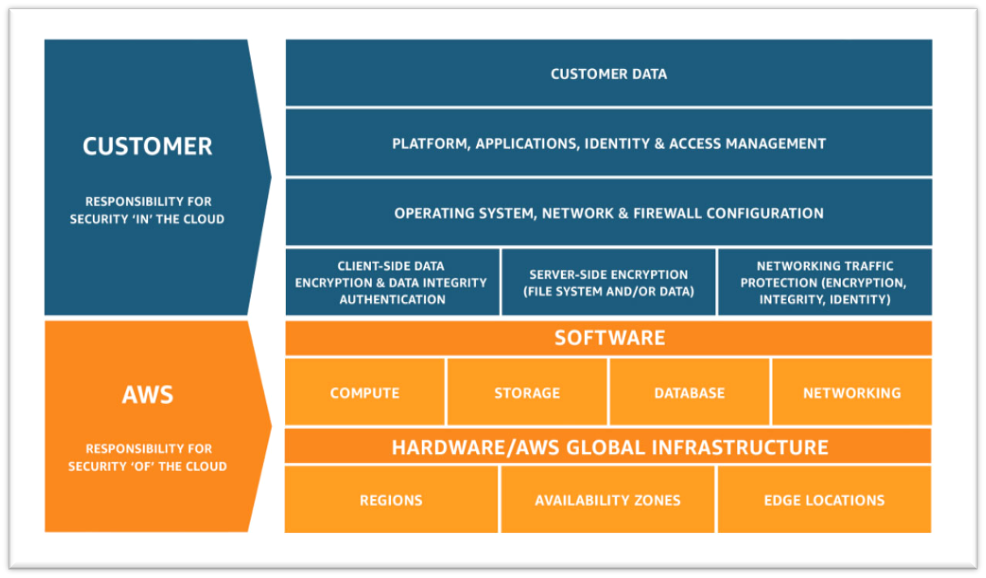
    • Amazon’s responsibility: AWS is focused on infrastructure security, including computing, storage, database and intrusion prevention networking services. AWS is also responsible for the security of the software, hardware and the physical facilities that host AWS services.
    • Customer’s responsibility: AWS customers are responsible for the secure usage of AWS services that are considered unmanaged. The customer is responsible for managing user base access-authentication methods, encryption of data stored inside AWS.

    2. Follow IAM Best Practices

    • The AWS Identity and Access Management Service enables users to manage access to AWS services and resources securely.
    • The AWS account can be administrated by creating groups and users and applying granular permission policies to users to provide limited access to APIs and resources. This video takes a deep dive into IAM policy management.
    • When granting IAM roles, follow the “least privileges” approach to security.
    • Rotate access keys and passwords.

    3. Manage OS-level Access and Keep Ec2 Instances Secure

    • Run an inspector assessment to generate an OS-level vulnerability report.
    • Use System Patch Manager to keep OS packages updated.
    • Patch the EC2 instance periodically to protect your infrastructure from newly discovered bugs and vulnerabilities.
    • Follow the security advice provided by OS vendors RedHat, Suse, Microsoft, etc. This helps to keep all OS-specific packages updated from a security perspective.

    4. Encryption

    • There are two methods for encryption in AWS: in transit and at rest.
    • Use AWS KMS for storing at rest encryption keys, which can be AWS-generated or customer-generated.
    • Use Cloud HSM to provide hardware-encrypted devices for storing keys.
    • Most AWS services provide in-transit encryption by providing https endpoints that provide encryption end to end.
    • AWS Certificate Manager allows you to create an SSL certificate for the public domain.

    5. Follow Security Best Practices for AWS Database and Storage Services

    • RDS storage should be encrypted at rest.
    • Restrict access to RDS instances to decrease the risk of malicious activities such as brute force attacks, SQL injections or DoS attacks.
    • S3 storage should be encrypted at rest.
    • S3 policy should be used to restrict access to S3 content. Keep your S3 bucket private if you don’t have any requirement to expose objects.
    • Use AWS Macie to detect and secure sensitive data within AWS-S3.
    • Use the AWS Parameter Store to store environment-specific credentials and secrets, which you can easily achieve using secrets management for your cloud-native application.

    6. Network Security

    • Intrusion detection systems (IDS) or Intrusion prevention systems (IPS) allow the detection and prevention of attacks on critical infrastructures such as payment gateway of banking-related transaction applications.
    • VPC flow logs should be enabled to monitor network traffic.
    • Restrict access by security group (EC2, RDS, Elastic Cache, etc.)
    • Use Guard Duty to monitor AWS accounts and infrastructures continuously.

    7. Web Application Security

    • Web application firewalls (WAF) provide deep packet inspection for web traffic.
    • WAF can also help to prevent platform and application-specific attacks, protocol sanity attacks and unauthorized user access.
    • Amazon Inspector is an automated security assessment service that improves security and compliance of applications deployed on AWS.
    • Use AWS Cognito to authenticate application user pools securely. It also supports federated access from Google, Amazon and Facebook.

    8. Enable Configuration Management

    • AWS Config helps to audit, assess and evaluate the configuration changes within AWS.
    • Customers can also rely on third-party configuration management tools, which can provide more granular visibility.

    9. Monitoring and Alerting

    • CloudTrail enables auditing and monitoring of authorized and unauthorized activities within the AWS account.
    • CloudWatch alerts can be set up for malicious activities within the AWS account and infrastructure deployed inside AWS and application logs.
    • Set billing alarms to keep your team aware of the cost utilization of specific accounts or infrastructure.

    10. Compliance, Training and Certification

    • AWS Artifact helps customers to get a no-cost, self-service portal for on-demand access to AWS compliance reports.
    • Train and educate teams using the AWS cloud platform for deploying or are responsible for the infrastructure.

    Implementing these cloud security best practices guidelines provided by AWS helps organizations implement the proper security measures, irrespective of where they are in their digital transformation journey or how large their organization is.

  • Cisco Aligns With Google to Meld DevOps and NetOps

    Cisco Aligns With Google to Meld DevOps and NetOps

    The extension of a partnership between Cisco Systems and Google to drive tighter integration between their respective software-defined wide area network (SD-WANs) offerings and cloud platforms promises to accelerate the convergence of NetOps and DevOps.

    John Apostolopoulos, vice president and CTO for Intent-Based Networking Group at Cisco, said in the wake of the COVID-19 pandemic it’s clear more organizations will be employing SD-WANs as an alternative to virtual private networks. Many of those SD-WAN deployments, however, will be on public clouds rather than in a traditional on-premises data center, he added.

    As that transition occurs, DevOps teams will increasingly invoke SD-WAN services via application programming interfaces (APIs) residing in the cloud to provide users with access to cloud applications, noted Apostolopoulos.

    Cisco and Google have a technology alliance in place that spans everything from Kubernetes to cloud management software. That partnership is now being extended to include forthcoming deployments of Cisco SD-WAN software on Google Anthos, a cloud platform based on Kubernetes that can be deployed on any cloud or on-premises IT environment, sometime in the first half of 2021.

    The availability of SD-WAN services from Cisco on multiple cloud platforms will naturally have significant implications for NetOps teams. Rather than having to manage individual routers and switches, the future of SD-WANs is moving more toward being a set of software services that are programmatically invoked. It’s not clear to what degree NetOps teams might be folded into DevOps teams as that transition occurs. IT teams will always require networking experts to optimize networking services to one degree or another, said Apostolopoulos. However, the days when DevOps teams had to wait days or weeks for a NetOps team to manually provision network services on their behalf are coming to an end.

    Apostolopoulos said in the wake of the COVID-19 pandemic, flexibility has become a highly prized IT asset. As such, more applications will soon be deployed in the cloud than ever. Cisco is betting that rather than having to manage multiple cloud network services, more organizations will prefer to extend enterprise networking services from Cisco across multiple clouds. That approach will enable IT organizations to more easily centralize the management of network services via a management console built on top of a consistent set of APIs, he noted.

    Just as importantly, Cisco will provide the integrated tools needed to secure those network services, added Apostolopoulos.

    In effect, Cisco is betting that enterprise IT organizations are going to consolidate networking and security services as part of an effort to reduce the total cost of IT. Cisco may not always be the least expensive provider of an individual router or switch. However, the total cost of integrating networking and security offerings from multiple vendors can add up quickly. The degree to which organizations have the political will and economic capital required to achieve that goal, of course, remains to be seen. Nevertheless, it’s also clear that maintaining the current networking and security status quo is not going to be able to hold for very much longer.

  • Ten Years Later — What Is Cloud Native?

    Ten Years Later — What Is Cloud Native?

    Ever since the term cloud native made its debut in 2010, its usage has grown in popularity. Today cloud native is used as a qualifier for innovative, leading edge applications, platforms and systems or cloud-savvy organizations and processes.

    However, what is cloud native exactly? There are some definitions, there are many opinions, but first and foremost there is a lot of confusion: Is my system already cloud native if I follow a microservice-based architecture? Is my system already cloud native if I run containers? Do I have to change development and operations?

    In this post, we cut through any uncertainty and ambiguity and provide an accurate and concise definition of cloud native systems.

    However, first, we have to discuss a set of prerequisite concepts.

    Application + Platform = System

    Frequently, in our day to day conversations, we use the terms application, platform and system interchangeably. Yet in this blog post, we draw a strict distinction:


    • Application: An application is the set of components that are designed and implemented for a specific use case.


    • Platform: A platform is the set of components that are designed and implemented independently of a specific use case.


    • System: A system is the combination of an application and a platform. Generally, we refer to an application as being hosted on a platform.


    End users do not interact with applications or with platforms only; end users interact with systems. Consequently, we will focus our discussion on system-level properties, not application—or platform-level properties.

    Application + Cloud Platform = Cloud System

    A cloud platform is a service provider that enables a service consumer to request and release resources on demand via an Application Programming Interface (API).

    According to this definition, a cloud platform is any service provider that enables a service consumer to request and release resources on demand:


    • Public Cloud Platform: A public cloud platform is a service provider that offers resources outside of its own organization.


    • Private Cloud Platform: A private cloud platform is a service provider that offers resources within its own organization.


    Consequently, a cloud system is any application that is hosted on a cloud platform. However, what is a cloud native system? 

    Responsiveness, Scalability and Reliability

    The distinction of cloud native systems versus non-cloud native systems is drawn along the lines of responsiveness, scalability and reliability. 

    In a nutshell, responsiveness is a system’s ability to meet the users’ expectations. In order to quantify responsiveness, we rely on a set of four related concepts: 

    • Service Level Indicator: A service level indicator is a quantitative observation about the behavior of a system.
    • Service Level Objective: A service level objective is a predicate (a function that yields true or false) on a service level indicator that determines whether the behavior of a system meets an objective.
    • Error Rate: The error rate is the ratio of the number of observations that do not meet their objectives to the number of observations in total for a fixed time interval.
    • Error Budget: The error budget is an upper limit on the error rate.

    Based on the above, we can now define responsiveness of a system as the ability of the system to keep its error rate below its error budget.

    These concepts are best explained with a tangible example: Consider a web application processing HTTP transactions, that is, accepting HTTP requests and returning HTTP responses.

    Service Level Indicators

    Here, we define two SLIs.


    • SLI Latency: determines the latency of a transaction, that is, the time when the request enters the system to the time the response leaves the system. 


    • SLI Result: determines the result of a transaction, that is, the status code of the response.


    SLIs are recorded at the edge of a system, here the Ingress component, to exclude any variation that is outside our control and focus on the performance of the system that is within our control. For example, we do not want to include any variation in observed latency or observed results originating in the users’ network connections. However, we do want to focus on the performance of the system once Ingress accepts the request until Ingress returns the response.

    Next, we define two SLOs.


    • SLO Latency: For this example, we define the SLO Latency to be met if a transaction’s SLI Latency is less than 250 milliseconds.


    • SLO Result: For this example, we define the SLO Result to be met if a transaction’s SLI Result is not in the HTTP 500 range.


    Finally, we set the value of the error rate’s time interval to a 30-day sliding window and the value of the error budget’s to 1%.

    By definition, this system is responsive if the ratio of the number transactions over the last 30 days that do not meet their SLOs to the number of transactions over the last 30 days in total does not exceed 1%.

    Scalability and Reliability

    At this point we have the necessary tools to define scalability and reliability:

    • Scalability is responsiveness in the presence of load.
    • Reliability is responsiveness in the presence of failure.

    So Finally, What Is Cloud Native?

    With the definition of cloud systems and the definition of responsiveness in place, we can now define cloud native systems: A cloud native system is a cloud system that is scalable and reliable by construction.

    The operator “by construction” is in stark contrast to “by requirement”: The design and implementation of a cloud native application guarantees scalability and reliability within the limits set by the service level objectives and error budgets.

    According to this definition a cloud native application must be able to:

    • Autonomously detect and mitigate the presence of load.
    • Autonomously detect and mitigate the presence of failure.

    Discussion

    This post defined the term “cloud native” as a property of a system, not as a property of organizations or processes.

    The defining criteria of a cloud native system are scalability and reliability by construction. Here, the employment of microservices (an architectural choice) or containers (a technological choice) is not a defining criteria of cloud native systems. If you want to know more, head over to—or better yet, get involved with—the Cloud Native Computing Foundation, a Linux Foundation project founded in 2015 with the mission to build a sustainable ecosystem for cloud native systems.

    — Dominik Tornow

  • Red Hat Updates OpenStack Platform

    Red Hat today made available an update to its distribution of OpenStack that enables it to run on Red Hat Enterprise Linux (RHEL) 8 operating system.

    Sean Cohen, senior manager for product management at Red Hat, said Red Hat OpenStack Platform 16 combines three releases of OpenStack, known as “Rocky,” “Stein” and “Train” into a single update that the company plans to update on a streaming basis. In addition, future updates to Red Hat OpenStack Platform will be aligned with updates to RHEL 8, said Cohen.

    Red Hat OpenStack Platform 16 is also now being made available under a long-term support subscription as well.

    Red Hat Open Hybrid CloudCohen said Red Hat continues to see continued growth in terms of customers adopting OpenStack to build their own cloud computing platforms. Telecommunications companies have already made major investments in cloud frameworks that are now being extended to the network edge. Earlier this week, Orange Egypt announced it will be using Red Hat OpenStack Platform to deploy virtual network functions (VNFs) to manage network traffic. Enterprise IT organizations, meanwhile, are building their own private clouds on top of an open source platform.

    In some cases, enterprise IT organizations are relying on OpenStack to provide the foundation on which cloud-native applications based on Kubernetes are deployed, added Cohen. The goal is to take advantage of the virtual machines on which OpenStack is deployed to ensure isolation between instances of containerized applications running on top of Kubernetes. In other cases, IT organizations are taking advantage of tools such as Ironic to automate the deployment of Kubernetes cluster on bare metal machines, said Cohen.

    The relationship between OpenStack and Kubernetes, however, remains complicated because there are those organizations that are deploying Kubernetes clusters in on-premises IT environments without relying on any legacy infrastructure-as-a-service (IaaS) platforms such as OpenStack or VMware vSphere. Nevertheless, Cohen said Red Hat expects to see wider adoption of the Red Hat OpenShift application development and deployment platform, which is based on Kubernetes, on top of Red Hat OpenStack Platform 16.

    Cohen said there is a high correlation between organizations that have embraced best DevOps practices and usage of OpenStack as IT organizations move to automate the management of IT infrastructure at scale. The challenge organizations face is determining which modules of a very comprehensive OpenStack framework to employ. In fact, that challenge is why organizations rely on Red Hat to curate OpenStack on their behalf. In terms of adoption, Red Hat has the largest market share of any OpenStack distribution, said Cohen.

    It’s not clear to what degree the shift toward cloud-native applications based on Kubernetes might result in increased adoption of OpenStack. As organizations look to build hybrid cloud computing environments, the ability to deploy a common framework on-premises and in the public cloud has a certain appeal. However, public cloud computing platforms such as Amazon Web Services (AWS) already make available a proprietary platform for managing their IaaS environment. Many IT teams would naturally prefer to integrate with that AWS platform rather than replace it. Regardless of the approach to hybrid cloud computing, however, chances are high OpenStack will be in the mix in one form or another.

    — Mike Vizard