Tag: cloud optimization

  • 5 Best Practices for Using VMs on Azure Cloud

    5 Best Practices for Using VMs on Azure Cloud

    When beginning a cloud improvement/optimization project, an easy place to start is to focus on the initial low-hanging fruit of your virtual machine (VM) environments. This article takes a closer look at these steps, using a Microsoft Azure VM environment as an example.

    Here are five best practices that can be easily achieved when using VMs on Azure cloud.

    1. Properly Size Your Virtual Machines: To maximize performance and minimize costs, it’s important to size your VMs appropriately. You can use the Azure portal to determine the right size for your workloads and then select the right VM size based on the CPU, memory and storage requirements of your application. For example, you can use the Azure VM sizing calculator tool to get an estimate of the virtual machine size based on your workload requirements.

    Let’s say you want to host a web application that requires 2 vCPUs, 8 GB of memory and 50 GB of storage. You can use the Azure VM sizing calculator tool to determine the appropriate VM size based on these requirements. The tool may suggest using a “Standard B2s” VM which has 2 vCPUs, 4 GB of memory and a maximum disk size of 32 GB.

    In this case, you would need to increase the disk size to 50 GB. You can do this by adding a data disk to the VM or using a larger VM size with enough disk space. For example, you could use a “Standard B4ms” VM with 4 vCPUs, 16 GB of memory, and a maximum disk size of 64 GB.

    It’s important to note that the actual VM size may vary based on your workload requirements and the specifics of your application. The Azure VM sizing calculator tool provides a helpful starting point, but you should also perform your own testing and validation to ensure that the VM size meets your needs.

    2. Use Managed Disks: Managed disks provide increased reliability, scalability and security compared to traditional storage accounts. For example, you can use managed disks to automatically scale the disk size and performance as the data grows and to replicate data for disaster recovery.

    For example, to create a 100 GB managed disk, follow these steps:

    • In the Azure portal, go to the “Disks” section and click on “Add.”
    • Select “Blank disk” as the source and specify the disk size as 100 GB.
    • Choose the appropriate storage account type (Premium or Standard), replication options and disk type (HDD or SSD).
    • Give the disk a name and create it in the same resource group as your VM.
    • Once the disk is created, you can attach it to your VM by going to the virtual machine’s “Disks” section, clicking on “Attach,” and selecting the newly created disk. By using managed disks, you benefit from automatic disk management and replication as well as improved reliability and security compared to traditional storage accounts. Additionally, managed disks simplify the process of attaching and detaching disks to and from VMs, making it easier to manage your storage resources.

    3. Enable Monitoring and Diagnostics: To monitor the health and performance of your VMs, you can use Azure Monitor which provides real-time insights into resource utilization, application performance and other key metrics. You can also configure alerts to notify you of potential issues and diagnose problems using Azure Log Analytics. For example, you can set up an alert to notify you if the CPU usage of a VM exceeds a certain threshold.

    You can also use Azure Monitor to gain real-time insights into the virtual machine’s resource utilization, application performance and other key metrics by following these steps:

    • In the Azure portal, go to the virtual machine’s “Monitoring” section.
    • Click on “Diagnostic settings” and then click on “Add diagnostic setting.”
    • Give the diagnostic setting a name, select the VM you want to monitor and choose the metrics and logs you want to collect.
    • Choose the storage account you want to use to store the monitoring data and specify the retention policy for the data.
    • Click “Save” to apply the changes.

    By enabling monitoring and diagnostics for your virtual machines, you can proactively monitor the health and performance of your VMs and quickly identify and resolve potential issues. Additionally, you can use the collected data to generate reports, visualize trends and perform analysis to gain deeper insights into the performance of your VMs.

    4. Implement Security Best Practices: To secure your virtual machines, you can use Azure Security Center to implement security best practices and monitor for potential threats. You can also use Azure Active Directory to control access to VMs and secure your identity management. For example, you can use Azure Security Center to assess the security of your VMs and implement security recommendations such as enabling network security group (NSG) rules to restrict inbound and outbound traffic.

    If you have a VM that you want to connect to other resources in your Azure environment, you can use a managed virtual network to provide a secure and scalable networking solution for your VM.

    Here is how to create a managed virtual network in Azure:

    • In the Azure portal, go to the “Virtual network” section and click on “Add.”
    • Give the virtual network a name, select the appropriate subscription and resource group and specify the address space.
    • Create one or more subnets within the virtual network, and specify the subnet address range and subnet name.
    • Associate the virtual network with a network security group (NSG) to control inbound and outbound traffic.
    • Create a network interface for your VM and associate it with the virtual network and subnet you created.

    By using a managed virtual network, you can create a secure and isolated network environment for your VM and connect it to other resources in your Azure environment. Additionally, you can use the virtual network to control and manage network traffic and implement advanced networking scenarios such as load balancing, VPN connectivity and more.

    5. Keep Virtual Machines Up-to-Date: Regularly updating your VMs with the latest security patches and software updates helps ensure that they are protected against potential threats and vulnerabilities. You can use Azure Update Management to automate the update process and keep your VMs updated. For example, you can schedule regular updates for your VMs to ensure they always have the latest security patches and software updates installed.

    When planning public cloud environments, two commonly used words are “progress” and “results.” Following the best practices above will help position your cloud journey for success.

  • 5 Technologies Powering Cloud Optimization

    5 Technologies Powering Cloud Optimization

    Cloud optimization is the process of improving the performance, cost-effectiveness, and reliability of cloud computing resources and services. It involves identifying and addressing inefficiencies in cloud architecture, application design and resource utilization, as well as implementing best practices for security, scalability and disaster recovery. 

    The goal of cloud optimization is to maximize the benefits of cloud computing while minimizing the risks and costs associated with it. It is a multi-disciplinary process that may involve several key elements, such as:

    • Capacity planning: Evaluating the current and future resource requirements of your cloud environment and ensuring that the right amount of resources are available to meet your needs.
    • Resource utilization: Monitoring and managing the utilization of cloud resources to ensure that they are used efficiently and effectively.
    • Cost optimization: Minimizing the cost of cloud resources and services by identifying and addressing areas of inefficiency and waste, such as over-provisioning or underutilized resources.
    • Performance optimization: Improving the performance of cloud applications and services by optimizing network bandwidth, storage performance and database performance.
    • Security optimization: Enhancing the security of cloud resources and data by implementing best practices for access control, encryption and threat mitigation.
    • Scalability optimization: Making sure that your cloud environment can scale up or down as needed to meet changing resource demands.
    • Disaster recovery: Establishing a disaster recovery plan to ensure that your cloud environment can quickly recover from failures or outages.

    Why is Cloud Optimization Important?

    Optimization is important for several reasons, including:

    • Cost savings: By optimizing the use of cloud resources, organizations can reduce their cloud computing costs and ensure that they are only paying for what they actually need.
    • Improved performance: By optimizing cloud applications and services, organizations can improve the performance and responsiveness of their systems, leading to a better user experience and increased productivity.
    • Increased reliability: Optimization helps organizations to improve the reliability and availability of their cloud environment, reducing the risk of downtime and ensuring that their systems are always available when they are needed.
    • Better security: By implementing best practices for security, organizations can better protect their cloud resources and data, reducing the risk of data breaches and other security incidents.
    • Scalability: Cloud optimization enables organizations to scale their environment up or down as needed, ensuring that they always have the resources they need to support their growing business.
    • Improved agility: Organizations can be more agile and responsive to changing business needs, enabling them to quickly and effectively respond to new opportunities and challenges.

    5 Technologies Powering Cloud Optimization

    Cloud Cost Management

    Cloud cost management is a critical component of optimization that helps organizations to monitor and manage their cloud spend. The goal is to ensure that organizations are only paying for the cloud resources they actually need and that they are using those resources efficiently.

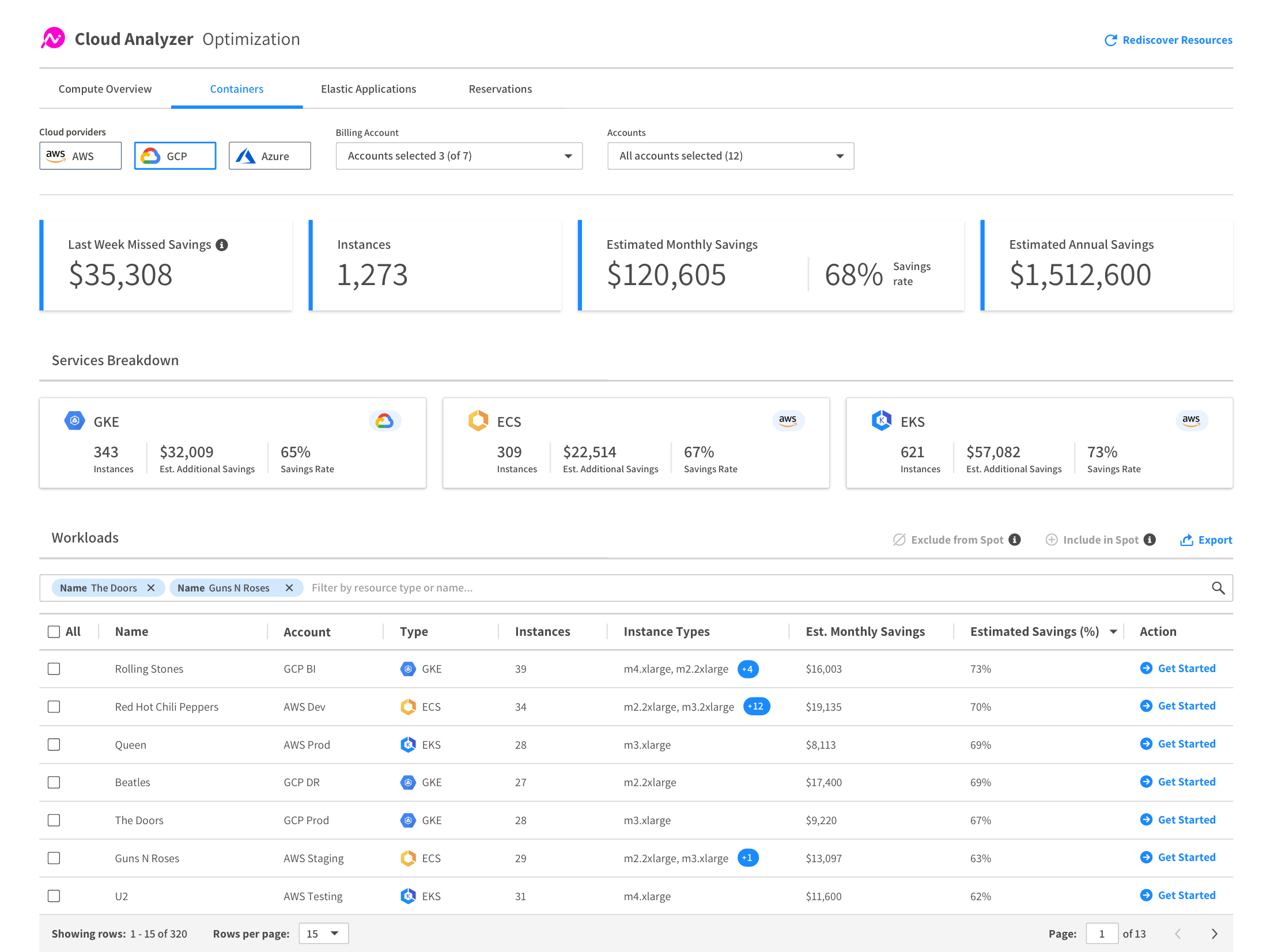
    Cloud cost management solutions (such as Azure Cost Management or AWS Trusted Advisor) provide detailed cost reports, usage analytics and cost optimization recommendations to help organizations understand their cloud spend and identify areas of inefficiency. For example, these solutions can:

    • Monitor and report on cloud resource usage: By monitoring the usage of resources, cloud cost management solutions can provide detailed cost reports that show how much an organization is spending on each resource, such as compute instances, storage and network traffic.
    • Automate cost optimization: Many cloud cost management solutions can automate cost optimization tasks, such as turning off unused resources or right-sizing instances to reduce waste.
    • Provide cost analysis and forecasting: These solutions can provide detailed cost analysis and forecasting to help organizations understand the impact of changes to their cloud environment and plan for future spending.

    Autoscaling

    Autoscaling is a technology that enables organizations to automatically scale their cloud resources up or down as needed to meet changing demands. The goal of autoscaling is to ensure that organizations always have the right amount of resources to support their workloads while minimizing costs and ensuring that their systems are always available when they are needed.

    Autoscaling works by monitoring the performance and usage of cloud resources, such as compute instances, storage and network traffic, and automatically adjusting the size of those resources to meet changing demand. For example, autoscaling can:

    • Add or remove instances as needed: If demand for a resource increases, autoscaling can automatically add more instances to meet that demand. If demand decreases, autoscaling can automatically remove instances to reduce waste.
    • Optimize resource utilization: Autoscaling can optimize the utilization of cloud resources by right-sizing instances to meet demand, ensuring that resources are not over-provisioned or underutilized.
    • Improve system availability: By automatically adding or removing resources as needed, autoscaling can ensure that systems are always available and responsive, reducing the risk of downtime and improving the user experience.

    API Gateway

    An API gateway is a server that acts as an intermediary between an application and one or more microservices. The API gateway is responsible for request routing, composition and protocol translation, which enables microservices to communicate with each other securely and efficiently.

    An API gateway can help with cloud optimization in several ways:

    • Load balancing: The API gateway can distribute incoming API requests to multiple microservices, improving the overall performance and reliability of the system. It can also provide features such as automatic failover and load balancing, which helps to ensure that the system remains available and responsive even in the face of high traffic volumes or other performance challenges.
    • Resource optimization: By acting as a single entry point for API requests, the API gateway can help to reduce the overall resource usage of the system. For example, it can cache frequently used data and serve it directly to clients without having to go back to the microservices, reducing the load on the underlying system.
    • Monitoring and management: API gateways provide a centralized management interface for the microservices, making it easier to monitor and manage the system as a whole. This includes features such as logging, monitoring and alerting, which can help to identify and resolve performance issues quickly and effectively.

    GitOps Platforms

    GitOps is a paradigm that helps automate application deployment and infrastructure provisioning. It typically involves using Git, an open source version control system, as a single source of truth for declarative infrastructure and applications. 

    GitOps aims to improve the developer experience by letting teams use their familiar software development tools to manage application and infrastructure changes.

    With GitOps, cloud optimization can be achieved by:

    • Automating the deployment process: GitOps automates the deployment process, reducing the risk of human error and speeding up the deployment process. This helps to ensure that resources are deployed consistently and correctly, improving the reliability and performance of the environment.
    • Managing cloud infrastructure as code: With GitOps, cloud infrastructure can be defined and managed as code, making version control and collaborating on configurations easier. This helps to optimize the use of resources and improve the overall efficiency of the cloud environment.
    • Improving collaboration and communication: GitOps enables teams to collaborate and communicate more effectively, reducing the risk of conflicts and delays. With Git, changes can be easily tracked, discussed and approved, improving the speed and quality of deployments.
    • Enforcing governance and compliance: GitOps provides a centralized and auditable record of all changes to the environment, making it easier to enforce governance and compliance requirements. This helps to improve the security and reliability of the cloud environment, reducing the risk of breaches and other security incidents.

    APM

    Cloud application performance management (cloud APM) is the practice of monitoring, analyzing and optimizing the performance of cloud-based applications. The goal is to ensure that these applications are available, responsive and performing optimally to meet the needs of users.

    These solutions provide a range of tools and capabilities for monitoring and optimizing cloud-based applications, including:

    • Performance monitoring: Cloud APM solutions monitor application performance in real-time, providing visibility into performance metrics such as response time, resource utilization and error rates.
    • Root cause analysis: These solutions can help identify the root cause of performance issues by providing detailed performance data and tracing information.
    • Capacity planning: Cloud APM solutions can provide detailed performance data and analytics to help organizations plan and optimize their application deployments.
    • Performance optimization: These solutions can provide recommendations for performance optimization, such as right-sizing cloud resources, reducing resource utilization and improving application design.
    • Continuous performance monitoring: These solutions can continuously monitor application performance, providing real-time visibility and alerting to help organizations quickly identify and resolve performance issues.

    Conclusion

    In conclusion, cloud optimization is critical for organizations looking to maximize the value and minimize the costs of their cloud deployments. By using technologies such as cloud cost management, autoscaling, API gateways, GitOps platforms and APM, organizations can improve availability, performance and efficiency while reducing costs and ensuring that they are always prepared to meet changing business needs. 

    These technologies provide the tools and capabilities necessary to monitor, analyze and optimize cloud-based applications, helping organizations to ensure that their deployments are always delivering the best possible value. By embracing optimization, organizations can stay ahead of the curve and ensure that their cloud deployments are always aligned with their business goals and objectives.

  • Optimizing Cloud Costs for DevOps With AI-Assisted Orchestration

    Optimizing Cloud Costs for DevOps With AI-Assisted Orchestration

    Kubernetes continues to grow as the leading container orchestrator for high-performance, cloud-native DevOps, DevSecOps and site reliability engineering (SRE) use cases. While Kubernetes offers excellent orchestration capabilities, it does not, by itself, assure cloud computing costs are optimized.

    The current state of cloud expenditures for many organizations indicates a lot of waste. So much so that there is a trend to replatform from the cloud to private infrastructures to save money—escalating cloud costs are too high and the deep level of real-time optimizations are too hard and too slow.

    According to an article from VentureBeat, Cloud computing: Cost at scale, “Large enterprises have started exploring cloud repatriation. What is worse, the forecasted trends are that “cloud spending could go up as high as 80% of the cost of the revenue for software companies. Moreover, the $100 billion market value among 50 software companies is lost due to the impact of the cloud on their margins.”

    An article by CAST AI indicated 60% of cloud costs could be eliminated by being smarter about the use of cloud resources and augment Kubernetes with AI tooling, no matter the size of the deployments. Given the large number of human and automated users associated with DevOps, DevSecOps and SRE use cases for enterprise cloud resources, the savings potential can equate to tens of thousands of dollars per month.

    However, typical optimization methods are not fast enough nor smart enough to process the resource changes quickly enough to achieve these optimizations at speed. An AI-assisted Kubernetes orchestration is needed to achieve this.

    Kubernetes Landscape

    According to 2021 State of Cloud Native Development Report, Kubernetes is used by 31% of all backend developers. Currently, 5.6 million developers use Kubernetes. The edge computing category has experienced rapid growth in the adoption of Kubernetes and has the highest usage rates of both containers and Kubernetes at 63%.

    A report from the Cloud Native Computing Foundation (CNCF) indicated that spending on Kubernetes, the primary means of orchestrating containerized applications, was up year-over-year from 2020 to 2021. Of those surveyed, 67% reported an increase of 20% or more over the last 12 months, and 10% spent more than $1 million per month on their deployments. Fewer than 25% accurately predicted how much they’d spend to within 5% of the actual cost. And over 20% could not predict their cloud bill. That’s no way to run an operation.

    Cloud Cost Use Cases for DevOps, DevSecOps and SRE

    DevOps, DevSecOps and SRE have many use cases for orchestrating cloud computing. The list of computing tasks below is only a partial set of computing resources that need to be orchestrated for every value stream.

    • Communication—emails, chats
    • Experimentation, planning and research-related computing tasks
    • Configuration tasks associated with infrastructure-as-a-service, platform-as-a-service, software-as-a-service and serverless.
    • Version and artifact repositories transactions
    • Application and microservice transactions
    • API transactions
    • DevOps administration tasks
    • Developer pre-commit builds and testing
    • Continuous integration commits, builds, scans, tests, and tools
    • Continuous delivery—pre-prod tests and deployment development
    • Continuous deployment automation and deployment strategies
    • Production operation, backups, rollbacks, production testing
    • Replication of hybrid cloud and multi-cloud instances
    • Software repositories, data lake transactions
    • Monitoring, logging, synthetic monitoring
    • Tracing, metrics, collectors, analytics and dashboards
    • Release and value steam management
    • Anti-fragility—Chaos engineering, disaster recovery, fire drills, security red/blue/purple teams
    • Diagnostics, issue reporting and tracking
    • On-call support and retrospectives
    • Documentation and training (computer-based) transactions

    Sources of Waste and Potential Savings

    According to the State of Kubernetes Report: Overprovisioning in Real-Life Containerized Applications, 37% of cloud compute capacity is not used. The primary reasons behind cloud waste are:

    • Lack of visibility into cloud usage and costs
    • Overprovisioning
    • Leaving cloud resources idle
    • Fragmentation of usage between teams and departments

    One of the major drivers of wasted cloud spend is the inability to scale back once application demand drops. By eliminating this sort of overprovisioning, organizations stand to reduce their monthly cloud spend by almost 50%. By adding spot instances to the mix, organizations could cut their cloud spend by 60% on average.

    Complexities Impacting Ability to Optimize

    According to the article Cloud Cost Management for DevOps, “When properly done, cloud cost management can truly save organizations significant amounts of money. But, there is a learning curve and traditional approaches cannot keep pace with the rapidly changing requirements for DevOps, DevSecOps and SRE use cases.”

    Trial and error are needed to identify optimization challenges that DevOps team members can anticipate. Before you can even begin planning around cost optimization, you need an accurate picture of your current infrastructure and spending landscape. Cost attribution cannot be done by simply opening your AWS bill. Cost data from monthly bills is not granular and cannot attribute costs to projects and teams. Furthermore, there are additional expenses that are included in your bill that are not tied to your cost of goods sold, such as research and development expenses.

    Accurately allocating costs requires accurate and disciplined tagging infrastructure. The act of tagging infrastructure requires a fair amount of manual work for each piece of infrastructure in each sub-account. Enforcing tag hygiene can be a challenge of its own.

    Opportunity for an AI-Assisted Kubernetes Orchestrator

    Overcoming the complexity of optimizing cloud compute resource orchestration for the many uses cases for DevOps, DevSecOps and SRE requires a smarter, more responsive approach than traditional approaches that require manual planning and implementation. There is an opportunity to save an average of 60% of cloud spend by using an AI-assisted Kubernetes orchestrator.

    What This Means

    While Kubernetes offers excellent orchestration capabilities, it does not, by itself, assure cloud computing costs are optimized for the many use cases required for DevOps, DevSecOps and SRE. An article by CAST AI indicated 60% of cloud costs could be eliminated by being smarter about the use of cloud resources, no matter the size of the deployments. Given the large number of human and automated users associated with DevOps, DevSecOps and SRE use cases for cloud resources in enterprises, the savings potential can equate to tens of thousands of dollars per month.

    An AI-assisted Kubernetes orchestration capability is needed to process cloud resource changes quickly enough to achieve optimizations at the speed needed for DevOps, DevSecOps and SRE use cases.

    This article explained the landscape of requirements for an AI-assisted Kubernetes orchestrator to optimize cloud costs for DevOps, DevSecOps and SRE use cases. Future articles will discuss a solution for such an orchestrator and detail specific applications of the AI-assisted Kubernetes orchestrator for DevOps, DevSecOps and SRE use cases.

  • NetApp Acquires Spot to Rein in Cloud Costs

    NetApp Acquires Spot to Rein in Cloud Costs

    NetApp this week announced it has acquired Spot, a provider of a service that enables IT teams to continuously optimize costs for cloud workloads.

    Anthony Lye, senior vice president and general manager for public cloud services at NetApp, said the Spot service is based on an application programming interface (API) that IT teams add to each application workload. That API then makes regular calls to Spot, which leverages algorithms that determine when and on what types of instances a workload should run to reduce cloud costs.

    The Spot service will then move workloads automatically between on-demand, reserve and spot instances on Amazon Web Services (AWS), Microsoft Azure or Google Cloud Platform (GCP). It is not designed to enable arbitrage across different cloud services; rather, it optimizes the allocation of compute resources on whatever cloud platform an IT team decides to deploy a workload on.

    Lye said cloud computing often winds up being more expensive than on-premises IT environments because IT teams don’t have the tools required to cost-optimize cloud platforms in real-time. Developers often programmatically deploy workloads in the cloud without understanding many of the implications of using one tier of service versus another. Even when they do appreciate the cost, most IT teams don’t provide them with the tools needed to do anything about it. In fact, it’s usually assumed the IT operations team will find some way to optimize costs as they monitor the cloud environment.

    Then, at the end of the month, the IT operations and finance teams receive a bill from a cloud service provider that is all but indecipherable in determining what workloads consumed what level of compute resources and when. In the absence of the Spot service, Lye said the best IT teams could hope for was an analytics report that offered suggestions about how to optimize cloud instances after the fact.

    NetApp views Spot as a complement to its approach to optimizing the consumption of cloud storage resources by deploying its software on a public cloud to manage those resources, said Lye. Collectively, those offerings enable IT teams to address what has now become the single largest cost in the enterprise.

    In addition, Lye noted that Spot can play a key role in enforcing service level agreements (SLAs) because, among other things, it automatically detects whenever a spot instance of a virtual machine is going away. It then automatically spins up additional instances to ensure a workload remains available.

    The debate over the real cost of cloud computing has been going on for years. Initially, most cloud service providers claimed cloud platforms were less expensive than on-premises IT environments because compute resources were paid for on a consumption basis. While that proved to be true for workloads that ran for a finite amount of time, longer-running workloads have proven to be in most cases more expensive to run in the cloud.

    As organizations look to the cloud to deploy cloud-native applications that are more flexible and resilient in the wake of the COVID-19 pandemic, which has made many on-premises IT environments less accessible, the debate over costs is flaring up again. While organizations need a more flexible approach to IT, they are simultaneously trying to reduce the total cost of IT in the wake of the economic downturn brought on by the pandemic.

    It’s too early to say to what degree IT organizations will embrace continuous optimization alongside continuous integration (CI) and continuous delivery (CD). However, given the current economic climate, it’s more now a question of when, not if, cloud cost optimization will become a major area of focus for IT teams large and small.

  • Continuous Optimization: An Idea Whose Time Has Come?

    Continuous Optimization: An Idea Whose Time Has Come?

    Agile makes development deliver code faster. CI makes testing move faster and CD makes delivery faster, but what keeps track of the volume of change all of this introduces and delivers optimizations faster?

    That is the question Opsani wants you to be asking. And it’s a valid question. Optimization in a complex and constantly changing software world becomes more important–if it can keep up. Opsani thinks it can, with a little AIOps to help anyway.

    The premise is simple. There are ways to adjust the environment that might increase performance and/or reduce costs. Those ways are individually relatively simple (such as JVM settings or cloud instance sizing), but combined they make a complex web that impacts performance as a whole, with individual bits sometimes helping and sometimes hurting.

    Up JVM memory on a large instance and it might help. Switch to a smaller instance later, and that JVM change may cause problems on the smaller footprint, for example. So something more dynamic is needed. As code changes, best optimization options might change also. As the other parts of the environment change, that magnifies the concern that applications are not running at their best and might be costing too much money.

    Opsani’s answer to this problem is continuous optimization. Using AIOps to check different combinations of settings at a rate that operations staff couldn’t manage even if they did have the time. And they generally don’t.

    From my (not their) perspective, there are two pieces to this puzzle. First is gathering inputs and determining performance, second is tweaking settings. Then repeat. Seems simple but the environment continuous optimization would work in is increasingly complex. Any look at how many places optimization can occur in a given environment–from VM/Instance to code to network to management platform to storage/database choices–there is a lot going on, and all of these settings can impact each other.

    Hence the idea of continuous optimization appeals to me. They’ve got the interfaces that one would expect to gather inputs, names such as Jenkins, DataDog and New Relic. They’ve got the interfaces to enact and test out changes too, with interfaces to products such as Kubernetes, Terraform, Rancher and Wavefront. So it certainly appears they’ve got the basics covered. Of course there are vendor interfaces I’d like to see that aren’t in the list of integrations, and no doubt the same is true for you. But the core is here, getting to the monitoring and management tools most companies use regularly.

    Opsani seems to be aware of the different comfort levels of various organizations, also. Able to run in dev or test as well as production. Since every organization has a different taste for putting new ideas into production, this is a good idea, though personally I would aim for eventual production rollout, just because that is where the rubber meets the road. Having it running as part of normal operations means even that small change that reduces responsiveness of your application by 25% (we’ve all seen it) will be detected, and Opsani can try changing some of the environment to compensate.

    When I spoke with them, we did not discuss cost, but we did discuss savings. For budget-sensitive environments, it is worth looking into the cost in your organization versus the potential savings in actual monthly dollars. Here is a screenshot showing the cost measure combined with the performance measure. Reducing monthly overhead to pay for a tool that also improves performance might just be a no-brainer–if it suits your environment.

    I can’t say if it suits your environment, nor can any other analyst/pundit. That’s for your organization to decide. But the idea of continuous optimization is a good one. Opsani is not alone in working on this problem, so even if this particular tool doesn’t suit your needs, you can look for others that do. I recommend getting the demo and seeing what they’ve got, and how it might help in your environment.

    — Don Macvittie

  • The Automation Continuum

    The Automation Continuum

    The speed of innovation these days is often influenced by the speed of adoption of new and exciting tools, and specifically open source tools.  Open source projects have been growing at an exponential speed over the course of the past few years; however the process for exploring, testing, configuring, and ultimately integrating these in production often times is still quite complex and time consuming.  In many cases, this process is still done manually.  Like with all DevOps processes by automating this, we are then able to adopt new tooling much more quickly, and with less human error in the process.

    The Open Source Revolution


    The friction in this process is due, in large part, to the fact that each of these stages from exploration through POC and testing, integration and then management, many times requires the use of very different tools for each stage, on top of a completely different setup and environment.  This means that every time you want to move from exploration to testing, for example, you have to basically rebuild the entire system.  This can become quite frustrating and, as mentioned above, time consuming.

    What if we could streamline this process  and explore tens and even hundreds of projects quickly, thereby enabling us to seamlessly increase our innovation?

    How this could work – the flow:

    1. Exploration: Explore the product without having to install any software at all.  This could be through a click of a button on Github, and seeing the product in action.  This would enable you to play with it without having to download, configure, or set up any machines.

    2. Testing: When we move to trying it out, we want to use the same model as in the exploration phase.  We’d like to try it out also on a SaaS basis, but this time with more control.  By this I mean testing with real clusters & machines, in a more high performance, and production-like environment.

    3. Development: At this stage, we want to be able to test it with our actual stack, and plug it into our project quickly.  Then, eventually at a later stage download it and run it in our own environment.

    What’s Needed

    With a unified tool for all of these stages, the majority of the friction in the process can be diminished.  One way to achieve this is by running the project as a service or in our environment, with an orchestration engine that can basically be used to take us through all these stages.

    By wrapping the entire project into an uber-launcher [which with Cloudify we call it “the widget”] that any open source project can plug into – like an app store or repository, and any user can start using immediately without necessarily having to know how exactly it runs or works.

    The nice thing is that we can eventually take the software from that app catalog or store, since it’s not packaged as a black box but rather as a blueprint or script. We can then fork it and customize it to our needs.  Because of this, we can actually use the same tools through the entire cycle and break the friction completely.

    So what it all boils down to, is the basic principle of combining the power of SaaS and cloud orchestration to avoid complexity of installation, use a script-based model to make the packaging of software generic – but still customizable, and use a cloud abstraction to move environments without having to change recipe.  This is what we call the automation continuum, and we’ve been using to demonstrate how to take the power of any open source project to any cloud.