After over a year of dreaded isolation, many of us are ready to return to the networking and social atmosphere of pre-COVID life. While physical proximity continues to be a struggle, virtual proximity through events like virtual summits and teleconference meetings, is getting increasingly more helpful amidst the transition.
Cloud-Native Days with Kubernetes is a continuation of the virtual social interaction we’ve seen throughout the last year but offers attendees more than just a chance to talk with session leaders and speakers.
Sessions will be geared toward practitioners, managers and C-level executives, and led by industry thought leaders and doers in the cloud-native space, allowing attendees an opportunity to meet and network with experts in the cloud-native field.
At the end of this two day virtual summit, attendees will walk away with a better understanding of cloud native and its impact on the IT landscape.
Cloud-Native Days is hardly short of talent with over 50 speakers holding featured, insight and spotlight sessions.
Attendees will have networking access to a variety of speakers through keynote sessions at Cloud-Native Days, but catching keynote speakers Tracy Miranda and Rosalind Radcliffe’s sessions will certainly be a highlight of the virtual summit.
Not only will attendees be able to network with speakers, by means of networking, attendees will have the opportunity to forge collaboration. Keynote speaker Tracy Miranda has some valuable words to share regarding projects born from collaboration. She says, “We had this idea that Continuous Delivery is bigger than just one project, and we should be working together to make things inter-operable and better for everybody. Then as we went around talking to people for that idea— when it resonated with other people— they really became fans, and they would be like, “How can we help? What can we do? This is how we build up on it.” So find that core set of folks who will be enthusiastic, and will get you through the honeymoon period.”
Learn from the best of the best in the cloud-native space. With cloud-native technologies becoming an integral part of IT environments, it’s incredibly valuable to learn from industry specialists changing the IT world as we know it.
Listen to the best of the best at Cloud-Native Days. It’s always important to listen. But when listening means driving ideas forward, opening your ears can be the most beneficial tool to be better than we were yesterday.
Get real-world insight into topics like: trends and best practices in the cloud-native space, addressing Kubernetes complexities, tackling cloud-native security from the onset, etc.
Have fun while learning new things! Who says networking and learning can’t be fun? With so many exciting people, sessions and topics, attendees have a lot to look forward to at Cloud-Native Days with Kubernetes.
Networking isn’t just about linking on LinkedIn anymore. Collaboration doesn’t come from a request, it comes from interaction, engagement and communication. Find all three and start collaborating at Cloud-Native Days with Kubernetes, Aug. 4 and 5 at 9 a.m. (ET).
Now mark your calendars and meet the best of the best in tech! Register today.
Keeping up with information can be challenging. With all these changes, you’re probably left wondering, “who can guide me through all this information?” Fortunately, Cloud-Native Days with Kubernetes is focused on giving attendees the tools they need to become proficient in cloud-native technologies. At the virtual summit, attendees can tune into our expert-led featured sessions and learn how to leverage cloud native technologies to move faster and more securely.
Cloud-native technologies are quickly becoming an integral part of IT environments as organizations continuously accelerate their development efforts to meet business demands. Because of this, it’s incredibly valuable to learn from industry specialists changing the IT world as we know it. And who better to learn from than the industry thought leaders and doers in the cloud-native space? Through sessions touching on topics like security and observability, our featured tech titans will give you a better understanding of cloud native and its impact on the IT landscape.
Today, the CI/CD pipeline is mainly built on open source tools – Kubernetes, Jenkins, GitLab, etc. Security has traditionally been closed, but it’s now clear the pace of innovation cannot be constrained by proprietary development models. Keynote speaker Loris Degioanni, CTO and founder of Sysdig, will discuss key practices needed for a secure cloud and container environment, including: what is required to increase security, visibility and simplicity in the cloud, lessons learned from major attacks like Kaseya and SolarWinds, ways to leverage Secure DevOps to not only ‘shift left,’ but also ‘roll right’ for detection and response, and how open source is the key ingredient to see all your signals in a constantly changing landscape.
In his article, “Open Source is Taking Over Security,” published last year on The New Stack, Loris Degioanni elaborates on this idea that open source is essential to maintaining high security, stating, “I argue that, despite having lower penetration of open source, security is the industry that benefits the most from an open source approach. I also argue that open source will gradually take over and become the standard way to do security.” To understand this further, Loris breaks it up into a few key questions: Why is open source the best way to do security? and, Will open source become the standard way to do security?
Let’s start with the most important question: Why is open source the best way to do security? Loris is adamant that open source is the key ingredient to security because of one thing – speed of innovation. Loris points out that the rise of widely adopted and open computing platforms like Kubernetes have had a big impact on how distributed, coordinated ecosystems can beat out a ‘behind closed doors’ single vendor 100% of the time. Loris writes, “On one hand, Kubernetes and cloud native have such a fast innovation pace that it’s hard for a vendor to keep up by itself. On the other hand, thanks to Kubernetes, for the first time we have a completely open platform to run our applications, where security can be natively integrated rather than being bolted on top.”
Open source also increases the speed of innovation because it empowers end users to work with vendors. Any user, regardless of size and level of sophistication, Loris says, can provide feedback in a tight loop and they can also contribute. So why is this relevant to security? As Loris explains, “The intrinsically fragmented nature of vulnerabilities and threats makes this bazaar-oriented approach to contributing very effective.”
This brings us to Loris’s second question: will open source become the standard way to do security? Not only does Loris say yes, open source will become the standard way to do security, but in fact there is no escaping this. Using a metaphor of bad guys vs. good guys to describe cybersecurity battles, Loris says, “the army of the bad guys is big, smart, and aggressive. And the deck is stacked in their favor.”
So how do the good guys win in this scenario? Loris says the best chance at this is, “working together, as a team, leveraging each other’s strength, making sure that no energy is wasted.” Rather than having competing standards upheld by a variety of vendors, Loris is adamant that “a much better approach consists of leveraging a common set of standards that are deeply integrated in the platform, owned by the community, driven by consensus, on top of which all of the players can confidently innovate.”
Much like Loris’s approach to open source, innovation and security are also valuable key practices at Cloud-Native Days with Kubernetes. Life moves fast. Innovation cannot afford to be slowed down, especially now. So begin your cloud-native information journey by tuning into our expert-led sessions, gathering your questions and learning from our talented speakers August 4 and 5 at 9 a.m. ET.
New York, USA/Noida, India, July 20, 2021: HCL Technologies, (HCL), a leading global technology company, today unveiled HCL SoFy, the Cloud Native solution factory and HCL Now, a Cloud-Native-as-a-service offering. The two new additions further enhance the company’s #HCLCloudSmart offering.
SoFy and HCL Now offerings are a result of the significant investments HCL has made towards evolving and modernizing its product portfolio, along with its long-term Cloud Native commitment. In the past year alone, HCL Software division has announced 22 major product releases, 10 new product modules, 390 total product releases, and over 900 enhancements.
Aligned with the #HCLCloudSmart journey, HCL Software’s Cloud Native strategy combines a technical platform rooted in the most widely adopted Cloud Native technologies with the choice and freedom that allows each customer to adopt Cloud Native in a way that best meets their own specific business objectives.
HCL SoFy, the foundational Cloud-Native platform, allows clients to deploy enterprise software in minutes on their Cloud of choice, without vendor lock-in, and scale to enterprise needs. Key features of SoFy include:
HCL Software at Your Fingertips: easy access to 50 product components, 2,000+ REST API endpoints, and Cloud Native demos.
One-click Deployment: the ability to deploy HCL Software in minutes with the innovative SoFy platform.
Multi-cloud, Multi-choice: enable implementation of a multi-Cloud strategy, run on any Cloud, public or private.
HCL Now unlocks the full potential of HCL’s Product and Service capabilities on a Cloud platform of client’s choice. The Cloud-Native-as-a-Service offers:
Cloud Native Now: enterprise-grade availability, unlimited scalability and flexibility built from the ground-up as Cloud-Native along with dedicated, secure environments deployed and managed on public Cloud of choice.
Experts-On-Demand: reduced risk and cost while transitioning to Cloud Native, empowered and enabled by our Cloud and HCL product experts.
More for Less, No Lock-in: software and customization investments portability to any Cloud, public or private as well as shared initial investment to kickstart your transformation.
“The foundations of our architectural strategy, Cloud Native and API First, gives our clients the ability to rapidly innovate new capabilities and components across our products – from automation, DevOps, commerce and marketing, digital solutions and security”, said Darren Oberst, Sr. Corporate Vice President & Head, HCL Software. “It gives strategic choices to our clients to avoid ‘lock-in’ and have the flexibility to control their data, mix-and-match among different tools, and to build their own solution architecture”, he added.
HCL SoFy and HCL Now’s Cloud Native capabilities depend only on Kubernetes and remain completely Cloud agnostic. This flexibility allows easy migration across Cloud providers, increased business agility, reduced risk, and allows customers to implement a multi-Cloud strategy.
HCL is a Gold Member of Cloud Native Computing Foundation (CNCF.io) as well as Cloud Native Foundation (CNF) and is also on the Governing Board of Cloud Foundry Foundation (CFF).
HCL Technologies (HCL) empowers global enterprises with technology for the next decade, today. HCL’s Mode 1- 2-3 strategy, based on its deep-domain industry expertise, customer-centricity and entrepreneurial culture of Ideapreneurship™, enables businesses to transform into next-gen enterprises.
HCL offers its services and products through three business units: IT and Business Services (ITBS), Engineering and R&D Services (ERS) and Products & Platforms (P&P). ITBS enables global enterprises to transform their businesses through offerings in the areas of applications, infrastructure, digital process operations and next generational digital transformation solutions. ERS offers engineering services and solutions in all aspects of product development and platform engineering. P&P provides modernized software products to global clients for their technology and industry specific requirements. Through its cutting-edge co-innovation labs, global delivery capabilities and broad global network, HCL delivers holistic services in various industry verticals, categorized as Financial Services, Manufacturing, Technology & Services, Telecom & Media, Retail & CPG, Life Sciences & Healthcare and Public Services.
As a leading global technology company, HCL takes pride in its diversity, social responsibility, sustainability and education initiatives. For the 12 months ended June 30, 2021 HCL had consolidated revenue of US$ 10.54 B. Its 176,499 Ideapreneurs operate out of 50 countries.
Certain statements in this release are forward-looking statements, which involve a number of risks, uncertainties, assumptions and other factors that could cause actual results to differ materially from those in such forward-looking statements. All statements, other than statements of historical fact are statements that could be deemed forward-looking statements, including but not limited to the statements containing the words ‘planned’, ‘expects’, ‘believes’,’ strategy’, ‘opportunity’, ‘anticipates’, ‘hopes’ or other similar words. The risks and uncertainties relating to these statements include, but are not limited to, risks and uncertainties regarding impact of pending regulatory proceedings, fluctuations in earnings, our ability to manage growth, intense competition in IT services, business process outsourcing and consulting services including those factors which may affect our cost advantage, wage increases in India, customer acceptances of our services, products and fee structures, our ability to attract and retain highly skilled professionals, our ability to integrate acquired assets in a cost-effective and timely manner, time and cost overruns on fixed-price, fixed-timeframe contracts, client concentration, restrictions on immigration, our ability to manage our international operations, reduced demand for technology in our key focus areas, disruptions in telecommunication networks, our ability to successfully complete and integrate potential acquisitions, the success of our brand development efforts, liability for damages on our service contracts, the success of the companies /entities in which we have made strategic investments, withdrawal of governmental fiscal incentives, political instability, legal restrictions on raising capital or acquiring companies outside India, and unauthorized use of our intellectual property, other risks, uncertainties and general economic conditions affecting our industry. There can be no assurance that the forward-looking statements made herein will prove to be accurate, and issuance of such forward-looking statements should not be regarded as a representation by the Company, or any other person, that the objective and plans of the Company will be achieved. All forward-looking statements made herein are based on information presently available to the Management of the Company and the Company does not undertake to update any forward-looking statement that may be made from time to time by or on behalf of the Company.
This blog series explains how to engineer applications for DevOps.
Topics covered in this blog series include:
• Factors used to decide whether an application is a good candidate for DevOps.
• Practices to engineer designs for DevOps.
• DevOps applied to enterprise apps and software services.
• DevOps applied to COTS systems.
• DevOps applied to manufactured (embedded) systems software.
• Five levels of application maturity.
Why is it that younger applications are more mature than older applications? DevOps works best with incremental changes rather than large complex changes that are time-consuming to change, build, test and deploy. DevOps also works best in ephemeral cloud computing infrastructures that can be scaled up and down quickly depending on short-term workload demands of supporting build, test and deployment requirements.
While existing applications will eventually be modernized to take advantage of the cloud, greenfield applications should be designed to exploit recent advancements in cloud-based platforms and application delivery.
The following paragraphs describe the characteristics of five levels of application maturity.
Spaghetti applications are older, monolithic legacy application designs that tend to be large and complex, like a big messy bowl of spaghetti. This complexity occurs partly because these older apps accumulate a massive amount of code and patches over time and partly because the architectural approaches at the time they were conceived did not have modular, cloud-oriented requirements in mind. Spaghetti applications are the least capable of taking advantage of cloud infrastructures.
Modular applications emphasize architecture designs that separate application components into functionally independent, interchangeable modules, such that each contains everything necessary to execute only one aspect of the desired functionality.
A module interface expresses the elements that are provided and required by the module. The elements defined in the interface are detectable by other modules. Modules often use a design style known as service-oriented architecture (SOA), where services are self-contained black boxes that provide capabilities to the other application modules, as a service, through a network protocol. SOA may be confused with microservices architecture.
There are key differences between SOA and microservices architecture that are important to DevOps. Microservices are preferred over SOA architecture because microservices are more fine-grained and restricted in what they can do. SOA uses an enterprise service bus for communication, whereas microservices use more lightweight stateless protocols and APIs managed as a product.
Changes to SOA modules usually require a new application release, while a change to a microservice usually only requires the microservice to be replaced. Migration of modular applications to the cloud may require rework to take advantage of cloud features such as autoscaling.
Cloud-ready applications that use the twelve-factor application modular design principles are more advanced. These modular designs emphasize declarative formats for automation, clean contracts with the underlying operating system and portability between execution environments. Deployment on modern cloud platforms obviates the need for servers and systems administration, minimizing divergence between development and production and enabling continuous deployment for maximum agility.
These characteristics and capabilities enable the application to scale up without significant changes to tooling, architecture or development practices. Cloud-ready applications can be easily mapped to virtual machines (VMs) available through cloud infrastructure services (IaaS) for VMs based on VMware vSphere or Microsoft Hyper-V.
Cloud-ready apps do not require rearchitecting or refactoring. They offer least-effort migration to the cloud with a lower availability rate. However, workloads such as legacy databases, third-party applications and homegrown business applications that are typically not designed for clustering or high availability suffer from a single point of failure.
Cloud-ready apps are expensive to maintain. This is primarily due to the way they consume computing, storage and network resources, even when idle. Each component of an app runs in a dedicated VM with no scope for optimization. Upgrading or patching results in downtime and makes maintenance complex and expensive. Ultimately, cloud-ready apps derive less value from the cloud than cloud-optimized or cloud-native applications.
Cloud-optimized applications take advantage of managed services offered by cloud providers. For example, instead of running a database in a VM, they consume database-as-a-service (DBaaS). Cloud-optimized apps typically target the platform-as-a-service (PaaS) delivery model of the cloud. They are portable and can be deployed in IaaS or PaaS. This reduces the deployment footprint, offering flexibility to IT teams. These apps are elastic, with the ability to easily scale in and scale out which results in optimal utilization of resources. Upgrading, patching and maintaining cloud-optimized apps is more manageable when compared to cloud-ready apps.
The downside of cloud-optimized apps is the learning curve involved in migrating to the cloud. Developers, operators and system administrators will have to learn new ways of deploying and managing workloads. Line-of-business applications with access to source code are great candidates for being cloud-optimized apps. They can be redesigned and rearchitected to take advantage of the cloud. Cloud-optimized apps can integrate and interoperate with cloud-ready applications.
Cloud-native applications are the most recent iteration of applications that are born in the cloud. They take full advantage of the cloud by exploiting capabilities such as elasticity, event-driven resource optimization and faster release cycles. Apps that are in the early stages of design and architecture are perfect candidates for cloud-native.
Cloud-native applications are designed as federated microservices, packaged and deployed as containers and managed through modern DevOps processes. When your organization needs to scale to thousands of services in the cloud, microservices application architectures offer major benefits over monolithic modular architectures, including the following:
• Separate microservices are better suited to different technology stacks.
• Federated microservices enable independent deployment of different parts of the system.
• Isolated deployments add to the resilience and fault-tolerance of the system.
• Scaling characteristics may be different for each microservice.
• APIs are used as connectors.
• Stateless protocols help assure seamless recovery.
• Event-driven programming reduces overhead and process latency.
• Antifragile practices inoculate against unanticipated failure modes.
The target deployment environment for cloud-native applications includes containers-as-a-service (CaaS) and functions-as-a-service (FaaS). This breed of apps delivers ultimate scalability and availability. Combined with continuous integration and continuous deployment, software is delivered rapidly, which accelerates time-to-market. It brings closed-loop feedback among developers, testers, operators and end users.
Cloud-native apps demand new skills of containerization, microservices and build and release management. However, the ROI is higher when compared to other app models. Greenfield applications that are still in the design phase are ideal for adopting the cloud-native pattern.
Diverse Applications for Cloud Migrations
Large enterprises moving to the cloud will deal with a diverse set of applications. Through hybrid connectivity and integration, spaghetti, modular, cloud-ready, cloud-optimized and cloud-native applications will co-exist and interoperate with each other. If you are after the benefits of modularity, make sure you do not trick yourself into a microservices-only mindset.
Explore the in-process modularity features or frameworks of your favorite technology stack. You will get support to enforce modular design instead of having to just rely on conventions to avoid spaghetti code. Then, make a deliberate choice whether you want to incur the complexity penalty of microservices. Sometimes you have no choice, but often, you can find a better way forward.
What This Means
This blog is one of a series that explained how to engineer applications to be most suitable for DevOps. Topics covered in this blog series include:
• Factors used to decide whether an application is a good candidate for DevOps.
• Practices to engineer designs for DevOps.
• DevOps applied to enterprise apps and software services.
• DevOps applied to COTS systems.
• DevOps applied to manufactured (embedded) systems software.
• Five levels of application maturity.
The cloud brings tremendous capabilities in terms of increased deployment fluidity and automation. Along with cloud adoption has come the use of cloud-native tools built specifically for developing applications for this domain. However, cloud-native tools carry some nuanced security concerns, such as misconfigurations, known vulnerabilities and leaked secrets. As such, 83% of organizations recognize security as very important to their cloud-native strategy, according to a recent report from Snyk.
Snyk’s State of Cloud Native Application Security report surveyed hundreds of IT professionals on their cloud-native security concerns. Below, we’ll pick out the top takeaways from the report, identify the most common trouble areas for cloud-native application security and see if there’s a correlation between deployment automation and higher degrees of application security.
The Move to Cloud-Native
Teams are moving to cloud-native tech, empowering DevOps with software-driven architecture and infrastructure-as-code (IaC). In this new cloud-native paradigm, 58% of production workloads are deployed as containers, 21% now are serverless and 50% use some form of IaC within the deployment process.
Organizations are moving to cloud-native technology for a variety of reasons. For one, containerized software affords increased speed — 68% of organizations moved to containers for increased deployment velocity, the study found. This is followed by ease of management (at 67%) and reduced cost (43%). There is also the security imperative for adopting cloud-native tools; 36% of respondents cited security as a primary reason for moving production applications to containers.
Top Cloud-Native Security Concerns
While cloud-native technologies such as containers, Kubernetes, serverless and IaC enable more rapid development, they also bring unique security issues. The report found that misconfigurations and known unpatched vulnerabilities are by far the most common type of incidents among cloud-native environments. In fact, 45% of organizations have experienced an incident arising from a misconfiguration, followed by 38% due to known unpatched vulnerabilities.
Other common cloud-native security incidents include secrets leaks, failed audits and malware. Interestingly, the study also found that data leaks by insiders are more common within organizations with higher degrees of cloud-native adoption. According to the report, 38% of organizations with high cloud adoption have suffered data leaks by an insider, whereas the figure is cut in half, at 17%, within organizations with low cloud adoption. Secrets like API keys must be managed carefully, especially as cloud-native tools force more dependencies. “The need for effective management of these kinds of artifacts is a key differentiator from the more centralized pre-cloud era,” the report noted.
Automating Security Testing
End-to-end deployment automation shows promise, yet is still at an early stage of maturity for most development teams. Though 95% of organizations use some kind of deployment automation, only about one in three organizations have an entirely automated deployment pipeline.
Organizations with increased deployment automation tend to embrace a higher degree of security testing, as well. Highly automated pipelines are twice as likely to use security testing throughout their development lifecycle, found the report. Since incidents most commonly arise from misconfigurations and known vulnerabilities, automated scanning could help identify many cloud-native issues, comparing production code against databases of known exploits.
So, when does this security testing occur? More often than not, it happens within the CI/CD pipeline. Over 60% of organizations perform security testing within the CI system. This is opposed to testing source code repositories or local IDEs and CLI tools early on in the development process. In terms of testing frequency, there is a wide range of executions. For those groups with high deployment automation, 70% test security daily or more frequently. Automated security testing seems to be functioning well, as 72% of fully automated teams find and fix critical vulnerabilities in under one week.
The report also exposed an interesting disconnect with regard to security testing ownership. Only a small percentage of security engineers (less than 10%) feel developers are responsible for the security of the cloud-native environment and applications, whereas 36% of developers stated they are responsible for security. These figures may demonstrate the security onus shifting left toward the development side. Or it could underline changing attitudes as full-cycle development becomes more realistic. Regardless, teams will have to find clarity on roles to avoid some difficult conversations!
Cloud-Native Security
With the shift toward cloud-native strategies, security standards are rising to respond to new issues like misconfigurations. To address mounting application threats, increased automation could help shift security left—this and other reports clearly demonstrate a correlation between fully automated deployment pipelines and an increased security testing regimen.
As a result of cloud-native adoption, 58% of organizations have increased their security concerns since adopting cloud-native tools. Part of this involves moving to a zero-trust approach across all infrastructure, whether internal or external facing. The report revealed that 58% of organizations are increasingly concerned with misconfiguration, 52% are increasingly concerned with insecure APIs and 43% are increasingly concerned about known unpatched vulnerabilities, while 41% are concerned about secrets leaks. Hopefully, these benchmarks will help you see how your organization stacks up in comparison to others.
Snyk’s State of Cloud Native Application Security report questioned 600 experts in development, security and operations on cloud-native adoption and security practices. For more insights, view the study in its entirety here.
The need for modern applications to support continuous integration, delivery and deployment spawned the need for DevOps. Increasingly, as cyberthreats evolve and grow and application development methods and time frames change, security now needs to be an integral part of today’s application life cycle. As a result, businesses should move from DevOps to DevSecOps.
DevSecOps is needed to address security implications introduced by changes in the way applications are now developed, deployed and updated. Some of the main drivers for moving to DevSecOps include:
The speed and frequency of new apps creation and updates: It is no secret that developers are under great pressure to create new applications and features in faster time frames than ever before. Some industries such as banking and financial services are being challenged by nimbler FinTech organizations offering innovative services and better customer engagement. The same is true in retail versus online competitors. And most other businesses are in the midst of a digital transformation. All of this necessitates the development of more apps in shorter time frames.
As the industry knows from DevOps, app development is just one part of the more extensive application lifecycle work that needs to be done. Here again, there is a change from tradition. Beyond the customary needs to update, patch and maintain applications, today’s users are accustomed to quick actions on their demands. They have an app store mentality. When they point out a flaw or suggest an enhancement, they expect these things to be addressed immediately.
They want the same responsiveness in their business applications. It is no longer enough to put items in a Jira or some other project tracking solution for later consideration; actions must be taken immediately.
In both the building and enhancing of the apps, the need for speed can overlook security issues.
Cloud-native architectures: Many modern apps are built using cloud-native architectures based on loosely coupled microservices and containers. The architecture lets developers quickly build and update applications. The approach typically makes use of third-party and open source code to build a larger application. For instance, a loan processing application might include an open source decision engine, an outside financial institution’s credit rating service and a commonly used mobile app user interface.
Another advantage of using a cloud-native architecture is that changes can be made quickly. Rather than writing a monolithic app from scratch or recoding an entire app when small changes need to be made, changes only need to be made to impacted elements. If a new feature needs to be added to a front-end mobile user interface, that’s the only element of the app that must be changed.
These conveniences that make cloud-native so well-liked in the development community, again, can mean that security issues are overlooked.
Low-code/no-code and composable applications: New technology such as low-code and no-code platforms abstract details about the code from developers. And they enable citizen developers, who certainly do not have an eye for security, to build their own apps. Composable techniques further simplify application development via the reuse of components.
Bringing Security Into DevOps
The implication of these industry changes is that security needs to be entrenched in the process throughout an application’s life cycle. It is no longer enough to test for vulnerabilities after the fact.
Specifically, security operations must be integrated at every step of application development, modification, and deployment. It must be real-time instead of reactive. Security can no longer wait for a breach or attack; it must constantly examine the elements of an application as they operate and are modified.
Additionally, DevSecOps is increasingly needed to find weaknesses and vulnerabilities due to hidden dependencies in today’s cobbled-together applications. The bottom line is that implementing cybercrime protection at the code-level and secure coding practices are lower cost, more efficient and more effective than trying to patch security holes in a finished application.
84% of companies are using containers in production.
Of those, 78% are using Kubernetes to manage their containers.
69% of companies have found security holes due to misconfiguration of their Kubernetes environment.
Your Kubernetes architecture is like a large house with container “tenants” living inside it. You’ll need to build it with care to make sure it’s a safe and happy place to live.
Here are six essential factors to get right when planning (or auditing) your Kubernetes architecture.
Setting the Foundation: Underlying Platform and Control Plane Configuration
The foundation of a house is a critical first step. A weak foundation leads to cracks over time.
Similarly, where you install Kubernetes is your first choice. There are several options available, each with pros and cons.
Kubernetes is a cloud-native tool. Therefore, it makes sense to install it on the cloud. There are two cloud deployment options: Infrastructure as a Service (IAAS) or Platform as a Service (PAAS).
An IAAS installation involves creating a series of virtual machines in the cloud (for instance, using Amazon EC2) and installing Kubernetes on those machines. You’ll be responsible for updates and configuration of the Kubernetes installation.
On the other hand, all major cloud providers offer managed Kubernetes services. This deployment model allows you to use Kubernetes without having to handle the infrastructure.
Even though Kubernetes was made for the cloud, you don’t have to install it in the cloud. An on-prem installation is an option, with many companies choosing to use their virtualization infrastructure to host Kubernetes.
You’ll find a quick summary of the pros and cons of each choice below.
Your decision depends on three factors:
The skillset of your team
Your need for control and flexibility
Your company’s goals
Control Plane Configuration
The Kubernetes Control Plane consists of the services run on the Master node. The cluster store, scheduler, controller manager, and API server combine to create the control plane.
Plan your control plane security well. If an attacker gains access to your control plane, they’ll be able to control your entire Kubernetes cluster. Use SSH or a VPN / VPC to connect to and use the control plane.
If you’re using a managed service from a cloud provider, protect your API keys and credentials. Don’t ever store them in a source control system. Losing your API keys would lead to a complete takeover of your cloud infrastructure, not only your Kubernetes installation.
Finding Good Tenants: Container Security and Composition Analysis
The wrong tenants can destroy your house. Similarly, dangerous containers can bring down your Kubernetes environment.
Make sure any containers you bring in from the outside are vetted and configured correctly. Only use trusted registries, such as Docker Hub or Quay.io.
Finally, scan your containers before using them. You can use open-source container scanners to find vulnerabilities and malware. You can integrate most scanners into your CI/CD pipeline.
Plan Your Rooms Wisely: Kubernetes Cluster Partitioning
The rooms in your house each have a different name and purpose. You don’t keep a stove inside your bedroom or a bed in the kitchen. You give tenants private rooms while allowing them to share common areas, such as the kitchen.
In Kubernetes, namespaces allow you to separate various applications within the same cluster logically. If the cluster is your house, each namespace is a separate room within it.
Give namespaces to each application within your cluster. This practice produces three benefits:
Logically separates applications and environments (Development, Staging, Production)
Allows for robust Role-Based Access Control (RBAC)
Allows for network partitioning for added security within the cluster
Kubernetes RBAC Primer
You can check out the Kubernetes docs for comprehensive explanations of RBAC within Kubernetes. But here’s a quick primer for those who don’t have the time to read it now.
Kubernetes has Roles and ClusterRoles. They contain rules that represent a set of permissions. There are no “deny” rules, so you have to know what access is necessary.
Each Role is scoped to a specific namespace. ClusterRoles, on the other hand, have no namespace. In Kubernetes, an object can only be namespaced or not; it can’t be both. Therefore it’s necessary to have two resources, one for each scenario.
Use Roles to create permissions tied to a specific application. Use ClusterRoles for access to cluster-scoped resources or resources used by multiple namespaces.
RoleBinding and ClusterRoleBinding is the act of assigning permissions to a specific user. A RoleBinding grants permissions within a single namespace while a ClusterRoleBinding grants access cluster-wide.
For example, assigning the “pod-reader” Role to the user “jane” in the “default” namespace allows “jane” to read pods in the “default” namespace.
Roles define a set of permissions. Then users, groups, or service accounts (collectively called “subjects”) are assigned roles to grant access to specific resources within the cluster.
Define network partitioning and access control appropriate for the business’s needs before deploying any application into your cluster.
Watch Your Wiring: Inter-Pod Communications
Shoddy wiring is more than an inconvenience. It can lead to damaging fires or even destroy the entire house.
Similarly, poor inter-pod communications can bring your Kubernetes cluster grinding to a halt.
A Kubernetes environment is a small network ecosystem. The same network topologies, protocols, and policies govern pod-to-pod communication as those you’d find in any corporate network.
A full discussion of Kubernetes networking is beyond the scope of this article. You can read up on it using the Kubernetes networking documentation. But here are some quick pointers.
You can use Service Topology to define how traffic flows to and from a particular service. For example, a service can specify that traffic should be routed to endpoints on the same node as the client.
Service Topology is useful in the public cloud. You can use it to keep a service’s traffic in a particular availability zone or region to reduce latency.
Another useful networking tool is NetworkPolicies. These application-level constructs specify how a pod is allowed to communicate with other entities. This feature is especially useful when you want to control network traffic using IP addresses or ports.
Finally, you need to have a robust authentication and authorization strategy. We recommend using a service mesh to simplify load balancing, service discovery, encryption, and authentication. For example, service meshes include support for OAuth, which makes service authorization much easier to manage.
Secure the Front Door: Ingress Architecture
There’s no point in building a secure home and then leaving the front door unlocked. You don’t want to do that with your Kubernetes cluster either.
In Kubernetes, Ingress exposes HTTP and HTTPS routes from outside the cluster to your services within it. Ingress is your environment’s “front door.”
Carefully consider which server to use in your Ingress architecture. NGINX is a tried and true web server with all of the security features necessary to protect your services. NGINX now offers an Ingress Controller for cloud-native Kubernetes environments.
However, you may want to give Envoy a look. It’s an open-source edge and service proxy built by Lyft specifically for cloud-native applications. It tackles the common observability and network debugging issues common in a microservice architecture. Envoy can also serve as a service mesh.
As the “front door” to your cluster, the choice of an Ingress server also impacts security. You can use it to terminate TLS connections from clients before they access your services. Be sure to include a key management strategy, including a Key Management Service or another secure vault.
Remember to follow the same security practices for your Kubernetes cluster as you do for any other part of your network infrastructure. Watch for OWASP Top 10 and OWASP API Top 10 vulnerabilities as well as logic-based threats.
(Hint: Traceable watches for common and logic-based vulnerabilities by learning the business logic of your microservice applications. Check it out for yourself here).
Finally, make sure your ingress plays nicely with mobile and IoT devices if you serve those clients.
Install Security Cameras: Secure and Monitor Microservice Communications
Video doorbells and security cameras are becoming commonplace. Homeowners want to know what is happening in and around their house.
Securing and monitoring within your Kubernetes cluster is equally critical. Make sure that microservice communications are protected, and you know what requests are being sent between services.
Consider point-to-point encryption between all microservices. And ensure real-time API monitoring for both REST and gRPC protocols.
Zero Trust principles not are becoming more popular as new technologies are appearing that support it. Zero Trust is an operating model where no traffic is trusted by default, inside or outside your network.
Within Kubernetes, implementing this model means verifying every request, client, or object trying to connect to your services. Nothing happens within your cluster unless the user or service account has proven that they have permission to act.
Zero Trust is essential to cloud-native security. At any moment, dozens or hundreds of services are trying to perform actions and share information. Zero Trust ensures that every request is validated and there are no holes due to the assumption that internal traffic is automatically safe.
Protect Your House
The world of microservices and cloud-native architecture unlock countless opportunities for businesses today. But new technologies also come with new dangers; new opportunities for malicious actors to steal sensitive information.
We’ve discussed six essential factors for securing your Kubernetes architecture:
1. Choosing the underlying platform and control plan configuration
2. Vetting and securing the containers running in your environment
3. Implementing cluster partitioning and access control
4. Defining inter-pod communications
5. Choosing your Ingress architecture (protecting your “front door”)
6. Securing and monitoring your microservice communications
With these factors in mind, what should your next steps be?
If you have an existing Kubernetes installation, use these factors as a mini-audit. Review your current policies and see how well they match up in these six areas.
If you’re planning your first Kubernetes installation, use these factors as a guide to making sure you cover all of your bases. Meet with implementers and make sure you have a plan for all of these factors.
Then your Kubernetes environment will be a happy home for your microservices.
For developers working with cloud-native technologies, software testing and quality assurance is a key part of product development. For most teams, testing has “shifted left,” so the quality of the code can be assessed as it moves through the CI/CD pipeline. This approach to quality assurance reflects the rise of DevOps and other modern development practices – developers today own their applications from end-to-end, and conducting testing early in the product life cycle is how they find potential bugs, save their organizations time and money and build products that delight their customers.
More recently, developers have added end-to-end API and browser tests into their CI/CD practices, extending the scope of their testing and quality assurance practices. By testing how code performs on different browsers and how it interacts with important data sources, developers have added another layer of quality testing to the early stages of their development processes. This has brought added benefits to other “shift left” practices, such as unit testing and security testing, and has led to a new understanding of quality assurance.
Traditional Approaches to QA Can’t Support the Pace of the Cloud
As companies have migrated to the cloud and adopted agile development methodologies that align with DevOps practices, they’ve encountered conflicting priorities between releasing code quickly and maintaining the highest level of quality on each release. Traditional manual testing techniques were not built for agile workflows, but instead supported older waterfall methodologies, in which testing could be conducted as a discreet instance before code went to production. With agile development, having a specific team in charge of all testing right before production is not the most sustainable approach, as it hinders the rapid pace of development that the cloud enables. This is why testing is “shifting left” to earlier stages of the development process, and why manual testing is being done by people embedded within each engineering team.
Cloud-Native Teams Have Shifted Left Into CI/CD Pipelines
As part of these agile methodologies, companies have moved toward leveraging CI/CD practices to ensure code is always in a state where it’s ready to be deployed. As code moves through these pipelines, developers want to ensure they are able to catch bugs earlier in the development cycle. To do this, they’ve taken to testing earlier and more often.
In particular, developers have increasingly recognized the value of end-to-end testing throughout their CI builds. API tests allow teams to verify end-to-end workflows by chaining HTTP requests and API calls, so they can validate all the layers of their systems from worldwide locations. Browser tests capture the user’s view during critical transactions, so teams can understand how UI changes are impacting web applications. Shifting both left into CI/CD pipelines saves time and money, as fixing a bug earlier in the development lifecycle is much less expensive than trying to fix it at the last minute, when it has grown in complexity and scope.
It also means many issues are caught by the developers, without the intervention of another engineer manually validating their work. This reduces the number of cycles required to find a bug, allowing the code to be circled back to developers, fixed and re-deployed to a testing environment. When regressions are caught early, developers can focus on the details that will make the product great.
Visibility of Metrics, Traces and Logs Drives Value
Running browser and API tests in your CI pipelines is beneficial, especially when teams can correlate these tests with data from across their stack – front end and back end, application and infrastructure. With correlated metrics, traces and logs that can be accessed easily without toggling between different products, teams will have the full context necessary for both detecting and troubleshooting failed tests. Detecting the failed tests allows for the rollback of bad code before it goes to production, and the correlated full stack data can be used to troubleshoot and fix any issues not caught during the development stage. This creates a new culture of quality assurance, in which maintaining quality is a holistic process that involves every part of the development cycle, and draws on data from every part of the stack.
Consistent Quality Requires Collaboration
This change in quality assurance goes beyond the practice of shifting browser and API testing left, and represents a fundamental change in how engineering teams collaborate within an organization. Testing happens before code goes to production, continues with robust monitoring once code is live, involves data from across the stack and is the responsibility of teams from various parts of the business. With this collaborative approach, for example, a front end engineer can easily identify an issue in the integration of their latest changes with the way the back end APIs are structured. They can then engage with the back end team owning this service to collaboratively iterate and find the best solution to resolve the issue. It may start with a shift left, but, ideally, it ends with the removal of silos and the opening of communication channels among teams.
Automated QA Delivers Customer Value Faster
A fully operational approach to quality assurance means that issues are resolved faster, or even resolved while code is still in development, so they never become issues at all. This creates a virtuous cycle – fewer regressions means less downtime, which makes customers happy, and frees up engineers to build new products, which makes customers happier still. That baseline of reliability and customer experience enabled by effective quality assurance is what allows for new innovation that delivers value to customers.
I was having a conversation with a CxO level customer as part of an AIOps/Observability workshop, and from what I could tell, most are confused about how to properly operationalize cloud-native production environments – especially the monitoring/observability portion. Here is how the conversation went.
“Andy, we are thinking about getting [vendor] to use for our observability solution based on your recent research. What do you think?”
“Well, I don’t want to endorse any specific vendor, as they are all good at what they do. But let’s talk about what you want to do, and what they can do for you, so you can figure out whether or not they are the right fit for you.” The conversation continued for a while, but the last piece is worthy of being called out specifically.
“So, we will be running our production microservices in AWS in the ____ region. And we are planning to use this particular observability provider to monitor our Kubernetes clusters.”
“Couple of items to discuss. First, you realize that this particular provider you are speaking of also runs in the same region of the same cloud provider as yours, right?”
“We didn’t know that. Is that going to be a problem?”
“Not particularly. However, you may get into a ‘circular dependency’ situation.”
“What is that?”
“Well, as an enterprise architect, I always call for separation of duties as a best practice. For example, having your developer testing the code is a bad idea, having your developer figuring out how to deploy is a bad idea. In much the same way as when your production services run in the same region as your monitoring software – how would you know about a production outage if the cloud region takes a hit, and your observability solution goes down at the same time your production services do?”
“Should we dump them and go get this other solution instead?”
“No, I am not saying that. Figure out what you are trying to achieve and have a plan for it. Selection of an observability tool should fit your overall strategy.”
For those who don’t understand the above conversation, here is the reason why this scenario could be a problem.
Coming from an enterprise architecture background, we were taught, as a best practice, to operationalize production systems to avoid circular dependencies. This includes not having two services depend on each other, or not to colocate monitoring, governance and compliance systems as part of the production systems themselves. If you were to monitor your production system, you would do it from a separate and isolated sub-system (server, data center rack, sub-net, etc.) to make sure that if your production system goes down, the monitoring system doesn’t go down, too. The same goes for public cloud regions – although it’s unlikely, individual regions and services do experience outages. If your production infrastructure is running on the same services in the same region as your SaaS monitoring provider, not only won’t you be aware that your production systems are down, but you also won’t have the data to analyze what went wrong. The whole idea behind having a good observability system is to quickly know when things went bad, what went wrong, where the problem is and why it happened so you can quickly fix it. You can check out this blog where I explain this in detail.
The best practice would be to either:
Consider an observability solution that runs in a different region than your production workloads. Better yet, consider something that runs on a different cloud provider altogether. Although it is exceptionally rare, there have been instances of cloud service outages that cross regions. The chances of both cloud providers going down at the same time would be slim.For example, if the cloud region goes down (a region-wide outage in the cloud is quite possible, and seems to be more frequent of late), then your observability systems will also be down. You wouldn’t even know your production servers are down to switch to your backup systems unless you have a “hot” production backup. Not only will your customers find out about your outage before you do, but you won’t even be able to initiate your playbook, as you are not even aware that your production servers are down.
Consider having your observability solution in a different location/region, yet still close enough to your production services so latency is very low. Most cloud providers operate in close proximity, so it is easy to find one.
Another option is to get a solution that gives you deployment flexibility. For example, there are a couple of observability solutions that allow you to deploy it in any cloud and observe your production systems from anywhere – both in the cloud and on-premises.
You can also consider sending the monitoring data from your instrumentation to two observability solution locations, but that will cost you slightly more. Or, ask what the vendor’s business continuity/disaster recovery plans are. While some think the costs might be much higher, I disagree, for a couple of reasons. First, because monitoring is mainly time-series metric data, so the volume and the cost to transport is not as high as logs or traces. Second, unless your observability provider is VPC peered, the chances are your data will be routed through the internet even though they are hosted in the same cloud provider. Hence, there will not be much more additional cost. Having observability data, all the time, about your production system is very critical during outages.
A very commonly overlooked consideration is monitoring your full-stack observability system. While it is preferable to have the monitoring instance in every region where your production services run, it may not be feasible either because of cost or manageability. On such occasions, monitor the monitoring system. You could do synthetic monitoring by checking the monitoring API endpoints (or do random data inputs and check to ensure it worked) to make sure that your monitoring system is properly watching your production system. Better yet, find a monitoring vendor that will do this on your behalf.
When/if you get the dreaded 2 a.m. call, what is your plan of action? Just think it through thoroughly before it happens and have a playbook ready, so you won’t have to panic in a crisis.
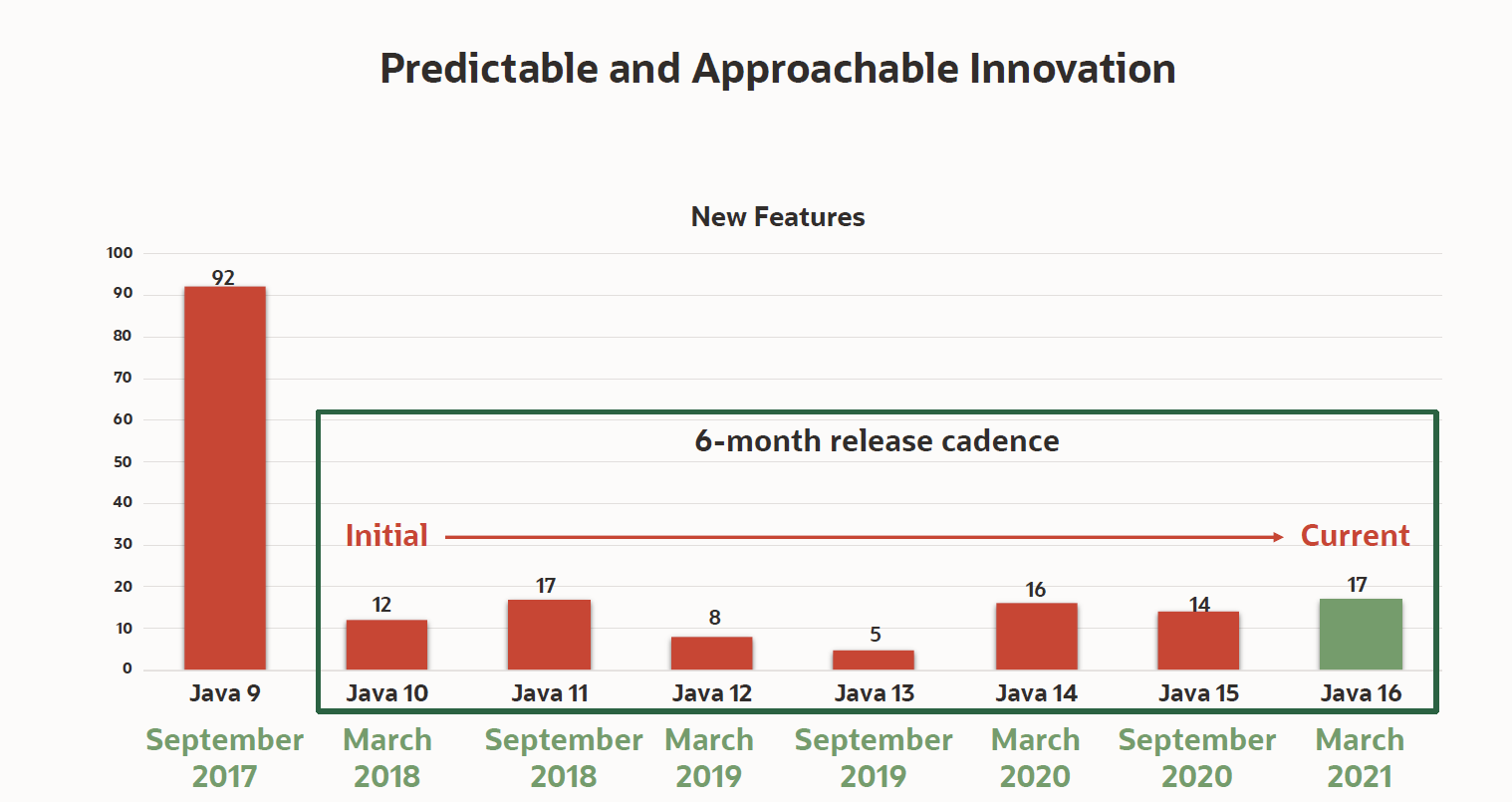
Oracle announced today the availability of Java 16, which adds 17 enhancements to a software development kit that is now being updated every six months.
Georges Saab, vice president of development for the Java Platform Group at Oracle, said while most Java development teams are still using Java 8 or earlier editions of the platform, the expectation is that many of them will soon move forward, as updates are made available in smaller increments that are easier to test and vet.
At the same time, Oracle is committing to make available long term release editions of Java that won’t be updated as frequently. While there are many organizations anxious to take advantage of new capabilities as quickly as possible, Saab noted there are just as many that value stability more than innovation.
The latest edition adds support for finalized pattern matching for instances and records, as well as other language enhancements that were previewed in Java 14. Developers can also employ a packaging tool to ship self-contained Java applications that will make it easier to deploy in modern IT environments, said Saab.
Additional capabilities now available include the Vector application programming interface (API), the Foreign Linker API (JEP 389), and the Foreign-Memory Access API that are all available in incubations as well as a sealed classes capability that is being made available as a preview.
In general, Saab said, one of the primary reasons many organizations don’t tend to update Java more frequently is the frameworks they rely on to employ it at a higher level of abstraction are still optimized for older versions. However, as Java updates are delivered in a more modular fashion, it will become easier for the providers of those frameworks to keep pace.
It’s not precisely clear to what degree IT teams are employing Java to build next-generation applications based on microservices. However, a recent survey published by VMware, found 95% of respondents have either already used the open source Spring framework, based on Java, to either containerize an application (65%) or plan to do so (30%).
A quarter of a century after its initial development, Java is still the dominant programming language relied on to build enterprise applications. In many instances, the lack of tools for building Java applications for Kubernetes platforms was a significant inhibitor of adoption for the cloud-native platform. In the last six months, however, the number of tools for building and deploying Java applications on Kubernetes clusters has increased.
Despite the proliferation of alternative platforms for building and deploying applications on Kubernetes platforms, the appetite for retraining legions of Java developers is low. Most developers will rely on the programming tool they already know, especially when it comes to building mission-critical applications for the enterprise. That may mean some of those applications might not be as fast as they could be, but, given the level of risk, there’s always going to be a natural tendency toward being safe rather than sorry.