Tag: cloud monitoring

  • How to Overcome Challenges With AWS Lambda Logging

    How to Overcome Challenges With AWS Lambda Logging

    Monitoring AWS Lambda can be a complex and potentially costly endeavor. Here’s what you need to know to stay on track and on budget

    Organizations are already experiencing a shift toward serverless cloud computing. According to the O’Reilly “Serverless Survey 2019,” around 40% of respondents said they had implemented serverless architecture. Forrester “Global Business Technographics” Developer 2019 found that 49% of companies are using it or planning to use it in the next 12 months.

    AWS leads the way in this space. According to Serverless.com, 96% of respondents choose AWS Lambda over Azure Functions and Google Cloud Functions. AWS Lambda helps us to design a lightweight and robust application architecture that can be built and deployed without any hassle. However, nothing comes for free. There are several, potentially costly, complexities when monitoring AWS Lambda. Fortunately, there is an array of solutions.

    Logging

    By default, AWS Lambda’s stdout and stderr messages are sent to CloudWatch Logs, where every function has its log group. A log group is a collection of log streams (sequence of log events) that can be stored as long as you want. Storage of logs costs USD 0.03/GB and data ingestion costs around USD 0.50/GB.

    It is common practice to break up your Lambdas into single responsibility functions. This means, for example, if you need one Lambda to read a certain object and another to write it, you’re setting up two separate functions. However, this also means two log groups.

    This creates a challenge when you want to analyze your application’s output log. There is no direct way to log queries across multiple log groups. In response to this, AWS enabled CloudWatch Log Insights to conduct cross-log querying. While this brought many of the improvements users wanted and needed, analyzing multiple log groups together meant a higher cost for queries. This prohibitive cost model encouraged many to look to external services.

    Tracing

    AWS X-Ray enables you to trace the underlying components of your application and helps you to dig out the fundamental reason behind distributed issues. It has quickly become an essential troubleshooting and optimization tool for engineers.

    For example, cold start latency can be problematic for AWS Lambda functions with slow startup times. Although you can counter this by enabling Provisioned Concurrency, you will need to pay extra.

    If you have budget constraints and still want to resolve the issue, X-Ray might help you eliminate or at least optimize your application by removing the bottleneck. It lets you know, among other things, if your application is consuming more time during initialization or invocation. You can find X-Ray SDK on AWS Lambda for Go, Java, Node.js, Python and .NET.

    Debugging

    Traditional architecture and serverless architectures are as different as day and night. Serverless requires changes across the software engineering spectrum, including debugging.

    A serverless application is a combination of various services or resources within infrastructure, which can include tools such as AWS API Gateway, CloudWatch and SNS. Such distribution of web services helps avoid a single point of failure (SPOF), but this design creates a problem. Debugging or replicating an issue on a local machine is not always feasible, and debugging a production application is always a dangerous proposition.

    Moreover, the abstraction of AWS Lambda makes debugging complicated, as you don’t have direct access to the underlying OS. Hunting down dispersed logs adds to this overhead. As your serverless infrastructure scales, it becomes difficult to identify the root cause.

    To combat this, developers can use AWS native tools such as CloudWatch, X-Ray or Serverless Application Model (also known as SAM). Any of these tools on their own can be difficult to use; together, however, they form a powerful debugging suite.

    Outside of the AWS-native toolset, some tools provide further assistance with debugging. For example, the Serverless framework, which is an open source tool to develop and deploy serverless applications over AWS, lets you see your live application’s function log, for example:

    Monitoring

    Robust monitoring ensures the smooth operation of an application and helps to detect issues quickly. In traditional infrastructure, metrics only appear from a handful of sources, so collecting them together is less of a challenge. In a serverless architecture, this problem is much more complex.

    AWS gives you the freedom of converting CloudWatch Logs to metrics. These metrics can be filtered, measured and, when a threshold is crossed, alerted on. You can define a metric filter by choosing a log group created by your serverless function and target the log stream. This enables you to create a visual reference for your log events. Every custom metric you create will cost $0.30/10000 metrics per month.

    Metric filters can be a powerful tool, but it can also be a bit overwhelming to set up everything, and there are certain bottlenecks as well. For instance, you can’t parameterize metric names, which forces you to create a filter for every custom metric you want to track. There is also a hard limit of 100 metric filters per log group, which restricts you as your application evolves.

    Other than this, AWS resources are tightly coupled with each other, which makes AWS-native monitoring tools a fine choice when you need to monitor individual AWS resources or Lambda functions. To get an infrastructure-wide view and to monitor other third-party tools, a centralized logging approach is necessary to take full advantage of the log data.

    Conclusion

    There is no denying that serverless tooling quickly unlocks high availability, scalability and cost optimization. To make the most of this new paradigm, engineers need to build a robust and reliable monitoring system. The ability to manage log data streaming from many components, detect and trace issues on the fly, and deliver accurate insights to keep on improving the application is crucial to remain online and competitive.

    While serverless solutions give access to many of the technical features we need, the dangers of vendor lock-in and the power of third-party providers must be considered if you want to scale your organization and its infrastructure smoothly.

  • Sysdig Extends Cloud Monitoring Alliance With IBM

    Sysdig Extends Cloud Monitoring Alliance With IBM

    Sysdig and IBM announced they have extended their alliance to make Sysdig monitoring tools more broadly available across IBM public cloud services.

    IBM first adopted the Sysdig platform to enable DevOps teams to monitor workloads running on a subset of the IBM Cloud in June 2018. Now the company will extend those managed instances of the Sysdig monitoring platform running on its own public cloud to include additional cloud services such as IBM Watson, Event Streams, Cloud Databases, Cloud Object Storage and Cloud Foundry.

    Janet Matsuda, chief marketing officer for Sysdig, said monitoring capabilities as especially critical as the number of microservices-based applications running on public clouds continues to increase. IBM also makes use of the open source Prometheus monitoring platform to monitor many of those applications. Sysdig last month announced compatibility with Prometheus as a data source.

    In the wake of the COVID-19 pandemic, it’s probable that more monolithic applications will also be moving into the cloud as part of organizations’ business continuity strategies. Applications that run in the cloud are easier to manage remotely. Regardless of whether applications are monolithic or based on microservices, it’s clear IT teams will be “flying blind” unless they have access to monitoring tools, Matsuda noted.

    Over time, many of the monolithic applications being moved into the cloud will be transformed into a more flexible set of microservices that are easier to update. As that transition occurs, the need to observe the myriad microservices running on a public cloud becomes an even bigger challenge for IT teams.

    Of course, some IT teams will prefer to employ their own monitoring tools versus relying on a managed service, especially if they are trying to centralize the management of IT across multiple public clouds and on-premises IT environments. However, for now, at least, the bulk of IT teams are still employing various public clouds in isolation from one another.

    Longer-term, the relationship between Prometheus and commercial monitoring platforms is still being defined. Many application developers are relying on Prometheus to observe applications during the development process. Many IT teams, however, are already making extensive use of commercial monitoring platforms to identify and correlate issues in production environments. Sysdig is betting most of those organizations will continue to rely on those tools because they are easier to set up and navigate. In addition, each instance of a Kubernetes cluster currently requires its own instance of Prometheus.

    On the plus side, the amount of time and effort being applied to instrumentation and observability as part of any set of best DevOps practices continues to increase sharply. Furthermore, the need to combine security and operational IT metrics and analytics to advance DevSecOps adoption is also going to push IT organizations toward more robust monitoring platforms. Arguably, the real challenge is no longer finding a way to instrument applications as much as it will be turning all the data being collected into actionable intelligence that can be relied on to automate the management of IT at an unprecedented scale.

    — Mike Vizard

  • Logz.io Unveils Azure Open Source ELK Monitoring Solution

    Logz.io Unveils Azure Open Source ELK Monitoring Solution

    Needless to say, DevOps as a practice is largely fueled by open source. The growth and popularity of open source tools such as Elasticsearch, Kubernetes and others are driven largely by the increased flexibility, innovation and familiarity of options. While this isn’t news for developers (65% of which are active open source contributors), leading cloud providers are taking notice, as they try to increase their appeal to DevOps engineers to finally win the cloud wars.

    Currently, AWS is the leading cloud provider. However, with Azure gaining more and more momentum, all three major cloud providers are scrambling to offer their customers the best open source options and empower them to use the tools they know and love in a manner that is convenient and native to their cloud environments.

    Going Big on Open Source

    Today, Logz.io and Microsoft Azure announced that our ELK-as-a-service will now be offered on Microsoft Azure. Logz.io offers an intelligent machine data analytics platform built on ELK and Grafana, two of the most popular open source monitoring and troubleshooting tools. Our platform enables engineers to easily deploy, run and scale ELK without the hassle and pain of maintaining and managing the stack themselves.

    Now, with Logz.io for Azure, users can use open source ELK as a highly integrated experience in Azure. The new offering includes seamless integrations to various Azure services, out-of-the-box Azure dashboards, built-in alerting and crowdsourced machine learning capabilities.

    The integration between Logz.io and Azure is not only significant in the context of the cloud wars, but in the culture of Microsoft itself. While the company was previously associated with a more proprietary structure, they have made tremendous strides in recent years toward empowering open source by opening its .NET framework and Azure SDK, as well as their acquisition of GitHub.

    According to Julia Liuson, corporate vice president of Microsoft’s developer division: “At Microsoft, we see open source as a major driver of innovation within the engineering community. Since we strive to empower our customers and facilitate their success, it is important to us to meet them where they are by making it easy to access and use open source tools. Our partnership with Logz.io will strengthen Microsoft Azure ties with the developer community, enabling teams to easily build and monitor their products using ELK.”

    AWS vs. Google Cloud

    Microsoft’s investment in ELK  comes just in time to provide an answer to its competitors, AWS and Google Cloud. Just two months ago, AWS announced Open Distro for Elasticsearch, which in their own words “is a value-added distribution of Elasticsearch that is 100% open source (Apache 2.0 license) and supported by AWS.” The new offering includes managed Elasticsearch and Kibana along with features such as built-in alerting, security and more. This was AWS’ most recent appeal to the engineering community, offering one of the most popular monitoring tools as a managed service on AWS.

    Following this release, Google Cloud announced its own open source offering featuring integrations with leading companies such as Elastic, MongoDB, Confluent and more. According to Google, the purpose of  these integrations was to “provide users with a seamless user experience and the ability to easily leverage these open-source technologies in Google’s cloud.”

    Is Open Source the Future?

    If what’s happening between cloud vendors is any indication of future trends in the engineering space, it seems imperative that all organizations targeting DevOps teams must consider how they’ll fuel open source and empower its vast user community. At Logz.io, we are proud to be part of this initiative.

    Overall, it is great to see the strides large organizations are taking in furthering the interests of the developer community and enabling them to work using the tools, methodologies and strategies that best suit their workflows and ideals.

    — Daniel Berman

  • The Key to Multi-Cloud Success

    The Key to Multi-Cloud Success

    In the era of cloud-based architectures, companies have implemented multiple cloud platforms but have yet to reap the full benefits. Whether it’s Amazon Web Services (AWS), Google Cloud or Microsoft Azure—or some combination thereof—a recent Forrester study found that nearly 86% of enterprises have incorporated a multi-cloud strategy. Not only does this strategy take companies out of the business of hosting their own applications, it also leads to benefits including avoiding vendor lock-in, reduced costs and optimized performance.

    While it’s clear that a multi-cloud strategy offers many benefits and flexibility for an organization, there are more moving parts to track (with the added challenge of hybrid, multi-generational infrastructure), making it all the more critical that businesses have a solid monitoring strategy in place. Luckily, the collection of monitoring data is essentially a solved problem; instead, businesses today are faced with an endless cycle of day-two operational challenges such as avoiding downtime and maintaining visibility.

    As Andreessen Horowitz so aptly put it, software is eating the world; every company is becoming (or has become) a software company. Software is not only ubiquitous, it’s powerful, enabling us to solve a wide range of problems. This emphasis on software within companies has led to the emergence of multiple cloud providers such as Amazon, Google and Microsoft, which all recognized the trend and seized the opportunity by building cloud computing platforms.

    Because companies no longer have to build their own data centers, they can focus on their core business of delivering value to their customers. With the public cloud, they’re able to achieve far greater time-to-value than they would if left to build their own data centers and cloud platforms.

    Today, companies can build a portable software stack that is DevOps-driven, free from vendor lock-in and capable of delivering a superior set of capabilities than can be gained from a single provider. Although we’re now consuming infrastructure from cloud providers (which has its own inherent risks), we have better tooling to enable multi-cloud strategies, minimizing the risk of being reliant on any one provider for cloud services.

    The Missing Piece: Multi-Cloud Monitoring

    In this software-dependent world, availability is critical, and downtime is not only expensive but also damaging to business reputation. As a result, monitoring systems and applications has become a core competency, crucial to business operations. To fully reap the rewards of a multi-cloud strategy and thrive in this cloud-based world, implementing a unified monitoring solution is critical for success. In addition to the existing benefits multi-cloud offers, a unified solution gives operators constant and complete visibility into their infrastructure, applications and operations.

    Surviving as a Modern Enterprise

    Improved operational visibility through monitoring is often cited as a top priority among chief information officers (CIOs) and senior operations leadership, and good monitoring is a staple of high-performing teams. Yet, too often it’s implemented as an afterthought in reaction to changes in the mission-critical systems that power businesses. When this happens, organizations can struggle to reap the benefits of multi-cloud because they lack sufficient visibility to detect and avoid problems or recover from expensive downtime.

    Further complicating this underlying challenge is the fact that ephemeral infrastructure platforms such as Kubernetes are the new normal, while digital transformation, cloud migration, DevOps, containerization and other initiatives are compelling movements in the modern enterprise. Although they vary in scope and overlap or intersect in practice, they are unified in purpose: To deliver increased organizational velocity, empowering organizations to ship more changes faster.

    While they are a boon to business initiatives and developer productivity, these practices can increase exponentially the number and duration of day-two operational challenges. Delaying adoption of the solution to these challenges only increases risk exposure and cost.

    Be Prepared for the Cloud Gold Rush

    According to Gartner, the number of cloud-managed service providers is expected to triple by 2020. While this gold rush is good news for analysts, investors and operators alike—everyone (except Amazon?) benefits from a competitive market—it suggests that the multi-cloud trend will only become more diverse moving forward. Given the already complex landscape and this forecast, it’s impractical to expect turnkey monitoring solutions to provide enough coverage—a different approach is needed.

    The good news is that the solution is surprisingly simple: Treat monitoring and observability like we do the rest of our DevOps toolchain—as a pipeline. When containerization gained in popularity and we incorporated Docker and Kubernetes into our multi-cloud strategy, we didn’t have to replace our CI pipelines; we simply shipped containers instead of RPMs, essentially making our CI tools future-proof.

    For monitoring and observability, that future-proof solution is the monitoring event pipeline. At the end of the day, there are only so many mechanisms for observing systems (APM and observability client libraries, Prometheus-style /metrics or /healthz endpoints, logs and good old-fashioned service health checks are a few great examples). Once we start to think about these as workflows that can be automated via monitoring pipelines, we’re empowered to continuously adapt and thrive (maintaining visibility and avoiding downtime) in the ever-evolving and increasingly multitudinous cloud world of IT infrastructure.

    — Caleb Hailey

  • VMware Advances Hybrid Cloud Ambitions

    VMware Advances Hybrid Cloud Ambitions

    VMware today advanced its hybrid cloud strategy by making a series of updates to existing offerings, including the CloudHealth by VMware software-as-a-service (SaaS) application for managing and optimizing cloud applications, which VMware acquired last summer.

    In addition, VMware Cloud on AWS is now available in data centers operated by Amazon Web Services in Canada, Paris and Singapore, the company noted. VMware also announced that the latest version of VMware Cloud Foundation—which provides and automatically updates all the VMware compute, storage and networking software required to build a cloud—has been optimized to deploy VMware Horizon virtual desktop infrastructure (VDI) software, and will available on Dell EMC VxRail hyperconverged infrastructure in April.

    New capabilities being added to CloudHealth by VMware include enhanced multi-cloud reporting, multidimensional reporting and workspaces reporting.

    The CloudHealth platform also is now integrated with the Wavefront by VMware cloud analytics and monitoring platform, enabling users of CloudHealth to employ Wavefront metrics to rightsize and optimize applications running on multiple cloud applications as part of their DevOps practices.

    A future update to the CloudHealth platform will add enhanced amortization as well as support for convertible Reserved Instance (RI) exchanger automation, container cluster visibility and cross-family rightsizing for Amazon EC2, according to the company.

    Finally, VMware announced it is making available version 9.7 of VMware vCloud Director to cloud service providers. This offering provides a single pane of glass through which multiple VMware environments can be managed regardless of whether they are deployed on-premises or in the cloud. The latest version of VMware vCloud Director adds support for version 3.0 of VMware Cloud Availability, which unifies onboarding, migration and disaster recovery services between multi-tenant clouds. VMware vCloud Director is only available to cloud service providers, but Ajay Patel, senior vice president and general manager for the cloud provider software business unit for VMware, said VMware and its cloud service provider partners plan to make available a software-defined data center (SDDC)-as-a-service offering through which they will manage deployments of VMware from the edge to the cloud on behalf of IT organizations.

    VMware also revealed there are now more than 60 partners building or delivering managed service offerings for VMware Cloud on AWS, and more than 280 partners have achieved the VMware Cloud on AWS Solution Competency. VMware also now has 35 VMware Cloud Provider Program partners that have achieved Cloud Verified status, which is required to be eligible to deliver the forthcoming SDDC-as-a-service offering. Patel also revealed the number of organizations running instances of VMware on public clouds now exceeds 1,000, in the wake of the launch of VMware Cloud on AWS last year.

    Patel said the shift to hybrid clouds is more about transforming IT operational models than it is about deploying workloads at new physical locations. The challenge many IT organizations will need to come to terms with going forward is deciding what portions of that IT operational model they want to run themselves versus opting to rely on VMware and its partners.

    — Mike Vizard

  • Identifying Cloud Migraines Before Cloud Migration: 6 Tips

    Identifying Cloud Migraines Before Cloud Migration: 6 Tips

    Migrating to the cloud isn’t as simple as signing up for a SaaS application or deploying applications on a cloud infrastructure or platform; there are other factors at play. And the move to cloud shows no signs of slowing, with Gartner predicting the worldwide public cloud services market to grow 17.3 percent in 2019. Getting cloud deployments right is more critical than ever.

    As organizations shift more to the cloud, it means they will increasingly rely on networks and infrastructure they don’t own and directly manage. Yet, this infrastructure is just as critical to consume and deliver the applications and services as when it was in the data center. Being able to explore these networks to identify choke points and routing issues in advance helps to inform better network investment and configuration decisions. It is essential for a successful cloud deployment as well as ensuring an optimized environment on an ongoing basis.

    There are six key network considerations IT managers should take into account before shifting to the cloud.

    Baseline Performance Before Deployment

    Getting a baseline measure of network performance when moving to the cloud, first and foremost, requires adopting a different set of data points than organizations have typically used in the past. The move to IaaS, SaaS—or any cloud service for that matter—means organizations are beholden to those providers as well as third-party service provider networks through which the application or service traffic traverses.

    Prior to cloud adoption, the network was essentially under an organization’s control. And it’s not that networks are necessarily less complex, it’s just that network teams had access to all the network data like packets, flows and device level information to monitor performance and security. And when issues arose, teams had the ability to troubleshoot and triage problems. Traditional monitoring approaches worked in a world where the network was managed and contained and boundaries were known. However, these data sources are no longer available for monitoring the performance of the cloud network, where devices can’t be directly instrumented or polled. Visibility into cloud and third-party networks can only come from data sources such as synthetic and end user monitoring. These techniques can provide quality of experience metrics that network teams can rely upon to test configurations and baseline performance before moving to the cloud.

    See and Understand Bottlenecks in your Infrastructure

    It’s very possible that, based on existing configurations and routing policies, certain offices and sites are not optimized to consume applications or services over the internet. For example, a branch office in India may have issues accessing Salesforce because of transcontinental latency and a bandwidth constrained MPLS circuit. Similarly, a branch in Austin may have better and more reliable access to applications being served from El Paso rather than San Antonio.

    But how do you know what the ideal configurations are before deploying? Time to have a look at your new data sources. The first in your arsenal is actually derived from a technique you may already be familiar with for monitoring application experience in terms of page load and user transaction timings. Synthetic monitoring can be used to gain insight into infrastructure and network performance as well as your application. What’s great about synthetic monitoring is that it works in cloud environments and across the internet in addition to your data center for in-depth information about how each portion of the network is performing.

    Map Out Real Traffic Paths

    Having visibility into specific areas of a distributed network that are problematic, as well as pertinent details that can help determine a root cause, results in more tangible and actionable information for the network you own and those of your providers. To achieve a more complete picture of how traffic is traversing the cloud network, it is essential to combine synthetic tests with ping and traceroute functionality. Now network teams can not only test the reachability of an endpoint or host through the cloud, but also use that data to determine the route or path of packet through a distributed network while measuring transit delays.

    Another useful data point is Border Gateway Protocol (BGP) routing table information. BGP knits the internet together by exchanging routing information between networks. And these routes determine how traffic flows to or from your apps and services. Layering this information into your diagnostic approach helps understand how routing configurations and changes impact reachability, latency, loss, jitter or other performance metrics.

    Collaborate with SaaS and Cloud Providers

    So, when it comes time to work with your your SaaS, ISP and cloud providers, it helps to share this information, related visualizations and diagnostic information in an easily consumable way. That way, when a trouble ticket is generated, it is dealt with much more quickly by the vendor or provider. Knowing exactly where a problem exists and the related cause analysis empowers teams to take immediate action and enable the responsible party take immediate action as well.

    Get Things Right Before Deployment

    With detailed visualizations and hop-by-hop metrics, it becomes possible to try out a routing change, plan for a new data center or test a roll out of a new application or SaaS service. Synthetic testing layered with contextual data and a detailed visual network topology allows teams to test performance and gain insight into initial infrastructure configurations, plan changes and understand their impact on cloud applications to get things right before deployment.

    Continually Monitor the Performance of Your Network and Its Impact on Applications

    The same techniques and data sources teams are used to baseline performance and achieve optimal cloud configurations can also be used on an ongoing basis to ensure continued performance. Active monitoring with additional layered information allows organizations to constantly keep an eye on performance degradation to optimize end user experiences across their network. And the additional inclusion of visual analysis reduces mean time to troubleshoot and repair issues. As the internet and cloud computing reshape the enterprise network, incorporating these new data sources, correlation of pertinent data points with a unified visualization is critical to the successful deployment and management of cloud applications and services.

    This virtuous cycle of better performance becomes even more important in the future as organizations increasingly rely on the internet for their critical operations. Growing levels of software-based automation will only increase the number of different network paths traversed and the resulting end user experience. Accurate insights into the entire cloud network enable organizations to troubleshoot and solve their cloud performance problems, alleviating potential cloud migraines and ensuring the business runs smoothly … and painlessly.

    — Alex Henthorn-Iwane

  • Wavefront by VMware Extends Monitoring Reach

    Wavefront by VMware Extends Monitoring Reach

    The gap that exists between the DevOps tools typically made available to traditional enterprise IT sites that have standardized on VMware and what’s typically employed by web-scale companies continues to close.

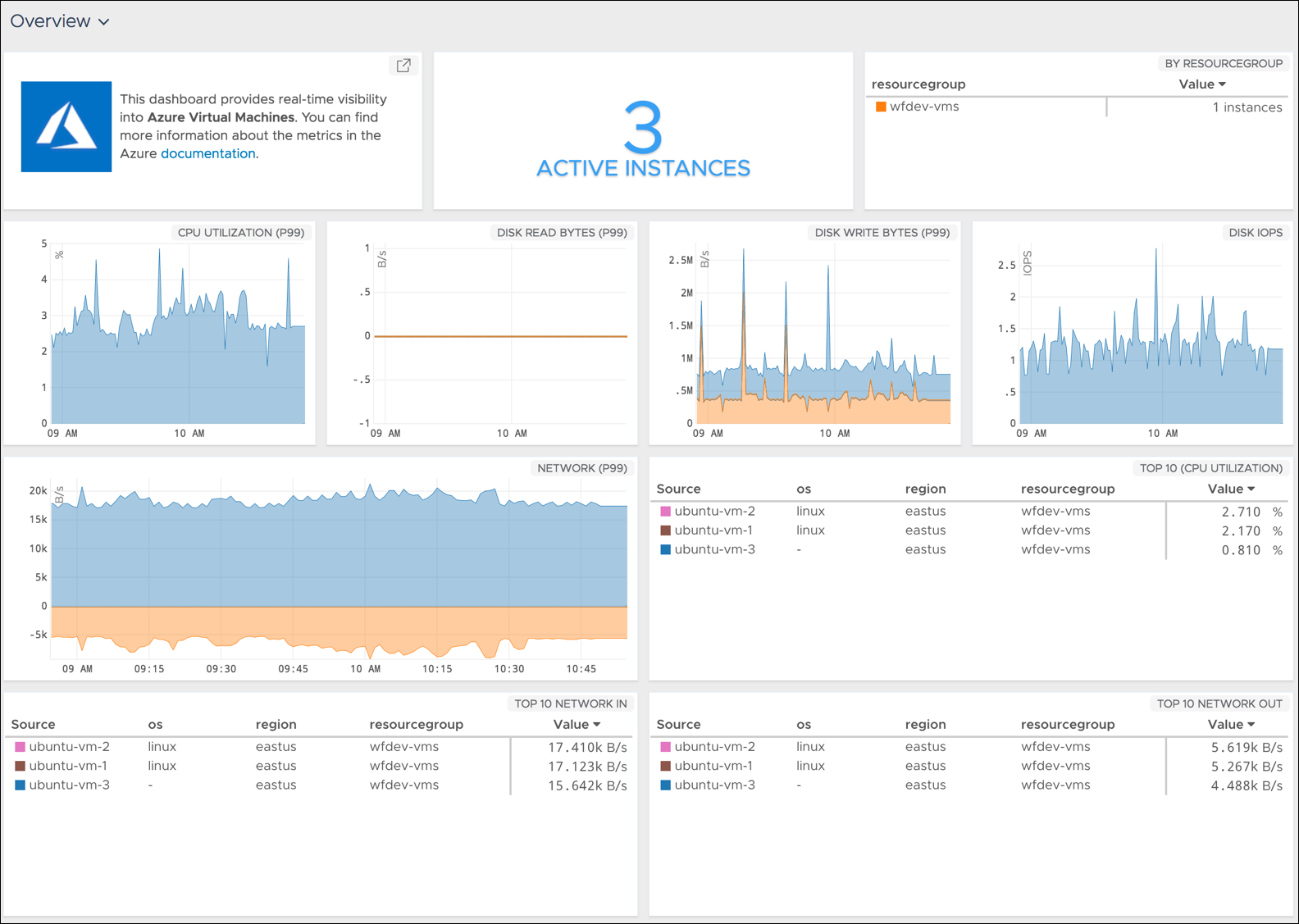
    The latest edition of the Wavefront analytics and monitoring tools from VMware now comes with pre-packaged support for a range of services running on the Microsoft Azure public cloud in addition to a significant expansion of support for a range of services provided by Amazon Web Services (AWS) and Google.

    Rob Markovich, senior director of marketing for the VMware business unit, said Wavefront has added 35 “out of the box” integrations for third-party applications and services to the software-as-a-service (SaaS) application.

    Wavefront has also added pre-packaged dashboards for Kong, Micrometer, Github and Bitbucket, VMware vRealize Operations, Hadoop MapReduce, Yarn, HDFS, Ceph, FluentD, Couchbase, Lighttpd, CoreOS, PHP-FRM, Papertrail, Rollbar, Suse Linux, Fedora Linux, FreeBSD, NetBSD, OpenBSD and Oracle Linux. Any Wavefront dashboard can be customized using more than 100 analytics functions, including correlation and predictive functions on any metric data source, he said.

    Those additions come on the heels of a wave of investments VMware has made over the last few months spanning everything from cloud extensions to VMware vSphere to embedding analytics within the VMware vRealize IT automation framework.

    Markovich said Wavefront is adding integrations at the rate of 10 to 20 a month—the total number he said should increase to more than 200 by the end of 2018. As organizations embrace various types and classes of cloud-native applications such as microservices, there is a much greater need for monitoring and analytics, especially as organizations begin to better understand the level of dependencies that exist between thousands of microservices, he said.

    In addition, Markovich noted the number of companies encountering that challenge is also starting to increase as almost every company begins to realize it is a software company that happens to sell something else. That doesn’t necessarily mean every organization will be updating applications at the same rate as a web-scale company, but it does means existing IT processes will need to be modernized, he said—for example, more enterprise IT organizations are starting to create site reliability engineering (SRE) teams.

    That shift may not result in every enterprise application being monitored, but it will most definitely increase the number of application workloads within those enterprise IT environments that are continuously monitored.

    There is, of course, no single definition of what officially constitutes DevOps. Every organization will tailor DevOps best practices to fit within the confines of their existing IT culture. In some organizations that shift will be driven from the bottom up, while others will be transformed by an initiative led from the top. At this point, the single biggest inhibitor to DevOps adoption has more to do with IT culture than any given set of technologies. But regardless of an organization’s level of DevOps maturity, VMware is betting there will soon be many more traditional enterprise IT organizations employing monitoring and analytics a lot more broadly than ever.

    — Mike Vizard