Tag: cloud cost management

  • Reducing Energy Consumption With Cloud Cost Efficiency

    Reducing Energy Consumption With Cloud Cost Efficiency

    A new study from Stanford University found that it takes 75 gigajoules per year of energy for a person to have a good, long life, but the average American uses nearly four times that amount: 284 gigajoules/year. In fact, the U.S. consumes 17% of the world’s energy while accounting for only 4% of the population. 

    It’s not a new call to action that we need to do more to reduce our energy consumption. Corporations are starting to take action by implementing environmental, social and governance (ESG) programs. However, digital infrastructure is a huge contributor to energy utilization. The collective cloud now has a bigger carbon footprint than the airline industry. So, when enterprises are evaluating and managing cloud costs, they have to look beyond the economic costs and also consider the environmental cost and potential harm to the planet—they have a responsibility to use cloud services efficiently with zero waste.

    So, the questions to ask are: How do you know if your organization is using the cloud as efficiently as possible, and how do you prove the software you’re developing is cloud-efficient? An organization can have a major competitive advantage if they make cloud cost efficiency a priority for all teams involved—especially given the ongoing climate crisis and current market downturn. Below are three basic rules to ensure continuous cloud cost efficiency.

    1. Pay For and Use Only What is Needed 

    The cloud is a service that gets turned on and off, like a light switch. And, like a light switch, it should also be turned off when not in use. Also, as is the case with separate bins for trash and recyclables, organizations shouldn’t reserve large instances when a medium-sized instance will be acceptable. How much cloud is required will change over time, but it’s rooted in knowing who—which team, application, etc.—is using which cloud resource for what purpose at any given time. Ideally, no cloud resource should be left untagged and no cost unallocated, even for shared resources. Organizations can then focus on eliminating unused and underutilized resources.

    2. Understand the Impact

    Take advantage of tools that measure the carbon footprint of cloud usage. When organizations can reduce their footprint, it saves money and impacts other business metrics, such as cost of goods sold (COGS), employee satisfaction and even customer experience. Experiment with different technical levers and see how they impact the cloud costs—this will also lead to smarter choices. By empowering engineering teams with cloud cost data, organizations will enable greater efficiency from the beginning of the software development life cycle.

    3. Cultivate Conscientiously

    Cloud consumption will increase as a business grows—but is it growing efficiently? According to the Flexera 2022 State of the Cloud Report, optimizing usage is the top cloud initiative for the sixth year running, as cloud costs can spiral out of control quickly for a growing SaaS business. With accurate budgeting and forecasting capabilities, organizations can take advantage of long-term savings plans and reserved instances with confidence. In addition, addressing cost anomalies quickly will assist in the stabilization of growth. Not to mention the fact that cloud cost management products offer automated recommendations; the faster users act on cost-cutting alerts, the more money and energy will be saved in the long run.

    When an organization is reviewing cost reports and deciding which infrastructure changes to make, they should also give engineering teams real-time visibility and control over cloud costs so they can act faster and more ethically. With a corporate focus on cloud cost efficiency, organizations can brag about their reduced carbon footprint and be confident that their “Go Green” attitude is benefiting customers, employees and shareholders and, above all, the planet.

  • Four Steps to Avoiding a Cloud Cost Incident

    Four Steps to Avoiding a Cloud Cost Incident

    The recent Flexera 2022 State of the Cloud Report found that organizations waste 32% of their cloud spend, up from 3o% last year. This can be due to cloud cost incidents triggered by unused resources, malicious activity or overambitious projects and which have a massive financial impact if not found and corrected promptly.

    As an organization’s cloud infrastructure footprint matures, mapping cloud resource use and costs accurately to product lines, teams and business units becomes progressively more complicated and problematic. However, accurate cloud cost attribution is vital to understanding team resource use and determining accurate cost of goods sold (COGS) margins and is imperative to budgeting and forecasting. Organizations need reliable, granular views of the cloud environment to attribute costs back to departments and optimize a meaningful budget.

    Cloud cost spikes can blow up an organization’s budget fast and can be hard to track down, but enterprises can help protect themselves from a cloud cost incident with just a few simple steps.

    Have a Strong Tagging Strategy That Attributes Cost Granularly

    The cloud operations team needs to identify what is important to business reporting, which will help define and create a strategy for tagging. For instance, when an organization has two teams managing a particular service, the teams should safeguard the services tagged with a team identifier. Also, the teams should add another tag for the environment in which they’re running so they can allocate cloud costs across teams and environments.

    When an application uses numerous resources, like a database and storage, teams should consider adding a specific application tag and break down costs by each application. It should be noted that there is no one-size-fits-all tagging solution, so enterprises will need to determine what works and try out different strategies by adding and removing tags later.

    Understand Cloud Cost Ownership to Avoid Chaos

    Ask yourself how well your organization has attributed cloud costs to teams, applications or COGS. If the answer is “Not well,” then you are missing vital information about how your cloud costs relate to your business.

    The lack of this context or visibility into resource allocation makes it unmanageable and impossible for cloud operations owners and senior leaders to agree on who is responsible for varied expenses and resources. Manual cost attribution doesn’t scale accurately or account for shared cluster resource use across teams and applications. This creates confusion that can escalate when users arbitrarily slice data and claim ownership without accountability or clear visibility.

    What happens is that costs can sometimes be double-counted with two owners—or even missed completely with no owner whatsoever. The resulting data emerges as an inferior quality that is untrustworthy and not actionable. The inability to visualize resource use in context can dilute, hinder and even defeat cost improvement initiatives and optimization.

    Cloud costs should have an owner who can ensure that cloud spending is tied to business value. Understanding who owns which pieces will help pinpoint the cause.

    Establish and Monitor Cloud Budgets

    Historical data on cloud spending is gold—it can help forecast and budget for what should be happening with the cloud’s cost footprint. If that’s not happening, then it should be flagged and investigated.

    Once you get cost data under control, organizations can get an accurate picture of where cloud spending is taking place. However, does this match the expectations of spending? By establishing and monitoring budgets at every stage of a project, organizations can have guardrails to cloud spending and prevent costs from soaring out of control when engineers overallocate on performance “just in case.” Once budgets are in place, organizations can monitor spending and right-size resources to balance actual usage, rather than estimated usage at the start of execution.

    Over time, right-sizing resources will allow for optimal spend, as well as identify unused resources that can be shut down. Organizations should identify development and test instances left running when no longer needed and shut them off.

    Implement Cost Anomaly Detection

    Organizations can shield themselves from cost anomalies by continually monitoring and optimizing cloud costs. Cost anomaly detection can help act as a barrier to early recognition before they become problematic. This is especially effective when prompt, actionable alerts can be delivered directly to resource owners via Slack or email when their forecast exceeds the set budget. The best option would be adopting a cloud cost monitoring and optimization (CCMO) tool that gives alerts in real-time when a cost anomaly occurs. These tools must be able to detect anomalies and analyze their root cause, while also allowing visibility into what went wrong to avert similar future errors.

    Executing continuous cost monitoring and anomaly detection tools for dynamic cloud environments is essential in identifying any activity that doesn’t align with expected expenditure or diverges from an established pattern. With proper monitoring, organizations can take corrective measures before the fact.

    Unwanted and unexpected cost incidents can clean out an enterprise’s budget quickly, especially as its cloud infrastructure grows. Organizations need to practice these steps to gain a full picture view of their cloud environment.

  • Survey Surfaces Multi-Cloud Computing and Cost Challenges

    Survey Surfaces Multi-Cloud Computing and Cost Challenges

    A survey of 360 CIOs and IT leaders in the U.S. and the United Kingdom found that, as the number of cloud platforms an organization employs expands, the number of tools they are required to deploy and master does, too.

    The survey, published this week by Virtana, a provider of a platform for managing cloud migrations, found nearly two-thirds of respondents (63%) reported their organization relied on at least five separate tools for migration, cloud cost optimization, integrated performance monitoring, application performance management and cloud infrastructure monitoring. A full 83% are expending some level of manual effort to consolidate data from all of these tools, or are simply using them in isolation from one another. Only 17% said data integration is fully automated.

    Nearly three-quarters (73%) also noted that siloed efforts limit their ability to realize the full potential of the cloud.

    It appears that multi-cloud computing only makes managing IT more challenging. Not to mention the increased pressure a multi-cloud approach puts on DevOps and developers that already juggle an overwhelming number of tools for development, DevSecOps and more. And, of course, the risk of cloud misconfiguration grows alongside the number of cloud platforms an organization uses.

    According to the Virtana survey, a total of 82% of respondents have a multi-cloud strategy, with more than three-quarters (78%) deploying workloads in more than three public clouds. A full 59% now run more than half of their workloads on public clouds. More than half (51%) also plan to increase the number of public cloud instances they support this year, with more than a third (34%) planning on using five or more cloud platforms.

    More challenging still, more than three quarters (76%) are in the early stages of implementing serverless computing frameworks. Overall, more than half (52%) will continue to maintain a hybrid environment as part of their core IT strategy. A full 96% of respondents see value in workload portability, but only 71% are in the early stages of achieving that goal. Top benefits anticipated include maximized cost savings (58%), reduced cloud service provider risk (46%) and increased business agility (43%). However, nearly three-quarters (75%) have either no or few cloud governance capabilities (34%) or have stitched together disparate tools to achieve that goal (41%).

    Jonathan Cyr, vice president of product management for Virtana, said that as the global economy becomes more challenging, it’s only a matter of time before sensitivity to cloud costs start to rise. Each time the overall IT environment expands, increases in complexity drive the total cost of IT higher.

    It’s not clear to what degree that sensitivity to cloud cost might drive more IT organizations to centralize the management of IT environments. In theory, a single control plane could be employed to manage multiple cloud computing environments, but today most clouds are still managed in isolation from one another.

    IT teams also find themselves inadvertently locked into a cloud platform. The more developers invoke proprietary application programming interfaces (API), the more difficult it becomes to migrate a workload from one cloud platform to another.

    It’s all but certain there will be a cloud management reckoning in the months ahead. Development teams may prefer one cloud platform over another for many reasons but, as the cost of IT continues to increase, there will soon be tougher cloud cost questions emanating from the finance office.

  • IT Spending to Reach $4.4 Trillion in 2022

    IT Spending to Reach $4.4 Trillion in 2022

    For those who doubted the digital transformation trend, it’s become clear that it’s not a marketing fad or a buzzword but is now standard operating protocol for businesses. A forecast released this week from market research firm Gartner confirms this, as the projected increase in application software, infrastructure software and managed services spending highlights that digital transformation is a CIO marathon and not a sprint.

    According to Gartner, every major consumer-focused online offering and mobile application is underpinned by infrastructure-as-a-service and comprises a substantial portion of the near 10% growth in software spending that will occur this year.

    Gartner said it expects digital business initiatives, such as experiential customer experience and optimization of supply chains, to push spending on enterprise applications and infrastructure software into double-digit growth next year.

    Gartner’s prediction is that worldwide IT spending is projected to total $4.4 trillion in 2022, an increase of 4% from 2021.

    But the technology battleground isn’t just about hardware and software, it’s also about talent. The tight IT talent pool is driving up salaries and forcing technology service providers to increase their prices. This is pushing up spending growth in analytics, cloud computing, seamless customer experiences and security

    Gartner expects software spending to grow 9.8% to $674.9 billion in 2022; IT services are forecast to grow 6.8% to reach $1.3 trillion.

    Cloud’s gain is traditional IT’s loss, according to a Gartner market forecast released earlier this year. Enterprise spending on public cloud computing in addressable segments will be greater than spending on traditional IT by 2025. Gartner’s ‘cloud shift’ research includes only those enterprise IT categories that can transition to cloud, within the application software, infrastructure software, business process services and system infrastructure markets. “By 2025, 51% of IT spending in these four categories will have shifted from traditional solutions to the public cloud, compared to 41% in 2022. Almost two-thirds (65.9%) of spending on application software will be directed toward cloud technologies in 2025, up from 57.7% in 2022,” Gartner predicted.

    In 2022, traditional offerings will constitute 58.7% of the addressable revenue, but growth in traditional markets will be much lower than in the cloud. Demand for integration capabilities, agile work processes and composable architecture will drive a continued shift to the cloud, as long-term digital transformation and modernization initiatives are brought forward to 2022. Technology product managers should use the cloud shift as a measure of market opportunity.

  • How Observability Can Improve Gaming

    How Observability Can Improve Gaming

    Competing in the gaming industry is becoming increasingly costly. To attract new players, millions of dollars are spent in user acquisition (UA), development and cloud infrastructure. As the space becomes more expensive, revenue and cost optimizations can become a matter of survival. 

    The cost to businesses because of server outages, game response lag or generally poor performance can equate to billions of market cap of gaming companies. The value of observability in modern games is about ensuring that revenue opportunity is not missed in a costly operating landscape. Observability assures that all investment spent on user acquisition is protected and that gaming user experience (UX) is maximized. And user experience depends not only on how the game’s UI is performing but also on the entire gaming environment performance and reliability.

    A modern gaming environment is usually highly distributed—a lot of pieces have to come together. The engineering team develops code for the gaming application, which can consist of many microservices, containers, managed cloud services, third-party APIs and serverless functions. Game designers create game levels, the art team produces visual effects and animations and the audio department creates game audio. Once these moving parts are packaged together, the game service has to be deployed on cloud infrastructure and the game itself shipped as executables for consoles, mobile devices and laptops.

    gaming observability

    All these elements generate massive amounts of observability data, particularly if a game is popular and played by millions of users. Thus, making sure that all gaming elements are working as expected means that gaming companies have to implement efficient ways of collecting and analyzing the massive amounts of that data. That data comes from gaming services, consoles and other sources in real-time. For instance, it is not uncommon to deal with hundreds of terabytes of ingested log data per day. As a result, improving the gaming experience can be quite challenging for gaming companies with large-scale operations. The companies’ success depends on how efficiently they can harness all the data generated by gaming environments.

    This is where observability comes in. Observability provides critical insights into what is—or what may be—wrong with the game, all its moving parts and user experience. Powerful observability capabilities are essential, including processing vast amounts of data (logs, metrics, traces, etc.) in real-time, managing fluctuating observability data from variable user loads and running concurrent real-time queries on a massive scale.

    So, what, exactly, needs to be measured for a great gaming user experience?

    Measuring the Gaming User Experience

    Gaming companies are under continuous financial pressure to deliver new features that attract and retain new users in order to offset mounting operating expenses. Attracting new users is a balancing act from the gaming companies’ perspective. If they move too slowly, they will lose gamers. If they move too quickly, the gaming user experience can deteriorate due to newly introduced bugs. Gamers can be very vocal on social networks, especially if their intent is to express their dissatisfaction with compromised gaming quality. As a result, companies are forced to balance the rate of feature introduction with user satisfaction. That’s why they need to measure user experience continuously.

    To improve gaming user experience, gaming organizations must establish measurable key performance indicators (KPIs), which can drive improvements and overall quality. KPIs include, but are not limited to: 

    • User video quality (frames per second)
    • Memory usage
    • Crash reports count
    • Database performance measurements
    • Service latencies 
    • User request count
    • Game-specific errors and warnings count
    • Code quality measurements, such as automated test coverage success criteria (a part of the CI/CD pipeline)

    Monitoring Service Latency for a High-Quality Gaming Experience

    Gaming applications are often bursty when it comes to user load, especially during the introduction of new games or new features. One of the critical indicators to monitor is service latency to manage fluctuating user demand during those times. 

    DevOps teams and SREs need to collect logs at a massive scale to analyze the performance of services, infrastructure and individual host utilization metrics such as high CPU utilization. This information gives engineers clues about the sources of bottlenecks and potential deterioration related to service latency. And logging tools need to be able to deal with this fluctuating demand, too. This level of insight into the state of the gaming application helps engineers troubleshoot issues before gamers face increased service latency that can impact their gaming experience.

    Analyzing Game-Specific Observability Data

    Game developers can create custom logs and metrics and combine those with observability data from the gaming engines. Both must be analyzed to assure a high-quality user experience. Some of the common gaming data parameters available for analysis are:

    • Log data that indicates when a player joins and leaves the game (associated with the player’s name)
    • The location of a player reported at specified times
    • Logs related to significant gaming events associated with each player (such as goals achieved or actions performed)
    • Logs related to chat messages between players, player location, the time when the message was generated and message context

    The more data collected, the better the chances to understand any issues that can turn players away from the game. Observability data management should evolve in parallel with game development. As new features are added, the code should be instrumented with KPIs to ensure the quality of the newly introduced code in the long run.

    Database Performance Monitoring is Critical for Gaming User Experience

    To store time-sensitive gaming data, DevOps teams must use fast databases. The database performance and how fast the game’s properties are retrieved from a database directly impact user satisfaction. Slow database performance negatively affects the gaming user experience. For DevOps teams to avoid any service issues, it is a must to measure key database performance indicators such as response times metrics, out-of-memory error logs and others.

    Fast databases could be expensive in the extremely competitive market where gaming companies are always looking for cost optimization to survive in the business. It’s non-trivial for DevOps teams to monitor user experience related to database performance and, at the same time, to look for ways to optimize the cost of fast databases.

    Build a Pipeline and Delivery Monitoring

    For a large-scale video game, new code is often pushed many times per day. Builds can be significant and deployed across many gaming consoles and end devices. Continuous build pipeline and delivery monitoring are crucial for frequent and commonly large software deployments.

    With large builds deployed daily over the network to thousands of gaming platforms—where each platform receives a massive amount of data—monitoring of build deployments should be automated. Errors from log data should trigger alerts and drive redeployments. QA automation is necessary to reduce the burden of QA efforts and make build deliveries less error-prone and less tedious. 

    Better Observability Improves In-Game Commerce

    Insights into user behavior are as important as monitoring possible issues affecting user experience. Observability tools can provide key insights into the overall engagement of all game users. High engagement then drives more excitement. Higher user excitement may increase the success of ad campaigns and accelerate in-game purchases.

    Observability Tools for Managing Gaming Experience

    When thinking about observability tools that can be instrumental in driving continuous improvement of user experience in the gaming industry, the following functionalities are important:

    • Ability to ingest and analyze log data at petabyte-scale and beyond in real-time to avoid gaming experience deterioration.
    • Zero-schema and ability to accept observability data in various formats from various gaming platforms, cloud servers, gaming consoles, and mobile devices. Because gaming environments use different third-party software packages, logs may come in many formats.
    • Ability to create alerts on collected observability data. Alerting can improve user experience by monitoring properties such as the number of active users experiencing client errors. 
    • Capability to handle backpressure when critical issues occur is essential. An alert storm can clog the data pipes, and the observability tool can be in the dark for hours unless it is designed to cope with backpressure.
    • Ability to collect data from build pipelines to monitor frequent and commonly large software builds being deployed daily over the network to numerous gaming platforms.
    • Capability to collect data from cloud environments such as cloud infrastructure monitoring. 

    Observability is key to protecting gaming revenue opportunities and assuring the success of video games, as long as you know what to look for in observability tools that are used to gather data from gaming environments.

  • Debunking 6 Stubborn Public Cloud Myths

    Debunking 6 Stubborn Public Cloud Myths

    A lot of enterprises migrate to the public cloud because they see everyone else doing it. And while you should stay up on the latest and greatest innovations—which often happen in the cloud—you need to be aware of the realities and understand different migration strategies. You need to know why you’re moving to the cloud. What’s your goal? And what outcomes are you seeking? Make sure you know what you’re getting your enterprise into before moving forward in your journey. Here are six stubborn myths that persist about the public cloud and the realities you’re facing.

    1. Cloud Technology is not a Project, it’s a Constant

    Be aware that while there is a starting point to becoming more cloud-native—the migration—there is no stopping point. The migration occurs, but the transformation, development, innovation and optimization is never over.

    There are endless applications and tools to consider; your organization will evolve over time, technology changes regularly and user preferences change even faster. Fueled by your new operating system, cloud computing puts you into continuous motion. While continuous motion is positive for outcomes, you need to be ready to ride the wave regardless of where it goes. Once you get on, success requires that you stay there.

    2. Flex-Agility is Necessary to Survival

    Flexibility + agility = flex-agility, and you need it in the cloud. Flex-agility enables enterprises to adapt to the risks and unknowns occurring in the world. The pandemic continues to highlight the need for flex-agility in business. Organizations further along in their cloud journeys were able to quickly establish remote workforces, adjust customer interactions, communicate completely and effectively and, ultimately, continue running. While the pandemic was unprecedented, more commonly, flex-agility is necessary in natural disasters like floods, hurricanes and tornadoes; after a ransomware or phishing attack; or when an employee’s device is lost, stolen or destroyed.

    3. You Still Have to Move Faster Than the Competition

    Gaining or maintaining your competitive edge in the cloud has a lot to do with speed. Whether it’s the dog-eat-dog nature of your industry, macroeconomics or a political environment, these are the things that speed up innovation. You might not have any control over these factors, but they’re shaping the way consumers interact with brands. Again, when you think about how digital transformation evolved during the pandemic, you saw winning businesses move the fastest. The cloud is an amazing opportunity to meet all the demands of your environment but if you’re not looking forward, forecasting trends and moving faster than the competition, you could fall behind.

    4. People are Riskier than Technology

    In many ways, technology is the easiest part of an enterprise cloud strategy. It’s people that introduce much of the risk involved. You may have a great strategy with clean processes and tactics, but if the execution is poor, the business can’t succeed. A recent survey revealed that 85% of organizations report deficits in cloud expertise, with the top three areas being cloud platforms, cloud-native engineering and security. While business owners acknowledge the importance of these skills, they’re still struggling to attract the caliber of talent necessary.

    In addition to partnering with cloud service experts to ensure a capable team, organizations are also reinventing their technical culture to work more like a startup. This can incentivize the cloud-capable with hybrid work environments, an emphasis on collaboration, use of the agile framework and fostering innovation.

    5. Cost-Savings is Not the Best Reason to Migrate

    Buy-in from executives is key for any enterprise transitioning to the cloud. Budget and resources are necessary to continue moving forward, but the business value of a cloud transformation isn’t entirely about cost savings. Really, it’s about repurposing dollars to achieve other things. At the end of the day, companies are focused on getting customers, keeping customers and growing customers, and that’s what the cloud helps to support.

    By innovating products and services in a cloud environment, an organization is able to give customers new experiences, sell them new things and delight them with helpful customer service and a solid user experience. The cloud isn’t a cost center, it’s a business enabler, and that’s what leadership needs to hear.

    6. Cloud Migration Isn’t Always the Right Answer

    Many enterprises believe that the process of moving to the cloud will solve all of their problems. Unfortunately, the cloud is just the most popular technology operating system platform available today. Sure, it can help you reach your goals with easy-to-use functionality, automated tools and modern business solutions, but it takes effort to use and apply those resources for success.

    For most organizations, moving to the cloud is the right answer, but it could be the wrong time. The organization might not know how it wants to use cloud functionality. Maybe outcomes haven’t been identified yet, the business strategy doesn’t have buy-in from leadership or technicians aren’t aware of the potential opportunities. Another issue stalling migration is internal expertise (or lack thereof). If your technicians aren’t cloud-savvy enough to handle all the moving parts, bring on a collaborative cloud advisor to ensure success.

  • FinOps Cloud Cost Optimization via Governance-as-Code 

    FinOps Cloud Cost Optimization via Governance-as-Code 

    Cloud implementations continue to grow in scope and complexity. Too often, this expansion also means costs keep spiraling out of control. In this article, we’ll examine why the emerging practice of cloud financial management (FinOps) is so essential to containing costs in the cloud. We’ll then discuss the challenges teams encounter as they start to apply FinOps approaches. Finally, we’ll reveal the opportunity presented by employing governance-as-code to establish continuous cloud cost optimization—and how this approach makes it practical for teams to put the theory of FinOps into practice so they can keep cloud costs in check.

    The Emergence of FinOps

    For many organizations, there’s been a race to leverage cloud services, with teams seeking to realize advantages in flexibility, agility and efficiency. Within an organization, it’s not only a matter of more workloads running in the cloud, it’s a matter of more distinct deployment models being used, more teams using cloud services and leveraging multiple service providers.

    In the process, teams have had to contend with rapid growth in the size and diversity of the implementations that have to be managed—and paid for. It is this latter aspect that has been a rude awakening to those responsible for managing budgets. Left unchecked, this growth in cloud use has led to spiraling costs and predicting, managing and controlling these costs only grows more difficult as deployments get more complex and more frequent.

    This need for improved cost management has given rise to a new discipline: Cloud financial management; or FinOps. In short, FinOps is a way of bringing financial discipline and accountability to the variable-cost paradigm found in the cloud. FinOps brings together a combination of technologies, processes and teams, including professionals from technology, finance and business. By gaining an improved ability to understand, track and manage cloud costs, teams can begin to maximize the value realized through their cloud expenditures. Given the strategic and urgent nature of cloud cost management, it’s not surprising that FinOps teams are growing. According to research conducted by the FinOps Foundation, FinOps teams expanded 47% over last year, and these professionals are expecting their teams to grow 75% in the next year.

    Challenges in Establishing FinOps

    While there’s a lot of promise behind the establishment of FinOps practices, there are also many obstacles standing in the way for teams. When the FinOps Foundation queried respondents about top challenges, these were the top five responses:

    • Getting engineers to take action (39%)
    • Dealing with shared costs (33%)
    • Accurate forecasting (26%)
    • Reducing waste or unused resources (25%)
    • Full allocation of costs (23%)

    Lacking comprehensive control and visibility over multi-cloud environments means these teams can’t proactively manage costs—and too often find out about wasted expenditures and high costs of underutilized resources after the fact. Because stretched teams are reliant upon manual follow-ups and tactics, it is difficult to get engineers to respond as quickly and effectively as needed.

    Compounding these challenges is the fact that across teams, different tools and processes are used. For example, different development teams might be using different provider services along with varying deployment tools, such as AWS Cloud Formation, HashiCorp Terraform, Kubernetes and so on. This inconsistency introduces inefficiencies and miscommunication and stifles team productivity.

    While the cloud offers a range of benefits compared to legacy, on-premises infrastructure, without proper governance, cloud costs can quickly spiral out of control. In fact, Gartner analysts report that in the next few years, 60% of organizations will encounter cost overruns in public clouds.

    Rethinking Cost Management

    For all the reasons articulated above, teams are being asked to take a new approach to cloud cost management, one that aligns with the principles of FinOps. For many, this means embracing the concept of governance-as-code to optimize cloud costs. Cloud governance-as-code represents a way to automatically and dynamically apply policies, including for cost optimization, in fast-changing cloud environments.

    With governance-as-code approaches, policies are defined using a standard language. Code associated with cost policies is created, deployed and maintained in much the same way developers manage application or infrastructure code. Developers don’t have to worry about tracking or managing costs. Cost policies are continuously evaluated against current state, utilization and configuration of cloud infrastructure. If any violations occur, automated notifications and workflows can be triggered. Here are the key requirements for using governance-as-code to establish continuous cloud cost optimization:

    Cost Policies are Defined via an Intuitive Language

    Traditionally, development, operations and financial groups worked in silos. Each team had its own tools, workflows and policies, and even fundamental terminology could vary substantially.

    To maximize the potential of continuous cloud cost optimization via governance-as-code, solutions need to enable teams to define, manage and revise policies using an easy-to-understand, consistent language. This makes it much easier for different teams to collaborate and gain alignment on key cost management policies and best practices.

    Finally, to be effective in establishing continuous cloud cost optimization, governance-as-code offerings need to employ a language that is independent of any specific programming languages that application developers may use. Further, these languages should be applicable to the broadest set of applications, cloud services, development tools and so on. This is vital to ensure that development teams retain maximum flexibility in the tools and services they can use.

    Cost Policies are Managed and Deployed via Git Within CI/CD Workflows

    Once policies are reviewed and finalized, teams must be able to apply these policies within the development organization’s existing continuous integration/continuous delivery (CI/CD) workflows.

    Through robust governance-as-code approaches, teams can create cost policies as code artifacts and deploy them via open source version control systems like Git. Through this approach, teams can apply policies in a manner consistent with their software development and delivery life cycles.

    By codifying cost governance in this way, cost controls can be deployed via Git within a CI/CD pipeline. This approach enables teams to avoid complex manual processes associated with tasks like managing tickets, requesting changes and so on. This also helps teams keep up with the accelerating pace of today’s dynamic cloud and development environments. Further, this approach means governance code can be traced through various state changes, rolled back if needed and so on, just like application code.

    Cost Policy Violations are Detected and Addressed in Real-Time

    Through continuous cloud cost optimization via governance-as-code, teams are  empowered to institute not only continuous detection but also immediate action. Policies can be employed at regularly scheduled intervals or they can be triggered based on certain events.  This approach enables enforcement of workflows and actions that may be required. If policy violations occur, notifications to relevant teams or team members can happen automatically and advanced workflows can be triggered. For example, a policy could identify RDS instances greater than 30 days old that have had no connections in the last 14 days. It would then notify the owners of these instances. If they don’t take action in seven days, the instances could automatically be stopped.

    Cost Policy is Continuously Enforced and Refined

    Continuous cloud cost governance-as-code has a never-ending life cycle, just like the team’s software development life cycle. Cost governance code is built, deployed, tested and released, and the process continues as new policies are developed and refined over time. As requirements change, teams need to be able to periodically analyze cost data and update policies as needed.

    As organizations continue to invest larger sums in their cloud implementations, the need to establish strong FinOps capabilities will only grow more critical. However, as these cloud deployments continue to grow more complex, it can get increasingly difficult to realize the promise of FinOps. For these reasons, employing governance-as-code to establish continuous cost management is emerging as a key approach. With this approach, teams can achieve sustained compliance and minimize waste.

  • Harness Updates Cloud Cost Control Tool for DevOps Teams

    Harness Updates Cloud Cost Control Tool for DevOps Teams

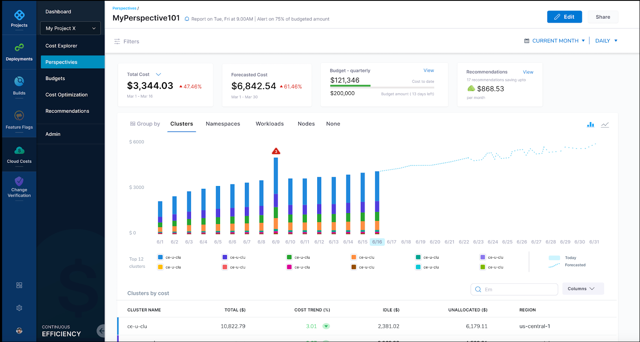
    Harness today announced that it has updated its cloud cost management (CCM) module for its namesake continuous integration/continuous delivery (CI/CD) platform to add support for Kubernetes at the node level in addition to providing business intelligence tools to analyze overall cloud costs.

    Harish Doddala, senior director of product management for Harness, said the update surfaces more granular insights into cloud costs that DevOps teams are incurring because cloud resources are being wasted. The latest version of CCM enables DevOps teams to create their own customized views of those resources.

    As the overall economy continues to recover from the COVID-19 pandemic, more organizations are looking to exercise greater control over IT costs. In the immediate aftermath of the pandemic, many DevOps teams consumed cloud resources without much regard to cost to enable organizations to advance various digital business transformation initiatives. Now, finance teams are requiring DevOps teams to account for those cloud costs.

    The goal is not only to reduce costs whenever possible—by, for example, quickly identifying a sudden spike in cloud resources consumption—but to accurately forecast budget costs on a monthly basis so that both IT and finance teams can collaboratively track spending. The typical finance team is just as concerned about accurately predicting costs as they are the total amount spent.

    Harness Cloud Cost

    Ultimately, Doddala says Harness’ CCM enables organizations to better assess which software development projects to prioritize based on the cloud resources allocated. It’s not uncommon for organizations to suddenly have to shift software development priorities as business conditions change and evolve. A project that may be a top priority today can easily be downgraded because, for example, a rival has been able to launch some new capability that an organization now needs to quickly match.

    DevOps teams, unfortunately, don’t always pay as much attention to infrastructure costs. Harness’ CCM helps reduce those costs by automatically stopping idle resources running on Amazon Web Services (AWS), Microsoft Azure, Google Cloud Platform (GCP) or any Kubernetes cluster, said Doddala.

    There are, of course, any number of existing tools that cloud service providers make available to enable IT teams to reduce costs. CCM, however, provides that capability within the context of a DevOps platform that can span multiple cloud computing environments, noted Doddala. DevOps teams, for example, can create and enforce cost policies for cloud infrastructure into a CI/CD pipeline and prevent an organization from being surprised by a bill from their cloud service provider at the end of the month.

    It’s not clear the degree to which cost control modules will influence the selection of one CI/CD platform over another. However, it’s apparent the days when organizations consumed cloud resources with little regard to cost are ending. In fact, there may soon be more cost controls imposed on software development projects than there were prior to the pandemic. The challenge, of course, is finding a way to automate the implementation of those controls and minimize the impact on software development velocity.

  • Designing Cost-Efficient Cloud Environments

    Designing Cost-Efficient Cloud Environments

    Today, the days of on-premises data centers are mostly behind us, and the cloud has largely taken over with the promise of scalability, flexibility and cost-efficiency. Despite these promises, the cloud often falls short of these ideals. Why?

    Because managing the cloud is hard—especially when it comes to managing its costs. There are no automatic savings the moment you sign up with AWS or any other cloud provider. Instead, realizing cloud savings requires lots of capacity planning, careful analysis, consistent monitoring, accurate forecasting and endless adjustments—it’s enough work to make anyone’s head spin.

    But the rewards make it worth the effort. If you manage your cloud correctly, it offers tremendous savings compared to on-premises environments. However, moving to the cloud without first putting a cost strategy in place can cost your organization millions as you scale in the long term.

    So, what guidelines should you follow to ensure you’re maximizing your potential cloud savings? Here are some common do’s and don’ts you can start implementing—or stop doing—now.

    Moving to the Cloud

    Migrating to the cloud is the first, and the most complex step. So before you get started, bear in mind the following:

    Do: Analyze Your Environment Prior to Migration

    Let’s face it—if you have a disorganized and over-provisioned on-premises environment, you’ll have a disorganized and over-provisioned cloud environment. Unless, of course, you clean it up prior to the big move.

    On the bright side, cleaning up your current, familiar environment is less daunting than doing the clean-up once you move to the new and unfamiliar cloud environment. Therefore, it’s critical to analyze your current environment prior to your cloud migration.

    Start by decommissioning all assets that are not currently being used. For example, you may have a virtual machine (VM) that was provisioned for a particular project and not turned off once that project was finished. As a result, you’d have an application running that is no longer needed. Identifying and removing these resources now will lower your future cloud costs while relieving engineers of future headaches.

    Do: Create a Blueprint for Your Cloud Architecture

    Next, you need to re-architect your application stack. Don’t worry, this task isn’t as scary as it sounds. You’ll need to create a list of the infrastructure you’re using now and find its corresponding infrastructure in the cloud. Say, for example, you’re using multiple dedicated servers for message queuing. If you’re moving to AWS, you’ll need to identify similar instance types in AWS prior to your cloud migration.

    Don’t: Follow the “Lift and Shift” Approach

    It may be tempting, but whatever you do, avoid the “lift and shift” approach. There are certainly ways to optimize your current environment, so simply moving exactly what you have into the cloud is a missed opportunity to reorganize, restructure and optimize performance and costs.

    For example, you may be running VMs that are not being used, backing up unused development servers, or storing data that can be allocated to a low-cost archival storage class. Make sure to readjust your architecture to fit the cloud, not the other way around.

    Governance

    The bottom line is, somebody needs to be responsible for managing cloud costs. Depending on your company size, it can be a team or an individual, but it must get done sooner rather than later.

    Do: Ensure Cloud Spend is Managed by a Specific Individual or Team

    Sticking to a cloud budget is easier said than done, but if you delegate this task to a team or specific individual, it will be their top priority to ensure your company stays on target. They will be responsible for handling cloud budgets, establishing who can and cannot provision resources and monitoring use.

    If you fail to establish governance, you run the risk of having many individuals provisioning resources without any liability or accountability, which results in significant overspend and lots of chaos.

    Don’t: Presume Governance Is Only for Large Organizations

    Think your company’s too small for governance? Think again.

    At least one individual should always be responsible for monitoring your cloud spend and ensuring it stays in line with the allocated budget. This person will work hand-in-hand with finance to create budgets, monitor use, create billing alerts and more.

    Cloud Security

    If you’re migrating to the cloud without thinking about security, you’re making a huge mistake. It is estimated that cybercrime will cost the world over $10.5 trillion by 2025. Even worse, according to Verizon’s recent study, cloud security breaches have surpassed their on-premises counterparts for the first time ever.

    So, needless to say, security should be prioritized when moving to the cloud. Here are some tips to get started.

    Do: Develop a Layered, Multi-Tiered Cloud Security Plan

    Your cloud security strategy should safeguard both your data and IT assets in the event of a cyberattack, while being compliant with the standards and regulations specific to your industry.

    Some cloud security strategies include:

    • Building your solution with a well-architected framework
    • Using solutions like threat detection, automated patching or security auditing
    • Connecting your on-premises network to the cloud using a transit gateway or similar technologies
    • Creating enough firewall rules for traditional systems and web applications

    Don’t: Rely Exclusively on Your Cloud Provider’s Security Controls

    While many cloud providers offer great security solutions, relying on them exclusively will not help you cover your bases. AWS regularly refers to the shared responsibility model, which states that AWS covers infrastructure, but the user must secure their own applications.

    Scheduling Your instances

    The longer you run your servers, the larger your bill will be. And, unfortunately for us, creating a new VM in the cloud has become so easy that many forget to turn them off when they are no longer in use. This results in cloud costs that are up to 66% higher than they need to be.

    So, if you’re looking to cut cloud costs, keep the following in mind when scheduling your instances:

    Do: Automatically Schedule Instances

    Let’s face it, it’s easy to forget about shutting down instances after hours. In fact, it’s so easy, it can happen to even the best of us. Automatically scheduling instances, on the other hand, avoids human error while simplifying the shutdown process.

    AWS’s Amazon Instance Scheduler or Azure’s Start/Stop feature makes it easy to shut down instances from non-production environments during “off hours” and spin them back up once they’re needed. In addition to these tools, you should consider implementing alerting so you can be notified if anything goes wrong in the scheduling process.

    Do: Take Advantage of AWS Auto-Scaling

    AWS auto scaling enables you to take full advantage of the cloud’s elasticity. The technology continuously monitors your application’s capacity needs and automatically adjusts resources to fit its current use. As a result, you don’t have to spin out a large VM for your workload. Instead, you can begin with a low-spec server and add it to an auto scaling group. When demand increases, more nodes will be added to your fleet to accommodate scale. Likewise, when the demand decreases, the extra nodes will be spun down.

    This helps optimize both performance and costs so you’re never paying for resources you’re not using and you always have the right number of instances to run your applications.

    Don’t: Allow Your VMs to Run Continuously

    This may seem obvious, but as we mentioned earlier, many forget to shut down VMs when they are not needed. For example, 9 AM to 5 PM on weekdays may be your peak hours. This means you probably won’t need certain VMs to run on Saturdays or at 3 AM—so why pay for them? Instead, shut down VMs during “off hours” to ensure your savings are maximized.

    Tagging Your Assets

    There’s no getting around it—tagging assets is an essential part of understanding your usage patterns and optimizing cloud costs. Asset tags are metadata labels which can be attributed to individual resources in your cloud fleet to track which application it belongs to. Usually, you can assign up to 50 tags per resource, and they can be organized and named according to your needs.

    When tagging assets, make sure to keep in mind the following:

    Do: Implement a Tagging Strategy Early in your Cloud Journey

    It’s never too early to start tagging assets. In fact, the longer you postpone it, the harder it will become. Once your spend and usage increases, which it inevitably will, you will need to have a tagging system in place in order to determine which team is responsible for each asset (so you can have them evaluate resources and costs), deactivate unneeded resources and more.

    Tags are extremely useful in many real-world scenarios. For example, if you’re not using a specific application, you can search for the tag “application” with a value of the application’s name. You will then see all resources related to that application, so you can easily delete them.

    Additionally, tags can be used to enforce budgets and prevent overspending. Simply set a budget threshold on your tag and set up alerts to notify you when you’re getting close to that threshold.

    Don’t: Embark on Cloud Migration Before Tagging Assets

    Tagging is simple if you do it in the beginning when your environment isn’t so complex. But it’s excruciatingly difficult once your environment is more mature. So, if you’re moving to the cloud, make sure to start tagging beforehand so you don’t have any regrets.

    Do: Use Reserved Instances and Savings Plans

    If you’re on AWS, using reserved instances (RIs) and savings plans can save you up to 72% over the cloud giant’s on-demand pricing. The catch is you have to commit to purchasing RIs one to three years in advance, which means you’ll need to predict your usage needs ahead of time. Despite this challenge, RIs offer tremendous savings for those that use them wisely.

    Don’t: Purchase Reserved Instances or Savings Plans Without Building a Strategy

    When using RIs, it’s crucial to develop a strategy to ensure your savings are maximized. Often, people make the mistake of purchasing many RIs, which are not used. This results in upfront savings, but no return. Make sure to come up with a plan for how you handle reserved capacity. Selling them on the AWS marketplace is a good place to start.

    We move to the cloud for the promise of more flexibility and lower costs. But to actualize that promise, we can’t expect the cloud or our cloud provider to do all of the work for us. Unfortunately, cloud savings are not automatic.

    That’s why creating a strategy that covers costs, security, and other critical aspects of cloud migration should be your No. 1 priority. Even if you’ve been using the cloud for years, you should continue to reassess your cloud cost strategy to ensure it is optimized fully. Start by pinpointing practices that result in cloud waste and creating a game plan to prevent it from happening.

    Keep in mind that new technologies are always emerging, so make sure you are aware of any industry changes which could impact your cloud cost strategy.

  • The Rise of the Cloud Economist: The Other CFO

    The Rise of the Cloud Economist: The Other CFO

    The new Cloud Economist job title wrangles runaway cloud costs

    Have you ever forgotten about a subscription? Maybe it was that Amazon Fresh upgrade you never used, charging you monthly payments. Or, your phone carrier slyly tacked on a feature and it went unnoticed for years. All these charges may seem insignificant, but they mount up over time.

    The same is true for cloud IT tools. Many Ops engineers know all too well the surprising bills that accompany cloud infrastructure. While cloud prices may start low, they often rise unexpectedly with hidden server costs, data replication charges, escalating API fees and other fun add-on expenses.

    Conversely, remaining at a low service tier could cause latency and a loss of revenue. Drowning in a sea of hybrid trends and feeling pressure to deploy at lightning speed, it can be difficult to keep track of which cloud models actually advance business objectives.

    Some believe an entirely new role is needed to rectify the gap between cloud and business repercussions—a Cloud Financial Officer, or the Other CFO (OCFO). An OCFO could act as a Cloud Economist, a tech-savvy ambassador who both understands the financial implications of a cloud strategy and optimizes service tiers to their necessary levels.

    I recently chatted with Leon Adato, Head Geek at SolarWinds, on how businesses could better drive cloud cost optimizations. Like a determined accountant sent in to save a struggling city (h/t to Ben Wyatt in Parks and Recreation), the OCFO may be the star companies need to slash the budget and balance the cloud checkbook.

    Why Do We Need a Cloud Economist?

    According to the “Flexera 2020 State of the Cloud Report,” 74% of companies report their annual cloud spending exceeds $1.2 million each year. At 20% of companies, it’s more than $12 million. As cloud spending skyrockets, balancing these expenses becomes business-critical.

    Yet, forecasting cloud costs is tricky. Unexpected complexities often arise with the cloud, skewing initial cost projections. Maintaining cloud oversight becomes especially complex as COVID–19 accelerates more cloud adoption across the board. Budgets are shrinking, and some companies are undertaking extreme measures to remain lean.

    Simultaneously, the ones that advocate for new technology don’t always consider cost implications. “Three clicks and you’re done means a DevOps engineer in the driver’s seat may not be aware of the cost considerations,” said Adato. In recent years, SaaS companies have stressed easy onboarding and developer experience as a top priority. The staying power of developers to adopt new tools is arguably at an all-time high. But while it’s important to improve developer workflows, developers don’t necessarily have business acumen. “Finance is a lexicon of itself,” noted Adato.

    Thus, some view a Cloud Economist role as necessary for translation across divisions. “IT divisions shouldn’t be encountering sticker shock when they view their cloud infrastructure bills,” he said. “We need IT folks to be able to pay attention to cloud costs in a meaningful way.”

    What Does a Cloud Economist Do?

    A Cloud Economist is an expert that specializes in cloud-spending and cloud cost optimizations. Such a role could help teams realize the efficiency benefits of cloud-native architecture while keeping costs lean.

    This job title truly requires “hands for code and a head for money,” described Adato. He laid out three simple goals of a Cloud Economist:

    1. Increase revenue.
    2. Decrease cost.
    3. Remove risk.

    A Cloud Economist understands the technical underpinnings behind cloud tools and how they support each other within a cloud-native ecosystem. They also appreciate maintenance realities, asking tough questions such as: Will it take 200 code pushes per day to support this microservices integration pipeline? How will server costs change as bandwidth scales? Which plan is most optimized for our needs?

    Specific Cloud Economist Duties

    A Cloud Economist must manage runaway costs associated with cloud adoption. They see the bigger picture and understand the repercussions behind cloud technologies. In terms of specific duties, the role may wear many hats.

    For example, a Cloud Economist may encourage a CSP migration, such as from AWS to GCP. Or, they may foresee the implications of future feature introduction, such as limitations across geographic zones, and advise IT teams accordingly.

    An avid Cloud Economist should also interface with monitoring and testing teams. “API testing before launch can mean the difference between a $25 cloud database bill and a $30k bill,” wrote Rapid API’s Chris McCallister in a separate blog post.

    Other Cloud Economist duties could include:

    • Logging and forecasting rising cloud costs.
    • Becoming Terms of Service (ToS) experts.
    • Avoiding costly data replications.
    • Upgrading servers.
    • Discontinuing unused instances and features.
    • Ensuring elasticity of applications.
    • Database scalability.
    • Increasing CPU power or data loads.
    • Optimizing subscription plans.
    • Considering implications behind feature updates.
    • Limiting the intake of new cloud tooling.
    • Acting as an ambassador between a company and CSPs.

    Traditional IT, or information services, as it was originally called, “has been able to avoid the need to integrate with business,” said Adato. That will likely change drastically as cloud costs escalate and thousands of very small charges amount to “death from a thousand cuts.” It appears that any business size, from startup to enterprise, could benefit from more cloud expense forethought.

    Inherently, DevOps is a cultural movement, not a technical movement, Adato noted. Assigning a Cloud Economist encourages specialization and de-siloing between disciplines, freeing up DevOps engineers to work on projects that matter to them. The role of a Cloud Economist “offloads responsibility that has always been there that may have been ignored,” he said.

    Avoid Ice Town With a Cloud Accountant

    Software architects are often sold on the idea that cloud infrastructure is a cheaper alternative to on-premises. “That statement is false,” Adato said. As an organization cloud evolves out of freemium tiers, where it began cost-wise is often far from where it ends up.

    To navigate the opaque cloud, “we need someone that has fluency and familiarity with tech, understands the platform, understands how code is updated and maintained, and can right-size the cloud platform,” said Adato. Cloud-native certainly has its benefits, but if runaway cloud costs aren’t wrangled, they could equate to revenue loss.

    As author Bob Lewis wrote: “There’s no such thing as an IT project.” We don’t do technology for the sake of doing technology. Rather, we do it in service to the business. A Cloud Economist could help ensure technology answers the business call, not vice versa.

    As of now, the OCFO is mostly a theoretical title; it could materialize as an internal team member or contract hire. Regardless, such a role could advocate for the business and keep operational overhead as lean as possible.

    In general, it may require a dash of hard realism to learn how to avoid plunging the books into a debt-ridden Ice Town.