Tag: cloud automation

  • Broadcom Survey Surfaces Drive to Consolidate Automation Platforms

    Broadcom Survey Surfaces Drive to Consolidate Automation Platforms

    Broadcom this week published a global survey of 535 IT leaders that found more than three-quarters (78%) are moving to consolidate cloud automation tools and platforms. However, thus far, only 8% of respondents said they had completed that effort.

    Overall, the survey also found more than 81% already have multiple cloud automation solutions in place, and 70% noted this issue had created significant challenges, including increasing time to automate (59%), time to report (52%) and time to remediation (52%) and higher costs (49%). In addition, 46% noted it’s more difficult to troubleshoot IT environments, while 41% noted multiple tools increase compliance risks.

    IT teams also find that having multiple automation tools slows down software delivery (37%) and contributes to the over-provisioning of IT environments (32%).

    Aline Gerew, head of automation for the Agile Operations Division at Broadcom, said the multiple islands of automation that have evolved on various cloud computing platforms now need to be centralized to reduce the current level of friction in the cloud. Those efforts need to start with platforms capable of unifying observability across all the platforms employed, she added.

    The amount of consolidation that any IT organization can implement depends on the amount of political capital they have. In many cases, the applications and associated automation tools running in any given environment have been adopted by a department or business unit that exercises a lot of autonomy regarding IT. The issue that creates is multiple tools and platforms increase the total cost of IT. At a time when many organizations are experiencing economic headwinds, the need to reduce the total cost of IT naturally becomes a more pressing concern.

    Rather than consolidate automation tools and platforms, the simpler option is to deploy an automation framework that is designed to be integrated with the various tools and platforms that are already in place, noted Gerew. That approach enables automation to be applied at much higher levels of scale to reduce costs without forcing every arm of an organization to standardize on the same tools and platform, she noted.

    The survey found that, when it comes to cloud automation, the most important consideration factors are operational costs (62%), performance (53%) and operational efficiency (49%).

    Responsibility for cloud automation will naturally vary from one organization to the next, but the survey noted that 67% of respondents currently have a cloud architect on staff and another 33% are planning to hire one.

    That role is increasingly required as organizations find themselves managing a wide range of cloud computing environments, including software-as-a-service applications (57%), legacy applications that have been lifted into the cloud (56%), new cloud-native applications (46%) and legacy applications that have been refactored for the cloud (41%).

    It’s apparent that cloud computing environments are becoming more complex with each passing day. There may come a day when artificial intelligence (AI) helps reduce the level of complexity; in the meantime, IT organizations need to find ways to streamline the management of cloud computing environments. Today, those environments are made up of applications based on a wide range of increasingly divergent architectures as the rate of application deployments exceeds the retirement of legacy apps.

  • Cloud Orchestration and its Impact on DevOps Teams

    Cloud Orchestration and its Impact on DevOps Teams

    Cloud orchestration refers to the coordination and management of various interconnected cloud services and resources to automate and streamline complex IT processes. In simple terms, it is the process of integrating, synchronizing, and automating various cloud-based components to create a seamless and unified workflow. 

    Cloud orchestration aims to optimize the deployment, management, and use of resources in a cloud environment, improving efficiency, reducing costs, and ensuring that cloud services are delivered in a timely and effective manner. It is related to the concept of CloudOps (cloud operations), which uses cloud orchestration concepts to allow more efficient management of cloud resources. Cloud orchestration is a critical aspect of modern IT infrastructure management, as it enables organizations to manage and control their cloud resources more effectively.

    Difference between Cloud Orchestration and Cloud Automation

    Though the terms cloud orchestration and cloud automation are often used interchangeably, they have distinct differences. 

    Cloud automation refers to the process of automating individual tasks and processes within the cloud environment. It involves the use of scripts, templates and other tools to automate repetitive tasks, such as provisioning resources, deploying applications and configuring environments. The primary goal of cloud automation is to reduce the time and effort needed to manage cloud resources.

    Cloud orchestration is a broader concept that encompasses not only the automation of tasks but also the coordination and management of the entire cloud ecosystem. It involves the integration of various cloud services, tools and resources to create a unified, streamlined workflow. Cloud orchestration ensures that all components in the cloud environment work together seamlessly, automating complex processes and managing dependencies between tasks.

    In essence, cloud automation is a subset of cloud orchestration. While cloud automation focuses on automating individual tasks, cloud orchestration takes a more holistic approach, orchestrating multiple tasks and resources to achieve a higher level of automation and efficiency.

    How Cloud Orchestration Enhances DevOps Practices

    Increased Efficiency and Speed

    One of the main benefits of cloud orchestration in a DevOps context is the ability to increase efficiency and speed in the software development and deployment process. By automating and streamlining various tasks, cloud orchestration eliminates manual processes, reduces the potential for human error and accelerates the overall development cycle. 

    Improved Collaboration and Communication

    Cloud orchestration fosters better collaboration and communication between development and operations teams by providing a unified platform for managing cloud resources. This shared platform enables teams to work together more effectively, breaking down traditional silos and ensuring that all stakeholders have visibility into the development and deployment process. 

    Enhanced Infrastructure and Application Management

    Cloud orchestration simplifies the management of complex cloud infrastructure by providing a single, unified platform for cloud optimization—improving the management of resources, applications and services in the cloud.

     This centralized management approach enables organizations to more easily monitor, control and optimize their cloud environment, ensuring that resources are used effectively and that applications are running smoothly. With cloud orchestration, organizations can more easily scale their infrastructure to meet changing demands, ensuring that they have the resources they need when they need them.

    Improved Monitoring and Troubleshooting

    Cloud orchestration provides improved monitoring and troubleshooting capabilities, enabling organizations to more effectively identify and address issues in their cloud environment. With comprehensive monitoring tools and dashboards, teams can gain insight into the performance of their applications, identify bottlenecks and pinpoint potential issues before they become critical.

    Challenges of Integrating Cloud Orchestration With DevOps

    Despite the numerous benefits of cloud orchestration, integrating it into DevOps practices can present several challenges. Some of the common challenges include:

    • Complexity: Cloud orchestration involves the integration of various cloud services, tools and resources, which can be complex and time-consuming. Organizations may struggle with complexity, particularly if they lack the necessary expertise or resources to effectively implement and manage the solution.
    • Resistance to change: Implementing cloud orchestration requires a change in mindset and approach to software development and deployment. As your organization migrates more systems to the cloud, some team members may be resistant to adopting new processes and tools, making it difficult to fully embrace and realize the benefits of cloud orchestration.
    • Security concerns: As with any cloud-based solution, security is a critical concern when integrating cloud orchestration into DevOps practices. Organizations must ensure that their solution is secure and that they have the necessary policies and procedures in place to protect their sensitive data and resources.
    • Cost and resource constraints: Implementing and managing a Cloud Orchestration solution can be resource-intensive, requiring significant investment in infrastructure, tools, and personnel. Organizations must carefully consider the costs and resources required to implement cloud orchestration and determine whether the benefits outweigh the investment.

    Best Practices to Integrate Cloud Orchestration Into DevOps

    To successfully integrate cloud orchestration into DevOps practices and overcome the challenges mentioned above, organizations should consider the following best practices:

    • Assess your organization’s readiness: Before implementation, evaluate your organization’s readiness for change. This includes assessing your existing infrastructure, processes and tools, as well as your team’s willingness and ability to adopt new practices and technologies.
    • Develop a clear strategy: Develop a clear strategy for integrating cloud orchestration into your DevOps practices. This should include defining your goals and objectives, identifying the tools and resources you will need and establishing a timeline for implementation.
    • Choose the right tools and technologies: Select the appropriate tools and technologies that best meet your organization’s needs and requirements. Consider factors such as ease of integration, scalability, security and cost when evaluating potential solutions.
    • Train and educate your team: Ensure that your team has the necessary knowledge and skills to effectively implement and manage cloud orchestration. This may involve providing training and education on new tools, processes and best practices, as well as fostering a culture of continuous learning and improvement.
    • Monitor and measure success: Continuously monitor and measure the success of your implementation. This includes tracking key performance indicators (KPIs), such as deployment speed, resource utilization and application performance, to ensure that your solution is delivering the desired results.

    Conclusion

    Cloud orchestration is an essential tool for organizations looking to streamline and optimize their IT infrastructure, particularly in the context of DevOps practices. By automating and coordinating complex cloud processes, organizations can improve efficiency, speed, collaboration and overall performance. 

    However, successfully integrating with DevOps can be challenging, requiring a clear strategy, the right tools and technologies and a commitment to continuous improvement. By following the best practices outlined in this guide, organizations can overcome these challenges and fully realize the benefits.


  • VMware Adds Cloud Automation for DevOps

    VMware Adds Cloud Automation for DevOps

    Those who follow my blog will recall that I covered (and did some work for) CloudCoreo, a cloud security and compliance start-up. What the company was working on was intriguing to me because it pulled many things into the realm of DevOps through automation at a time when cloud security was a big issue.

    It’s still a big issue, and the former CloudCoreo product has been enhanced and integrated into VMware’s growing DevOps infrastructure as VMware Secure State. I hopped on a call with Jason Needham, senior director of product management, multicloud security at VMware, to get an idea of what was new and how the product was integrated with VMware’s other offerings.

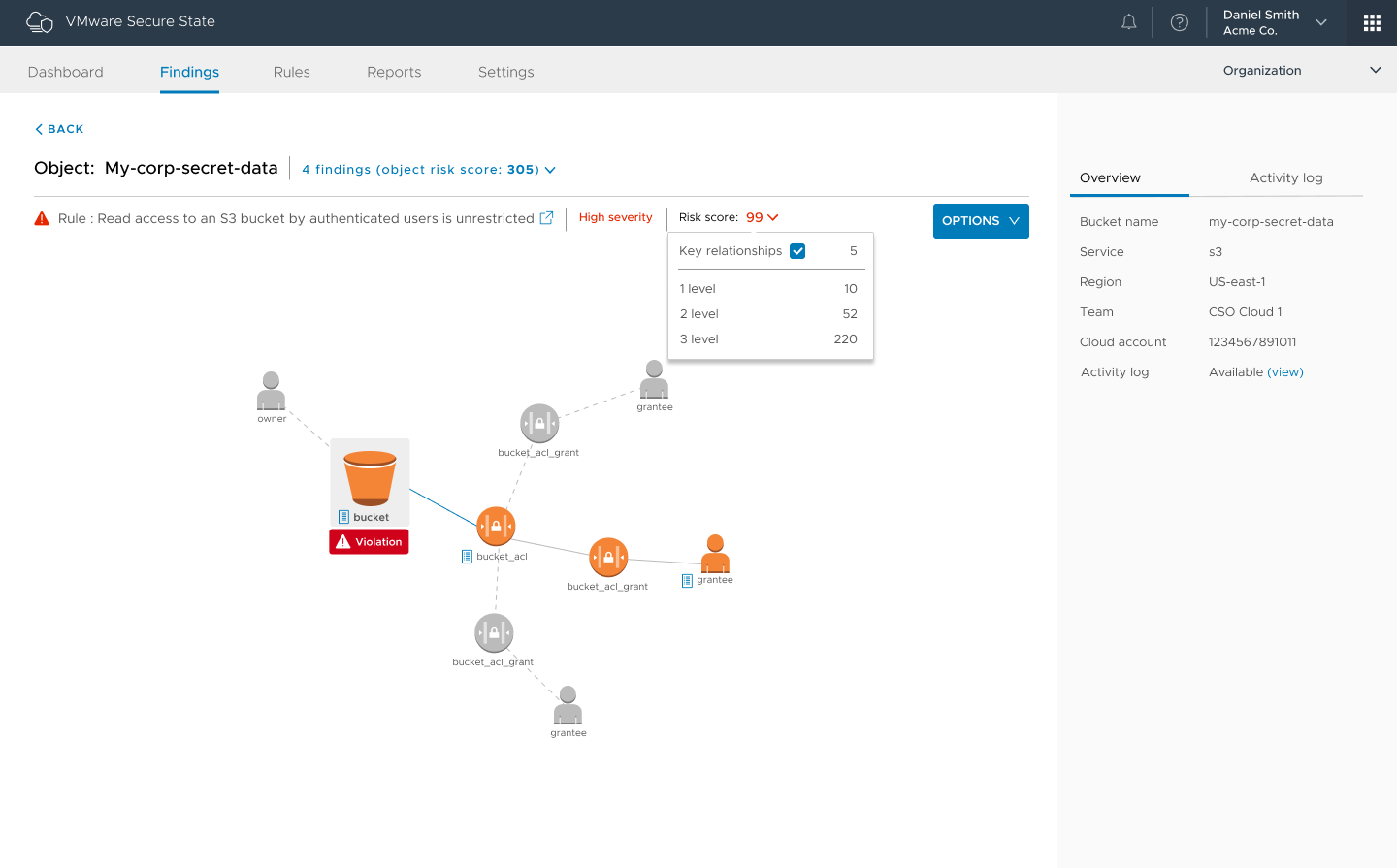
    We’ll get the thing that will interest every risk manager out of the way first. Secure State can tell you about buckets and their current security settings. It can tell you how to fix them. Considering the number of high-profile leaks caused by insecure buckets, I figured I’d mention that even before I talked about how Secure State fits with other VMware offerings. You’re welcome.

    Figure 1: Of the many violation chains available in the product, “authenticated user” buckets are one of the coolest, IMO.

    Secure State is part of VMware’s Cloud offering (grouped with CloudHealth and WaveFront), bringing security and compliance to multicloud. The cool bit is the level of automation, which allows teams to include cloud infrastructure security and compliance with DevOps efforts. That is where the world is headed, and VMware Cloud sees a greater level of DevOps automation than most alternatives just because it was conceived with APIs aimed at automation in the first place. Adding checks for rights and security settings, even compliance, into the DevOps cycle is breaking down one last wall (now we’re basically waiting for someone to do something astounding for cloud storage).

    Part of Secure State is near real-time reporting on status/state. This is big in environments that have real-time reporting for everything else, adding in the one missing piece. It is far better to be told, “There is a problem right now with instance X,” than to be fighting attackers. One of the examples Needham offered was of a project that was used via a small subset of tools: One day a report came in that it was being accessed via JVM instead of the normal methods. In this case, it turned out to be a new developer trying to get work done, but you can imagine such a warning being a heads up that you had an attack going on.

    The other interesting bit is risk scoring, officially known as Smart Risk Scoring. The ability to get a prioritized risk list allows DevOps teams to focus on what is most important. When there is so much for security to get done, this is a huge benefit.

    Disclaimer: I haven’t used this version of the product. That means I can’t say “This rocks!” but if Secure State delivers, it certainly will.

    Anything that adds automation and visibility is a welcome addition to the DevOps stack, making life easier and helping you to rock it.

    — Don Macvittie

  • The Cloud and DevOps: Like Peanut Butter and Jelly

    The Cloud and DevOps: Like Peanut Butter and Jelly

    Cloud is practically designed for DevOps. No matter which cloud provider you are using, each has set up systems designed to spin up/spin down on demand, has the ability to run pretty much what you need and offer APIs/command lines to achieve your DevOps goals on the infrastructure side.

    That means that the infrastructure side of DevOps can be handled by careful choice of base image, some scripts to configure network and other supporting infrastructure, and some scripts to install what’s needed once the instance is running and protected.

    Not All Roses …

    The problem is one of breadth and complexity. Yes, cloud is the perfect place to spin up DevOps, at least on the infrastructure side and, once you have a Jenkins instance, on the coding side, too. But the complexity masked by “spin up the infrastructure side” can be daunting. Different sets of APIs for servers, storage and networking, and sometimes different APIs for security versus accounts … It can get snarled quickly.

    So, What to Do?

    What can you do to make life in cloud automation/DevOps easier? There are numerous options available to you to simplify the operational part of cloud DevOps and allow you to focus on discussing issues and resolving them.

    First on the list is the growing amount of automation of cloud automation. Sound crazy? It’s not—just my way of expressing that cloud vendors provide you with APIs and tools such as Puppet are getting better at wrapping those APIs for you, so you can focus on problems, not what is supposed to be the solution.

    This idea is extended by companies that are tying disparate APIs together into a unified whole in one segment or another. One example of this is CloudCoreo, whose tools can do security audits of cloud deployments. The company takes the time to wrap the various security-related APIs and let you pick what is important for your team to monitor.

    There also is an entire market segment growing up of both consultants and VARs that will help an enterprise move to the cloud. Most of these companies focus on one vendor or another, but all share a desire to help make the shift to the cloud easier. By way of examples to get you started, consider Neoxia (in the EU) for GCE, Accenture (in North America) for AWS or Atmosera (in North America) for Azure. (Note: I have never used the cloud services of any of these companies; I’m merely offering you a sampling of what is available. Check your cloud providers’ partners page for more partners.)

    Another option that will reduce, but not eliminate, cloud-based complexity is to use containers to set up the application. The container can then be run on whatever cloud platform suits your needs (or in your data center, if that’s the preference). Any instances spun up still must be protected and given access, but most of the networking, security and instance complexity can be handled at the container management level.

    In fact, if you implement container management and choose for interoperability, a container management tool such as DC/OS can let you choose at deployment time where to put the container.

    Seeing what enterprises are starting to do with containers and entire build/test environments, it is possible that very soon you will be able to just kick off a job, have it build containers that will run your DevOps processes, run tests, deploy to other containers and then go away once the relevant data from them has been saved. The containers used along the way, by taking advantage of a multitarget container management platform, could be anywhere.

    To Sum It Up: Cloud is Good for DevOps

    The issue at hand—as it has been for DevOps and cloud for a while—is the rate of change. Here we’ve discussed a cross-section of ways to make DevOps in the cloud easier and more complete. But no doubt we’ve missed some great ideas and products, because there is so much going on.

    The point is, tools are coming available to make it easier. Don’t write a billion miles of scripts that are useful for only one provider if you can avoid it. Look into these options (and others that will crop up) to lighten your load of technical debt moving forward, and make getting DevOps roaring in the cloud easier.

    And as always, keep rocking it. The change has been constant, and you’re still cranking. That says a ton.

    — Don Macvittie

  • AWS re:Invent – New Releases Drive Cloud Security Innovation

    AWS re:Invent – New Releases Drive Cloud Security Innovation

    The recent AWS re:Invent conference in Las Vegas saw the release of several new AWS services for security. Some of these announcements such as AWS Web Application Firewall and AWS Inspector seemed to take many in the security press and blogosphere by surprise.

    Cloud-native security companies like Evident.io however, weren’t surprised by these announcements. In fact, AWS has been actively partnering with their security ecosystem to create opportunities for partners to innovate on top of these new base services.

    Both incumbent and emerging partners need to remember that a platform is not a product, it is a constantly growing and evolving entity that will continue to adapt as the cloud ecosystem continues to change.

    If you want eternal stability, consider investing in a pet rock. If you want to be part of continuously improved technology ecosystems, then strap in because AWS is the rocket ship of platforms in this space.

    AWS, no matter what they innovate, will encroach on similar value positions of its ecosystem as a matter of existence. However, this is the best situation possible for customers of the platform.

    Customers win out because they receive constant technology innovation and improvement as part of their platform experience, which is something that was never present in the datacenter ecosystem.

    Let me paint some color to what these services mean for the ecosystem:

    AWS Web Application Firewall (WAF)

    AWS WAF enables customers to create filtering rules that whitelist or blacklist application calls coming inbound from the internet towards a customer’s deployed CloudFront CDN resources.

    For example, a customer could write a WAF Rule that filters requests to their web application based on source IP address matching or pattern-matches against the request string.

    If I was running an e-commerce store that only sold products to the US, I would ensure that my WAF rules contained blocking request patterns for IP Address ranges from China, Syria, Sudan, North Korea, and other embargoed countries (and huge sources of malicious traffic).

    While this appears to be a direct attack on some cloud security providers, it really creates a new market path and opportunity for them to deliver their WAF intelligence to the customer.

    Let’s be honest — there’s nothing differentiating about building a big x86 appliance and having it run the rules intelligence for your infrastructure.

    AWS has removed that barrier of virtualizing the appliance and created a direct path for these companies to deploy their core value proposition — curated and powerful rulesets that protect customers from historical, existing, and future attacks.

    Expect to see branded rulesets available through some kind of marketplace or other delivery mechanism here, as that is what customers need.

    AWS Inspector

    Inspector, in our eyes, was the most important announcement in recent AWS history. We’ve finally seen the true convergence of cloud-based security begin to emerge: Continuous API-centric security intelligence accessibility that is pervasively built into the platform’s diverse feature-set.

    With the advent of Inspector, security providers can directly interface to the hosts and applications to provide deep, thorough security visibility for customers without deploying additional third-party agents.

    Let’s face it, customers were already overburdened with agents before they ever got to their security stack, and the value delivered by security agents has been questionable at best in cloud environments.

    Expect security platforms to integrate singular-views of workload-wide security intelligence in order to provide customers a complete picture of their security posture, risk profile, and attack surface.

    Config Rules

    Config Rules was, perhaps, the least exciting of AWS announcements in the security space. Unfortunately for Config-based service interactions, the limitations of the service are still apparent a year after initial launch.

    Config Rules offers no exception, where interesting capabilities for customers to define custom rules that help them understand what changes impact security in their environment are hampered by limited service support, a cost model that is too unpredictable for small customers and of minimal security value beyond the “ping” that happens when rules fire.

    These challenges are compounded by the barrier to entry of writing well-structured and contemplated security rules by a broad audience of non-security experts, which delivers an almost false sense of protection.

    Contrasted with CloudTrail, which gives valuable audit information that makes sense at an operational level, Config Rules anticipates the customer will have strong security experience and operational knowledge to leverage the service.

    But some customers in every user base are satisfied with what we call “good enough” security in the industry, which defines a scope of offerings that barely make the cut to be called security technology.

    The platforms and vendors slinging “good enough” security tend to be at the international buffet, where you get a below-average pizza, a mediocre taco salad, and a poor hamburger.

    Nothing you get leaves you with a feeling of being satisfied, because not enough effort was put into the final product to actually change the way you think about the experience.

    But mature, focused products will always deliver a superior customer experience, and in security that should never be considered optional.

    A vendor who divides their attention between cost management, security, optimization, etc. will never provide the same quality or attention to protecting your infrastructure as a focused innovator in the space can offer.

    Users can expect a waiting period for service support for new AWS services, meaning that your security controls are dependent on Config’s roadmap.

    But security savvy customers, are not keen on waiting for security to grow up around them – they need it now, they need it on 100% of their cloud infrastructure, and they need it to be actionable.

    This is why many will continue to choose the leaders in each security layer over the basic security features tied into the platform itself.

    Expect Config Rules to grow over time – but if Config is any indicator, it will be a long time before Config Rules provides real value for customers on the platform.

    The real value here is that innovators in the security space will continue to fill the gaps left by services in the platform and innovate customer value atop the technology that does make the cut.

    Wrap-Up

    Well, that was a journey – and we only covered three services! AWS re:Invent 2015 was a whirlwind of sessions, 19k participants, and awesome discussions on every topic under the sun.

    It’s hard to believe we have to wait another year to see this massive gathering happen again, but that leaves a lot of time for innovation, new customer success stories, and to sort through the giant piles of swag that everyone picked up in that madhouse of an expo hall.


    Author: Tim Prendergast co-founded Evident.io to help others avoid the pain he endured when helping Adobe adopt the cloud at a massive level. After years of building, operating, and securing services in AWS, he set out to make security approachable and repeatable for companies of all sizes. Tim led technology teams at Adobe, Ingenuity, Ticketmaster, and McAfee.

  • Q&A with Mark Carrizosa of Soha Systems on secure transition to DevOps and cloud computing

    Q&A with Mark Carrizosa of Soha Systems on secure transition to DevOps and cloud computing

    We recently spoke with Mark Carrizosa, vice president of security at secure application delivery service provider Soha Systems about the trends he sees with enterprises moving to cloud services. Prior to recently joining Soha Systems, Carrizosa held the position of principal security architect at Walmart where he developed and implemented the company’s global e-commerce security architecture framework. Prior to Walmart, Carrizosa held security positions at companies including Wells Fargo, where he analyzed the company’s infrastructure and application compliance to improve the security of both customer-facing and internal systems. Before that, Carrizosa held positions at Freeport-McMoran and PetSmart. This interview has been edited for brevity.

    devopsy.kinsta.cloud: With the rapid move to DevOps and cloud, are there opportunities to improve automation and for enterprises to do more with less? Or is DevOps moving so fast that there are additional challenges being created that outweigh some of the benefits?

    Carrizosa: In my opinion, and in my experience, particularly over the last few years in dealing with predominately DevOps shops, the challenges that we faced were not necessarily “can we automate something,” rather it’s “should we automate something.” There are absolutely some things that should not be left entirely out of the automation stream, but should have controls setup as a requirement at a staging gate. For example, you can automate the dynamic scanning your application for vulnerabilities, but what you also need is somebody to actually look at those applications and manually verify and make sense of the reports. These are key components in deploying and delivering secure applications.

    There are also ways to expedite processes by integrating certain security frameworks into your workflow, providing the right training, and also creating a shift in your culture. And DevOps, for the most part, is a good thing. It allows organizations to rapidly come to market.

    It’s also common in DevOps to have contentions between security and IT. The security group says “No, you can’t do this, it’s going to hurt us.” While the engineers say “We need this to push this out.” How well organizations manage these relationships is a mixed bag. But there is a formula for doing it successfully, and it is all about ingraining security into the culture, into the operations, so that you come out with a secure product and not have to remediate it once it’s done.

    devopsy.kinsta.cloud: When you’re constantly iterating and changing your infrastructure and deploying new apps and updates, how does that affect aspects of security that can’t be automated, such as threat modeling applications before they are built or changes are put in?

    Carrizosa: Threat modeling, while a new term, it’s not a new concept. If you think about risk management, typically audits are done at a point in time. But very good information assurance programs not only audit a point in time, but they implement a continuous model of checks and balances. So should threat modeling.

    Threat modeling needs to happen at inception to ensure that the concept is sound and the methodology is acceptable from a security perspective. But there should also be some levels of checks and balances to ensure that the baseline, or security posture, is maintained throughout the entire change management cycle from inception all the way to delivery.

    These are some of the things that can be embedded within DevOps and Agile. Microsoft has a very good, secure lifecycle management methodology that incorporates various elements of security checks throughout the entire development lifecycle. It’s something like this that needs to be included within these operations to ensure that every step you take has some level of checks and balances, whether it be automated or manual, to ensure that the process of an application or an environment is up to what organizations are requiring.

    devopsy.kinsta.cloud: There’s still considerable interest out there when it comes to how companies are meeting the challenges of moving to cloud services. Are there common threads you see out there when it comes to the challenges enterprises face when moving to cloud services?

    Carrizosa: Yes, absolutely, and one of the key factors is that organizations are looking for ways to securely move to the cloud, or move to a more shared compute environment while still maintaining the control and the reduction of risk that they are used to internally. I spent the majority of my career dealing with these topics from an enterprise level. Most recently at Walmart E-commerce, but I’ve also done the same for PetSmart, Wells Fargo, and some leading industrial companies throughout the industry.

    Some of the challenges that I faced have to do with public exposure. You have to deal with migrating from on-premises to cloud, and dealing with BYOD enterprise users. There are a number of potentially sensitive customer-facing applications or data sets that organizations are a little hesitant to move to, particularly at large organizations.

    Those large organizations are used to doing things a certain way. Time and time again I’ve heard the phrase, “but we’ve always done it this way.” That in essence could be some of the downfall, or some of the hesitance with these organizations in moving to the cloud, because they are not absolutely sure that they will maintain the control and the effectiveness for environments that they can’t manage.

    That’s what Soha is about. Soha allows these organizations to make that next step, to be able to take advantage of these cloud benefits, or even take advantage of some of the cost overhead and the security controls that they’re typically having to address at a high rate of cost and a great deal of effort.

    devopsy.kinsta.cloud: Broadly, considering a lot of the credit card and other significant breaches that have occurred in the past decade, do you think the sense of control enterprises have about how well their security and governance efforts are doing is illusionary?

    Carrizosa: Well, there’s that old adage of, “it’s never ‘if,’ it’s always ‘when.’ These recent breaches, for instance, are not necessarily based on the types of controls that organizations have, but a lot of times legacy controls or legacy approaches have always seemed to be good enough. And until there is some sort of catalyst to effect change, organizations aren’t necessarily going to stick their necks out. You have CIOs saying, “We do this, we do this, and we do this,” because that’s what they’ve always known. It’s time to now shift to a more open model. With that comes many risks, but in order to do so, there needs to be a fundamental change in the methodology of how organizations are tackling security.