Tag: cloud agnostic

  • Building Hybrid and Multi-Cloud Architectures for Analytics and AI

    Building Hybrid and Multi-Cloud Architectures for Analytics and AI

    We are in the early stage of the data revolution. Today’s conventional wisdom states that hybrid latency prevents you from running analytic and machine learning workloads in the cloud with the data on-prem. As a result, most companies either do not burst their workloads into the cloud or have to copy their data into a cloud environment and maintain that duplicate data—and even this can take days or weeks.

    Counter to conventional wisdom, you can create a high performance hybrid/multi-cloud data platform for analytics and machine learning by using data orchestration technology. Container orchestration technology (e.g. Kubernetes) enables containers to run in any environment agnostic to the hardware that is running the application, similarly data orchestration technology enables active working sets and data to be orchestrated on demand. This enables enterprises to create a compute agnostic, storage agnostic and cloud agnostic stack to serve all their data driven workloads, including analytics (e.g. Apache Spark, Presto, Apache Hive) and AI (e.g. Tensorflow, PyTorch).

    An enterprise hybrid cloud analytics strategy should burst compute that spans on-prem and cloud data stores. By bringing the hot data to the analytics and machine learning applications, the performance is the same as having the data co-located in the cloud. Also, the on-prem data stores will have offloaded the computation and minimized the additional I/O overhead.

    Specifically, a data orchestration system should:

    • Abstract data access across storage systems. Today, data is siloed in various storage systems and deployments. For example, lots of on-premise data is stored in systems such as Apache HDFS, Ceph, EMC Isilon and IBM Cleversafe, and data in the cloud is stored in systems such as AWS S3, GCP Store, Alibaba OSS, etc. Historically, there have been many attempts to unify all data into a single storage deployment with limited success. As a result, we’ve seen more of a trend around embracing these data silos by abstracting the data in various storage systems/deployments. To do this, the data orchestration system needs to abstract and virtualize across various storage deployments/deployments by server side API translation, which enables users to run existing applications without modifying any code. The system also needs to provide a single global namespace to enable apps and users to access all the data in their environments without the need to understand which storage the data is stored in.
    • Bring data locality in a separated compute and storage environment. While cloud vendors and leading companies in data-heavy industries have adopted a decoupled compute and storage architecture, it can still be very challenging to implement this type of architecture, especially when it comes to bursting on-premises data into the public cloud. A data orchestration system resolves this challenge by providing caching functionality that enables the system to automatically orchestrate the hot data to be closer to compute while at the same time keeping cold data in a cheap storage. Because each workload may have a different usage pattern, the system must have a policy that enables customized policies best suited for those specific workloads. Moving forward, it is also very critical to have policies across various clouds to enable a multi-cloud environment.
    • Provide security for data in motion and at rest with secure access methods. A data orchestration system plays a critical role in the success of an organization’s data strategy. While open source software is important and can help in avoiding potential vendor lock-in, it is also critical to provide necessary security features in this environment given the system touches a lot of data in the organization.

    Besides empowering data driven application developers, a data orchestration system also brings value to data and infrastructure engineers. It de-risks vendor lock-in by providing organizations with flexibility at the infrastructure level. Transitioning to different storage systems (including cloud storage), adopting another application framework, or even having a hybrid or multi-cloud environment are all possible without the need for many different technologies or incurring large development costs.

    — Haoyuan Li

  • Making Your Cloud Work For You

    Making Your Cloud Work For You

    Does your cloud work for you, or do you work for your cloud? Given the enormous dependency and costs associated with cloud computing, that is a question more and more DevOps teams are asking these days. After more than a decade of pressure from higher-ups to move workloads to the public cloud, DevOps teams are now facing the reality that there is such a thing as too much cloud.

    Don’t take that the wrong way. I’m not here to tell you the cloud is inherently bad or we should return to the days when all our critical workloads ran on bare-metal servers housed in a closet in the back of the office. Public cloud services offer a number of critical benefits and DevOps teams should take advantage of them.

    However, to use the cloud responsibly, it’s crucial to control for two risks. The first is cloud computing costs, which easily can get out of hand if not managed properly. The second is a rigid dependency on public cloud services that undercuts agility and makes it more difficult to deploy applications at scale—which is exactly the opposite of what the cloud is supposed to do.

    In this article, we’ll take a look at what causes each of these risks and how DevOps teams can respond to ensure their cloud strategy actually delivers value.

    Risk 1: Cloud Computing Cost

    You’ve probably heard a lot of talk about how the cloud saves money. If you use the cloud effectively, that is true. However, because of the complexity of cloud computing cost structures and the difficulty of comparing cloud computing costs to on-premises costs, it’s easy to end up with a cloud hangover after paying a much higher cloud computing bill than you bargained for.

    There are several distinct challenges at play in predicting and understanding the true costs of your cloud. Let’s take a look at each one.

    Never-Ending Cloud Computing Costs

    When you move workloads to the cloud, your costs vary month by month and are spread out over time. At first, moving to the cloud feels like a great money-saver because it frees you from having to make large, upfront purchases of on-premises hardware. However, just as leasing a car ultimately costs more in the long run for most people than owning, paying monthly for cloud services hosted on someone else’s infrastructure adds up. If you ignore this fact, you can end up failing to appreciate the true cost of your cloud computing bill over the long term.

    Unpredictable Cloud Costs

    Another fundamental challenge of cloud computing cost compared to on-premises is that, in the cloud, costs structures are opaque and unpredictable. Public cloud vendors change the prices of services without notice. The same service might cost more in one cloud region than another, while some services have multiple fees attached. For example, if you store data in the public cloud, you pay not just a per-gigabyte cost to store it but also fees whenever you move the data. This adds up to tremendous difficulty in predicting your true cloud computing bill.

    On-premises costs are not entirely straightforward to predict either, of course. There are some fluctuating expenses, such as the cost of electricity. However, the lion’s share of on-premises computing costs is the hardware itself, which is a very simple and tangible expense. It’s also a one-time expenditure that you can amortize over the life of your servers. Once you have purchased a server, you don’t have to worry that its effective cost will change month to month, as you would with a virtual server in the public cloud.

    Overlooked Workloads

    In the cloud, it’s trivially easy to spin up a new workload. It’s also easy to leave a workload running after you no longer need it—and public cloud vendors don’t go out of their way to notify you when you have resources that are activated but sitting idle. You can’t blame them; that would be like a restaurant telling you you’re ordering too much food or a builder telling you your house is bigger than you need.

    If you don’t carefully manage your cloud workloads, they add up to extraneous and unnecessary costs.

    To be sure, you can have unnecessary workloads running in an on-premises environment, too. But the difference is there is no substantial cost increase on-premises that accompanies each extraneous workload. You’ve already paid for the servers and you don’t get a bill for every service you have running on your own infrastructure.

    Risk 2: Lack of Cloud Agility

    Beyond unnecessary costs or inefficient cost structures, relying too heavily on the public cloud also undercuts the agility of DevOps teams.

    When you run a service or workload in the public cloud, moving it to different infrastructure can be challenging. Not only is it usually difficult to migrate from one cloud to another, but also doing so entails adapting to a new cost structure and possibly paying more for the same set of services.

    There is an irony here: Conventional wisdom suggests that one of the main reasons to migrate to the cloud is that the cloud is inherently more scalable and agile than on-premises infrastructure. That may be true in some cases, but when you factor in the cost and the difficulty of migration from one cloud to another, the cloud quickly starts to look less agile and scalable.

    On-premises infrastructure doesn’t always scale painlessly either, of course. I don’t dispute that. But the cloud doesn’t always live up to the hype when it comes to scalability and agility. On-premises and cloud-based infrastructures both have limitations in this regard.

    Cutting the Cord: Making the Cloud Work For You

    Now that we’ve identified the inherent (and underappreciated) cost and agility challenges of cloud computing, let’s consider solutions.

    Optimize Cloud Computing Costs

    Cost optimization is something you should always do on any infrastructure, and the cloud is no exception.

    There are many guides out there on cloud cost optimization. Some vendors also offer tools designed to monitor your cloud workloads and identify underused resources or help you right-size cloud service instances. These are all good ways to help reduce your cloud-computing bill.

    Be Cloud-Agnostic

    Another useful strategy is to architect your cloud workloads in a way that makes them as cloud-agnostic as possible. Instead of deeply integrating with a particular cloud vendor’s services, rely on third-party tooling whenever you can.

    For example, if you run containerized apps in the cloud, run your containers in standard virtual server instances and use a third-party registry instead of using the container registry and managed container service of one cloud vendor. This will require a bit more work on your end, but it will give you the freedom to move your workload to another cloud easily. It also enables cost-efficient scalability, because you are not beholden to the cost structures tied to the vendor’s managed container service. Rather, you are using only virtual server instances (and perhaps some storage to go along with them), which have much more flexible pricing on public clouds.

    Don’t Be Afraid of On-Prem

    My final recommendation, and my most important one, is to embrace on-premises infrastructure.

    Again, I say this not because I want to move backwards and return to a world where everything runs on-premises. I’m not anti-cloud.

    However, from a cost and agility perspective, the public cloud is not the best fit for every type of workload. Workloads that have very convoluted cost structures in the public cloud—or that would be difficult to run in a public cloud without sacrificing a great deal of mobility and scalability—are often a better fit for on-premises environments.

    You may be thinking that embracing on-premises means sacrificing all of the advantages of the cloud or having to forgo cloud-native workloads. Fortunately, that’s not the case. There are software vendors that offer the services of a public cloud, but on your own enterprise infrastructure using the public cloud APIs.

    Thus, you can obtain the cost and agility benefits of on-premises infrastructure (not to mention the security advantages) while still running cloud-native applications. In fact, you don’t even need to overhaul your CI/CD pipeline; you can simply deliver your cloud-native apps onto on-premises infrastructure that runs services designed to be compatible with those of the public cloud, even though they are hosted on your own servers.

    Conclusion

    Don’t move workloads to the cloud just because it seems like the thing to do or because someone told you it’s necessarily better. Some workloads work better in the cloud while others are best hosted on-premises. An all-in cloud strategy is not typically the most cost-efficient or agile architecture you can adopt.

    — Ariel Maislos

  • Should Your Apps be Cloud-Native?

    Should Your Apps be Cloud-Native?

    There’s plenty of life left in a great number of the applications companies have been relying on and profiting from for years. The future may belong to cloud-native apps that deliver the performance and efficiency benefits of microservices and containers, but in the here and now, organizations are looking for ways to combine the best of the old with the promise of the new.

    With continuous development, you could argue that the software industry has eliminated the concept of product life cycle altogether. Yet, IT managers know that some of the applications currently used by their organization likely will be running long after they have hung up their compilers.

    These legacy applications have proven their worth many times over. Some are one-offs that easily accommodate and are accommodated by new systems as they are implemented. Some are so good at what they do they epitomize, “If it ain’t broke, don’t fix it.” In the mass migration of apps and data to the cloud, it’s natural that such grand old apps would come under scrutiny as candidates for replacement by their cloud-native counterparts.

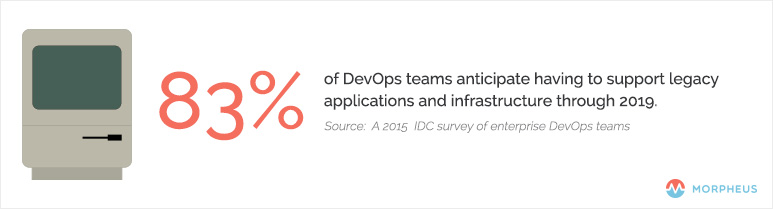
    In a Dec. 8, 2015, article on The Stack, Red Hat’s Gordon Haff examined the results of a recent IDC survey of enterprise DevOps teams, which found that 83 percent anticipate having to support legacy applications and infrastructure through 2019.

    DevOps_Cloud_Native

    It may seem counterintuitive, but the organizations that have gone furthest in adopting distributed, scale-out, microservices-based applications are twice as likely to delay converting existing apps to cloud architectures, he noted.


    What Characteristics Make an Application Cloud-Native?

    The simplest definition of a cloud-native application is one that is “decoupled from the physical infrastructure,” as TechTarget’s Sean M. Kerner wrote in a December 2015 article. In addition to being designed from the ground up to run in the cloud—whether private or public—the app also must scale on demand, both up and down, and across nodes.

    Cloud-native apps are fault-tolerant, built to scale and designed to process requests asynchronously, using queues to decouple functionality, according to Munish Kumar Gupta via Slideshare.

    Another feature that quickly is becoming standard on cloud-native apps is the use of Docker containers, which facilitates deployment on public Amazon Web Services (AWS) clouds and private OpenStack clouds, among other options. A more formal definition of “cloud native” likely will arrive soon from the Cloud Native Computing Foundation (CNCF), an effort sponsored by the Linux Foundation and others.

    Containers are a key component of the CNCF’s proposed standard for applications and services that run natively on public and private clouds, and that move seamlessly between the two environments. Rather than writing specs on paper first and then implementing the code based on the specs, CNCF will create the code for its reference implementations. Google, a CNCF member, has donated its Kubernetes container-orchestration system and stands to benefit via the foundation’s support for private and hybrid clouds, a technology the company currently lacks.

    The Continuing Evolution of Cloud-Native

    It’s tempting to limit the definition of a cloud-native app to those two primary characteristics: decoupled from the infrastructure and scalable up, down and across nodes. If this approach strikes you as too simplistic, you’re not alone. InformationWeek’s Charles Babcock explained in a July 30, 2015, article that the key to cloud-native is microservices—which he referred to as “discrete application services”—running in their own containers and connected via a network to create custom applications. The result is an environment for “user-driven systems” comprised of standardized parts and governed by “standardized deployment and operational procedures.”

    The combination of microservices and containers pushes down the app stack and simplifies deployment in computing environments of all types, according to Richard Harvey of Ngineered via SlideShare.

    The payoff for companies is still far off, according to Babcock, but ultimately cloud-native apps will keep firms focused on their customers as the software landscape shifts around them. This translates into a competitive advantage via continuous deployment and delivery of “fresh” software.