Tag: CI pipeline

  • 5 Guaranteed Ways to Kill DevOps Developer Productivity

    5 Guaranteed Ways to Kill DevOps Developer Productivity

    “A developer is an organism that turns coffee into code.” I still laugh when I see that quote as it reminds me of my hardcore developer days, when my cube always seemed to be directly next to the coffee machine and caffeine was management’s way of ensuring we had the energy to develop well into the wee hours of the evening.

    What is developer happiness? I like to believe it hasn’t changed dramatically over the years. It’s about giving developers the right tools and the freedom to do what they do best—produce meaningful code. That means reducing distractions so they can meet or beat expectations and timelines, ultimately driving revenue for the organization.

    I trust your company is not in the practice of molding reusable human coffee filters. But are you doing everything you can to help your developers be as satisfied and productive as possible, or are you taking the “necessary” steps to ensure they are buried in context-switching hell?

    If the latter is your aim, read on to learn about five guaranteed ways you can totally kill developer productivity.

    Saddling Developers With ‘Plumbing’ Work

    Companies frequently look at developers primarily as technical resources instead of true innovators, so they get saddled with plumbing work. In DevOps and continuous delivery (CD), that’s writing a lot of ad-hoc scripts to string together pipelines, define infrastructure and manually create deployment plans. If your company is on the road to cloud adoption, it’s imperative to get unnecessary scripting under control because things only get more complicated as you start to incorporate the many different cloud platforms and services that are available.

    Making Developers Deal With Security After the Fact

    A fail-safe way to kill developer productivity is to make them deal with security after a release has left development. Too often, they first build code, QA then tests it and finally someone from security checks it to make sure there are no holes well after the code has been written. If security problems are found after coding is done, the release is halted and must go back to the developer to fix. This often occurs either just before the production release or, worst case, just after. In either case, not only does it take longer to resolve the problem, it also prevents the developer from moving on to the next big thing.

    Expecting Them to Chase Down Features and Status Requests

    Because development pipelines are often not integrated with the higher-level CD pipeline, those outside of development have no way of seeing the status of features, deployments and releases. Understandably, their only option is to ask developers to provide status information or call a status meeting which, of course, are additional interruptions that divert them from feature development. Developers don’t like it, and it doesn’t exactly help anyone else in the pipeline be more productive, either.

    Bogging Developers Down With GUIs

    GUIs are a great democratizer in large organizations. They offer a user-friendly way for people across the company, regardless of technical know-how, to access the information they need to be productive. But many developers see them as a waste of time. And while even the most GUI-resistant developer needs them every so often, they are not their preferred way to work.

    Taking Away Their Favorite Tools

    Standardizing your software delivery process is a must to increase efficiency, but standardizing on tools is not. Taking away their favorite tools is highly recommended only if you’re keen on decreasing developer satisfaction.

    What are the Alternatives?

    Managers and leaders can help developers by taking as much of these mind-numbing tasks off their plates as possible. They can do that by automating the release process and integrating CI pipelines into the CD pipeline. Doing so allows everyone to plug in to what’s happening in development without having to interrupt developers, and they can continue to use their beloved tools and simply connect them into the release pipelines.

    It’s also important to standardize most of your operations work upfront—infrastructure, provisioning, compliance, security. All this advance work will allow developers to consume environments on-demand and just deploy without extensive scripting or re-scripting for changes and maintenance.

    Keep in mind, if you shift security left, closer to the development process, you need to automate it. Otherwise, it becomes someone’s manual task—a developer, DevOps engineer or security person—and that will slow down the delivery process. For example, SAST test and SCA scans can be automatically run on every check-in. DAST tests can be automated to run after each build. This way, any security holes are caught as early as possible, while the code is still fresh in the developer’s head.

    Finally, reduce the amount of work developers need to do through GUIs. Give them a way to kick off releases from their respective CI pipelines and the ability to define release pipelines—infrastructure, configuration, security and so on—in code.

    Coffee Machine or Barista?

    Doing these five things—relieving developers of unnecessary scripting, standardizing compliance requirements and security checks upfront, reducing the need for developer-provided status updates, enabling them to work in code and allowing them to continue to use their favorite tools—will make the difference in whether your developers feel like the office coffee machine or a master barista.

    — Dan Beauregard

  • Differentiating Between CI Pipelines and DevOps Assembly Lines

    Differentiating Between CI Pipelines and DevOps Assembly Lines

    “What’s in a name?” wrote the greatest Bard who ever lived.

    All I can say is, he lived in simpler times, when DevOps and the confusing world of continuous integration (CI), continuous deployment (CD), CI/CD, the other CD, application release automation (ARA), pipelines, assembly lines, etc., didn’t exist.

    The biggest challenge today is that vendors use overloaded terms to describe completely different use cases. CI vendors claim to support CI/CD, even though the “D” here is just a deployment to a development environment and not staging or production. ARA vendors claim to enable continuous delivery, even though they do not include critical steps such as infrastructure provisioning, security patches or configuration management.

    The terms “pipelines” and “assembly lines” are relatively new. Multiple vendors have recently announced pipelines and assembly lines, and the differences aren’t obvious at first glance. So let’s do a deep dive.

    What are CI Pipelines?

    Continuous integration has evolved tremendously over the last few years. What started as a simple process of automating build and unit tests for each code change has evolved into a pretty complex workflow.

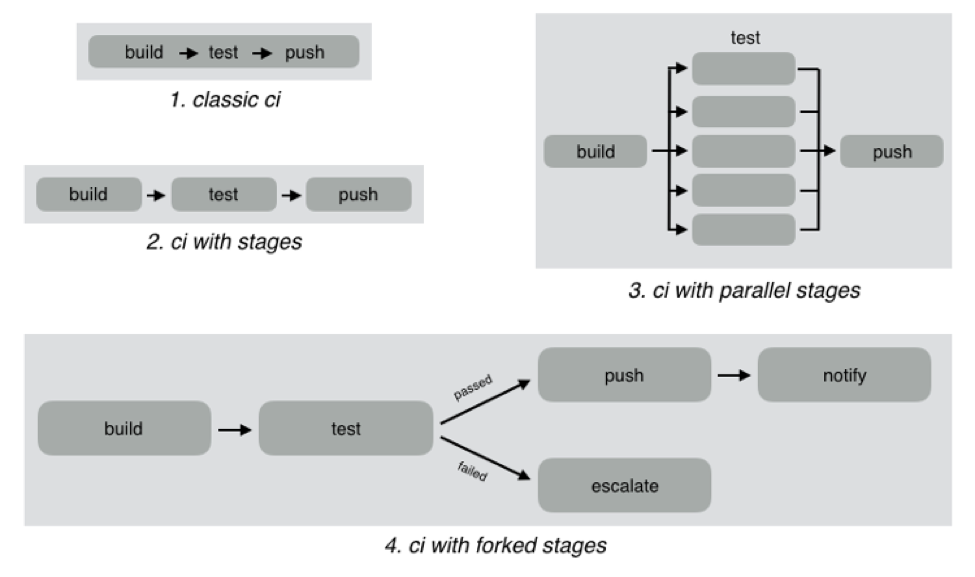
    As an example, look at the different CI workflows shown below:

    In classic CI, all build and test instructions were included in a single blob and instructions were executed serially. If all instructions executed successfully, CI was successful, and if anything failed, then it was marked failed. Almost all CI providers, until recently, offered just classic CI.

    However, as CI became mainstream, developers wanted to define more complex workflows with decision trees and parallelism. CI pipelines support this complexity, such as:

    • Defining the CI workflow in stages, so you can get results from a stage faster without having to wait for the entire workflow to finish. This also enables scenarios such as running a basic test group and only running the extended test suite if the basic tests pass.
    • Running stages in parallel, so you can split tests or test your code against different environments or language versions, and get faster feedback.
    • Forking your CI logic based on the results of a stage.

    While CI pipelines are a huge improvement over classic CI, they are still limited to developer-focused workflows. Jenkins, Teamcity, Shippable, Gitlab and CircleCI all support some form of CI pipelines.

    What are DevOps Assembly Lines?

    DevOps assembly lines are focused on automating and connecting activities performed by several teams, such as CI for devs, infrastructure provisioning and configuration management for ops, test automation for test, security patching for SecOps, semantic versioning and approval gates for release managers, deployments for multiple environments, and so on.

    Today, most organizations use various tools for automating specific DevOps activities. However, the DevOps toolchain is fragmented and gluing it together to achieve continuous delivery is a challenging task.

    Most teams adopt one of the following approaches:

    • Using cultural collaboration as the glue between silos. As an example, when a new application version is available, the test team creates a JIRA ticket and assigns to ops. Ops then copies the application version information into their deployment scripts and run them.
    • Writing ad-hoc scripts to trigger one activity from another, including passing state information through intermediate storage such as S3. In this case, the DevOps engineer would likely write a Jenkins job that runs automated tests, and then pushes application version information to S3. Another Jenkins job polls the S3 bucket, and when a change is detected, runs the deployment scripts.

    The first approach introduces inefficiency and unnecessary human-dependent steps. The second approach is better, but only works well for small teams working on a single application. It creates a Frankenstein of spaghetti automation when you have many applications or even a single application with microservices.

    DevOps assembly lines address this problem by focusing on gluing together these various DevOps activities into streamlined, event-driven workflows with the ability to easily share state and other information across activities.

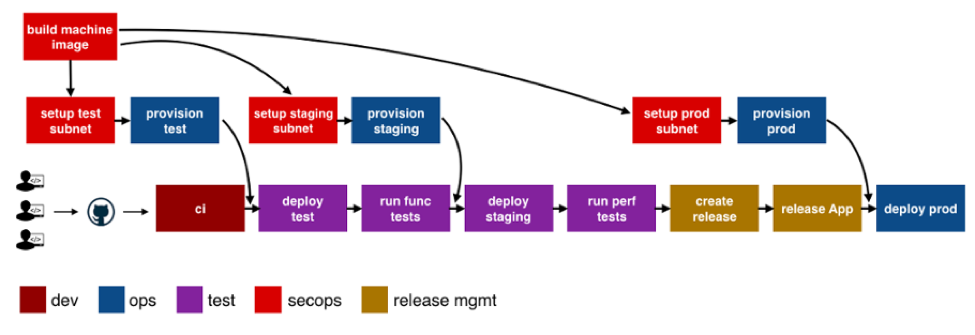
    The following image shows a typical assembly line for a single application or service:

    See the difference? The CI pipeline is just ONE activity in the assembly line. Each of the boxes in the picture above is a pipeline, just for different activities! Each has specific needs with respect to tools integration, runtime, configuration, notifications, etc. In addition, each pipeline is owned by a different team, yet needs to interact with other pipelines and exchange information. For example, if the ops team changes provisioning scripts for staging environment, the test team needs to redeploy the application and run performance tests.

    A DevOps assembly line is, therefore, a “pipeline of pipelines.”

    DevOps assembly lines need to support the following:

    • Ability to easily define workflows across multiple pipelines.
    • Versioned and reusable workflows, enabling rapid changes and scaling for multiple applications and/or microservices.
    • Integrations with all popular source control systems, clouds, artifact repositories, DevOps tools, languages, services, etc.
    • Runtime to execute every pipeline, including pre-installed tools and CLIs, and the ability to use the right runtime, depending on pipeline type.
    • Accelerators/playbooks for common pipelines and tools.
    • Ability to pass state and other information while triggering dependent pipelines.
    • Automatic triggers or manual approval gates between each pipeline.
    • Configurable notifications for each stage of every pipeline.
    • Release automation features such as semantic versioning of packages.
    • Audit trails for each pipeline, with the ability to go back or forward to a specific state.
    • Abstraction of all sensitive information like passwords, tokens, keys, etc. for security reasons.
    • Roles and permissions restricting assembly line and pipeline actions.
    • Manage DevOps infrastructure, including spinning VMs and containers up and down as required.
    • Visibility into each pipeline and stage, including logs, status and versioned data.
    • Metrics and Analytics across pipelines to help identify bottlenecks.

    In short, DevOps assembly lines help automate and scale end-to-end workflows across all teams and tools, enabling continuous delivery.

    About the Author / Manisha Sahasrabudh

    Manisha Sahasrabudhe is co-founder and vice president of product management at Shippable. Prior to Shippable, Sahasrabudhe was senior program manager at Microsoft. She can be found online at Linkedin.