Tag: ChatOps

  • CTO.ai Launches SlackOps Tool for DevOps

    CTO.ai Launches SlackOps Tool for DevOps

    CTO.ai has launched SlackOps, a platform for managing DevOps workflows in real-time via the Slack communications and collaboration service.

    Company CEO Kyle Campbell said many DevOps teams are embracing Slack to share updates with one another. SlackOps takes that preference for DevOps a step further to enable complex DevOps processes, also known as ChatOps, to be launched from the Slack command line.

    That approach allows any member of the DevOps team to write a workflow once and securely share it regardless of what language is employed, added Campbell.

    SlackOps also provides access to a public registry that CTO.ai already makes available for sharing developer shortcuts within a specific community.

    Beyond streamlining communications processes across DevOps teams, Campbell said DevOps teams will be able to surface additional insights into workflows using DevOps research and assessment metrics to make them more efficient. SlackOps also makes it easier to onboard new members of a DevOps team, he noted.
    SlackOps is deployed as a container on the Slack platform and can be downloaded via the Slack marketplace in a couple of minutes.

    The goal is to enable organizations to embrace a lean approach to DevOps that enables them to quickly adjust processes as required, said Campbell. Rather than having to commit to a single tool or platform, developers should be able to advance the overall state of DevOps within their organizations without having to be concerned whether a new tool or platform will disrupt communications across the DevOps team.

    It’s too early to say to what degree Slack might emerge as a control plane for managing DevOps processes. It is, however, becoming more popular as a way to communicate across members who employ a broad range of tools. Rather than attempting to force DevOps teams to standardize on a single set of tools and platforms, Slack provides a more flexible means of communicating in real-time that is delivered as a cloud service.

    Of course, there are now plenty of alternatives to Slack. It will be up to each DevOps team to decide which communications medium best suits them. However, embedding a DevOps workflow application within a communications platform could serve to make Slack a more compelling option for many DevOps teams. Regardless of the communications medium, DevOps teams should expect to be more continuously engaged with one another. That may prove to be a critical requirement with most members of a DevOps team working from home for the foreseeable future in the wake of the COVID-19 pandemic.

    As workflows built around asynchronous email messages increasingly are giving way to real-time communications, the challenge many DevOps teams face is finding a way to embrace that higher level of interactivity without members of the DevOps team becoming overwhelmed by the volume of messages being shared. Making the transition to DevOps was enough of a cultural challenge for many organizations. Inundating DevOps teams with real-time messages, not all of which may be pertinent to a DevOps workflow, needs to be tempered by tools that help identify the DevOps signal within all the noise.

  • The Role of Bots in DevOps

    The Role of Bots in DevOps

    DevOps has evolved from its infancy into a mainstream focus area for a majority of CIOs. DevOps has become a main focus and has been shaping the world of software and infrastructure engineering and operations for the last few years.

    Some of the key DevOps trends include:

    • DevOps assembly lines automation.
    • Smart, actionable alerts from monitoring tools.
    • Monitor and orchestration infrastructure.

    Improved Collaboration

    With the increase of DevOps adoption, organizations today face many challenges in the end-to-end service delivery life cycle.

    • For applications with complex environment configurations, creating, setting up and deploying a new environment is costly, time-consuming and prone to errors.
    • Due to manual interventions, moving/promoting code across environments involves risks and may give rise to outages.
    • Development teams are looking to maximize change by writing new code or enhancing existing code, while operations teams are looking to minimize change to keep up with key performance indicators (KPIs) and service level agreements (SLAs). These goals are opposing in nature and create a culture of blame between dev and ops teams.
    • Organizations are unable to keep dev, test and production in synchronization due to process and tool gaps. A manual process cannot bridge this gap in consistency; thus, outages in production are common.

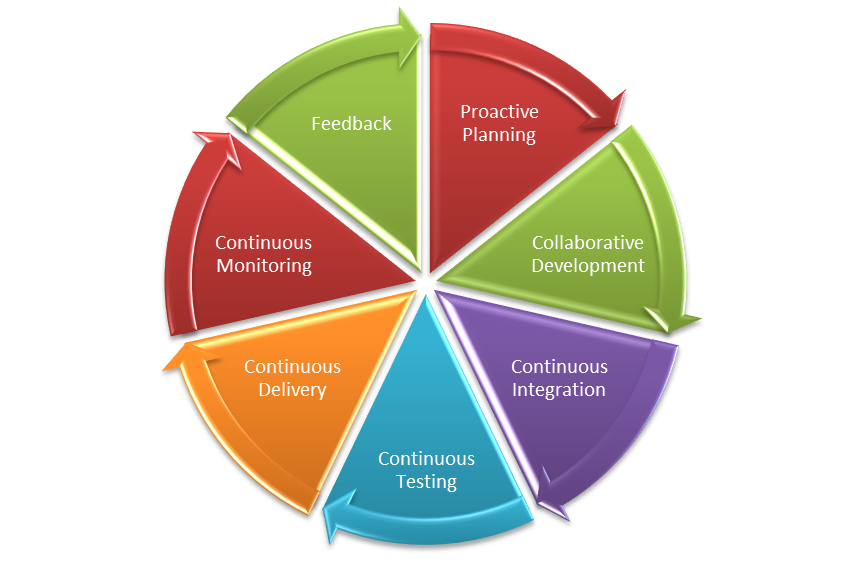
    Various collaboration mechanisms let teams work and learn together to produce better results. The figure below depicts the end-to-end life cycle of DevOps. Collaboration across the phases is essential to the success of your enterprise DevOps transformation.

    DevOps Lifecycle

    What are ChatOps and Bots?

    ChatOps is a term coined by GitHub to describe “putting tools in the middle of a conversation.” In a typical CI/CD pipeline, there are multiple tools that you interact with that have varied functionalities, such as source code management (SCM), defect management, continuous integration, continuous deployment and others. These are all discrete tools, but there is nothing that bridges them together. This is where ChatOps comes into play.

    A bot is a bridge between the collaboration tool and the DevOps tools. The bot receives a request from the user in the form of a chat command through a collaboration tool, analyzes the request and executes a set of commands on the target DevOps tool.

    The main components of ChatOps and bots are:

    Chat app/collaboration tool: This is the front-end chat system that connects the various stakeholders and enables them to interact between themselves and the systems around them.

    The bot: This is the core of ChatOps. A bot is the glue between your collaboration tool and your systems. It facilitates a two-way communication channel where you can fetch relevant information from the systems and act on the information received. A bot fits in between your collaboration tool and the DevOps tools, e.g. Hubot, Lita, ErrBot or AWS Lex.

    Target platform/infrastructure: Integration with the target platforms/DevOps tools is a key ingredient to a successful implementation of bots. These are the target tools and platforms on which the bot will execute the required commands. The tools integration allows your bot to communicate with tools and execute actions such as build, deploy, test, provision and scale infrastructure directly from the chat window.

    Where Bots Fit in the DevOps Pipeline

    Bots can prove to be an accelerator in various stages of the CI/CD pipeline. Below are the details of the integration with various DevOps tools in each phase of the life cycle:

    • Proactive planning – JIRA
    • Requirements management – JIRA
    • Continuous integration – Jenkins
    • Continuous deployment – Ansible, Chef
    • Continuous monitoring – Nagios, Grafana, Splunk
    • Continuous feedback – JIRA

    A chatbot plays a major role in bringing the different teams together into a single, persistent chat room to triage and resolve the issue at hand. In addition to just troubleshooting and triaging issues, bots can be used for various other business-as-usual jobs including:

    • Cleaning up servers.
    • Kicking off build and deployment jobs.
    • Rotating server logs.
    • On-boarding application on the monitoring tools.
    • Collecting metrics from tools such as Nagios or AppDynamics.

    Bot Technical Blueprint

    To achieve the aforesaid targets, we need to have a supportive bot platform in place. How closely the tools integrate with the bot ensures the quality of the implementation and opens new opportunities of automation.
    Bot Blueprint
    As the diagram depicts, the chatbot is hosted on a chat tool such as Slack. This can be on the cloud platform or an existing chat/communicator application. The bot is integrated with a key-value pair reference database, which is fed with the responses depending upon the activities or capabilities that have been fed to it. The key could be the name of the application to retrieve data from or any unique ID that would reduce the number of reads. A lookup of the defined key corresponding to the secondary key is performed on the response database and a response is sent back to the chatbot. Depending upon the number of outputs, the queries can be defined and stored in the response database.

    DevOps Bots: Use Cases

    Below are some examples of use cases for bots. This includes the complete life cycle of DevOps:

    Proactive Planning
    Create new user stories in sprint planning tools and assign sprints to teams. Update sprints and product backlogs.

    Build and Continuous Integration
    Execute build jobs and report back statistics of the build job. Perform daily/nightly builds and report on the status of the build to the relevant teams.

    Continuous Deployment
    Run deployment jobs and perform deployments across environments. Roll back deployments in case of failures, status checks, perform post-deployment actions such as JVM restarts.

    Infrastructure Provisioning and Configuration Management
    Kick off Chef jobs to provision infrastructure or provision application environments. Enable monitoring and restarting services and servers.

    Continuous Monitoring
    Provide application statistics or performing daily data lookups and grabbing metrics.

    Continuous Feedback
    Monitor application health and perform analytics.

    Key Measurement Metrics

    To achieve optimization and enhance performance of the continuous delivery process, metric measurement is the key. These indicators will help in taking certain corrective and preventive actions based on the results. Below are some of the key metrics indicators that can be measured.

    Effort Reduction
    Indicates the reduction of human/manual efforts for tasks such as triggering a build or deployment or collecting metrics from monitoring tools.

    Human Error Reduction Rate
    Reduction in the effort required due to rework caused by human errors.

    Reduce Issue Triaging time
    Indicates the time taken to resolve issues where multiple parties are involved and triaging of problems is required.

    Conclusion

    DevOps bots can significantly improve team efficiency, as well as a team’s ability to respond to emergencies. They save time and money, are fun to build and use and can have a positive impact on team morale, as well as increases the overall productivity of teams. This applies to both the engineering and operations teams. Enterprises embracing digitization are looking for partners with an engineering mindset who know how to bring in collaborative agile teams with the very latest knowledge of open source platforms and DevOps toolchains.


    Contact the Authors

    For more details please contact the authors on LinkedIn @
    Shriniwas Sathe
    Saswati Mohanty

    — Shriniwas Sathe

  • Smashing the (DevOps) Stack for Fun and Profit

    Smashing the (DevOps) Stack for Fun and Profit

    Most organizations that I deal with have a similar story for the promulgation of DevOps in their data center. The story is similar for bringing in most new technology and techniques: A team that usually does a new project without any attachments—relatively small compared to projects at the center of the business—adopted DevOps from the start. A smaller (by far) number shoehorned DevOps into an existing project as a first taste. Some decided to go “all-in” and “convert” IT to DevOps. This is a painful method; I can’t say I recommend it. I suspect my friends at those organizations wouldn’t recommend it, either.

    When I say “DevOps” in this sense, I am talking more about process and procedure changes, even cultural changes, rather than tools. My experience is that most companies that have been around longer than the last spring shower started adopting the tools of DevOps before they started looking at ways to streamline the process. And that isn’t a terrible thing at all. It doesn’t matter what marketing spin is used to sell the product; if it makes your life better or allows you to react faster, implementing it is worth consideration. I just wanted to be clear what we’re talking about here.

    Those companies that started small generally grew small, also. It is a big deal to move that 20-year-old codebase with a ton of processes that touches everything into DevOps when compared to saying, “New projects will use DevOps.” This, too, is in line with what we’ve always done. Iterative replacement has always been the case, where the large, important systems are concerned. In a couple of industries I am familiar with, I’d even argue that those large, important systems weren’t completely upgraded to Customer Information Control System (CICS), so don’t hold your breath on seeing them completely upgraded to DevOps. But that is a different blog.

    Once a critical mass has been hit, these shops start referring to themselves as a “DevOps shop” or “DevOps first shop.” This is the point I want to talk about today (though it took me a bit to get here).

    You’ve got a bunch of apps or a couple of application portfolios that are now running under DevOps. In most organizations, the tool sets are not a perfect match. Indeed, in some organizations the DevOps toolchains look like they were assembled on opposite day. Teams tend to be more standardized, but even team composition varies from project to project, as do communications.

    This is the next point of inflection in DevOps growth. You have it in your grasp to jump again, from amazing to truly amazing.

    Time to smash the DevOps stack.

    Get the teams together, build a list of each system used at each step in the process for each app, each manual intervention, each communications channel—essentially each difference between DevOps teams—and start to look for synergy. If one team is using ChatOps, check out what benefits they perceive from doing so and if ChatOps fits all teams. Does one team have a standard process to roll from continuous delivery to continuous deployment? Check it out. If you have several disparate DevOps teams, it is almost guaranteed that one team will handle DevSecOps better than the others. Take a look at what/how they’re doing and promulgate it to less security-intensive projects as needed.

    Basically, build the corporate process/toolchain from what is successful. That sounds like simple advice, but it isn’t. Teams often love their tools and processes, and are certain their choices are better than others. It takes work to get to a common understanding and there are always exceptions in a complex environment: “Well, yes that works, but for our app, we have this thing over here that makes it not possible/feasible/affordable.” It requires extra work, but that’s always true. Because the environment is complex and has been for a long time, these issues have always existed; you’re just dealing with them with new processes.

    Keep kicking it! Keeping the virtual lights on is as important as keeping the physical lights on in today’s environment. Unless your company is listed in “haveibeenpwned” emails, or your website has been suffering catastrophic outages, you are kicking it.

    — Don Macvittie

  • Implementing ChatOps Using Open Source Tooling

    Implementing ChatOps Using Open Source Tooling

    ChatOps is an exciting proposition for organizational Ops communication. Throwing development and operational tooling into the chat conversation can ease the development pipeline, increase transparency and increase security by streamlining bug detection and remediation efforts.

    At the heart of ChatOps are bots, scripts and chat clients; many are pre-built and open source. In this article, we’ll review a completely open source method for building out your ChatOps setup. We’ll cover integrating with Hubot, using CoffeeScript commands, and how building custom scripts can ignite ChatOps in your own environment.

    Why Open Source for ChatOps?

    Many arguments have been given as to the benefits of open source. Building upon open source inherently evades vendor lock-in, enabling more security and service longevity. Furthermore, to avoid reinventing the wheel, forking existing open source ChatOps projects naturally will be more efficient than purely greenfield initiatives.

    Open Source Chatbots

    There are many Chatbots available for use; each with unique capabilities, varying types of integrations out of the -box, and different ways to extend functionality with custom scripts. Take Lita, for example, an open source chatbot built with Ruby. It works with IRC, HipChat and Campfire. Many other open source chatbot options exist, such as Errbot, Jarvis and Lazlo.

    Example: Hubot

    By far the most adopted open source ChatOps companion is Hubot. Designed and open sourced by Github, Hubot takes market share in the ChatOps discussion. Described as “a customizable, life betterment robot,” Hubot is written in Node.js and takes commands with CoffeeScript.

    Using Hubot, developers can initiate commands with Hubot scripts to perform actions such as post images, translate languages and integrate with maps, but also initiate vital commands to your favorite DevOps cloud tools. A full catalog of scripts can be found here, and it’s quite easy to craft your own CoffeeScript commands as well.

    Example Hubot Scripts

    The community scripts that support Hubot are similarly open source, meaning that you can repackage these implementations to suit your own needs. Let’s take a look through the catalog of Github-supported Hubot scripts to see what sort of pre-constructed extensions we can seamlessly add to a Hubot environment.

    With Hubot, you can ping your major cloud development platforms, such as Heroku. Some example commands for returning status of issues on Heroku include:


    hubot heroku status - Returns the current Heroku status for app operations and tools hubot heroku status issues <limit> - Returns a list of recent <limit> issues (default limit is 5) hubot heroku status issue <id> - Returns a single issue by ID number

    Or perhaps you want to conveniently check PagerDuty from your chat client to see who is on call within your incident response team, or to gather details on current incidents. Hubout has a script for that. Using pagerduty.coffee, some example requests might be:


    hubot who's on call - return the username of who's on call hubot pager me trigger <msg> - create a new incident with <msg> hubot pager me incidents - return the current incidents hubot pager me notes <incident> - show notes for incident #<incident> hubot pager me problems - return all open incidents

    Another example could be direct interaction with the Twilio API for sending SMS. Using sms.coffee you can initiate a command with the following syntax:


    hubot sms <to> <message> - Sends <message> to the number <to>

    Configuring sms.coffee is easy, all you need to insert are:


    HUBOT_SMS_SID HUBOT_SMS_TOKEN HUBOT_SMS_FROM

    Of course, there is no shortage of Gifs, cat memes, and other scripts to add some humor to your workday, such as mustache insertion using image detection.

    Generating Your Own Hubot Scripts

    Aside from using third party scripts, you can always craft your own. To be an executable Hubot script, your code must be in .coffee or .js, and it must be in the correct directory (src/scripts and scripts by default). It must also export a function, as in the following:


    module.exports = (robot) -> # your code here

    Essentially, Hubot listens to all chat communication; it will hear commands and respond accordingly. To configure what it must hear in regards to your script, you must specify what to listen for, and what to respond with. For example:


    module.exports = (robot) -> robot.hear /badger/i, (res) -> # your code here robot.respond /open the pod bay doors/i, (res) -> # your code here

    For further details, see the documentation on Scripting here.

    Getting The Most of Chatbots

    Once integrated into a chat platform such as Slack, your chatbot configuration can truly thrive. Given the wide breadth of community generated and Github-maintained scripts, DevOps teams have near unlimited potential for uniting their tooling into a single, human-readable CLI. Another benefit of choosing open source tools for such projects is that you can detach your bot and integrate with whatever chat client you prefer.

    ChatOps can add fun and efficiency to the remote workspace. We’ve covered high-level methods for adopting this into your team’s space, and hopefully, a helpful foundation into the power of open source for streamlining the power of ChatOps.

    — Bill Doerrfeld

  • 6 Must-Haves When Using Chat for Incident Management

    6 Must-Haves When Using Chat for Incident Management

    Over the last few years, teams have realized the benefits of sharing and distributing knowledge in chat applications such as Slack. Today, teams are extending the use of these applications beyond collaboration by embracing ChatOps. ChatOps empowers teams by bringing complex day-to-day operational work into shared chat channels. If done correctly, it drastically reduces context switching and increases the speed at which teams can tackle tough challenges.

    Companies are realizing incredible benefits by incorporating ChatOps into their incident management workflows. Chat channels provide hyper-effective means to alert teams of issues, take immediate action and collaborate with clarity and urgency. It is for this reason that companies including OpsGenie, PagerDuty and VictorOps have invested in integrating their incident management applications into chat applications such as Slack, HipChat and Microsoft Teams.

    ChatOps to the Rescue

    Ideally, users of a modern incident management solution need to have access to a multitude of features so that they can address specific challenges directly within the chat tool. During an incident, switching between applications to access and collaborate on the actionable data is a waste of time. Keeping the conversation and action in one place, where team members already are, is the key to a fast and successful incident resolution process. That is why ChatOps has emerged as an alternative to the war room concept.

    To get the most out of the technology and resolve problems more quickly and easily, here are six tips to consider when using ChatOps for incident management:

    1. Post Messages with Clarity

    The basic requirement for integrating any application within chat tools is to simply have messages posted within chat channels. However, there are three additional needs to consider when integrating an incident management tool into chat when increasing efficiency is the goal.

    • The integration must be able to post chat messages regardless where the incident originates and additional information added (monitoring, ticketing, or collaboration tools).
    • Messages need to be customized based on the specifics or severity of the incident. Often the basic message needs to be appended with tags or additional information fields.
    • If possible, include a button in the message that allow responders to take instant, prescriptive actions.

    2.  Control How Information is Shared

    Posting every alert and comment into a shared channel can quickly become overwhelming and is considered bad practice. A strong integration enables the creation of separate channels for specific responders and have direct control over what types of alert and follow-up messages are shown.

    A seamless integration also provides the flexibility to receive only the incident actions that are decidedly relevant. Low-priority issues that don’t require immediate action can be filtered and not sent to the chat stream, ensuring the team stays focused on what really matters.

    3. Accelerate Actions

    ChatOps transforms chat into a vehicle through which users take actions and deploy solutions. This virtually eliminates the need for operations teams to switch between applications when responding to an incident.

    Most integrations enable users to execute incident actions using text commands. This method is valid and often preferred. However, deeper integrations simplify tasks by providing interactive buttons that enable users to begin working on incidents with just a click.

    The value of responding to an alert by clicking a button extends beyond simple alert acknowledgement. Enabling all common responses (i.e. assigning an alert, taking ownership, adding notes, muting incidents, etc.) to be executed in this manner accelerates resolution and unlocks the real power of ChatOps.

    4. Instantly Retrieve Supporting Information

    A challenge of a long chat thread is that critical information can get lost within the communications or additional information may be needed. A user might have to leave the channel to look up important details and related information, such as looking at other open incidents, for example.

    The integration of an incident management system into the chat environment needs to allow users to access supporting information at any time. The ability to query not only additional details about a specific incident but also general information regarding on-call schedules and alert policies is a requirement. By empowering team members to access this data directly within the chat interface, they stay focused and are able to respond in the most efficient manner possible.

    5. Create New Alerts

    A common task when managing an incident is to create manual alerts. Again, requiring people to switch applications to complete this task is a distraction and slows the progress.

    Creating new alerts for a team or service right within the chat channel is a necessity. The incident management system then notifies the person on-call automatically. Having the ability to create an alert directly within chat empowers individuals that may not have direct access to the incident management system to report problems efficiently.

    6. Control Access

    When an incident occurs, it is important that corrective action is taken by only the people who are authorized to respond. Mapping (or linking) the chat users to the users within the incident management system enables this level of control.

    Linking the user profiles between the chat and incident management has additional benefits. As alerts are acknowledged and responded to within the chat environment, the events are recorded within the incident management solution. A clear history describing who took each action is recorded for future reporting and analysis.

    While there are many things to consider when integrating incident management into a chat application, the benefits are clear. Response time, ability to collaborate, and team access to incident details are crucial factors for incident resolution.

    About the Author / Serhat Can

    Serhat Can is a Technical Evangelist for OpsGenie. He has contributed to different parts of OpsGenie as an engineer and now tries to spread the word by coding, writing and talking about DevOps. He is still a proud member of the on-call schedules. Follow him on Twitter and connect with him on LinkedIn.
  • AIOps: Managing the Second Law of IT Ops

    AIOps: Managing the Second Law of IT Ops

    Or, why IT systems keep breaking

    The tension between the two halves of DevOps is long-standing, going back long before the term was even invented. What underlies the split between Development and Operations is a fundamental difference, like an actual physical law. Let’s explore that analogy together.

    IT Ops is fundamentally a constant fight against entropy, meaning disorder. Sysadmins expend significant energy trying to keep everything up and running, in a process which can sometimes feel like trying to shore up a sandcastle while the tide is coming in. Systems are constantly breaking down; users need changes made that introduce risk; and, as if that wasn’t enough, the whole shebang is constantly under attack from malicious outsiders. It’s no wonder that sysadmins have a reputation for being a bit grumpy!

    Homer: In this house, we obey the laws of thermodynamics!
    It’s not just a good idea, it’s the law.

    In contrast, Dev actually increases the level of entropy. Every new release, be it as small as a one-line fix or finding that errant semicolon, is a change that has to be made, reducing the order that Ops fights so hard to maintain. Dev is entropogenic, embracing change as a positive force.

    The interaction between Dev and Ops is analogous to the second law of thermodynamics: Entropy can only increase over time, unless energy is introduced to the system from outside. In other words, unmanaged change will eventually cause something to break, unless people put in continuous effort to prevent those breaks.

    Thermodynamics: Lots of Heat, not Much Light

    These conflicting goals, taken to extremes, can get unhealthy, with Ops actively fighting change or Dev going around Ops to increase their velocity of change. Left unchecked, this tension can turn into a vicious cycle, as frustration with the “Department of No” drives developers into unmanaged “shadow IT.”

    The good news is that the analogy with hard laws of physics is not perfect. The process of increasing entropy is not irreversible, and does not require constant inputs of energy to prevent. New agile approaches to IT Ops are emerging that are light and flexible, taking their structure from that tension. In the physical world, this is called “tensegrity,” and was originally formulated by Buckminster Fuller, one of those annoying polymaths who seem to make breakthroughs in every field they touch.

    Tensegrity structure
    Tensegrity structure

    IT Ops needs its own equivalent to tensegrity, a flexible, holistic structure that is able to embrace change while maintaining its shape. Structures that try to resist change through rigidity are brittle and ultimately fragile.

    Today, this flexible strength is enabled by AIOps, a term coined by Gartner to describe a new way of operating IT, based on augmenting human skills with automated analysis enabled by modern algorithmic and machine-learning approaches.

    Complexity Breeds Complexity

    Modern IT is too complex for any single person or even team to keep track of, instead requiring multiple specializations. In turn, each of these functions requires its own specific support tools that enable that particular role. Beyond a certain point, it becomes very difficult to combine these partial views to gain a holistic understanding of what is actually happening in the environment.

    Because of the scale of modern IT environments and the sheer rate of change that businesses require, old-style rules-based “Managers of Managers” can no longer keep up, requiring more effort to build and maintain their worth. Especially as infrastructure becomes more and more self-modifying in response to changing conditions and demand, IT Operations needs to accelerate just to keep up.

    AIOps brings developing issues to the attention of sysadmins before they become visible to customers and end users, and gives them the tools to collaborate effectively between different teams and specialist roles to avoid outages or restore service quickly and efficiently. In this world, automation is used to augment the capabilities of the human operators to make them more effective, letting people concentrate on adding value, not just fighting fires.

    This is how Ops can get out of the business of fighting Dev, and instead become a supportive partner. AIOps can catch issues that are affecting services and flag them to the right people early on, including the DevOps engineers that are responsible for production support.

    For developers, one of the fears around DevOps is that in “picking up the pager,” they are opening themselves up to a constant stream of irrelevant alerts. Old Ops hands nod wryly at this, or maybe try to share their personal approach to filtering the noise. Instead, AIOps ensures that only valid, actionable alerts get as far as being shown to a human being and taking up their valuable time.

    Eyes on the Prize

    It’s not all roses. As the AIOps market begins to mature, there is a certain amount of “algorithm-washing” going on, with more and more vendors trying to claim that either their legacy tool was AIOps all along, or that their one-trick pony is actually a whole three-ring circus. What gets lost in the excitement is what all of those algorithms are actually supposed to achieve.

    Me too!
    Me too!

    In considering a shift toward AIOps, the goal should not be simply to build a better mouse trap, meaning a smarter filter for monitoring events. The success of the project can be measured not so much in the mathematical results of the algorithms, but in the smoother exchange between the human users. This easier collaboration is especially important across team boundaries, whether these be different specialist units within the Ops function or developers and software engineers who need to work with Ops to understand the performance of their code in production.

    The benefit of transforming operations this way—moving from sequential, waterfall Ops to abile, collaborative Ops—is to turn DevOps-enabled teams into a sort of perpetual-motion machine, able to continue operating without requiring constant massive inputs of energy from outside the system. Modern applications and the complex infrastructures that support them cannot be managed with the sorts of rigid, cobbled-together, industrial approaches that were appropriate in the mainframe days. AIOps is the agile, flexible approach that can not only accomodate that complexity, but thrive on it.

    — Dominic Wellington

  • From Waterfall Incident Management to Collaborative IT Operations

    From Waterfall Incident Management to Collaborative IT Operations

    What can Ops learn from Dev in the transition from sequential, reactive IT support to real-time DevOps?

    One of the signature ideas of DevOps is right there in the name: the blurring of the boundary between the historically separate worlds of Development and Operations.

    On the face of it, this seems like a great idea. Developers have always grumbled about how Operations is preventing them from deploying as rapidly or as frequently as they would like. Meanwhile, Operations people have harbored a dark suspicion that developers might code with more attention if they were the ones getting paged at 3 a.m.

    Another of the great things about DevOps is that it is pretty easy to adopt in one area or project without needing to get the entire company onboard before you can get started. This means that you can quickly produce some interesting results in terms of accelerated development times and release frequencies, faster resolution of problems and more time spent innovating instead of firefighting.

    Armed with these results, DevOps evangelists spread through the organization, telling their story and recruiting other departments and teams to join them in the bright future.

    This is Where the Problems Start

    Complex enterprise IT environments are, well, complex. Different teams have adopted different tools and methodologies to do their jobs, and are justly resistant to throwing out something that works for them. Specialists in different areas require their own specialist tools to be able to do their jobs. Because of this, when an incident occurs, all of that agility and collaboration that DevOps brings goes out of the window in favor of something that looks much more like a classic “waterfall” approach:

    • When an event is received, it is routed to one particular team
    • The event is placed in a queue
    • Eventually, someone from the relevant team takes a look at the event and makes a determination of whether it falls in their area or not
    • If it’s in their area, they begin working to resolve the issue within their team
    • If it’s not (believed to be) in their area, they reassign it, either back to the front-line team, or to whichever team they believe to be responsible (often, this is the network team)
    • Repeat until either someone takes ownership and fixes the issue, or it becomes a Major Incident and everyone gets paged at 3 a.m.

    Just to complicate matters, there may be multiple instances of this process going on at any one time, as two or more different teams grapple with what eventually turn out to be different aspects of the same problem.

    Why Does This Happen?

    In health care, there is only so much that can be done by way of prevention. There is always the need to react to patient’s issues, starting from their symptoms. In the same way, the starting point for Operations is monitoring—gathering the symptoms of the IT infrastructure to be able to return it to health as quickly as possible.

    To understand problems with the Ops part of DevOps, we needed to start at the beginning, with those symptoms. We wanted to do this the scientific way, so we polled attendees of Velocity and Monitorama to understand their top monitoring challenges.

    The interesting fact was that across both populations, the main challenge listed by attendees was “alert noise/fatigue/volume.” Simply put, Operators were drowning in alerts to the point that they had completely lost the ability to understand what was actually important, let alone an overall picture of how those alerts related to the service that IT was supposed to deliver.

    This is another parallel between IT and health care, where alert fatigue has long been a concern, and with potentially far more serious consequences than in IT.

    A big part of the cause of the alert fatigue on the IT side is the proliferation of specialist monitoring tools. In the poll, 66.67 percent of people we surveyed have five to 10 monitoring tools in place, and yet 61.90 percent of them are still struggling with that problem of alert noise/fatigue/volume.

    To be clear, those different tools are each very important. Trying to monitor the network with an APM tool is probably not going to go well for you. They only become a problem when it becomes too difficult to build up an overall picture of what is going on, and sharing that between different people to solve problems faster.

    So What Can Be Done?

    Dedicated Operations organizations have long worked to assemble tools and techniques that can give them a complete view of the environment that they are supporting, and of the services that run in it. The accelerated pace of release that comes with DevOps is causing the old models to break down, but fortunately, it also carries in itself the seeds of a new approach to the problem.

    As development moved from the sequential waterfall model to a more rapid, collaborative, and agile approach, operations teams can learn from that transition to come up with a more agile approach to IT Ops.

    What would this look like? The first thing to do is to get rid of the blame-storming and buck-passing: “It’s the network!” “No, it’s the database!” I don’t know about you, but personally, I’ve been in enough of those meetings to last me for the rest of my life, thank you very much.

    Let’s All Go Fishing in the Data Lake

    Instead, a common perspective is needed, so that everyone can quickly agree on what is going on and what needs to be done.

    This does not mean throwing out all of those specialist monitoring tools! They are there for a reason. Rather, gather all of those symptoms in one place where the whole team can collaborate to make sense of them more easily. These days, it should be easy to get information in and out of the various components of your toolchain (and if it’s not, that’s a glaring warning sign that maybe it’s time to migrate off that particular tool).

    This will, of course, produce a huge pile of data, so it’s not sufficient to stop here with the creation of a “data lake.” Things disappear into lakes and are never seen again—in which case, why did you bother gathering them in the first place?

    What you need is a way to make sense of what is going on in the lake, and show that to the right human operators. In the same way that developers resent sitting around waiting for the Change Advisory Board to meet, operations people get frustrated and bored just staring at a screen waiting for something to happen. If instead you can use automatic techniques to assemble all the related symptoms of a single issue together in one place, that will give you a good starting point to resolve that underlying issue quickly.

    Brainstorming, not Blamestorming

    This is where the collaboration comes in. Again, people are doing this already, but they are doing it in a disconnected way. The tools have evolved, from email and IRC, to Slack and Google Hangouts, or even (heaven help us all) WhatsApp. What has not evolved is the usage model; it’s still ad-hoc and reactive, and requires lots of copying and pasting.

    Operations people can learn from what their developer colleagues have built or adopted. Kanban boards are a great technique for tracking open issues and who is working on them. ChatOps is a fantastic way to integrate human-to-human communication with human-to-machine communication. Integrated collaboration tools capture knowledge that otherwise is stuck in people’s heads or inboxes, unavailable to their colleagues.

    I’m an Ops guy at heart, but I can recognize a good idea when I see it. Our Dev colleagues have come up with quite a few that we could stand to adopt in Ops. Let’s learn from what they already know to work, instead of trying to reinvent the wheel.

    — Dominic Wellington

  • ChatOps: Has the Fat Lady Already Sung?

    ChatOps: Has the Fat Lady Already Sung?

    One of the sometimes unsung stars of the DevOps scene is ChatOps. I have heard lots of folks use the term, but what does it really mean to you? ChatOps is a phenomenon that started, perhaps not surprisingly, inside of GitHub. It was only natural that developers leveraging the repository to share and build better code would eventually start collaborating in ways that other messaging options just couldn’t provide.

    Whether ChatOps in GitHub is something that gave rise to the growing enterprise collaboration and chat  product/services market is open for debate. There is no doubt, however, that the 30 (give or take) cloud-based messaging and chat platforms out there today are looking to make their mark in the world of developers, engineers, admins, DevOps and IT professionals. Some of the larger players in the space have already launched features designed specifically to appeal to this set of users, with Atlassian HipChat and Slack among the leaders. But they are not alone. I thought it would be worth the effort to take a look at some of the players and up and comers in the space.

    HipChat has been a strong proponent of ChatOps for a time now. The company has consistently been tagged as a leader and boasts product integrations with many different tools and services. For example, a Puppet integration brings the power of ChatOps to joint HipChat/Puppet DevOps customers. Slack has made strides as well. Integrations with incident management and response providers including VictorOps and PagerDuty are only a few examples of how Slack has given teams the ability to collaborate on and fix problems with just a few clicks.

    Despite the millions of users already using Slack, HipChat, Microsoft Teams, Facebook Workplace and other apps in the market, there is still no definitive proof of whether any of the competitors have won the hearts and minds of the IT professional. In fact, we are seeing many of general IT publications writing about several of these tools because many of their users are in that category. The original ChatOps tool that was brought to life in GitHub, for all we know, may still be king among the IT audience.

    Will the Jury Reach a Verdict?

    There are two things that are certain in the market: The jury hasn’t yet decided if there is a ChatOps winner among the numerous options, and developers and other IT professionals may want to consider other options before reaching a decision. Unfortunately, for as much as the true IT practitioners despise marketing, there simply has been no way to avoid the  buzz that the aforementioned providers have created. Chances are, if you are searching for a solution, one of the biggies is going to pop up in the top of your browser and potentially block you from finding all options available.

    The Choice Gets Tougher

    The foundational similarity between top platforms is that they use cloud-based applications to connect teams in efficient, collaborative and transparent ways. Mobile workflows and the growth of BYOD has increased the popularity of enterprise messaging and chat platforms as they create ways for employees to quickly reach one another on their own terms. Yet even so, enterprise messaging vendors are learning that  to be effective, they must also provide users with agility, security and the ability to execute on change.

    Options to Consider

    The past couple ​of year​s​ have highlighted just how competitive this space is, and how quickly it is moving. If you work in an environment that leverages ChatOps or are considering ChatOps options, the list below presents a few of the lesser-known or up-and-coming platforms out there with the potential to become your ChatOps solution. That is not to say that the big guys such as HipChat or Slack are not worthy. On the contrary; they are great solutions. But some of these others might be worth looking into:

    Newcomer Flock entered the U.S. market in September 2016. With an eye on the developer community, the startup worked quickly to open its API to developers and has started adding integrations with partners such as PagerDuty, Bitbucket and Appsignal. Flock’s biggest differentiator is that it allows developers to build bots, widgets and apps on its framework using Java and Node.js SDKs, which easily feed into Flock’s Appstore for distribution. Flock allows developers  to spin up applications in just days. For developer teams stretched on time and budget, they’ll find the application has GitHub integration, engages quickly after being turned on and offers low costs for its paid version.

    Ryver, founded in 2015, provides all-in-one team collaboration, from chats, posts and files to the option to invite as many team members and guests as needed. Additionally, Ryver has a broad range of functionality that offers the ability to share long-form posts or threaded discussion, and integrates with the likes of Google Docs, Dropbox, Asana, Jira, Twitter and Facebook, among others. Ryver recently rolled out its “Global search” bar, which allows a keyword search to locate multiple matches across conversations and solves email’s common problem of archiving data.

    Third, there’s ChatWork, known as a group app for global teams. ChatWork is available in five languages and says it supports 124,000 customers in 205 countries. Last month, ChatWork announced new features to connect multiple chat platforms through the ChatWork desktop app as well as a new screenshot feature. The multichat and chat service integration features allow users to be logged into multiple ChatWork accounts without having to change browsers or log in and out repeatedly. This comes in handy when using multiple ChatWork accounts, such as personal and business accounts at the same time. It also allows teams that use Gmail, Outlook or Skype to use these services together from a single area within the desktop app.

    eXo Platform began as an open-source project in 2002 focused on implementing the industry’s first Java portlet container. The project grew into a company in 2003, to start working with its first customer, the U.S. Department of Defense. Today, eXo is an all-in-one open-source digital collaboration platform that provides knowledge, document and content management, social engagement and project collaboration tools integrated into your business’s applications. It is full-featured and extensible, and has a great design. eXo helps companies connect their employees, customers and developers through social, collaborative and content-driven intranets, websites and dashboards.

    Assembla is a set of cloud-based task and code management tools for software developers. Created in 2005, Assembla hosts more than 100,000 commercial and open-source projects and is used by more than 800,000 users in 100+ countries. With Assembla, software engineering teams can manage tasks, teams and code in one place with SVN, Perforce, Git repos, cardwall view of tickets for drag and drop planning, wikis and more. Integrations include Slack, Github and Zapier.

    Finally, there’s Salesforce company Quip. Quip was founded in 2012 by Facebook and Google alumni and combines documents, spreadsheets and chat into one experience. With Quip, enterprises can manage projects, finalize budget plans, share meeting notes and stay connected. Quip is used by thousands of the world’s most well-known and innovative companies, including Facebook, NewRelic, Quora, and Pinterest.

    As you can see, there are lots of choices out there if you have not already settled on Slack or HipChat, or if you want to see if something else is better for your situation. If you haven’t heard the singing, there is still time to check them out.

    — Alan Shimel

  • Automation, ChatBots Can Improve DevOps

    Automation, ChatBots Can Improve DevOps

    At its heart, the goal of DevOps is to foster better communication between the development team and operations team at an organization. When these two teams are systematically connected, they can easily stay in sync on most issues and there is strong coordination in building and delivering the product to customers.

    Automation and ChatBots can play a big role in the connecting development and operations. They open the door for companies to go beyond simply being alerted when something happens in a chat application, allowing an employee to take action after receiving the alert either in an automated manner or by providing guidance to the employee on which actions to take.

    Automation: Creating Smart Alerts That Don’t Require Follow-Up

    Monitoring applications, systems, virtual machines and networks are a key part of any operations team. There are a number of tools that are used for this purpose, including CloudWatch, Splunk, Rollbar, Pingdom and Newrelic. These tools typically alert the operations teams when there are issues. Engineering teams, on the other hand, use tools such as JIRA and Github to track tickets and manage their agile development process. Alerts from the tools used by operations are helpful, but they still require some manual follow-up. For example, imagine a critical alert is reported by one of the tools because of a product issue. Follow up on this alert would require:

    • Creating a ticket in JIRA/Github with all the relevant information to help diagnose the issue.
    • Escalating that ticket so that it gets looked into right away.
    • Keeping the required people in sync as the status of the issue changes.

    This entire process can be automated. When automated, the workflow operates like this:

    • When the monitoring tool senses there’s something abnormal, like error rates above certain thresholds or a critical failure, alerts are sent and a ticket is created in JIRA or Github automatically with all the relevant information about the issue.
    • Taking this a step further, based on the type of issue, it can be automatically assigned to the right person and even post a message on the appropriate Slack channel.
    • As engineering works through the issue, everyone is automatically informed in Slack when the ticket is updated.

    The key to getting this scenario automated is to leverage an integration and automation platform that is powerful enough to handle complex workflows, yet easy to use so that these automations can be built in minutes. Users don’t want to work for your automations, they want their automations to work for them. With that in mind, the platform should also be flexible so changes can be made to the workflows without any engineering effort (i.e., an automation platform where integrations and automations can be built and changed without any coding).

    ChatOps: Monitor and Orchestrate via Chat Platforms

    With all the apps being used by DevOps, it is difficult for any team to stay on top of monitoring and managing issues while also taking actions across all these tools. Studies show that app hopping is not efficient and results in constant context switching, which negatively impacts productivity.

    ChatOps allows users to stay on top of everything including orchestrating workflows right from chat platforms such as Slack. To make ChatOps work, users need a bot that works in tandem with an integration and automation platform. The bot works with all business apps (even the tough ones with custom objects such as Github and Salesforce), is customized to meet the specific needs of the business and can extend to address all operational needs.

    Here are three ways users can leverage bots for better DevOps:

    Smart, actionable alerts: Rather than have a firehose of alerts coming in, users can define various thresholds, monitor velocity of alerts and, based on these settings, post an alert to the relevant channel or person on Slack. Bots can also prompt the person to take action based on the notification.

    Stop services, virtual machines: Bots can connect with any app, or service that has a HTTP/REST API. Not only can they monitor various apps and environments, they also can start and stop them.

    Workflow orchestration: Various workflows such as managing incidents, escalations and deploying code are all triggered and managed through Slack.

    Automating DevOps has significant benefits in overall increased engineering and operations productivity. The key to automation success is to select an integration and automation platform that is secure, resilient, can handle complex workflows, can be easily customized to meet the specific needs of the business and can be managed through Slack. It should be easy to use so automations can be built fast and changed easily as workflows change. Automation and ChatOps will streamline business workflow, keep the important players from both development and operations informed and increase productivity for everyone involved.

    About the Author / Gautham Viswanathan

    Gautham Viswanathan is the founder/head of products at Workato, www.workato.com. He also leads the team in creating Workbot For Slack, a bot designed to be customizable and allow you to do work in your apps right from Slack. Gautham has a deep background in integration platforms and was previously the head of products and engineering at TIBCO. Connect with him on LinkedIn.